

There’s a new type of fake account spreading across Twitter — and unlike the old bots, these ones are not easy to recognize. They have real-looking profile photos, natural replies, believable bios, and posting behavior that feels human enough to pass at a glance.
These AI-made accounts blend silently into follower lists and create a completely false picture of your audience.
And if you rely on analytics to grow your account, collaborate with brands, or simply measure reach, they can damage everything without making any noise.
Why Today’s Fake Accounts Are Harder to Spot
Traditional bots were simple. They followed thousands of accounts, had no photo, and posted the same spam repeatedly.
They were easy to remove because they were easy to notice.
AI changed that.
Modern fake profiles are built to look legitimate:
- High-quality face photos (often AI-generated)
- Clean bios with real locations
- A few normal tweets to appear active
- Replies that look conversational
- Balanced follower/following counts
- Content written in a human-like rhythm
At surface level, nothing seems suspicious. But these accounts still behave differently underneath.
How AI-Driven Fake Profiles Damage Your Analytics
Even if they’re quiet, they have real consequences:
1. Your Engagement Rate Gets Distorted: Fake followers never interact.
So even if your follower count grows, engagement goes down.
2. The Algorithm Reduces Your Reach: When early engagement is weak, your tweets stop being pushed to real users.
3. Your Audience Insights Become Unreliable: Analytics stop reflecting real interests, demographics, or behavior.
4. You Misjudge Your Content Strategy: You may think your tweets are underperforming… when the truth is your audience isn't real enough.
This is why spotting these accounts early matters.
Signs You’re Dealing with an AI-Generated Fake Profile
No single clue is enough — but patterns reveal the truth.
1. The Profile Photo Looks “Perfect”
AI photos often have:
- Symmetrical faces
- Clean, studio-like lighting
- No real background context
- Slightly unnatural details around eyes or hair
2. The Timeline Feels Too Generic
AI-generated profiles often post:
- Motivational sentences
- Overly neutral comments
- Replies that lack emotional nuance
- Content that doesn’t match any real interest pattern
3. Unbalanced or Unnatural Activity
Common behaviors:
- Brand-new accounts posting too actively
- Old accounts suddenly reactivated
- Inconsistent tweet times
4. Engagement That Doesn’t Fit the Profile
Example:
- An account with 20 followers getting consistent likes
- Or a profile with 500 followers getting zero engagement
5. Follower–Following Ratio That Doesn’t Tell a Story
Real people show growth patterns.
Fake accounts show… patterns with no logic.
Why Manual Detection Fails (Even for Experienced Users)
You can check profile photos, activity, replies, tweet history, but you’ll still miss many.
Why?
- AI facial generators improve monthly.
- Posting patterns can now be automated.
- Some bot networks “warm” accounts slowly over weeks.
- Fake engagement can mimic real conversations.
Even when you suspect an account, you can’t confidently confirm it without deeper analysis.
That’s why automated detection tools became necessary.
The Reliable Way: Identifying AI Fake Profiles with Circleboom Twitter
At this point, trying to spot AI-generated fake profiles manually feels impossible.
They look real, talk real, even interact like real users. That’s why I rely on Circleboom Twitter — because it does the part that human eyes simply can’t.
And here’s the important detail:
Circleboom is an official X/Twitter partner.

So everything it does is through Twitter’s approved API. No tricks, no scraping, no risky shortcuts. Your account stays completely safe because the system follows the same rules Twitter uses internally.
That’s a big difference compared to random “bot checker” tools on the internet.
✔ How Circleboom actually detects fake profiles
It looks at the things you can’t check manually in bulk:
- Activity history
- Follower/following behavior
- Tweet frequency
- Profile completeness
- Sudden spikes in activity
- Mass-follow patterns
- Engagement quality
Instead of guessing, Circleboom reads the signals behind the account and tells you whether it’s real, inactive, suspicious, or likely AI-generated.
✔ You can analyze any account’s followers
Not just your own — you can open any profile and scan their audience too.
Great if you want to:
- Check an influencer’s real follower quality
- Audit a community
- Compare your audience with other accounts
 Fatih Kemal Oksuzoglu
✔ And the cleanup part is just as important
Once Circleboom identifies fake or inactive accounts, you can:
Everything works smoothly because it uses Twitter’s official API limits. No risk, no warnings, nothing sketchy.
How to Detect AI Fake Profiles Using Circleboom
Here’s the simple flow:
Step #1: Go to the Circleboom Twitter website and log in with your credentials.
If you’re a new user, sign up—it’s quick and easy!

Step #2: On the left-side menu, click on the Followers section. A dropdown menu will appear. Select Fake/Bot Followers to see the full list of your followers.
If you want to remove specific accounts, such as inactive users, you can directly select these categories from the dropdown menu instead of viewing all followers.
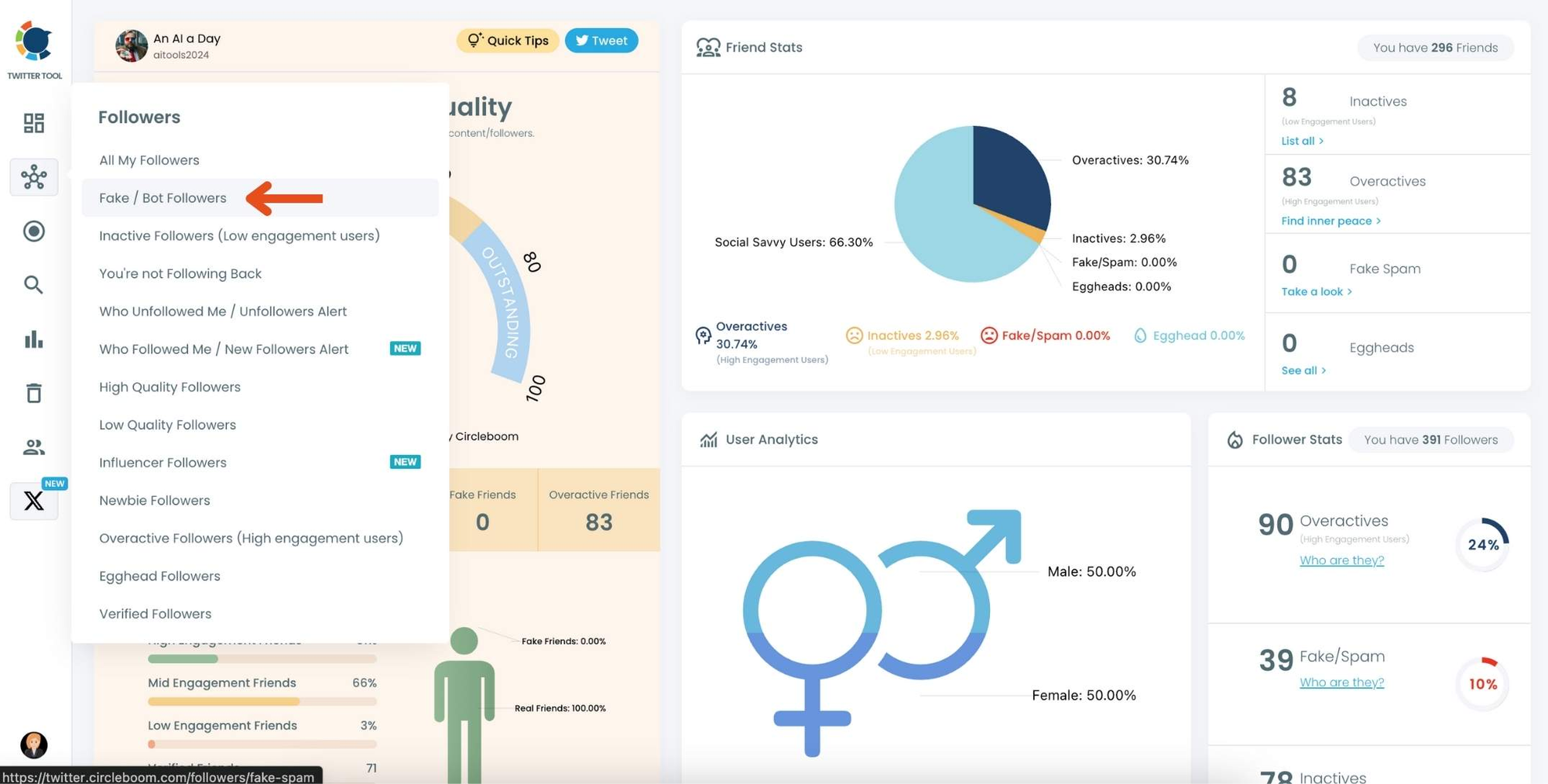
Step #3: You will see a complete list of your fake/bot followers.
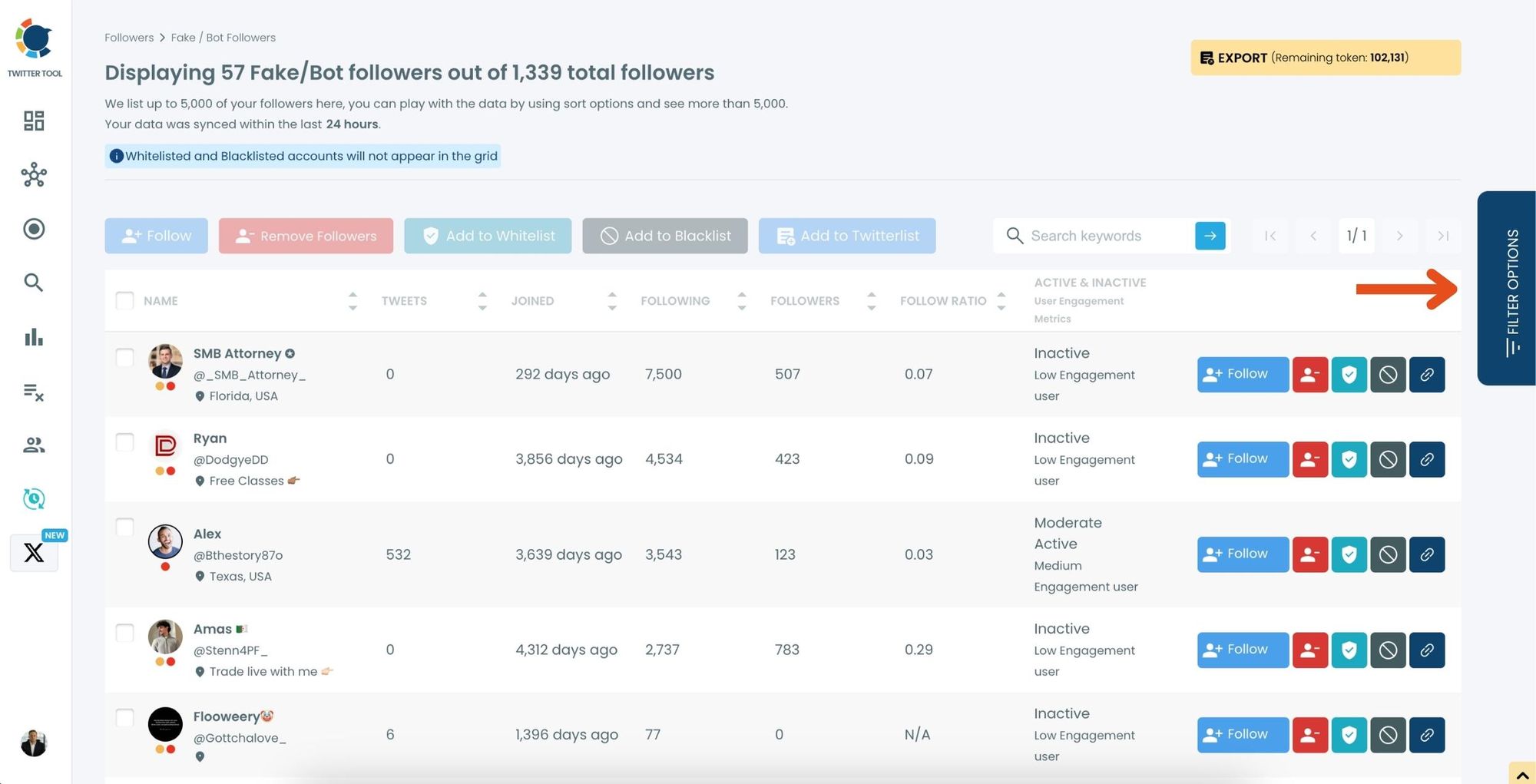
Use the Filter Options on the right-hand side to refine your list. You can filter followers based on engagement levels, fake/spam accounts, inactivity, verification status, and more.
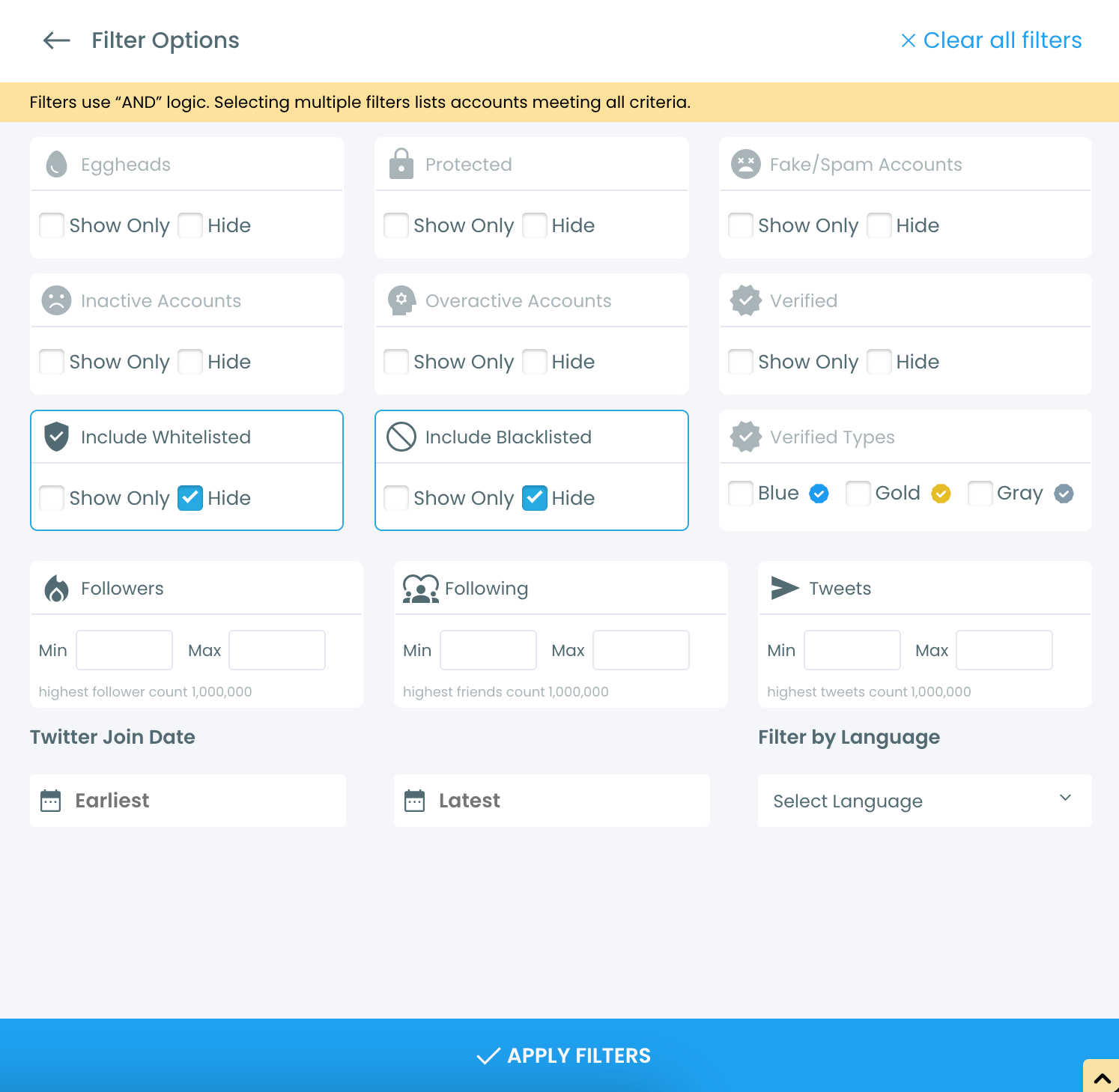
Step #4: Browse through your followers and check the boxes next to the users you want to remove.
You can also select multiple users at once. Once you have selected the users, click on the Remove Followers button at the top.
Alternatively, you can remove individual followers by clicking the red remove icon next to their name on the right side of the list.
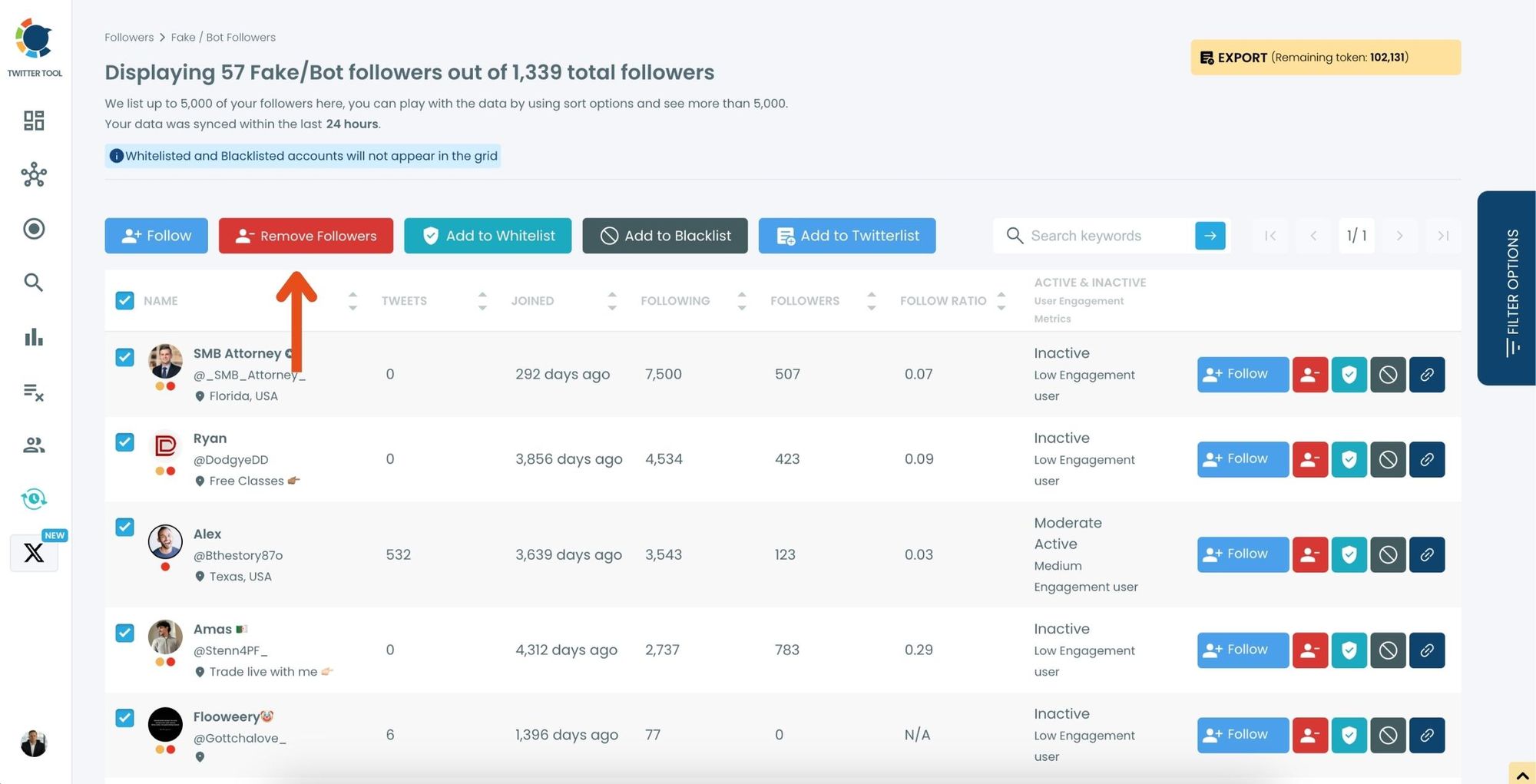
A confirmation message will appear asking if you are sure you want to remove the selected followers. Click ''Remove Followers''.
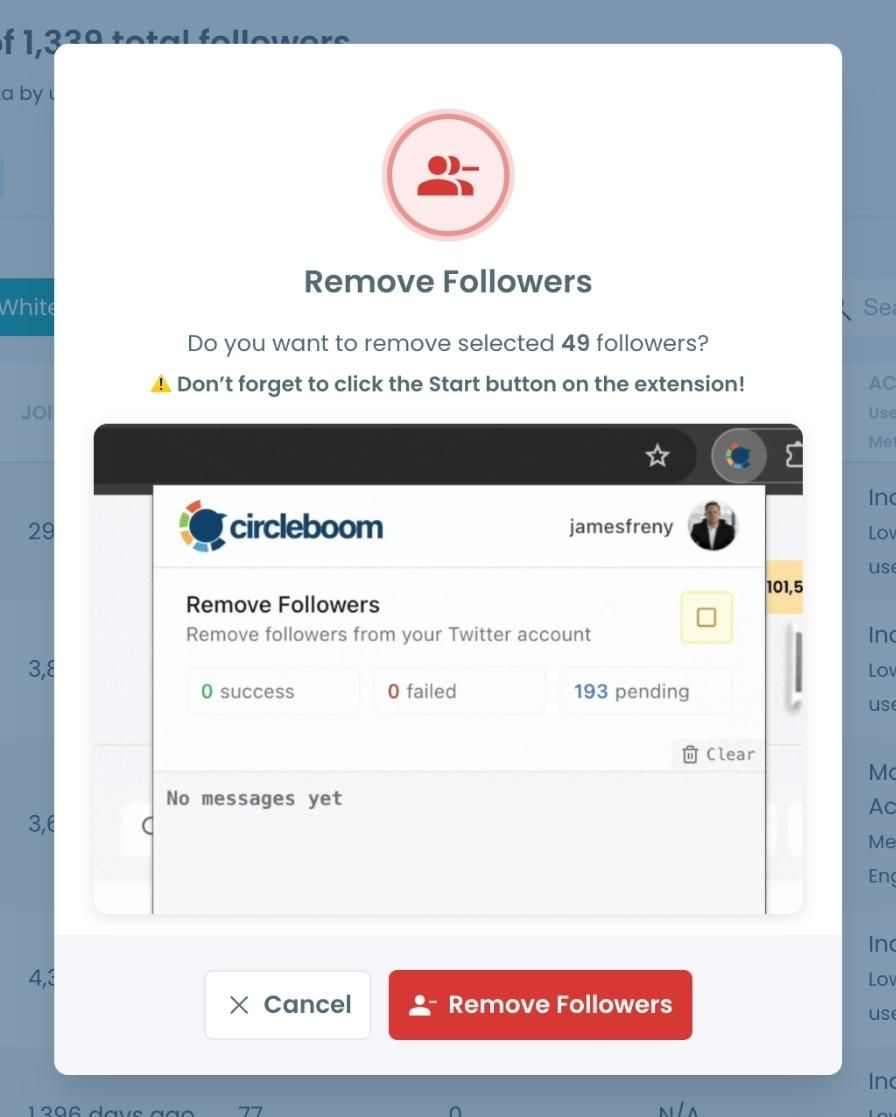
Step #5: Since the removal action is processed via the Circleboom Remove Twitter/X Followers extension, you need to install it to complete the process.
Click on Download the Extension and install it from the Chrome Web Store.
Once installed, you can easily remove followers.

Step #6: After installing the extension, Circleboom will automatically add all your removal requests to the extension queue.
Click on the Start button to begin the removal process.
The extension will process your requests and remove the selected followers.
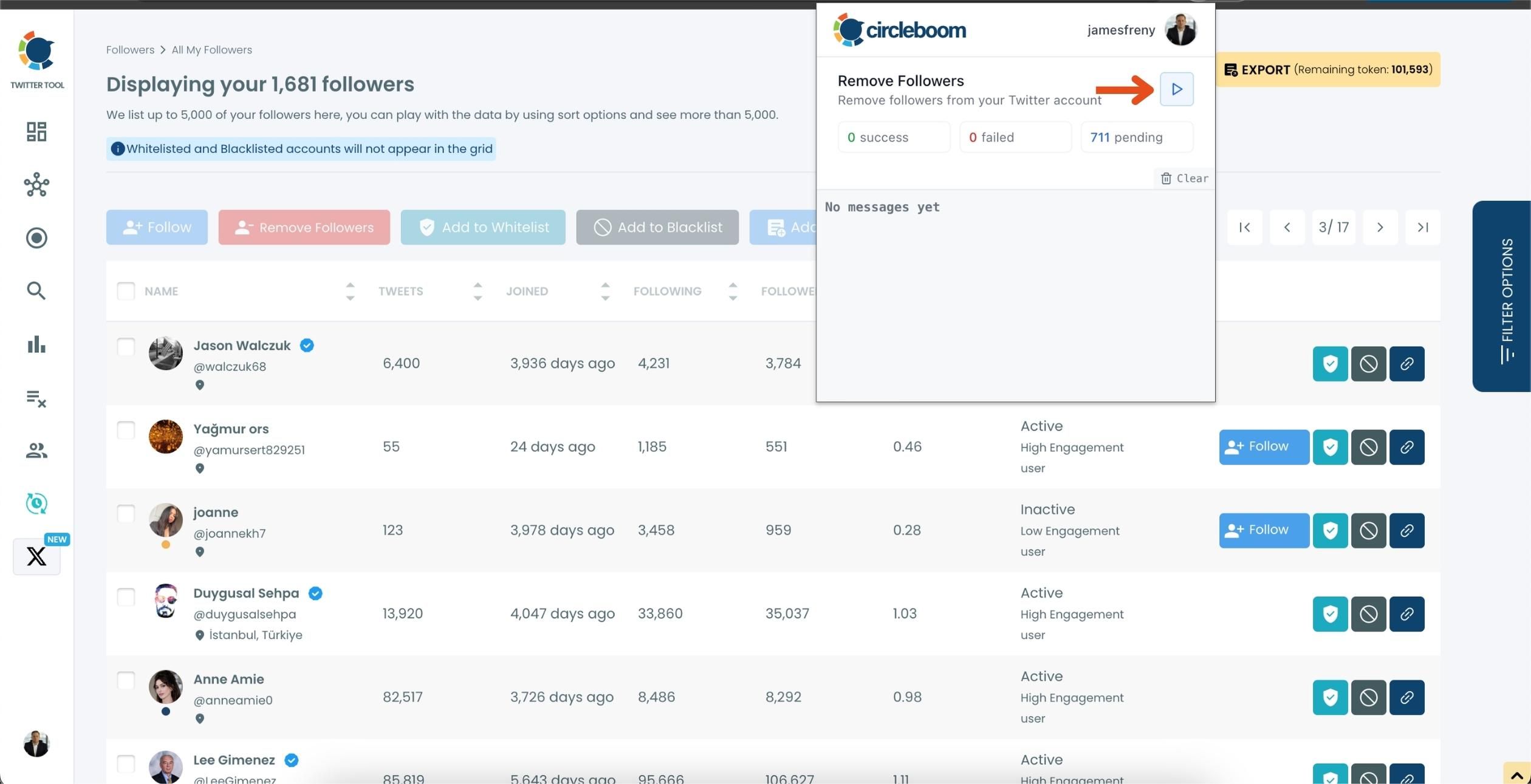
That's it! Your selected followers are now removed automatically.
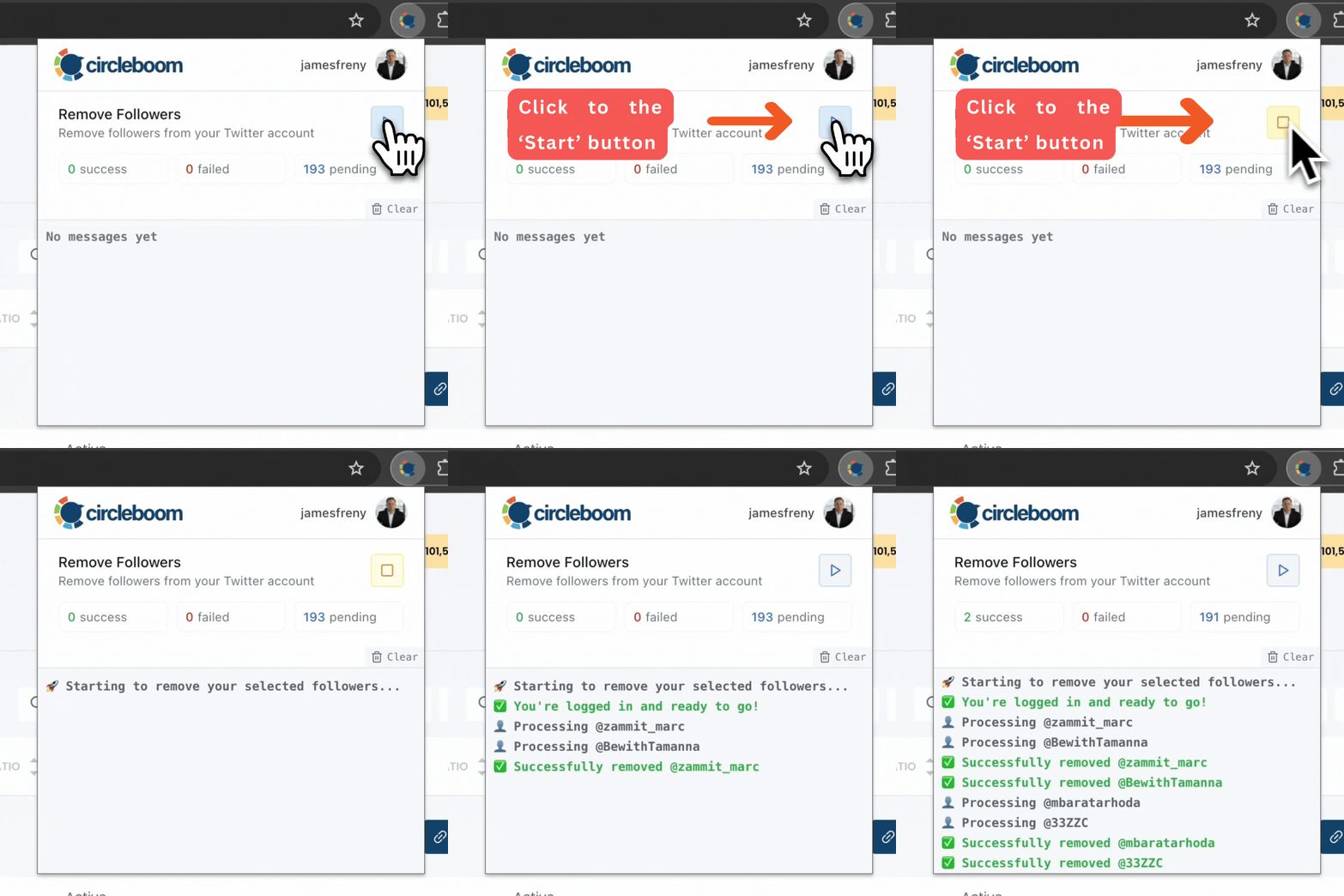
⚠️ Important Warning: Once the removal process begins, do not close your Chrome browser or the Circleboom tab. The tool will automatically remove followers in the background, but if you close the tab or exit Chrome, the process will stop.
If you need a more detailed guide check this video ⬇️
No guessing. No manual checking. No risk.
Final Thoughts
AI-made fake profiles are the newest challenge on Twitter — and they’re more convincing than anything we’ve seen before. They don’t look fake, they don’t behave obviously wrong, and they blend into audiences easily.
But their effect on your analytics is real.
Cleaning your audience is now a necessity, not an option. And while manual methods fall short, tools like Circleboom make the process accurate, safe, and fast.

