

By [Altug Altug] | [25.03.2026]
You're in the middle of a conversation, scheduling your content for the week, or running through your follower list and then it happens. "Rate limit exceeded." Everything grinds to a halt.
Twitter's rate limits are one of the most misunderstood and frustrating aspects of using the platform at any serious level. They seem arbitrary. They kick in at the worst moments. And the official documentation doesn't fully explain how they work.
This guide breaks down everything you need to know about Twitter's rate limits in 2026, why they exist, what triggers them, and — most importantly — the best practices for staying well clear of them.
TABLE OF CONTENTS
- What Are Twitter Rate Limits?
- Why Twitter Enforces Rate Limits
- Twitter's Key Rate Limits in 2026
- What Triggers Rate Limits?
- Best Practices for Avoiding Rate Limits
- How Scheduling Tools Help You Stay Safe
- How Circleboom Keeps You Rate-Limit-Free
- What to Do When You Hit a Rate Limit
- Frequently Asked Questions
- Conclusion
What Are Twitter Rate Limits?
Twitter rate limits are caps on how many actions you can perform — or how many API requests an application can make — within a specific time window. When you exceed those caps, Twitter temporarily blocks further activity and shows you the "Rate Limit Exceeded" error until the window resets.
Rate limits apply to virtually every meaningful action on the platform: posting tweets, following accounts, liking posts, sending DMs, reading timelines, and using the API. They operate on rolling windows — typically 15 minutes, 24 hours, or monthly — depending on the type of action.
The key thing to understand is that rate limits aren't a punishment. They're a structural feature of the platform. Hitting them once doesn't flag your account or put you at risk. But consistently hammering them, especially on engagement endpoints like follows and likes, can attract closer scrutiny and, in some cases, lead to temporary locks.
Why Twitter Enforces Rate Limits
Twitter tightened its rate limits significantly in 2023, largely as a response to mass data scraping by AI companies and the explosion of bot activity on the platform. The logic is straightforward: the platform processes hundreds of millions of posts daily from over 600 million monthly active users, and uncapped automated activity would make that infrastructure unsustainable.
Rate limits serve three main purposes: they prevent spam and bot networks from overwhelming the platform, they protect the user experience from degrading under the weight of automated manipulation, and they ensure fair access to the API for developers and third-party tools. Understanding this context makes it easier to work with the limits rather than against them.
Twitter's Key Rate Limits in 2026
Twitter has never published a single comprehensive document listing all of its limits, and numbers change without official announcements. Here are the most widely reported limits as of 2026:
Posting (tweets, replies, retweets, quote tweets): Free accounts are capped at approximately 2,400 posts per day, with a rolling 30-minute window of roughly 50 posts. New accounts have lower limits, around 500 posts per day. X Premium subscribers get significantly higher allowances, up to 10,000 posts per day.
Following: The official daily follow limit is 400 for free accounts and 1,000 for Premium accounts. However, for best results and to avoid triggering bot detection, staying under 100 to 150 follows per day is strongly recommended, spaced at 10 to 15 per hour. After you follow 5,000 accounts, Twitter enforces an additional ratio-based cap: you can only continue following if your follower count grows proportionally.
Direct Messages: Capped at 500 DMs per day.
API Requests: API rate limits operate on 15-minute rolling windows. The specifics vary by endpoint and API tier. Hitting a 429 (Too Many Requests) error means you've exceeded the window limit, not a ban, just a temporary pause.
Reading/Viewing: Free accounts have lower reading caps. Premium subscribers can view up to 10,000 posts per day at higher tier levels.
What Triggers Rate Limits?
Knowing the limits is useful. Understanding what pushes you toward them is more useful. Here are the most common triggers:
Rapid bursts of activity. The 30-minute rolling window for posting is what catches most people, not the daily cap. Firing off 30+ replies in a short period during a hot conversation or trending topic is one of the fastest ways to hit this limit.
Mass following or unfollowing. Bulk following actions, especially in quick succession, look like bot behavior to Twitter's systems. Unfollowing sessions also count toward rate checks, so doing both on the same day compounds the risk.
Third-party apps running in the background. Every app connected to your Twitter account — scheduling tools, analytics dashboards, follower trackers, old apps you've forgotten about — makes API calls on your behalf. If multiple apps are running simultaneously, their combined requests count against your limits even when you're not actively using Twitter.
Engaging with trending hashtags or viral threads. High-volume threads generate enormous request volumes on Twitter's backend. Participating heavily in these moments can push you toward limits faster than normal.
Automated engagement actions. Automated likes, follows, and retweets are not only rate-limit risks, they directly violate Twitter's automation policy. X's systems are specifically tuned to detect these patterns, and they're the number one cause of automation-related suspensions.
Best Practices for Avoiding Rate Limits
Here's the practical playbook that keeps your account running smoothly, day after day.
1. Space Out Your Activity
The single most effective habit is pacing your actions throughout the day rather than bunching them together. Instead of following 100 accounts in 10 minutes, follow 10 to 15 per hour. Instead of firing off 40 replies in a row, engage steadily across the day. The 30-minute rolling post window is the most commonly tripped limit, slow and steady always wins here.
2. Stay Well Under the Daily Follow Limit
The official daily follow limit is 400, but smart users stay at 100 to 150 or fewer. The headroom matters. Consistently operating close to your caps signals bot-like behavior to Twitter's systems, even if every action you're taking is manual and legitimate. Build in buffer.
3. Audit and Revoke Unused Connected Apps
Go to Settings → Security → Connected Apps and review every third-party application with access to your account. Revoke anything you no longer actively use. Each connected app makes API calls on your behalf, and if you have five apps all running queries simultaneously, they're eating into your limits whether you realize it or not. A quarterly app audit is one of the most overlooked best practices on the platform.
4. Use a Trusted Scheduling Tool That Respects Rate Limits
Scheduling your tweets is one of the most effective ways to distribute your activity evenly and stay within limits. Rather than posting multiple times in a burst, a scheduling tool sends your content at designated times, spreading it out naturally throughout the day and week.
The key is using a tool that is compliant with Twitter's API policies and built with rate limiting in mind. Circleboom is an Official X Enterprise Developer, certified by Twitter after extensive evaluation. It is purpose-built to operate within Twitter's API rules, which means it handles rate limit management on your behalf, you never have to worry about whether your scheduling activity is pushing you toward a cap.

Keep in mind that the API provides a more accurate real-time data stream than the X interface itself. While the platform UI may experience lag, the API captures and reflects new developments instantaneously.
Circleboom has the official Enterprise API, we don't scrape data from X!
5. Automate Content, Never Engagement
This is the most important distinction in Twitter automation: automating content creation and scheduling is allowed and encouraged. Automating social engagement — likes, follows, replies, retweets — is a direct policy violation and a fast track to account suspension.
You can safely use automation for scheduling tweets in advance, posting content when new blog posts or videos go live, and distributing content across multiple platforms simultaneously. What you cannot automate is the social layer: interactions with other users must come from you. Circleboom makes this distinction cleanly, it automates content distribution, scheduling, and cross-posting while leaving all engagement actions in your hands.
6. Monitor Your Following Ratio
After 5,000 follows, Twitter enforces a ratio-based cap. If your follower count hasn't grown proportionally, you'll hit a hard wall on following more accounts. Maintaining a healthy follower-to-following ratio — ideally between 2:1 and 10:1 — keeps you well away from this ceiling and signals account credibility to both Twitter's algorithm and new visitors to your profile.
Circleboom's Twitter Management Tool includes follower analytics that let you
- track your ratio,
- identify inactive and bot followers dragging down your numbers,
- and clean up your following list safely and efficiently,
all without triggering rate limits in the process.

7. Clean Your Follower List Regularly
Bot followers and inactive accounts don't just hurt your engagement rate, they can indirectly contribute to rate limit exposure. Bots often generate spam replies and interactions, which drives up activity around your account. Cleaning your follower list removes this noise at the source.
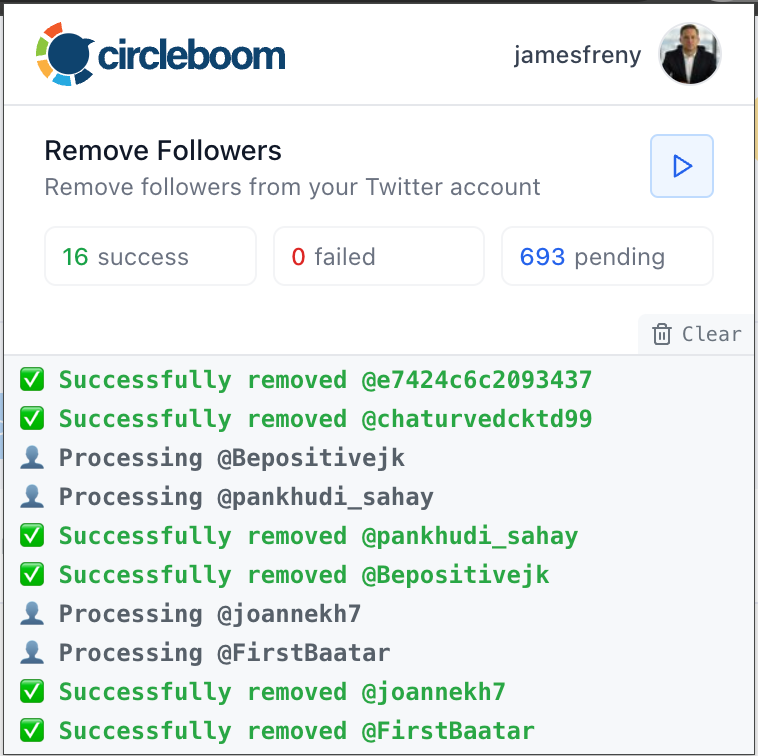
Circleboom's fake/bot follower detection tool analyzes your entire follower base, identifies accounts with no profile photos, spammy bios, extreme following ratios, or repetitive behavior, and lets you remove them in bulk — safely and within API rate limits. This is one of the most proactive things you can do to keep your account healthy and your rate limit exposure low.
8. Stagger Bulk Actions Over Time
If you need to do bulk actions — deleting old tweets, cleaning up likes, managing your following list — spread them over hours, not minutes. Circleboom's tweet deletion and follower management tools are designed specifically for this: they execute bulk actions in batches, with appropriate pauses, to ensure you never trip a rate limit window in the process.
 Altug Altug
9. Consider X Premium for Heavy Users
If you consistently bump into rate limits despite following best practices, your usage patterns may simply exceed what the free tier supports. X Premium increases posting limits to 10,000 per day, raises follow limits to 1,000 per day, and provides higher reading caps. At $8 per month, it's a worthwhile investment for active creators, businesses, and social media managers who need more headroom.
How Scheduling Tools Help You Stay Safe
The connection between scheduling tools and rate limit avoidance is direct: scheduled posts are distributed evenly, which means your posting activity never spikes in ways that attract rate limit triggers. Instead of posting 15 tweets in an hour, your content goes out at designated times throughout the day — completely within the platform's rolling window limits.
But not all scheduling tools are created equal. Tools that operate outside Twitter's official API permissions, or that bundle in automated engagement features, put your account at risk of both rate limit restrictions and outright suspension. Always verify that any tool you use is an authorized Twitter partner.
The rules change every week, from payout boosts to reach suppression. Don’t get left behind. Join the Circleboom X Creator Growth Lab, your dedicated space for real-time algorithm updates, tested engagement strategies, and creator-to-creator insights.

How Circleboom Keeps You Rate-Limit-Free
Circleboom is built from the ground up with Twitter's API compliance as a core design principle. As an Official X Enterprise Developer, every feature it offers is engineered to operate within Twitter's published and unpublished rate limit boundaries.
Here's specifically what Circleboom does to protect you from rate limit issues:
Smart scheduling distributes your tweet activity evenly throughout the day and week, preventing any burst activity that could trip the 30-minute rolling window.
Bulk action pacing in follower management and tweet deletion tools executes operations gradually, with appropriate intervals, rather than hammering endpoints all at once.
Fake follower cleanup removes the bot accounts that generate spam interactions around your profile, reducing the ambient activity that contributes to rate pressure.
Follower analytics keeps your following ratio healthy so you never run into the ratio-based following cap at 5,000+.
Multi-platform cross-posting lets you publish to Instagram, LinkedIn, Facebook, Threads, and Bluesky simultaneously from the same Circleboom composer, reducing the need for repeated separate API calls across tools.
What to Do When You Hit a Rate Limit
Despite best efforts, rate limits happen. Here's the right response:
Stop the activity immediately. Continuing to attempt actions while rate-limited can extend the restriction period. Close the app, put down the phone, step away.
Wait. Most rate limits reset within 15 minutes to an hour. For the 30-minute rolling window on posts, waiting 60 minutes and then resuming is a reliable approach.
Do not attempt workarounds. Switching to a secondary account or using a VPN to bypass a rate limit is not a sustainable solution and can attract further scrutiny. The only correct response is to wait for the natural reset.
Review what triggered it. Was it a burst of replies? A forgotten app running in the background? A mass follow session? Identifying the cause prevents it from recurring.
For persistent issues, contact Twitter Support. Rate limit violations alone don't get accounts suspended, but if you're hitting limits repeatedly despite moderate usage, it's worth checking whether your account has been flagged for any other reason.
Frequently Asked Questions
Does hitting a rate limit damage my account? No. Hitting a rate limit is a temporary restriction, not a penalty. It lifts automatically. Consistently hammering limits — especially on engagement endpoints — can trigger a manual review, but a single rate limit event has no lasting impact.
Are rate limits the same for all accounts? No. X Premium subscribers have significantly higher limits. Newer accounts have lower limits than established ones. Accounts with clean engagement histories also tend to have more effective headroom.
Can rate limits affect my scheduled posts? If a third-party tool hits a rate limit while attempting to publish a scheduled tweet, the post may fail or be delayed. This is another reason to use a trusted, compliance-first tool like Circleboom that actively manages rate limit exposure.
Will cleaning my followers help with rate limits? Indirectly, yes. Cleaning bot and inactive followers reduces spam activity around your account, which keeps your engagement profile cleaner and reduces the ambient API load generated by automated accounts interacting with your content.
Conclusion
Twitter rate limits aren't going away, and in 2026, with the platform running tighter controls than ever on API access and automation, understanding them isn't optional for anyone who uses Twitter seriously.
The good news is that the best practices for avoiding rate limits are also just good practices for running a healthy Twitter account: pace your activity, clean your follower list, use compliant tools, automate your content distribution, and never automate your engagement.
Circleboom makes all of this dramatically easier. From smart scheduling that distributes your content safely, to bot follower removal that cleans your account at the source, to bulk action pacing that keeps you well inside every rate window, it's the most comprehensive rate-limit-safe toolkit available for serious Twitter users in 2026.

