

If you searched for a fake tweet generator, you’re probably not trying to post a real tweet.
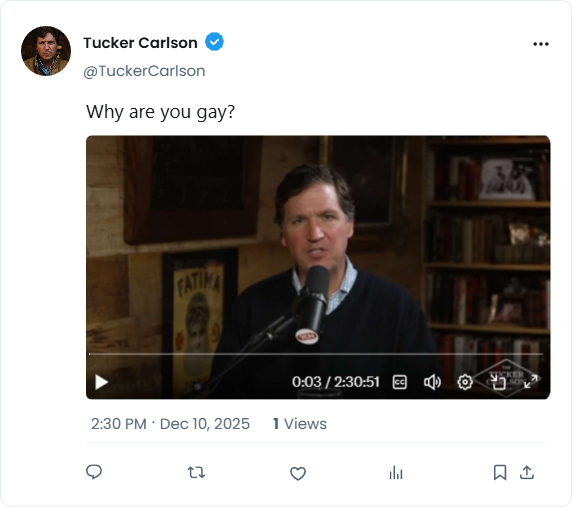
You’re trying to create a tweet that looks real for a project, presentation, design mockup, or school assignment.
That’s where blank tweet templates come in.
A blank tweet template lets you create a realistic-looking Twitter/X post without publishing anything, without using a real account, and without misleading screenshots. Today, fake tweet generators are among the most practical tools for students, educators, designers, and marketers.
This guide explains:
- what a fake tweet generator is
- what a blank tweet (and blank tweet template) actually means
- why students use them so often
- how blank tweet generators work
- and which tool offers the most realistic results
What Is a Fake Tweet Generator?
A fake tweet generator is an online tool that creates realistic tweet images without posting on Twitter/X.
Instead of publishing a real tweet, you generate a blank tweet template where you can customize every detail, including:
- username
- handle
- tweet content
- profile photo
- attached images
- likes, replies, reposts, and views
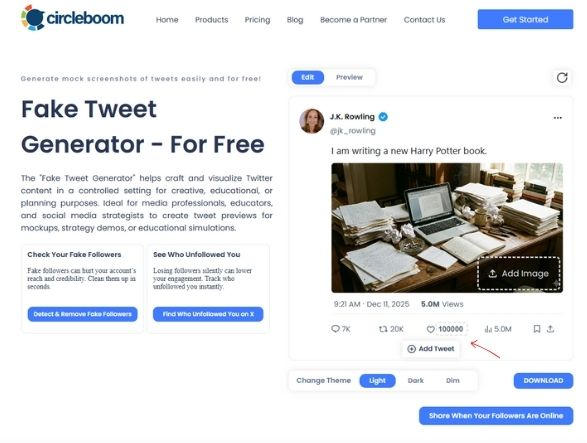
The final output is a high-resolution image that looks like a real tweet—but exists only as a visual mockup.
This makes fake tweet generators ideal for:
- students
- presentations
- marketing examples
- UI/UX mockups
- case studies
- blog visuals
What Is a Blank Tweet or Blank Tweet Template?
A blank tweet is simply a tweet layout with no real data attached to it.
A blank Twitter tweet template acts like a canvas:
- it looks exactly like a real tweet
- but all fields are editable
- nothing is connected to a real account
Instead of editing screenshots or recreating tweets in design tools, a blank tweet template lets you build a tweet from scratch, cleanly and accurately.
That’s why blank tweet templates are commonly used alongside fake tweet generators.
Why Blank Tweet Templates Are Popular with Students
Search interest for “blank tweet template for students” has grown rapidly and for good reason.
Students use blank tweet generators for:
- social media marketing assignments
- political communication analysis
- digital media studies
- UX/UI design projects
- presentations and reports
With a blank tweet template, students can:
- simulate real-world social media scenarios
- test messaging without real accounts
- avoid misleading screenshots
- keep projects ethical and controlled
This makes fake tweet generators a safe and academic-friendly tool when used responsibly.
Fake Tweet Generator vs Screenshot Editing
Many people try to fake tweets by editing screenshots.
That approach almost always fails.
| Method | Common Problems |
|---|---|
| Screenshots | Cropping issues, blurry text, wrong spacing |
| Image editors | Time-consuming, unrealistic layouts |
| Blank tweet generator | Clean, realistic, instant |
A proper fake tweet generator:
- uses accurate Twitter/X typography
- maintains correct spacing
- avoids visual inconsistencies
- exports clean images ready to use
If realism matters, blank tweet templates outperform screenshots every time.
Is Using a Fake Tweet Generator Allowed?
Yes—when used responsibly.
Fake tweet generators are appropriate for:
- education
- design mockups
- demonstrations
- marketing examples
- presentations
They should not be used for:
- impersonating real people
- spreading misinformation
- misleading audiences
Ethical tools focus on visual simulation, not deception.
What Makes a Good Fake Tweet Generator?
Not all fake tweet generators are equal.
A high-quality blank tweet generator should offer:
- up-to-date Twitter/X design
- full customization (name, handle, text, metrics)
- image and media support
- clean, watermark-free exports
- realistic engagement displays
Many tools fall short by using outdated layouts or limiting customization.
The Most Realistic Fake Tweet Generator: Circleboom
This is where Circleboom clearly stands out.
Circleboom’s Fake Tweet Generator is built by an official X Enterprise customer, which means its tweet layouts align with the current Twitter/X interface, not outdated approximations.
With Circleboom, you can:
- create blank tweet templates from scratch
- customize username, handle, and tweet content
- add images inside tweets
- set likes, replies, reposts, and views
- export clean, high-resolution tweet images
Unlike many fake tweet generators, Circleboom focuses on accuracy and legitimate use cases, making it especially popular among students, educators, designers, and marketers.
You can create fake and mock up tweets with Circleboom Fake Tweet Generator by following these steps:
Step #1: First of all, you need to upload a profile photo.
If you want your tweet looks like very original, you should use the same profile picture that is used on X.
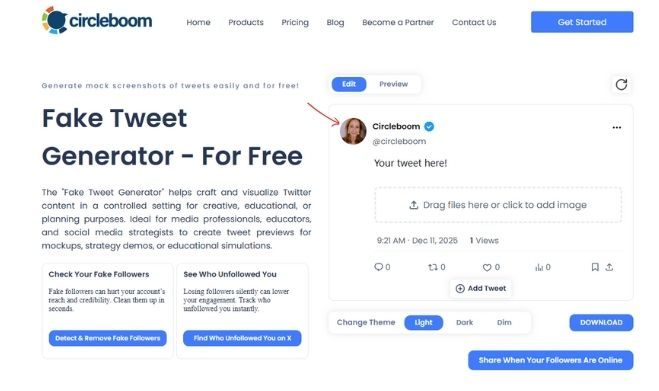
Secondly, I need to write the X username and @ X handle.
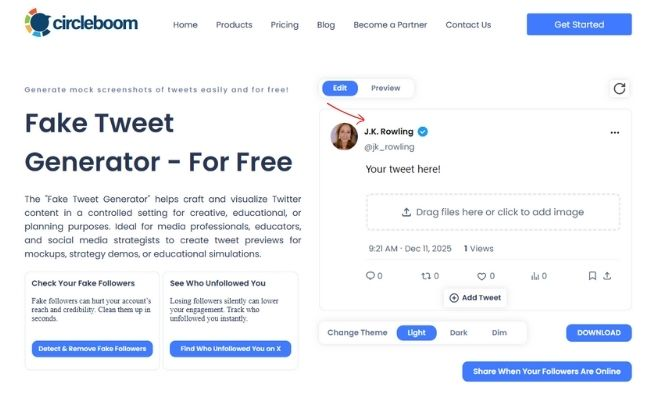
Lastly, for the profile, you can select verification. Blue, golden, and gray ticks are all available.
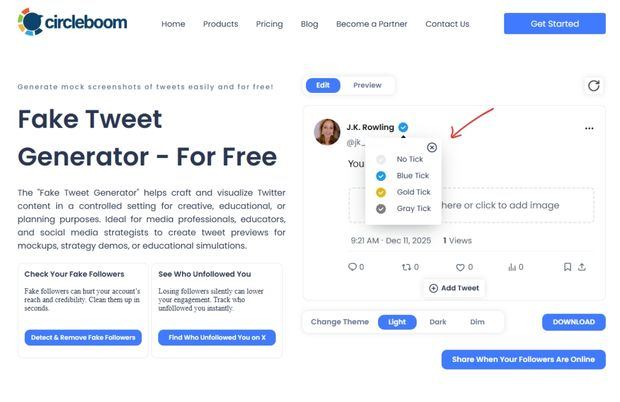
Step #2: Now, things for your content. First, you should write your mock up tweet.
Please be careful about ethical issues.
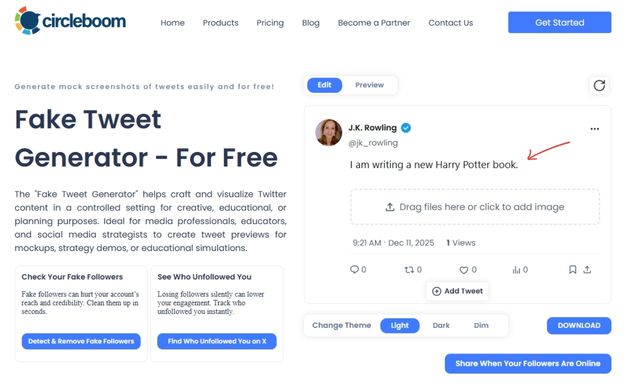
Then, you should upload a picture if you want.

Lastly, you can edit the date and view numbers.

Step #3: You can edit post statistics.
You can enter any comment, like, retweet and view number.
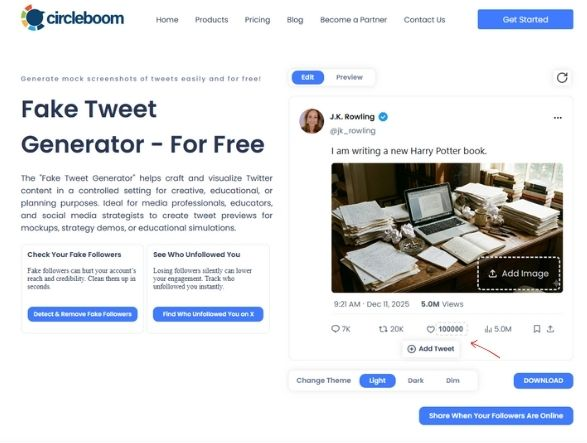
You can make it an X thread by clicking on "Add Tweet".
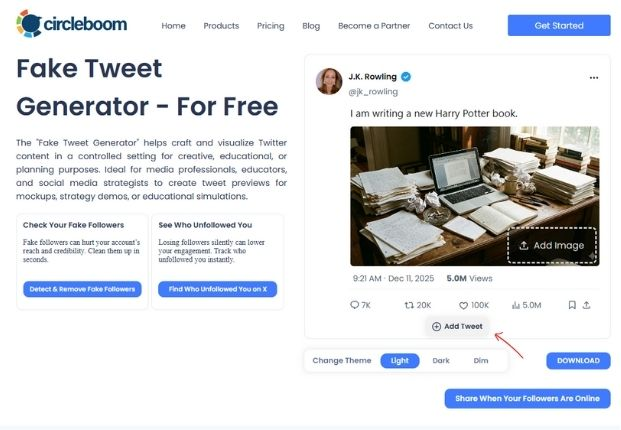
You can change the theme and make your tweets dark, dim, and light.

Step #4: You can download your fake tweet and publish it on X or any other platforms.
Circleboom gives you advanced posting options that X doesn't offer!

Blank Tweet Generator Use Cases Beyond Education
Blank tweet generators aren’t just for students.
They’re widely used for:
- landing page visuals
- blog illustrations
- pitch decks
- product demos
- tutorials
- social media previews
Any time you need a tweet visual without actually posting one, a blank tweet generator is the safest option.
Final Thoughts: Fake Tweet Generators Done Right
A fake tweet generator isn’t about tricking people, it’s about simulation and clarity.
When used correctly, blank tweet templates help you:
- present ideas clearly
- teach responsibly
- design efficiently
- avoid misleading content
If you’re looking for a realistic blank tweet generator that stays accurate to Twitter/X and supports ethical use cases, Circleboom’s solution stands out especially because it’s built by an official X Enterprise customer.

FAQ: Fake Tweet Generators & Blank Tweet Templates
What is a fake tweet generator?
A fake tweet generator is a tool that creates realistic tweet images without posting on Twitter/X.
What is a blank tweet template?
A blank tweet template is an editable tweet layout where you can customize username, content, images, and engagement metrics.
Why do students use blank tweet templates?
Students use them for assignments, presentations, and case studies without relying on real Twitter accounts.
Is using a fake tweet generator legal?
Yes, when used for education, design, or demonstrations and not for impersonation or misinformation.
Are fake tweet generators better than editing screenshots?
Yes. They produce cleaner, more realistic results with correct fonts, spacing, and layout.





)

