

For a long time, my situation on social media was a bit unbalanced.
I was doing well on Twitter (X): my tweets were getting engagement, retweets, and conversations. But when I looked at my Instagram account, it felt almost abandoned. The account was there, but it was inactive, and the engagement was close to zero.
The problem wasn’t the content. It was visibility.
Most of my audience was on Twitter, while my Instagram followers never saw the ideas, opinions, and insights I was already sharing every day.
That’s when I decided to start cross-posting my tweets to Instagram Stories and that decision changed how my Instagram account performed.
Why Cross-Posting Tweets to Instagram Stories Matters
Twitter and Instagram attract very different audiences. Even if people follow you on one platform, it doesn’t mean they follow you on the other.
Twitter is fast and text-driven. People engage through replies, retweets, and short conversations. Instagram, on the other hand, is visual-first, and Stories are one of the most visible content formats on the platform. They sit at the top of the app and are consumed quickly and casually.
By cross-posting tweets to Instagram Stories:
🟢 Your ideas reach people who never open Twitter
🟢 You reuse content instead of creating everything from scratch
🟢 You keep inactive Instagram accounts alive and consistent
🟢 You build recognition across platforms with the same message
In my case, this was exactly what my Instagram account needed.
 infocircleboom.com
The Main Challenge: Tweets Are Text, Instagram Stories Are Visual
The biggest obstacle is simple: Instagram Stories don’t support text-based posts the way Twitter does.
Manually sharing tweets usually means:
- Taking screenshots
- Cropping and resizing
- Dealing with unreadable text
- Inconsistent visuals from story to story
Doing this occasionally is fine, but doing it every day quickly becomes tiring and messy. I needed a way to turn tweets into clean, story-ready visuals automatically.
How I Solved It with Circleboom Twitter
That’s when I started using Circleboom Twitter.

Circleboom Twitter, an official X enterprise developer, allows me to manage my Twitter content and share it across multiple platforms from one place. I connected my Twitter and Instagram accounts, and suddenly cross-posting became a system instead of a manual task.
With Circleboom, I can:
➡️ Create tweets from scratch or reuse existing ones
➡️ Schedule tweets in advance
➡️ Share the same tweet on LinkedIn, Facebook, Threads, Bluesky, and Instagram
The key difference is Instagram.
While other platforms support text-based posts, Instagram doesn’t. Circleboom automatically converts my tweets into stunning visual formats designed specifically for Instagram.
Turning Tweets into Instagram Stories Automatically
When sharing to Instagram, Circleboom doesn’t just post raw text. It transforms tweets into visuals with:
- Different text styles and layouts
- Clean typography
- Background colors and themes
- Story-friendly dimensions
I can choose how the tweet will appear:
- As an Instagram Story
- As a post
- Or as a Reel
Personally, I focus on Instagram Stories. They feel natural, easy to consume, and perfect for sharing short ideas or strong opinions from Twitter.
How to Cross-Post Tweets to Instagram Stories with Circleboom
Step #1: First, log in to your Circleboom Twitter account.
If you don't have an account yet, you can create one in seconds!

Step #2: On the Circleboom Twitter dashboard, navigate to the left menu.
First, find the “Post Management & Analytics” and then click on “Write and Plan Your Post”.

Step #3: Write your tweet. Circleboom’s AI options can generate tweets for you automatically.
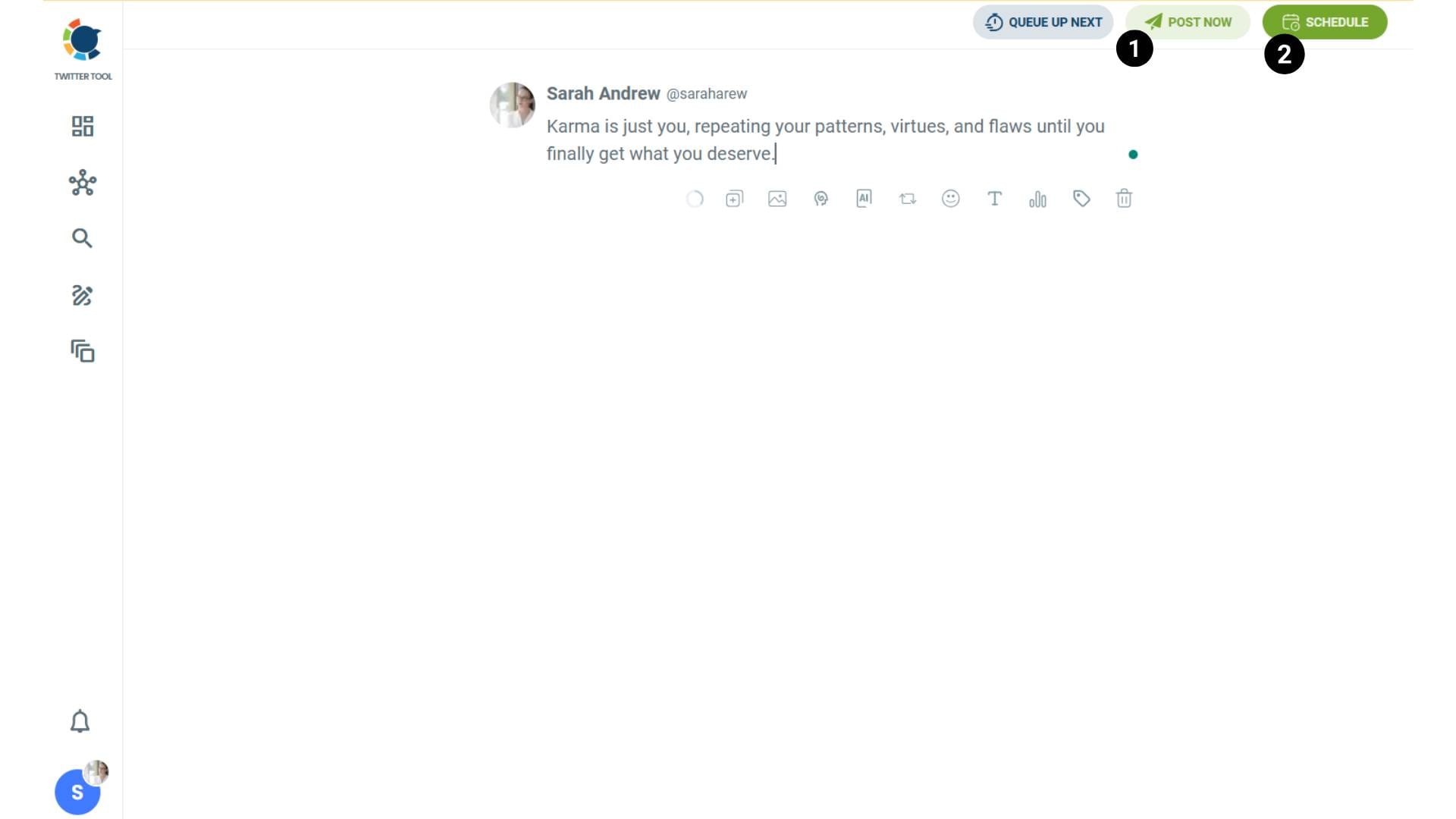
When it is ready, you can “Post” or “Schedule” your tweet. To see your cross-posting options, you should click on one of them.
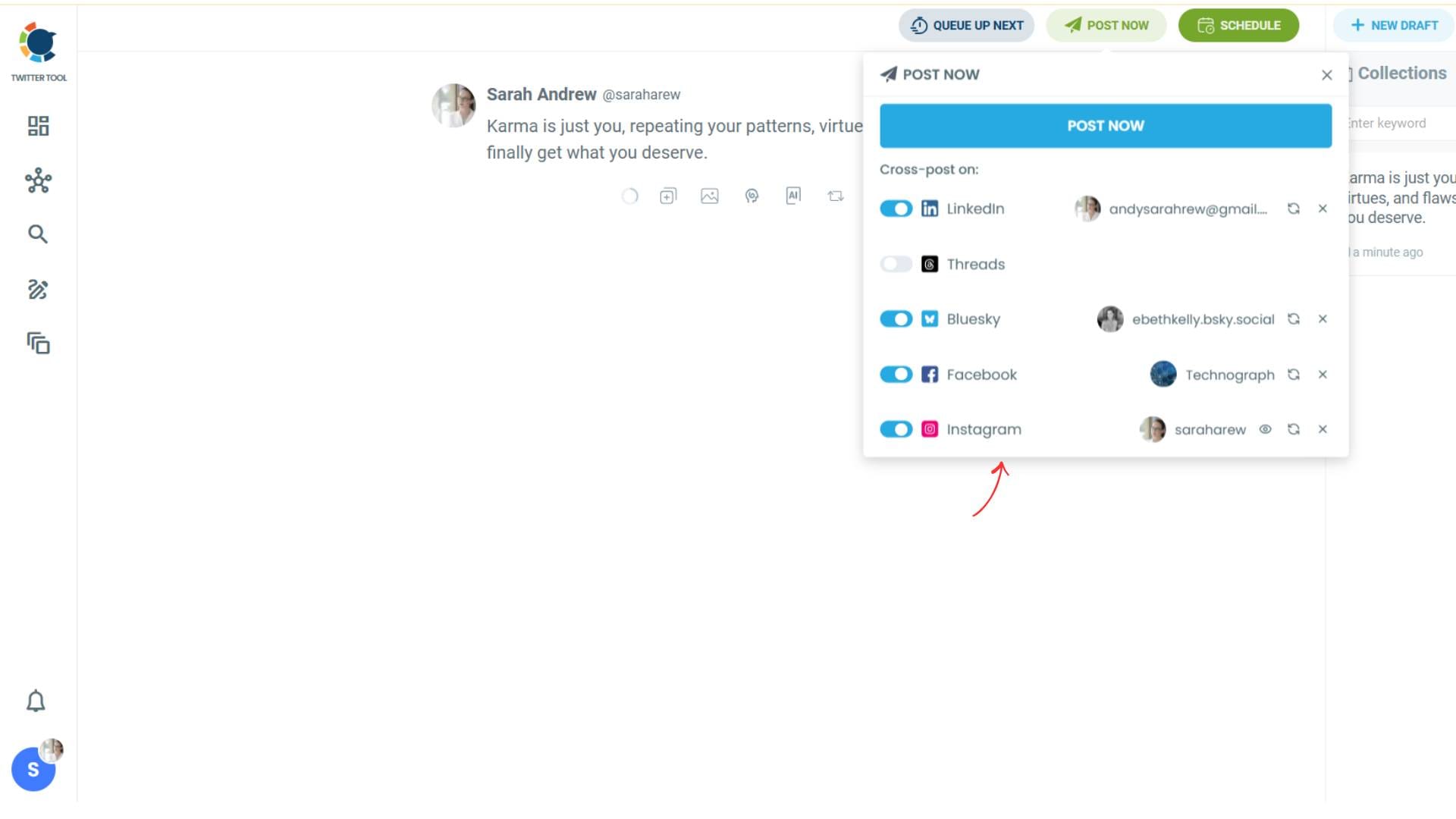
Step #4: You will see your connected platforms. You can cross-post your tweets to these accounts automatically.
You can share tweets on LinkedIn, Facebook, Threads, Bluesky, and finally, Instagram!
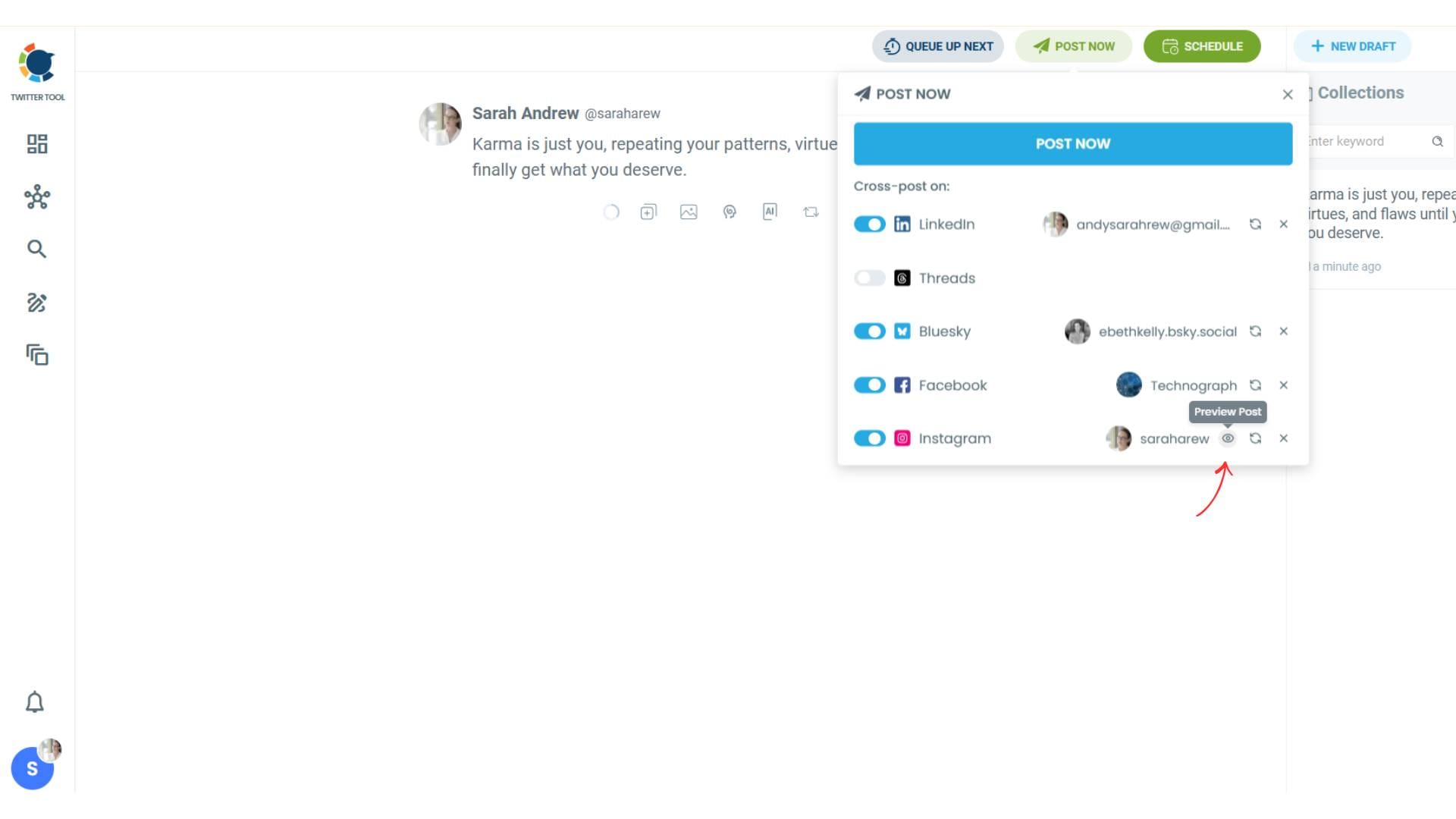
To decide if it is going to be a standard Instagram post or Story or Reels, and decide layouts and colours, click on “Preview”.
Step #5: Here you can select Instagram post type: “Post”, “Story”, and “Reels”.
You can also select the post layout.
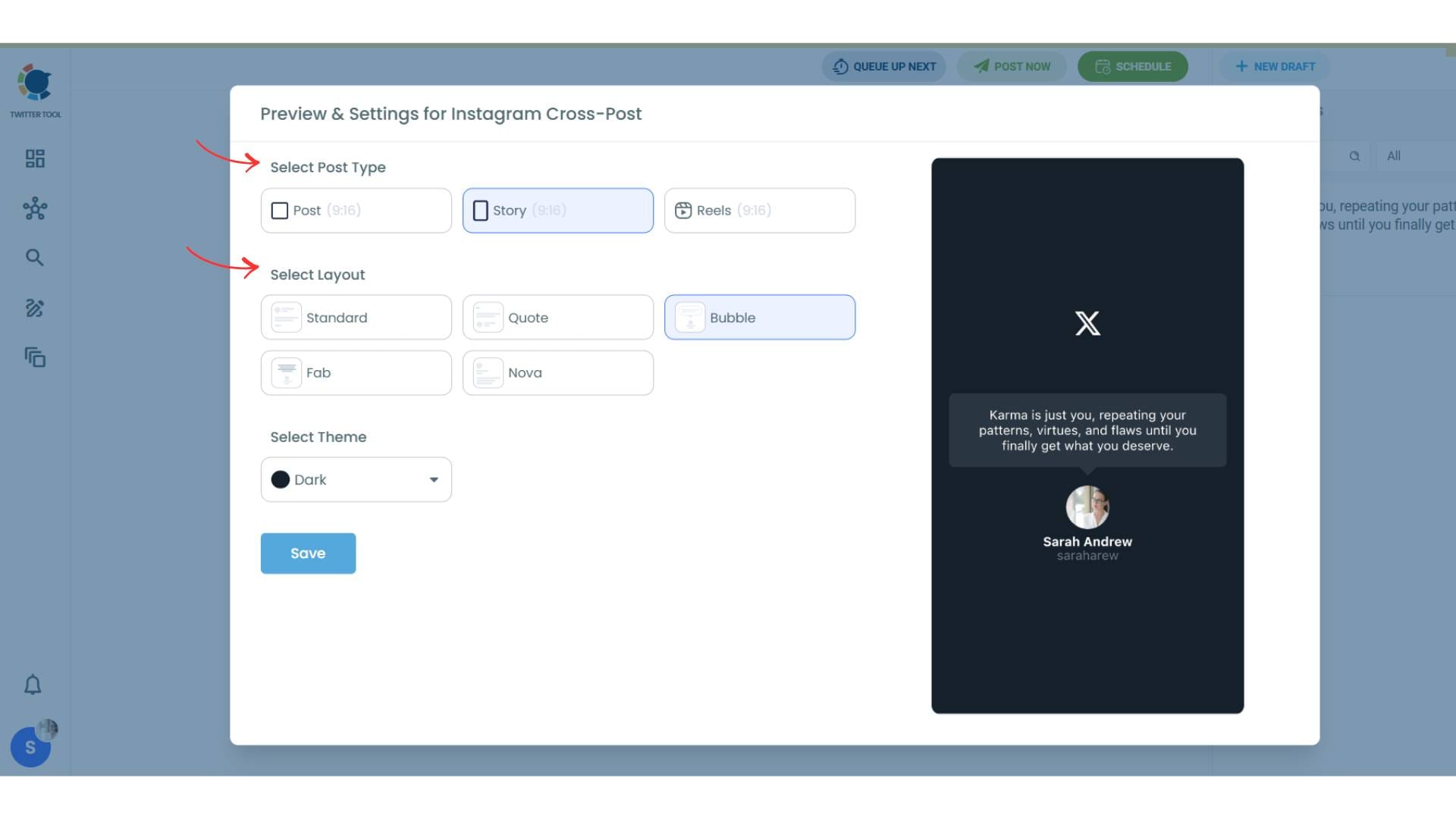
You can also select different themes. Share your tweet on Instagram with different colors.
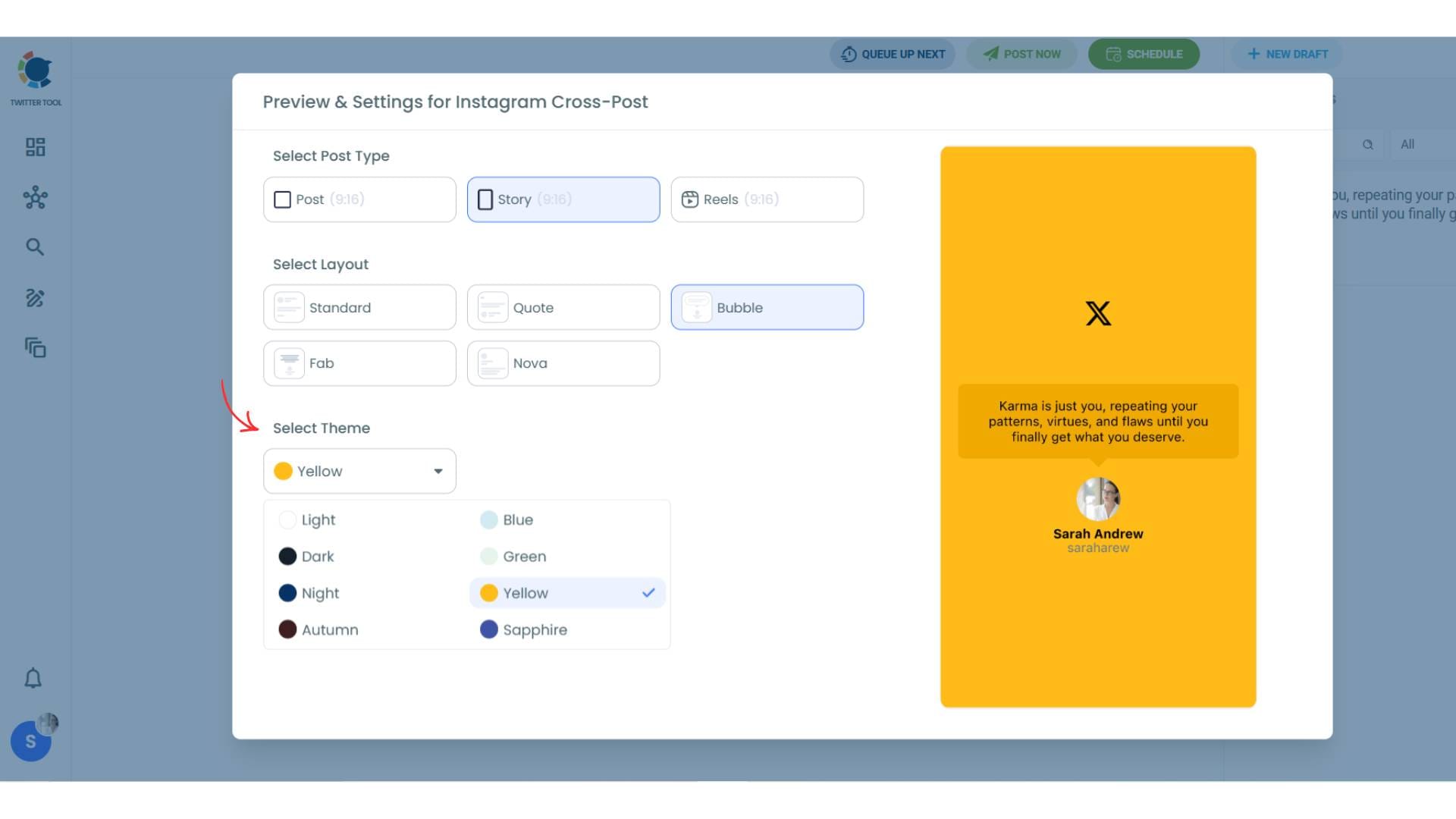
Lastly, you should click on “Save” and your Instagram cross-post is ready.
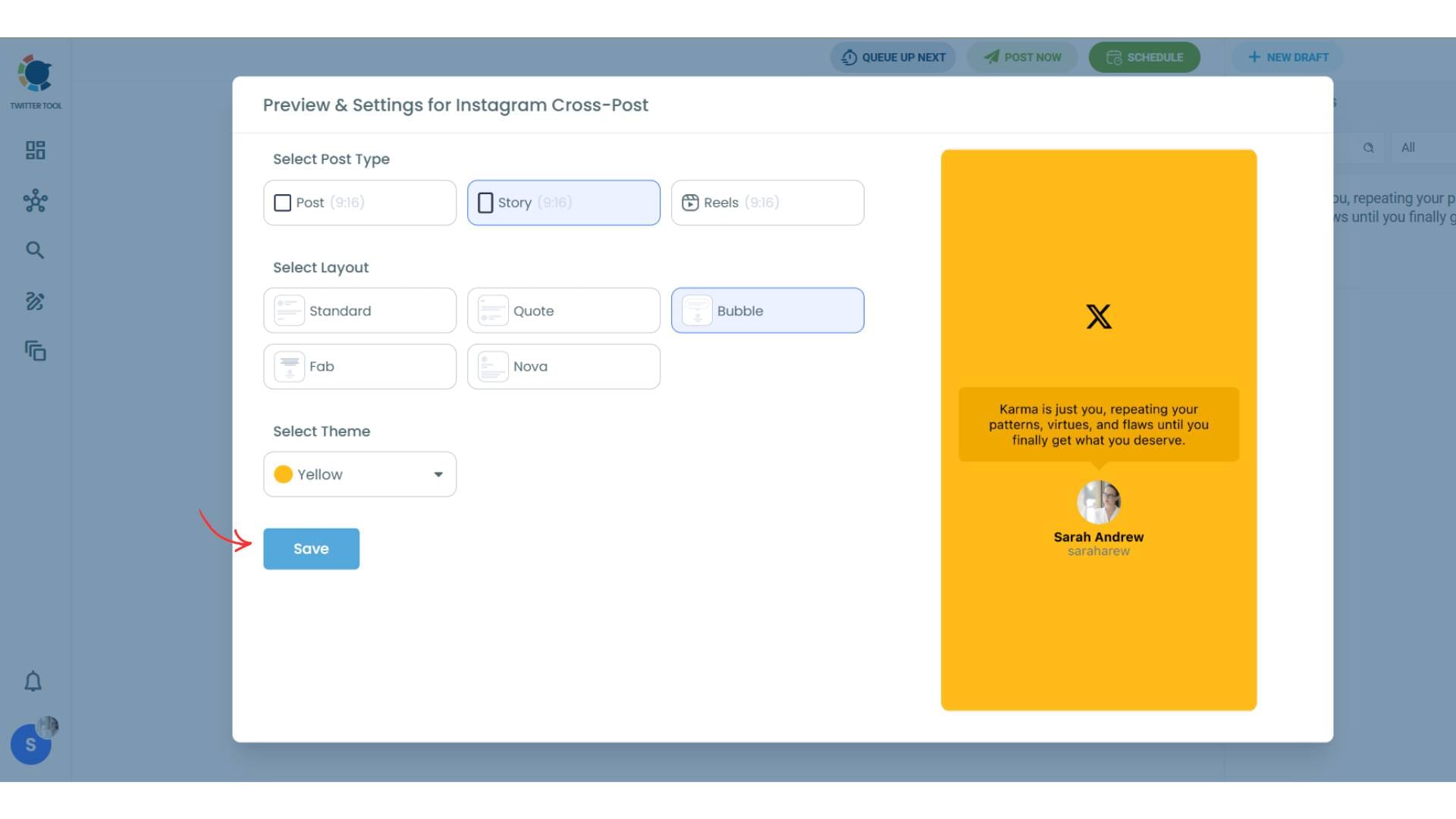
Step #6: When all is set, you can share your cross post immediately or schedule it for a later time.
You can select the day and hour and click to share your tweet!

You can get more impressions and engagement for your tweets on Instagram. Don't limit yourself to Twitter (X).
Share your tweets on Instagram to reach a wider audience.
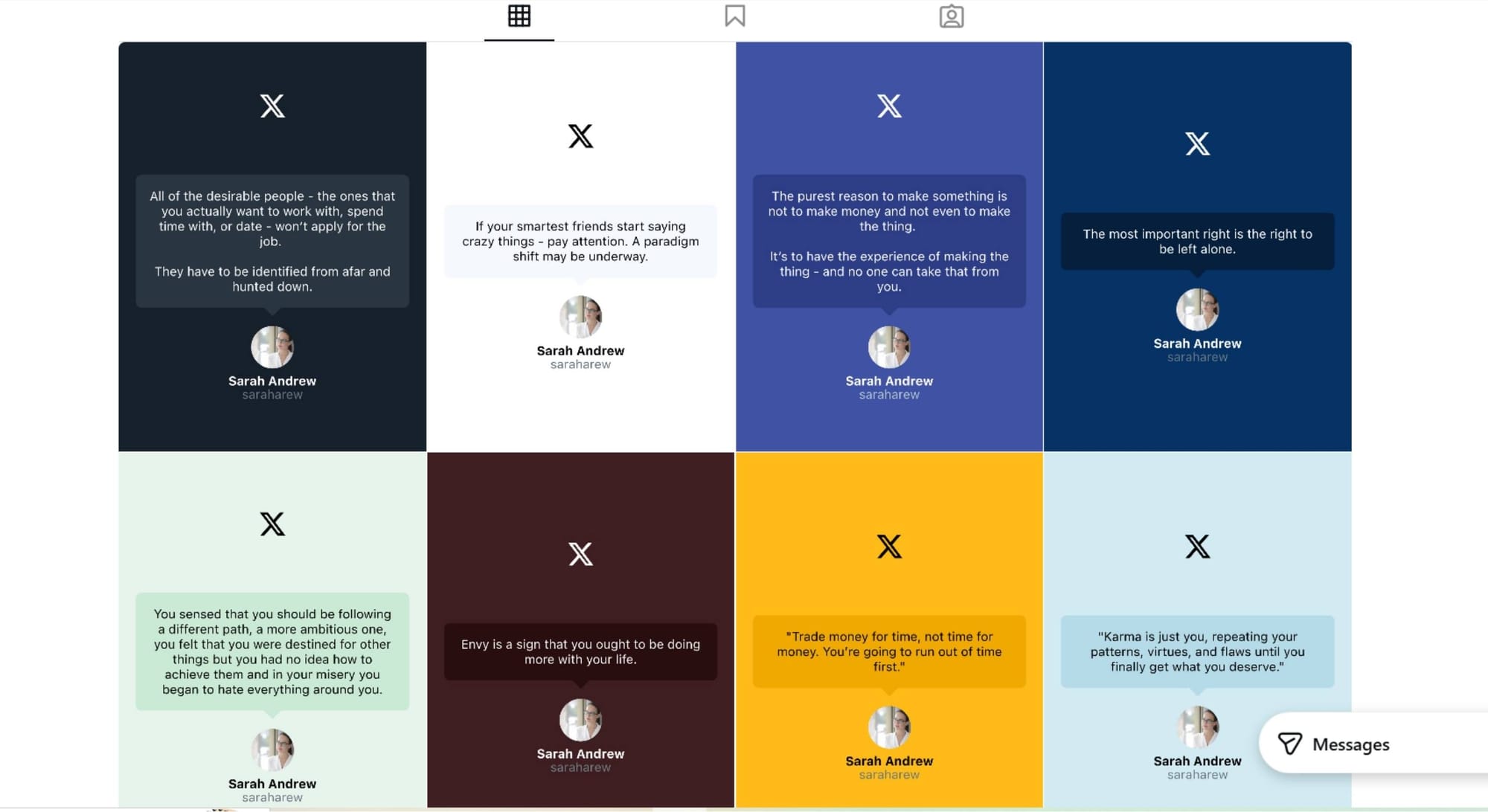
What Happened After I Started Sharing Tweets as Stories
After connecting my Twitter and Instagram accounts and consistently sharing my tweets as Stories, I started noticing changes.
 Arif Akdogan
My Instagram account, which had been inactive for a long time, slowly came back to life:
- Story views increased
- People started reacting and replying
- Profile visits went up
- Follower growth became noticeable
The content wasn’t new. The audience was.
By showing my Twitter content to Instagram users in a format they’re used to, engagement started to build naturally. It didn’t feel forced, and it didn’t require extra content creation.
If you are a creator on X and want to know about the latest developments regarding the algorithm changes, engagement strategies, payout boosts, etc., you can join Circleboom's X Creator Growth Lab Community and enjoy a free space to learn from and contribute to!

Best Types of Tweets to Share as Instagram Stories
Not every tweet translates well into an Instagram Story. Stories are designed for quick consumption, so the format matters just as much as the message. Over time, I noticed that certain types of tweets consistently perform better when shared as Stories, mainly because they are easy to read, visually clear, and immediately understandable.
I usually get the best results from:
🟠 Short insights or strong opinions
Tweets that express a clear point of view work especially well in Stories. Instagram users often scroll quickly, so a bold statement or a concise insight grabs attention instantly. These tweets don’t require much context, which makes them ideal for Story slides.
🔵 Tips and quick takeaways
Practical tweets that offer a single tip or a quick lesson are perfect for Stories. When a tweet delivers value in one or two lines, it feels natural in a visual format. These also encourage reactions because they feel helpful rather than promotional.
🟢 Quotes and one-liners
Quotes, punchy sentences, and short reflections are highly Story-friendly. They fit well into visual layouts, remain readable on small screens, and often resonate emotionally with viewers, leading to replies or shares.
 Arif Akdogan
🟣 Educational tweets with a clear message
Educational content works best when it focuses on one clear idea. Instead of long explanations, a simple concept or key insight performs better as a Story. If a tweet teaches something quickly, it feels like a micro-learning moment rather than a lecture.
Across all of these types, the key is clarity and simplicity. Keeping the text concise and readable allows the Story to be consumed in a few seconds, which matches how Instagram users naturally interact with content. When a tweet feels effortless to read, it’s much more likely to get reactions, replies, and profile visits.
Final Thoughts: One Tweet, Two Platforms, More Reach
Cross-posting tweets to Instagram Stories helped me turn an inactive Instagram account into a growing one without creating extra content.
Twitter and Instagram audiences are different, but the ideas you share don’t have to be. When tweets are transformed into visual Stories, they fit naturally into Instagram’s ecosystem and reach people who would otherwise never see them.
Instead of posting once and moving on, cross-posting lets the same content work harder, and that’s what made the difference for me.

