

Trying to reset your Twitter (X) followers sounds simple… but once you look for the option, you realize it doesn’t exist.
There’s no reset button. No bulk remove option. No way to start fresh with one action.
X doesn’t offer any feature to reset your followers. The only way to do it natively is removing people one by one, which becomes unrealistic as your account grows.
That’s exactly why tools like Circleboom Twitter exist.
As an official X Enterprise Developer, Circleboom gives you full control over your followers. Instead of dealing with each account manually, you can see all your followers in one place, analyze them, select them, and remove them in bulk, making it possible to actually reset your follower list.
You Can’t Reset Followers Directly on X
X does not provide any feature that allows you to remove all followers at once.
The only option available is manual:
- Open your followers list
- Visit each profile
- Click “Remove this follower”
- Repeat the same steps over and over
This might be manageable for small accounts.
❌ But once you have hundreds or thousands of followers, it becomes extremely time-consuming.
There is simply no practical way to reset your followers natively on X.
Reset Your Followers with Circleboom Twitter
Circleboom Twitter removes this limitation completely.
Because it is an official X Enterprise Developer, it works directly with X’s infrastructure.

This means you’re not using risky automation tools or scraping-based systems. Everything is structured, compliant, and designed to work safely within platform rules.
Instead of forcing you into a repetitive process, Circleboom gives you a centralized follower management dashboard.
From there, you can:
- Access your entire follower list instantly
- Analyze accounts with real data
- Apply filters if needed
- Select multiple accounts at once
- Remove followers in bulk
 infocircleboom.com
What would normally take hours or days can be done in a much shorter time, without losing control over what you’re doing.
More importantly, you’re not just deleting randomly. You’re making informed decisions based on actual account data.
How to Reset All Your Twitter Followers with Circleboom
Step #1: Go to the Circleboom Twitter website and log in with your credentials.
If you’re a new user, sign up—it’s quick and easy!

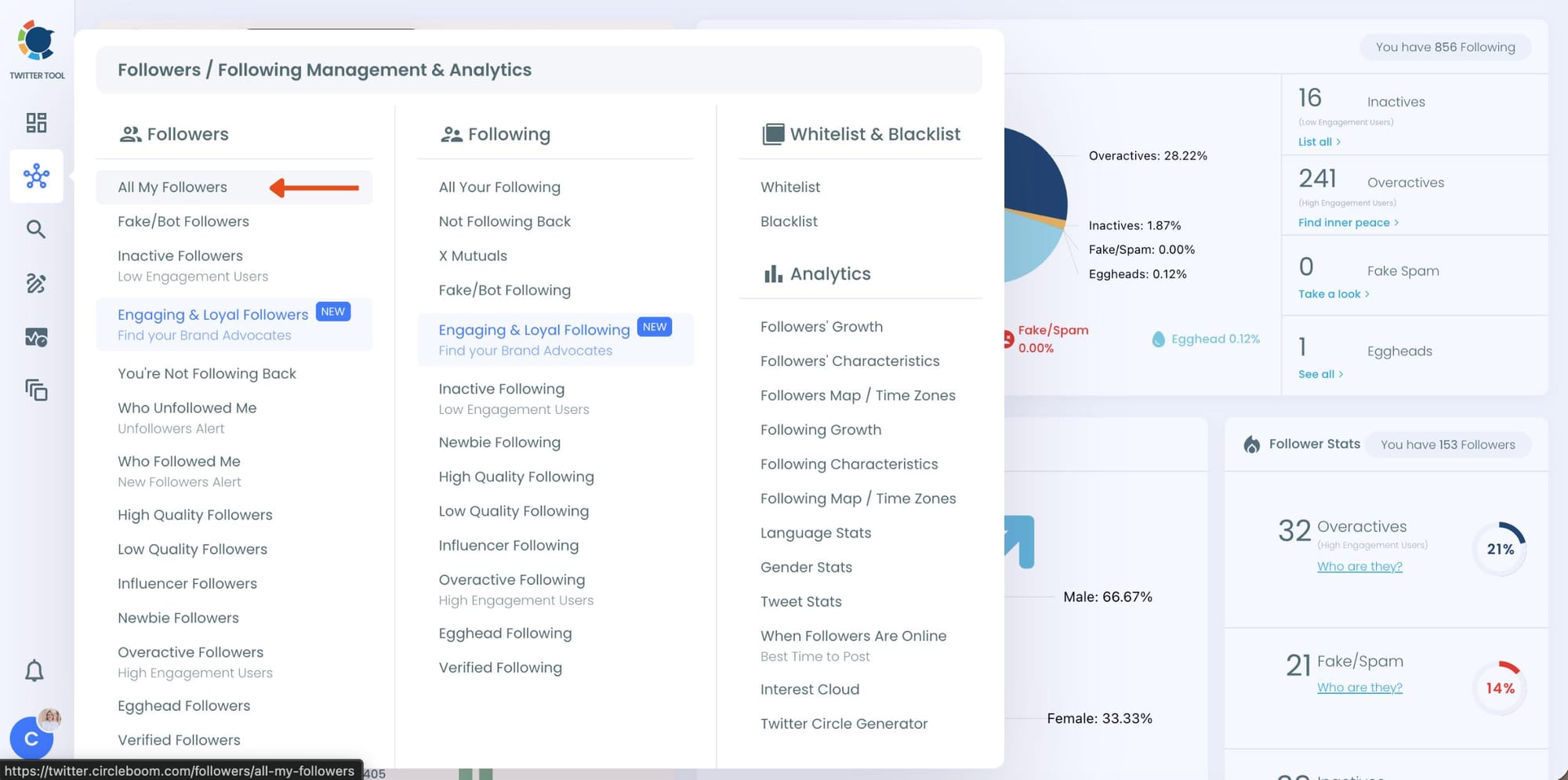
Step #2: On the left-side menu, click on the Followers / Following Management & Analytics section. A dropdown menu will appear. Select All My Followers to see the full list of your followers.
If you want to remove specific accounts, such as inactive users, you can directly select these categories from the dropdown menu instead of viewing all followers.
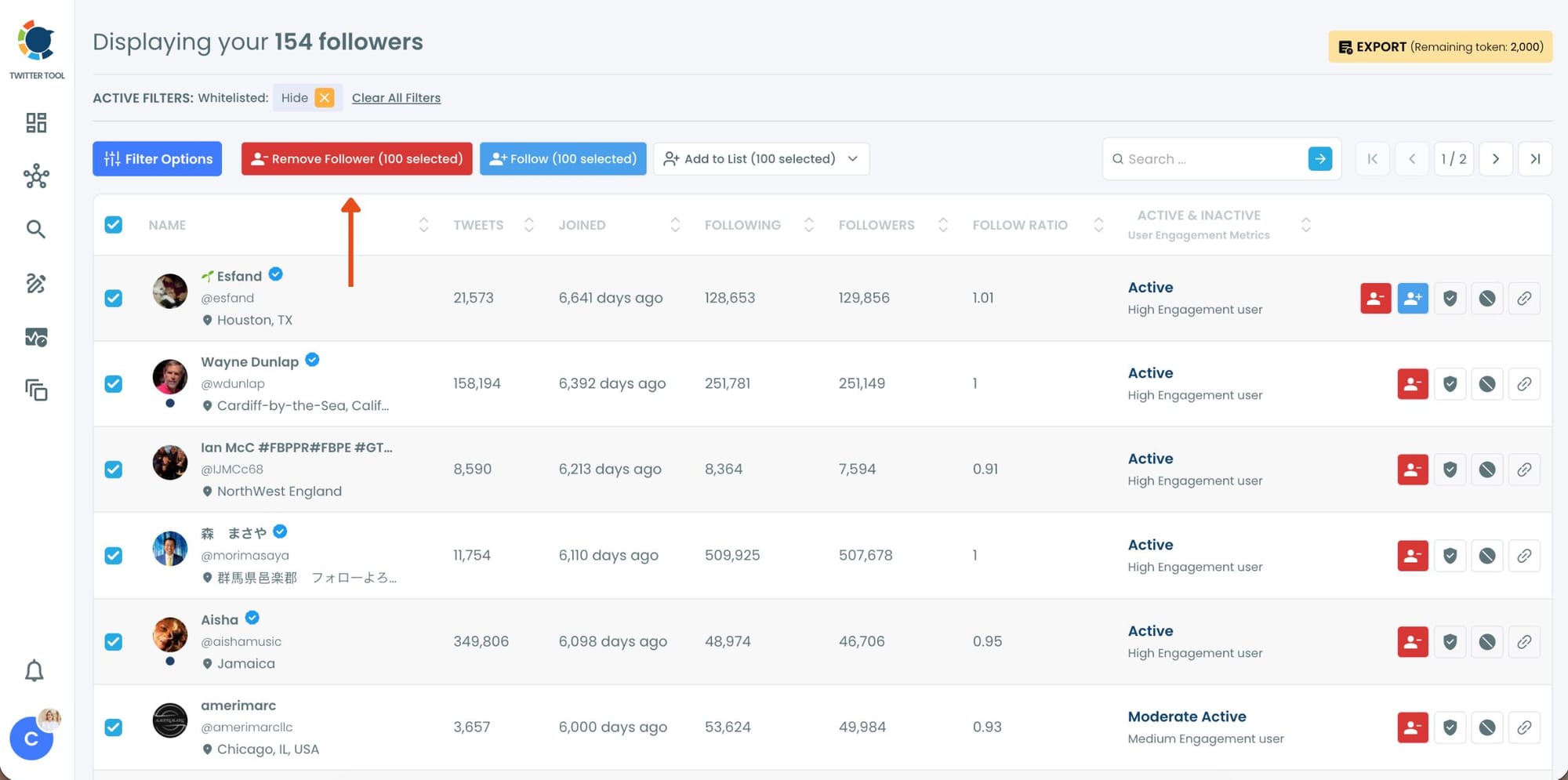
Step #3: You will see a complete list of your followers. Browse through your followers and check the boxes next to the users you want to remove.
You can also select multiple users at once. Once you have selected the users, click on the Remove Followers button at the top.
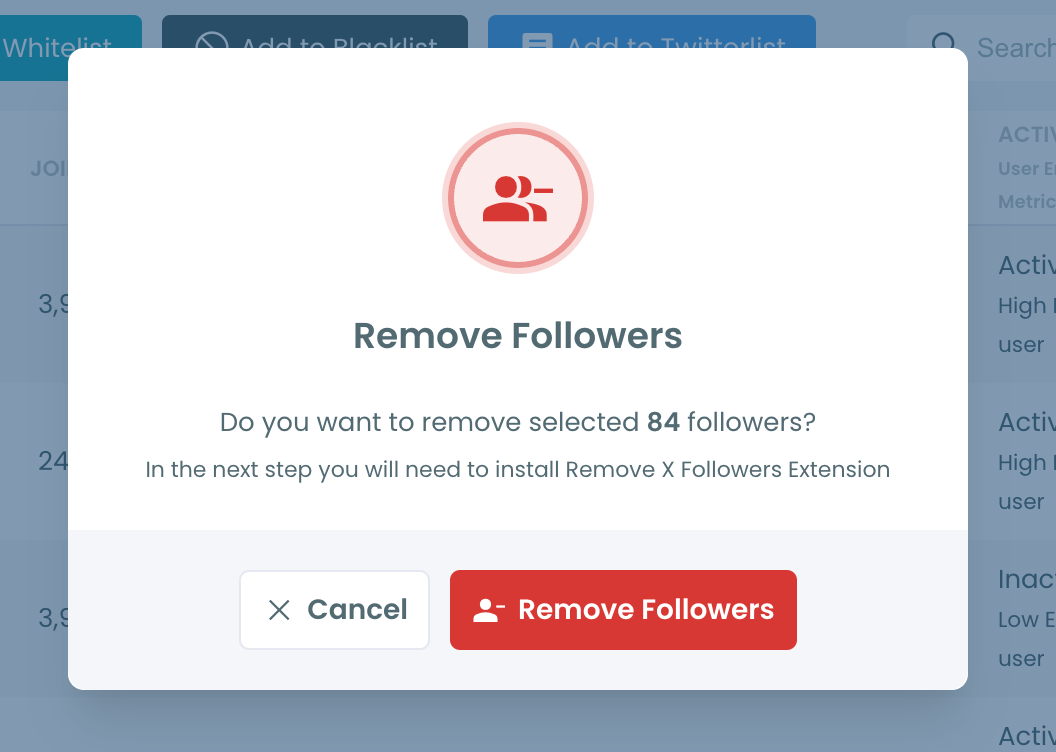
A confirmation message will appear asking if you are sure you want to remove the selected followers.
Click ''Remove Followers''.
Step #5: Since the removal action is processed via the Circleboom Remove Twitter/X Followers extension, you need to install it to complete the process.
Click on Download the Extension and install it from the Chrome Web Store.
Once installed, you can easily remove followers.

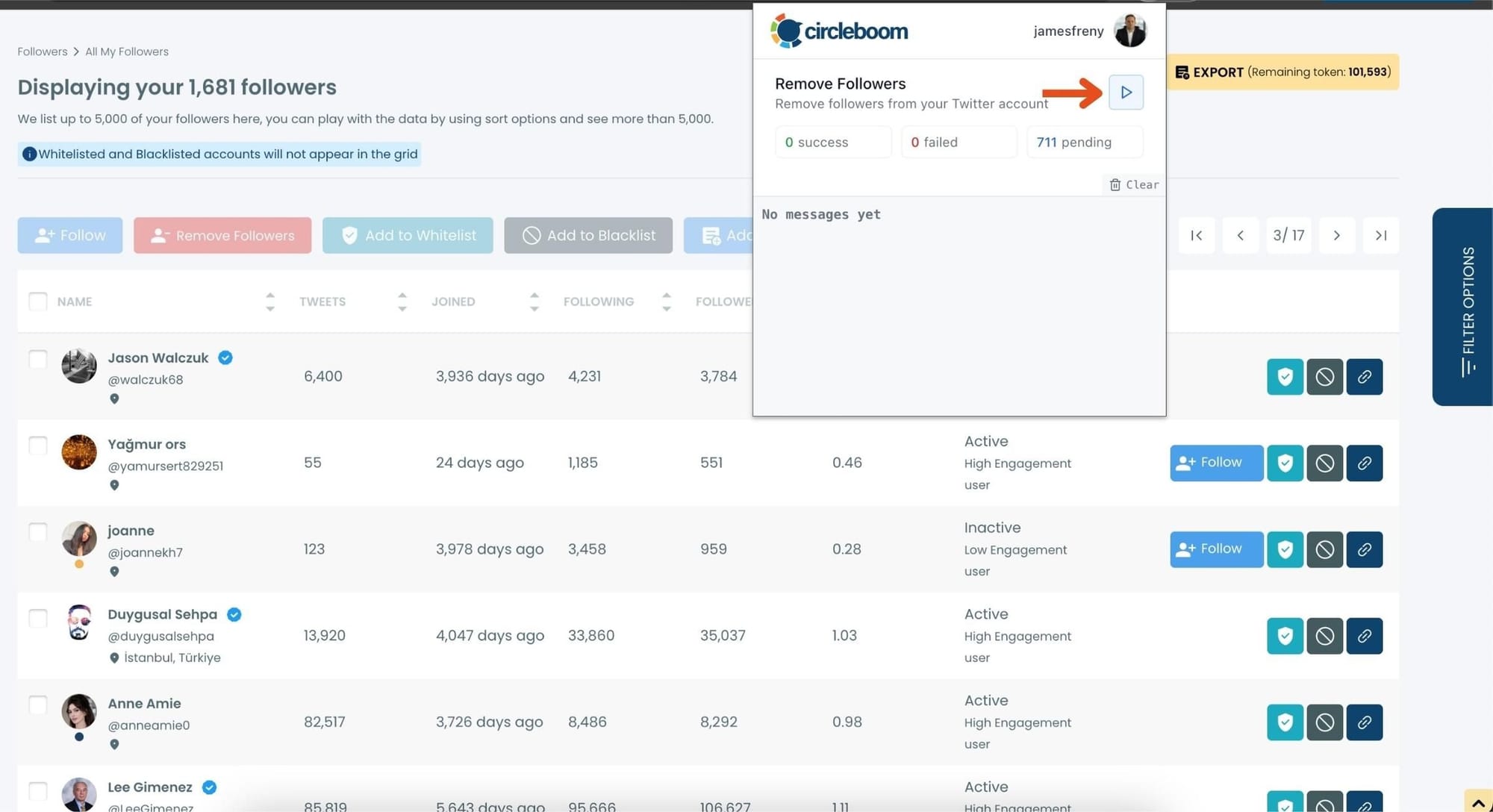
Step #6: After installing the extension, Circleboom will automatically add all your removal requests to the extension queue.
Click on the Start button to begin the removal process.
The extension will process your requests and remove the selected followers.
That's it!
Your selected followers are now removed automatically.
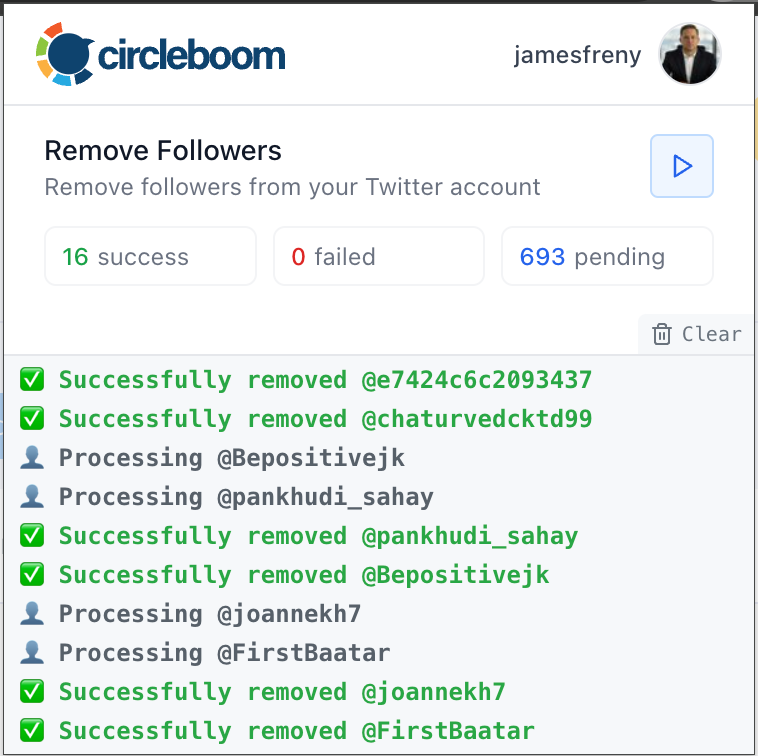
⚠️ Important Warning: Once the removal process begins, do not close your Chrome browser or the Circleboom tab.
The tool will automatically remove followers in the background, but if you close the tab or exit Chrome, the process will stop.
What You Can See About Your Followers
One of the biggest problems on X is the lack of visibility.
You see usernames, profile pictures, and maybe a short bio. But that’s not enough to understand who is actually following you.
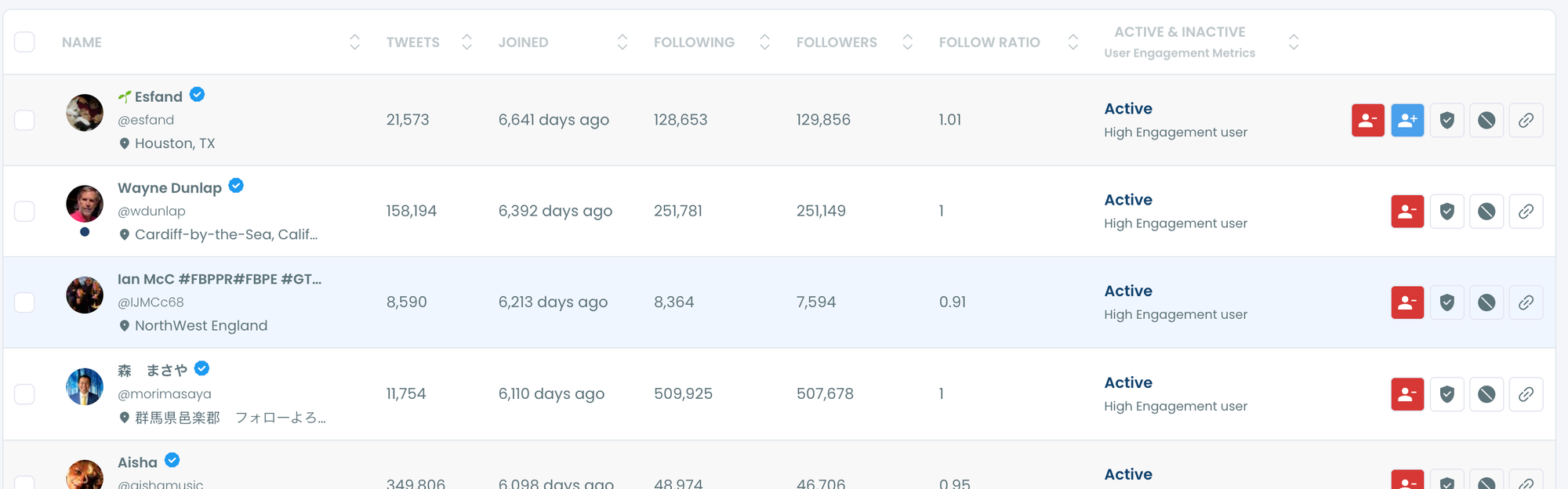
Circleboom solves this by giving you detailed insights for each follower.
You can see:
🔵 Total tweet count, which helps you understand how active an account is
🔵 Follower and following numbers, useful for spotting suspicious or low-quality accounts
🔵 Account creation date, so you can identify newly created profiles
🔵 Verification status, including different types of verified accounts
🔵 Activity level, showing whether someone is active or not
🔵 Bot or fake signals, helping you identify accounts that don’t look real
This changes how you approach follower management. And this is where it becomes even more useful.
Because you don’t have to remove everyone.
If you want, instead of resetting your entire follower list, you can simply remove low-quality accounts like inactive users, fake profiles, or bot-like followers, and keep the real ones.
This gives you much more control.
You can either start completely fresh, or just clean your audience and improve its quality.
This is what makes resetting followers meaningful, not just mechanical.
 Kevin O. Frank
Why Someone Might Want to Reset Their Followers
Resetting followers is not just about reducing numbers. It’s about improving account quality.
Some common reasons include:
- Starting fresh with a new content strategy
- Removing fake or bot followers
- Cleaning inactive accounts that never engage
- Repositioning a personal or brand account
- Building a more relevant and targeted audience
A high follower count doesn’t always mean a strong account.
In many cases, having fewer but real and interested followers performs much better than having a large but low-quality audience.

Why Bulk Removal Is Better Than Doing It Manually
The difference between manual removal and bulk removal is not just speed, it’s sustainability.
Manual process:
- Repetitive
- Time-consuming
- Mentally exhausting
- Easy to abandon halfway
When you remove followers in bulk, you stay consistent. You don’t lose motivation halfway through. And most importantly, you actually finish what you started.
For accounts with large follower bases, this is not just a convenience, it’s the only realistic way to complete the process.
Final Thoughts
Resetting your Twitter followers is something many people want to do, but very few actually complete.
Not because it’s a bad idea, but because X does not provide the tools to do it efficiently.
With Circleboom Twitter, this changes completely.
You can:
- See your entire follower list in detail
- Understand who follows you and why
- Select accounts based on real data
- Remove them in bulk instead of manually
Instead of spending hours clicking through profiles, you can reset your follower list in a structured, controlled, and practical way.
And once you do, you’re not just starting over.
You’re starting better.

