

For a long time, one of the biggest problems I faced on X (formerly Twitter) was dealing with bot accounts.
They would start following me suddenly. Then a few minutes later, a DM would arrive. Usually it was a strange message that looked copied and pasted. Sometimes they tried to move the conversation to WhatsApp or Telegram.
 Kevin O. Frank
Other times they would post completely unrelated tweets that had nothing to do with their profile.
At first, spotting these accounts was easy. Their profiles looked fake, their tweets were random, and their behavior was obviously automated.
But things have changed.
➡️ Today, many Twitter bots look surprisingly real.
The good news is that there is a way to deal with them. Instead of trying to manually check every suspicious account, I use Circleboom Twitter, an official X Enterprise Developer, to analyze my followers and detect bot accounts automatically. It identifies suspicious profiles and allows me to remove them with just one click.
But before explaining how I do that, it’s important to understand how Twitter bots actually work and why they now act so much like real humans.
What Are Twitter Bots?
Twitter bots are automated or semi-automated accounts designed to perform actions on the platform without direct human involvement.
These accounts can automatically:
- Follow users
- Send direct messages
- Like or repost tweets
- Reply to posts
- Publish tweets on a schedule
Some bots are harmless and used for automation purposes. However, many of them are created for spam, scams, fake engagement, or phishing attempts.
In many cases, these accounts try to appear normal so they can interact with users without being immediately detected.
How Do Twitter Bots Work?
Most bot accounts rely on automation systems that allow them to perform repetitive actions at scale.
Automated actions
Bots can be programmed to automatically perform actions such as:
- Following large numbers of users
- Sending repeated DM messages
- Posting tweets automatically
- Replying with generic comments
- Retweeting content to boost visibility
These actions are usually triggered by scripts or automation software.
Pattern-based behavior
Many bots operate based on specific patterns. For example:
- Sending the same DM message to hundreds of users
- Following users who follow certain accounts
- Posting similar content repeatedly
- Interacting with specific keywords or hashtags
When many accounts follow these same patterns, they often form large bot networks.
Bot networks
In many cases, bots are not acting alone.
Groups of automated accounts can work together to:
- Amplify certain tweets
- Promote scams or suspicious links
- Create fake engagement
- Make certain topics appear more popular than they actually are
This coordinated behavior is what makes bots particularly disruptive on social media platforms.
How Bots Now Act Like Real Humans
In the past, bots were easy to recognize. Their profiles were empty, their tweets looked robotic, and their behavior was repetitive.
Today, AI tools have made them much more convincing.
Modern bot accounts may:
- Use realistic profile photos
- Have natural-looking bios
- Post mixed content instead of only spam
- Write replies that sound like real conversations
- Mimic normal posting patterns
Some bots even spend time building trust first. They follow accounts, interact normally, and only later start sending suspicious messages or links.
Because of this, detecting bots manually has become much harder than before.
The Easiest Way I Deal With Twitter Bots
Because bots have become more sophisticated, manually checking every follower is almost impossible.
Instead, I use Circleboom Twitter to analyze my followers and detect suspicious accounts.

Circleboom Twitter is an official X Enterprise Developer, and it provides advanced follower analysis tools. It scans your audience and helps identify accounts that may be bots, fake profiles, or low-quality followers.
 infocircleboom.com
Once these accounts are detected, you can remove them easily.
How to Detect and Remove Bot Accounts with Circleboom Twitter
Here is how I usually clean bot followers from my account.
Step #1: Go to the Circleboom Twitter website and log in with your credentials.
If you’re a new user, sign up, it’s quick and easy!

Step #2: On the left-side menu, click on the Followers / Following Management section. A dropdown menu will appear. Select Fake/Bot Followers to see the full list of your followers.
If you want to remove specific accounts, such as inactive users, you can directly select these categories from the dropdown menu instead of viewing all followers.
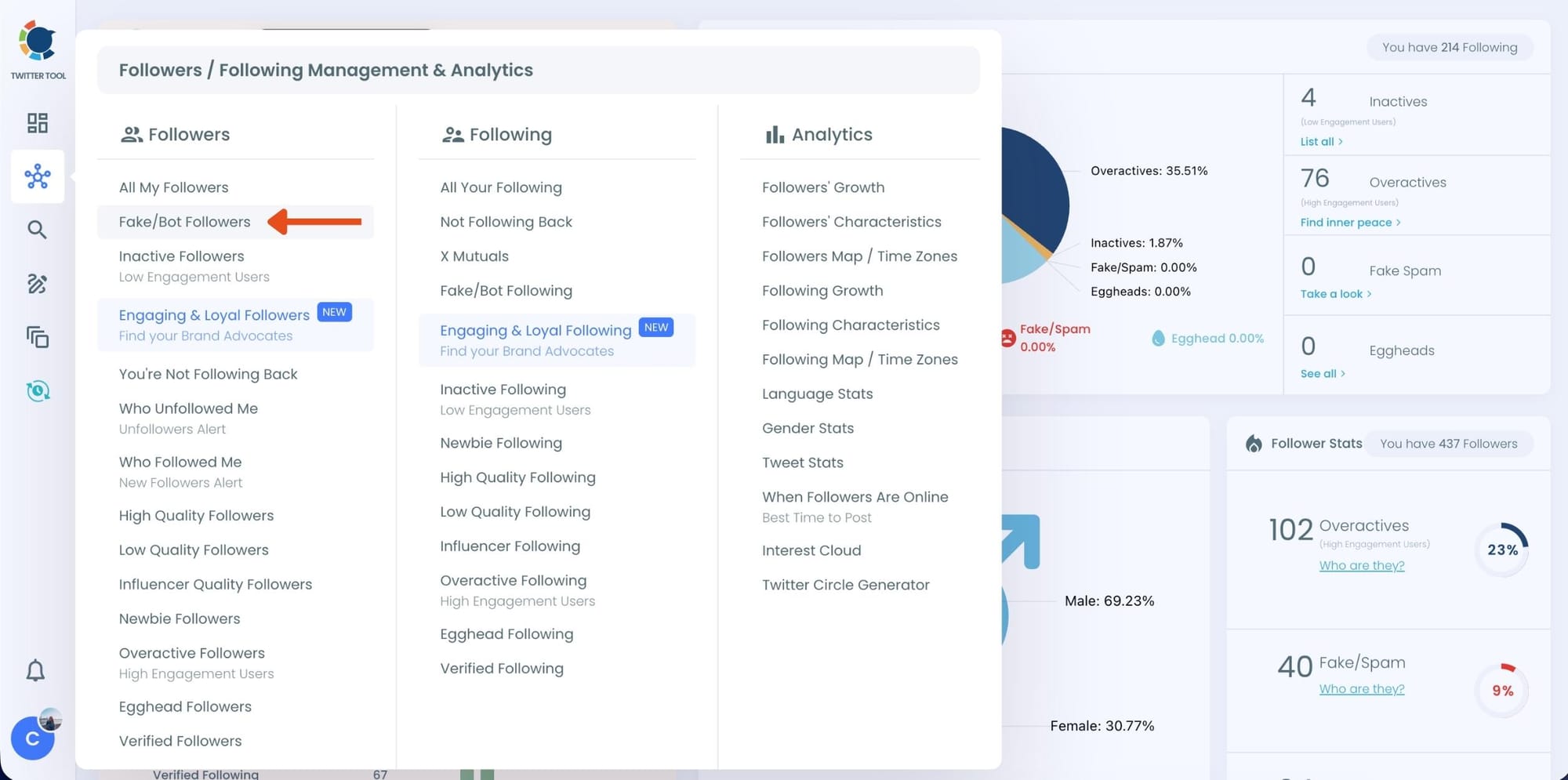
Step #3: You will see a complete list of your fake/bot followers.
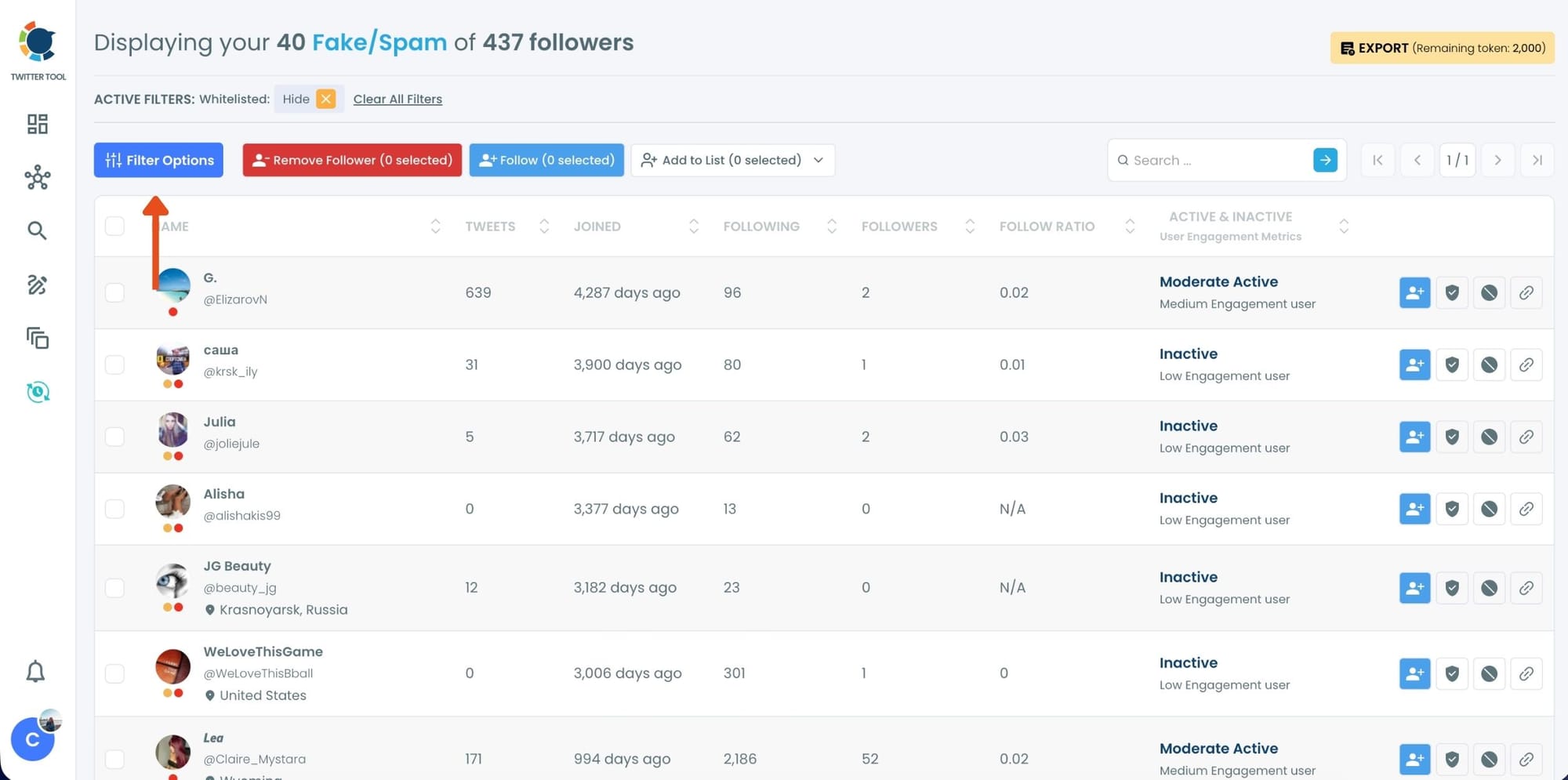
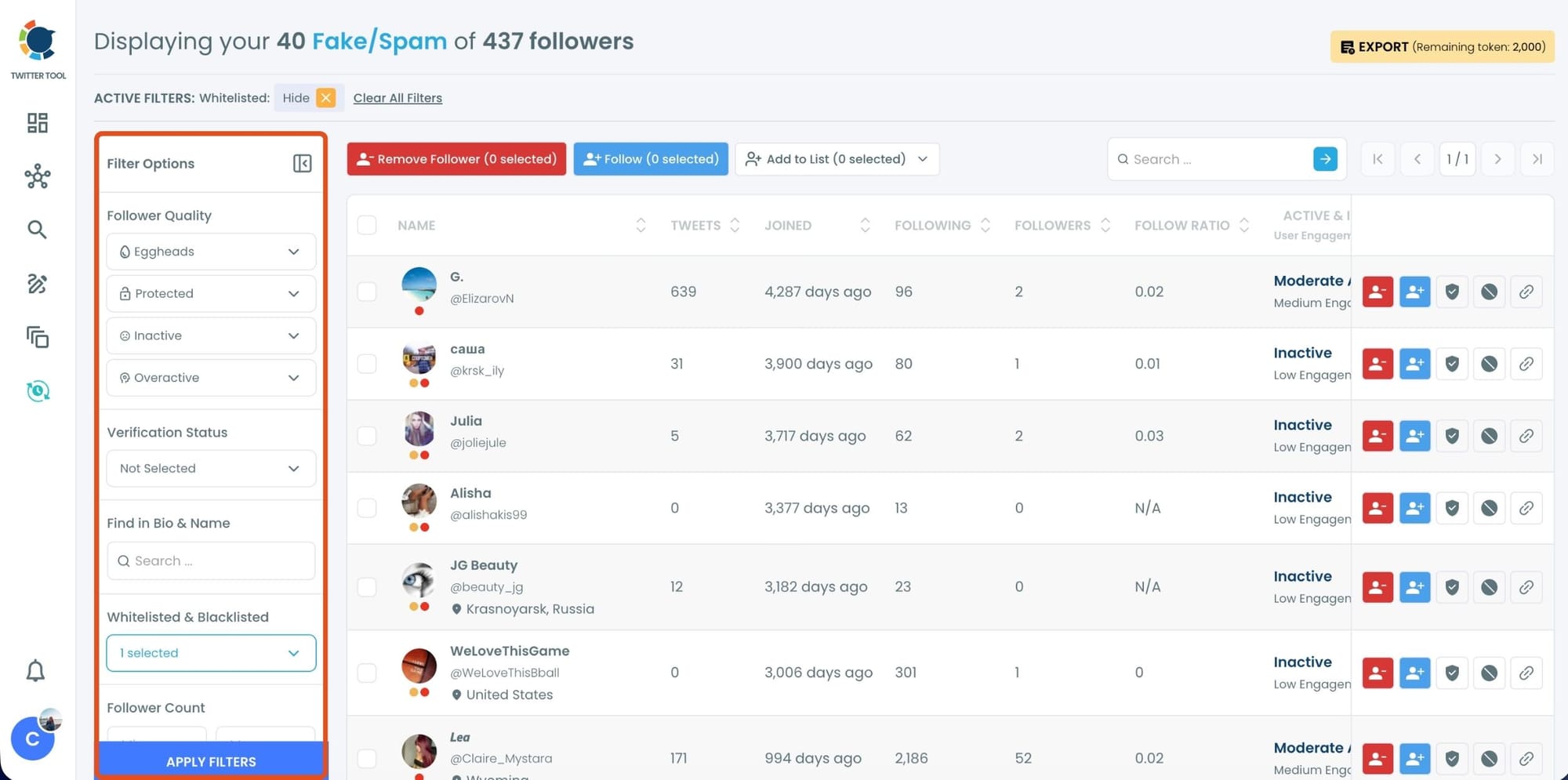
Use the Filter Options on the left side to refine your list.
You can filter followers based on engagement levels, inactivity, verification status, follower/following count, and more.
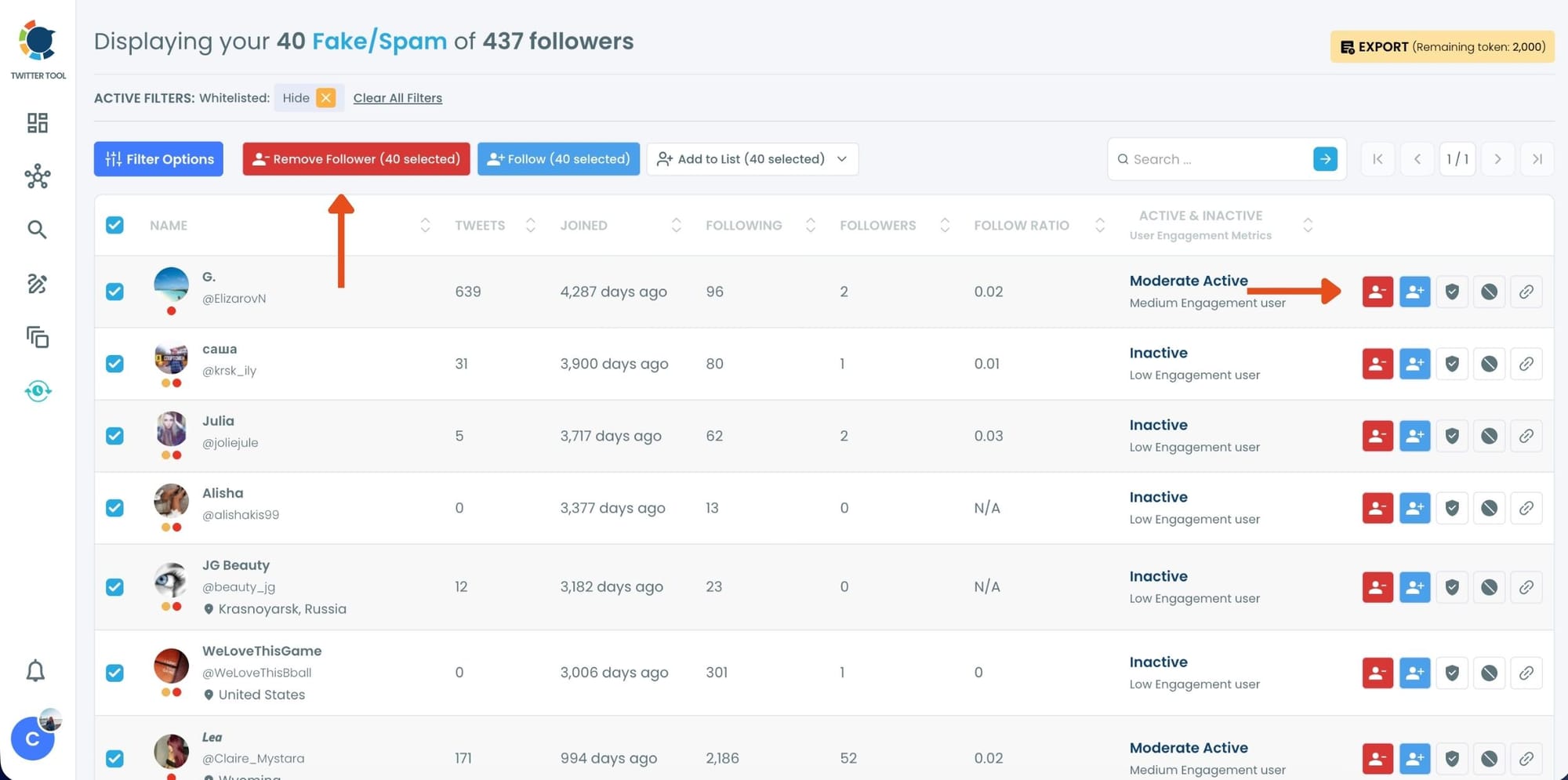
Step #4: Browse through your followers and check the boxes next to the users you want to remove.
You can also select multiple users at once. Once you have selected the users, click on the Remove Followers button at the top.
Alternatively, you can remove individual followers by clicking the red remove icon next to their name on the right side of the list.
A confirmation message will appear asking if you are sure you want to remove the selected followers. Click ''Remove Followers''.
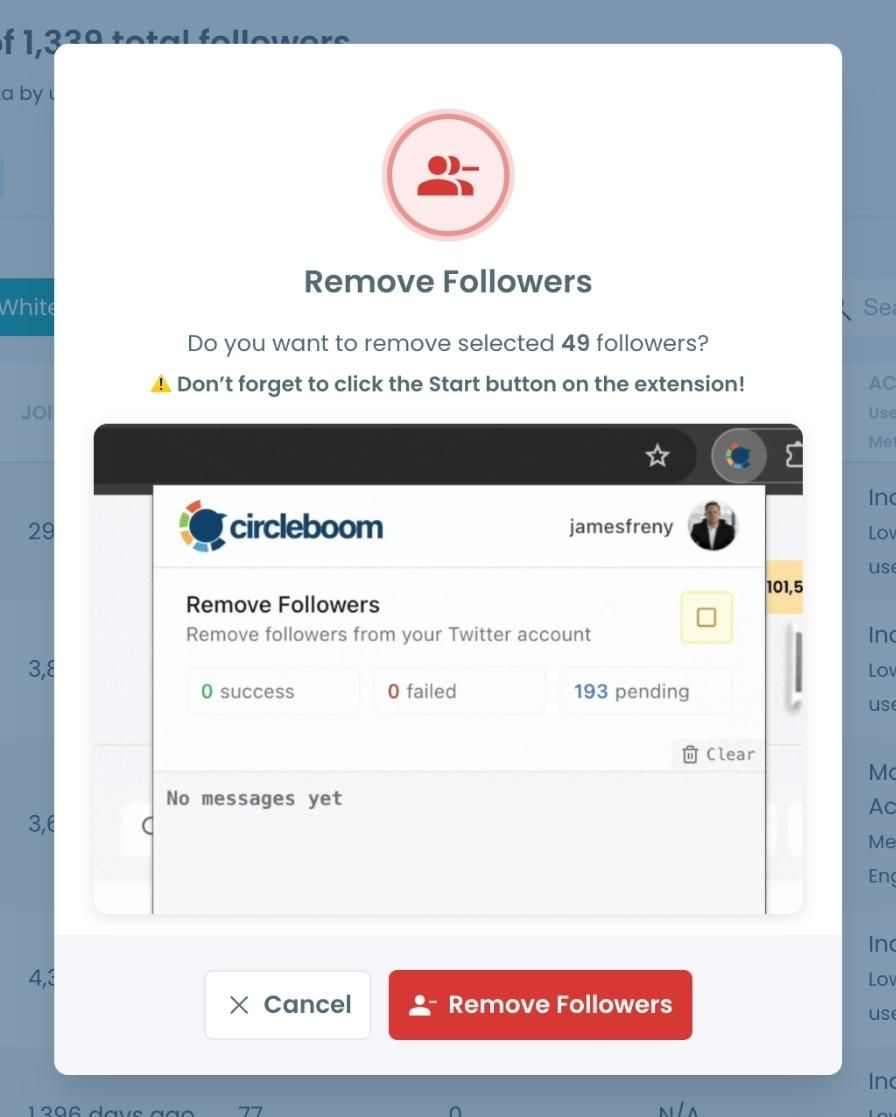
Step #5: Since the removal action is processed via the Circleboom Remove Twitter/X Followers extension, you need to install it to complete the process.
Click on Download the Extension and install it from the Chrome Web Store.
Once installed, you can easily remove followers.

Step #6: After installing the extension, Circleboom will automatically add all your removal requests to the extension queue.
Click on the Start button to begin the removal process.
The extension will process your requests and remove the selected followers.
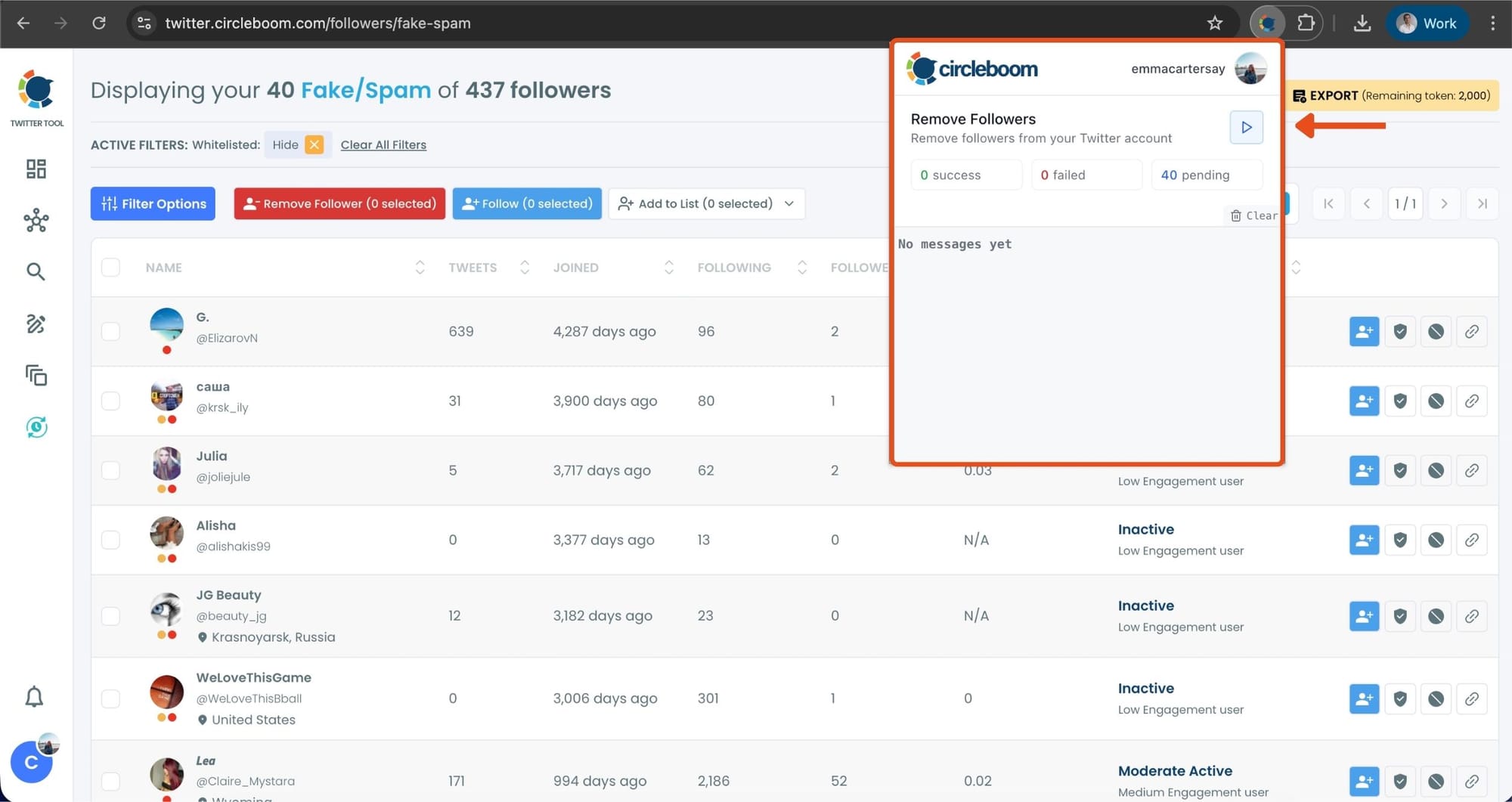
That's it! Your selected followers have been removed automatically.
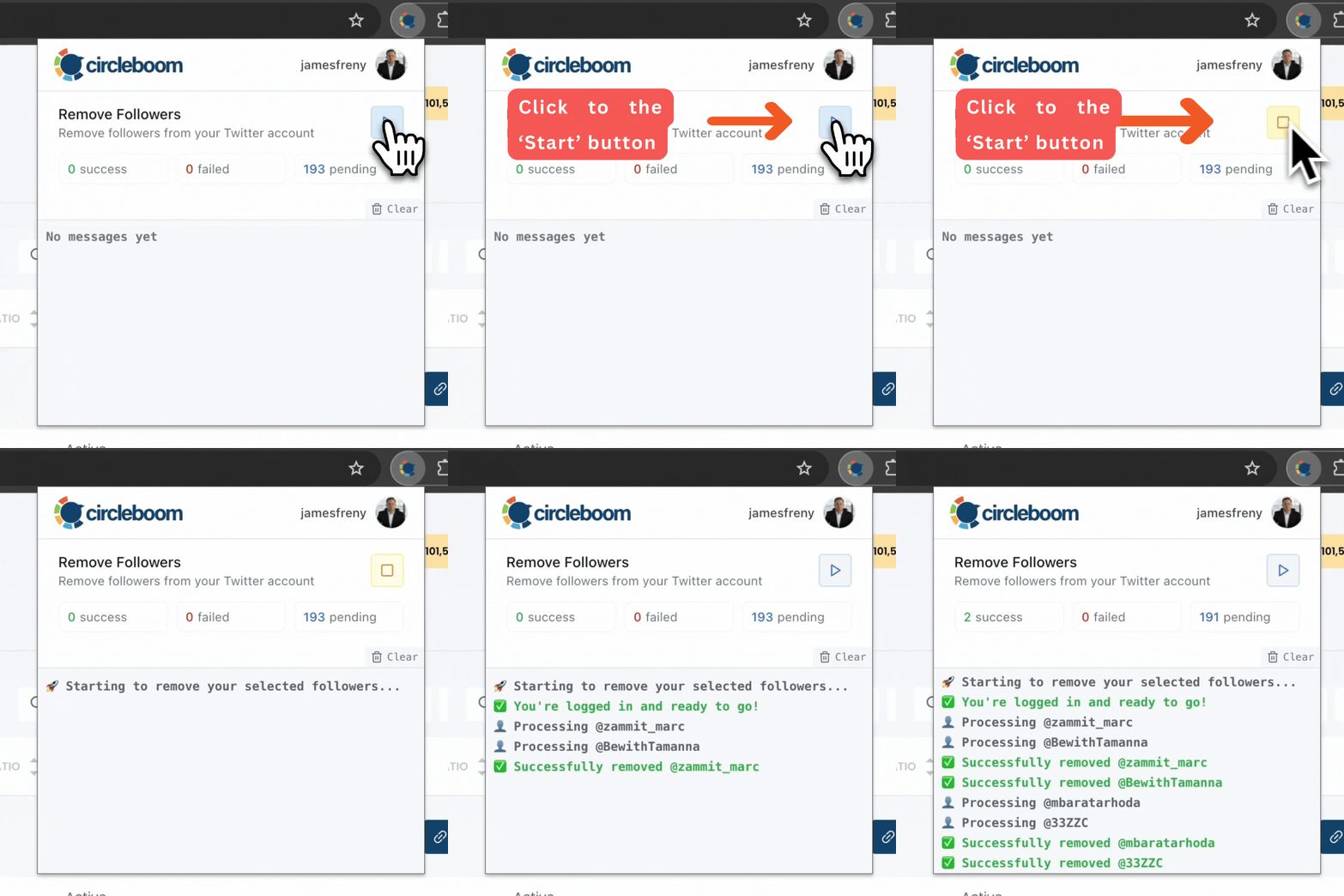
⚠️ Important Warning: Once the removal process begins, do not close your Chrome browser or the Circleboom tab. The tool will automatically remove followers in the background, but if you close the tab or exit Chrome, the process will stop.
If you need a more detailed guide check this video ⬇️
Why Bot Accounts Are Dangerous on X
Even if they sometimes look harmless, bot accounts can cause several problems:
- Spam messages in your inbox
- Scam attempts through DMs
- Fake followers that damage account quality
- Lower engagement from real users
- Suspicious links or phishing attempts
If many bots follow your account, it can also attract even more bot activity, creating a cycle where your notifications and messages become full of spam.
Conclusion
Twitter bots have evolved a lot over the years.
What used to be obvious fake accounts are now much more sophisticated. With AI-generated content, realistic profiles, and human-like behavior, many bots can imitate real users surprisingly well.
This makes manual detection difficult.
That’s why tools that analyze follower behavior can make a big difference. By identifying suspicious accounts and removing them easily, you can keep your audience cleaner and reduce spam interactions on your account.
For me, using Circleboom Twitter has been one of the easiest ways to manage this problem and keep bot activity under control.



%20Act%20Like%20Real%20Humans%3F)


