

Most people picture a troll as someone sitting at a keyboard, deliberately writing provocative replies. That picture is mostly wrong.
The accounts flooding your mentions, spamming your replies, and appearing in your follower list are not usually real people. They are bots, fake profiles, and coordinated spam accounts that behave like trolls because that is what they are built to do.
The problem is not just the interaction itself. It is the network connection that keeps enabling it. These accounts are attached to your profile on both sides: following you so they can interact with your content, and sitting in your following list because they looked real enough when you followed them back.
Circleboom Twitter lets you detect fake and bot accounts on both sides of your network, remove them from your followers, unfollow them from your following list, and mass block the worst offenders, without touching each profile one by one.
What Are Twitter Trolls, Really?
The word "troll" covers a wide range of behavior: harassment, spam, provocation, coordinated pile-ons, and reply manipulation. What most people do not realize is that the majority of this behavior on X is not driven by real individuals. It is driven by bot networks and fake accounts operating at scale.
A real person might leave one bad reply and move on. A bot can fire off hundreds. A real person's account has history, content, and a recognizable identity. A fake account often has none of those things.
The signals that identify a troll account as a bot or fake profile are consistent:
- No profile photo or a clearly stock image
- Very high following count relative to followers
- Bursts of activity followed by complete silence
- Repetitive reply patterns with no original content
- Account created recently with almost no tweet history
These are not troll personalities. These are bot signatures.
📌 Blocking a troll manually treats the symptom. Removing the bot network treats the source.
How Do You Stop Twitter Trolls?
The most effective way to stop Twitter trolls is to cut the network connection that gives them access to your account in the first place.
🟢 Most persistent troll activity on X comes from bot and fake accounts already embedded in your follower or following list, not from random accounts attacking from the outside.
Blocking individual accounts as they appear is reactive and does not address the network behind them.
To stop Twitter trolls means identifying and removing the fake and bot accounts connected to your profile at scale, and the fastest way to do it is with Circleboom Twitter.
What Is Circleboom Twitter?
Circleboom is an Official X (Twitter) Enterprise Developer and social media management platform that works directly with X's official APIs.

It is fully compliant with X's API policies, with no scraping and no credential sharing. Every detection and removal action runs through the same infrastructure X authorizes for enterprise-level partners, which means your account is protected throughout the process.
For stopping trolls and cleaning both sides of your network, Circleboom Twitter lets you:
➡️ Detect fake and bot accounts in your follower list and remove them from your audience in bulk
➡️ Identify suspicious and bot-like accounts in your following list and unfollow them at scale
➡️ Mass block multiple accounts at once, including from filtered follower and following lists
➡️ Review flagged accounts with full profile data before taking any action
➡️ Execute all actions through X's official APIs within platform rate limits
How to Stop Twitter Trolls with Circleboom Twitter
There are three separate actions to take, each targeting a different part of the troll-bot connection. Work through them in order for a complete cleanup.
Action 1: Remove Troll Followers from Your Audience
The first connection to break is the one where trolls and bots are following you.
As long as they are in your follower list, they can see your content, interact with it, and use that connection to target you repeatedly.
Circleboom Twitter's Fake/Bot Followers feature analyzes your entire follower list using behavioral signals: follower-to-following ratios, tweet frequency, account age, and activity patterns.
 infocircleboom.com
Accounts that match suspicious combinations of these signals are flagged and grouped into a reviewable list. You check the accounts, select the ones to remove, and Circleboom executes the removal in bulk.
Once removed, those accounts no longer follow you and can no longer interact with your content as part of your audience.
How to Remove Fake and Bot Followers with Circleboom Twitter
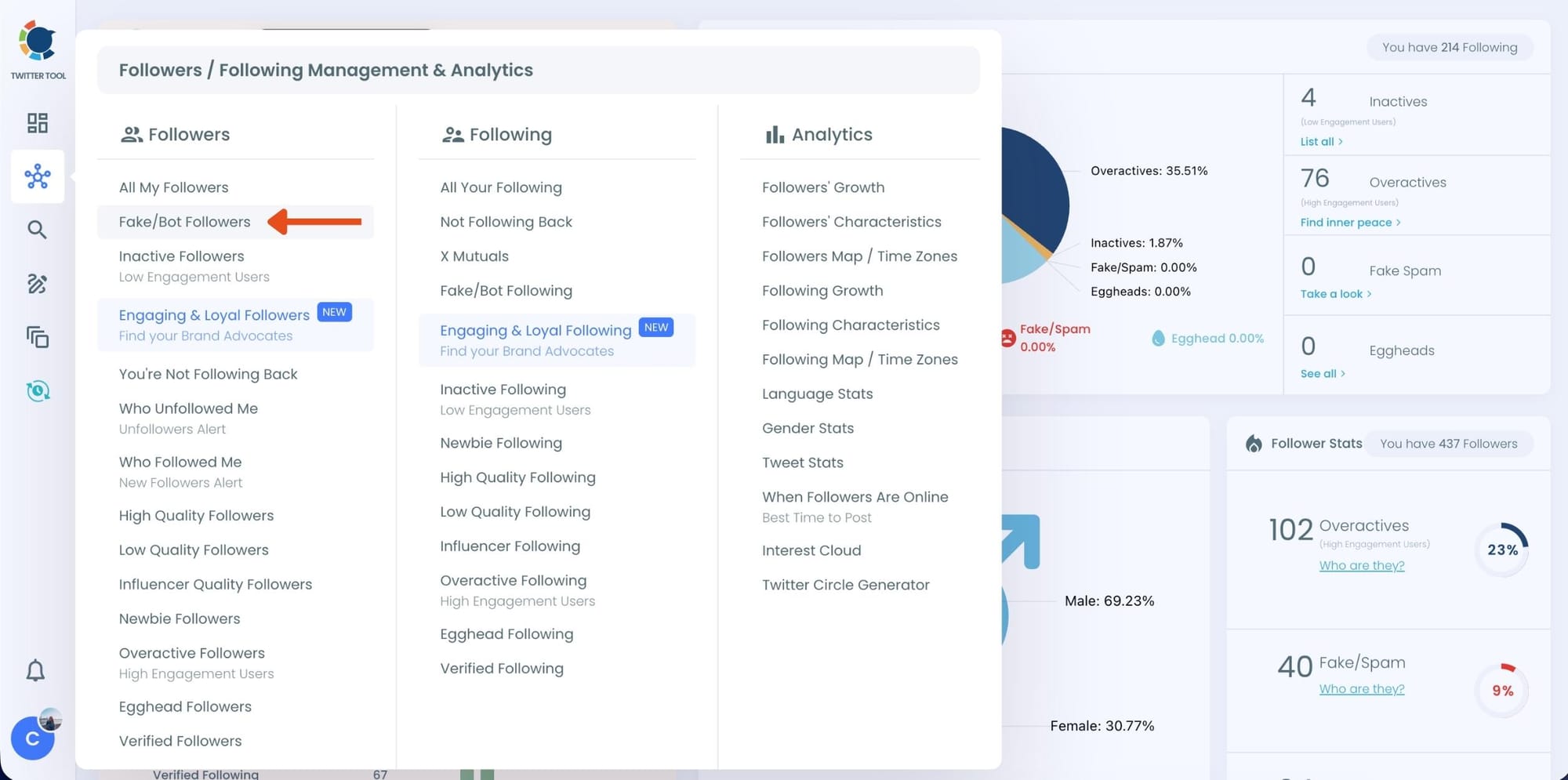
Step #1: On the left-side menu, click on the Followers / Following Management section. A dropdown menu will appear. Select Fake/Bot Followers to see the full list of your followers.
If you want to remove specific accounts, such as inactive users, you can directly select these categories from the dropdown menu instead of viewing all followers.
Step #2: You will see a complete list of your fake/bot followers.
Use the Filter Options on the left side to refine your list.
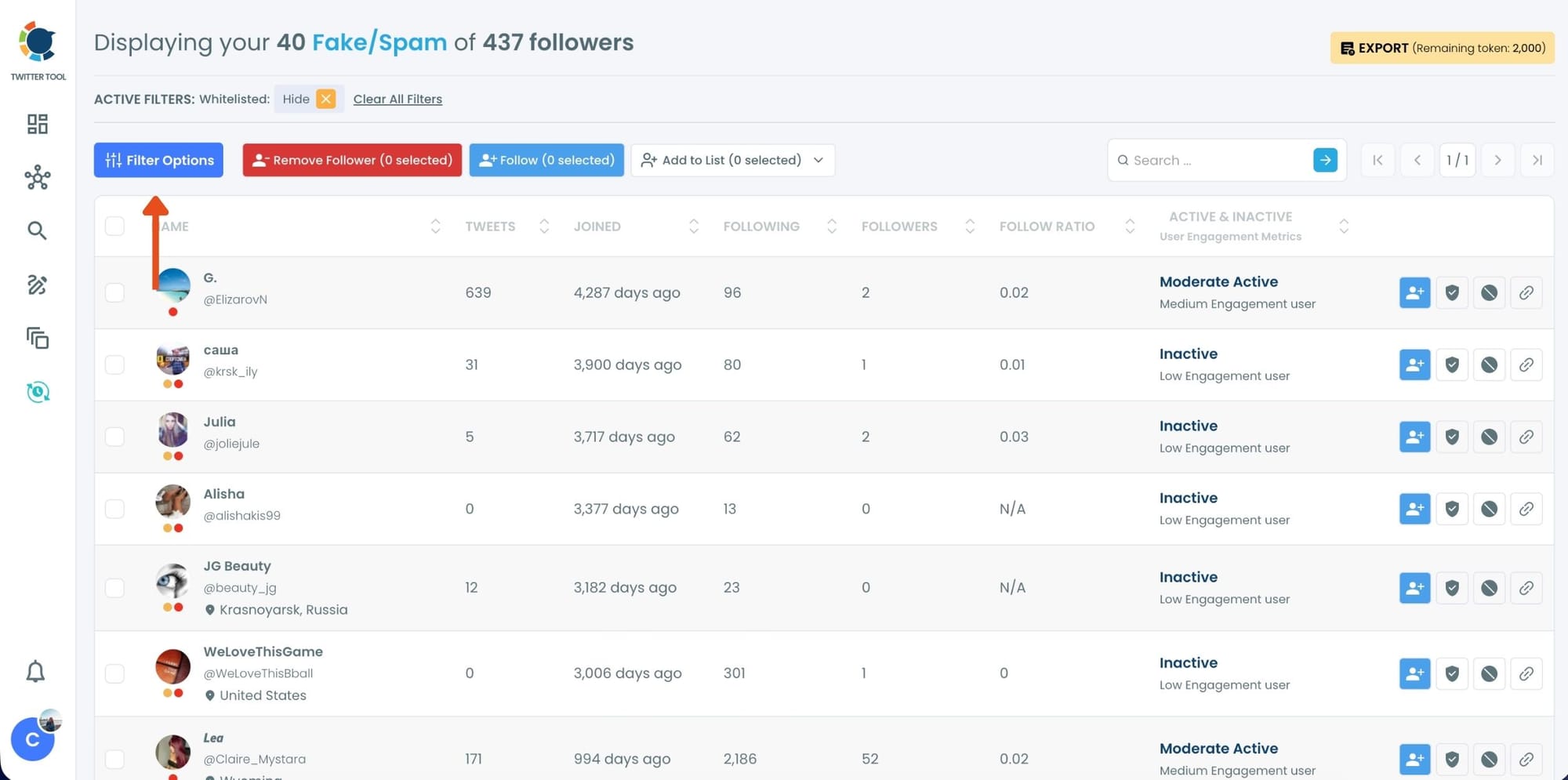
You can filter followers based on engagement levels, inactivity, verification status, follower/following count, and more.
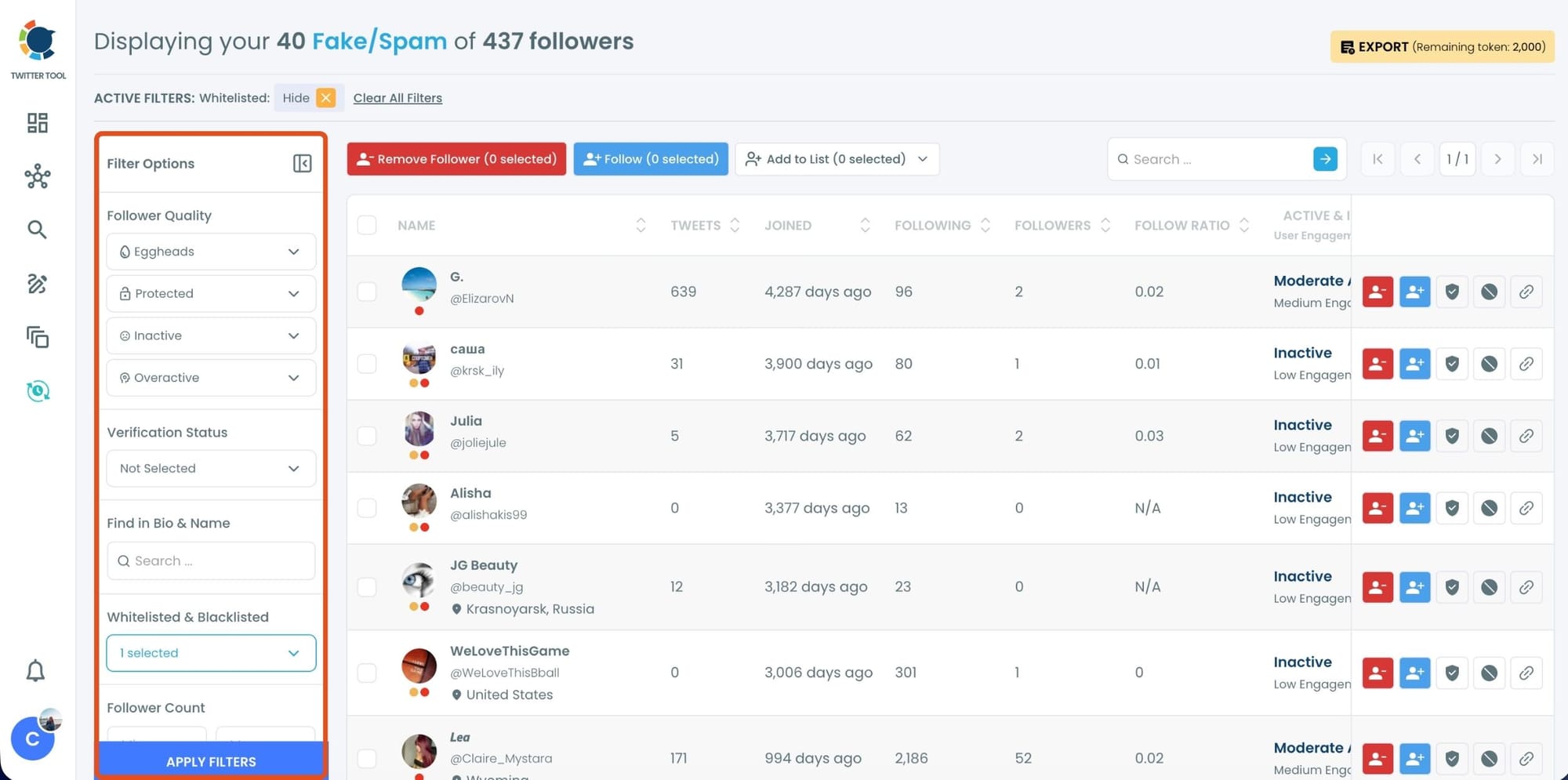
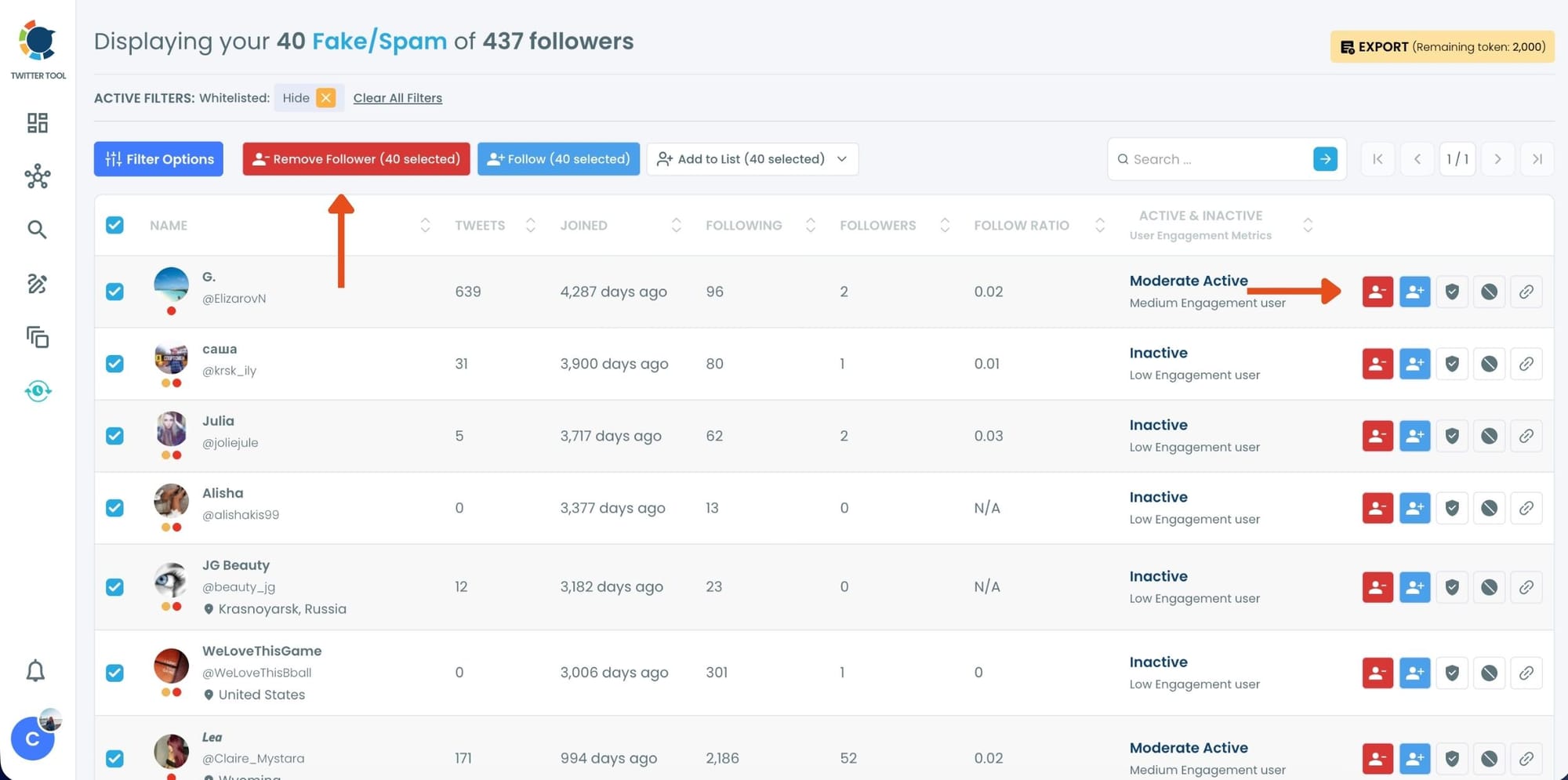
Step #3: Browse through your followers and check the boxes next to the users you want to remove.
You can also select multiple users at once. Once you have selected the users, click on the Remove Followers button at the top.
Alternatively, you can remove individual followers by clicking the red remove icon next to their name on the right side of the list.
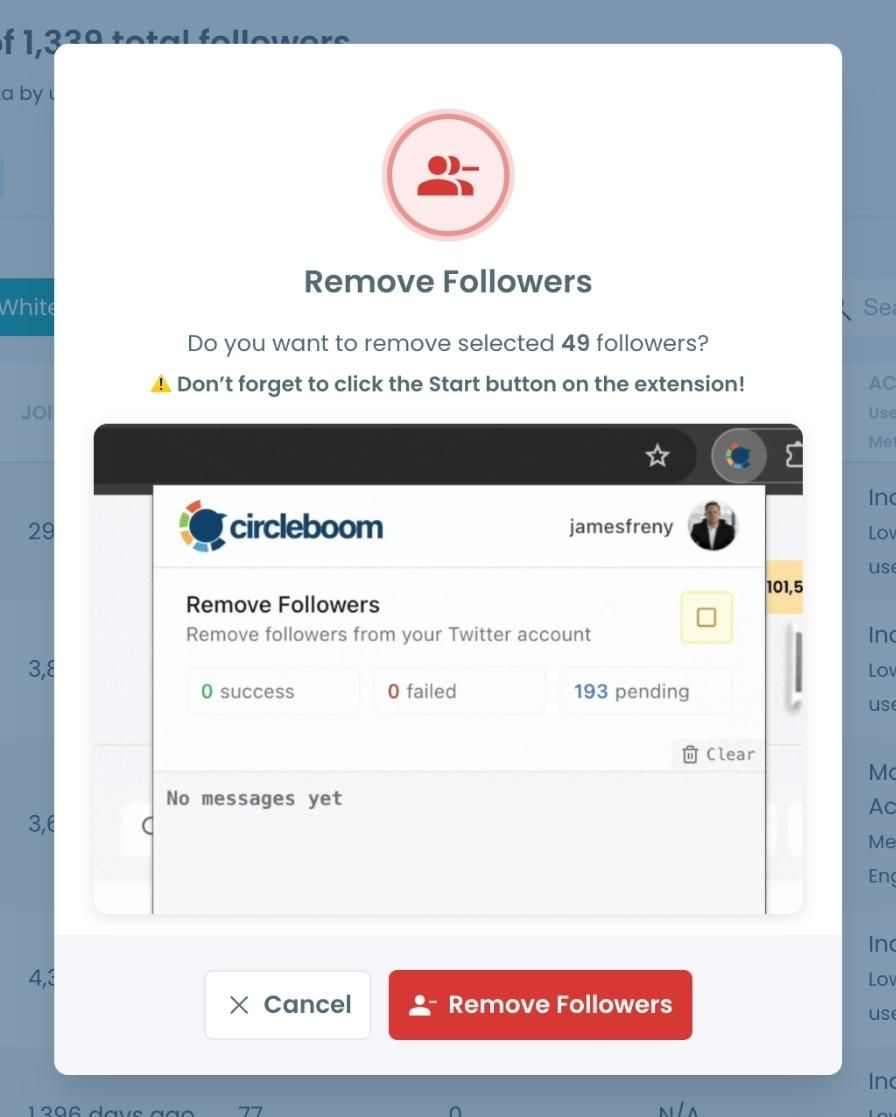
A confirmation message will appear asking if you are sure you want to remove the selected followers.
Click ''Remove Followers''.
Step #4: Since the removal action is processed via the Circleboom Remove Twitter/X Followers extension, you need to install it to complete the process.
Click on Download the Extension and install it from the Chrome Web Store.
Once installed, you can easily remove followers.

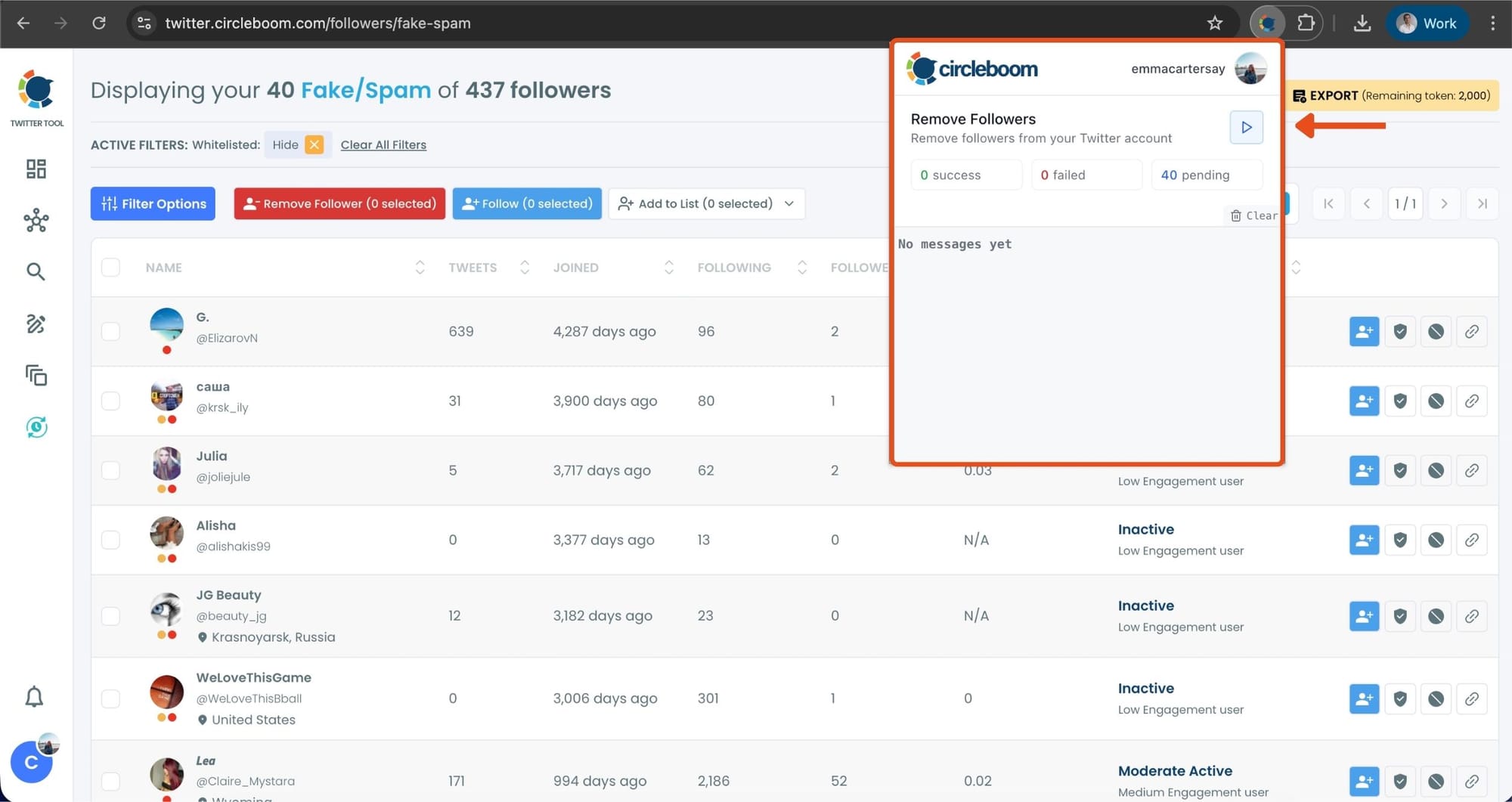
Step #5: After installing the extension, Circleboom will automatically add all your removal requests to the extension queue.
Click on the Start button to begin the removal process.
The extension will process your requests and remove the selected followers.
That's it!
Your selected followers have been removed automatically.
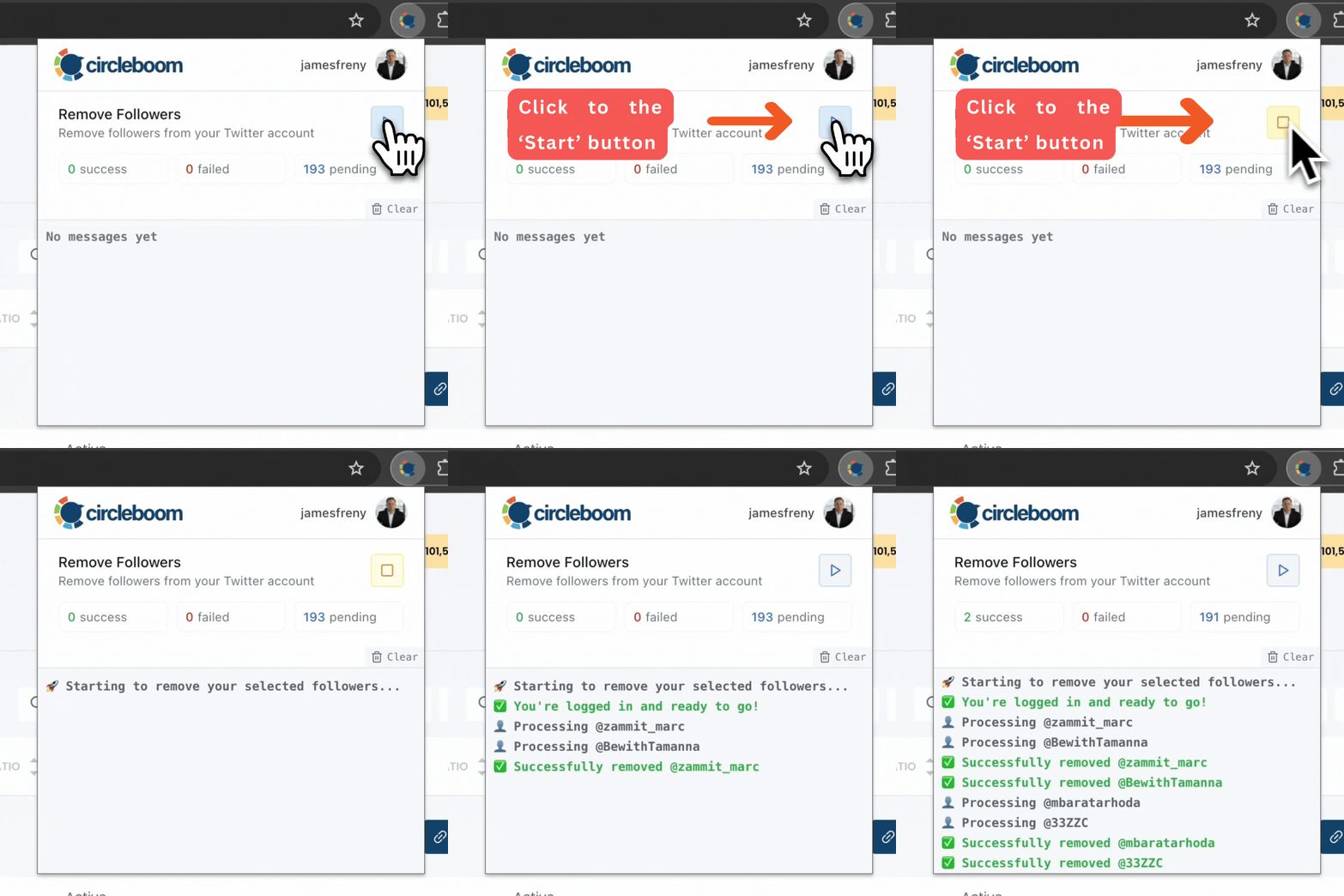
⚠️ Important Warning: Once the removal process begins, do not close your Chrome browser or the Circleboom tab. The tool will automatically remove followers in the background, but if you close the tab or exit Chrome, the process will stop.
If you need a more detailed guide check this video ⬇️
Action 2: Unfollow Bot Accounts from Your Following List
The second connection is the one where you are following bots without realizing it. These accounts looked credible enough to follow at some point, but over time they revealed themselves through behavior, inactivity, or outright spam patterns.
Circleboom Twitter's Fake/Bot Following feature runs the same analysis on the accounts you follow. It surfaces accounts that show bot-like or low-quality signals on your side of the network and lets you mass unfollow them without visiting each profile individually.
infocircleboom.com
This cuts the second connection and removes the implicit signal to the algorithm that those relationships are legitimate.
How to Unfollow Bot Accounts with Circleboom Twitter
Step #1: Log in to your Circleboom Twitter dashboard.
From the left-side menu, go to Followers / Following Management & Analytics, then click on All Your Following.
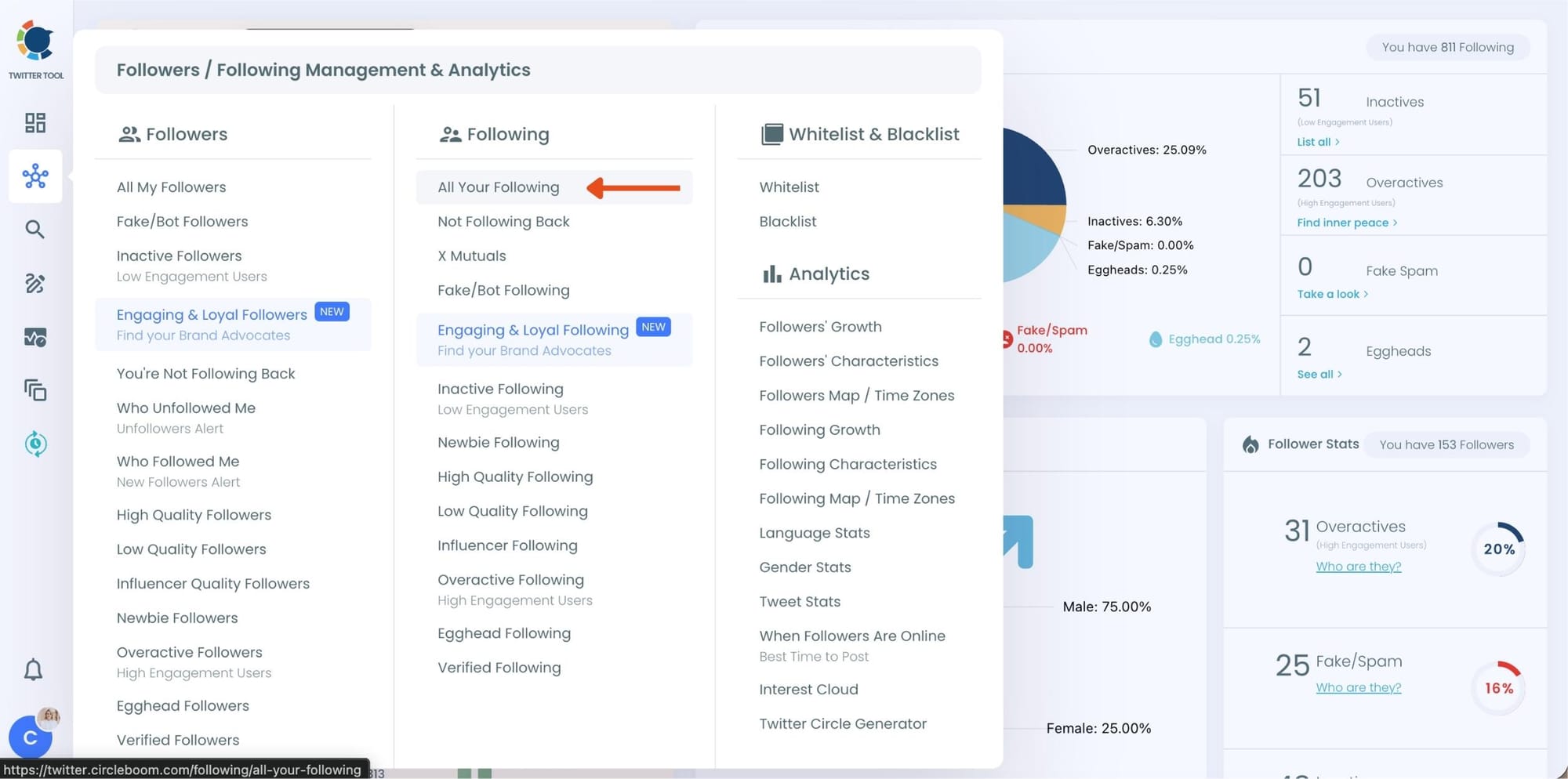
At this point, Circleboom loads your entire following list and displays each account with detailed metrics such as tweet count, join date, follower and following numbers, follow ratio, and activity level.
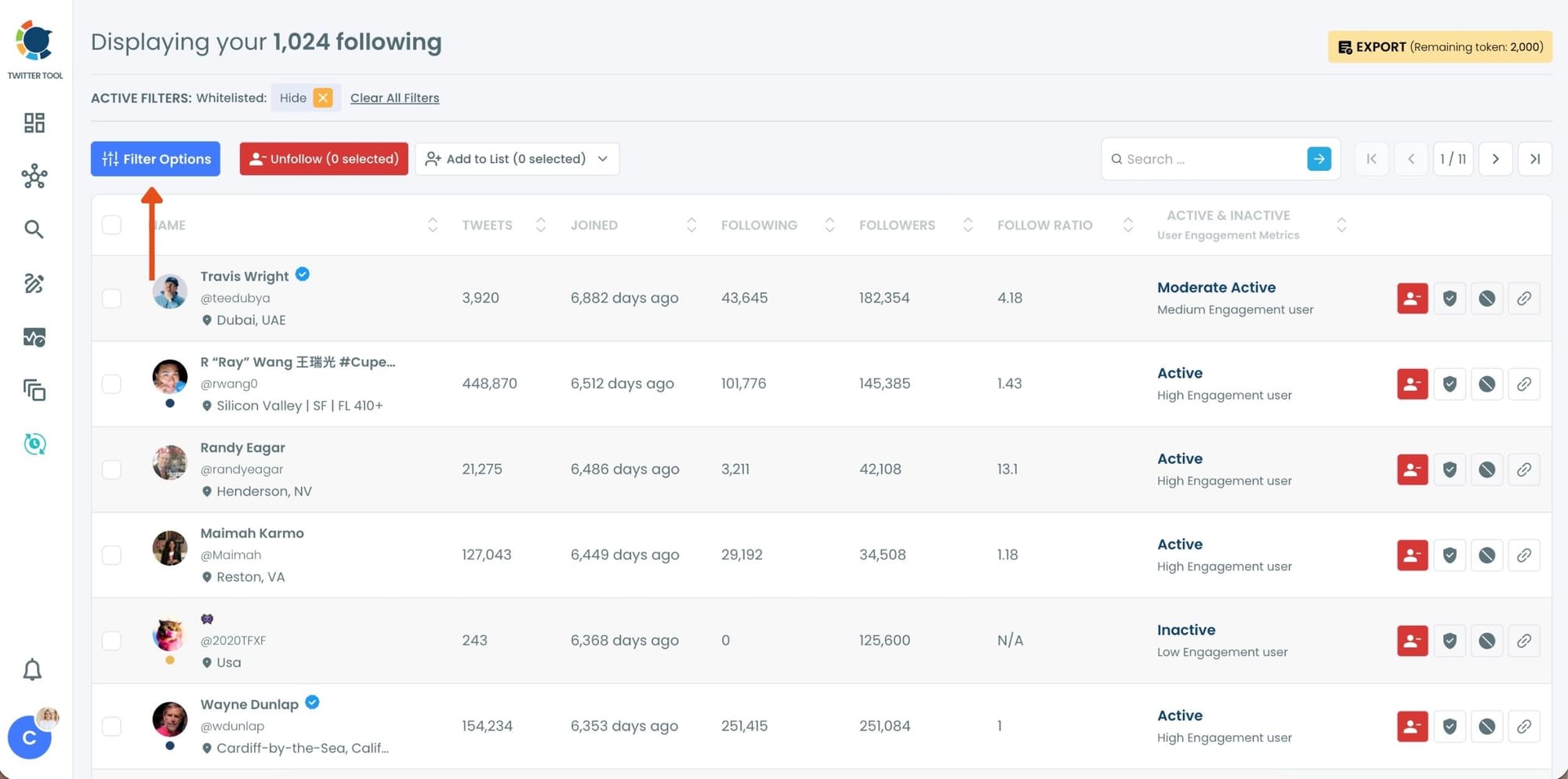
Step #2: Once your following list is visible, click on Filter Options at the top of the page.
Inside the filter panel, use the Follower Quality section to define what you want to see.
Select Fake/Spam and enable Show only. You can also adjust additional quality filters depending on how strict you want the cleanup to be.
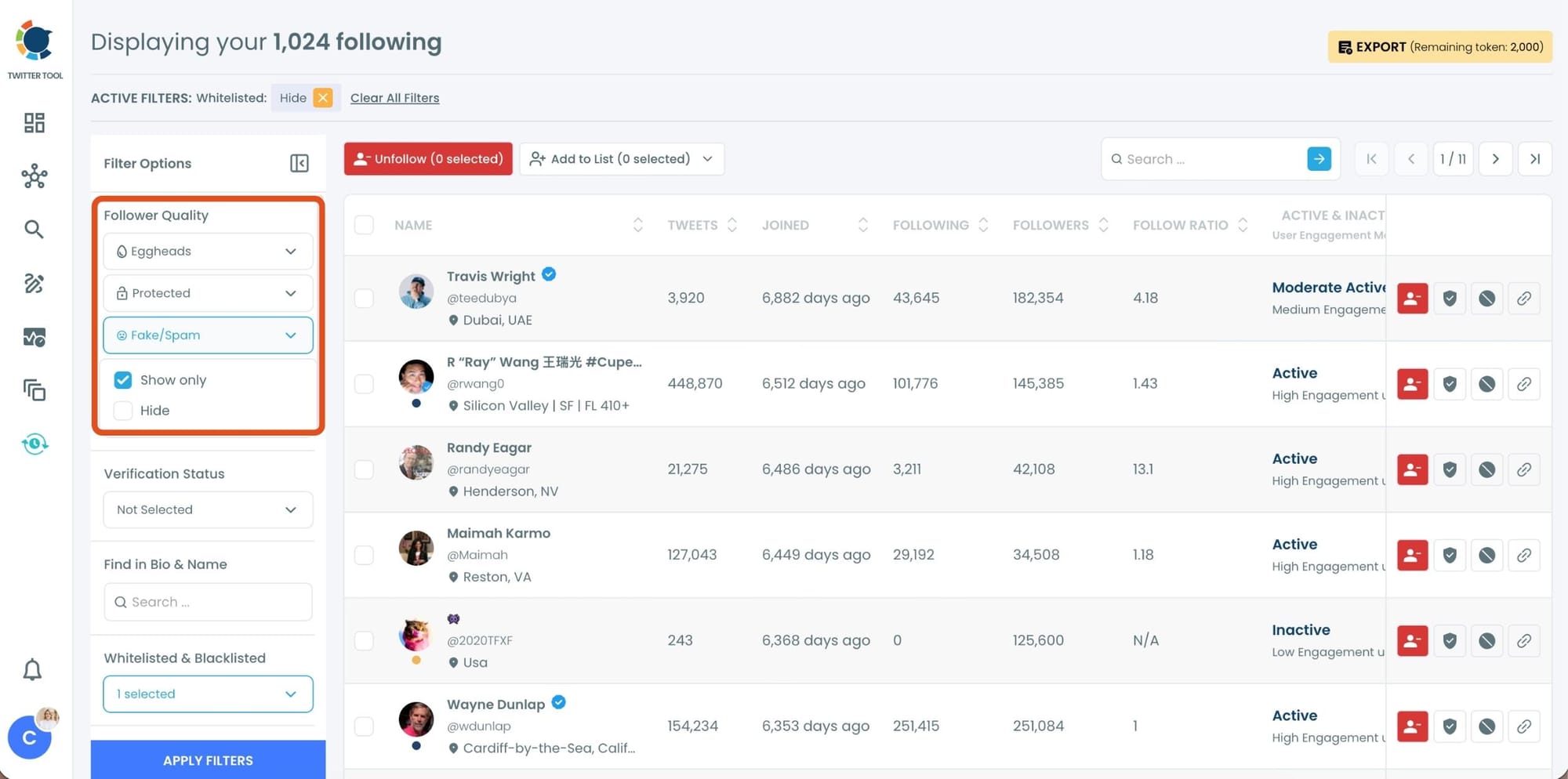
After setting your filters, apply them. Circleboom now lists only fake and low-quality following accounts.
Step #3: Circleboom now shows only low-quality or fake following accounts, each clearly labeled with engagement and activity indicators.
Select the accounts you want to remove by using the checkboxes on the left. You can select multiple accounts at once.
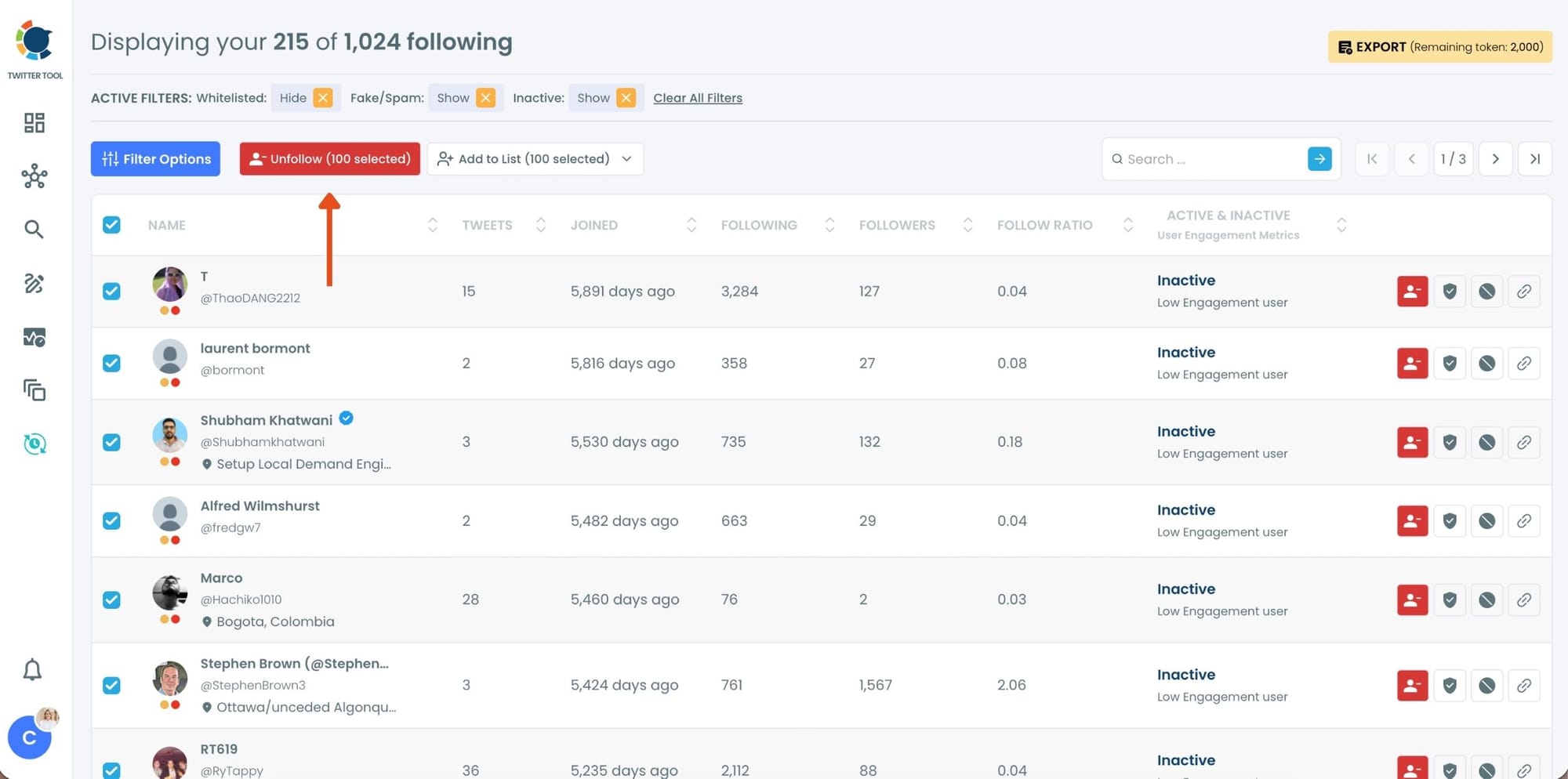
Click the red Unfollow button at the top of the list after making your selection.
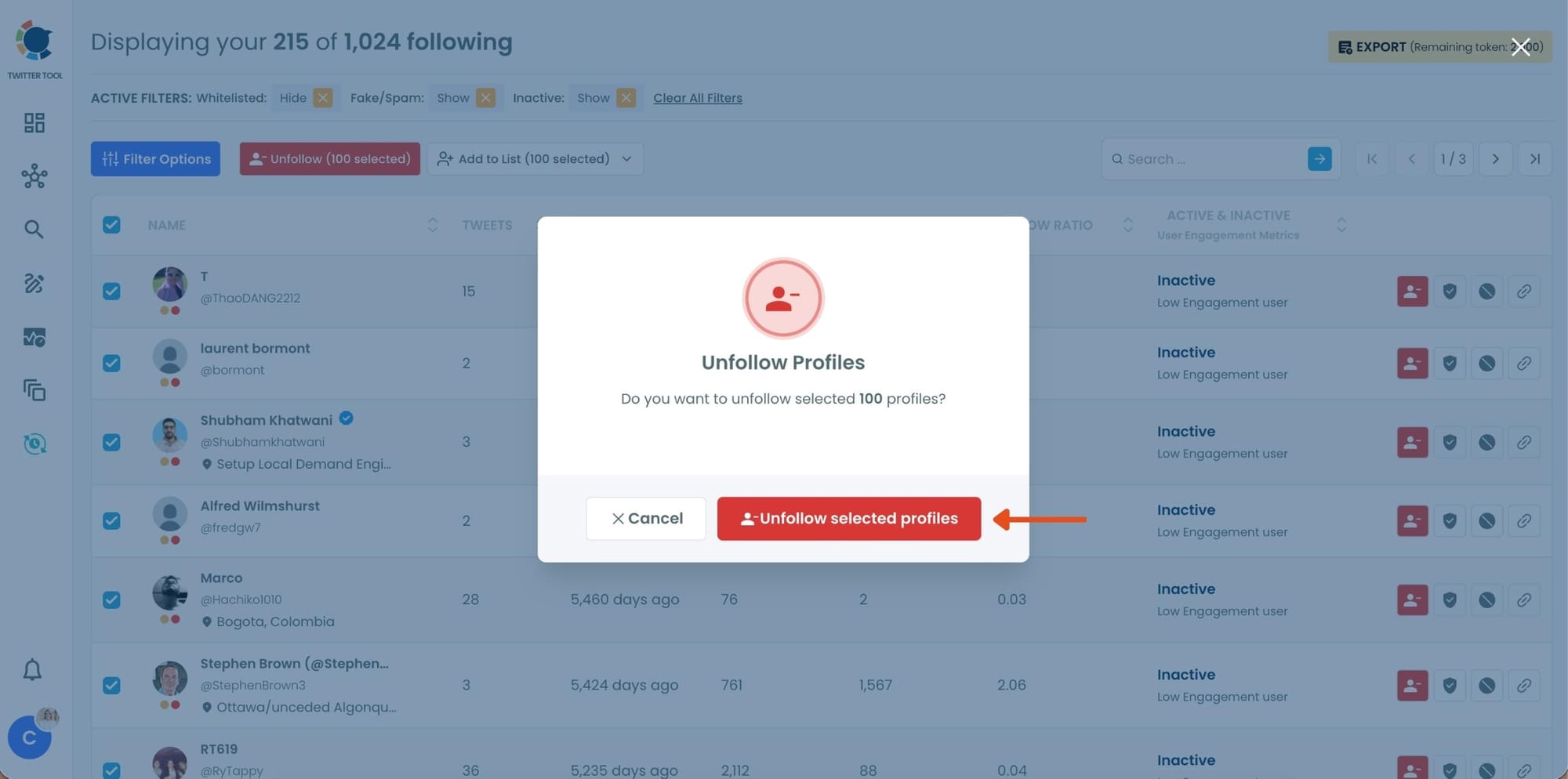
Step #4: Circleboom will show a confirmation pop-up to prevent accidental unfollow actions.
Confirm the action by clicking Unfollow selected profiles.
Action 3: Mass Block the Worst Offenders
For accounts that keep reappearing after cleanup, that targeted you following a viral post, or that you want to permanently prevent from ever interacting with your profile again, unfollowing and removing is not enough. You need to block them.
Circleboom Twitter's Mass Block feature lets you block multiple accounts at once directly from filtered follower and following lists.
infocircleboom.com
Blocking is the strongest of the three actions: it removes any existing follower relationship, prevents the account from viewing your profile, and stops any future interaction.
How to Block All Followers of a Twitter Account Automatically
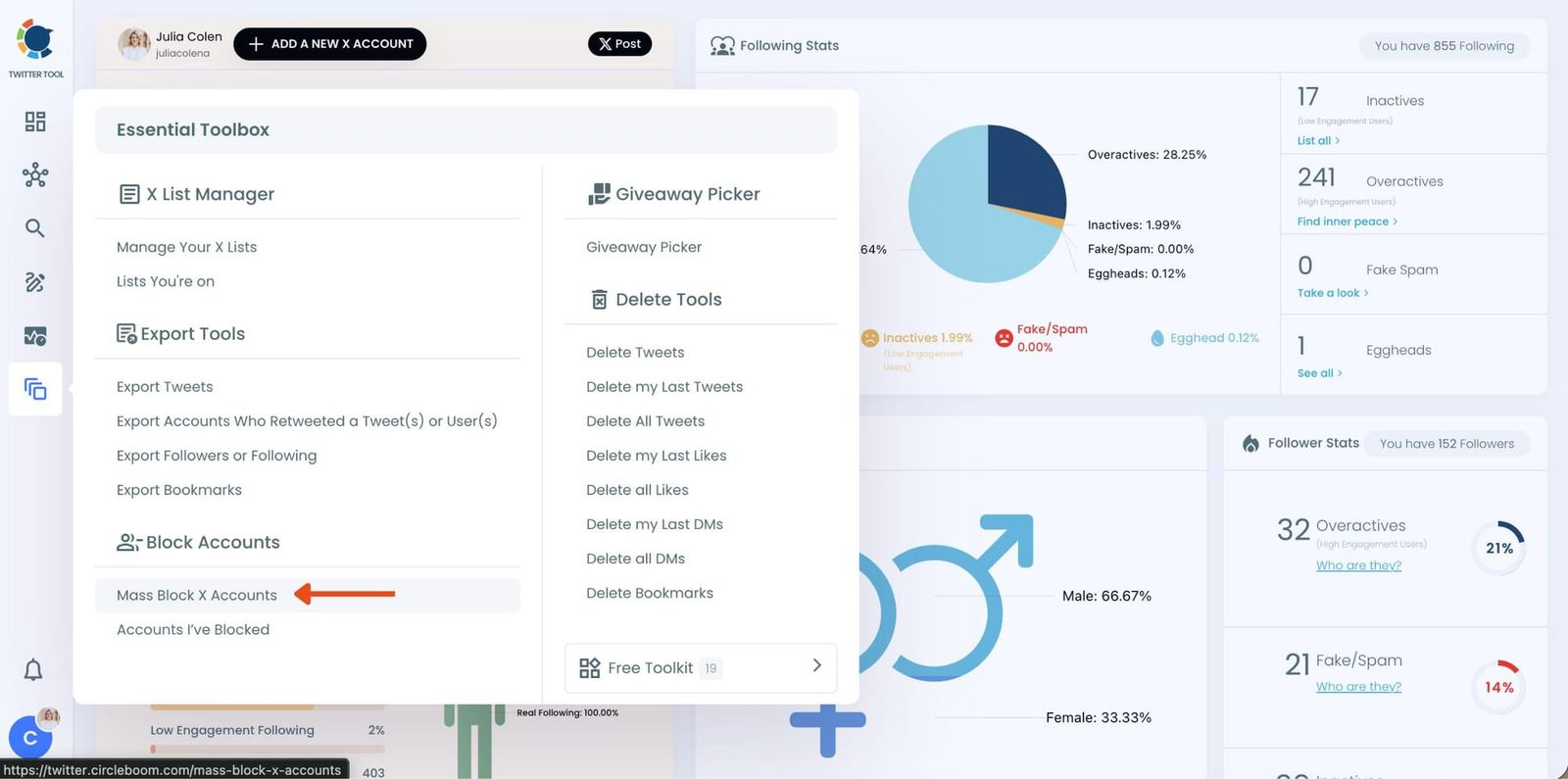
Step #1: On the left-hand menu, scroll down and click on “Mass Block X Accounts” under the Essential Toolbox section.
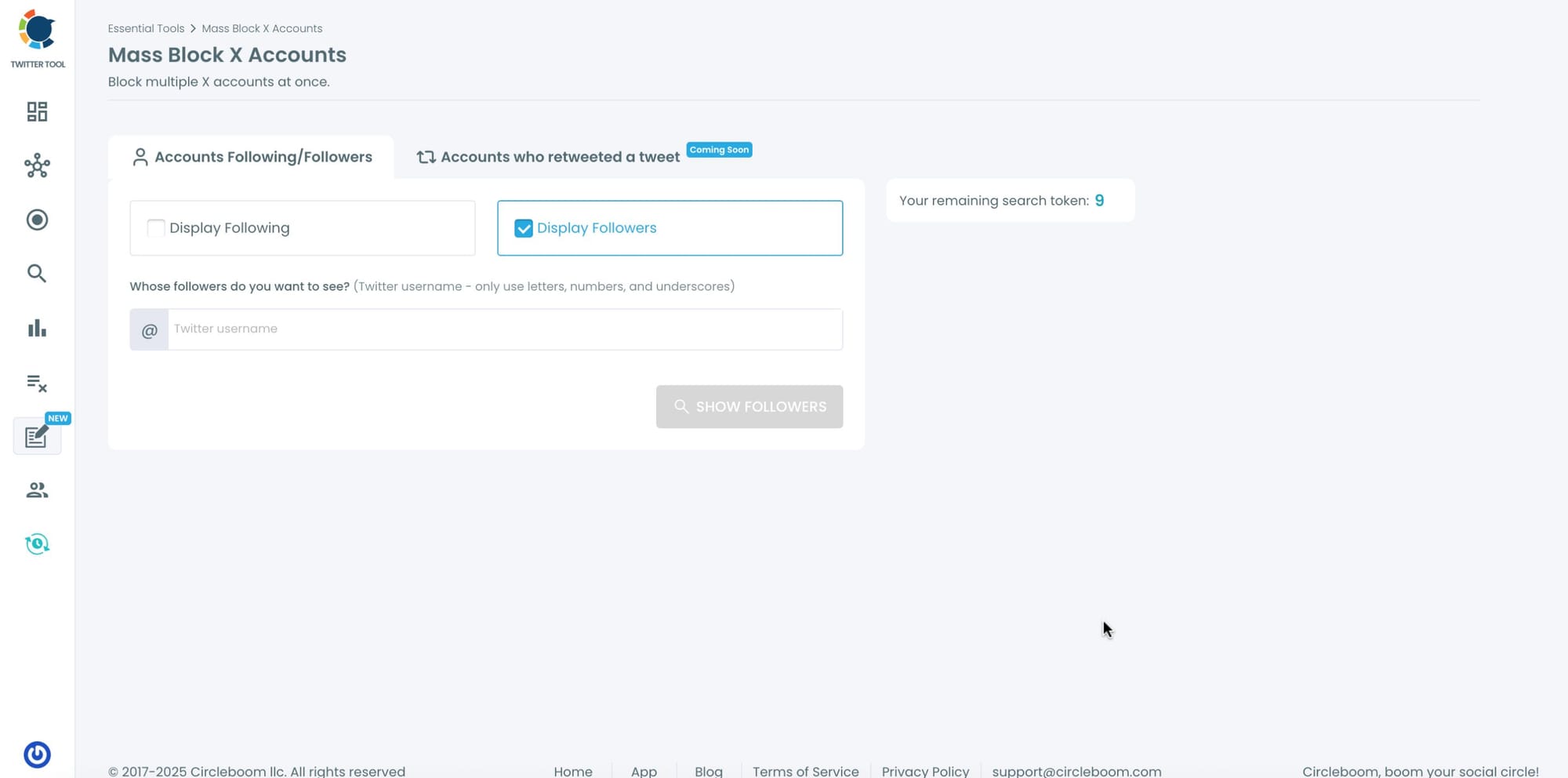
Step #2: You’ll be directed to the Account Search module.
Here, you’ll see two options:
- “Display Followers” → to block the followers of a specific Twitter account.
- “Display Following” → to block the accounts that a specific user follows.
Choose one based on your preference.
Enter the Twitter username of the account whose followers or followings you want to block.
Step #3: Circleboom will instantly list all the followers or followings of that account.
You can browse through the list, review profiles, or directly select all accounts to block them.
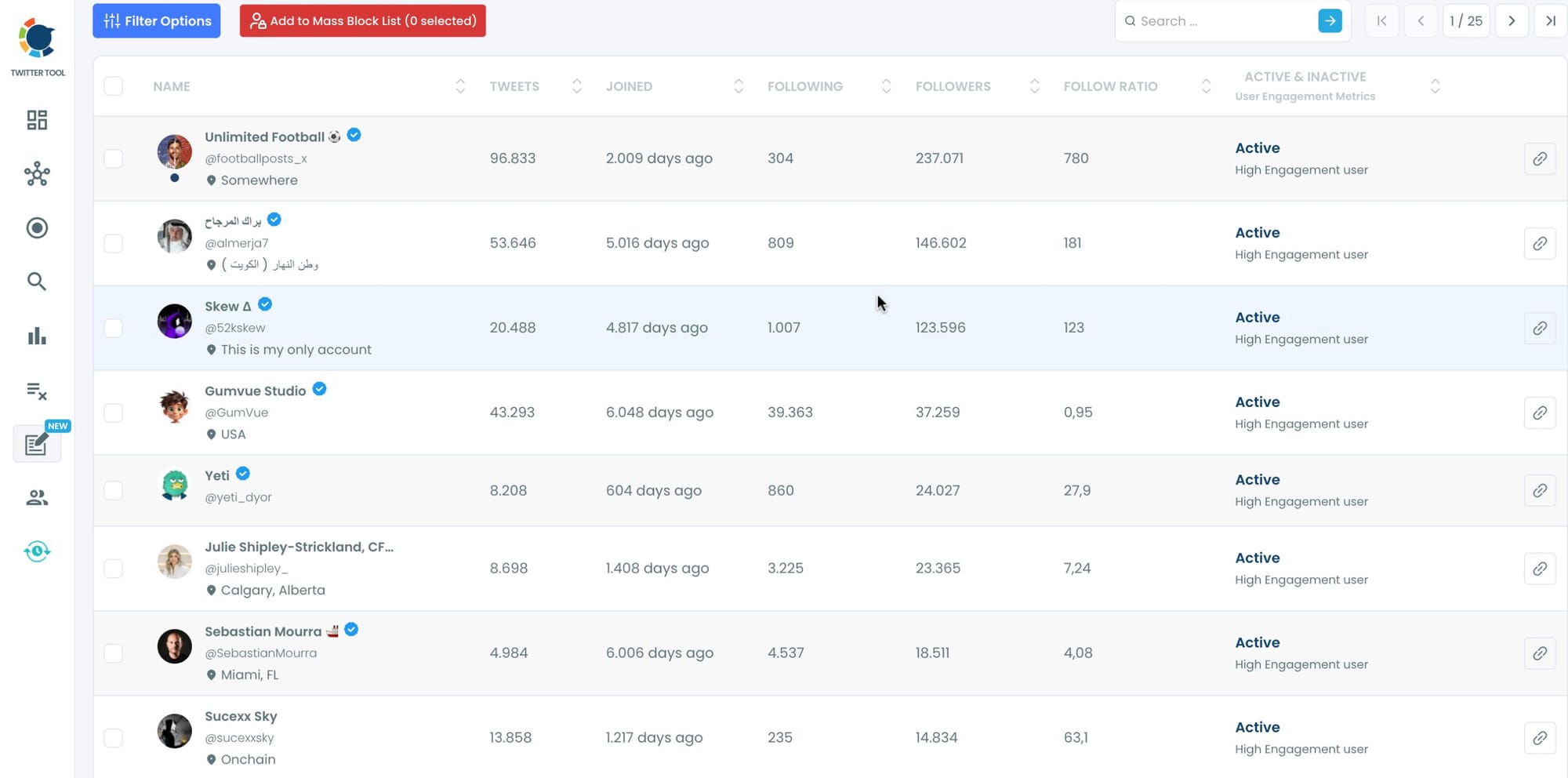
Step #4: Once you’ve made your selection, click on “Add to Mass Block List.”
A pop-up will appear asking you to download Circleboom’s Twitter Mass Block Extension if you haven’t already.
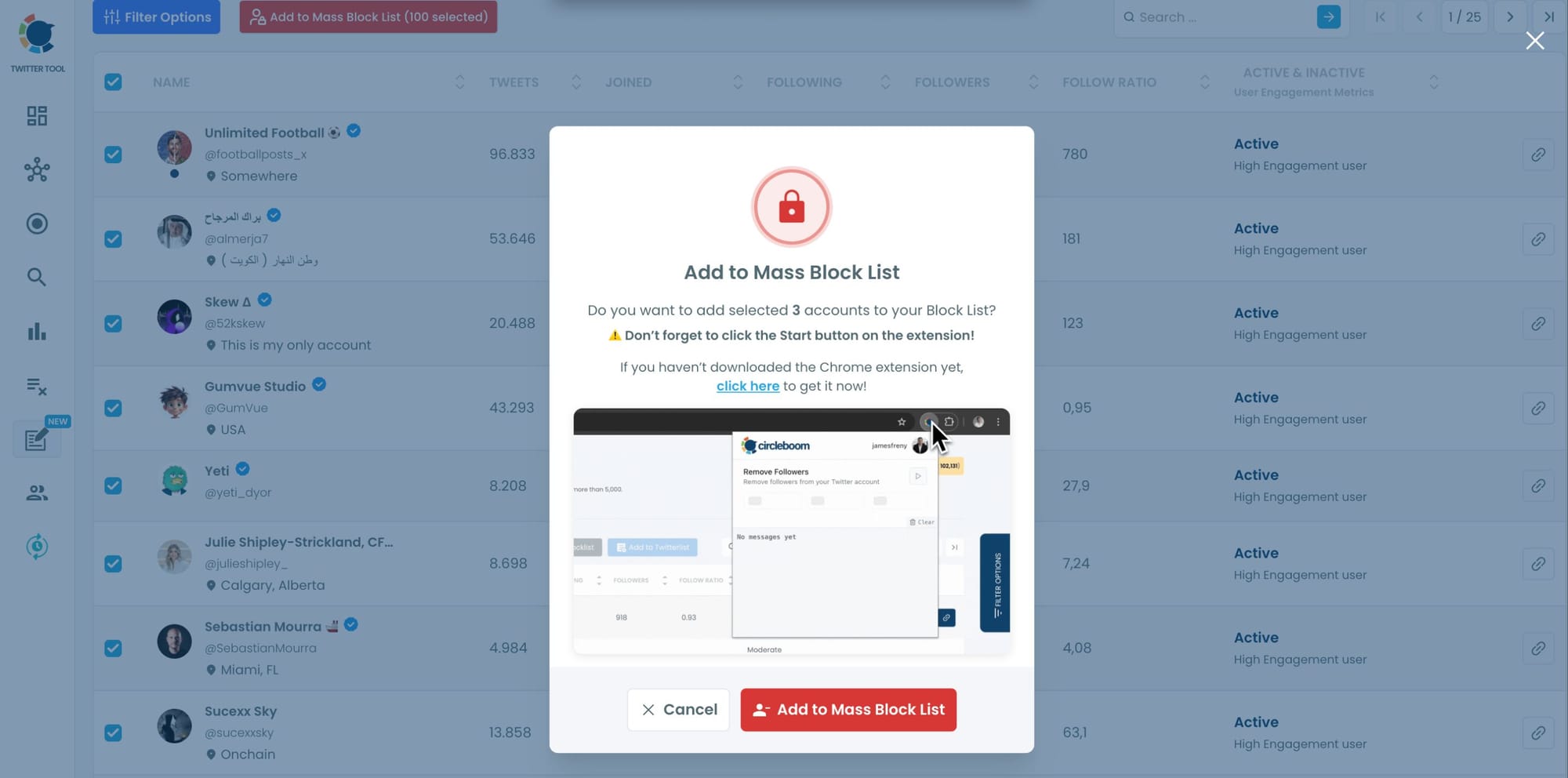
If you already have it, simply confirm by clicking “Add to Mass Block List.”
Step #5:You’ll be redirected to the Chrome Web Store.
Click “Add to Chrome” to install the extension.
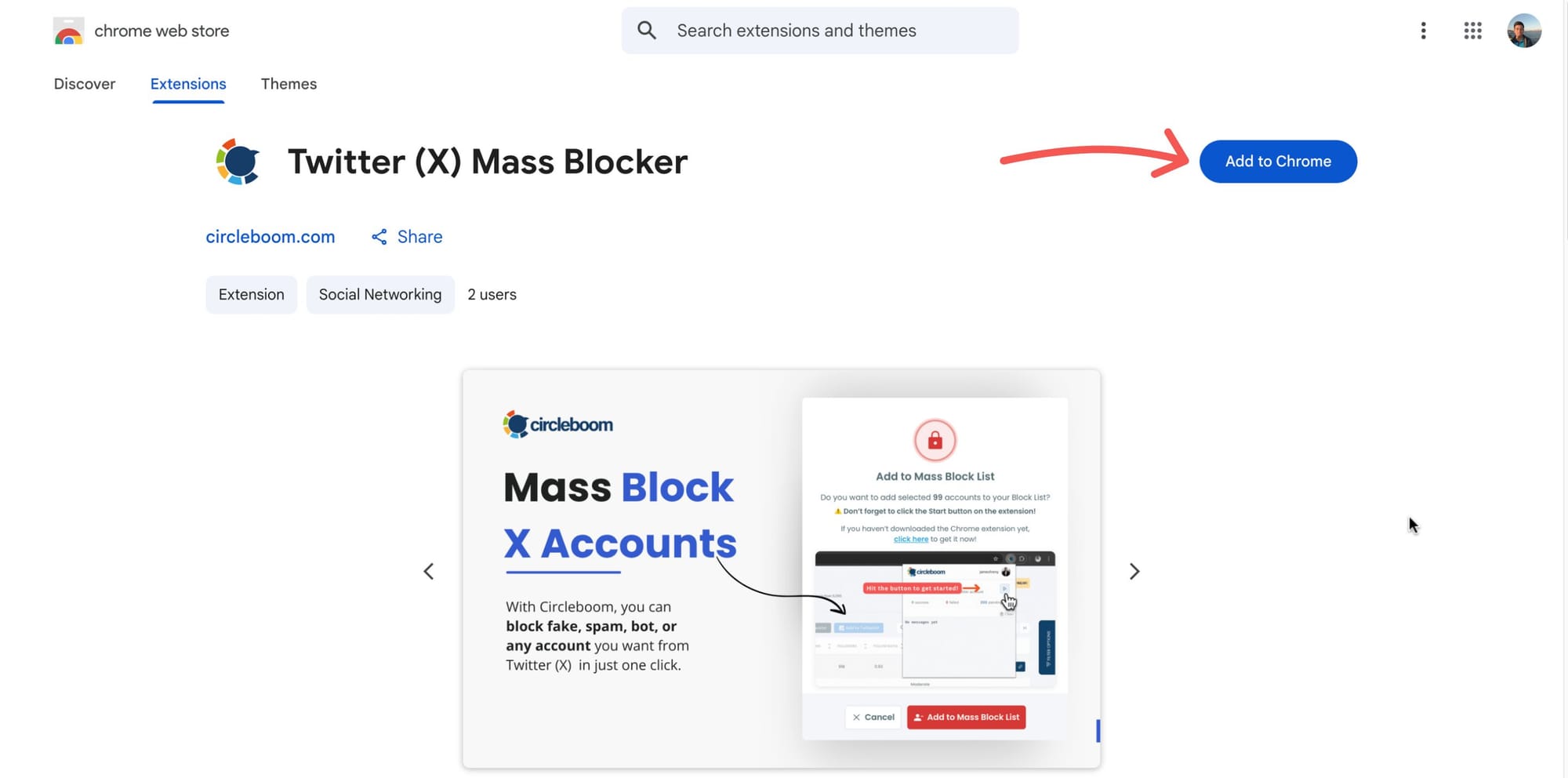
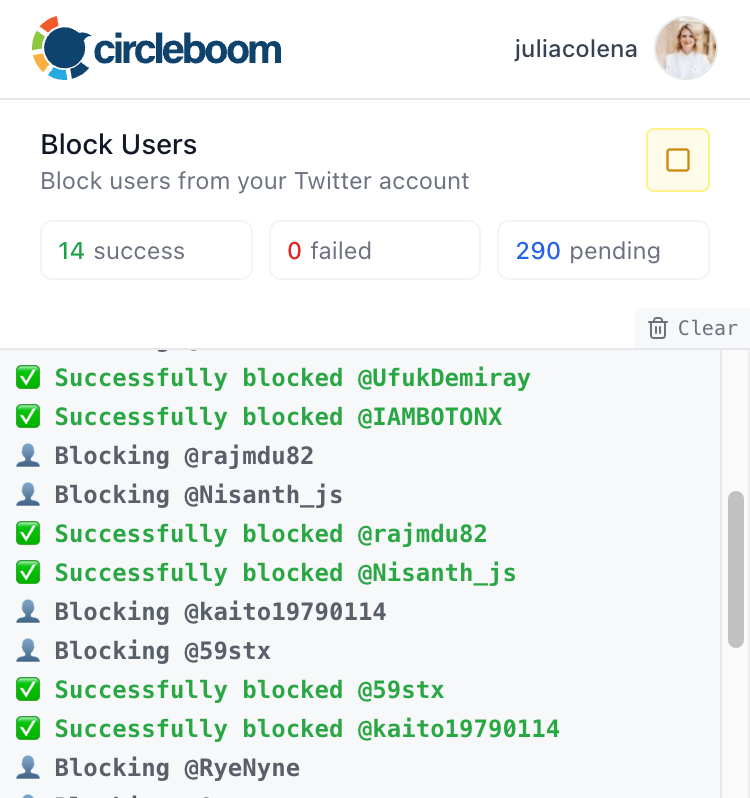
After that, you can start mass blocking, and the process will continue automatically.
Frequently Asked Questions About Stopping Twitter Trolls
Are Twitter trolls usually real people or bots?
Most persistent troll activity on X, especially coordinated harassment, reply spam, and mention flooding, comes from bot or fake accounts rather than real individuals. Real people can troll, but bots operate at scale in ways a single person cannot replicate. The accounts that appear repeatedly, that follow bot-like activity patterns, and that have no genuine content history are almost always automated profiles rather than real users choosing to cause problems.
What happens when I remove a follower on X?
When you remove a follower, that account stops following you. They will no longer see your tweets in their feed, and the follower relationship is severed. Unlike blocking, removing a follower does not prevent the account from viewing your public profile or following you again in the future. It is a softer action designed to clean your audience without permanently restricting an account.
Does blocking someone on X notify them?
No. X does not send a notification when someone blocks an account. The blocked account may notice that they can no longer view your profile, follow you, or interact with your content, but there is no direct alert that a block occurred. For bot accounts in particular, there is no human on the other end to notice anything.
Can I mass block trolls without the Chrome extension?
The Mass Block feature inside Circleboom Twitter requires the Chrome extension to execute bulk blocking actions, because X's API does not support bulk blocking natively. The extension handles the blocking through your browser session within X's rate limits. Without the extension, you can still remove followers and unfollow accounts in bulk through Circleboom Twitter's other features, which do not require the extension.
Will removing fake followers affect my follower count?
Yes, your follower count will decrease. This is the correct outcome. A follower count inflated by bots and fake accounts is a misleading number that damages your engagement rate and makes your audience data unreliable. A smaller but cleaner follower base produces better engagement metrics, more accurate analytics, and stronger account credibility, all of which matter more than the raw count.
How do I stop new bots from following me after I clean my account?
Bot influx is an ongoing dynamic on X, not a one-time event. Viral tweets, trending hashtags, and account growth all attract new bot follows. The practical answer is to run regular cleanup cycles with Circleboom Twitter rather than treating it as a single fix. Periodic reviews of your fake and bot follower list, combined with proactive unfollowing of low-quality accounts, keeps the network clean over time rather than letting it accumulate again.
Final Thoughts on Stopping Twitter Trolls
Troll activity on X is mostly a bot network problem. The accounts causing the noise are not real people making deliberate choices. They are fake and automated profiles embedded in your network, interacting with your content because the connection exists and no one removed it.
Cutting that connection is the fix. Circleboom Twitter gives you the tools to do it on both sides: detect and remove fake followers from your audience, unfollow bot accounts from your following list, and mass block the accounts that need to be permanently shut out.
That is not a reactive approach to trolls. It is a structural one.
Start removing trolls and cleaning your network with Circleboom Twitter today:

