

Replies on X are becoming more crowded and harder to follow.
Too many AI replies in posts right now
— Jary - Web Design (@jarydesign) March 17, 2026
Where are the real humans?
This isn’t because conversations are improving, but because AI-generated bot accounts are now extremely active on the platform. These accounts reply to popular tweets constantly, often using generic or automatically generated responses just to stay visible.
At first, many of these replies may seem normal.
But after spending some time on the platform, you start to notice patterns:
- Similar wording across different accounts
- Repetitive and surface-level comments
- Replies that don’t add any real value to the discussion
Instead of meaningful conversations, reply sections often feel cluttered and difficult to navigate.
The good part is that you are no longer completely passive in this situation. There are now ways to reduce these types of replies and improve what you see.
 Arif Akdogan
Why AI Replies Are Everywhere on X
The main reason is simple: generating content has become extremely easy.
With AI tools, anyone can create replies in seconds and post them at scale. This has lowered the effort required to stay active on X.
At the same time:
- X monetization encourages more user activity
- Visibility depends heavily on engagement
- Replying is one of the fastest ways to gain impressions
Because of this, many users and bots focus on replying as much as possible, rather than contributing meaningful input.
As a result, you often see:
- Repetitive or templated replies
- Irrelevant comments that don’t relate to the tweet
- AI-generated responses that feel generic
Over time, this reduces the overall quality of discussions on the platform.
Can You Block AI Replies on X?
You cannot completely eliminate all AI-generated replies.
However, you can reduce how often you see them and improve the quality of your feed over time.
X has introduced a feature that helps with this.

The New Solution: Reply Feedback
The Reply Feedback feature is designed to give users more control over what they see in reply sections.
Instead of ignoring low-quality replies, you can now actively signal to X that certain types of content are not useful to you.
What You Can Do with Reply Feedback
When you open the feedback option on a reply, you can mark it as:
- Not interested
- Incorrect or misleading
- AI-generated
- Spam
- Or report it if necessary
Each action you take is used as a signal.
X collects this feedback and uses it to adjust the type of replies that appear in your feed. Over time, the system starts to understand your preferences.
This means:
- AI-generated replies appear less frequently
- Spam and low-quality content is reduced
- More relevant replies are prioritized
It does not change everything instantly, but with consistent use, the difference becomes noticeable.
How to Block AI Replies on X (Step-by-Step)
Step #1: Identify a Low-Quality Reply: Scroll through replies and find one that looks AI-generated, repetitive, or irrelevant.
Step #2: Open the Feedback Option: Tap on the reply options (usually the three-dot menu or feedback icon).
Step #3: Choose the Appropriate Feedback
Select the most relevant category, such as:
- AI-generated
- Spam
- Incorrect or misleading
- Not interested
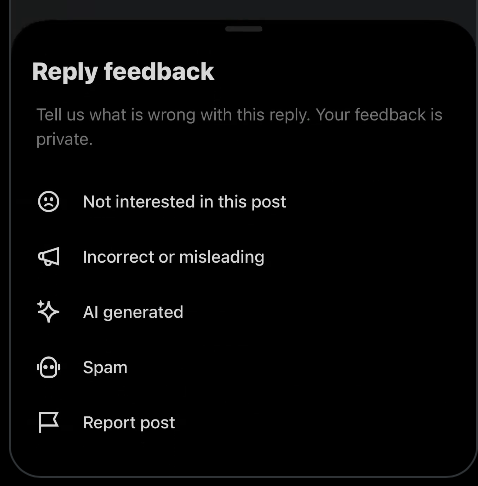
Step #4: Repeat This Process Regularly: The system improves based on repeated signals. The more feedback you provide, the better your feed becomes.
The Hidden Problem: AI Bots in Your Followers
There is another important factor that many users overlook.
AI-generated accounts do not only reply to tweets. They also follow accounts in large numbers.
This means that some of your followers may actually be bot or low-quality accounts without you realizing it.
 Altug Altug
And this directly affects your experience.
Why This Matters
Your audience influences who interacts with your tweets.
If your follower base includes bots or low-quality accounts:
- Your tweets are more likely to attract similar accounts
- Your replies may become filled with low-value comments
- Your engagement quality decreases
So even if you filter what you see, your own audience can still affect the quality of replies.
Why You Should Remove AI Bot Followers
Improving your follower quality has a direct impact on your overall experience.
When your audience consists of real and relevant users:
- Replies tend to be more meaningful
- Conversations become more engaging
- Interactions feel more natural
On the other hand, keeping bot or AI-generated accounts leads to:
- Spam replies
- Generic engagement
- Lower-quality interactions
If your goal is to improve reply quality, cleaning your follower base is an important step.
The Tool I Use: Circleboom Twitter
Manually identifying fake or AI-generated followers is not practical, especially as your account grows.
For this reason, I use Circleboom Twitter.

It is an official X Enterprise Developer, and it provides tools specifically designed to analyze and manage your account.
Circleboom analyzes your followers and categorizes them based on their behavior and quality.
It helps you identify:
🟢 Suspicious or overly active accounts
This makes it much easier to understand which followers are affecting your engagement.
How to Remove AI Bot Followers with Circleboom Twitter (Step-by-Step)
Step #1: Go to the Circleboom Twitter website and log in with your credentials.
If you’re a new user, sign up, it’s quick and easy!

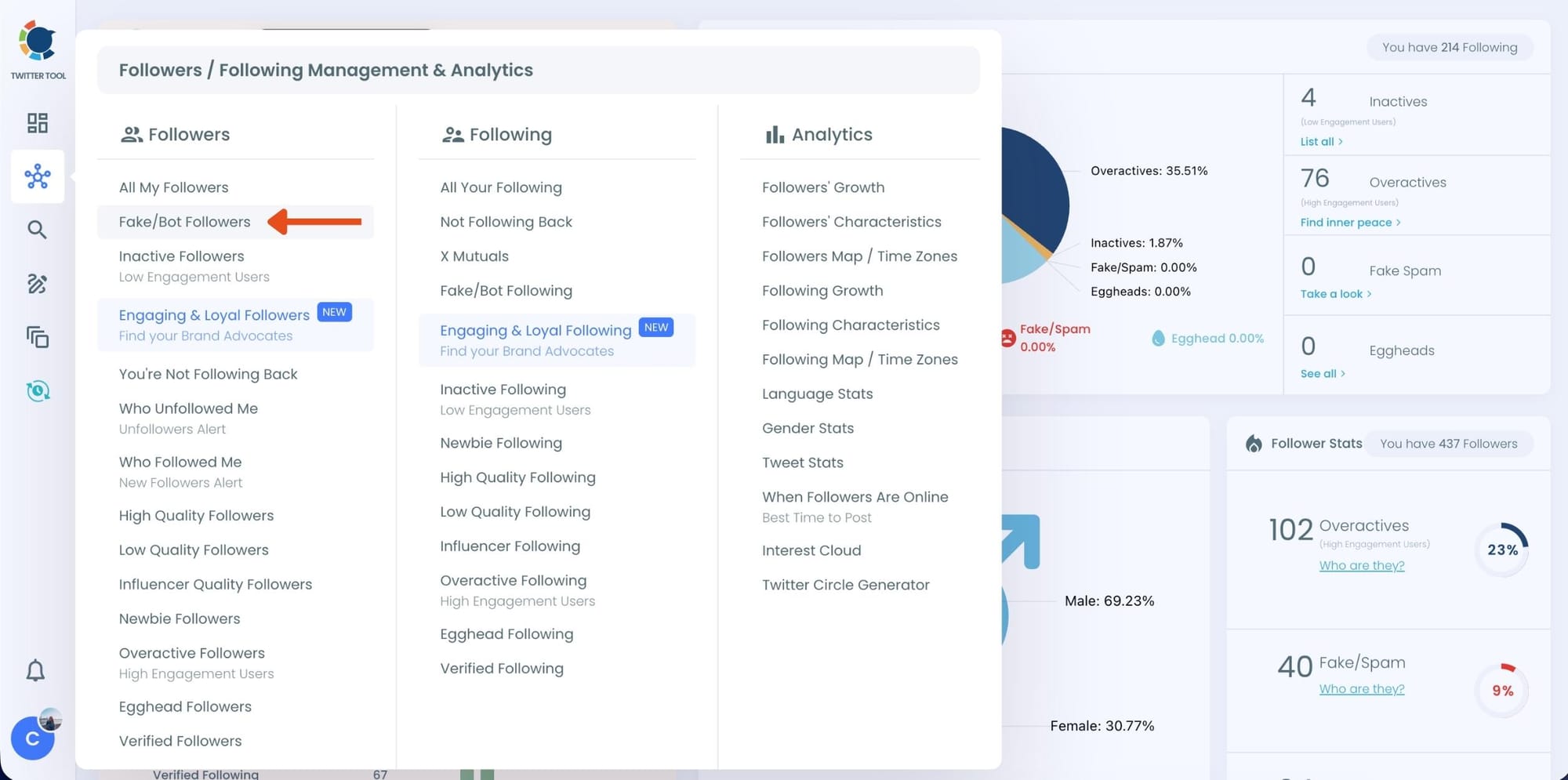
Step #2: On the left-side menu, click on the Followers / Following Management section. A dropdown menu will appear. Select Fake/Bot Followers to see the full list of your followers.
If you want to remove specific accounts, such as inactive users, you can directly select these categories from the dropdown menu instead of viewing all followers.
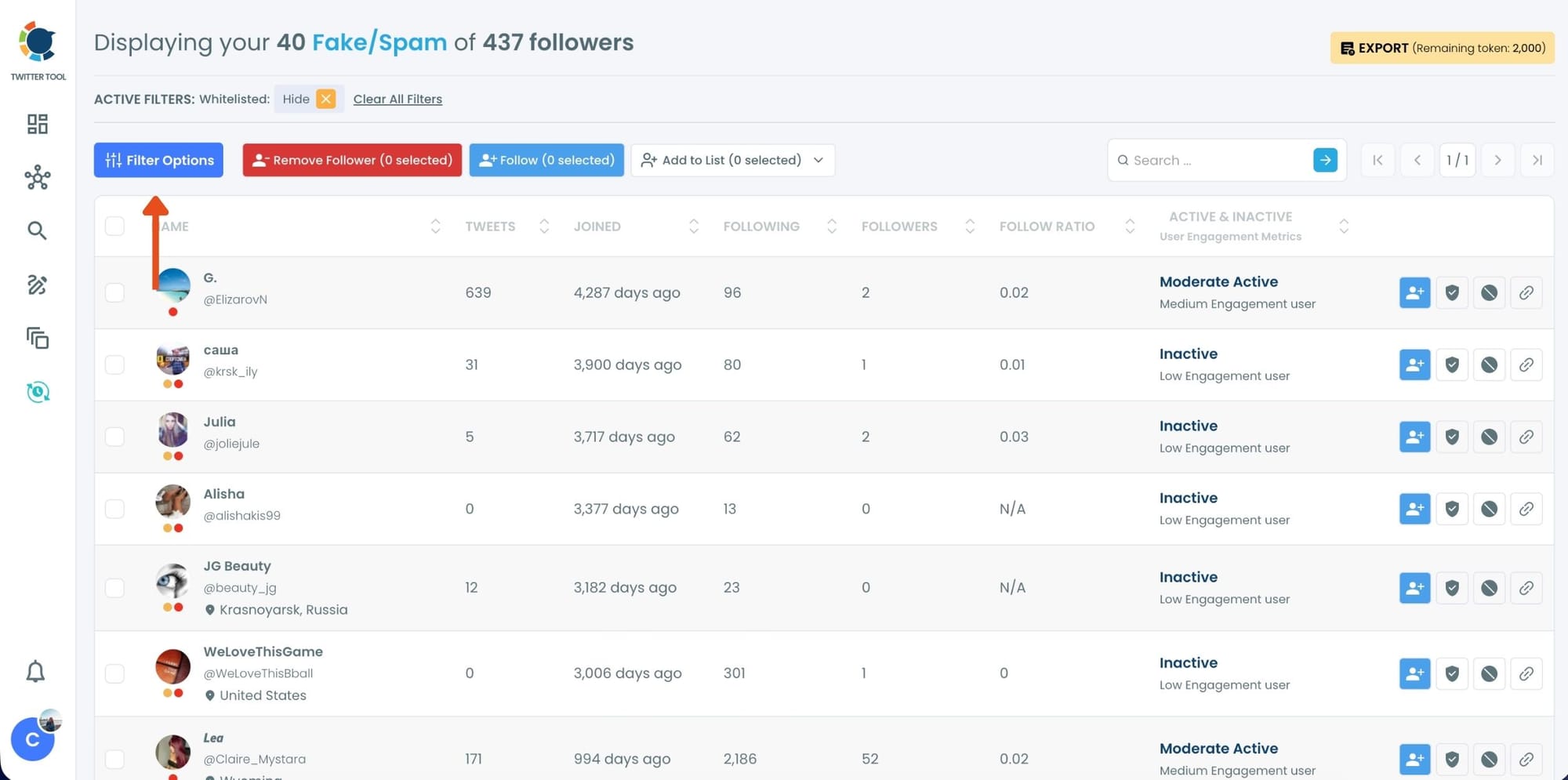
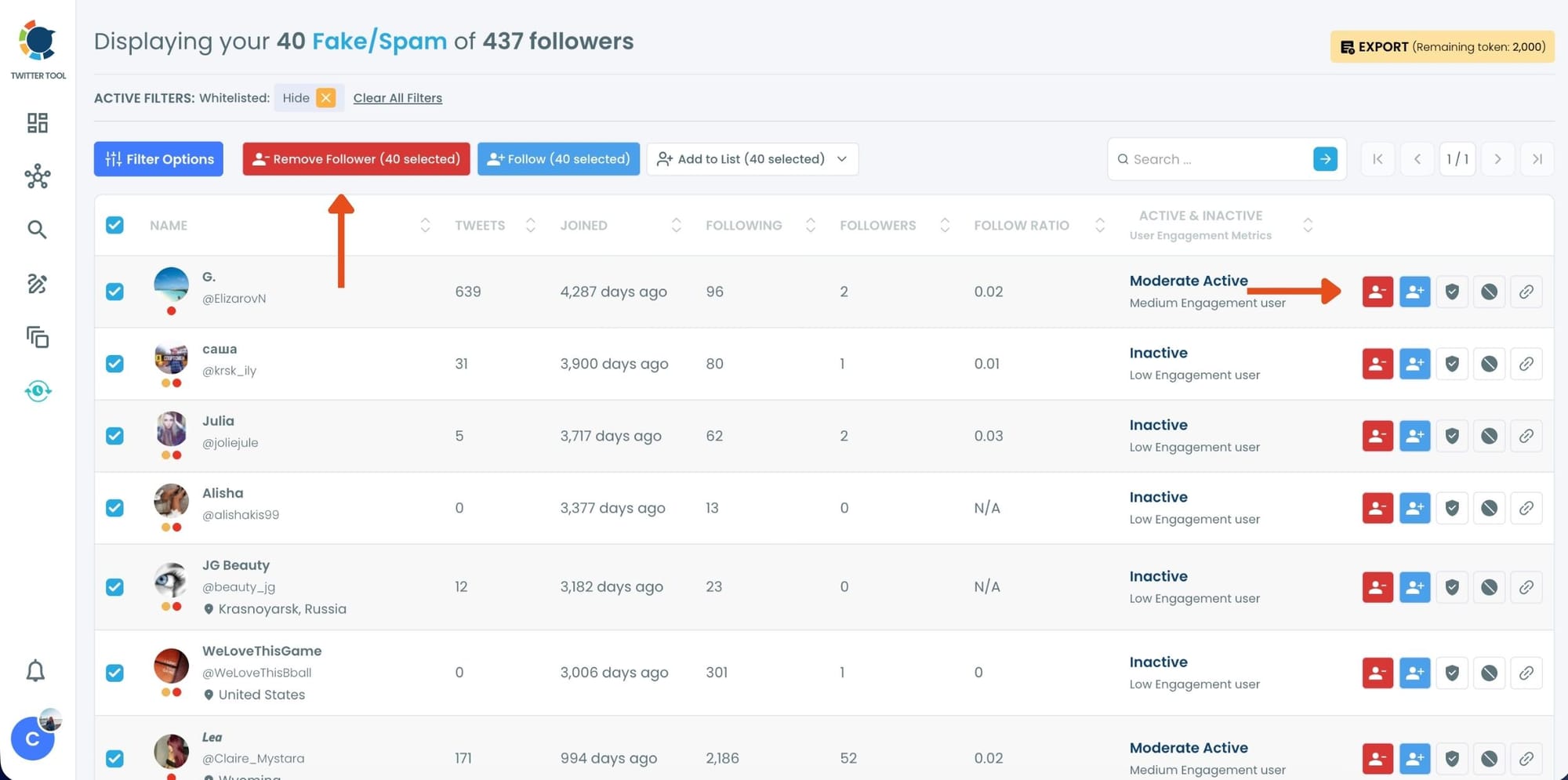
Step #3: You will see a complete list of your fake/bot followers.
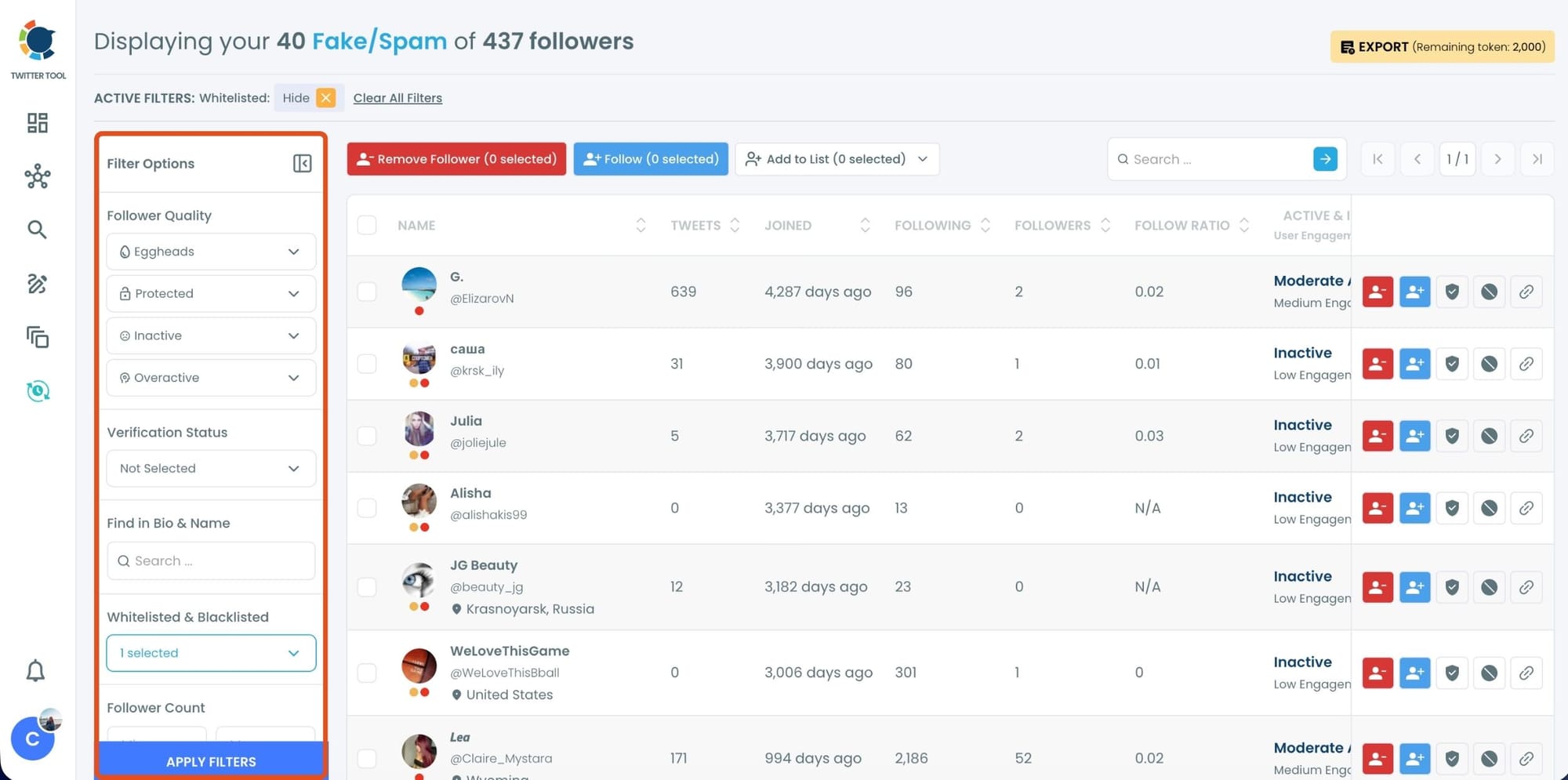
Use the Filter Options on the left side to refine your list.
You can filter followers based on engagement levels, inactivity, verification status, follower/following count, and more.
Step #4: Browse through your followers and check the boxes next to the users you want to remove.
You can also select multiple users at once. Once you have selected the users, click on the Remove Followers button at the top.
Alternatively, you can remove individual followers by clicking the red remove icon next to their name on the right side of the list.
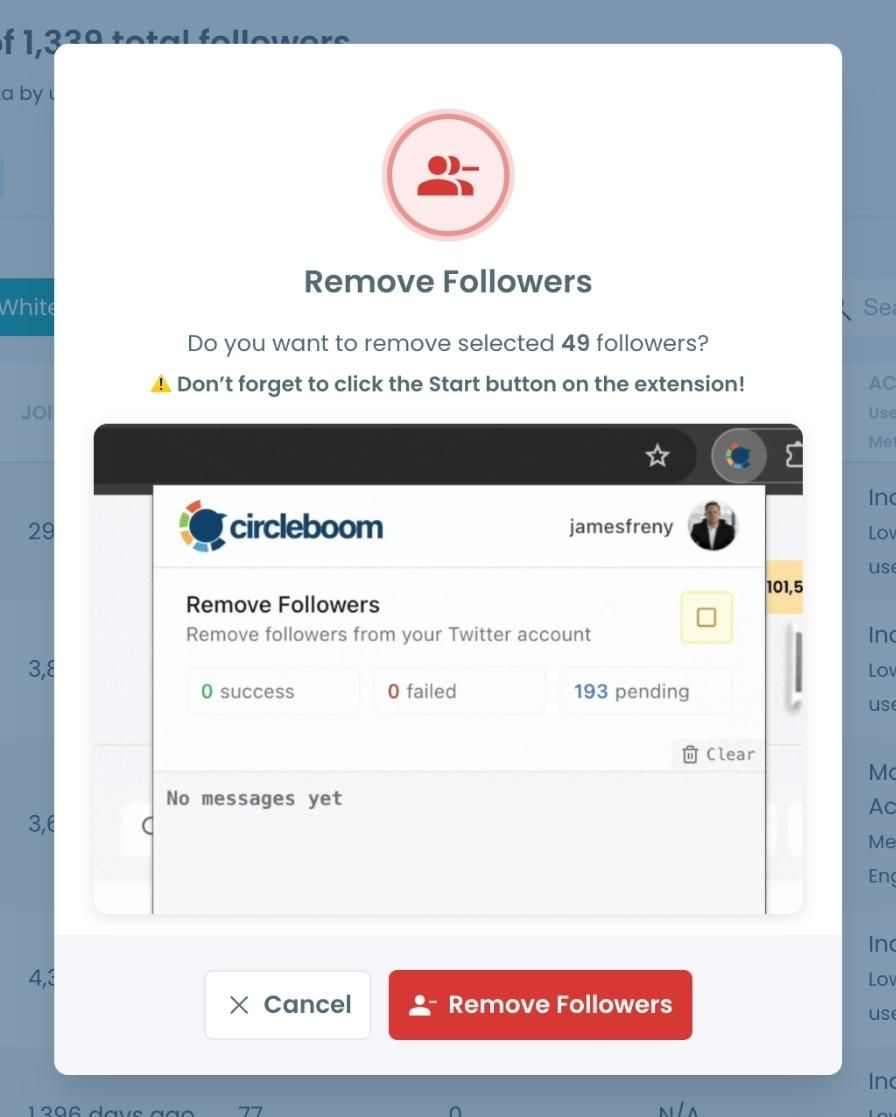
A confirmation message will appear asking if you are sure you want to remove the selected followers. Click ''Remove Followers''.
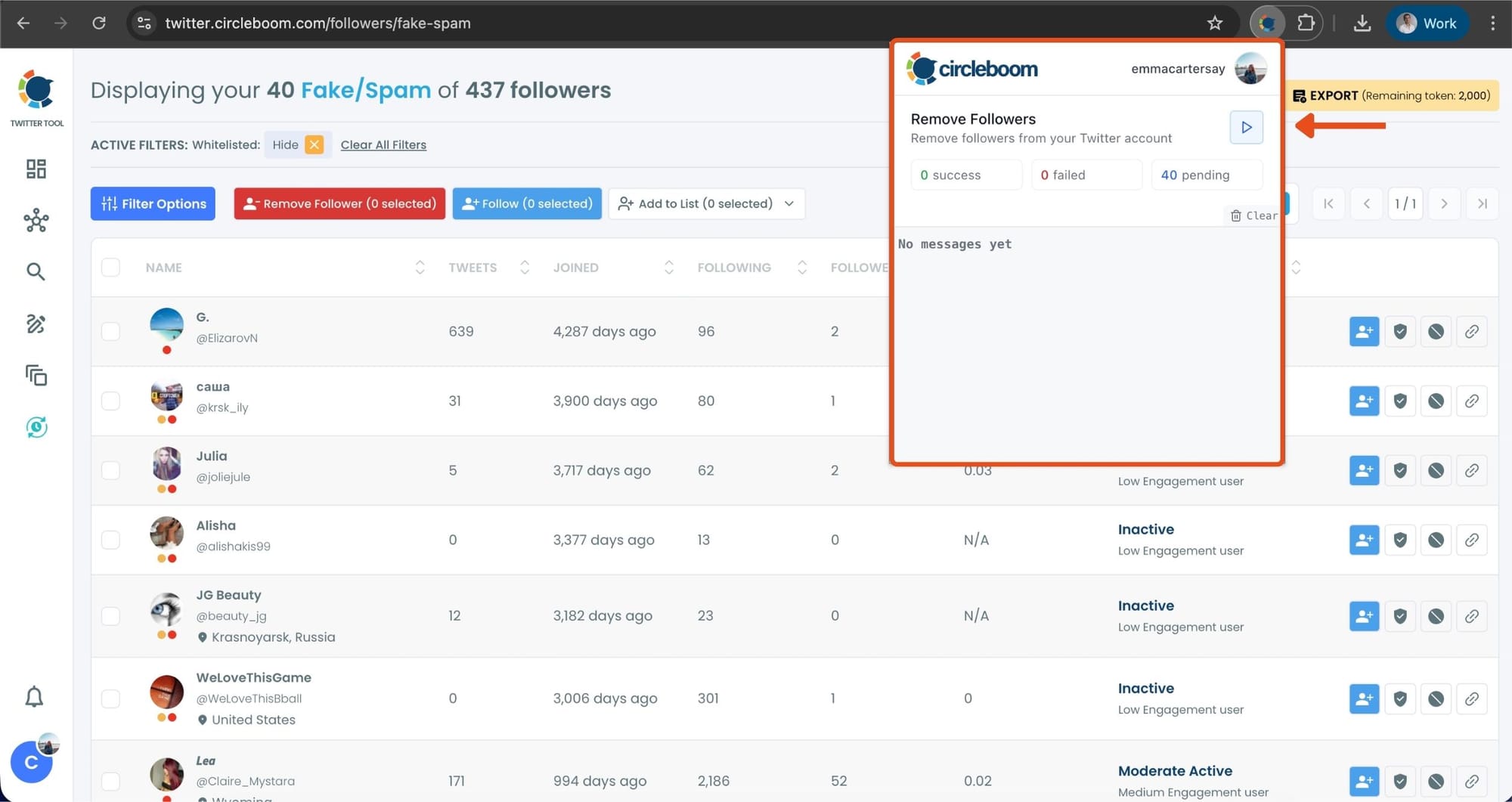
Step #5: Since the removal action is processed via the Circleboom Remove Twitter/X Followers extension, you need to install it to complete the process.
Click on Download the Extension and install it from the Chrome Web Store.
Once installed, you can easily remove followers.

Step #6: After installing the extension, Circleboom will automatically add all your removal requests to the extension queue.
Click on the Start button to begin the removal process.
The extension will process your requests and remove the selected followers.
That's it! Your selected followers have been removed automatically.
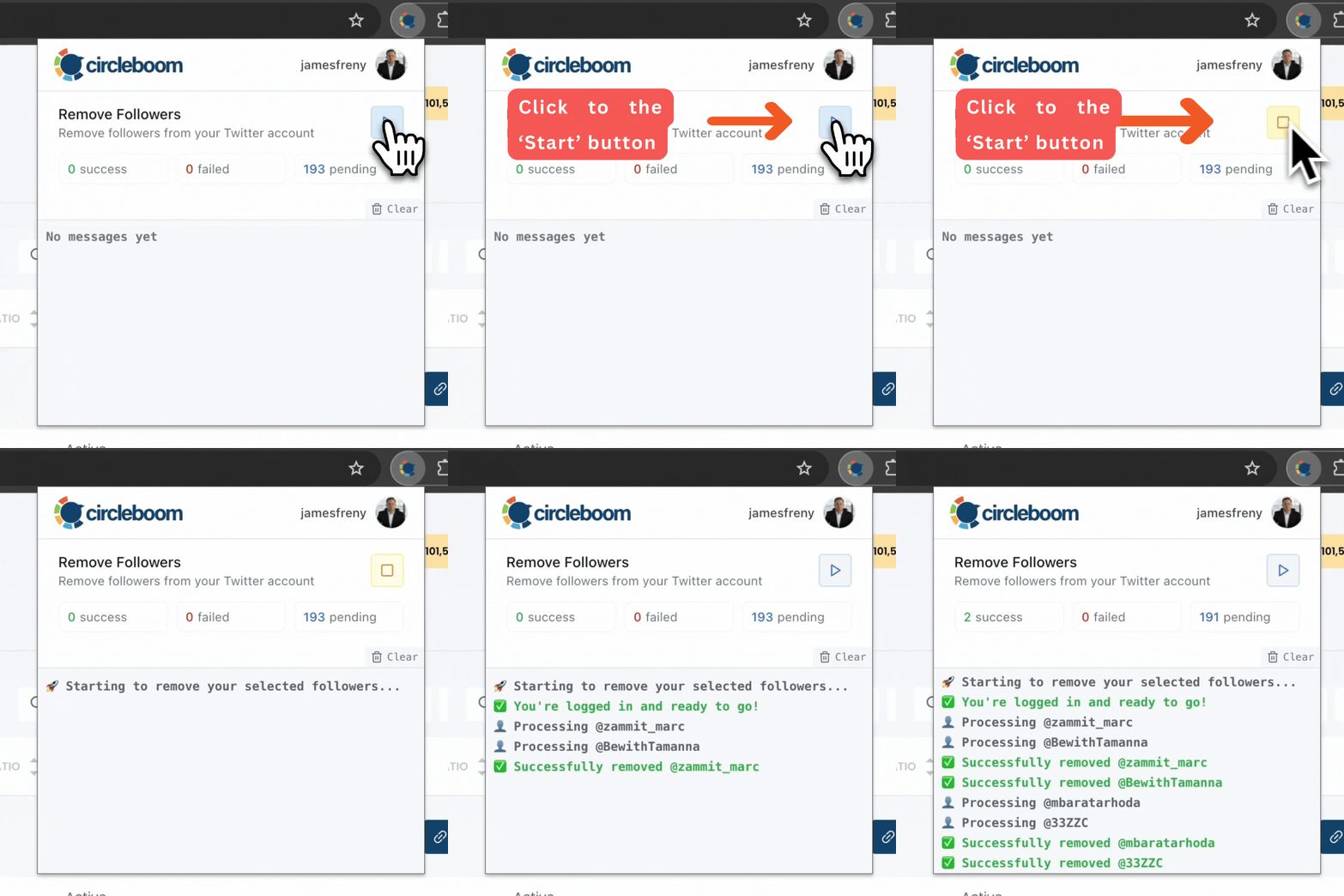
⚠️ Important Warning: Once the removal process begins, do not close your Chrome browser or the Circleboom tab. The tool will automatically remove followers in the background, but if you close the tab or exit Chrome, the process will stop.
If you need a more detailed guide check this video ⬇️
What Happens After Cleaning Your Followers
Once you improve the quality of your audience, the impact becomes noticeable.
- You see fewer spam and AI-generated replies
- Engagement becomes more relevant
- Conversations improve in quality
- Your overall experience on X becomes cleaner
Your content starts attracting users who are actually interested, rather than automated accounts.
The Best Strategy: Combine Both Approaches
The most effective way to reduce AI replies is to use both methods together.
- Use Reply Feedback to control what you see
- Clean your followers to control who interacts with you
When combined, these actions:
- Reduce low-quality replies
- Improve engagement quality
- Create a more useful and enjoyable feed
Final Thoughts
AI-generated replies are becoming more common on X, and this trend is likely to continue.
However, you are not limited to the default experience.
By actively using feedback tools and maintaining a clean follower base, you can significantly improve what you see and how others interact with your content.
Over time, these small actions lead to a much better overall experience on the platform.
)
