

By [Altug Altug] | [24.03.2026] | 16 min read
Learn how to automatically cross-post your tweets to Instagram as Posts, Stories, Reels, and Carousels using Circleboom. The complete guide covering every format, step-by-step setup, best practices, and troubleshooting for 2026.

TABLE OF CONTENTS
- Introduction
- Why Cross-Post from Twitter to Instagram?
- What Is Circleboom's Twitter to Instagram Cross-Post Feature?
- Key Features of Circleboom's Cross-Post Tool
- Tweet to Instagram Post
- Tweet to Instagram Story
- Tweet to Instagram Reels
- Twitter Thread to Instagram Carousel
- How to Cross-Post from Twitter to Instagram with Circleboom: Step-by-Step
- Best Practices for Cross-Posting from Twitter to Instagram
- Repurpose, Don't Just Repost
- Adapting Your Captions for Each Platform
- Scheduling Your Cross-Posts for Maximum Reach
- Maintain a Content Calendar
- Cross-Promote Strategically
- Troubleshooting Common Issues
- Frequently Asked Questions
- Conclusion
Introduction
If you're looking for a way to cross-post from Twitter to Instagram automatically, you're not alone. Millions of creators, brands, marketers, and businesses are actively searching for the most efficient way to connect their content across both platforms and in 2026, the landscape has changed significantly.
Back in the day, Instagram had a native option to automatically share your tweets as posts. That integration was quietly removed in 2023, and Twitter (now X) has similarly scaled back on direct partnerships with Meta-owned platforms. The one-tap connection that many relied on is gone, and it isn't coming back.
But here's the good news: what replaced it is far more powerful.
Circleboom's Cross-Post from Twitter to Instagram doesn't just replicate the old native integration, it obliterates it. With Circleboom, you can automatically convert your tweets into Instagram Posts, Stories, Reels, and Carousels, with full control over layouts, themes, timing, and formats. All from one dashboard. All without lifting a design finger.
This guide covers everything you need to know: why cross-posting matters, how Circleboom's feature works, a complete step-by-step walkthrough, advanced best practices, and answers to the most common questions.
Let's get into it.
Why Cross-Post from Twitter to Instagram?
Before diving into the how, it's worth understanding the why, because the case for cross-posting in 2026 is stronger than it's ever been.
Expand Your Audience Reach
Twitter (X) and Instagram are fundamentally different platforms with meaningfully different audiences. According to Sprout Social's 2026 Social Media Demographics Report, nearly two-thirds of Twitter's global user base is male, and the platform skews heavily toward news consumption, real-time commentary, and text-driven discussion. Instagram, on the other hand, has reached 2 billion monthly active users, with a more balanced gender distribution and an audience that primarily engages with visual content, Reels, and aspirational storytelling.
These aren't just different platforms, they're different worlds. And if your content is only living in one of them, you're leaving an enormous audience untouched.
Cross-posting from Twitter to Instagram means a single idea, a hot take, a product announcement, a thread packed with insight, can reach the fast-paced, text-hungry Twitter crowd and the visually-driven, discovery-oriented Instagram community simultaneously.
Build a Consistent Brand Presence
Consistency across platforms is no longer a nice-to-have for brands and creators; it's a baseline expectation. When someone encounters your Twitter profile and then finds your Instagram account, the experience should feel cohesive. The same voice, the same ideas, the same identity, expressed in the language each platform speaks.
Cross-posting from Twitter to Instagram helps you maintain that consistency without doubling your workload. Your messaging stays unified while your formats adapt to fit each platform's culture.
Drive Cross-Platform Traffic
Sharing your Twitter content on Instagram isn't just about visibility, it's about actively funneling audiences between platforms. A compelling tweet repurposed as an Instagram Story can drive your highly visual Instagram followers to your Twitter profile. A thread published as an Instagram Carousel can send Instagram readers to the original tweet for comments and conversation.
This two-way traffic flow is one of the most effective organic growth strategies available in 2026, and Circleboom makes it effortless.
Save Time on Content Creation
Creating unique, platform-optimized content for every network is genuinely exhausting. Most creators and social media managers don't have the time, budget, or bandwidth to produce fully original content for Twitter, Instagram, LinkedIn, Facebook, and beyond every single day.
Cross-posting changes the math entirely. One tweet becomes an Instagram post, a Story, a Reel, and a Carousel with minimal extra effort. Your content budget goes further. Your output looks bigger than it is. And you spend less time context-switching between apps and more time doing the work that actually moves the needle.
Improve Analytics and Tracking
When your Twitter content is consistently showing up on Instagram, you can begin to track which ideas resonate across audiences. A tweet that performs well on Twitter but barely gets engagement on Instagram tells you something about platform-specific content preferences. A thread that goes viral as an Instagram Carousel tells you that your long-form ideas have visual appeal.
According to DataReportal's Digital 2026 Global Overview, Instagram users are among the most likely of any platform to use the app to research and follow brands with 62.8% of its active user base saying they use Instagram specifically for brand discovery. If your Twitter content is absent from Instagram, you're missing one of the highest-intent discovery environments on the internet.
What Is Circleboom's Twitter to Instagram Cross-Post Feature?
Circleboom's Twitter to Instagram Cross-Post feature is an automation tool that bridges your Twitter content and your Instagram audience automatically, intelligently, and in full compliance with both platforms' rules and policies.
In simple terms: you write a tweet in Circleboom, hit publish or schedule, and Circleboom simultaneously formats and distributes that tweet to Instagram as the format of your choice. No separate design work. No manually screenshotting tweets. No uploading to Instagram separately.
Circleboom handles the entire conversion pipeline: it takes your written tweet, formats it into a visual asset optimized for Instagram, applies your chosen layout and theme, and publishes or schedules it to your Instagram account all in one workflow.
It supports four distinct Instagram output formats:
- Instagram Post — A standard feed post, ideal for quotes, announcements, and evergreen content
- Instagram Story — A full-screen vertical format that's perfect for timely content and driving clicks
- Instagram Reels — A video format that gives your written tweets a visual, dynamic life
- Instagram Carousel — Automatically converts Twitter threads into multi-slide carousel posts
This isn't a basic workaround, it's a fully built cross-platform content engine. And it's available through Circleboom's official dashboard, where your Twitter and Instagram accounts live side by side.

Key Features of Circleboom's Cross-Post Tool
Circleboom's Twitter to Instagram Cross-Post feature is loaded with capabilities that go far beyond simple content mirroring. Here's what makes it genuinely powerful:
Tweet to Instagram Post
Circleboom automatically converts a single tweet into a visually polished Instagram post. You don't design anything, the tool handles the formatting, the text layout, the visual treatment, and the sizing. You get a ready-to-publish Instagram post in seconds.
This is ideal for standalone tweets: opinions, announcements, quotes, or any short-form content that stands on its own.
 Altug Altug
Tweet to Instagram Story
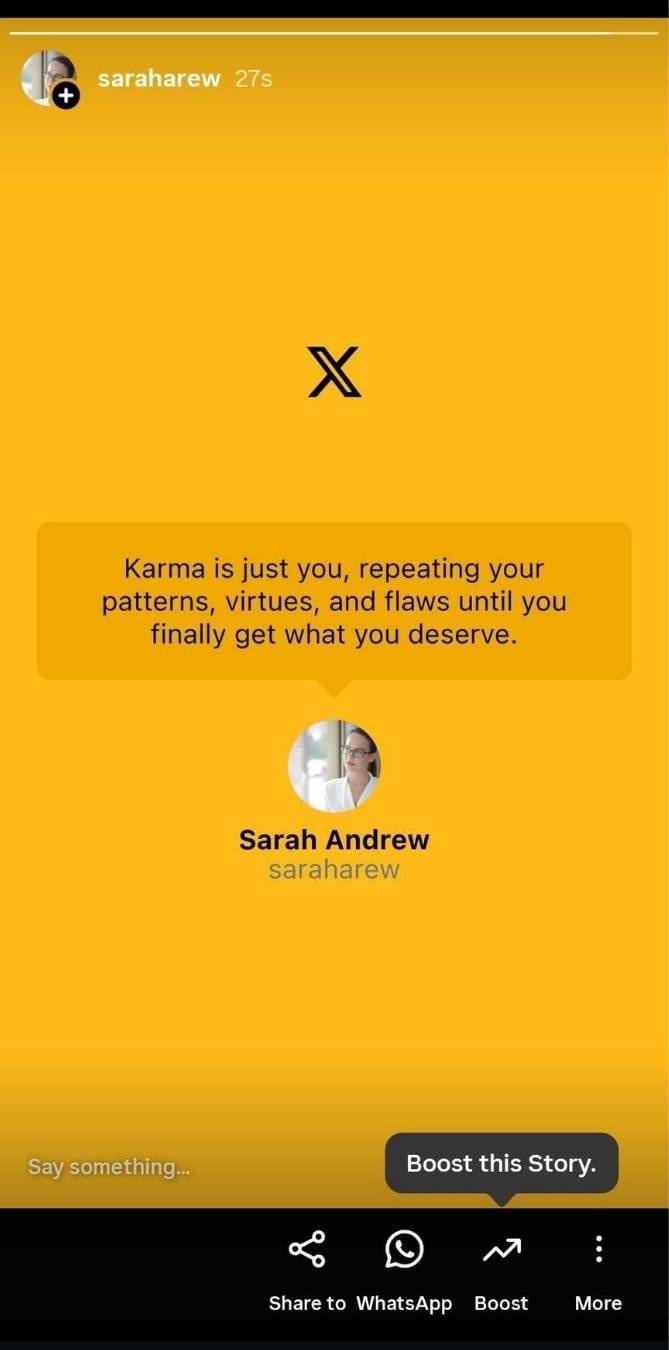
Instead of letting your tweets disappear into the feed, Circleboom allows you to convert them instantly into full-screen Instagram Stories, one of the most high-visibility formats on the platform. Stories sit at the very top of the Instagram interface, the first thing users see when they open the app.
With Circleboom's Tweet to Instagram Story feature, you can route your most important tweets directly into this premium placement, driving your Instagram audience to your Twitter content or simply ensuring maximum visibility for your message.
Tweet to Instagram Reels
This is where Circleboom gets genuinely creative. The Tweet to Instagram Reels feature converts your written tweets and threads into engaging video Reels, one of the most powerful discovery formats on Instagram in 2026.
Reels consistently outperform all other Instagram formats for reach, making them the go-to format for growing your audience. By converting your tweets into Reels, Circleboom helps you tap into Instagram's discovery engine without having to produce video content from scratch.
Twitter Thread to Instagram Carousel
Arguably the most impressive feature of the cross-post tool. When you write a Twitter thread — a multi-tweet sequence of connected ideas — Circleboom automatically formats it as a multi-slide Instagram Carousel post.
Carousels are Instagram's highest-performing format for engagement with existing audiences. Each slide of the carousel corresponds to a tweet in the thread, giving your long-form ideas a native, visual format that Instagram users love to swipe through.
This is content repurposing at its most elegant. No reformatting. No copying and pasting. Just write your thread, and Circleboom handles the rest.
Multiple Layouts and Themes
Circleboom gives you full creative control over how your cross-posted content looks. You can choose from multiple layout options and color themes to ensure your Instagram posts feel intentional and on-brand — not like automated screenshots.
Simultaneous Multi-Platform Publishing
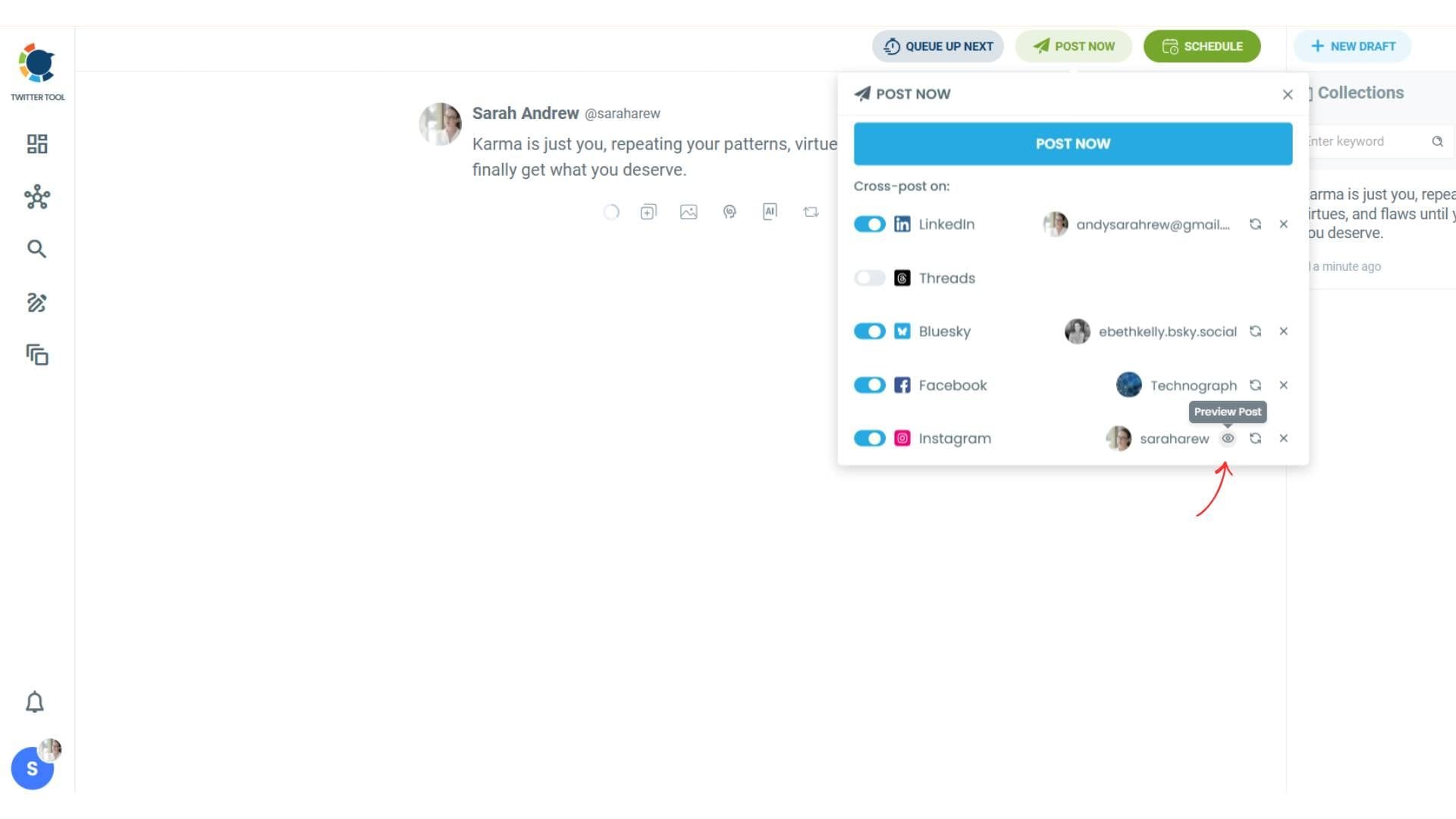
While this guide focuses on the Twitter-to-Instagram workflow, it's worth noting that Circleboom lets you cross-post to multiple platforms simultaneously. A single tweet can be published to Instagram, LinkedIn, Facebook, Threads, and Bluesky all at once, without any additional steps.
Schedule or Post Immediately
Every cross-post can be published immediately or scheduled for a later date and time. This gives you full control over your content calendar and allows you to time your posts for peak engagement windows on both platforms.
How to Cross-Post from Twitter to Instagram with Circleboom: Step-by-Step
Setting up your first Twitter-to-Instagram cross-post with Circleboom takes just a few minutes. Here's exactly how to do it:
Step 1: Log Into Circleboom and Connect Your Accounts
Go to Circleboom and log in (or create a free account if you're new). On the main dashboard, you'll see connection options for all supported platforms: Twitter, Instagram, Facebook, LinkedIn, Google Business Profile, Pinterest, YouTube, TikTok, Threads, and Bluesky.
Connect both your Twitter/X account and your Instagram Business or Creator account. Note that Instagram requires a Business or Creator account for third-party integrations, if your account is set to Personal, you'll need to switch it in Instagram settings before connecting.
Step 2: Navigate to the Twitter Dashboard and Open the Post Composer
From the left-hand menu, navigate to the Twitter/X Dashboard. Then click on "Post Management & Analytics" and select "Write and Plan Your Post" to open the post composer.
Step 3: Write Your Tweet
Compose your tweet in the post editor. If you need inspiration or want to speed things up, Circleboom's built-in AI Tweet Generator can create tweet drafts for you automatically, just describe your topic or paste in a URL and let it generate options.
If you're writing a thread, compose each tweet in sequence using Circleboom's thread composer. The tool will automatically recognize the thread structure when it converts it to a Carousel.
Step 4: Click Post or Schedule to Access Cross-Posting Options
When your tweet is ready, click either "Post" (to publish immediately) or "Schedule" (to set a future date and time). This will reveal your cross-posting options — a list of all connected platforms, including Instagram.
Step 5: Select Instagram and Click Preview
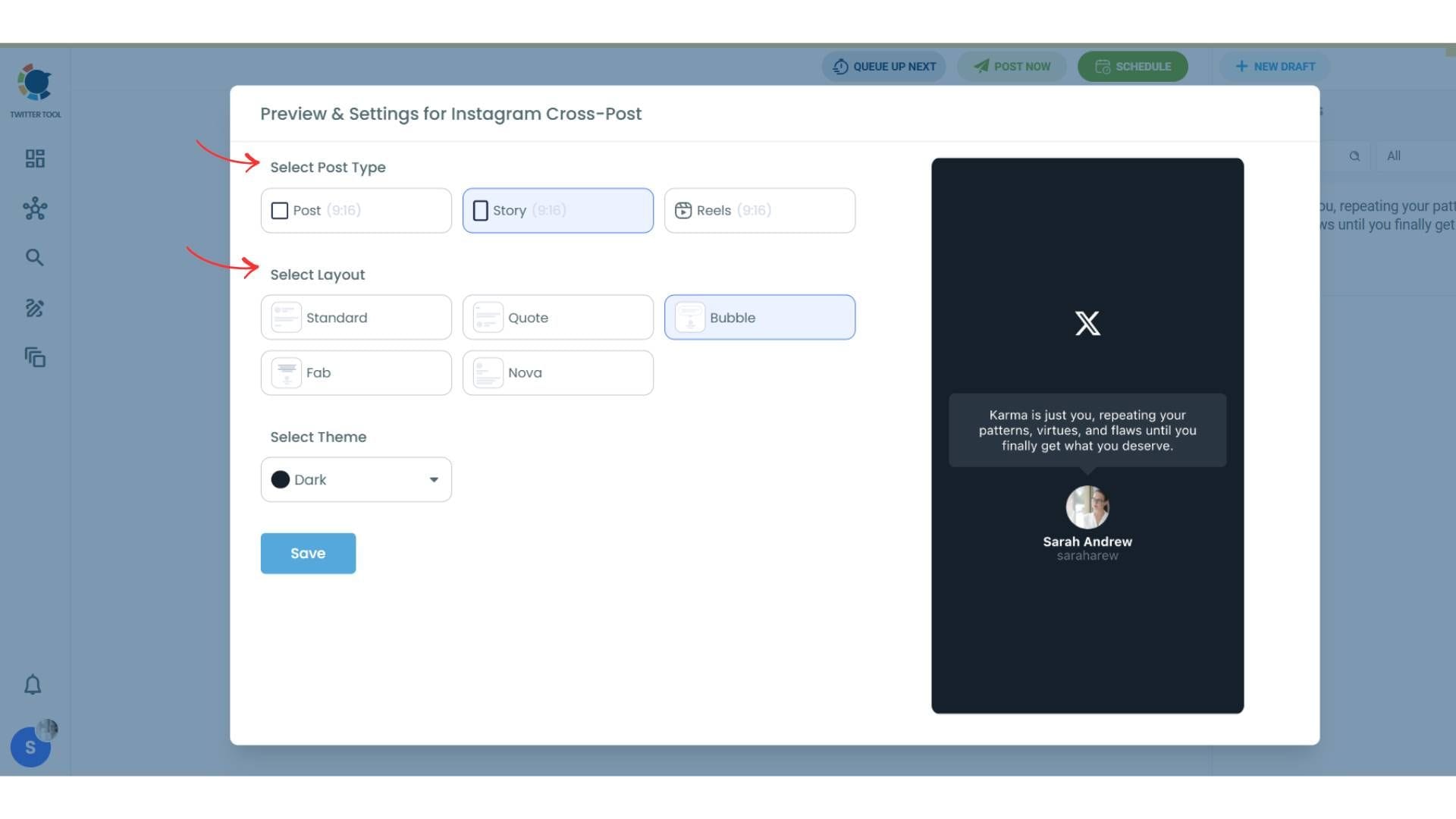
Toggle on Instagram in the list of connected platforms. Before saving, click "Preview" to access the full Instagram formatting options.
Step 6: Choose Your Instagram Format and Layout
In the Preview panel, you can select exactly how your tweet will appear on Instagram:
- Post — A standard feed post
- Story — Full-screen vertical format
- Reels — Video format
You can also browse available layouts and select a theme — including different color palettes — to match your brand aesthetic.
Step 7: Save and Publish or Schedule
Once you've chosen your format, layout, and theme, click "Save". Your Instagram cross-post is ready. Then choose whether to publish immediately or schedule it for a specific date and time.
That's it. Your tweet will appear on Twitter/X and on Instagram simultaneously in whatever format you chose, without any further action on your part.
Best Practices for Cross-Posting from Twitter to Instagram
Getting the mechanics right is only half the battle. The other half is using the tool strategically. Here are the best practices that separate effective cross-posters from those who get ignored.
Repurpose, Don't Just Repost
The single biggest mistake people make when cross-posting is treating it as a copy-paste operation. Twitter and Instagram are not the same platform, and their audiences don't want the same experience. A tweet that's designed to spark a conversation may need a different visual treatment to work as an Instagram post.
Circleboom handles the format conversion automatically but you should still think carefully about which content is worth cross-posting and which isn't. Not every tweet belongs on Instagram. The ones that do tend to be: clear standalone ideas, strong opinions, educational threads, or high-interest announcements. Short reactive tweets, replies, and inside-Twitter-culture jokes rarely translate well.
Use Circleboom's layout and theme options to make each cross-post feel intentional. A tweet that looks designed is a tweet that gets engagement.
Adapting Your Captions for Each Platform
Circleboom converts the visual format of your tweet automatically, but you should consider whether the caption also needs to shift. Twitter favors concise, punchy, conversational text. Instagram supports longer captions — up to 2,200 characters — and rewards storytelling, hashtag use, and calls to action.
Best practices by platform:
On Twitter/X: Keep it under 280 characters. Use 1–2 relevant hashtags at most. Lead with a hook. End with a question or bold statement that invites replies.
On Instagram: Expand the idea if it deserves it. Use 5–15 relevant hashtags in 2026 for discoverability. Include a clear call-to-action ("Save this," "Follow for more," "Link in bio"). Let your personality come through.
Scheduling Your Cross-Posts for Maximum Reach
One of Circleboom's most valuable features is the ability to schedule your cross-posts for optimal timing. Twitter and Instagram have different peak engagement windows, and publishing at the right time can significantly increase your content's reach.
As a general rule: Twitter sees its highest engagement during morning commute hours, lunch breaks, and early evenings. Instagram engagement peaks in the evening and on weekends — though your specific audience's patterns may vary.
Use Circleboom's scheduling feature to set your Twitter and Instagram posts to go live at different optimal times if needed, rather than both exactly simultaneously.
Maintain a Content Calendar
Cross-posting works best when it's part of a consistent, planned content strategy — not an ad-hoc activity. Build a simple content calendar that maps out which tweets you plan to cross-post to Instagram each week, which format they'll use, and when they'll be scheduled.
Even a basic spreadsheet or free calendar tool can keep your cross-posting organized and ensure you're consistently showing up on both platforms.
Cross-Promote Strategically
Use each platform to actively drive followers to the other:
On Twitter: Periodically mention that you share behind-the-scenes content, visual breakdowns, or exclusive posts on your Instagram. Give people a compelling reason to follow you on both platforms.
On Instagram: Reference your Twitter presence in Stories or captions — particularly for real-time commentary, live threads, or breaking news content that lives naturally on Twitter.
Platform-exclusive content: Don't cross-post everything. Reserve some content as platform-exclusive so that your followers on each platform have a reason to follow you on the other one too.
Troubleshooting Common Issues
Even with a polished tool like Circleboom, you might encounter some hiccups. Here are the most common issues and how to solve them.
"I Can't Find a Native Twitter-to-Instagram Option in Instagram Settings"
This is the most frequently asked question, and the answer is straightforward: Instagram permanently removed its native Twitter integration in 2023. There is no built-in "Share to Twitter" button in Instagram, and there never will be again, it was removed as part of broader competitive changes between Meta and X.
The solution is exactly what this guide covers: use Circleboom's cross-post feature, which fills the gap far more powerfully than the old native integration ever did.
"My Instagram Account Won't Connect to Circleboom"
Instagram's API only allows third-party tools to connect to Business or Creator accounts — not Personal accounts. If you're having trouble connecting, go to Instagram Settings → Account → Switch to Professional Account. Choose "Creator" for individuals and "Business" for companies. Then reconnect in Circleboom.
If you've already switched and still have issues, try disconnecting and reconnecting your Instagram account in Circleboom's settings, making sure to grant all requested permissions during the authorization flow.
"My Cross-Posts Look Robotic or Generic"
This is a common concern with automated cross-posting. The fix is to use Circleboom's layout and theme options intentionally. Browse the available design options and choose one that reflects your brand's visual identity. Consistent use of the same theme across your cross-posts will start to feel branded rather than automated over time.
You can also add a personal touch by customizing your Instagram caption separately after the cross-post is set up — expanding the idea, adding hashtags, or including a call-to-action that wouldn't make sense on Twitter.
"My Cross-Posted Content Isn't Getting Engagement on Instagram"
Cross-posting alone doesn't guarantee growth. If your content isn't getting traction on Instagram, consider these adjustments:
Make sure every Instagram post has a clear call-to-action. Don't just post — tell people what to do next. Engage with comments. Reply to DMs. The Instagram algorithm rewards accounts that participate in conversations, not just those that broadcast content.
Check your hashtag strategy. In 2026, 5–15 highly relevant hashtags remain the sweet spot for Instagram discoverability. Avoid overly generic tags and focus on niche, community-specific ones.
Review your posting times. Circleboom's scheduling feature lets you publish at the times your audience is most active. Use your Instagram Insights to identify when your followers are online.
"My Follower Counts Aren't Growing Despite Cross-Posting"
Consistency and patience are the two most underrated growth factors on social media. Cross-posting builds compounding momentum over weeks and months — not overnight. Focus on showing up consistently, giving people a reason to follow you on both platforms, and engaging authentically with your community on each network.
"Instagram Keeps Flagging My Cross-Posted Content"
If your content is being flagged or restricted on Instagram, check that your tweets don't contain links that Instagram's algorithm might flag as spammy. Also ensure your account is in good standing and hasn't received any Community Guideline strikes that might be restricting your reach.
Frequently Asked Questions
Can I still directly connect Twitter and Instagram natively?
No. As of 2023, the native integration between Twitter/X and Instagram has been permanently removed by both platforms. There is no built-in setting in either app that allows direct account linking or automatic cross-posting. Circleboom is the most powerful and reliable solution for bridging the two platforms in 2026.
What Instagram formats can Circleboom cross-post to?
Circleboom supports four Instagram formats for Twitter cross-posts: standard Instagram Posts, Instagram Stories, Instagram Reels, and Instagram Carousels (automatically generated from Twitter threads). You can choose your format at the time of publishing.
Does Circleboom work with Instagram Personal accounts?
No. Instagram's API requires Business or Creator accounts for third-party tool integrations. You'll need to switch your account to Professional before connecting to Circleboom. This is a quick, free process done within Instagram's Settings.
Can I customize how my tweets look when cross-posted to Instagram?
Yes. Circleboom offers multiple layout options and color themes that you can apply to your cross-posted content. You can preview and adjust these settings before publishing or scheduling your post.
Can I schedule my Twitter-to-Instagram cross-posts?
Absolutely. Every cross-post can be published immediately or scheduled for a specific date and time. Circleboom's scheduling interface lets you plan your content calendar across both platforms from a single dashboard.
Will cross-posting hurt my engagement?
Only if done lazily. Identical, unformatted content posted identically across platforms tends to underperform because platform algorithms and audiences respond better to native-feeling content. Circleboom's format conversion — automatically turning tweets into visual posts and threads into carousels — handles the heavy lifting of making your cross-posts feel native to Instagram.
Should I use the same handle on Twitter and Instagram?
Ideally, yes. Consistent usernames across platforms make it much easier for your audience to find and follow you everywhere. If your preferred handle is taken on one platform, get as close as possible and clearly reference both handles in your bios.
How often should I cross-post from Twitter to Instagram?
A good starting point is to cross-post around 30–50% of your Twitter content to Instagram. Not every tweet belongs on Instagram — select the ones with the broadest appeal and the strongest visual potential. Reserve some content as platform-exclusive to give followers a reason to follow you on both.
Is Circleboom safe to use with my Twitter and Instagram accounts?
Yes. Circleboom is an Official X (Twitter) Enterprise Developer — one of a select group of platforms formally recognized and certified by X after an extensive evaluation process. It fully complies with Twitter's and Instagram's rules and policies. Your data is not shared with third parties without your permission.
Can I cross-post to other platforms at the same time?
Yes. In addition to Instagram, Circleboom lets you simultaneously cross-post your tweets to LinkedIn, Facebook, Threads, and Bluesky — all from the same composer, in one click.
Conclusion
The days of one-tap Twitter-to-Instagram integration are behind us — but what's replaced them is dramatically more capable. With Circleboom's Cross-Post from Twitter to Instagram feature, you don't just duplicate content between platforms. You transform it. A tweet becomes a visual post. A thread becomes a swipeable carousel. A hot take becomes a Reel that can reach thousands of new eyes.
The platforms are different. The audiences are different. And in 2026 — with Instagram hitting 2 billion monthly active users and Twitter/X remaining one of the highest-intent content environments on the internet — having a connected presence across both isn't optional for anyone serious about growth. It's the baseline.
Remember the core principles:
Always have a clear pathway from your Instagram presence to your Twitter content, and vice versa. Circleboom's cross-posting makes this automatic and consistent.
Repurpose your content, don't just replicate it. Use Circleboom's layout and theme options to make every cross-post feel intentional and platform-appropriate.
Schedule smartly. Twitter and Instagram have different peak engagement windows — Circleboom's scheduling tools let you hit both, without being chained to your phone.
Stay consistent over time. Cross-platform growth is a long game. The creators and brands who win are those who show up every day, on every relevant platform, with content worth following.
Your best ideas deserve the biggest possible audience. With Circleboom, every tweet gets a second life — and your Instagram feed becomes a direct reflection of your best thinking on X.
%20to%20Instagram%3A%20The%20Complete%20Circleboom%20Guide%20for%202026)
