

Downloading videos from Twitter (X) sounds like something that should be simple.
You see a video, you want to save it, you click a button, and it downloads.
But that’s not how X works.
Even today, there is no built-in way to download videos directly to your device. And surprisingly, this limitation still exists even if you are using Twitter Premium.

That’s why most users end up searching for external solutions.
The good news is, there is a much easier way to do this.
You can download any Twitter video in seconds using Circleboom, without needing a Premium account, without logging in, and without dealing with ads or confusing tools.
All it takes is copying the tweet link and pasting it into the downloader.
Download Twitter videos instantly with Circleboom
Circleboom offers a free Twitter video downloader designed to make this process as simple as possible.
 infocircleboom.com
Instead of going through complicated steps or unreliable tools, you get a direct and clean experience. You don’t need to install anything, create an account, or connect your Twitter profile.
What makes it stand out is how straightforward the process is:
🟢 No Premium subscription required
🟢 No login or account connection needed
🟢 No ads, popups, or distractions
🟢 No technical steps or setup
🟢 Just copy, paste, and download
Circleboom is also an official X Enterprise Developer, which means it works within X’s ecosystem using official APIs.

This is important because many random tools online operate in unclear ways, while Circleboom provides a more reliable and trustworthy experience.
Instead of guessing whether a tool is safe or not, you are using something built with platform compliance in mind.
How to download Twitter videos (step-by-step)
The process is designed to be as simple as possible, even if you’ve never used a tool like this before.
Step 1: Copy the link of the Twitter (X) video that you want to download.
You can get the link after clicking on the "Share" button under the video tweet.

Step 2: Go to Circleboom's Twitter Video Downloader, paste your link within the text bar, and click on that big blue "Download" button.
Then, the download options will appear. And if the video has multiple quality options, you'll also be able to download that Twitter video in HD quality without watermarks!
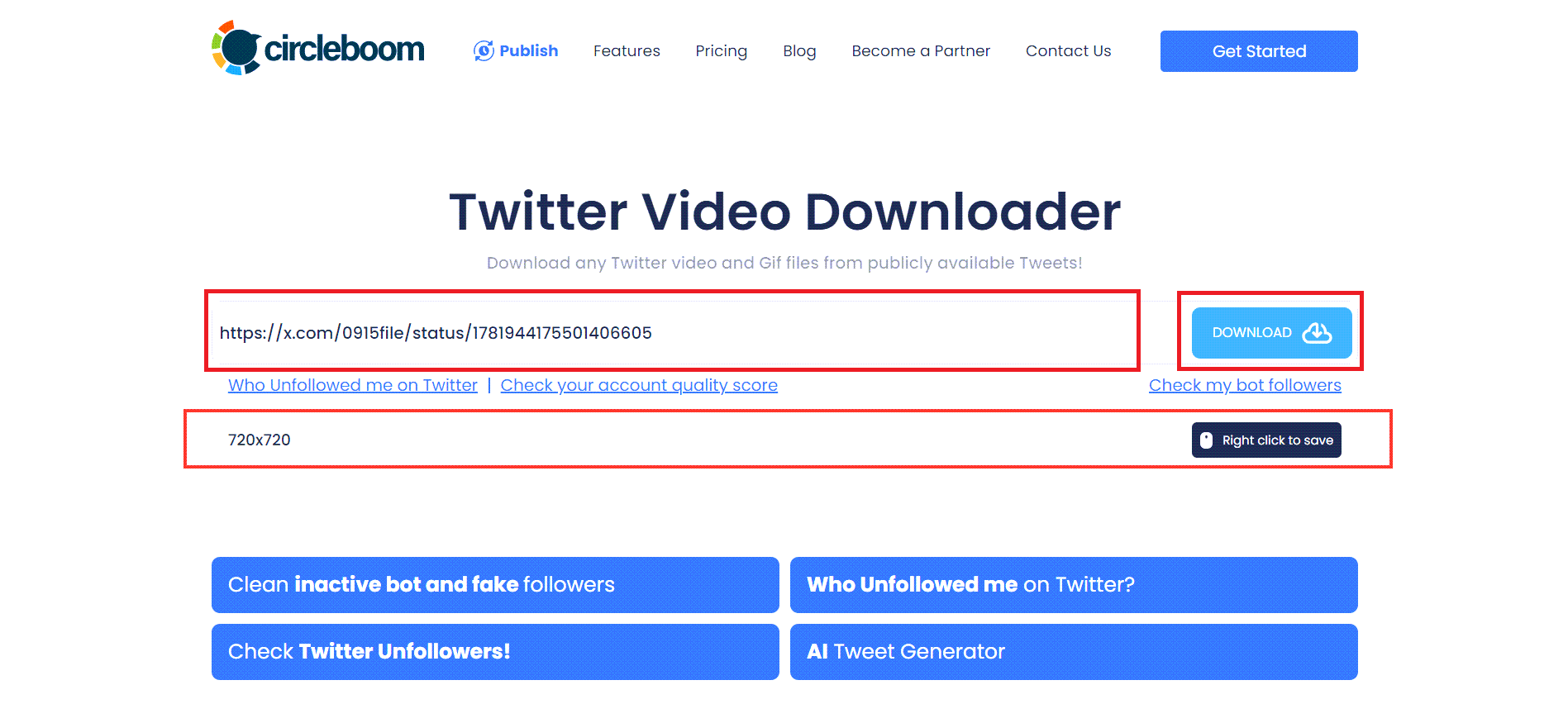
Step 3: After clicking on the "Right click to save" button, the Twitter video will open in a new tab
Then, all you need to do is click on the three-dots button from the bottom right and choose "Download" among the options. Additional Information: For videos downloaded with a watermark, consider utilizing an AI watermark remover for assistance.

If you need a more detailed, step-by-step guide, feel free to check out our video for a complete walkthrough. ⬇️
Why you need a tool like this (even with Twitter Premium)
Many users assume that Twitter Premium unlocks more control over content, including video downloads.
But in reality, Premium does not change this limitation.
On X, you can:
- watch videos
- like and repost them
- share them with others
But you still cannot download them directly to your phone or computer.
This means that even paying users face the same restriction as everyone else.
If you want to save a video for later, use it in your own content, or keep it as a reference, you need an external solution.
That’s where tools like Circleboom come in.
Why people download Twitter videos
Downloading videos is not just about convenience. In many cases, it becomes necessary.
Here are some common reasons:
Saving videos for offline use: Sometimes you want to watch a video later without relying on an internet connection. Downloading allows you to access it anytime.
Reusing content on other platforms: Creators and marketers often repurpose content. A video seen on X might be useful for Instagram, LinkedIn, or other platforms.
Archiving valuable content: Some videos contain important information, insights, or tutorials. Saving them ensures you don’t lose access later.
Avoiding deleted content: Content on X can disappear at any time. Tweets get deleted, accounts get suspended, and videos get removed. Downloading ensures you keep what matters.
👉 Try it now: Download Twitter Videos for Free
 infocircleboom.com
The problem with most Twitter video downloaders
If you search for Twitter video downloaders, you will find dozens of tools.
But most of them come with serious drawbacks.
Many require you to:
- log in with your account
- deal with aggressive ads and popups
- click through multiple confusing steps
- accept lower-quality downloads
Some tools even feel unsafe, with unclear permissions or suspicious redirects.
This creates friction and risk, especially for users who just want a simple and quick solution.
Why Circleboom stands out
Circleboom removes all of these problems by focusing on simplicity and reliability.
No login required: You don’t need to connect your account or share any personal data. This reduces risk and keeps the process clean.
Completely free: There is no hidden cost, subscription, or Premium requirement. Anyone can use the tool.
No ads or distractions: You don’t have to deal with popups, banners, or misleading buttons. The experience is straightforward.
Fast and efficient: The process takes only a few seconds from start to finish. You paste the link, click download, and save the video.
High-quality downloads: The video is downloaded in its original quality, which is especially important if you plan to reuse or archive it.
Tips for downloading Twitter videos
To avoid issues and get the best results:
- Make sure the tweet is public
- Always copy the correct tweet link
- Download videos before they are deleted
- Check the quality before saving
These small steps ensure a smooth experience every time.
Is it safe to download Twitter videos?
Not all tools are created equal.
Some downloaders include unnecessary scripts, ads, or redirects that can create security risks.
That’s why choosing a trusted tool is important.
✅ Circleboom, as an official X Enterprise Developer, offers a more reliable alternative compared to unknown tools.
It focuses on a clean experience without requiring access to your account or exposing you to unnecessary risks.
Final thoughts
Downloading videos from Twitter (X) should be simple, but the platform itself does not provide that option, even for Premium users.
This is why external tools are necessary.
With Circleboom, the process becomes straightforward and efficient. You don’t need to log in, you don’t need a subscription, and you don’t have to deal with ads.
You just copy the link, paste it, and download the video.
That’s all it takes.




%20Videos%20Without%20Premium)


