

Most advice tells a small account to post more original tweets and wait for one to catch. The better way to go viral on Twitter with few followers is the reverse: attach your point to posts that are already spreading, and save your own tweets for the hours your followers are online.
What a small account needs to go viral on Twitter.A live view of which posts in its topics are gaining engagement right now.A quote, reply or rewrite in its own voice, published while that post is still climbing.A posting slot that matches when its own followers are online.
Circleboom tracks trending posts across your topics on X and writes a first draft of your quote, reply or rewrite through official Enterprise APIs from X. Use it to go viral on Twitter without waiting for a large following.
Why posting more original tweets rarely works for a small X account
Posting more originals rarely works because volume does not change who sees the first minutes of a tweet. A small account's tweet is shown first to the followers who are online at that moment, and with a few hundred followers that group can be close to empty.
The usual response is to post again, which repeats the same test on the same thin audience. Ten quiet tweets a day are still quiet.
Two things change the outcome. One is a different first audience, which a reply or quote under a rising post provides. The other is a better hour for your own tweets, so the followers you do have are there to react.
→ See which posts could help you go viral on X
Nothing in this guide promises a viral tweet. It removes the avoidable reasons a good tweet from a small account never gets tested.
Can a small account get reach on X, and what should it do first?
Yes, a small account can get reach on X, but the right first move depends on which of three situations the account is in. The wider debate over whether Twitter has reduced organic reach for small to mid accounts is a separate read. The fork below is about what to do this week.
Situation one: an active account under 500 followers
What changes: very few of your followers are online at any given hour, so an original tweet gets almost no early engagement to build on.
Next step: put most of your effort into quotes and replies under rising posts in your topics, where the readers already are. Keep original tweets for the hours when your followers are most active.
Situation two: an older account that went quiet
What changes: the follower count looks healthy, but the activity pattern behind it is stale. Circleboom's follower-activity chart reflects your audience at the time of analysis, and it is designed to be rechecked after the audience shifts.
Next step: recheck when your followers are online before trusting old posting habits. Then update your Content Interests so the trending feed matches what you post about now, and restart with a steady run of rewrites in your own voice.
Situation three: an account that suspects a restriction
What changes: no tactic helps until you know the account is visible. Quoting, replying and timing all assume your posts can be shown.
Next step: test for a restriction first, using the check described in the questions at the end of this guide.
X is also adding its own view. TechCrunch reported that X is open-sourcing its ranking algorithm and piloting an Under the Hood page in settings. Eligible users can download a file there showing whether labels were applied to their account or posts.
The situation decides the first move. The method after that is the same for all three.
What Circleboom's trending feed gives a small Twitter account
On Twitter, Circleboom's Inspiration feed collects the posts that are trending inside your chosen content topics and puts each one's engagement counts on its card. Guesswork gives way to a list of posts your subject area is rewarding right now.

Each card in the feed carries four things:
- The author's name and handle
- The full tweet text, with any image or article preview
- A timestamp
- The post's replies, retweets, likes and bookmarks
Hovering over a card reveals the AI actions. Rewrite produces a new tweet on the same angle in your style. AI Reply drafts a reply in the thread, and AI Quote drafts a quote tweet with the original embedded below your comment.
For a small account, the quote has one advantage over the reply: the engagement lands on your own tweet and stays on your own timeline. Circleboom's blog looks at whether you get impressions for quote tweets in a separate post.
A tool that publishes from your account should be one X itself recognizes. Circleboom qualifies, as one of the companies on X's official Enterprise developers list. Both the feed and the publishing rely on that listing, so your account is never handed to a scraping tool.
When to quote, and when to reply
Choose by where the response should live. A reply joins the thread under the original post, which suits a direct contribution such as a follow-up question. A quote is for an audience-facing interpretation: the news plus what it means for the people who follow you.
Speed is the second choice. A response to breaking news loses value by the hour, so it should be published as soon as you have reviewed it. Commentary that will still be relevant tomorrow can be queued or scheduled for a stronger slot.
How to tell a post is still climbing
A post is worth joining when its timestamp is recent and its counts are already high for your topic. Circleboom's guidance gives the example of a post that already has 2,000 likes and is still growing: a useful response published while it is fresh is read by many of the people following that conversation.
An old post with large numbers is finished. The audience has moved on, and a late quote reaches almost none of it.
I would rather see a small account publish three considered quotes on fresh posts than thirty hopeful originals. That is the fastest honest way I know to go viral on Twitter with few followers.
How to go viral on Twitter with a small account, step by step
To go viral on Twitter with a small account, find a post in your topic that is still gaining engagement and add your own point to it as a quote while it is fresh. Publish your original tweets separately, at the hours when your followers are online. The six steps below run that loop in Circleboom in three phases.
Open the feed that shows which posts are climbing
- Log in to Circleboom Twitter and connect the X account you post from.

- Go to the X Post Planner menu and select Inspiration.

- Filter the feed with a topic chip, then narrow it with the Search keywords field. Compare the engagement counts on the cards and choose a post that is recent and still rising.
Add your point to a rising post with a quote
- Hover over the card and click AI Quote. The result panel shows the drafted comment above the embedded original post.
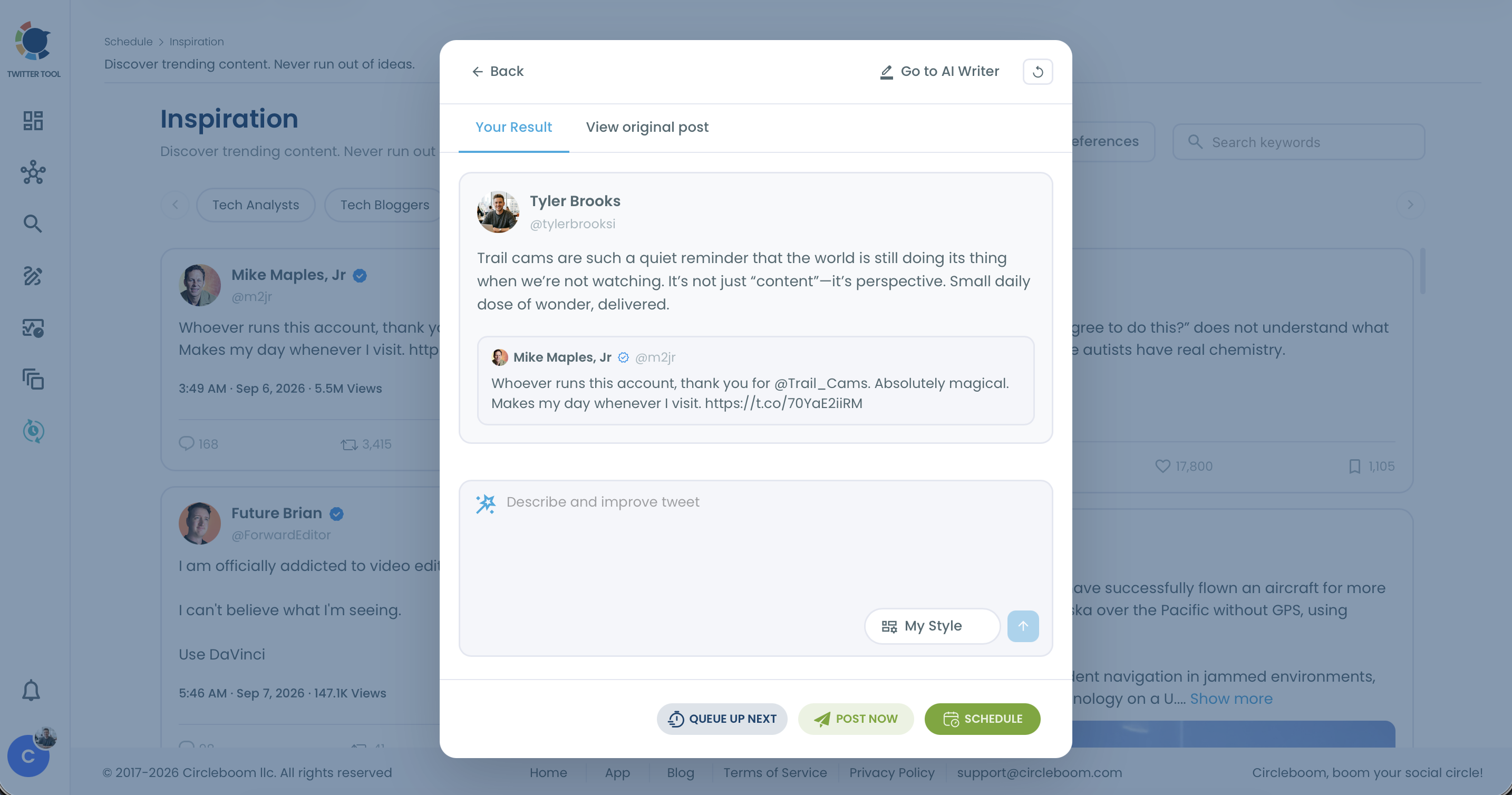
- Edit the draft using the field labelled Describe and improve tweet, and choose Post Now when the topic is time-sensitive. Ask for one practical implication for your audience and keep the original claim accurately represented. Remove anything you would not say yourself.
Publish your own tweets when your followers are online
- Schedule original tweets and rewrites with Find your best posting time. Open When Followers Are Online to see the weekly pattern behind the suggested slot, where larger bubbles mark the hours with more of your followers active.
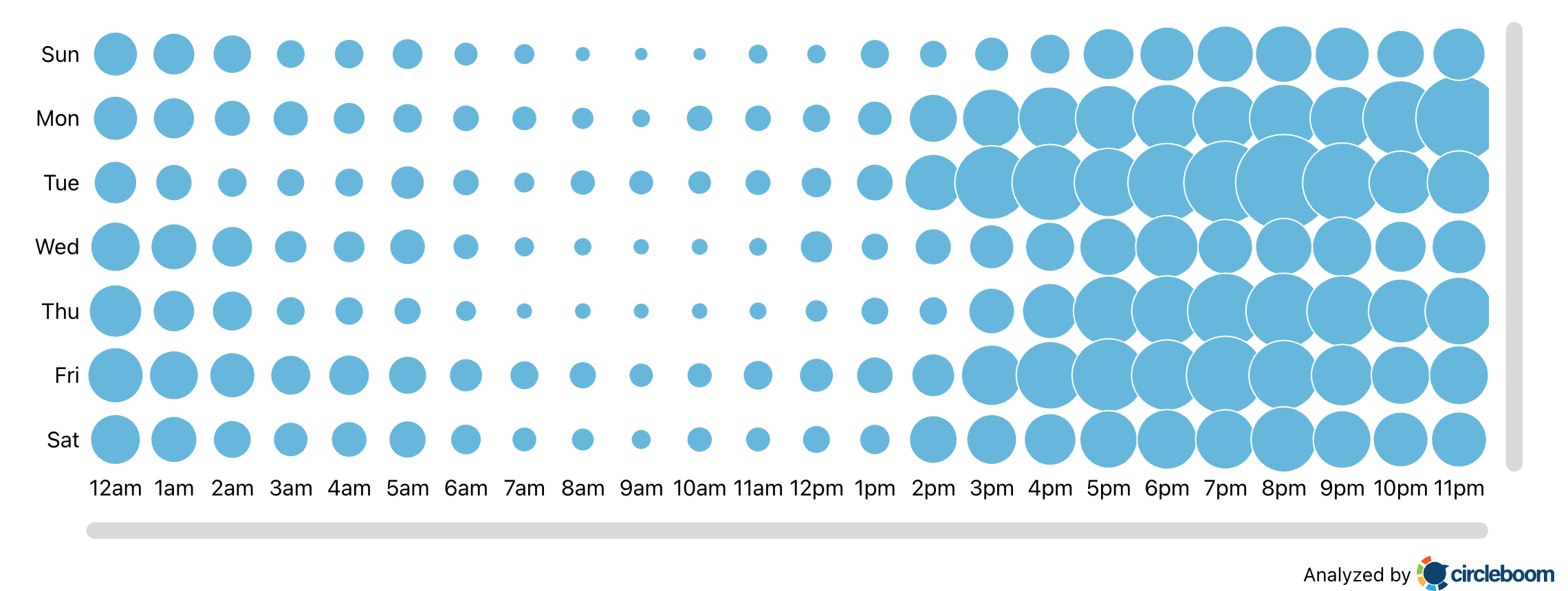
Each phase is there to supply something a small account lacks. The feed supplies evidence of what is spreading, and the quote supplies an audience that is already reading. The time slot supplies first viewers for the tweets that are yours alone.
The loop in brief:
- Find a rising post in your topic.
- Quote it with one useful point.
- Publish while the conversation is fresh.
- Schedule your own tweets for your followers' peak hours.
Podcast episode: five tweet types that tend to spread on X, useful when you are choosing which post to quote or rewrite.
What to type in the improve box so the quote is yours
The improve box accepts plain instructions, and the draft is only as specific as what you give it. These are the kinds of instructions that work for a quote:
- Explain why this update matters to a named audience, using one implication you supply.
- Add your own opinion and keep the original claim accurately represented.
- Use a practical example from your work to explain the point.
- End with one relevant question for your followers.
The AI supplies the drafting. Your reasoning is what gives the quote its value, and it is also what makes a stranger click through to a small account's profile.
Notes on the timing step
The suggested slot is calculated from your own followers' activity, not from platform-wide averages. Circleboom explains the chart on its When Followers Are Online: Best Times to Post page.
The chart hours are shown in your account's time-zone setting, so confirm that setting before you read them.
Treat the slot as timing guidance. It raises the chance that followers see the tweet early, and it does not guarantee engagement.
Is quoting or replying under trending posts engagement farming on X?
No, as long as the quote or reply contributes something to the conversation. It becomes engagement farming when the post exists only to collect reactions and adds nothing a reader can use.
The practical test is what the response contains.
| Contribution | Bait |
|---|---|
| Responds to the main point of the original post | Could be pasted under any post without changes |
| Adds an example, an implication or a reasoned objection | Adds generic praise or a one-word reaction |
| Written for one post you chose and reviewed | Repeated across many posts in a row |
Circleboom's workflow sits on the contribution side by design. Each draft is generated for one post you selected, the original stays visible for comparison, and you choose whether to publish.
Rewrite does not copy the source either. The original only sets the subject, and the tweet that comes out is newly written.
The responsibility stays with you. Circleboom's documentation says users must review every generated rewrite, reply and quote for accuracy, tone and compliance with X's content policies before publishing. The feed can also include political or sensitive posts, so read the original context first.
X sets the outer line in its authenticity policy, which is where reply tactics cross into platform manipulation. For the tactic itself and how to recognize it, see Circleboom's post on engagement farming on Twitter.
Who are the new followers after a viral tweet on Twitter, and are they real?
Most new followers after a spike come from the conversation you joined, and some may be low-quality or fake accounts. Check them soon after the spike, while the list is short enough to read.
Three checks cover it:
- Open Circleboom's Who Followed Me list to check new followers on Twitter. It shows the accounts that recently started following you with enriched profile data, so you can judge quality as they arrive. Optional weekly or monthly email alerts cover the days you are not looking.
- Review follower quality in Fake/Bot Followers if the new arrivals look suspicious.
- Recheck When Followers Are Online once the spike settles.
The third check is the easiest one to skip. A burst of new followers can change when your audience is active, especially if the viral post reached a different region. A posting schedule built on the old pattern can then miss the new followers entirely.
A spike is also the moment to extend the tweet. Circleboom's AI Writer can generate a thread from a tweet, which gives arriving visitors more to read while attention is still on you.
A small Twitter account goes viral by arriving early, not by posting louder
A small account gains nothing by posting louder. It gains by being early in the right conversation with something worth quoting, then meeting its own followers at the hour they are online.
That is the whole method for a small account trying to go viral on X, and every part of it is something you control.
Reach is never guaranteed. Showing up early with a real point, at an hour your followers are awake, is a choice.
→ Pick a rising conversation and take your shot to go viral on Twitter
Questions small accounts raise about going viral
How do I check whether my account is restricted before I try?
Run your username through Circleboom's shadowban check for Twitter. The test looks for five separate kinds of visibility restriction on X and marks each one passed or failed, so you know whether to fix visibility first or move on to content and timing.
What matters in the first minutes after a tweet goes out?
Early engagement matters most. Circleboom's timing guidance puts the decisive window at the first 10 to 15 minutes: likes and replies inside it give the tweet velocity, and X then distributes it further, including into the For You timeline.
How do I find which of my past tweets came closest to going viral?
Sort your tweets by engagement in Circleboom's Post Engagement Analytics, a per-tweet performance table for your X account. I look past the top rows to the tweets that earned strong engagement from a small audience, because those are the ideas worth another attempt at a better hour.
Why does my trending feed show posts outside my niche?
Circleboom's Inspiration feed follows the Content Interests saved in your AI Preferences. Click the AI Preferences button on the Inspiration page, update your topics, and the topic chips and trending posts on X will change to match.
Can I schedule a quote or rewrite instead of posting it right away?
Yes. The Schedule button opens a panel where you set the date and time or click Find your best posting time, and Queue Up Next adds the post to the next open slot in your queue. Use Post Now only for news-sensitive responses, after you have reviewed them.

