
What people tweet about your competitors is some of the most valuable intelligence available to you on Twitter, and most of it is completely public.
Every complaint someone posts about a competitor's product is a problem they wish was solved. Every comparison thread is an active evaluation. Every time someone tweets "I'm thinking of switching from X to something else," they're announcing an open door. None of it requires any special access. It's all sitting in public tweet data, waiting to be found.
By tracking what people tweet about your competitors, you can catch dissatisfied customers before they've made their next move, understand exactly what your competitors get criticized for, see what their audience values and what falls short, and identify the language real users use when describing pain points you might solve.
Circleboom Twitter makes this possible at scale. Search any competitor's name or product keyword historically to map what's been said over months, and monitor it in real time to catch new conversations as they happen.
Can you monitor what people tweet about a competitor?
Yes. Any public tweet is searchable. Circleboom Twitter's advanced keyword search lets you scan historical tweet data and monitor in real time for any competitor name, product, or phrase.
Results return every matching tweet with full engagement data and the accounts behind them, so you can analyze the conversation, identify dissatisfied users, and engage directly.
 infocircleboom.com
What Is Circleboom Twitter?
Circleboom is an Official X Enterprise Developer. All data is retrieved through X's official APIs using publicly available information. No scraping, no workarounds, fully compliant with platform rules.

Here's what Circleboom Twitter gives you for competitor monitoring:
- Search any competitor name or product keyword across historical tweet data up to a year back
- Monitor competitor mentions in real time as new tweets are posted
- View every matching tweet with full engagement data including impressions, likes, and replies
- Switch to profile view to analyze the accounts behind competitor mentions
- Follow, add to lists, or export discovered accounts directly from the results
How to Monitor Competitor Mentions on Twitter with Circleboom Twitter
Step #1: Log in to Circleboom Twitter and connect your X account.
Circleboom is an Official X Enterprise Developer, meaning all tweet and account data comes directly from X’s official APIs in a safe and compliant way.
Step #2: Open the left menu and go to “Historical Tweet Search”.
You can find it under:
“X Account Search / on Tweets” → “Historical Tweet Search”
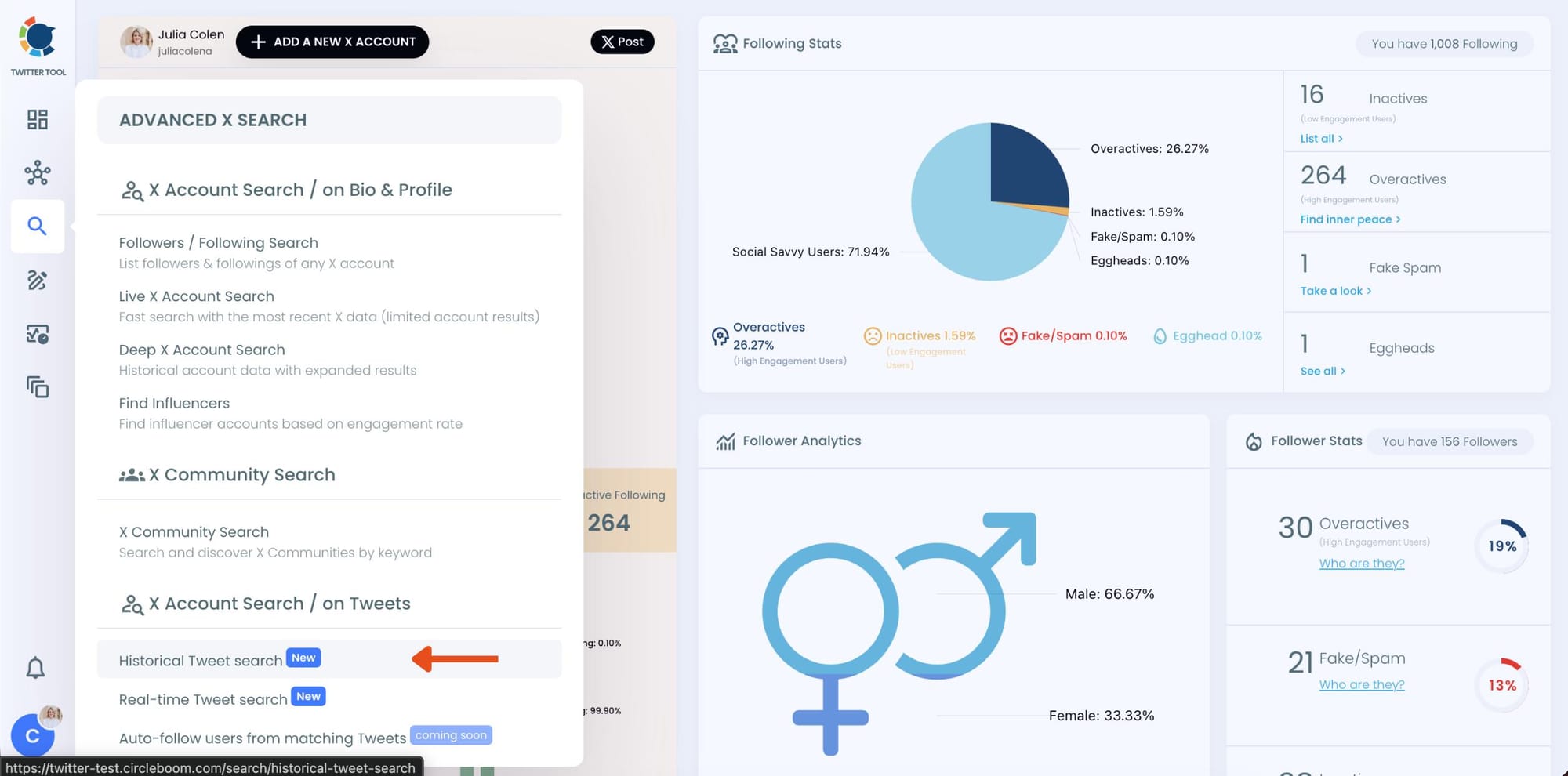
Circleboom also offers “Real-time Tweet Search” in the same section. Historical Tweet Search helps you discover people who tweeted about a keyword in the past across a selected date range, while Real-time Tweet Search continuously monitors new tweets as they happen.
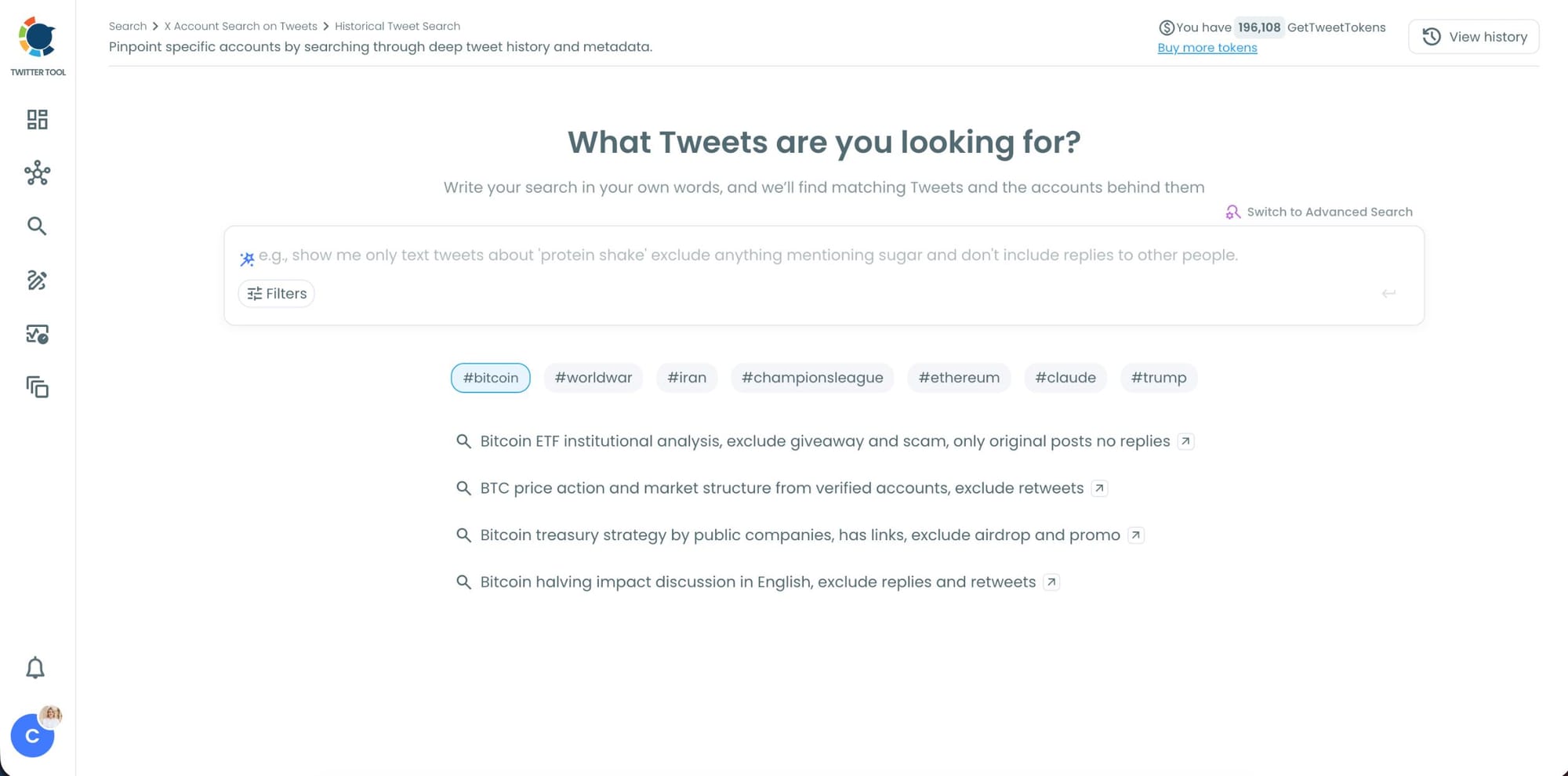
Step #3: Describe the brand mentions you want to find using AI Smart Search
Instead of writing complicated Twitter search operators, you can simply type what you are looking for.
For example: "Find tweets mentioning [competitor name], exclude retweets and promotional posts."
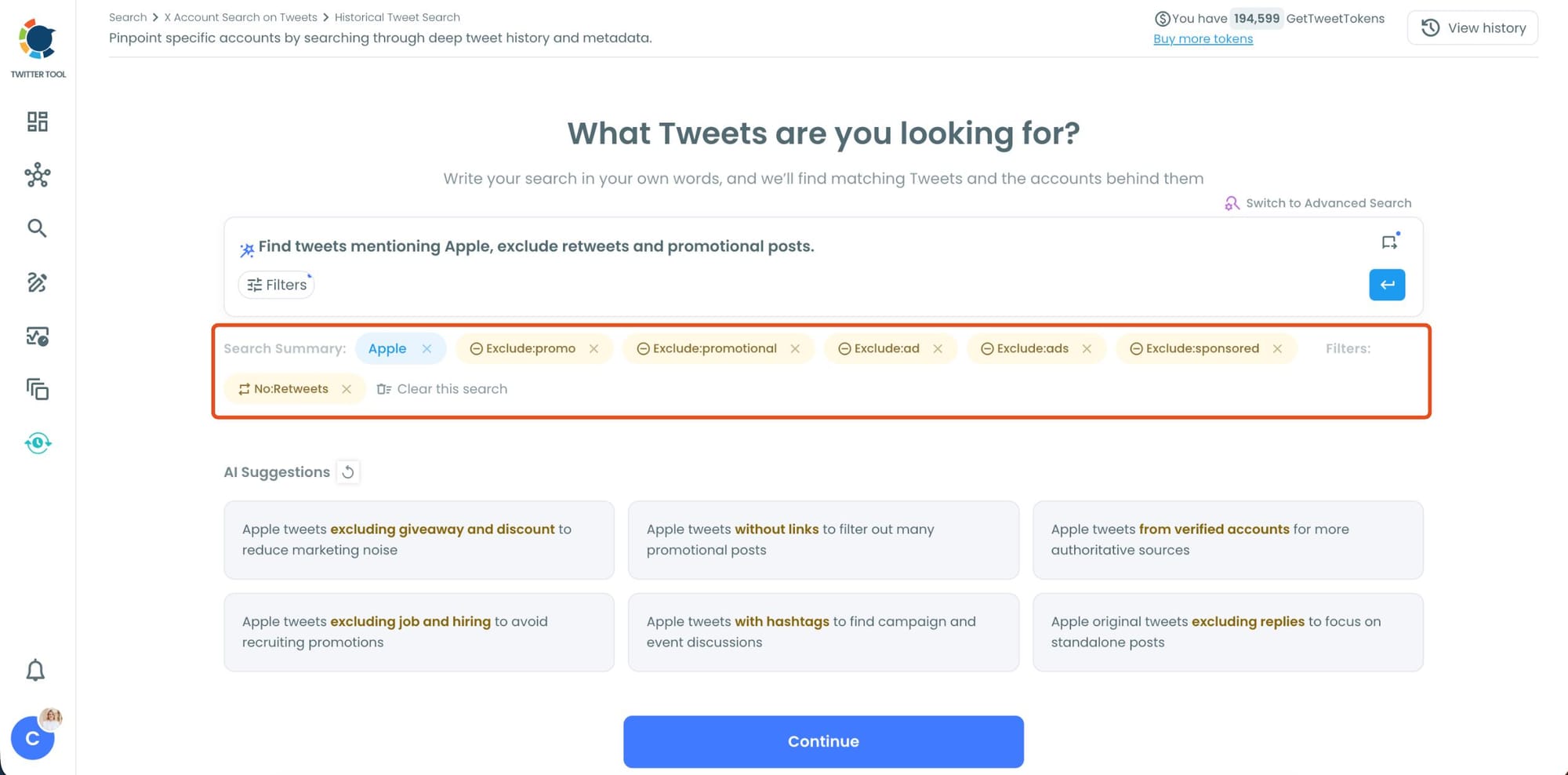
Circleboom AI automatically understands the intent behind your query, extracts the important keywords, and applies filters automatically.
Step #4: Refine your keyword monitoring search with AI suggestions and filters.
Circleboom also suggests ways to narrow your search results. You can focus on intent, comparison posts, replies, or specific languages while filtering out spam, retweets, and noise.
This helps you find more relevant people tweeting about your keyword instead of scrolling through random tweets.
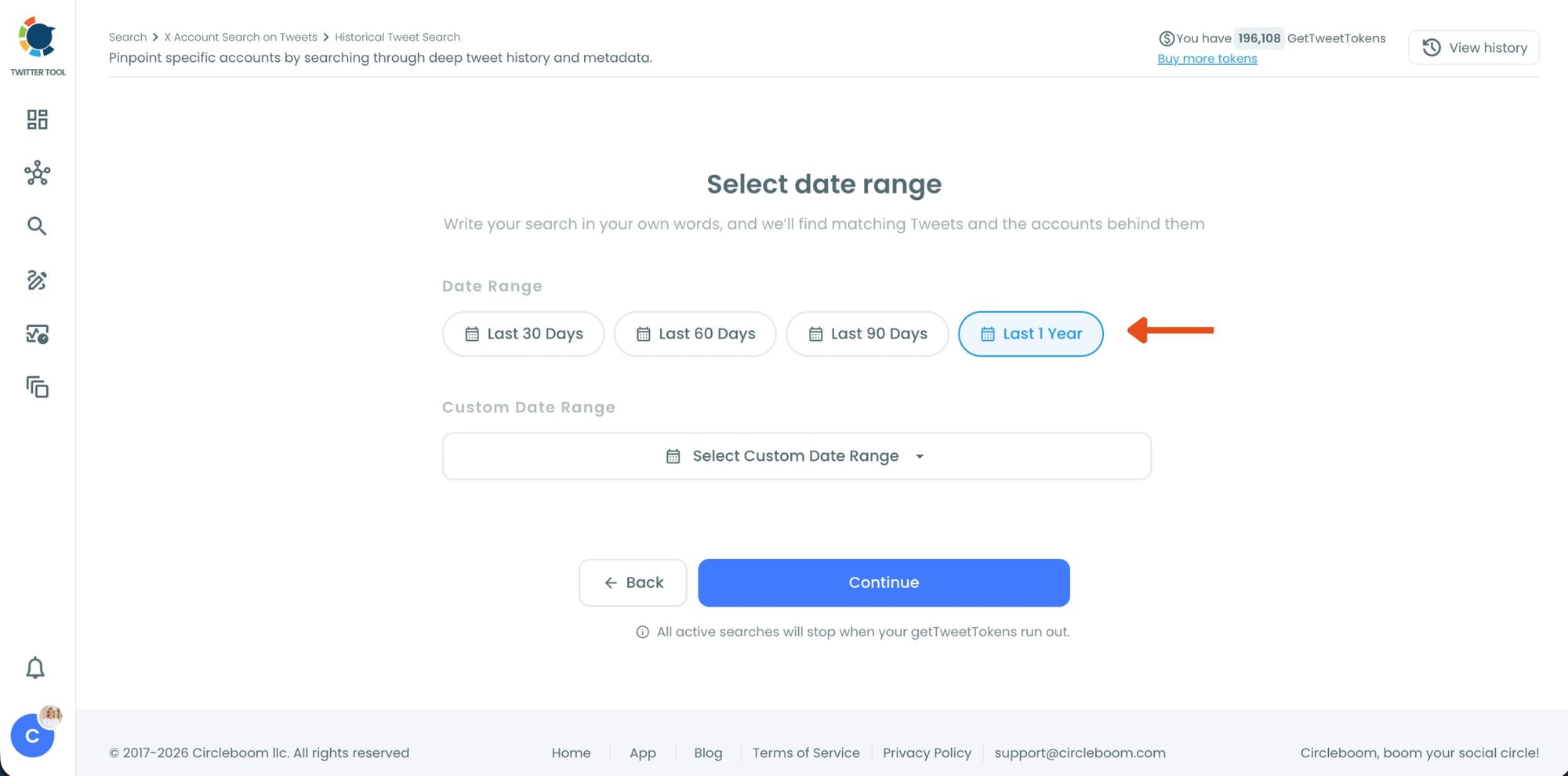
Step #5: Select your historical search date range.
You can monitor tweets from the last 30, 60, or 90 days, search across the last year, or define your own custom date range.
This makes it possible to discover people who tweeted about your topic weeks or even months ago, not just recent tweets.
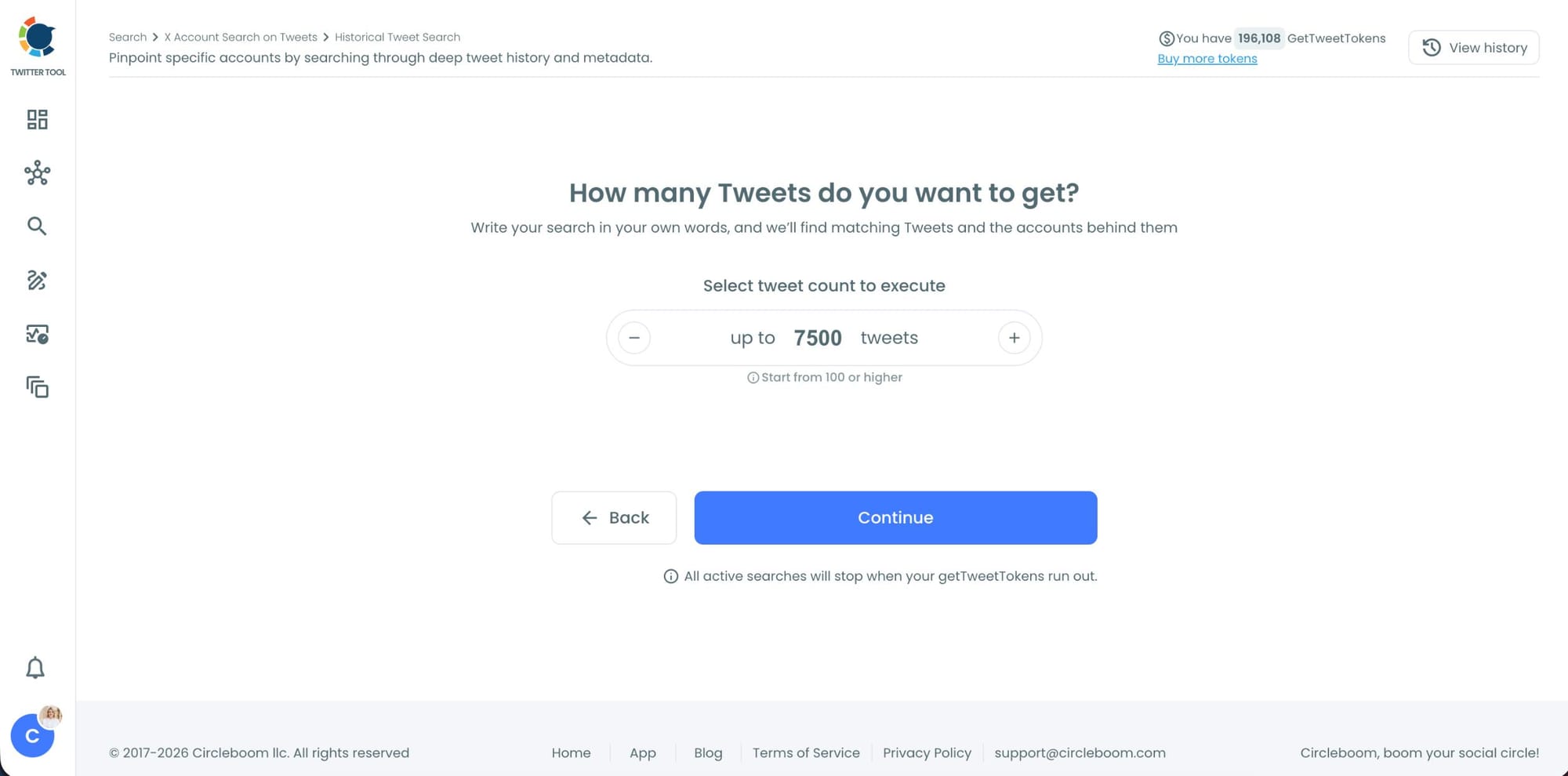
Step #6: Choose how many tweets Circleboom should collect.
Before the search starts, Circleboom lets you select the tweet volume you want to analyze.
Once you click “Continue”, Circleboom scans historical tweet data and starts collecting matching tweets together with the accounts behind them.
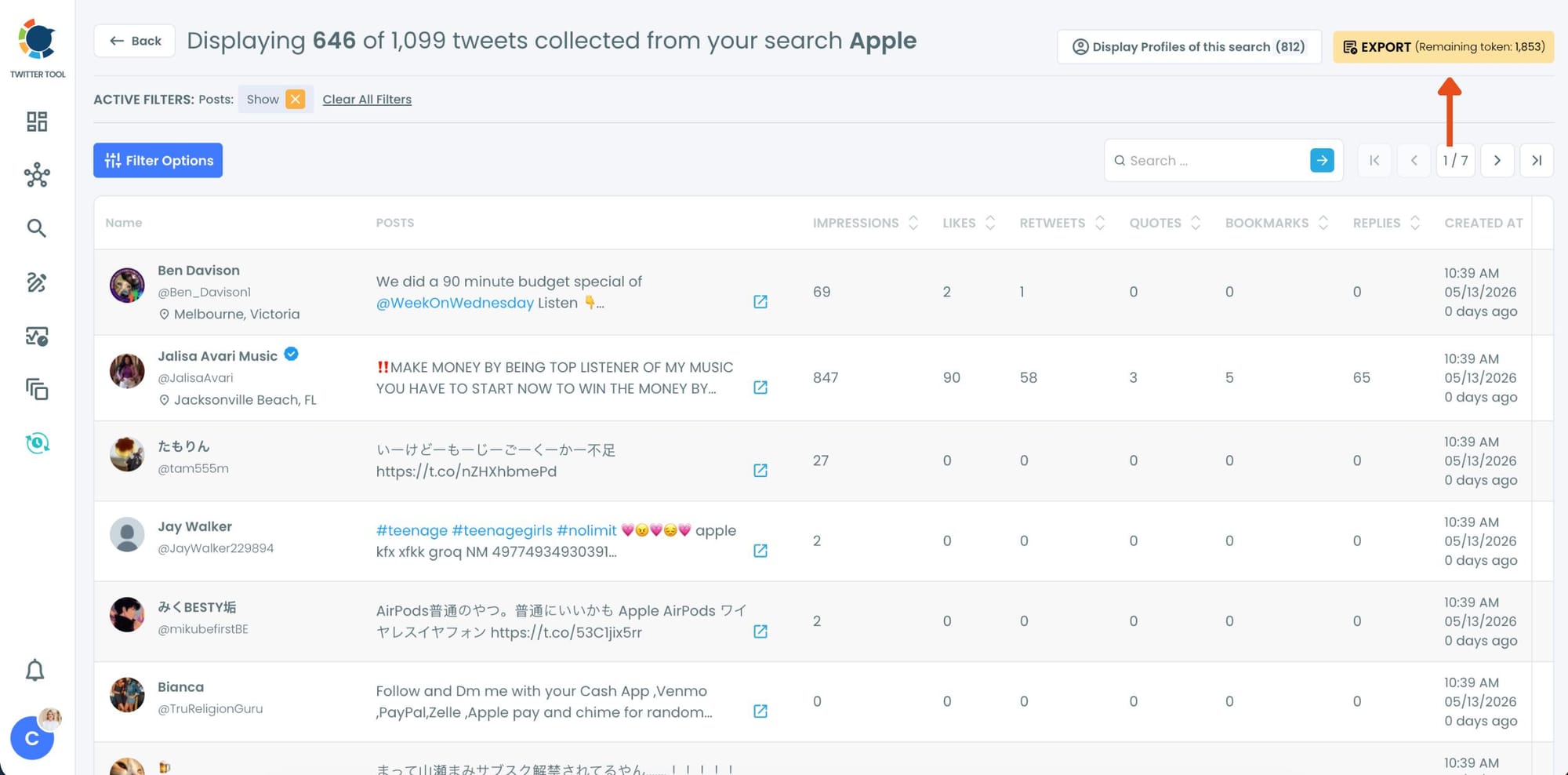
Step #7: Analyze the matching tweets and discover the accounts behind them.
Tweet View displays the matching posts together with impressions, likes, retweets, replies, bookmarks, and posting dates so you can quickly understand which conversations are getting attention.
You can also switch to Profile View to focus on the people behind those tweets.
Profile View displays follower count, following count, account age, tweet count, follow ratio, and engagement activity levels so you can evaluate account quality before interacting with them.
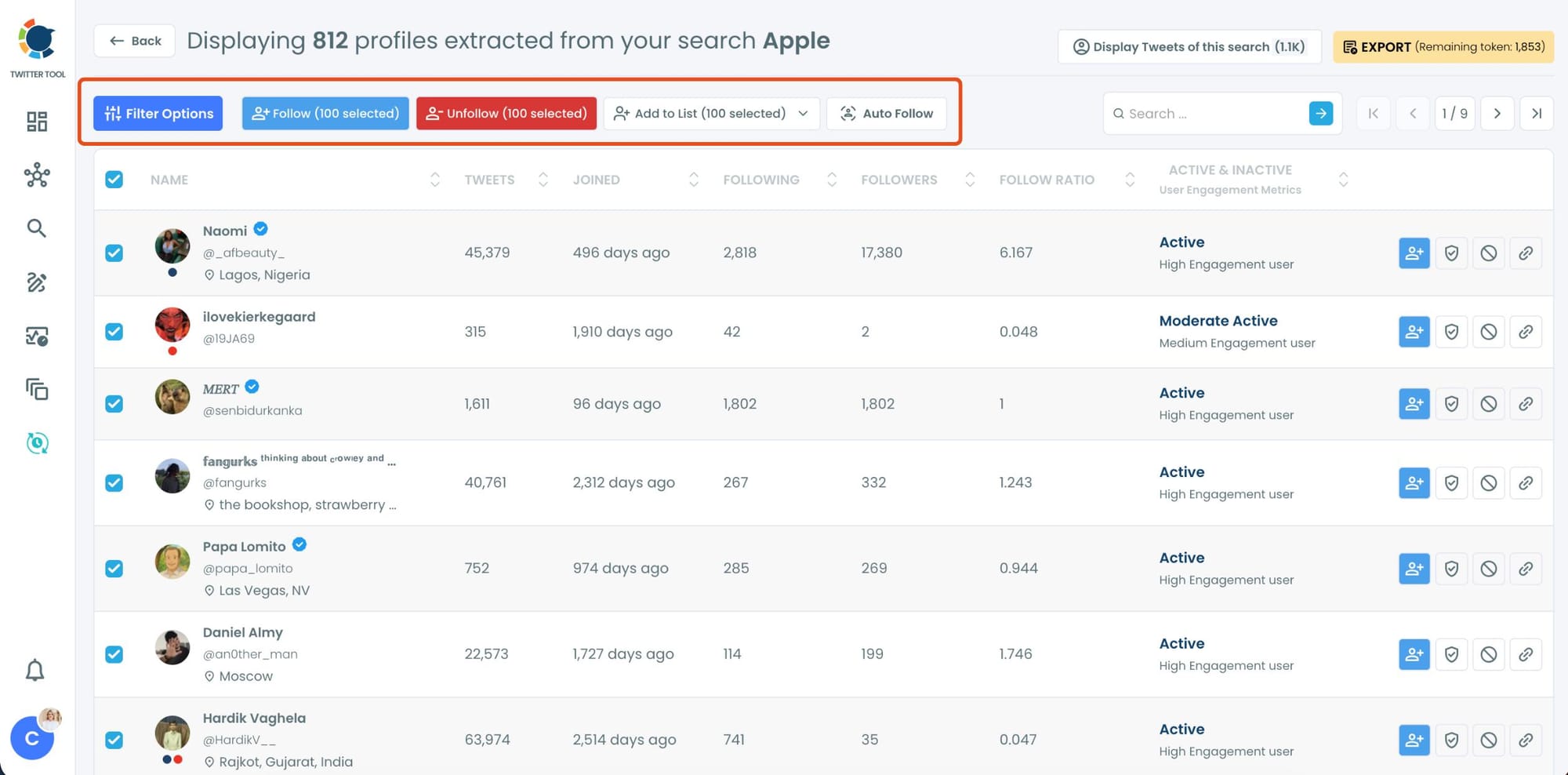
From there, you can directly follow accounts, unfollow them, add selected users into Twitter/X Lists for ongoing monitoring, auto-follow matching users, or export the collected profiles and tweets as CSV files.
What Competitor Mentions Actually Tell You
Tracking competitor mentions on Twitter isn't just about knowing they exist. It's about reading what's in them.
Complaints and frustrations. These are the highest-value signals. When someone tweets "I can't believe [competitor] still doesn't have X feature" or "their support team took three days to respond," they're describing a problem that's actively bothering them. That's an unmet need looking for a solution.
Cancellation and switching intent. "Thinking about leaving [competitor], any recommendations?" "We're evaluating alternatives to [competitor] for our team." These tweets are explicit buying signals. The person is in motion. They're open to something new. Finding them at this moment and responding with something useful is one of the most direct paths to a new customer available on Twitter.
Comparison threads. When users compare your competitor to others, including possibly you, they're doing their research publicly. The criteria they use in comparisons tell you what the market actually prioritizes when evaluating tools in your category.
Praise and what they get right. Understanding what competitor users genuinely love is as useful as understanding what they hate. If a specific feature, pricing model, or onboarding experience comes up repeatedly in positive mentions, that tells you what the market values and where the bar is set.
Feature requests and workarounds. Users tweeting "I wish [competitor] would add X" or sharing workarounds for limitations are describing exactly what they need that isn't being provided. These are product intelligence signals that most companies pay research firms to collect. They're free on Twitter if you know where to look.
📌 The more specific the keyword query, the more useful the signal. Searching a competitor's exact product name returns sharper results than searching a generic category keyword. Adding intent phrases, "looking to replace," "frustrated with," "alternatives to," focuses the results even further.
Historical Search vs Real-Time Monitoring for Competitor Tracking
Historical search is where you start. Before you can respond to anything or act on any signal, you need to understand the landscape.
What has been said about this competitor over the last 90 days? What complaints come up most often? Which accounts are the most vocal? Where does the conversation cluster?
Run a historical search on your competitor's name across the last 30, 60, or 90 days and build a map of the conversation. Read the tweets in tweet view to understand the sentiment and specific pain points. Switch to profile view to see who the most active voices are and what their audience looks like.
Real-time monitoring is what keeps the intelligence current.
Once you understand the historical landscape, switch on real-time search for the same keywords. New competitor mentions surface as they're posted. When someone tweets that they're frustrated with your competitor right now, you're seeing it at the same time as they post it, not three days later.
The combination is what makes competitor monitoring actually actionable. Historical search gives you the context. Real-time search gives you the timing.
⚠️ Competitor monitoring works on any public tweet. Accounts that have set their profile to private are not searchable. The intelligence you gather covers only what has been posted publicly, which is still a substantial and valuable dataset for most active accounts and brands.
How to Use What You Find
Engage with dissatisfied users. When someone tweets a frustration about a competitor, a reply that acknowledges their problem and offers something genuinely helpful is worth more than any ad you could run to that person. You found them at the exact moment of peak frustration. The timing is the advantage.
Build a watching list. Add accounts expressing switching intent or comparing options to a private Twitter List. Monitor when they post again about the same topic. Engage when the conversation returns or when they post something that directly connects to what you offer.
Identify recurring pain points. If the same complaint about a competitor appears repeatedly across different accounts, that's a product opportunity, a marketing angle, or both. The volume and consistency of a specific frustration is more reliable than a single vocal user.
Export for sales and marketing use. Profile data from competitor mention searches exports as a CSV. Sales teams can use it as a prospect list of accounts actively evaluating alternatives. Marketing can use it to build custom audiences for targeted campaigns. Both cases benefit from the intent signal that brought the account into the dataset.
Track sentiment over time. Run the same historical competitor search monthly and compare periods. Is the tone shifting? Are new complaints emerging? Did a recent product update or pricing change drive a spike in negative mentions? The historical data makes trend analysis possible.
Circleboom Twitter's Find Influencers feature can complement this by identifying which accounts in the competitor conversation have the most reach and influence.
 infocircleboom.com
Frequently Asked Questions
Can you monitor competitor mentions on Twitter?
Yes. All public tweets are searchable. Circleboom Twitter's keyword search scans historical tweet data and monitors in real time for any competitor name, product, or phrase. Results include full engagement data and account profiles for everyone behind a matching tweet.
Is monitoring competitor mentions on Twitter legal and ethical?
Yes. Public tweets are public. Reading and analyzing what people post publicly is standard competitive research. Circleboom Twitter accesses this data through X's official APIs, which is the compliant and approved method for doing so at scale.
How far back can I search competitor mentions?
Historical Tweet Search covers up to one year of past tweet data with date range options of 30, 60, or 90 days or a custom window you define. This lets you audit months of competitor conversation rather than just the last few days.
How quickly does real-time monitoring surface new competitor mentions?
Real-Time Tweet Search surfaces new matching tweets as they're posted. There is no delay or batch processing. When someone tweets about your competitor right now, it appears in your results immediately.
Can I filter competitor mention results by account quality?
Yes. Profile view includes follower count, account age, activity level, follow ratio, and engagement status. You can focus on accounts that match your target profile before taking any action, so you're not wasting time on inactive or irrelevant accounts.
Can I export the accounts behind competitor mentions?
Yes. Profile data exports as a CSV with username, bio, follower count, account age, and activity status. This can be imported into a CRM, used to build a custom ad audience, or fed into any outreach workflow.
Should I search my competitor's brand name or their product name?
Both. Brand name searches surface general brand sentiment and broader audience conversations. Product name searches surface more specific feature-level feedback and comparison discussions. Running both gives you the fullest picture of what's being said.
Final Thoughts
Your competitors' dissatisfied users are tweeting publicly about exactly what they wish was different. Their switching intent announcements are sitting in tweet data. Their feature complaints are search queries away.
Circleboom Twitter's keyword search gives you the historical depth to map that conversation over months and the real-time monitoring to catch new signals the moment they appear. The intelligence is already out there. Finding it is the first step.
Monitor competitor mentions on Twitter with Circleboom Twitter.
 infocircleboom.com