
X gives you two ways to take someone off your followers list, and which one you use mostly depends on whether you're at a computer or holding your phone.
Short answer: to remove followers on X, open the follower's row or profile on x.com, pick the more icon (three dots), choose Remove this follower and confirm with Remove. X offers that button on the web only, so inside the iPhone or Android app the working route is to block the account and then unblock it, which ends their follow the same way, per X's following FAQ.
The problem is finding them. On large accounts, X's followers list stops loading after a point, so many older followers and bots never show up for you to remove.
That's where an official X partner comes in. With Circleboom, an Official X Enterprise Developer, you can pull your complete follower list through X's official API, sort and filter it, and remove the accounts you pick from there. No scraping, and Circleboom never asks for your X password.
So the rule of thumb is:
A few followers you can already see: use the Remove button on x.com or the block and unblock method in the app. Both are covered step by step below.
A large account, or followers you can't reach in X's list: use Circleboom to see every follower and remove them in bulk. That flow is covered in the bulk removal section further down.
Below: both native routes step by step, what each one leaves behind, and how to reach the followers X's own list never shows you.
How to remove followers on X with the Remove this follower button
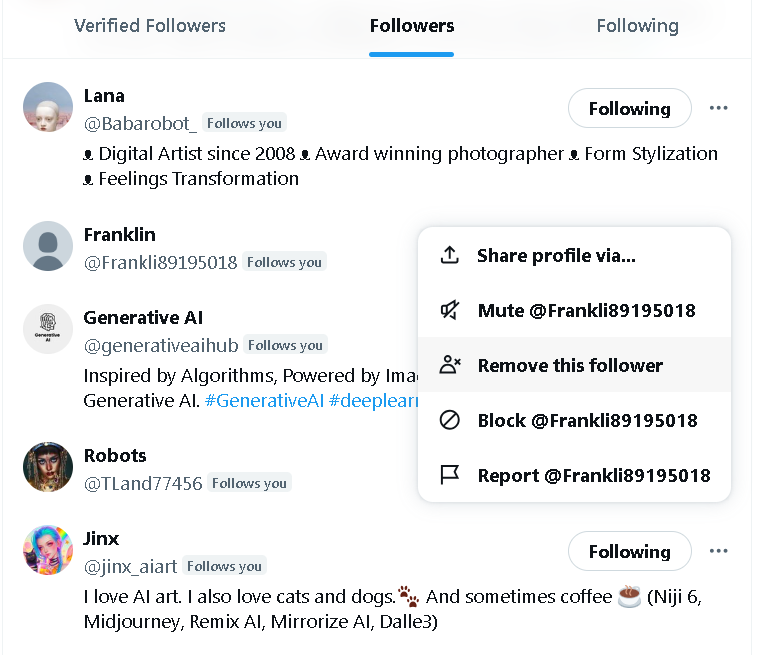
The cleanest way to remove followers on X is the Remove this follower option, which X documents in two places: your own followers list and the follower's profile page.
Both end at the same Remove confirmation, and neither one blocks the account or touches your own follow of them.
Use whichever route gets you to the account faster.
Remove a follower from your followers list on X
The followers list works best when the account is recent or easy to spot near the top.
- Open your profile on x.com and select Followers.
- Find the account you want to remove.
- Click the more icon to the right of that account's Follow button.
- Choose Remove this follower, then confirm by clicking Remove.
The account drops off your list as soon as you confirm.
Remove a follower from their profile page on X
On a long followers list, scrolling for one name is slow. Going straight to the account is quicker, and it works from any link or reply where you see them.
- Open the follower's profile page on x.com.
- Click the more icon on their profile.
- Select Remove this follower and confirm with Remove.
A small "Follows you" label next to their handle tells you that you're on the right kind of profile before you start.
The more icon is the three dots at the top right, above the profile photo.
That same three-dot menu is where Block lives too, which matters for the second method below.
The Remove button is on the web only
X's own note on this is short: the option to remove an account from following you is currently available on web only. So if you open the X app on your phone and can't find Remove this follower anywhere, nothing is wrong with your app.
You have two ways around it on a phone:
- Open x.com in your phone's browser, sign in, and follow either set of steps above.
- Stay in the app and use the block and unblock method in the next section.
How to remove followers on X by blocking and unblocking them
Blocking and then quickly unblocking an account removes it from your followers, and it works in every version of X, app included.
People often call this a soft block.
It works because of how X defines a block. According to X's page on blocking and unblocking accounts, accounts you have blocked cannot follow you, and blocking an account that follows you ends that follow.
Lifting the block afterward does not restore it. The account stays unfollowed until it chooses to follow you again.
Step 1: block the follower on X
On the web or in the app:
- Go to the profile page of the follower you want to remove.
- Open the more icon on their profile.
- Select Block from the menu.
- Confirm by selecting Block.
You can also start from one of their posts: tap the icon at the top of the post, choose Block and confirm.
Step 2: unblock them straight away
Now lift the block so the account is simply gone from your followers, not locked out.
- Stay on the blocked account's profile, where the Follow button has turned into a Blocked button.
- Click or tap Blocked.
- Confirm the unblock: X labels it Unblock on iOS and Yes on Android.
Check your followers list afterward and the account won't be on it.
What the block and unblock leaves behind on Twitter
A soft block does one thing the Remove button never does: it cuts the connection in both directions. X's blocking page says that blocking an account you currently follow makes you unfollow it as well, and after the unblock you'd have to follow it again yourself.
If you followed that person and want to keep seeing their posts, use the Remove button on x.com instead.
If you never followed them, the two methods end in the same place.
Remove button or soft block: which one to use on X
Both methods take the account off your followers list. The difference is in the side effects:
- Remove this follower: web only, ends their follow of you, and leaves your follow of them untouched.
- Block, then unblock: works in the app, ends their follow, and also ends your follow of them.
- Block and keep it: ends the follow and stops them from following you again, messaging you or engaging with your posts.
On a computer, use the Remove button. On a phone, soft block. When the account shouldn't come back, block it and leave the block in place.

Will the follower know you removed them on X?
No. X's help pages describe no notification for a removal, and a blocked account isn't notified either.
What gives it away is a visit. If the person opens your profile later, they'll see a Follow button where Following used to be.
The soft block has one extra moment of exposure: X's blocking page notes that a blocked account which visits your profile while the block is on will see it has been blocked. Unblock quickly and that window is small.
After the fact, a removal and a soft block look the same from the other side. This piece on how to know if someone soft blocked you on Twitter looks at it from their point of view.
What changes when your X account is protected
Removing a follower matters more on a protected account, because on X only approved followers can see protected posts. A removal cuts that person off from everything you've posted, not just from new posts in their timeline.
It also changes how they come back. X's following FAQ says a removed follower can follow a public account again at any time, while on a protected account they can only send a new follow request, which you're free to ignore.
For more on cleaning up a protected account, see this guide to removing followers on a private Twitter account.
When to keep the block instead of lifting it on X
Some followers shouldn't get a second chance to follow you. For an account that harasses you, sends spam or keeps re-following after every removal, skip the unblock and leave the block on.
X's blocking page lists what a blocked account cannot do:
- engage with your posts, such as like, reply or repost
- follow you
- send you Direct Messages
- add your account to their lists
- tag you in a photo
If your posts are public, a blocked account can still see them; it just can't interact with them. If your posts are protected, it can't see them at all.
This breakdown of the effects of muting or blocking a person on Twitter helps when you're weighing a mute instead.
Blocks are easy to lose track of. When you want to review them later, this guide on how to see blocked Twitter accounts and unblock them shows where your block list lives.
Why can't I remove followers on X from the app?
Because X hasn't put the option there. The Remove this follower button is a web feature, and X's help center says so directly. Updating the app or reinstalling it won't make it appear.
A few other situations look like a missing button:
- You're on someone else's followers list, where only your own followers can be removed.
- The account has already unfollowed you, so there's nothing left to remove.
- The account was locked and X took it out of follower counts, which X's following FAQ says it does for locked accounts.
For the other reasons the option may not show up, this article on why you can't remove followers on Twitter goes through each case.
Why removing bot followers on X one at a time stops working
Both methods above are built for a handful of accounts. Each removal is three or four clicks, and a soft block is two separate actions per account. That's fine for an ex-colleague or a single spam profile.
It stops being fine when the problem is a few hundred of them.
That usually happens after a post travels further than normal, a giveaway, or a spike nobody can explain.
The new followers share a look: no profile photo, almost no posts, a recent join date, and a following count in the thousands.
X doesn't sort those accounts out for you. There's no filter on your followers list for suspected bots, so finding them means opening profiles one by one before you even start removing.
If you're not sure how big the problem is, this guide on how many of your X followers are bots helps you size it first.
Removing bot followers in bulk with Circleboom
Bots don't reply, click or repost, but they still count as followers. So every one of them lowers your engagement rate and makes your audience look less real to anyone checking it.
Clearing them by hand is where most people give up.
Circleboom Twitter's Fake/Bot Followers view is built for exactly that step. It pulls your whole follower list and puts the suspicious accounts on one page, so you review a short list instead of scrolling through thousands of profiles.
The access is the safe kind. Circleboom is an official X Enterprise developer, so it reads your followers through X's official access rather than scraping, and it never asks for your X password.

How Circleboom decides which followers look like bots
An account lands on the list only when several signals line up, never on one weak sign alone:
- very few posts for the account's age
- a lopsided follow ratio, following thousands with almost no followers
- no profile photo or bio
- a very recent join date
- low or no engagement
Every column is sortable. Sorting Follow Ratio from lowest to highest brings the most obvious bots to the top, and a filter panel narrows the list further by join date, tweet count, language or location.
How the bulk removal works
Circleboom's help page on how to remove followers on Twitter/X lays out the flow:
- Log in and open Fake/Bot Followers from the Followers menu on the left.
- Whitelist real accounts that look unusual, so no bulk action can touch them.
- Tick the accounts to drop, or select everything that's left, and press Remove Follower.
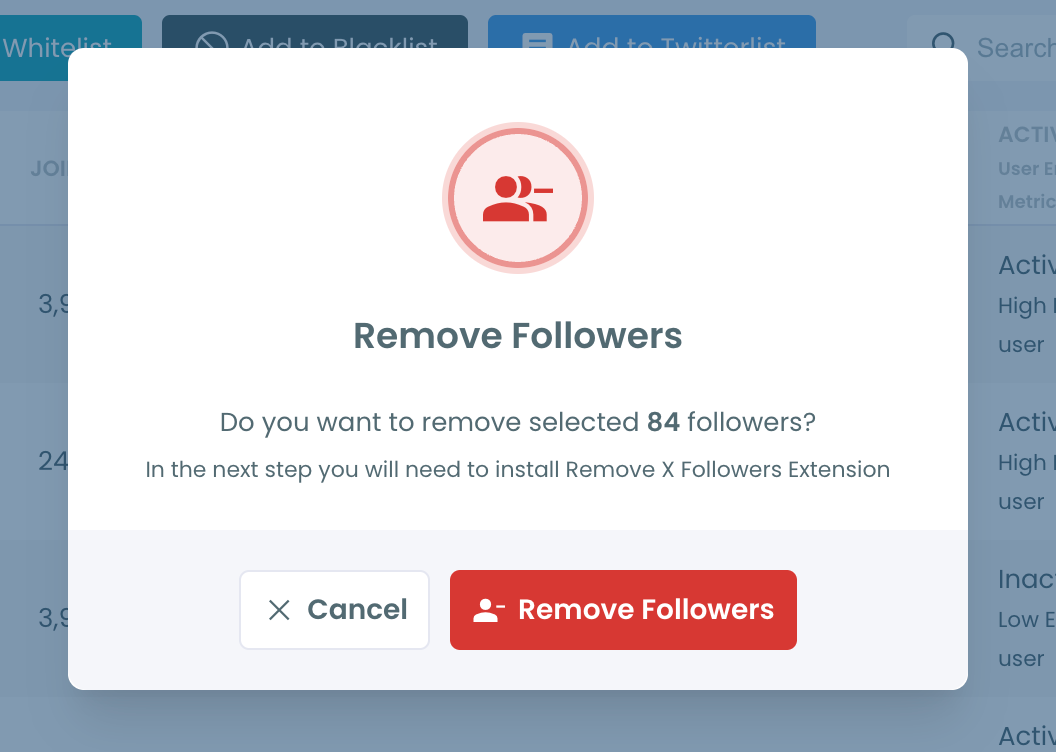
- Install the Remove Twitter/X Followers extension for Chrome when prompted, then press Start.
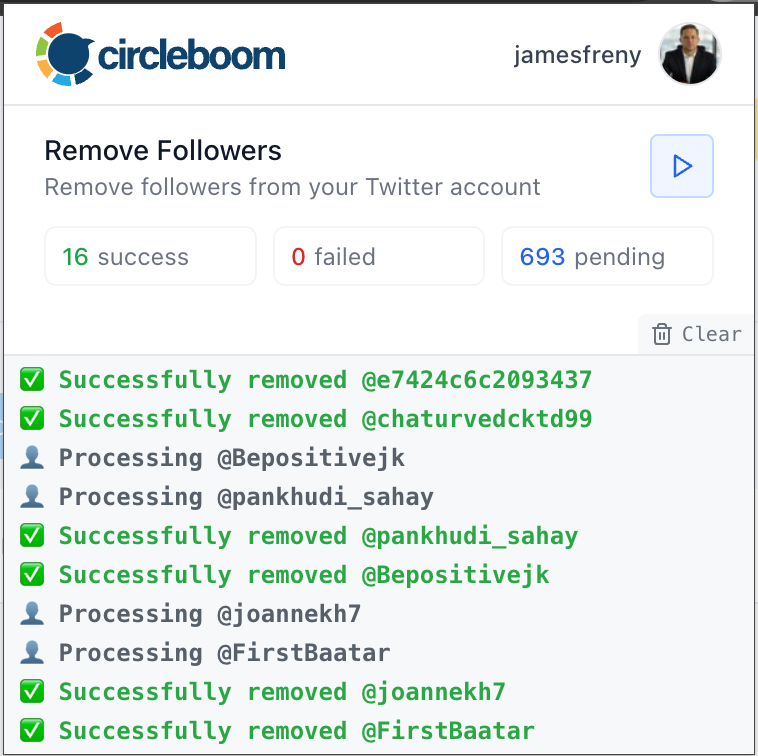
The extension works through the queue at a pace X accepts, pausing for 1 to 20 minutes whenever the rate limit is reached.
Keep Chrome and the Circleboom tab open until it finishes.
The processing times on Circleboom Twitter page lists Remove Follower at up to 2,000 requests every 24 hours.
A removal through Circleboom behaves exactly like one on x.com: the account can follow you again later.
For bot networks that keep coming back, the same view can add them to a Mass Block list instead.
This guide on stopping bots from following you on X looks at keeping the next wave away.
The full walkthrough, with the Fake/Bot Followers screen and the extension, is on the Remove Twitter Bot Followers page.
Removing followers on X comes down to one person or a hundred
For one follower, X has you covered: the Remove button on x.com, or a block and unblock in the app. Both take seconds and neither tells the other person.
When the list you want gone is long and full of bots, that's when a bulk tool earns its place.
→ Clear out bot followers in one pass with Remove Twitter Bot Followers
Remaining questions about removing followers on X
Does removing a follower on X unfollow them too?
No. Following on X isn't mutual, so the Remove button ends only their follow of you. If you follow them back, you'll keep seeing their posts until you unfollow them.
A soft block is different: it ends both follows at once.
Is muting someone the same as removing them on Twitter?
No. Muting hides an account's posts from your timeline while it keeps following you and seeing your posts. Removing ends the follow but changes nothing about what you see from them.
This guide on how to mute someone on Twitter/X covers the steps.
Can you undo removing a follower on X?
Not from your side. X has no undo for a removal, and its following FAQ says there's no way to ask someone to follow you. A follower removed by mistake comes back only if they notice and follow you again.

