

Reposting is one of the easiest things to do on X.
You see something funny, insightful, or newsworthy — tap Repost — and it instantly appears on your timeline.

For a long time, I constantly reposted. Memes, quotes, threads, breaking news, hot takes — my timeline was always full and active.
Earning from X
— Circleboom (@circleboom) October 9, 2025
> > For Content Creators
Many Twitter X creators hit this wall:
☝️Impressions climb
🔻Payouts fall
We worked with X creators (including a global public figure) to test what X actually rewards.
Here’s the field-tested 14-day plan:
The Problem
Twitter X…
But after a while, something felt off.
When I scrolled back through my profile, I realized almost everything on my timeline was someone else’s voice. My original posts were buried. My feed didn’t really sound like me anymore. It looked like a collage of random thoughts from random people across random years.
That’s when it became clear:
I needed to clean up my reposts.
But then came the real problem — deleting reposts one by one is almost impossible if you’ve been active for more than a few months.
So I went looking for a smarter way.
 Arif Akdogan
What Counts as a Repost on X?
On X, reposting means sharing someone else’s post to your own audience. Today, you’ll see two versions:
🔷 Repost (formerly Retweet): Shares the post exactly as it is.
🔶 Repost with Comment (Quote Tweet): Shares the post but gives you space to add your own thoughts.
Both have their place. Reposts help you:
- Join conversations quickly
- Boost creators you like
- Keep your timeline active even when you don’t have something original to say
But unlike your own posts, reposts don’t age well. They can look out of context, irrelevant, or even misleading later.
Why Removing Old Reposts Matters
Cleaning up reposts isn’t about pretending you never shared something. It’s about making your profile reflect who you are now.
Here are the biggest reasons people remove reposts:
✅ Your Personal Voice Gets Lost: When your timeline becomes a stream of other people’s posts, your own identity fades.
✅ First Impressions Matter: New followers often scroll your profile before deciding whether to follow you. A timeline full of reposts can look unfocused or messy.
✅ Reputation & Clarity: Your views evolve. A repost from three years ago may not represent you today.
✅ Better Engagement on Your Own Content: Your original posts perform better when they aren’t buried under reposts.
✅ A Fresh, Clean Look: Sometimes you just want to feel like you’re starting from a clearer place.
How to Remove Reposts Manually (If You Only Have a Few)
You can remove reposts manually:
- Go to your profile.
- Find a repost.
- Tap the Repost icon.
- Select Undo Repost.

If you want to find reposts faster, use the search filter:
from:YourUsername filter:reposts
This will show only reposts in your timeline — but you still need to remove them one by one.
The problem?
If you have hundreds or thousands of reposts, this process can take hours or even days. Most people quit halfway.
That’s exactly where I got stuck.
Why Bulk Removal Needs to Be Done Carefully
There are scripts and extensions out there that claim to delete reposts fast — but many of them:
- Ask you to enter your X password (major red flag)
- Trigger unsafe automation
- Ignore X’s rate limits
- Can get your account temporarily restricted or permanently suspended
When cleaning up your account, safety matters more than speed.
So I needed something official, trustworthy, and selective — not a “wipe everything instantly” tool.
The Tool I Used to Remove My Reposts Quickly (and Safely)
That’s when I started using Circleboom Twitter.

I had heard of it before, but I didn’t realize it was actually an official Enterprise customer of X — meaning it works within the platform’s rules and uses the Twitter API safely. No password sharing. No risky automation.
The best part was that Circleboom let me see only my reposts — separated from my original tweets — which meant I could finally clean up my profile without digging through years of posts.
I could also:
- Filter reposts by date
- Filter by keyword
- Keep reposts I wanted to keep
- Remove only the ones that didn’t represent me anymore
It wasn’t a blind wipe — I stayed in control of what was deleted.
How to Remove Reposts in Bulk Using Circleboom (Step-by-Step)
Step #1: Go to the Delete Tweets Tool
From your Circleboom dashboard, look at the left-hand menu. Under Essential Toolbox > Delete Tools, click on “Delete Tweets”.

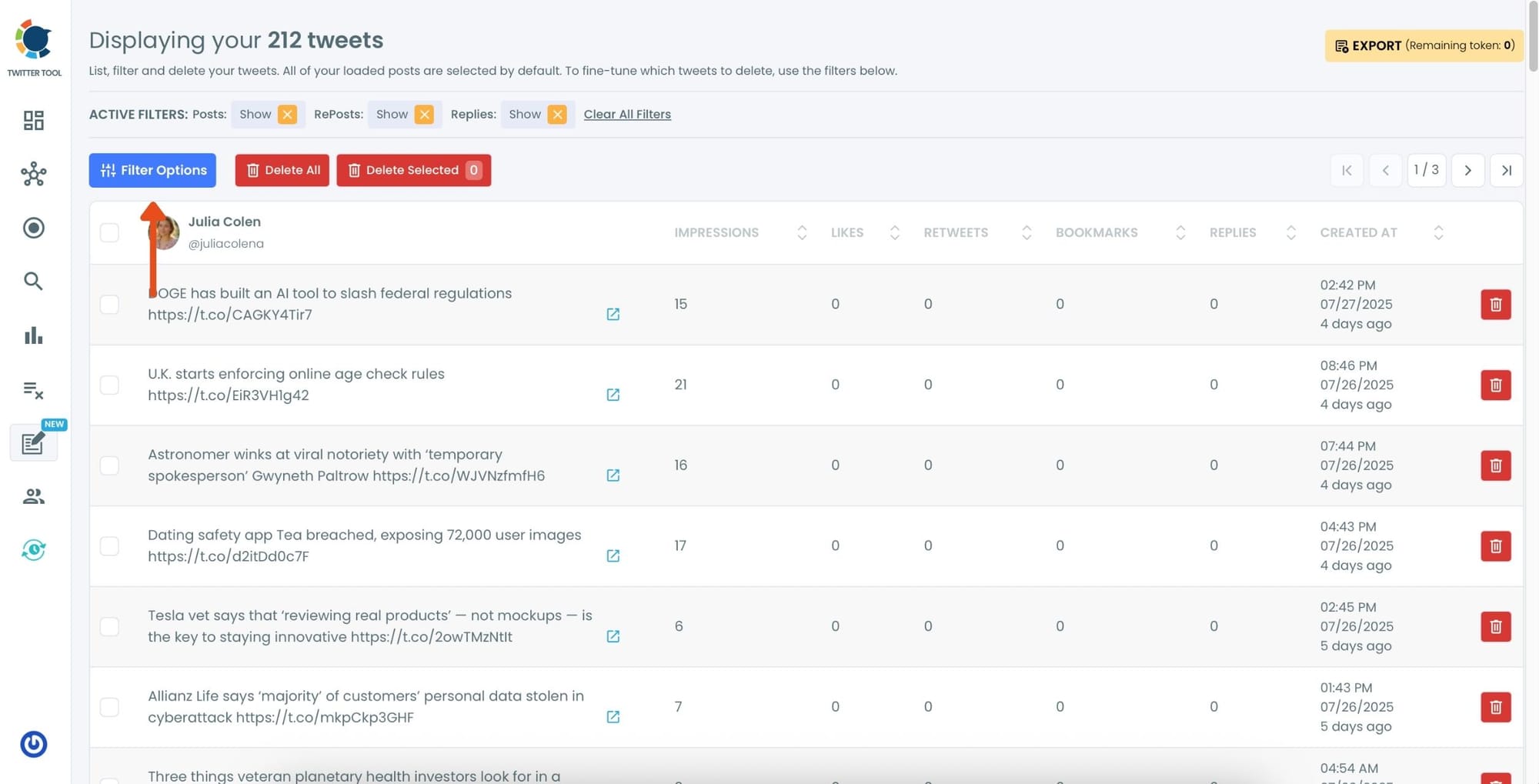
Step #2: Open Filter Options
Once your tweets load, click the “Filter Options” button above your tweet list.
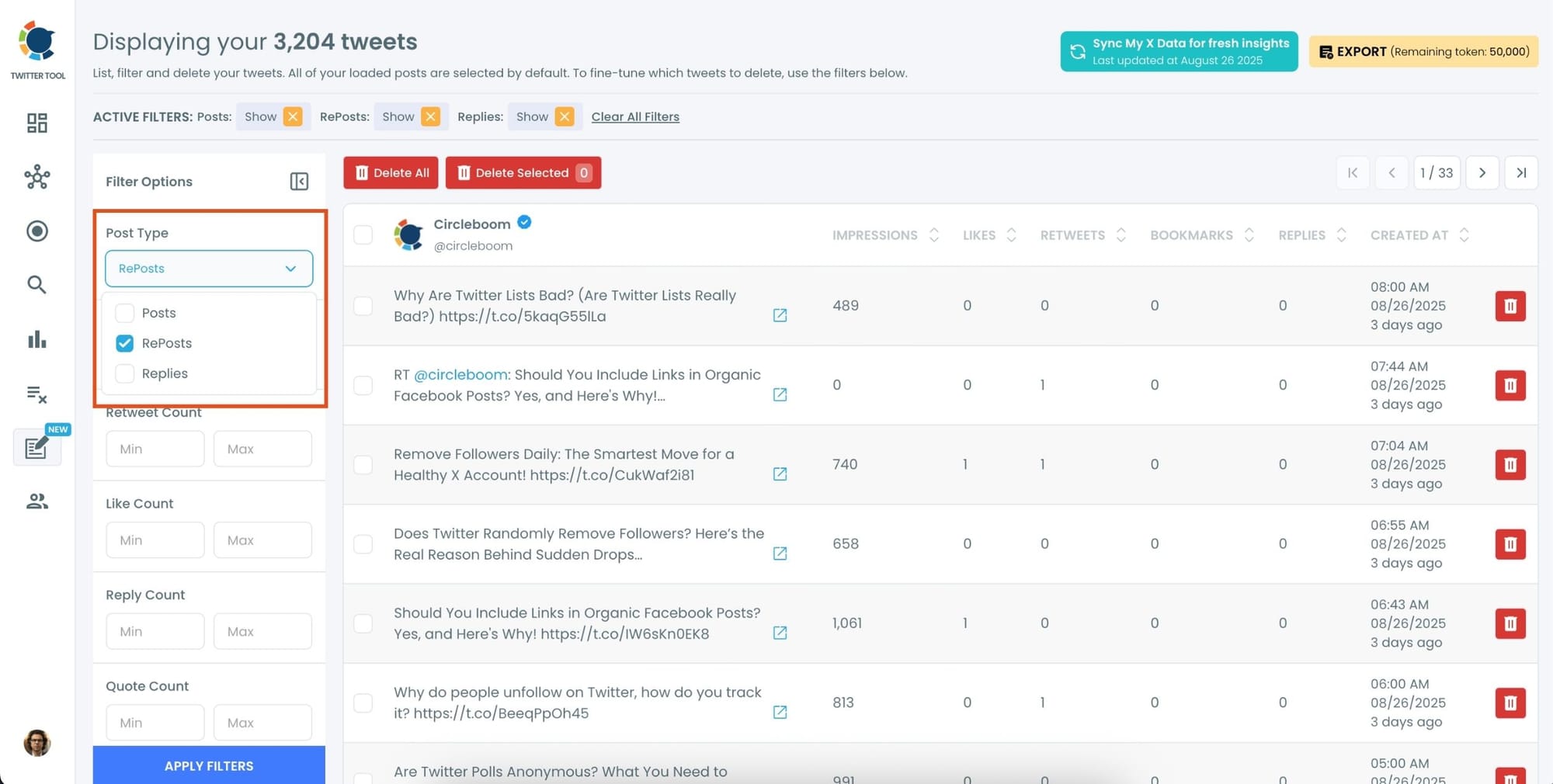
Step #3: Choose “RePosts” as Post Type
In the filtering panel, under Post Type, check the “RePosts” option and uncheck others. Then, click “Apply Filters.”
This will display only your retweets.
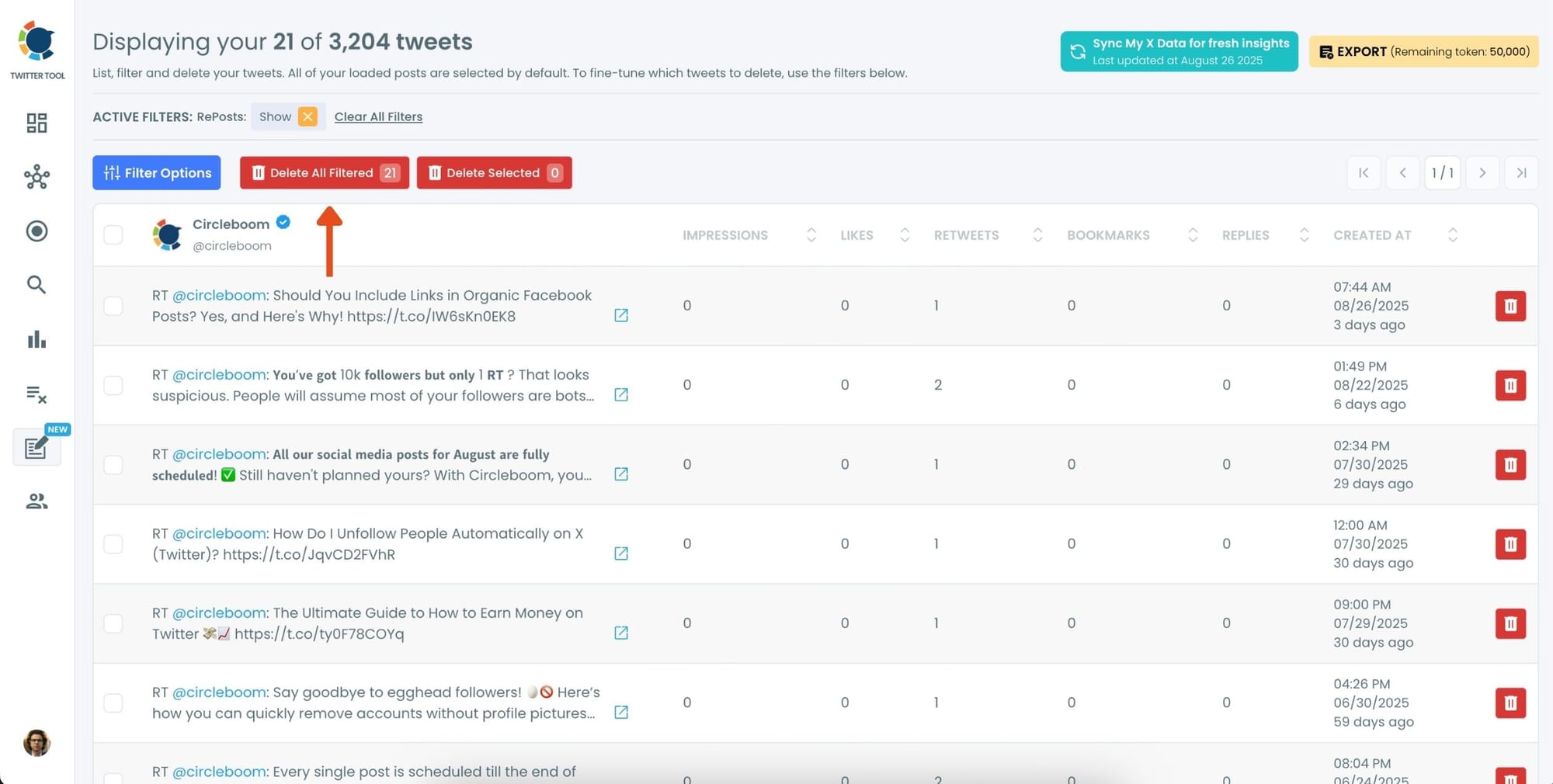
Step #4: Review the Filtered RePosts and Click “Delete All Filtered”
Now you’ll see only your retweets listed—nothing else. You can scroll through and review if needed.
Once you’re sure you want to delete all retweets, click the red “Delete All Filtered” button at the top.
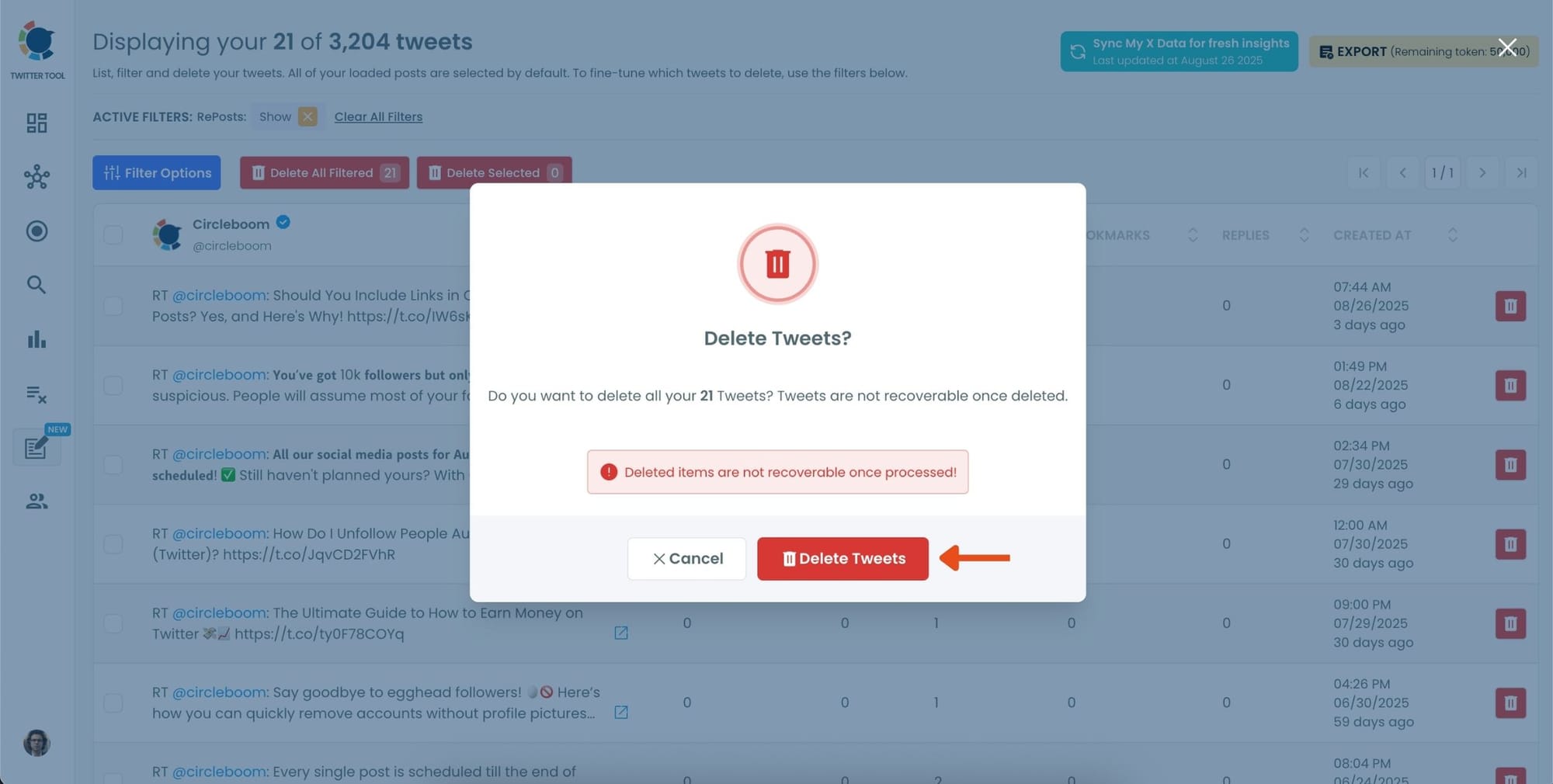
Step #5: Confirm the Action
A pop-up will appear asking if you’re sure. Click “Delete Tweets” to permanently remove all selected retweets.
When I refreshed my profile, my timeline instantly felt cleaner—more focused on my own voice.
If you need a more detailed guide, here is our hands-on video:
Before and After My Repost Cleanup
Before
🔴 My profile looked chaotic.
🔴 My voice was hidden under other people’s posts.
🔴 Engagement was scattered and low quality.
After
🟢 My profile finally looked like my profile again.
🟢 New followers understood who I am and what I talk about.
🟢 My engagement improved because my posts weren’t buried anymore.
It honestly felt like I reclaimed my own timeline.
Tips to Keep Your Profile Clean Moving Forward
➡️ Keep Quote Reposts: They contain your thoughts.
➡️ Delete Reposts Older Than a Year: They rarely hold value.
➡️ Be Intentional: Repost less, create more.
Your timeline is your identity — shape it on purpose.
Final Thoughts
Reposts are great in the moment. But over time, they can drown out your voice and blur your profile’s identity. If you care about how your profile looks — whether for personal expression, credibility, career, or growth — cleaning up old reposts is worth it.
Doing it manually is possible for just a few reposts.
For anything more than that, Circleboom Twitter makes the process fast, safe, and controlled.
If you’re ready to make your profile reflect who you are again:
Start removing your reposts in minutes!

