
The setting is not where you would look for it. It is not in Privacy and Safety, not under Direct Messages, and not anywhere in your account settings. It sits inside Chat, behind a dropdown most people have never opened.
That is why plenty of accounts already have X Numbers available and have no idea. X began rolling the feature out on September 22, 2026, and the controls arrived in a place nobody thinks to check.
X Numbers are here.
— XChat (@chat) September 22, 2026
Share yours with anyone you want to contact you, even if you don't follow them. It's an optional way for people to message or call you, without you needing to accept requests or follow them back. pic.twitter.com/HkObZSQMhm
Getting it switched on takes about thirty seconds. Getting it switched on correctly takes a couple of minutes, because two of the defaults point the wrong way for anyone planning to share their code with people they do not know.
Here is the whole process, including the settings worth fixing before you hand the code to a single person.
How to Turn On Your X Number
1. Open Chat. Tap the Chat icon in the X app. This is XChat, the messaging layer, not the old DM inbox behavior you might remember.
2. Enter your Chat PIN if you are prompted. XChat asks for a PIN on protected accounts and on new devices. If you have not set one, you will not see this step.
3. Open the inbox dropdown. Tap the header at the top of your inbox to expand the menu. This is the dropdown that holds the inbox filters.
4. Select Number. This opens the X Number sheet, which holds every control for the feature in one place.
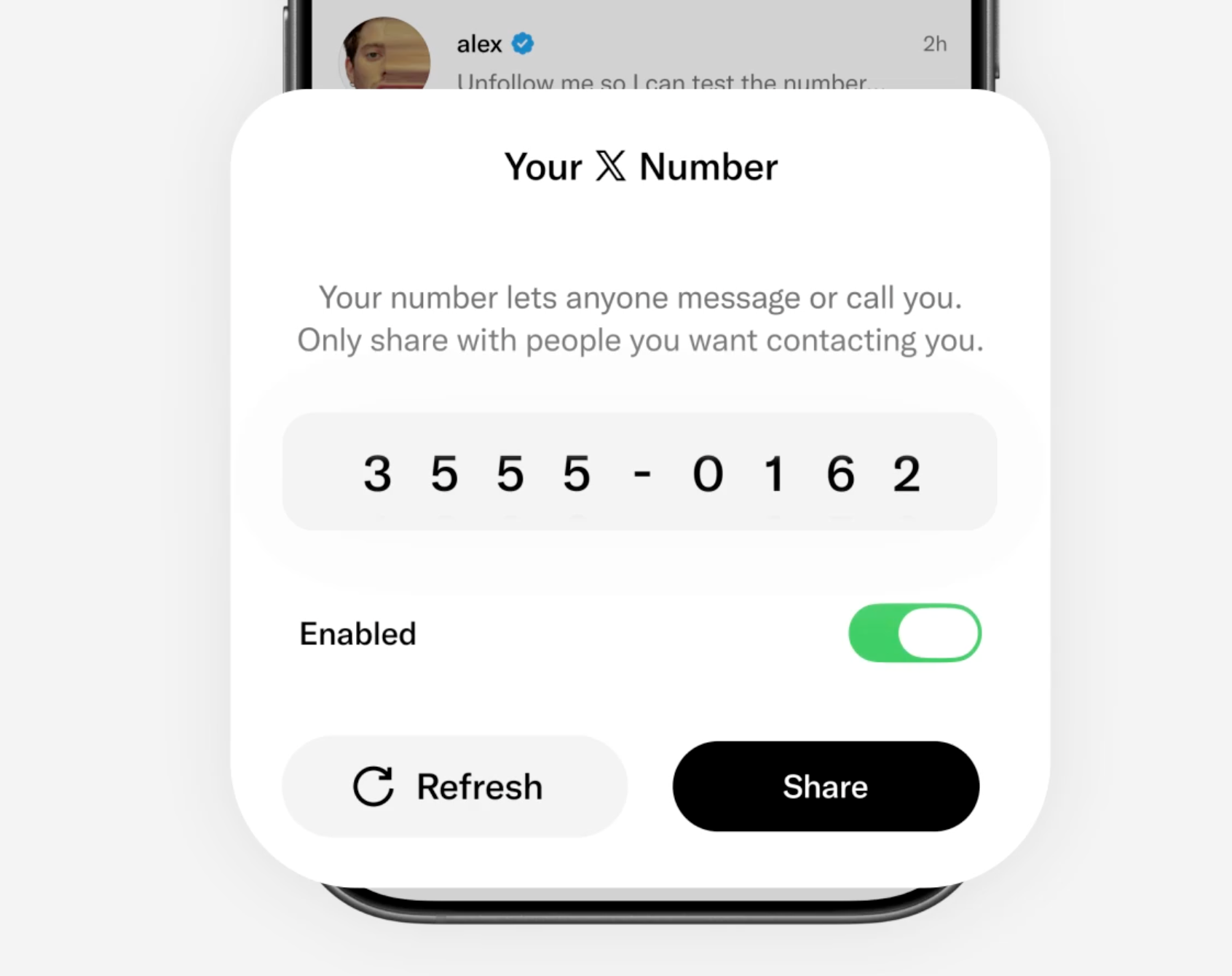
5. Enable it. Flipping the toggle generates your code. It exists from that moment and it works immediately, so do not share it until you have gone through the settings below.
If you do not see a Number option in the dropdown, the feature has not reached your account yet. It is rolling out in stages and there is no way to request it early.
The Two Settings to Fix Before You Share Your Code
Enabling an X Number without touching anything else leaves you more exposed than most people expect.
Turn on Hide from others. By default, anyone you have exchanged messages with can see your X Number in the conversation and pass it to whoever they like. A code circulating through screenshots is not a gate. The Hide from others toggle lives in the same X Number sheet and keeps the code out of view for past contacts.
Turn on Enhanced call privacy. This one is in Chat settings rather than the X Number sheet, and it defaults to off. With it off, XChat calls connect peer to peer, and a peer to peer call can reveal your IP address to the person on the other end. That is a manageable risk when you are calling people you know. It is a bad default when you have handed your code to strangers at an event.
While you are in there, look at who can call you. Many of the reasons to use an X Number are text only, and narrowing your call setting to something tighter than Everyone gives you the inbox access without the ringing.
How to Share Your X Number Without Losing Control of It
There is no invite flow and no approval step. Whoever holds the current code can message you. Possession is the permission, which makes how you distribute it the only real control you have.
Share it in one direction, to one group, at a time. A code you gave to conference attendees and a code you gave to a client should not be the same code, because you cannot revoke one without revoking the other. Refresh between contexts.
Treat anything printed or posted as permanent. A code on a slide, a badge, or a pinned post will keep reaching people long after the reason for it ended. Plan the refresh before you print it.
Never put it in your bio. A public code behaves exactly like an open inbox, except it looks private and gives you a false sense of control. If you want anyone to message you, open your inbox instead.
How to Refresh or Turn Off Your X Number
Both live in the same sheet, and they do different jobs.
Refresh replaces your code with a new one. The old code immediately stops working for anyone trying to start a new conversation, which makes this the correct response to a leak or a wave of unwanted contact.
Disable switches the route off entirely. Nobody can use a code to reach you while it is off.
Two details surprise people. First, refreshing or disabling does nothing to conversations that are already open. Someone who reached you yesterday is still in your inbox today. Blocking is a separate control and it is the one you want for an individual account.
Second, turning your X Number off does not remove the X Number prompt other people see when they try to message you. The prompt appears either way. All the setting decides is whether entering a code actually reaches your inbox, which means nobody can work out from the outside whether you have the feature on.
📌 The spam playbook, in order: refresh the code, block the accounts that already got in, then decide whether the group you shared it with should get the new one.
Troubleshooting
No Number option in the dropdown. The feature is still rolling out. Update the app, then wait. There is no waitlist.
Someone says your code does not work. Most likely you refreshed it after sharing, or they are entering an older code. Send the current one.
You are being asked for someone else's X Number. That prompt appears when you try to message an account whose inbox is closed to you. You need the code from them directly, and no, X will not tell you what it is.
A stranger got in and you do not know how. Check whether Hide from others is off, because a past contact may have passed your code along. Refresh, then turn the setting on.
Calls are coming in that you do not want. That is your call settings, not your X Number. The code does not override them, so tighten who can call you.
Is It Worth Turning On?
For anyone with a closed inbox, yes. It is the first control on X that lets specific people through without loosening anything for everyone else, and a code you can burn in one tap is a better thing to hand out than a phone number or an email address.
With one caveat worth keeping in view. X Numbers governs access, not protection. XChat's end to end encryption has not been independently audited, there is no published protocol specification, X holds the keys, there is no forward secrecy, metadata is unencrypted, and adding Grok to a conversation removes encryption while it is present. Matthew Green of Johns Hopkins told TechCrunch he would not trust it more than unencrypted DMs until it gets a proper audit, and security analysts have said much the same.
So turn it on, fix the two defaults, and keep genuinely sensitive conversations somewhere audited. Details on the feature itself are in X's Help Center.
FAQ
Where is the X Number setting?
Chat, then your Chat PIN if prompted, then the inbox dropdown, then Number. It is not in your account privacy settings.
Do I need X Premium to turn on an X Number?
X's Help Center lists no subscription requirement, unlike X Money which stays limited to Premium. If you cannot find the option, it is a rollout issue rather than a paywall.
Does turning on an X Number change who can already message me?
No. Mutual follows, existing XChat contacts, and whatever your message settings already allowed all stay exactly as they were. The code only adds a route for people who would otherwise be blocked or sent to requests.
How often should I refresh my X Number?
Whenever the group you shared it with changes. After an event ends, after a campaign closes, or the moment unwanted messages start arriving.
Can I have more than one X Number?
No. There is one code per account at a time, which is why refreshing between different groups matters. Sharing the same code with two audiences means you cannot cut off one without cutting off both.
Will people know if I turn my X Number off?
No. The prompt still appears when they try to message you. Only you know whether a code would work.