

If you want to clean up who you follow on X Android, there is no bulk option, no filter, and no shortcut. You go to the list, find the first account you want to remove, tap the Following button, confirm, and go back. Then find the next one. Tap. Confirm. Go back.
Every unfollow is its own three-step process. For anyone following hundreds of accounts, that's not account management, it's manual labor.
There is no mass unfollow option in the X Android app, or in the iOS app, or on the web. It is one unfollow button per account, and that is all the platform offers.
With Circleboom Twitter's Mass Unfollow feature, you can view your complete following list, filter by account type, select as many accounts as you want, and unfollow them all at once, without touching a single profile individually.
Bulk Unfollowing Your Following List with Circleboom Twitter
Circleboom Twitter is an Official X Enterprise Developer, which means all unfollow actions run directly through X's official APIs.

No scraping, no credential sharing, fully compliant with X's platform rules. That compliance matters for bulk actions specifically, it's what keeps your account safe while the cleanup runs.
The Mass Unfollow feature gives you something the X app never has: a real management layer over who you follow.
 infocircleboom.com
Here's what it offers:
🟢 View your complete following list in a structured, sortable dashboard with full account details
🟢 Filter by specific account types, accounts not following you back, inactive accounts, newbie accounts, or accounts flagged as fake or low-quality
🟢 Select multiple accounts at once and unfollow them all in a single action
🟢 Safe, controlled execution, actions run in batches with built-in intervals that respect X's rate limits automatically
🟢 Full user control before any action, nothing happens until you confirm the selection, no automatic unfollowing of any kind
The X app shows you a list. Circleboom gives you the tools to actually work with it.
How to Mass Unfollow on X with Circleboom Twitter
Step #1: Open Circleboom Twitter your Android device's browser and log in with your X account.
Tap the account menu icon or your profile area to open the Followers / Following Management panel. You'll see your account listed with options for Followers, Following, Whitelist & Blacklist, and Analytics.
Tap Following to proceed.
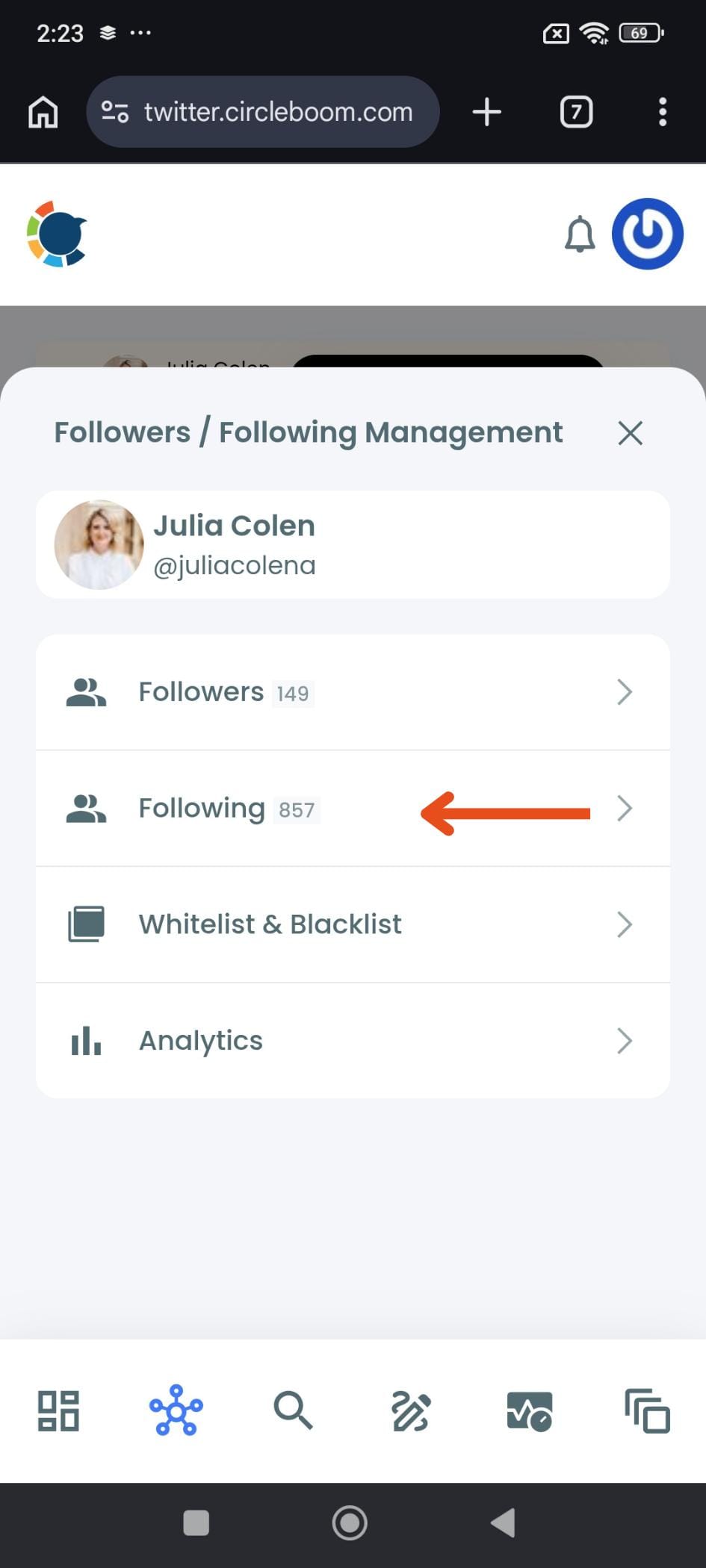
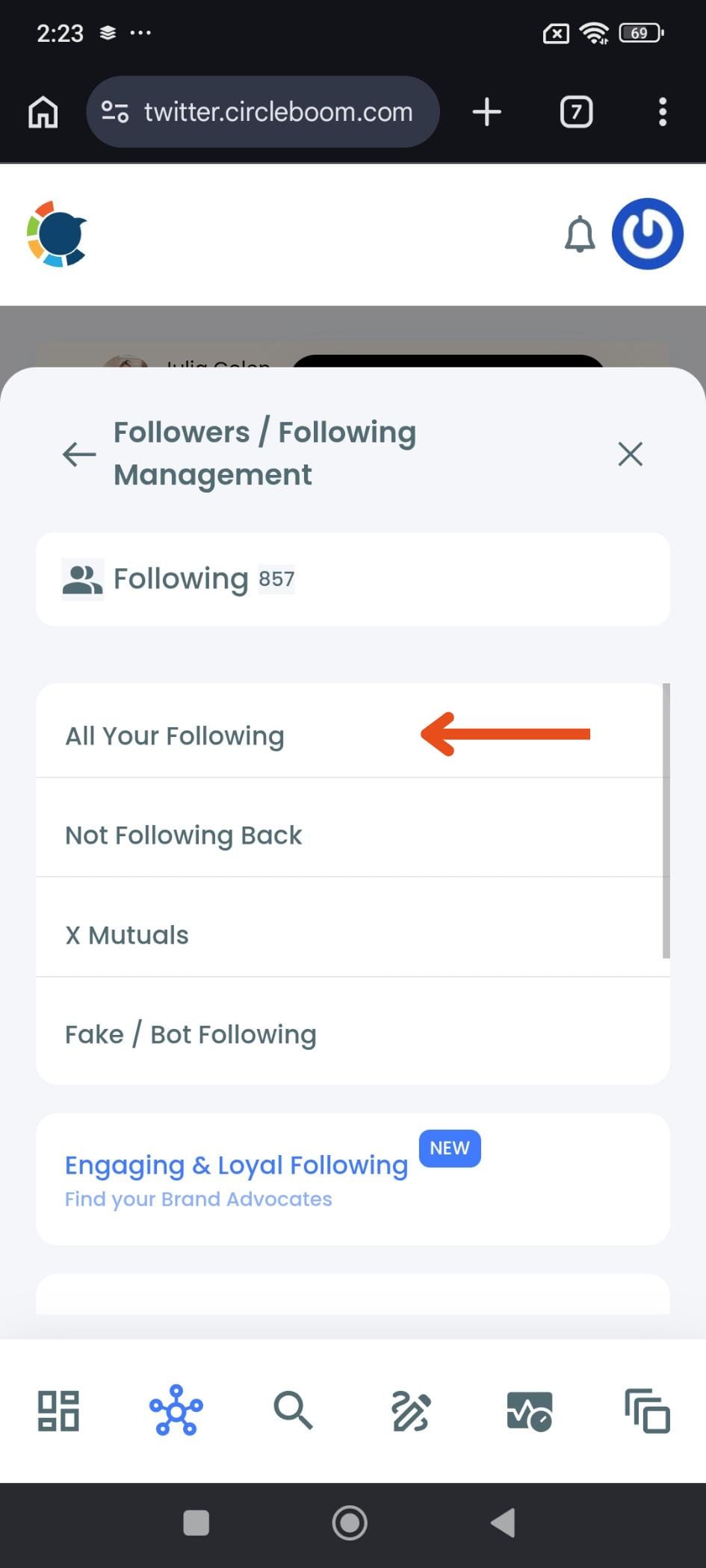
Step #2: Select "All Your Following"
A sub-menu opens showing the different segments of your following list: All Your Following, Not Following Back, X Mutuals, Fake / Bot Following, and Engaging & Loyal Following. Tap All Your Following to load your complete following list, or choose a specific segment if you already know which type of accounts you want to unfollow.
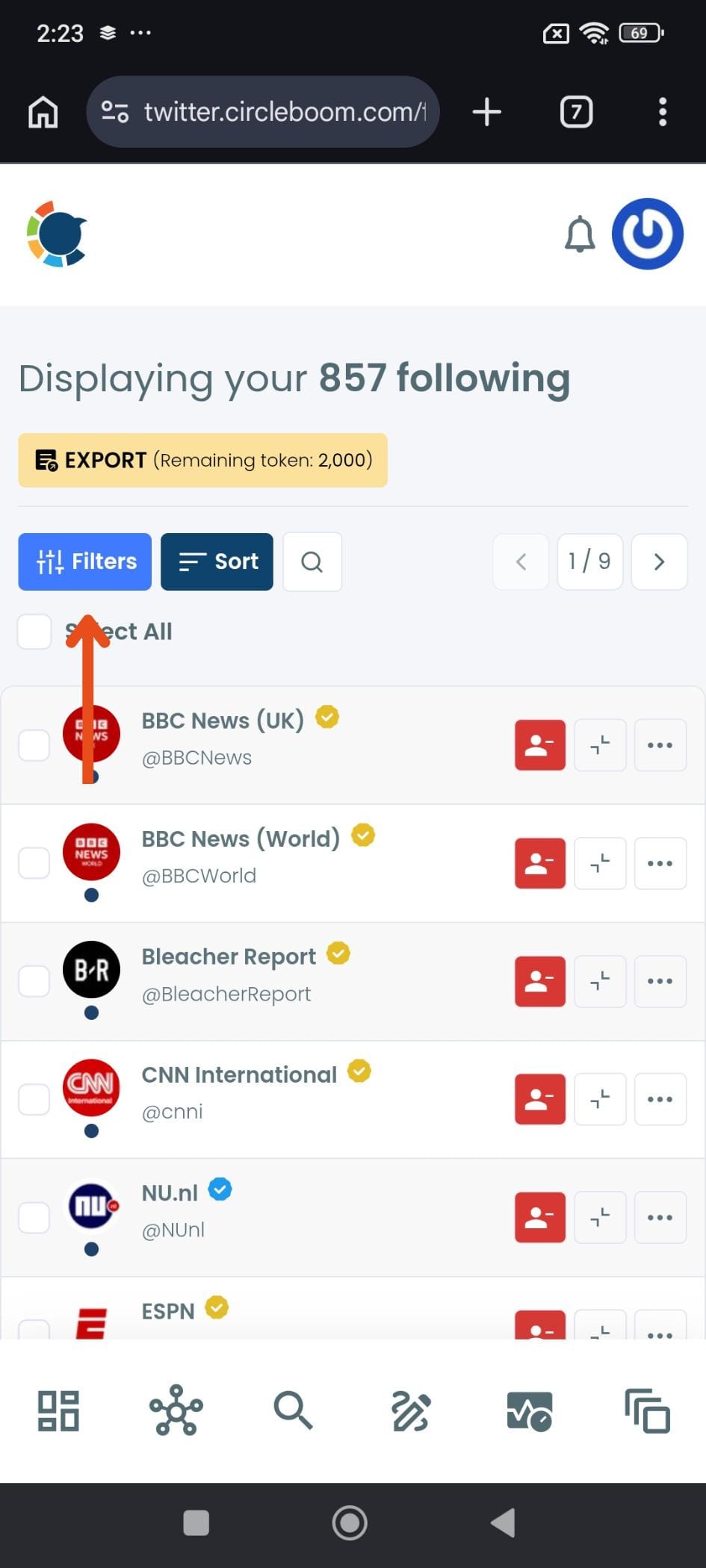
Step #3: Browse your full following list
Circleboom loads all the accounts you follow in a structured, scrollable list. You can see each account's name, handle, and verification status at a glance. At the top you'll find a Filters button, a Sort button, a search icon, and a Select All checkbox.
From here you can either select accounts manually or use filters first to narrow down who you want to unfollow.
Step #4: Apply filters to target the right accounts (optional but recommended)
Tap Filters to open the filter panel. Here you can narrow your following list by account type: Eggheads (no profile picture), Protected accounts, Fake/Spam accounts, Inactive accounts, Overactive accounts, and more. You can also filter by Verification Status, follower count range, following count range, tweet count, follow ratio, join date, and bio keywords. Set your filters and tap Apply Filters to update the list.

Step #5: Select the accounts you want to unfollow
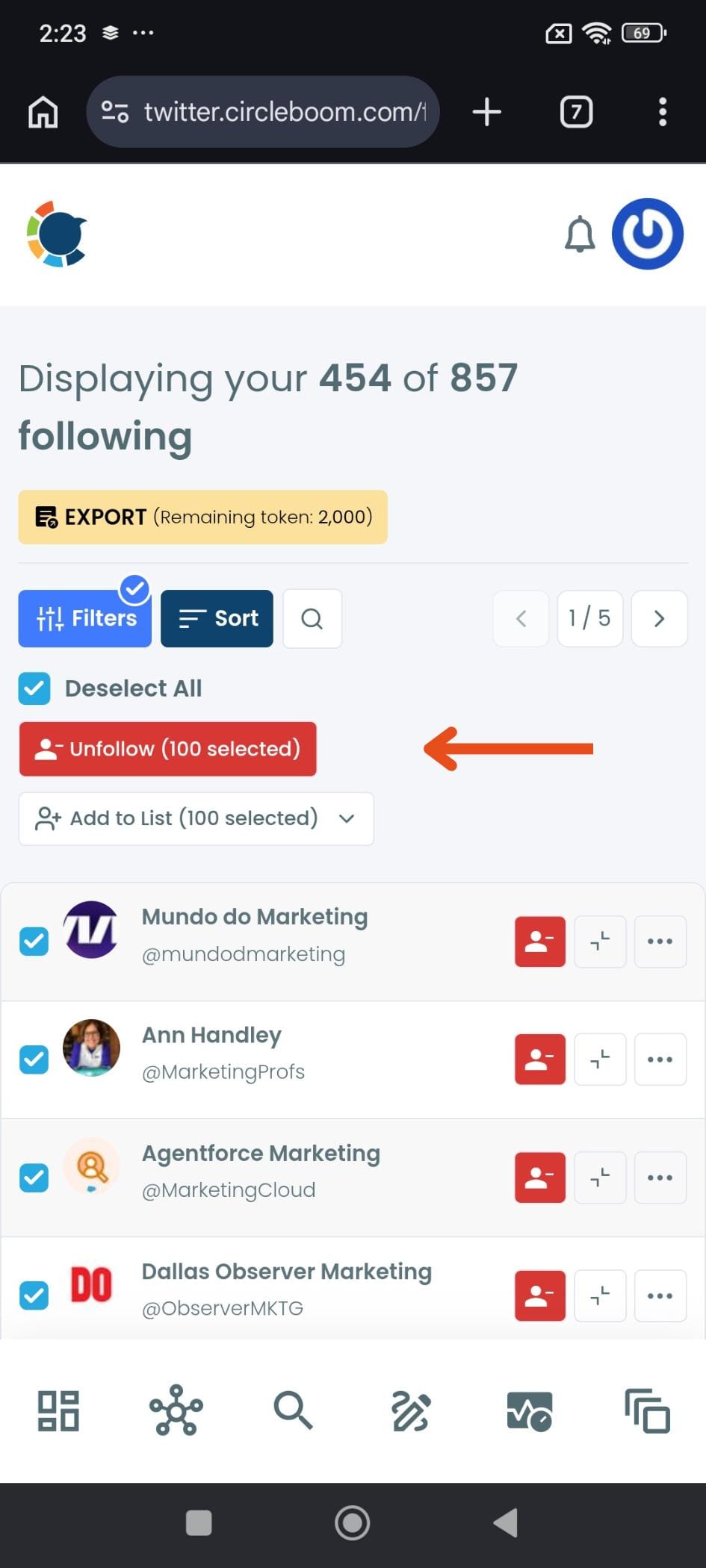
With your filtered list in view, tap the checkbox next to individual accounts to select them, or tap Select All at the top to select every account on the current page. Once accounts are selected, the Unfollow button appears at the top showing how many accounts are selected. Tap Unfollow (100 selected) to proceed.
Step #6: Confirm the unfollow action
A confirmation dialog appears asking "Do you want to unfollow selected 100 profiles?" Tap Unfollow selected profiles to confirm. Circleboom will process the unfollows in safe batches, respecting X's rate limits automatically. If you change your mind, tap Cancel to go back without making any changes.
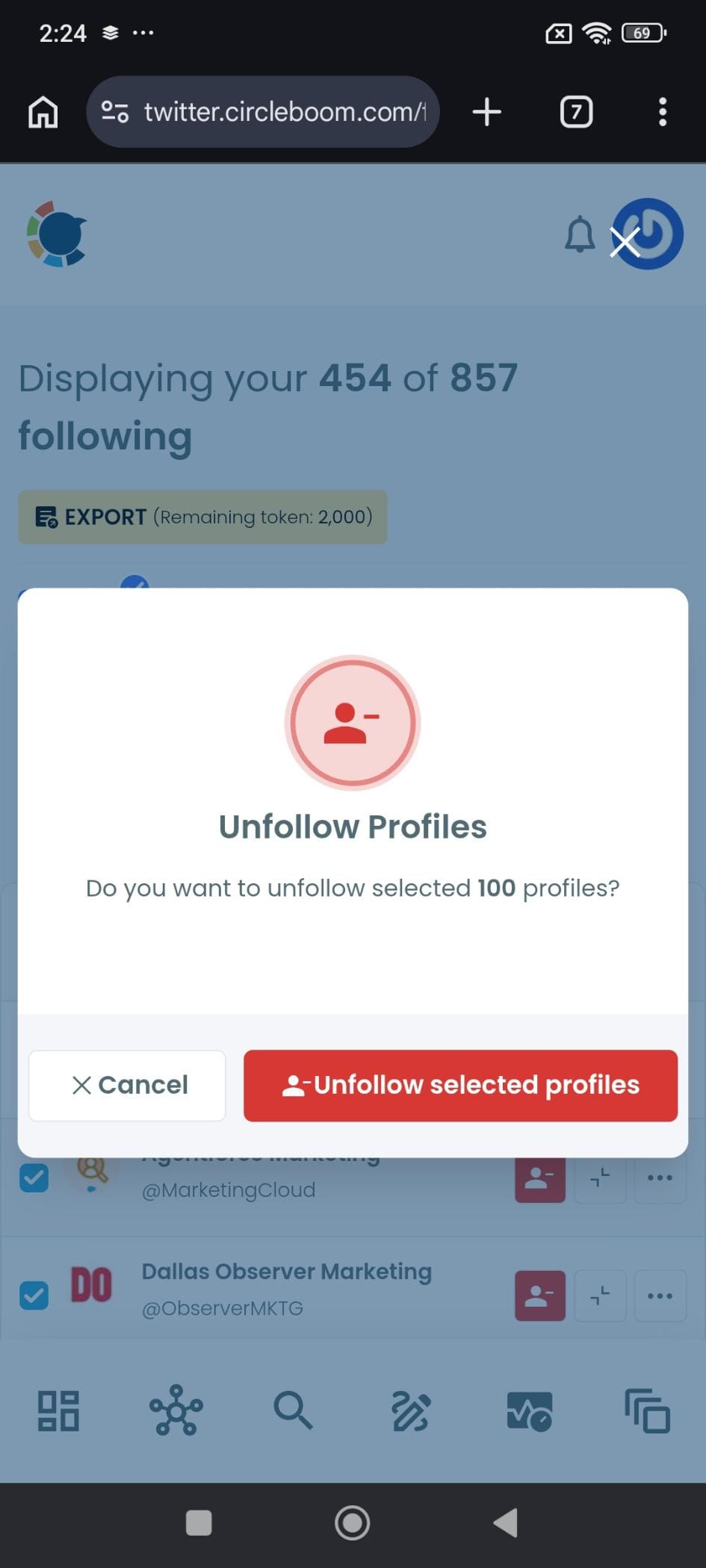
That's it. Circleboom handles the rest in the background. If the daily limit is reached, the process pauses automatically and you can continue the next day from where you left off.
Why the X Android App Won't Let You Unfollow in Bulk
This is not a missing feature waiting to be added in the next update. X's mobile app was built for consuming content and following new accounts, not for managing the ones you already follow at scale.
The following list on Android loads accounts one at a time with no multi-select capability. Each unfollow requires you to locate the account, tap the button, confirm, and return to the list, every single time.
There is no filter within the app to sort by who's inactive or who doesn't follow you back. You are looking at one flat, unfiltered list with one action available per account.
The desktop web version is no better. The same account-by-account limitation applies there too. This is a platform-wide design choice, not an Android-specific problem.
📌 X's interface was built for discovery and engagement, not for account management at scale. Bulk actions of any kind, unfollowing, blocking, list management, are simply outside what the platform offers on any surface.
The result is that following lists naturally accumulate clutter over time. Accounts you followed during a specific period, brands that stopped posting, people whose content no longer fits where your interests are now. Cleaning any of that up manually is slow enough that most people just don't do it, and the list keeps growing.
Smart Filters to Use Before You Unfollow
The most important thing Circleboom's Mass Unfollow does differently from blind bulk action is giving you filters before you touch anything. Instead of selecting your entire following list and unfollowing indiscriminately, you can target exactly who makes sense to remove.
Not Following Back is the most commonly used filter. It shows you every account you follow that doesn't follow you back in a dedicated, structured view with full account details. This is a clean starting point for any following audit.
infocircleboom.com
Inactive Following surfaces accounts that have gone quiet, profiles you follow that haven't posted in a long time. These accounts contribute nothing to your timeline and are unlikely to start again.
Filtering for inactivity is one of the cleaner ways to reclaim feed quality without overthinking individual decisions.
infocircleboom.com
Newbie Accounts flags recently created profiles in your following list. New accounts are disproportionately likely to be spam or bot profiles.
Reviewing this segment is a quick quality check, especially if your following list grew fast during a period of active follow-back activity.
infocircleboom.com
Fake and Low-Quality Accounts are flagged directly based on account signals. If something in your following list has already been identified as inauthentic, this filter surfaces it for easy removal.
infocircleboom.com
Beyond those categories, you can also filter your following list by follower count, tweet count, verification status, language, and location to build a more targeted cleanup list based on whatever criteria matters for your account.
⚠️ Not following back is not the same as having no value. A lot of accounts worth following, major publications, well-known creators, and public figures never follow back anyone. Always review the filtered list before unfollowing in bulk. The filter is a starting point, not a verdict.
Why a Cluttered Following List Actually Matters
The accounts you follow are not just a number on your profile. They determine everything that appears in your feed, and they send signals that affect how X treats your account.
Your timeline is a direct product of who you follow. Every inactive account or irrelevant follow is a slot in your feed that produces nothing useful. A cleaner following list means a more relevant, more readable feed, the kind you actually want to check rather than scroll past.
The follower-to-following ratio is a visible signal. Following significantly more accounts than follow you back is one of the first things people notice when visiting a profile. A lopsided ratio can suggest an account that followed indiscriminately, which affects how new visitors read it before deciding whether to follow.
Algorithm visibility responds to engagement signals. When you follow accounts you never interact with, the algorithm registers low engagement across a large following list. Tightening that list to accounts whose content you actually engage with helps X understand what's relevant to you, which shapes what gets surfaced in your feed and how your own content performs.
Inactive accounts don't disappear quietly. They occupy your following count and your timeline allocation without contributing any content in return. The more of them accumulate, the noisier the list becomes, and the harder it is to find the accounts that actually matter.
For a focused view of the accounts that have gone quiet specifically, Circleboom's Unfollow Inactive Accounts tool surfaces that exact segment in one dedicated place, ready to act on.
FAQ
Can you mass unfollow on X Android natively?
No. The X Android app only allows you to unfollow accounts one at a time. There is no bulk selection, no filter, and no way to act on multiple accounts at once from within the app. To mass unfollow on X Android, you need a third-party tool like Circleboom Twitter, which provides a full management dashboard with bulk unfollow capability.
Is Circleboom's Mass Unfollow safe to use?
Yes. All unfollow actions run through X's official APIs and fully comply with X's platform rules. Circleboom does not bypass any rate limits or platform restrictions. Actions run in controlled batches with built-in intervals, and the process pauses automatically if any limit is reached, keeping your account safe throughout.
How many accounts can I unfollow at once with Circleboom?
Circleboom processes unfollows in safe batches that respect X's rate limits. If a daily limit is reached, the process pauses automatically and you can continue the following day without losing your progress. The approach is built around sustainable cleanup rather than aggressive bulk removal that could put your account at risk.
Will the accounts I unfollow know they were unfollowed?
X does not send notifications when someone unfollows an account. The accounts you remove will only notice if they check their follower count or browse their followers list directly. There is no alert or message triggered by an unfollow action.
Can I undo a mass unfollow?
Unfollow actions cannot be reversed in bulk. Once you unfollow an account, the only way to reverse it is to follow them again individually. This is exactly why the filter and review step matters before running the action, it ensures you are unfollowing intentionally rather than having to clean up a mistake afterward.
Does this work on iPhone as well, not just Android?
Yes. The X app on iOS has the same limitation as Android, no bulk unfollow capability. Circleboom Twitter works as a web-based platform accessible from any browser, so the Mass Unfollow feature is available regardless of which device you are on. The Android framing applies because the problem is identical across all mobile X surfaces.
What is the best filter to start with when cleaning a following list?
Not Following Back is the most practical starting point for most accounts. It gives you a concrete, reviewable list of one-sided relationships to evaluate. From there, Inactive Following is the next highest-value filter, accounts that haven't posted in a long time are easy to unfollow without second-guessing. Running both filters before taking any action covers the majority of what most people want to clean up.
Final Thoughts on How to Mass Unfollow on X Android
X built the unfollow button for individual decisions. That made sense when following lists were small and curated. Once a list grows into the hundreds or thousands, the one-tap-at-a-time approach becomes a genuine obstacle to keeping your account in good shape.
Circleboom Twitter's Mass Unfollow feature gives you what the X Android app never will: a full view of your following list, smart filters to find exactly who shouldn't be there, and a bulk action to remove them cleanly and safely. The cleanup that would take hours of tapping on Android takes a few minutes with the right tool.
If your following list has grown beyond what you can realistically manage one tap at a time, this is how you fix it.
Mass unfollow on X with Circleboom Twitter:
infocircleboom.com
