
For a long time, I chased numbers on Twitter. I thought growth meant watching the follower count rise — 1k, 5k, 10k. It felt like progress. But something never quite matched the number: my engagement.
You can calculate your X engagement!

Some tweets got likes. Some got nothing. And sometimes, even with more followers, my posts seemed quieter than before.
That’s when I realized something important:
A big audience means nothing if they’re not engaging.
What matters isn’t the size of your follower list — it’s the quality of the people in it.
The shortest way to build a high-quality follower list is just to remove low-quality ones.
Why Quality Beats Quantity
Imagine two accounts:
| Account | Followers | Average Likes | Comments | Clicks | Result |
|---|---|---|---|---|---|
| A | 50,000 | 8 | 1 | 0 | Feels inactive, low trust |
| B | 3,000 | 70 | 12 | Strong | Feels alive, attracts new followers |
Account A looks big, but its audience is silent.
Account B has fewer followers but actual momentum.
Engagement creates visibility
When followers reply, retweet, and comment, the algorithm pushes your posts into more timelines. Engagement tells the system:
“People care about this — show it to more users.”
And when the algorithm pushes your posts to more people, your audience grows naturally.
So the real question isn’t:
“How many people follow me?”
It’s:
“How many people interact with what I share?”
Low-Engagement Followers Can Hurt Your Account
This part surprises a lot of people.
Having too many inactive or silent followers is actually hazardous for your profile.
 infocircleboom.com
Here’s why:
🔴 When your followers don’t engage, Twitter assumes your content isn’t interesting.
🔴 That leads to lower reach and fewer impressions.
🔴 Which leads to even less engagement.
🔴 And the cycle continues.
Your account slows down — even if you’re posting good content.
This is why some creators “plateau.”
It’s not content quality — it’s follower quality.
So What Causes Low-Engagement Followers?
Some common reasons:
➡️ They were active once, but not anymore (inactive accounts).
➡️ They followed during a trend and never came back.
➡️ They’re fake or bot accounts.
➡️ They’re ghost followers who never interact.
If your audience is filled with people who no longer care, never cared, or are not real, your content struggles — even when it's good.
The solution is simple:
Keep followers who engage.
Remove followers who don’t.
How I Cleaned My Follower List
I wanted to improve engagement, so I decided to audit my followers.
Doing it manually would have taken forever.
There’s no built-in Twitter tool that shows:
- Who is inactive
- Who never interacts
- Who might be fake
- Who hasn’t tweeted in months
So I used Circleboom Twitter.

It’s an official Enterprise customer of X, so it works safely inside Twitter’s limits.
What I liked most was that it analyzes every single follower and categorizes them.
It showed me:
🟢 Followers who hadn’t posted for days
🟢 Accounts with bot-like behavior
🟢 Followers who never engage
🟢 Accounts that follow me but I don’t want associated with my profile
And once the list was generated, I could remove them in one click — safely.
Step-by-Step: How to Remove Inactive, Fake, or Ghost Followers
Here’s how the process worked for me:
Step #1: Go to the Circleboom Twitter website and log in with your credentials.
If you’re a new user, sign up—it’s quick and easy!

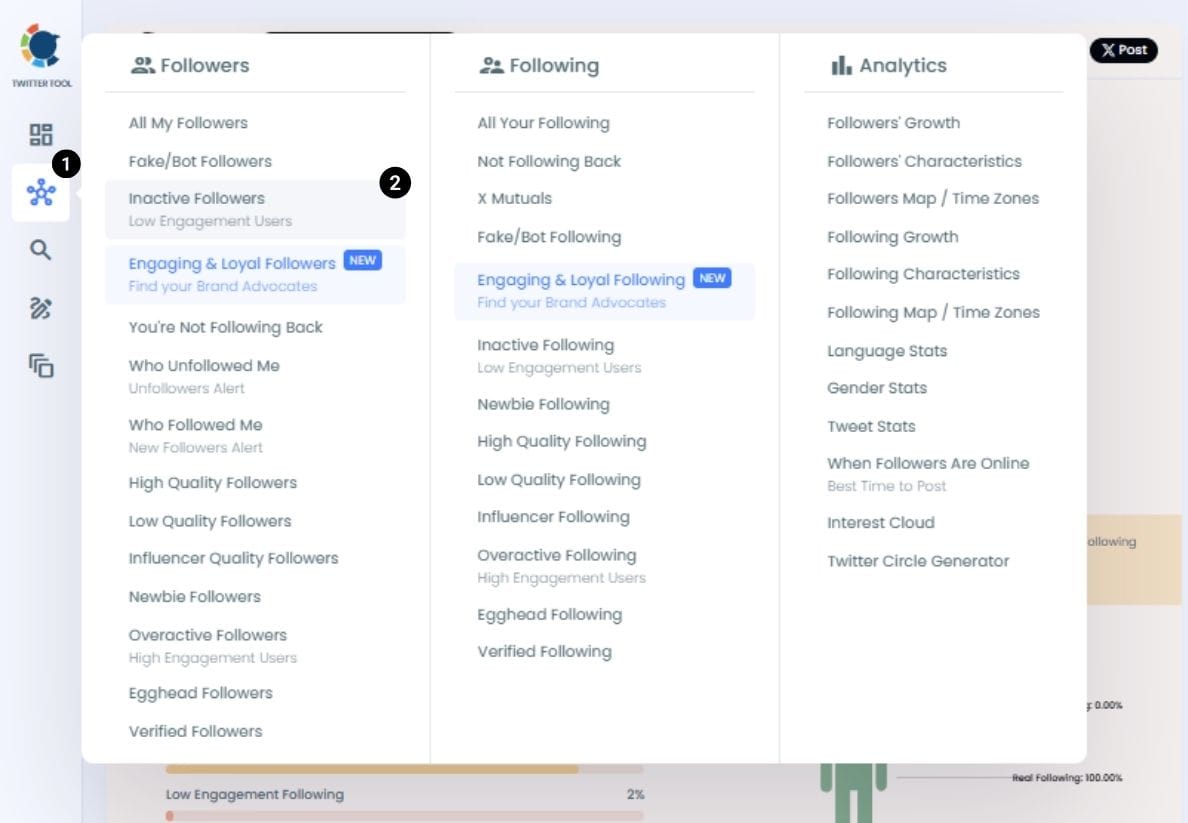
Step #2: On the left-side menu, click on the Followers section. A dropdown menu will appear. Select Fake/Bot Followers to see the full list of your followers.
If you want to remove specific accounts, such as inactive users, you can directly select these categories from the dropdown menu instead of viewing all followers.
Step #3: You will see a complete list of your fake/bot followers.
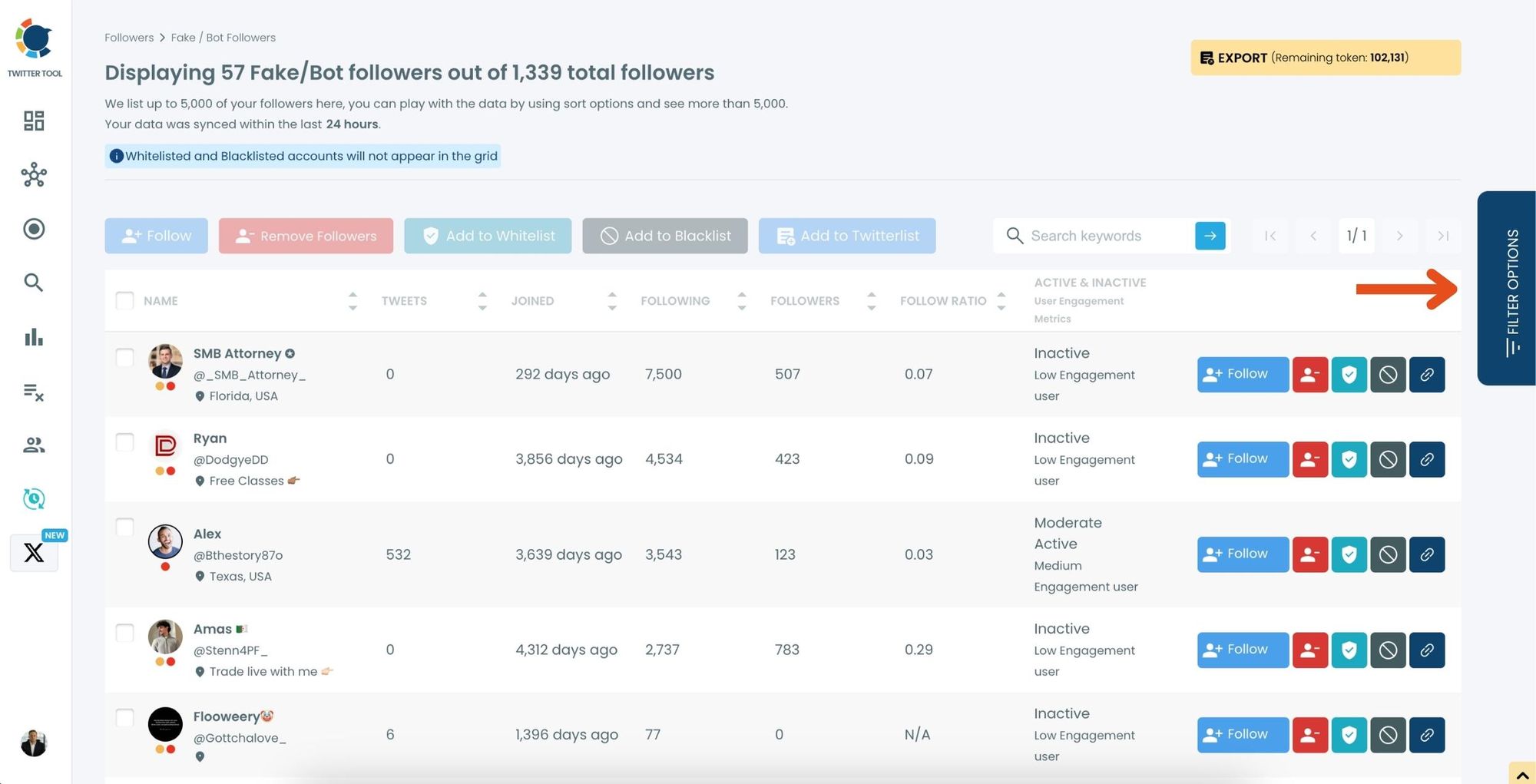
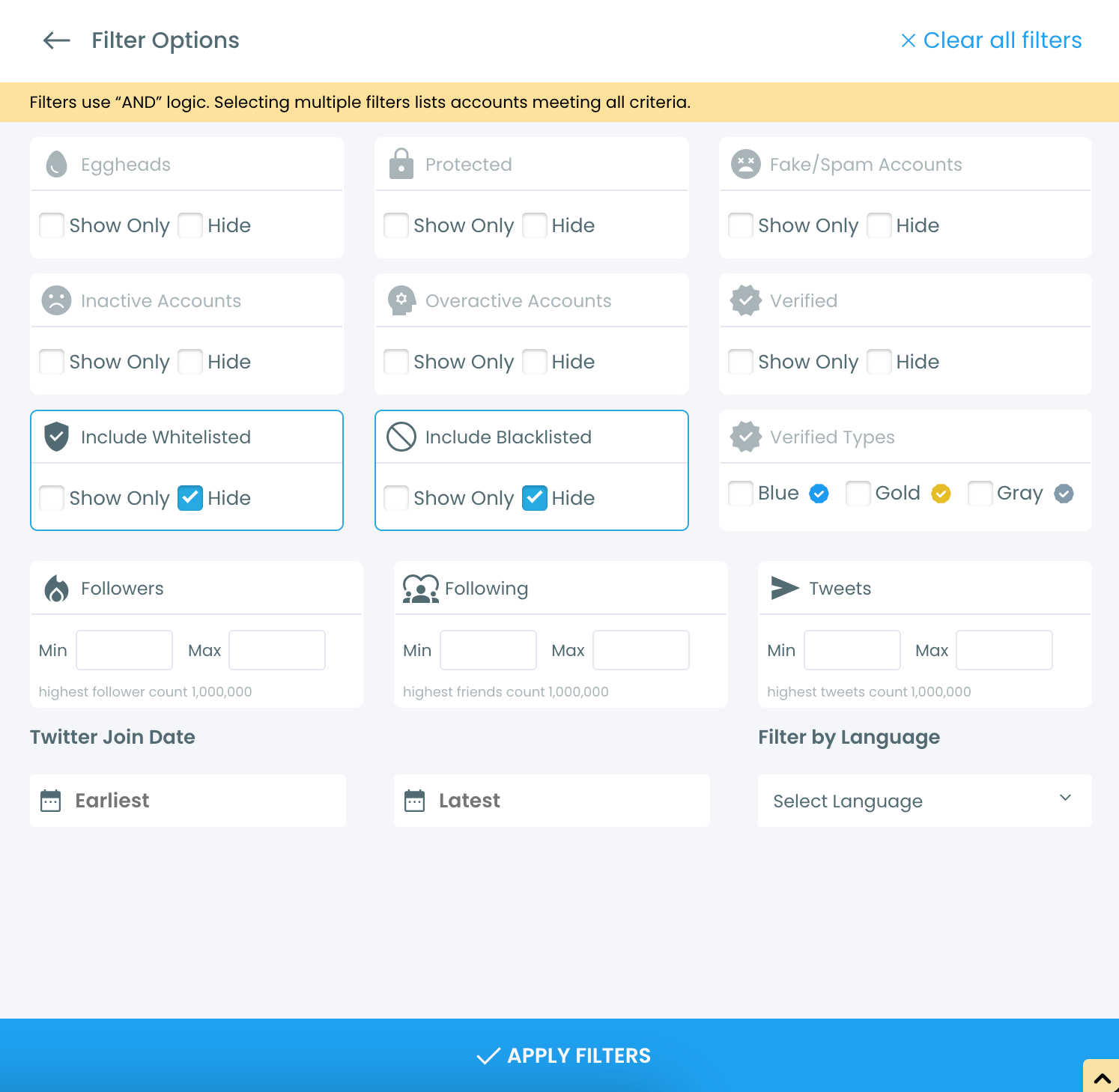
Use the Filter Options on the right-hand side to refine your list.
You can filter followers based on engagement levels, fake/spam accounts, inactivity, verification status, and more.
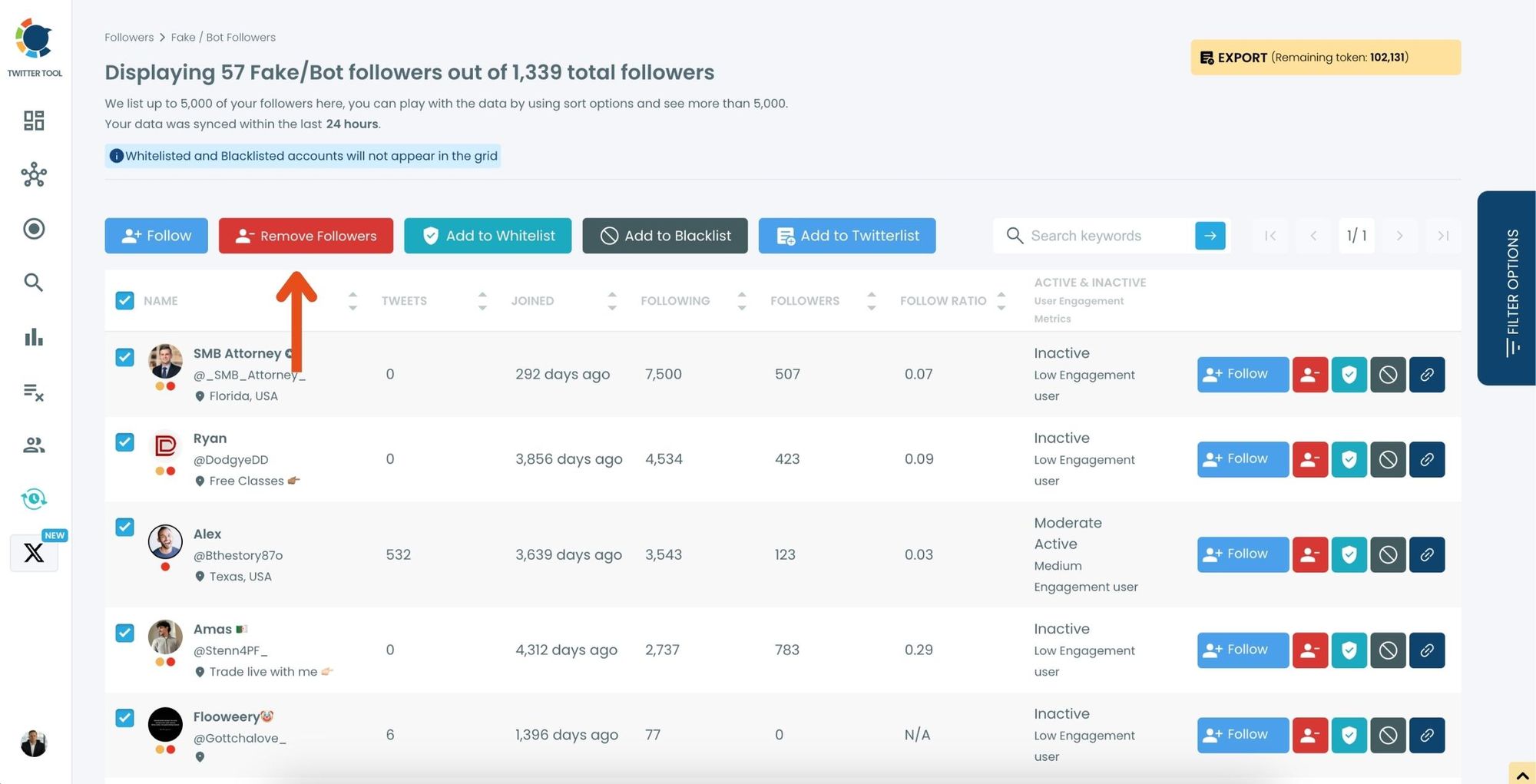
Step #4: Browse through your followers and check the boxes next to the users you want to remove.
You can also select multiple users at once. Once you have selected the users, click on the Remove Followers button at the top.
Alternatively, you can remove individual followers by clicking the red remove icon next to their name on the right side of the list.
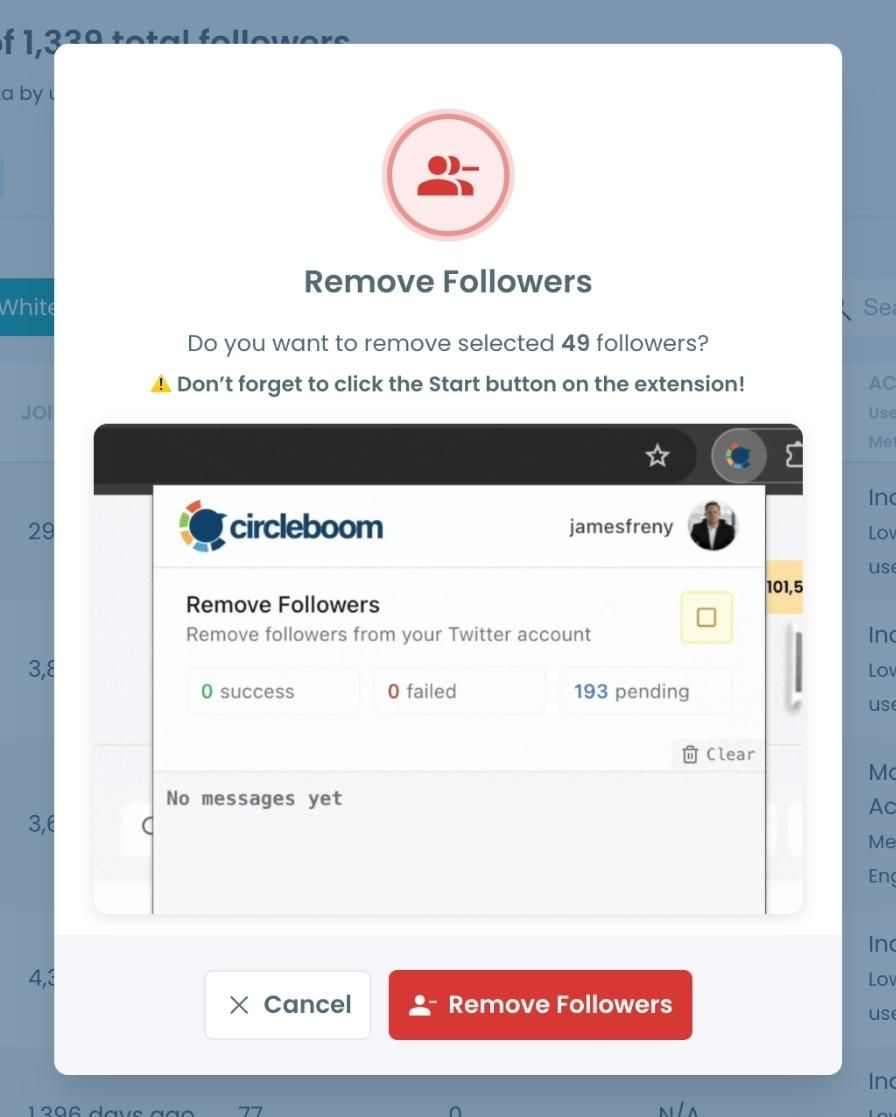
A confirmation message will appear asking if you are sure you want to remove the selected followers. Click ''Remove Followers''.
Step #5: Since the removal action is processed via the Circleboom Remove Twitter/X Followers extension, you need to install it to complete the process.
Click on Download the Extension and install it from the Chrome Web Store.
Once installed, you can easily remove followers.

Step #6: After installing the extension, Circleboom will automatically add all your removal requests to the extension queue.
Click on the Start button to begin the removal process.
The extension will process your requests and remove the selected followers.
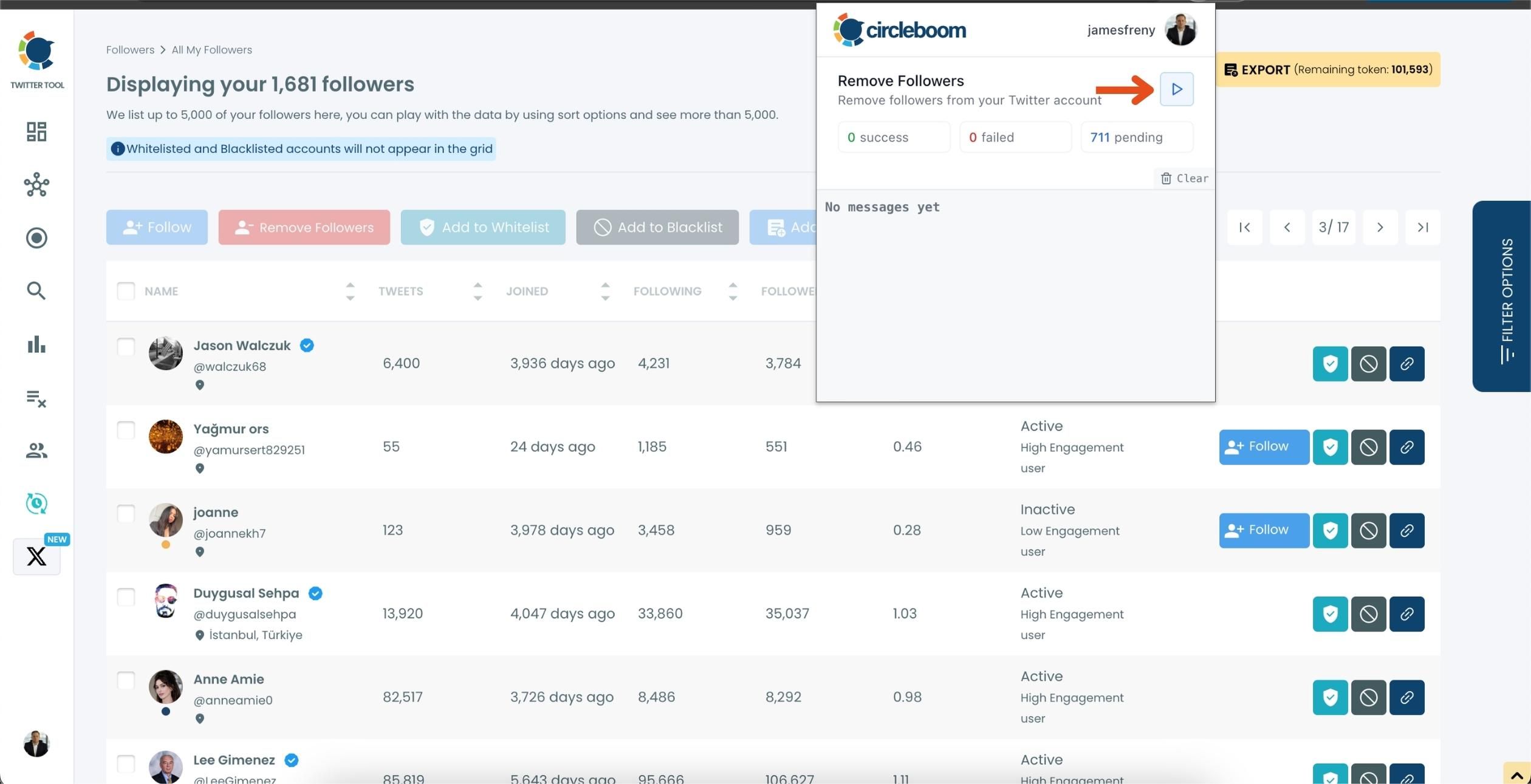
That's it! Your selected followers are now removed automatically.
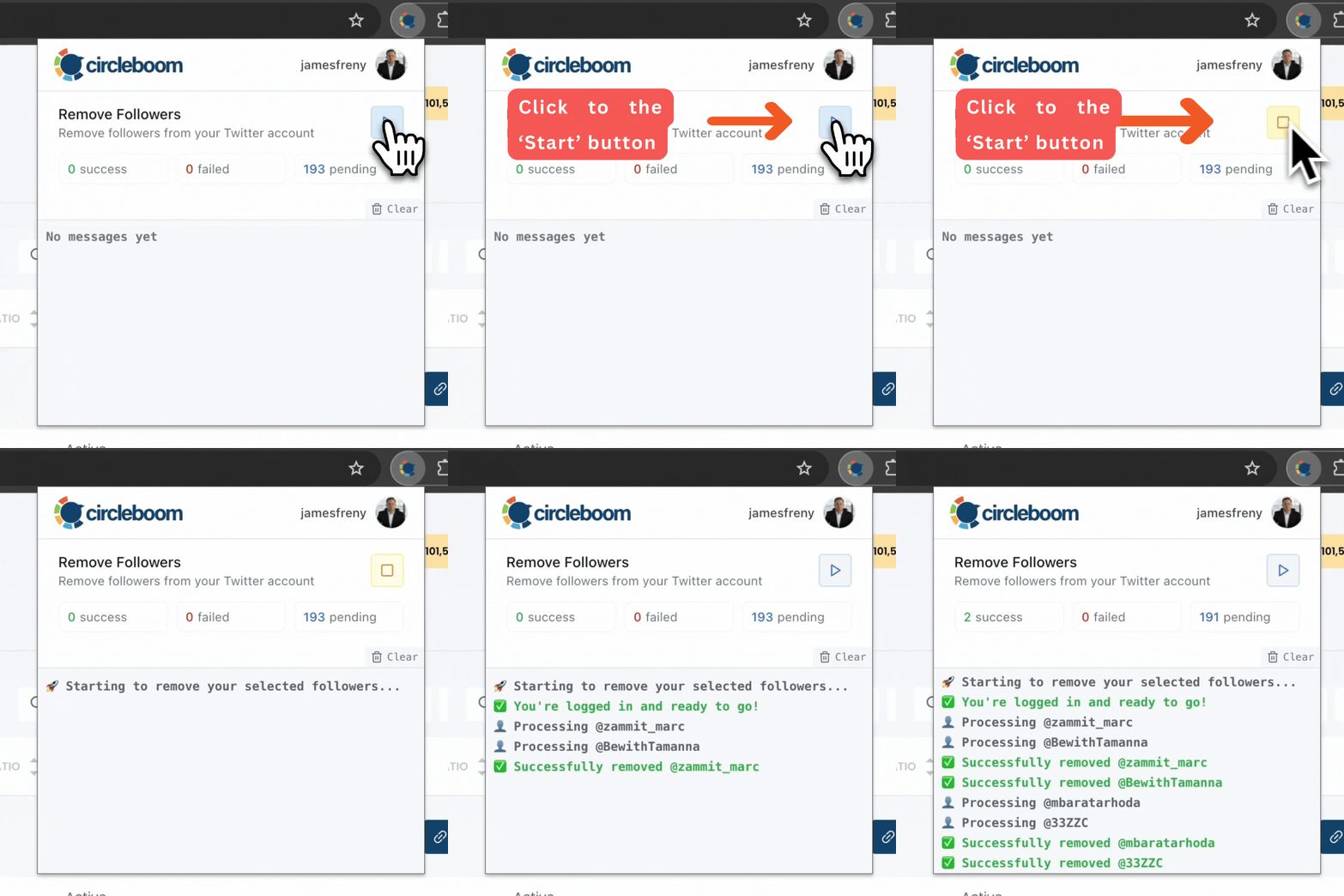
⚠️ Important Warning: Once the removal process begins, do not close your Chrome browser or the Circleboom tab. The tool will automatically remove followers in the background, but if you close the tab or exit Chrome, the process will stop.
If you need a more detailed guide check this video ⬇️
The entire process took me less than an 5 minute—something that would have taken me days, if not weeks, to do manually.
What Happens When You Focus on Quality
After the cleanup:
- Replies increased.
- Retweets became more frequent.
- New people discovered my content.
- My account felt alive again.
Why?
Because now, when I post, I’m speaking to people who care.
Your voice is louder when the right people are listening.
Final Thoughts
A high follower count is nice for first impressions — but engagement is what creates impact.
If your account feels stuck, or your posts don’t get the visibility they should, the issue may not be your content. It might be your audience.
Quality > Quantity. Always.
If you want to improve your engagement, reach, and growth:
- Analyze your followers
- Remove inactive, fake, and ghost accounts
- Rebuild with people who interact

