
Yes, there is.
And not just partially or manually. You can download all of a user’s tweets in a structured, usable format.
With Circleboom Twitter, it’s possible to export tweets from any account as a detailed CSV file. Since Circleboom is an official X Enterprise Developer, it works directly with X’s API, which ensures the data is accurate, complete, and reliable.

Instead of scrolling endlessly through timelines or copying tweets one by one, everything is collected and delivered in one organized file.
Circleboom Twitter: The Easiest Way to Download All Tweets
Circleboom Twitter provides a direct and efficient way to download tweet data at scale. Because it is an official X Enterprise Developer, it does not rely on scraping or unofficial workarounds.
 infocircleboom.com
All data comes directly from X’s API, which means: No missing tweets, inconsistent data, or unreliable extraction methods
The process is simple.
Enter a username, and Circleboom collects all available tweets from that account and prepares them as a downloadable CSV file.
This turns a scattered timeline into structured data.
Instead of browsing tweets one by one, you get:
- A complete dataset
- Organized and searchable information
- A format ready for analysis
For anyone working with Twitter data, this removes a major limitation.
How to Download All of a User’s Tweets with Circleboom Twitter
Step #1: Enter the Username
On the Circleboom export page, type in the Twitter/X username of the account you want to export tweets from (without the “@” symbol) and click on the blue “Search” button.

Step #2: Confirm the Tweet Count
Circleboom will display the total number of tweets available for export from the selected account. Review this information, then click the “Next” button to proceed with the export process.

Step #3: Enter Your Email Address
Enter the email address where you’d like to receive the exported tweet file. Circleboom also recommends creating an account for easy access to your export file at any time. After entering your email, click the “Next” button to continue.

Step #4: After entering your email address, Circleboom sends the exported tweets in a CSV format directly to your inbox.
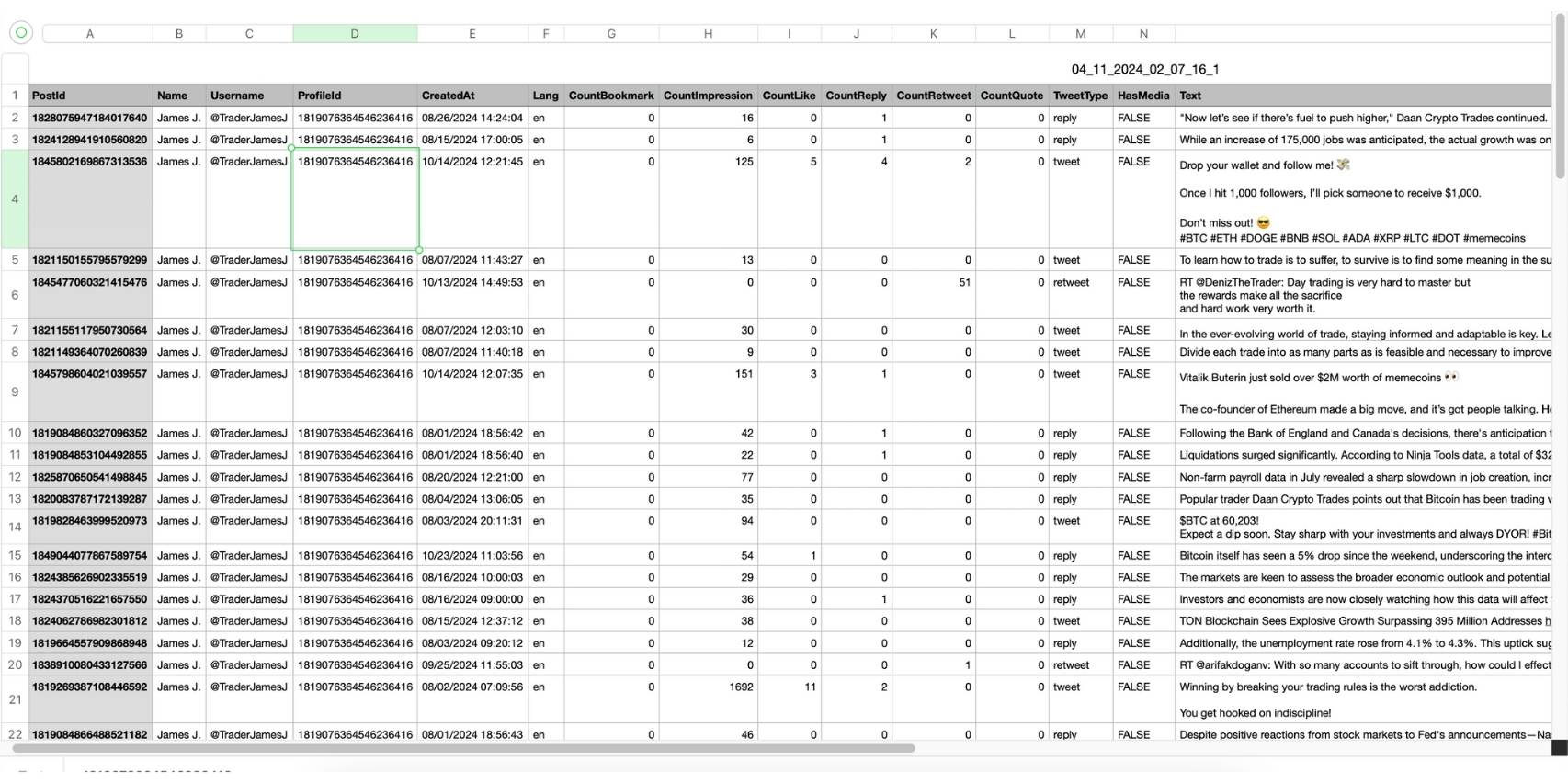
This CSV file includes essential details like Post ID, username, tweet text, engagement metrics (likes, retweets, replies), language, and timestamps, making it easy to review, analyze, or archive the tweets.
Why Someone Would Want to Download All of a User’s Tweets
Downloading tweets becomes essential once you move beyond casual usage.
For content analysis, it allows you to understand what type of tweets perform best.
For competitor research, it helps break down posting strategies and engagement patterns.
For growth-focused accounts, it provides insight into:
- High-performing topics
- Content formats
- Engagement trends over time
It is also useful for:
- Archiving tweet history
- Academic or data research
- Social media reporting
The key point is simple:
Manual collection is not scalable.
When an account has hundreds or thousands of tweets, collecting and analyzing them manually is not realistic. A structured export is the only practical solution.
What You Get in the Tweet Export CSV File
Circleboom does not just export tweets as plain text. It provides a structured CSV file with detailed data for each tweet.
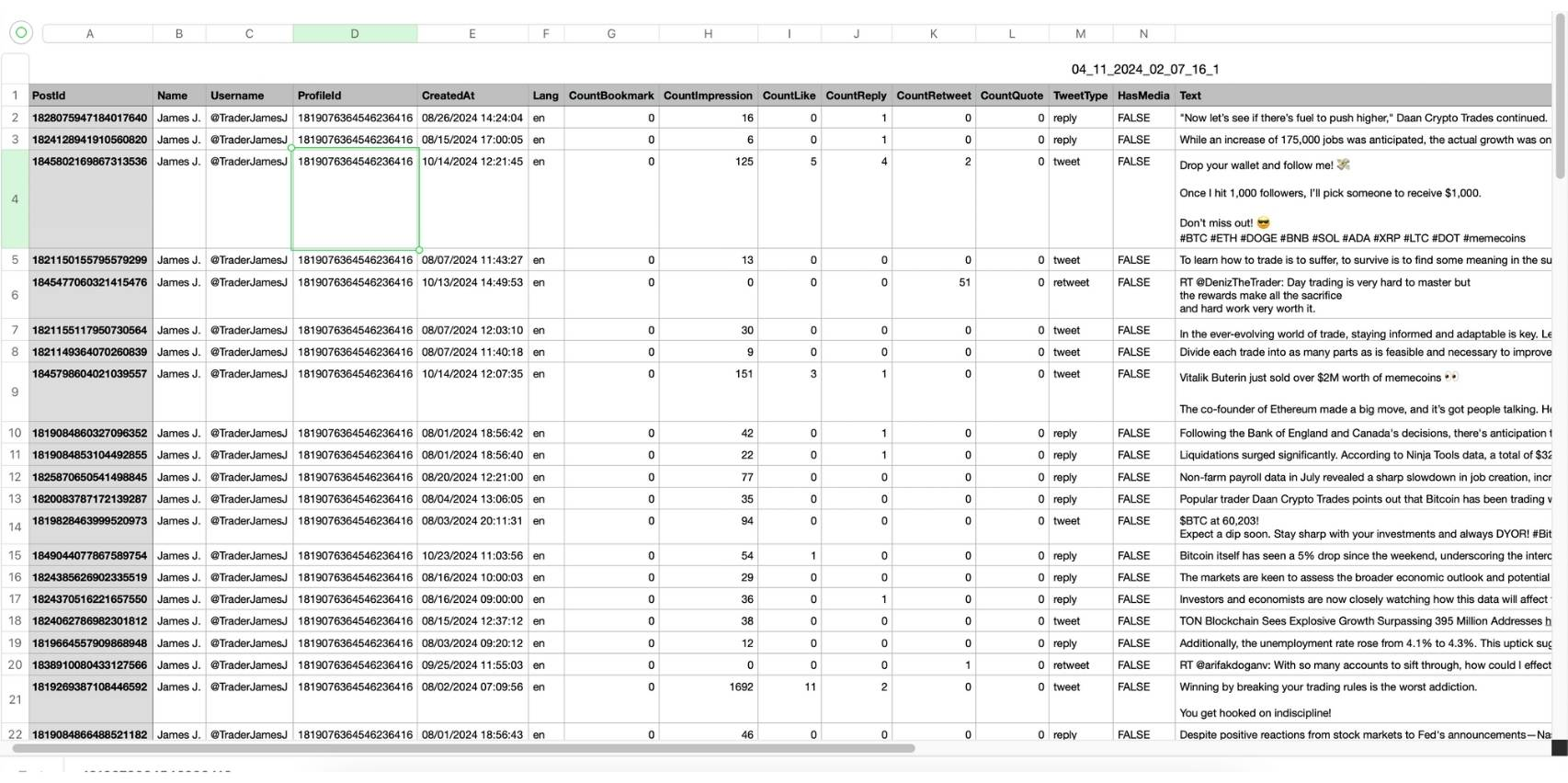
Each row represents a tweet, and the file includes fields such as:
- Post ID
- Name and username
- Tweet text
- Creation date and time
- Language
- Engagement metrics:
- Likes
- Replies
- Retweets
- Impressions
- Tweet type (tweet, reply, retweet)
- Media information
This structure makes the data usable.
Instead of just reading tweets, you can:
🟢 Sort by engagement
🟢 Filter by date or type
🟢 Identify patterns
🟢 Compare performance
It turns raw tweet history into actionable insights.
Benefits of Downloading Tweets with Circleboom
Using a structured export method provides several advantages.
First, it saves time. What would take hours manually is completed in minutes.
Second, the data is clean and organized. There is no need to manually compile or format anything.
Third, it enables large-scale analysis. Hundreds or thousands of tweets can be reviewed easily.
It also supports:
- Better content decision-making
- Clear performance analysis
- More efficient research workflows
And because Circleboom works through X’s official API, the data is consistent and reliable.
 Kevin Frank
Why Circleboom Is a Reliable Option for Tweet Exports
Many tools claim to provide tweet exports, but most rely on unofficial methods.
This often leads to:
- Missing data
- Incomplete exports
- Inconsistent results
Circleboom avoids these issues by working directly with X’s API as an official X Enterprise Developer.
This ensures:
- Accurate data
- Complete tweet history (within accessible limits)
- A stable and consistent export process
The result is a clean, structured dataset that can be used immediately.
Final Thoughts
So, is there a way to download all of a user’s tweets?
Yes.
Circleboom Twitter makes it possible to export tweets from any public accoun and download them as a detailed CSV file.
 infocircleboom.com
Because it works with X’s official API, the data is accurate, structured, and ready for analysis.
If the goal is to analyze content, study performance, or build a data-driven Twitter strategy, this is one of the most efficient ways to access tweet data at scale.