You see a Facebook Story worth saving and you have maybe 24 hours before it disappears forever. Unlike Instagram, where story-saving tools are widely available, Facebook keeps things more locked down. So the question is natural: is there a website to download Facebook stories the same way you can with Instagram?
The answer is yes, and one of the most reliable options is already built into a platform you may already use.
Is There a Website to Download Facebook Stories?
Yes, there are websites and tools that let you download Facebook stories and videos, with Circleboom's Facebook Video Downloader being one of the safest and most straightforward options available. To download Facebook stories using Circleboom, you log in to your Circleboom account, paste the public Facebook video or story URL into the downloader, and save the file in your preferred resolution. For private stories, Facebook's native archive feature remains your most reliable fallback since no external tool can bypass Facebook's privacy settings.
Downloading a Facebook story means capturing and saving a temporary video or image post before it expires in 24 hours, and the fastest way to do it for public content is to use Circleboom's Facebook Video Downloader, which is fully compliant with Facebook's policies and requires no browser extensions or technical workarounds.
TABLE OF CONTENTS
- Why Facebook Stories Are Harder to Download Than Instagram Stories
- How Many People Actually Use Facebook Stories?
- What Circleboom's Facebook Video Downloader Does
- How to Download Facebook Stories Using Circleboom (Step by Step)
- How to Save Your Own Facebook Stories Natively
- What About Private Stories? Your Options
- Screen Recording as a Universal Fallback
- Privacy and Terms of Service: What You Need to Know
- How Circleboom Goes Beyond Downloading
- FAQ
- Conclusion
Why Facebook Stories Are Harder to Download Than Instagram Stories
Instagram and Facebook are both Meta products, but their approaches to third-party content access are different. Instagram has a longer history of working with authorized developer tools, which is why story downloaders for Instagram are more mature and widely available.
Facebook applies stricter controls on story content, and its API does not expose a direct download endpoint for story files. This is intentional. Stories shared with "Friends Only" or custom audiences are fully protected from external tools. Any website claiming to download private Facebook stories is either not telling the truth or is requesting your login credentials, which is a serious security risk.
Public stories and videos on public profiles or pages, however, are accessible by authorized tools. That is where a compliant downloader like Circleboom comes in.
How Many People Actually Use Facebook Stories?
Facebook Stories have 500 million daily active users. That is not a niche feature. It is one of Facebook's most actively used surfaces, and with over 1 billion stories posted every day across the Facebook family of apps, the volume of content passing through Stories every single day is staggering.
After seeing a product or service in a story, 58% of Facebook users went on to browse the brand's website for more information, and 50% visited a site where they could purchase it. Stories are not just casual content. They drive real actions, which is exactly why marketers and creators want to save, reference, and repurpose them.
The size of the platform matters too. Facebook has over 3 billion monthly active users, making Stories reach far broader than any other ephemeral content format outside of Instagram.
What Circleboom's Facebook Video Downloader Does
Circleboom's Facebook Video Downloader is a browser-based tool that lets you save publicly available Facebook videos and GIFs directly to your device without installing any extension, plugin, or third-party app. It works on desktop and on mobile devices including iOS and Android.
The tool is built and maintained by Circleboom, an Official X (Twitter) Enterprise Developer trusted by NBC News, BBC, the American Red Cross, and L'Oréal. Circleboom's Facebook Video Downloader is fully compliant with Facebook's platform policies, so you never have to worry about whether the tool is putting your account or your data at risk.
Unlike some random downloader sites that pepper you with ads or ask for your Facebook password, Circleboom uses a clean four-step flow: log in to Circleboom, paste the Facebook video URL, grab the file, and choose your download resolution. That is it.
How to Download Facebook Stories Using Circleboom (Step by Step)
The process is the same for Facebook videos, story videos saved to a public profile, and GIFs shared publicly on Facebook.
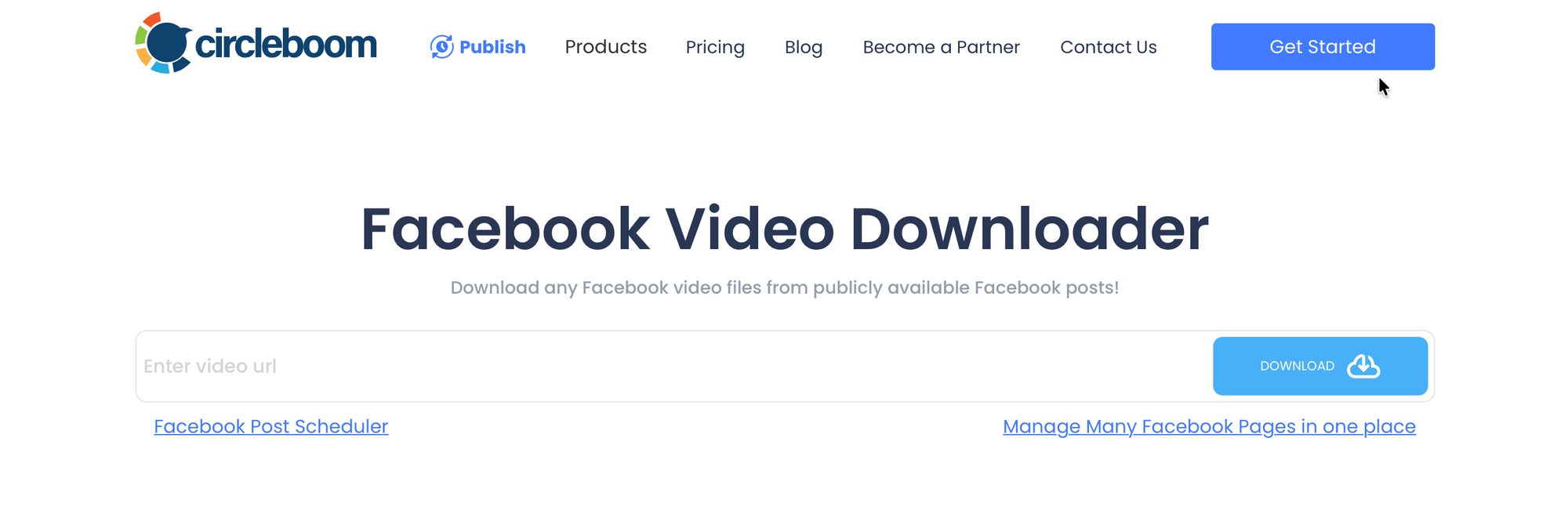
Step 1: Visit Circleboom's Facebook Video Downloader.
Step 2: Go to the Facebook story or video you want to download. Copy the URL of the post from your browser address bar or by tapping "Copy Link" from the post menu.
Step 3: Paste the URL into Circleboom's Facebook video search field and click "Grab that video file."
Step 4: Select the video resolution you want to download. Right-click the download link and choose "Save video as..." to save it to your computer or device.
The entire process takes under a minute for any publicly accessible Facebook video or story. You can use Circleboom's Facebook Video Downloader on any device, and no browser extension installation is required.
How to Save Your Own Facebook Stories Natively
If the story you want to save is your own, Facebook provides a built-in option that is even faster than any third-party tool.
On the Facebook mobile app:
- Open the app and tap your profile picture to view your active story.
- Tap the three-dot menu in the top right corner of the story viewer.
- Select "Save Photo" or "Save Video" depending on the content type.
- The story saves directly to your device's camera roll.
Through Story Archive: Facebook automatically archives your own stories for 30 days after they expire publicly. Go to your profile, tap the three-dot menu near your cover photo, and look for "Story Archive." You can browse, download, or reshare any story saved there within the 30-day window.
For your own content, this native method is the quickest path. For public videos and stories from pages or profiles you do not own, use Circleboom's Facebook Video Downloader.
What About Private Stories? Your Options
No tool can download a Facebook story that is set to "Friends Only" or a custom audience without the poster's explicit permission. This is Facebook's privacy architecture working as intended, and compliant tools like Circleboom do not attempt to bypass it.
If you want to save a private story from a friend or contact:
- Ask them to send you the video directly via Messenger.
- Ask them to save and share it with you from their own Story Archive.
- Use screen recording (see the next section).
Never use tools that claim they can access private Facebook content. They are either ineffective or they harvest your credentials.
Screen Recording as a Universal Fallback
For any story you can view on screen, regardless of privacy settings, screen recording captures exactly what you see.
On iPhone: Add Screen Recording to your Control Center via Settings, then swipe down and tap the record button before playing the story.
On Android: Most Android 11 and above devices have a native screen recorder in the notification shade. Swipe down, find the Screen Recorder tile, start recording, then play the story.
On Mac: Press Cmd+Shift+5 to open the Screenshot toolbar and select the screen or window recording option.
Screen recordings are larger files than downloaded originals, but they work universally and require no additional tools.
Privacy and Terms of Service: What You Need to Know
Downloading publicly available Facebook content for personal reference is widely practiced, but a few boundaries always apply.
The content you download remains the intellectual property of whoever created it. You cannot redistribute, repurpose commercially, or claim ownership of someone else's story or video without their permission. Compliant tools like Circleboom handle publicly accessible content only and stay within Meta's platform policies.
The rule of thumb: save your own content freely, save public content for personal reference, and always get permission before using someone else's content in any form of publication or marketing.
How Circleboom Goes Beyond Downloading
Circleboom's Facebook Video Downloader is one piece of a much larger platform. Once you have the content you want, Circleboom's Social Media Scheduler lets you plan, create, and publish your own Facebook content alongside posts for Twitter, Instagram, LinkedIn, Pinterest, and more, all from a single dashboard.
With Circleboom, you can schedule Facebook posts at optimal times, batch an entire week of content in one session, and manage your cross-platform presence without switching between apps. Circleboom is built for creators, marketers, and teams who need both a reliable download tool and a smarter way to manage what they publish next.
FAQ
Can I download Facebook stories from any profile?
You can download publicly visible Facebook videos and stories from public profiles and pages using Circleboom's Facebook Video Downloader. Stories set to "Friends Only" or custom audiences cannot be accessed by any external tool due to Facebook's privacy architecture. For those, screen recording or asking the poster to share directly are your only options.
Is Circleboom's Facebook Video Downloader safe to use?
Yes. Circleboom is an Official X Enterprise Developer and a fully policy-compliant social media management platform trusted by major organizations including NBC News, BBC, the American Red Cross, and L'Oréal. The Facebook Video Downloader does not ask for your Facebook password and operates entirely within platform guidelines.
Does the Circleboom Facebook Video Downloader work on mobile?
Yes. The tool works on both iOS and Android devices, as well as on desktop browsers. You do not need to install any app or browser extension. Log in to Circleboom from your mobile browser, paste the video URL, and download directly to your device.
Why can I not find a download button on Facebook Stories directly? Facebook does not provide a native download button for other users' stories. You can save your own stories using the three-dot menu in the story viewer, but for public content from other accounts, a compliant third-party tool like Circleboom's Facebook Video Downloader is the correct solution.
Does Circleboom support downloading Facebook GIFs as well?
Yes. Circleboom's Facebook Video Downloader handles both video files and GIFs shared publicly on Facebook. The same four-step process applies: paste the URL, click to grab the file, and choose your download format.
How long does Facebook keep stories in its archive?
Facebook keeps your own stories in your Story Archive for 30 days after they expire publicly. After that window, the content is no longer accessible through the archive. If you want to keep a story long-term, save it to your device during that 30-day period using the native option or Circleboom.
Conclusion
There is a clear answer to the question of whether a website exists to download Facebook stories like Instagram: yes, and Circleboom's Facebook Video Downloader is the safest, most policy-compliant way to do it for public content. For your own stories, Facebook's native save and archive features are just as fast. For private stories, screen recording and direct sharing remain your best alternatives.
Start saving Facebook videos and stories the right way with Circleboom's Facebook Video Downloader.