
If you’re serious about growing on X (Twitter), one question matters more than almost anything else:
Are my followers actually real?
Searches for “validate Twitter followers” usually come from creators and brands who want to know whether their audience consists of:
- real people or bots
- active users or abandoned accounts
- potential customers or empty numbers
Follower count alone no longer means much. What matters is follower quality.
In this guide, we’ll explain:
- what it means to validate Twitter followers
- why follower validation is critical for growth and monetization
- how to identify fake or low-quality followers
- how tools like Circleboom help validate followers at scale
What Does It Mean to Validate Twitter Followers?
To validate Twitter followers means evaluating whether your followers are:
- authentic (not bots or fake accounts)
- active (still using X)
- relevant (interested in your content)
Validation goes beyond simply counting followers. It’s about understanding who is behind the number.
A validated follower base is one where:
- engagement comes from real users
- impressions reflect genuine reach
- growth is sustainable
 Kevin O. Frank
Why Validating Twitter Followers Is So Important
Unvalidated followers create misleading signals.
Accounts with large numbers of fake or inactive followers often experience:
- low engagement rates
- poor tweet distribution
- reduced trust from brands and advertisers
- wasted ad spend
 Altug Altug
Numerically, studies consistently show that:
- accounts with high bot ratios can see 30–60% lower engagement rates
- impressions generated from low-quality followers rarely convert
- algorithms deprioritize content with weak engagement signals
In short: fake followers don’t just do nothing, they actively hurt performance.
Common Types of Low-Quality Twitter Followers
When validating followers, these are the most common issues:
Inactive Accounts
Profiles that haven’t tweeted or engaged for months, or even years. Inactive accounts actively hurt your engagement!
Bot Accounts
Automated profiles designed to inflate numbers without real interaction.
Spam and Fake Profiles
Accounts with:
- generic bios
- no profile photos
- unnatural follower/following ratios
Irrelevant Followers
Real users who have no interest in your topic and never engage.
All of these dilute engagement signals.
How Fake Followers Affect Tweet Performance
Twitter/X relies heavily on early engagement.
When your tweets are shown to followers who:
- don’t log in
- don’t interact
- are automated
your tweets receive weak initial signals.
This often leads to:
- lower impressions
- stalled distribution
- reduced reach outside your follower base
Validating followers improves who sees your tweets first, which matters more than how many people follow you.
How to Validate Twitter Followers Manually (and Why It Doesn’t Scale)
Manually checking followers involves:
- opening profiles one by one
- scanning bios and activity
- guessing authenticity
This approach:
- takes hours
- is inconsistent
- becomes impossible past a few hundred followers
That’s why follower validation requires tools.
Validating Twitter Followers with Circleboom
This is where Circleboom fits naturally into the process.
Circleboom helps users validate Twitter followers by enabling them to:
- analyze follower activity levels
- identify inactive or bot-like accounts
- filter followers based on behavior
- understand follower quality at scale
- clean up low-quality followers safely
Instead of guessing, you get data-backed validation.
When you find bot followers after the validation, you can remove them with Circleboom:
Step #1: Go to the Circleboom Twitter website and log in with your credentials.
If you’re a new user, sign up, it’s quick and easy!

Step #2: On the left-side menu, click on the Followers section. A dropdown menu will appear. Select All My Followers to see the full list of your followers.
If you want to remove specific accounts, such as fake/bot followers or inactive users, you can directly select these categories from the dropdown menu instead of viewing all followers.

Step #3: You will see a complete list of your followers.
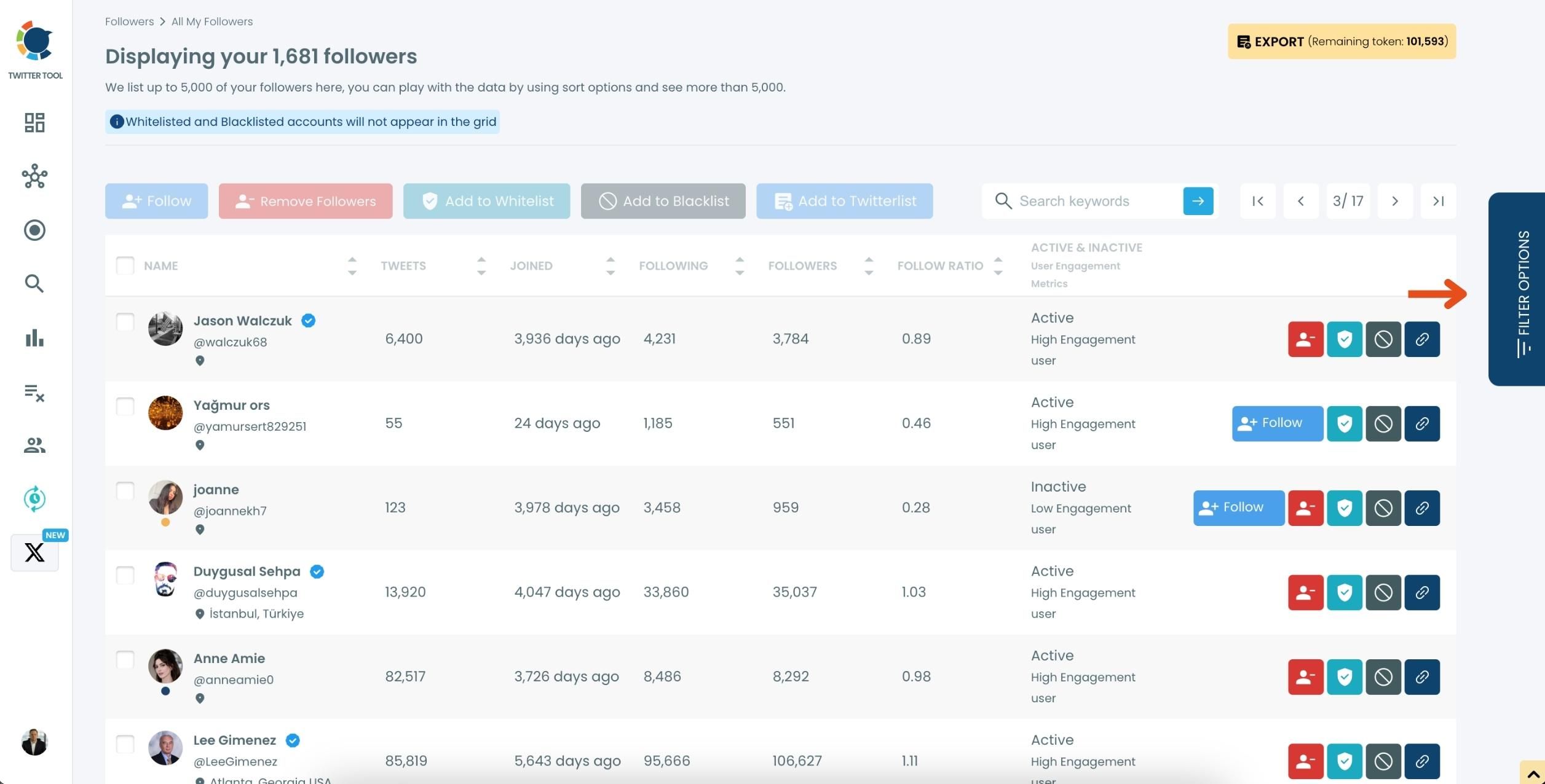
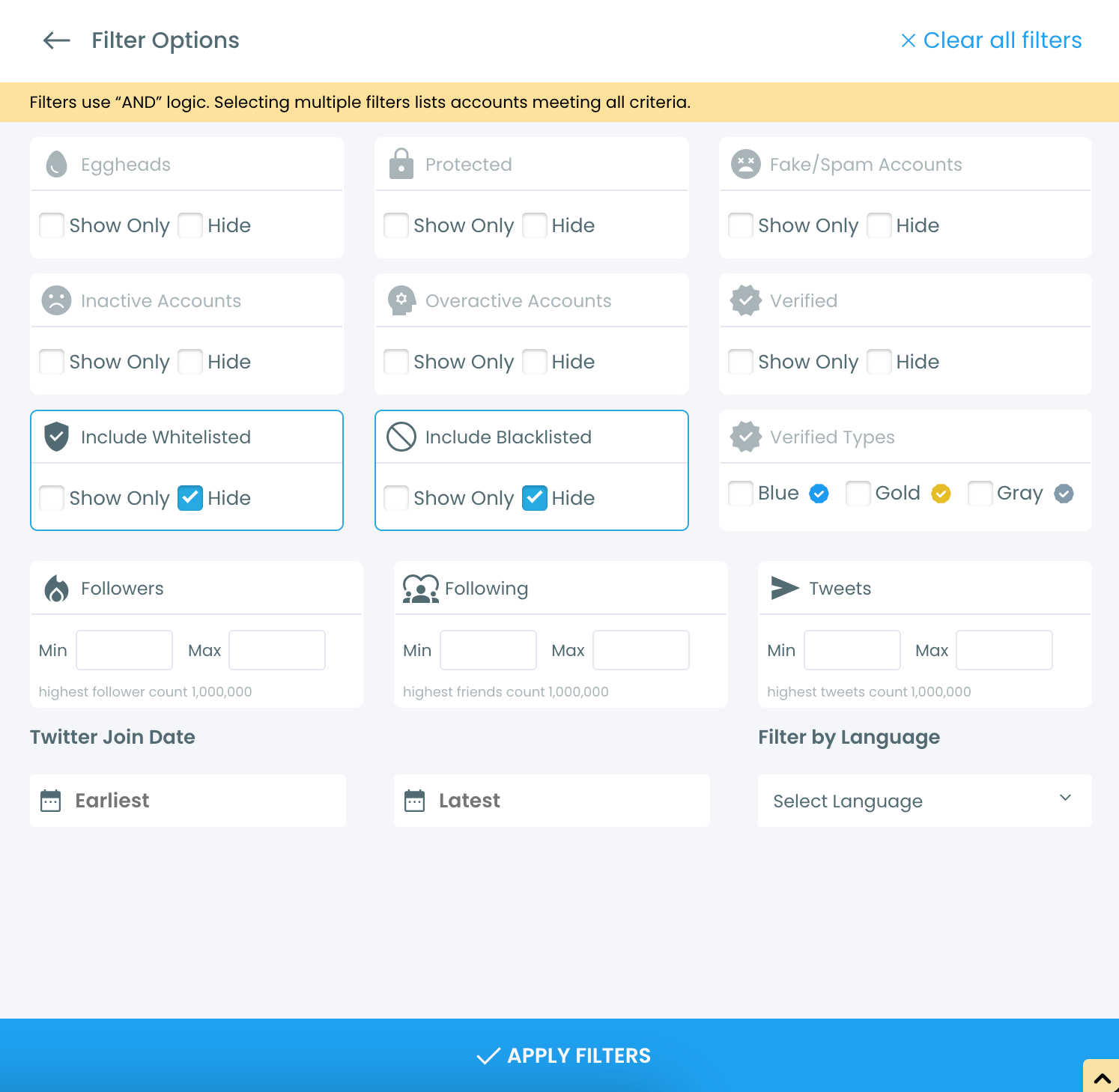
Use the Filter Options on the right-hand side to refine your list.
You can filter followers based on engagement levels, fake/spam accounts, inactivity, verification status, and more.
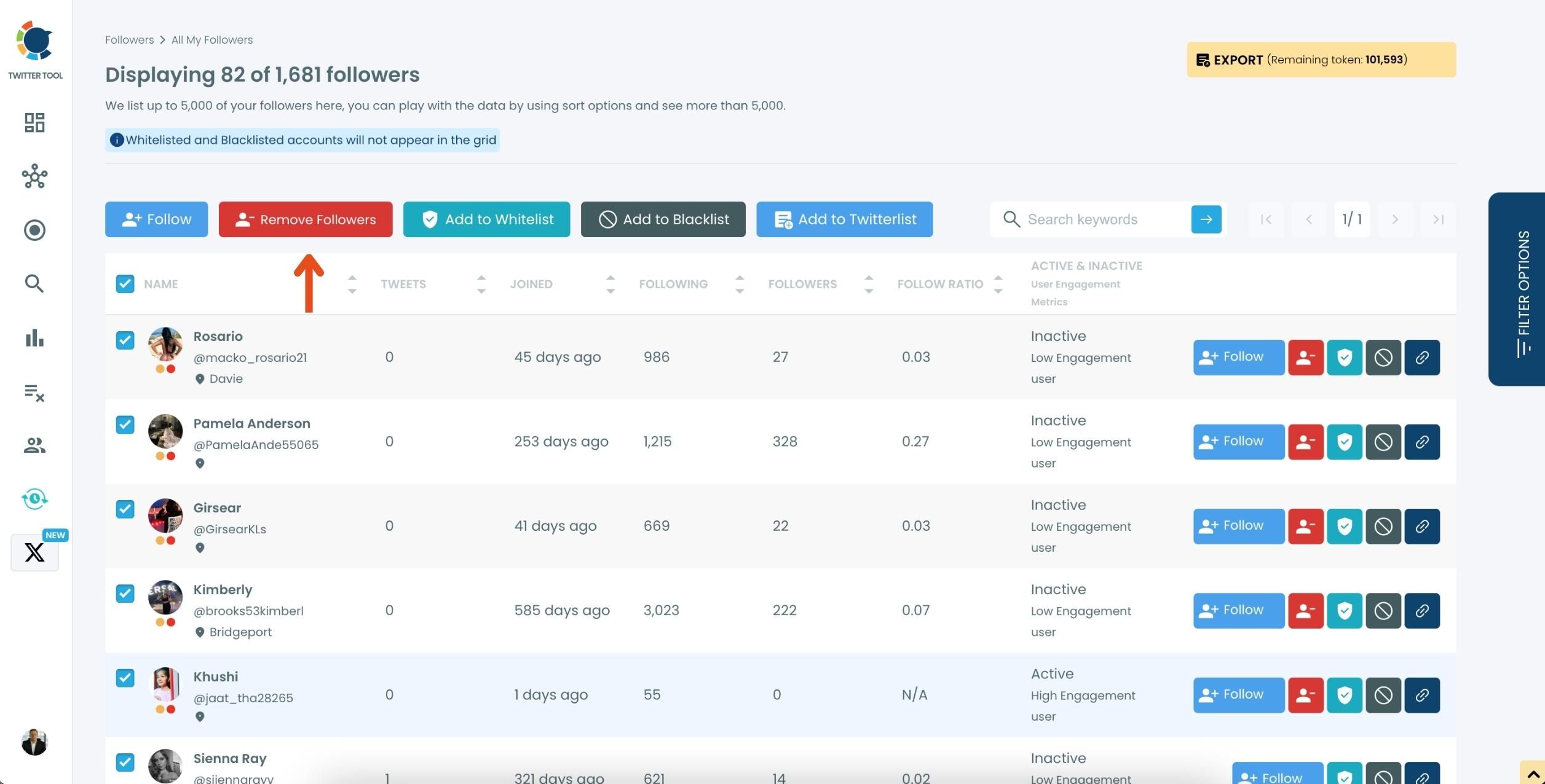
Step #4: Browse through your followers and check the boxes next to the users you want to remove.
You can also select multiple users at once. Once you have selected the users, click on the Remove Followers button at the top.
Alternatively, you can remove individual followers by clicking the red remove icon next to their name on the right side of the list.
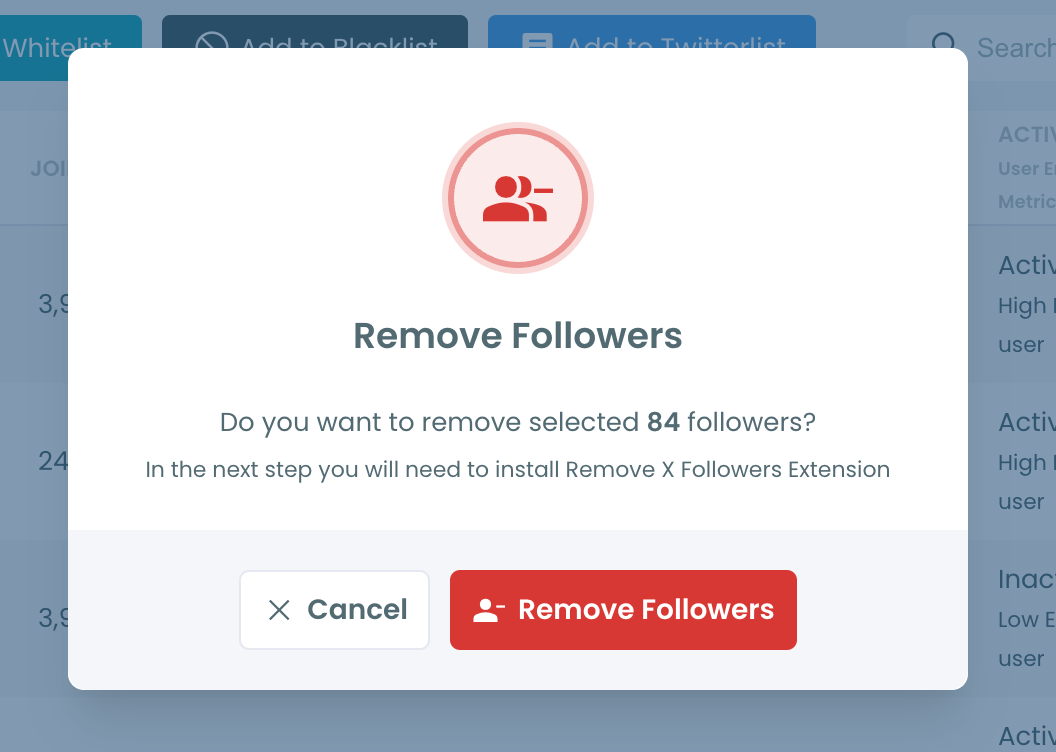
A confirmation message will appear asking if you are sure you want to remove the selected followers. Click ''Remove Followers''.
Step #5: Since the removal action is processed via the Circleboom Remove X Followers, you need to install it to complete the process.
Click on Download the Extension and install it from the Chrome Web Store.
Once installed, you can easily remove followers.

Step #6: After installing the extension, Circleboom will automatically add all your removal requests to the extension queue.
Click on the Start button to begin the removal process.
The extension will process your requests and remove the selected followers.
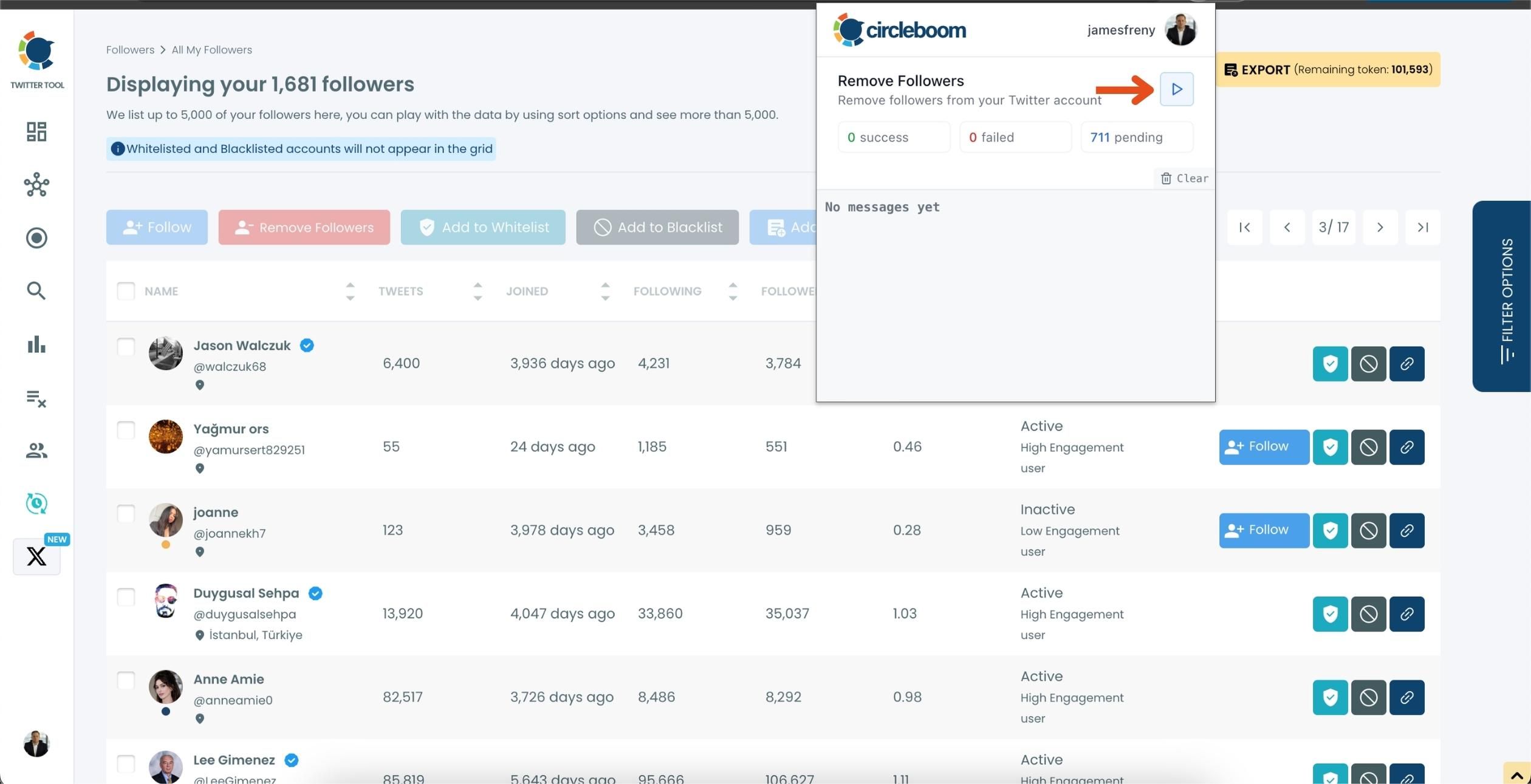
That's it! Your selected followers are now removed automatically.
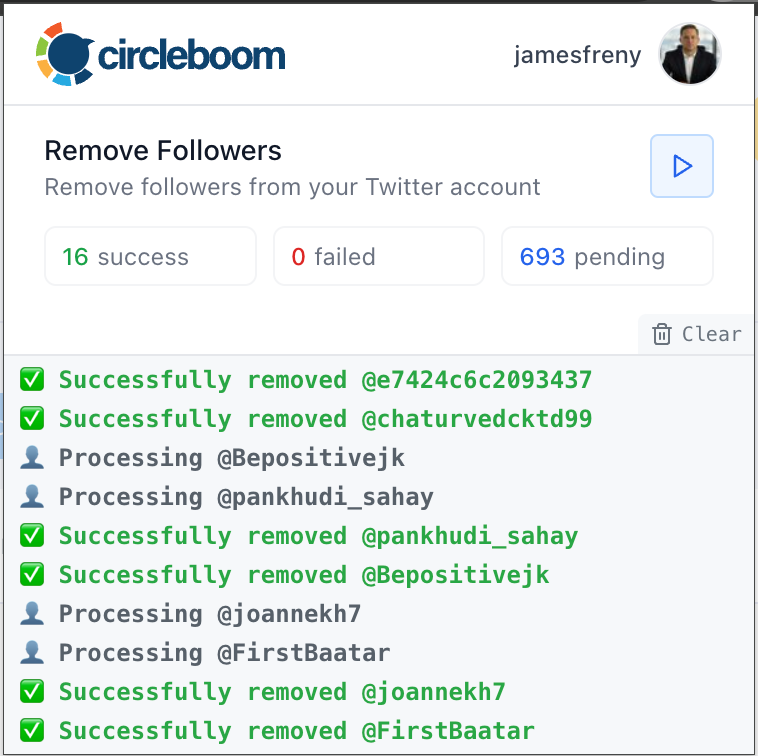
⚠️ Important Warning: Once the removal process begins, do not close your Chrome browser or the Circleboom tab. The tool will automatically remove followers in the background, but if you close the tab or exit Chrome, the process will stop.
What Happens After You Validate Your Followers
Creators and brands who validate their followers often notice:
- higher engagement rates
- better tweet distribution
- more meaningful interactions
- improved ad performance
Numerically, many accounts observe:
- 15–40% engagement rate improvement after cleaning inactive followers
- more consistent impressions
- better performance from the same posting volume
This happens because the algorithm starts testing content on real, responsive users.
Validating Followers and Monetization
For monetized accounts, follower validation is critical.
Brands care about:
- audience authenticity
- engagement quality
- conversion potential
An account with 20,000 validated followers can be far more valuable than one with 100,000 unverified ones.
Valid followers = credible reach.
Validate Before You Grow
One of the biggest mistakes is scaling an unvalidated account.
Growing with:
- bots
- inactive users
- irrelevant followers
only compounds the problem.
Validating your existing follower base before focusing on growth ensures:
- cleaner analytics
- stronger engagement signals
- healthier long-term performance
Final Thoughts: Validation Is a Growth Strategy
Validating Twitter followers isn’t about shrinking numbers.
It’s about strengthening signals.
When you know your followers are real:
- engagement becomes predictable
- analytics become trustworthy
- growth becomes sustainable
Tools like Circleboom don’t just help you manage followers, they help you understand and validate your audience, which is the foundation of real success on X.
FAQ: Validate Twitter Followers
What does it mean to validate Twitter followers?
It means checking whether followers are real, active, and relevant.
Can fake followers hurt my account?
Yes. They lower engagement rates and weaken algorithmic distribution.
How do I know if my followers are bots?
Common signs include inactivity, generic profiles, and no engagement.
Is it safe to remove fake followers?
Yes, when done gradually and responsibly.
Should I validate followers before running ads?
Absolutely. Ads perform better when shown to real, active users.