

It’s easy to follow hundreds or even thousands of accounts on Twitter without realizing how much it affects your account and timeline.
At first, it did not seem like a problem. You follow interesting people, brands, creators, and conversations. But over time, the list grows. Suddenly your timeline becomes chaotic.
Posts you care about get buried. Low-quality content fills your feed. Some accounts never post, while others post spam or irrelevant content.
Following too many accounts can distract your algorithm, damage your feed quality, and even affect the overall health of your account.
That is when I realized I needed to thin out my follows.

The problem was simple: I did not know where to start.
Going through hundreds or thousands of accounts manually is extremely time-consuming. I needed a smarter way to review my followings.
That’s when I started using Circleboom Twitter.
It is an Official X Enterprise Developer, and it analyzes your following list and categorizes accounts so you can easily decide who to keep and who to unfollow.

Why Following Too Many Accounts Is Not a Good Idea
Many users think following more accounts means discovering more content. In reality, the opposite often happens.
When your following list becomes too large, several problems appear:
- Your timeline becomes crowded and noisy
- Valuable posts get lost among low-quality ones
- Bots and spam accounts appear in your network
- Your algorithm receives mixed signals about your interests
- It becomes harder to engage with meaningful content
A cleaner following list leads to a better Twitter experience.
That’s why thinning out your follows is important.
 Arif Akdogan
The Most Effective Way to Thin Out Your Follows
The most effective way is not manually checking accounts one by one.
Instead, the smarter approach is to analyze your followings by categories and then remove accounts that do not add value to your feed.
This is exactly what Circleboom Twitter helps you do.

The platform analyzes the accounts you follow and organizes them into useful categories such as:
➡️ Active vs inactive accounts
➡️ High-quality vs low-quality accounts
➡️ Verified vs unverified accounts
Instead of guessing who to unfollow, you can quickly review your followings based on data.
When I did this, I noticed that many accounts I followed were fake profiles, inactive users, or simply low-quality accounts. Cleaning them up immediately improved my timeline.
Why I Used Circleboom Twitter
Before using Circleboom, thinning out my follows felt impossible.
But Circleboom Twitter made the process simple because it:
✅ Analyzes your following list automatically
✅ Categorizes accounts intelligently
✅ Helps detect fake and bot accounts
✅ Highlights inactive or low-quality profiles
✅ Allows you to unfollow accounts easily
Because Circleboom Twitter is an Official X Enterprise Developer, it works safely within the platform’s system and provides reliable account insights.
Step-by-Step: How to Thin Out Your Twitter Follows
Here is exactly how I cleaned up my following list.
Step #1: Log in to your Circleboom Twitter dashboard.
From the left-side menu, go to Followers / Following Management & Analytics, then click on All Your Following.
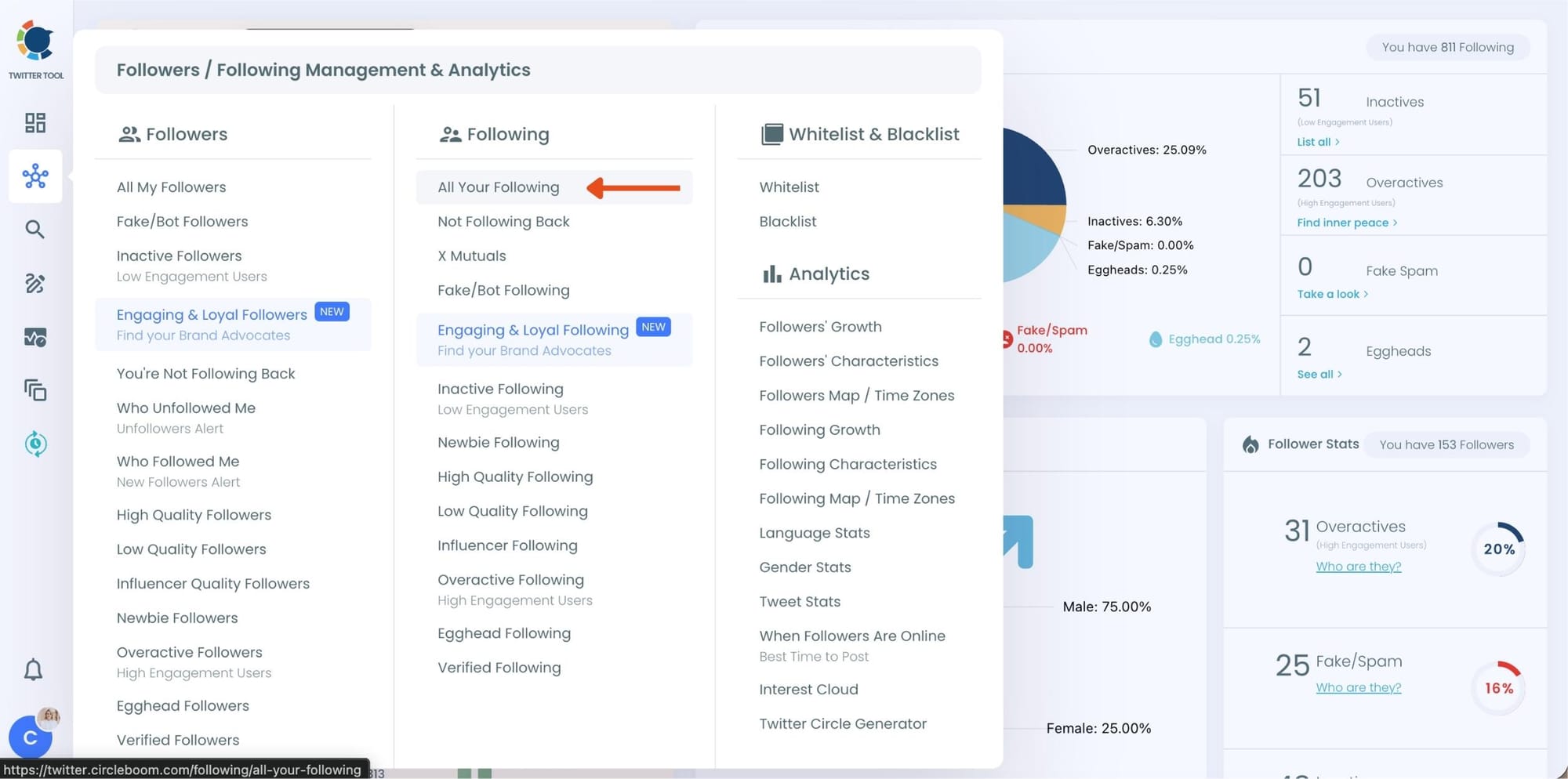
At this point, Circleboom loads your entire following list and displays each account with detailed metrics such as tweet count, join date, follower and following numbers, follow ratio, and activity level.
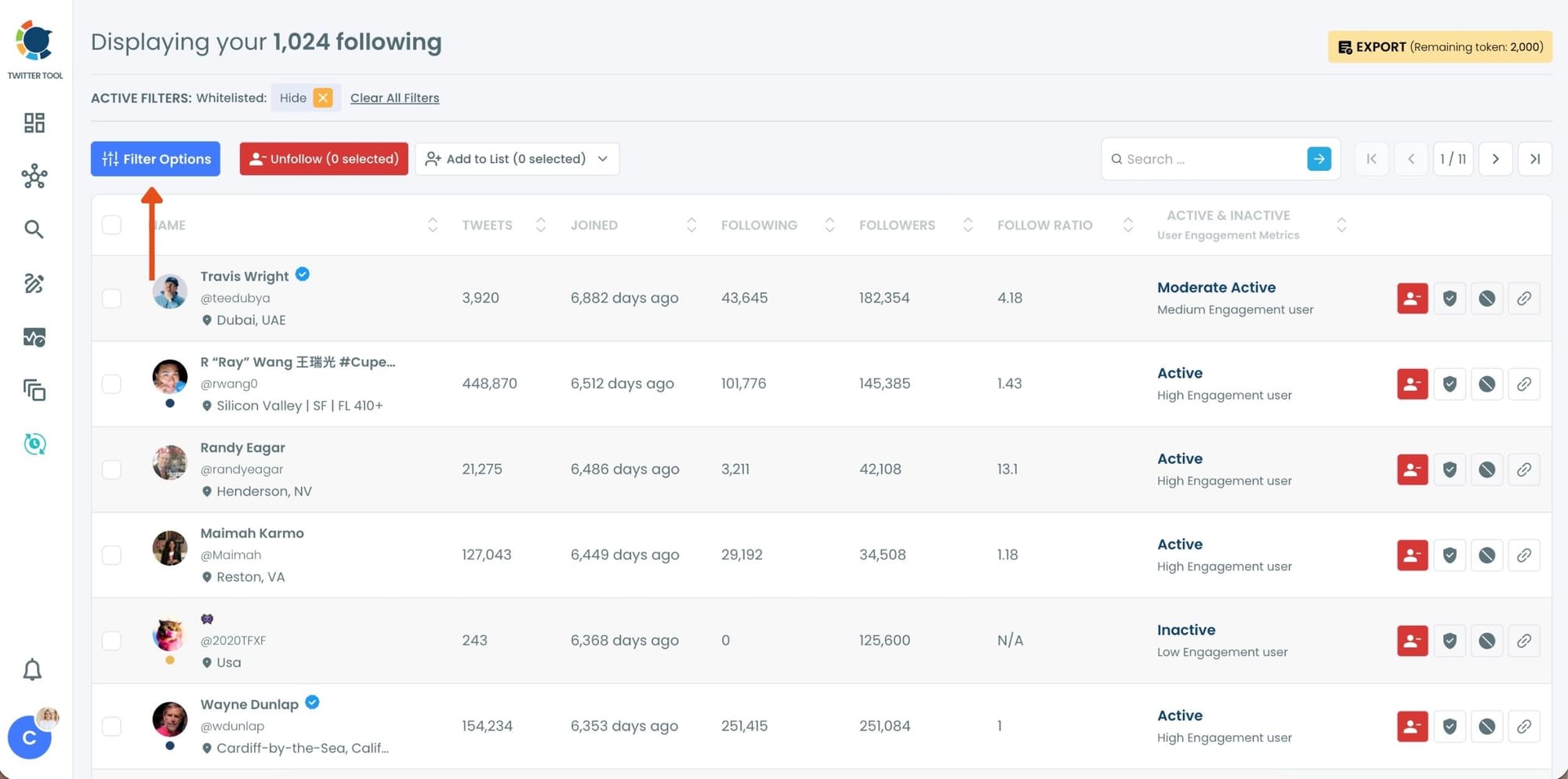
Step #2: Once your following list is visible, click on Filter Options at the top of the page.
Inside the filter panel, use the Follower Quality section to define what you want to see.
Select Fake/Spam and enable Show only. You can also adjust additional quality filters depending on how strict you want the cleanup to be.
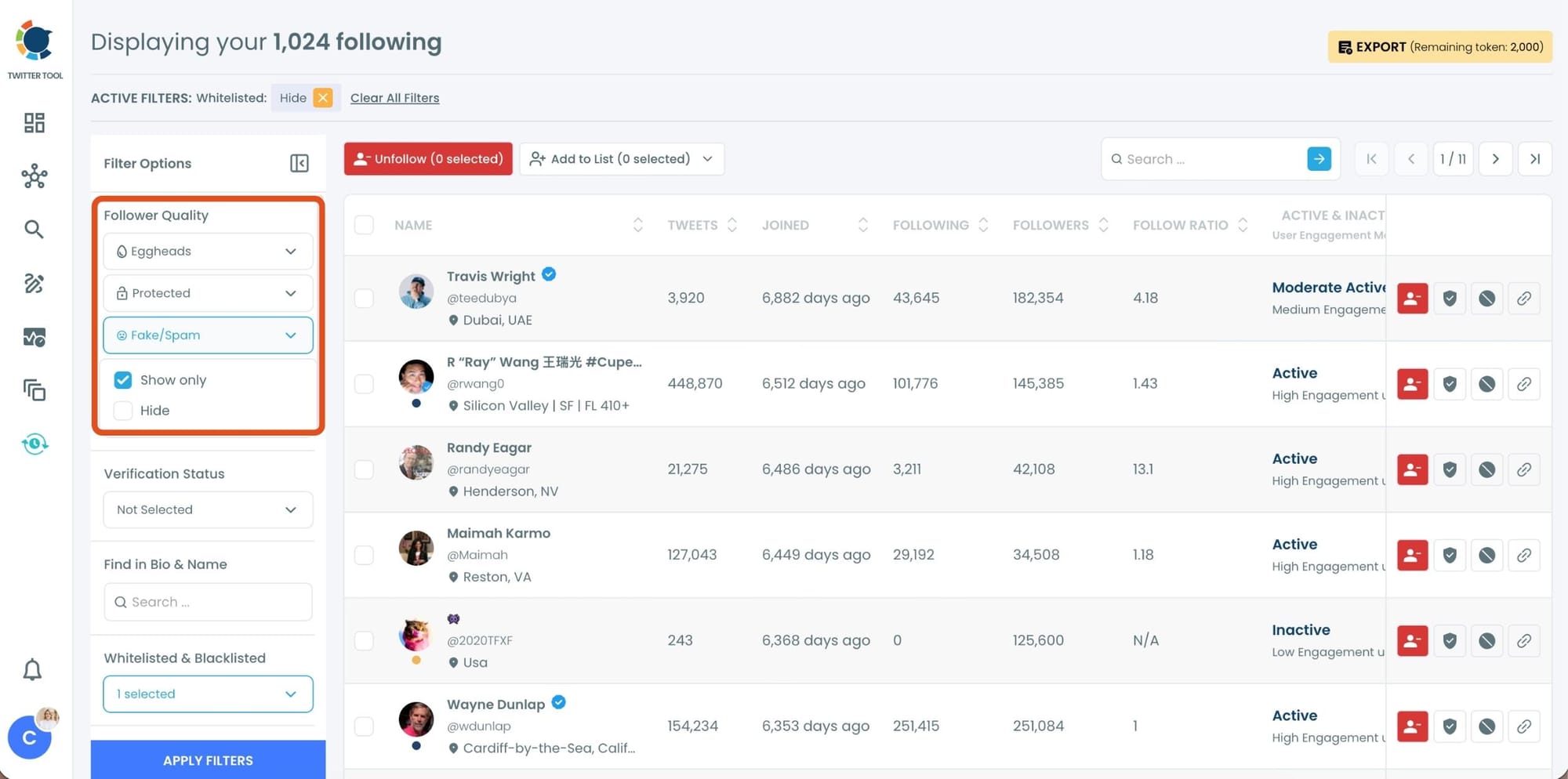
After setting your filters, apply them. Circleboom now lists only fake and low-quality following accounts.
Step #3: Circleboom now shows only low-quality or fake following accounts, each clearly labeled with engagement and activity indicators.
Select the accounts you want to remove by using the checkboxes on the left. You can select multiple accounts at once.
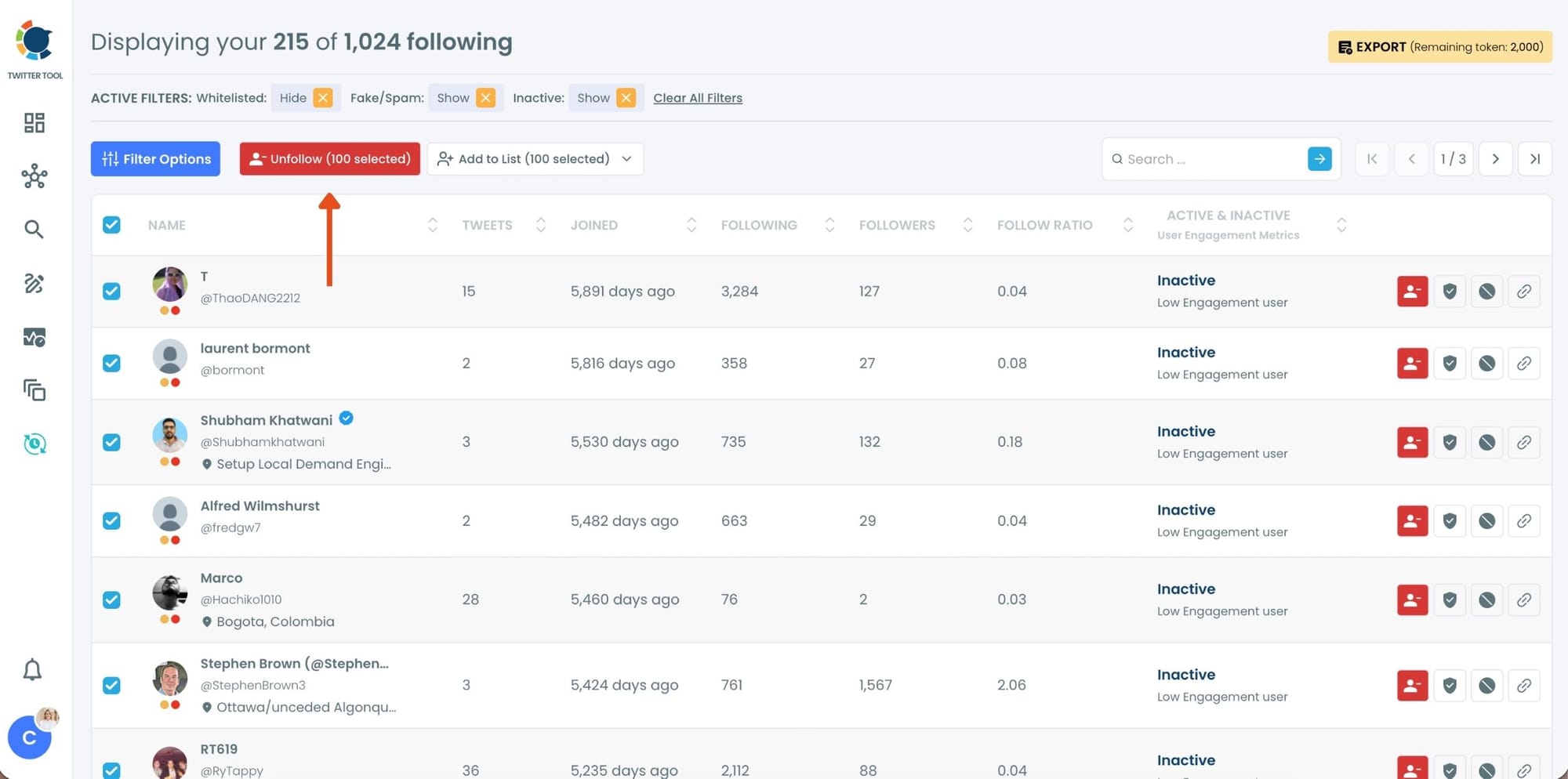
Click the red Unfollow button at the top of the list after making your selection.
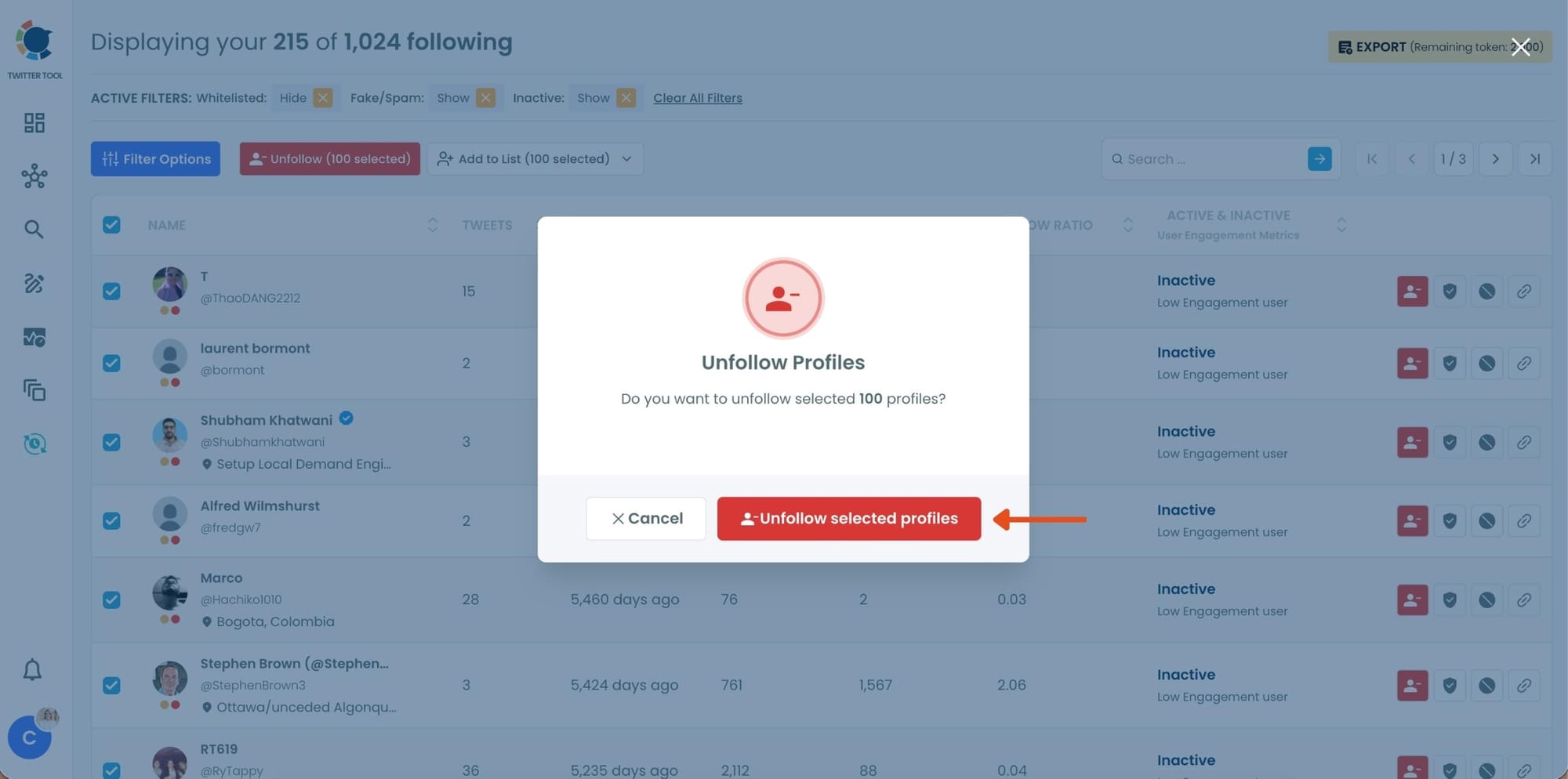
Step #4: Circleboom will show a confirmation pop-up to prevent accidental unfollow actions.
Confirm the action by clicking Unfollow selected profiles.
Which Accounts Should You Unfollow First?
If you are unsure where to begin, start with the accounts that most commonly reduce feed quality:
- Fake or bot accounts
- Accounts that never post
- Spam or promotional profiles
- Low-quality or irrelevant accounts
Removing these accounts alone can make a big difference in your timeline experience.
What Happened After I Cleaned Up My Follows
After thinning out my follows, the change was noticeable.
My feed became:
🟢 Cleaner
🟢 More relevant
🟢 Easier to navigate
Instead of scrolling through noise, I started seeing posts from accounts that actually mattered.
Engagement also became more natural because I was interacting with content I genuinely cared about.
In short, my account became better and more focused.
Conclusion
Following too many accounts on Twitter (X) can harm your feed quality, confuse your algorithm, and make your timeline difficult to enjoy.
The most effective way to thin out your follows is to analyze your following list and remove low-quality accounts strategically.
Instead of manually reviewing hundreds of profiles, Circleboom Twitter simplifies the process by categorizing your followings into meaningful groups like fake accounts, inactive users, and low-quality profiles.
This makes it much easier to decide who to unfollow and helps you build a cleaner, healthier Twitter experience.
If your timeline feels crowded or unfocused, thinning out your follows might be the best place to start.





)