

Nowadays you can see tweets complaining about X suspending reply guy accounts like this one ⬇️
X just suspended all of my reply guys 💀
— JBond (@jbondwagon) February 26, 2026
These mfers will always be the first to comment in my posts
First, I thought they just had their notifs on
Then I thought, they’re just farming engagement from me for InfoFi
Now, it’s apparent that they’re AI slops 😂
Good riddance 👋 pic.twitter.com/dYYwagumh6
Yes, this is official. X is blocking users who auto reply to tweets through API. However, Enterprise API clients are exceptions. So, if you are a X Enterprise API client like Circleboom, you can continue to be a reply guy!
Keep in mind that the API provides a more accurate real-time data stream than the X interface itself. While the platform UI may experience lag, the API captures and reflects new developments instantaneously.
Circleboom has the official Enterprise API, we don't scrape data from X!

They announced this with an email to API users and developers:
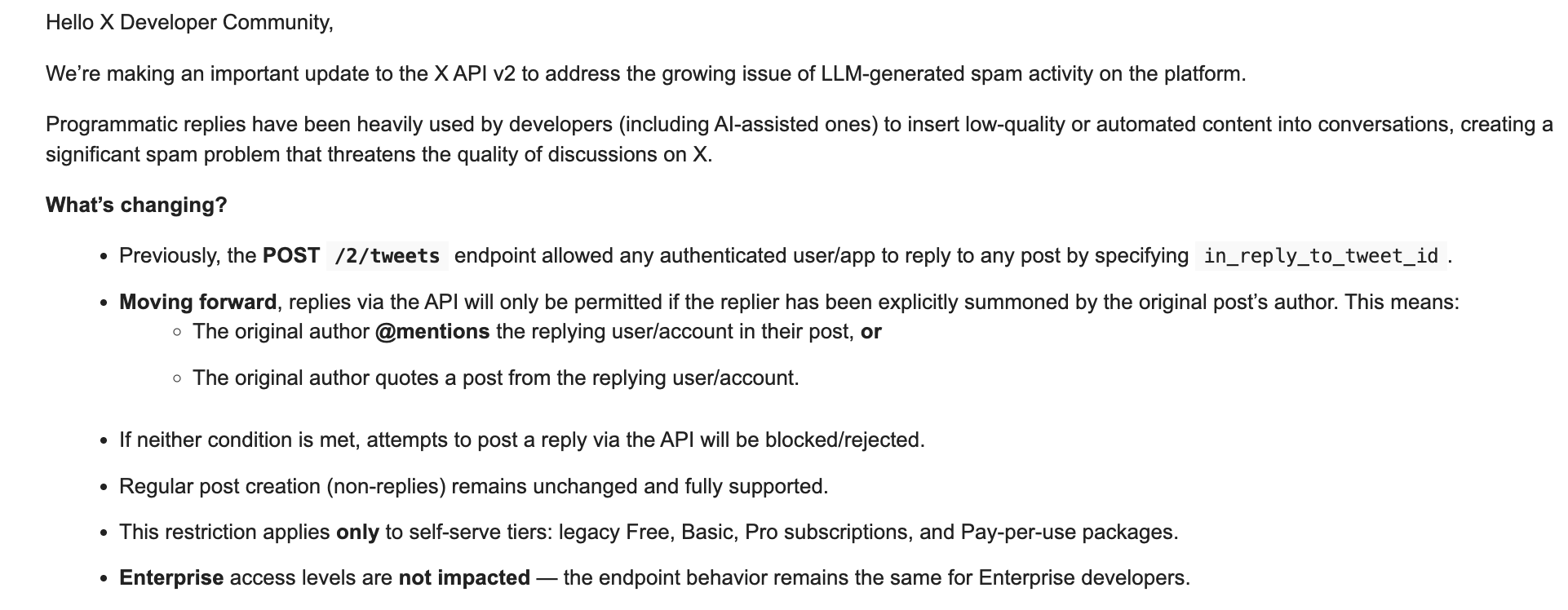
"Enterprise access levels are not impacted - the endpoint behavior remains the same for Enterprise developers."
And many X creator who are using API to automate X things like replies, tweeting, etc. published tweets about it.
it's done
— Tibo (@tibo_maker) February 25, 2026
X removed the ability to reply through the API
so tell me:
are you seeing a huge reduction in AI replies today?
But why? What happened and X blocked API access to reply bots? Actually, it was coming and people could see it on Nikita Bier's (X Head of Product) tweets. They declared a war on bots and spam activities on the platform:
We are rolling out more detection for automation & spam (and a lot more to come).
— Nikita Bier (@nikitabier) February 14, 2026
If a human is not tapping on the screen, the account and all associated accounts will likely be suspended—even if you’re just experimenting.
While we aim to support legitimate use-cases of agents,…
As I said earlier, you can use Circleboom, X Official Enterprise client, to automate your reposts without any problems.

Effective X (formerly Twitter) outreach is about strategically engaging the right audience whether they are potential customers, future collaborators, or key industry influencers. When executed correctly, high-quality outreach transforms your marketing efforts across several pillars:
- Follower Growth: By targeting users within your specific niche, you build authentic bonds that turn strangers into loyal followers.
- Boosted Engagement: Outreach is a powerful tool for cross-platform promotion, such as driving traffic to a new YouTube video or a high-value blog post.
- Influencer Partnerships: Directly reaching out remains the most effective way to secure collaborations with key figures in your industry.
- Lead Generation & Sales: Tailored, value-driven messaging allows you to move prospects through the funnel, highlighting unique product benefits through direct, personal contact.
The Case for Automation (and the New Rules of X)
While the benefits are clear, manual outreach is a massive time sink. Who has the hours to manually DM hundreds of prospects every day? Automation allows you to scale your efficiency and refine your targeting without losing the "human" touch of a well-crafted message.
However, the landscape of X automation has recently shifted. X has begun aggressively blocking "reply guy" accounts and basic API users associated with spammy, automated behavior. If you are using a standard, low-level tool, your account is at high risk of suspension.
Why Circleboom is the Safe Choice for Outreach
This is where the distinction between "botting" and "professional automation" becomes vital.
The Enterprise Advantage: Because Circleboom is an Official X Enterprise API Partner, our users operate under a different set of rules. Unlike basic apps that X is currently phasing out, our Enterprise status ensures your account remains compliant and functional.
We prioritize your account's safety by:
- Preventing Spam: Our tools are designed to facilitate genuine growth, not "churn and burn" spam tactics.
- Using Official Channels: We don't scrape data or use "gray-market" workarounds that trigger X’s security red flags.
- Advanced Targeting: We help you find relevant users so your outreach is welcomed, not reported.
By choosing a verified Enterprise client like Circleboom, you can automate your DMs and mentions with confidence, knowing you’re protected from the crackdowns affecting the rest of the platform.
Step-by-Step: Automate Reposts While Creating a Tweet
Here’s how to set it up for a new tweet.
Step 1: Go to Circleboom Twitter’s X Post Planner
Open Circleboom Twitter and click X Post Planner + AI Writer.
Then select Write & Plan Your Post to start creating your tweet.

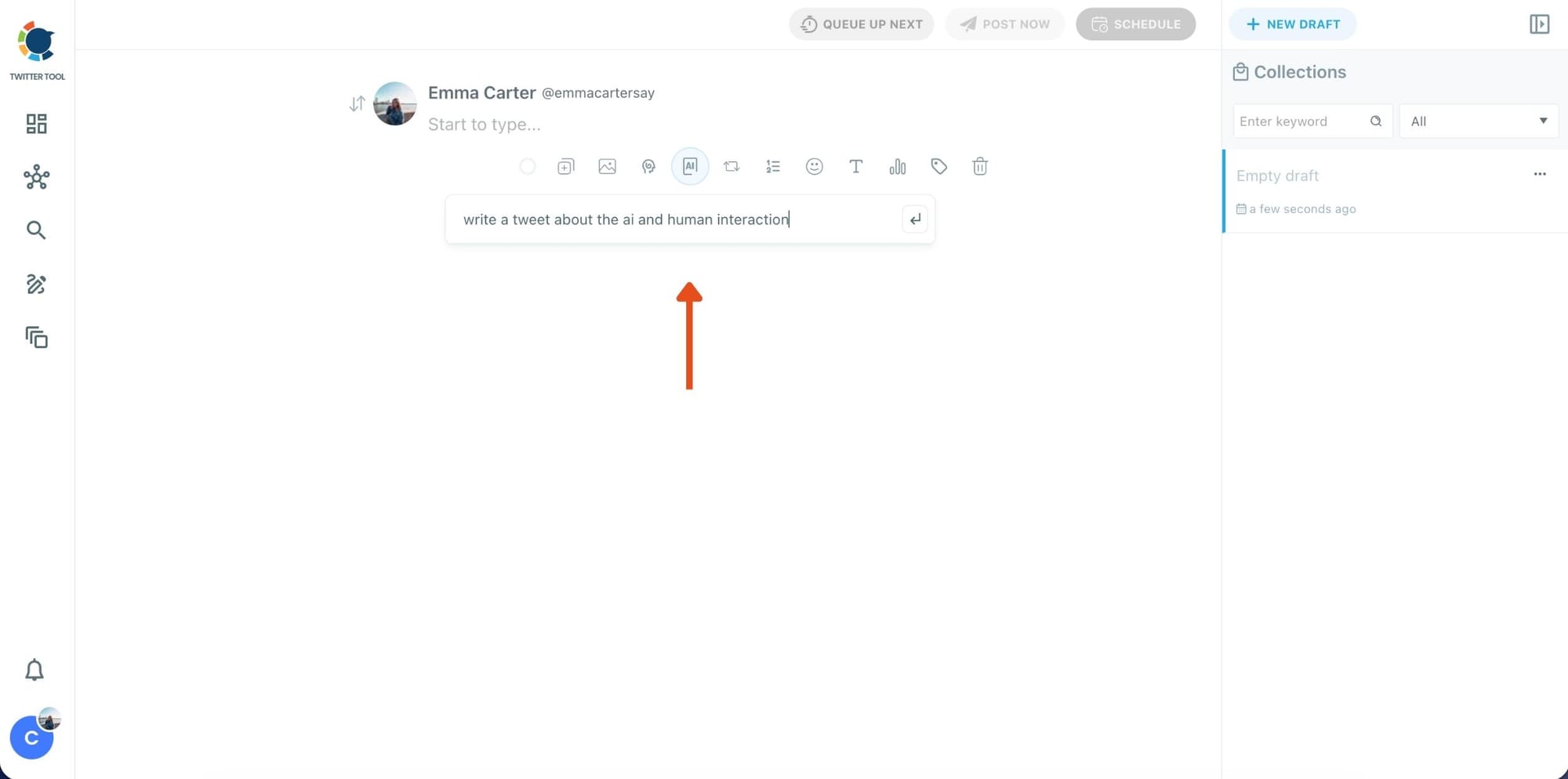
Step 2: Write your tweet (or generate one with AI)
You can type your tweet manually in the editor.
Or, if you want to move faster, click the AI option and let Circleboom generate a tweet idea for you based on your topic.
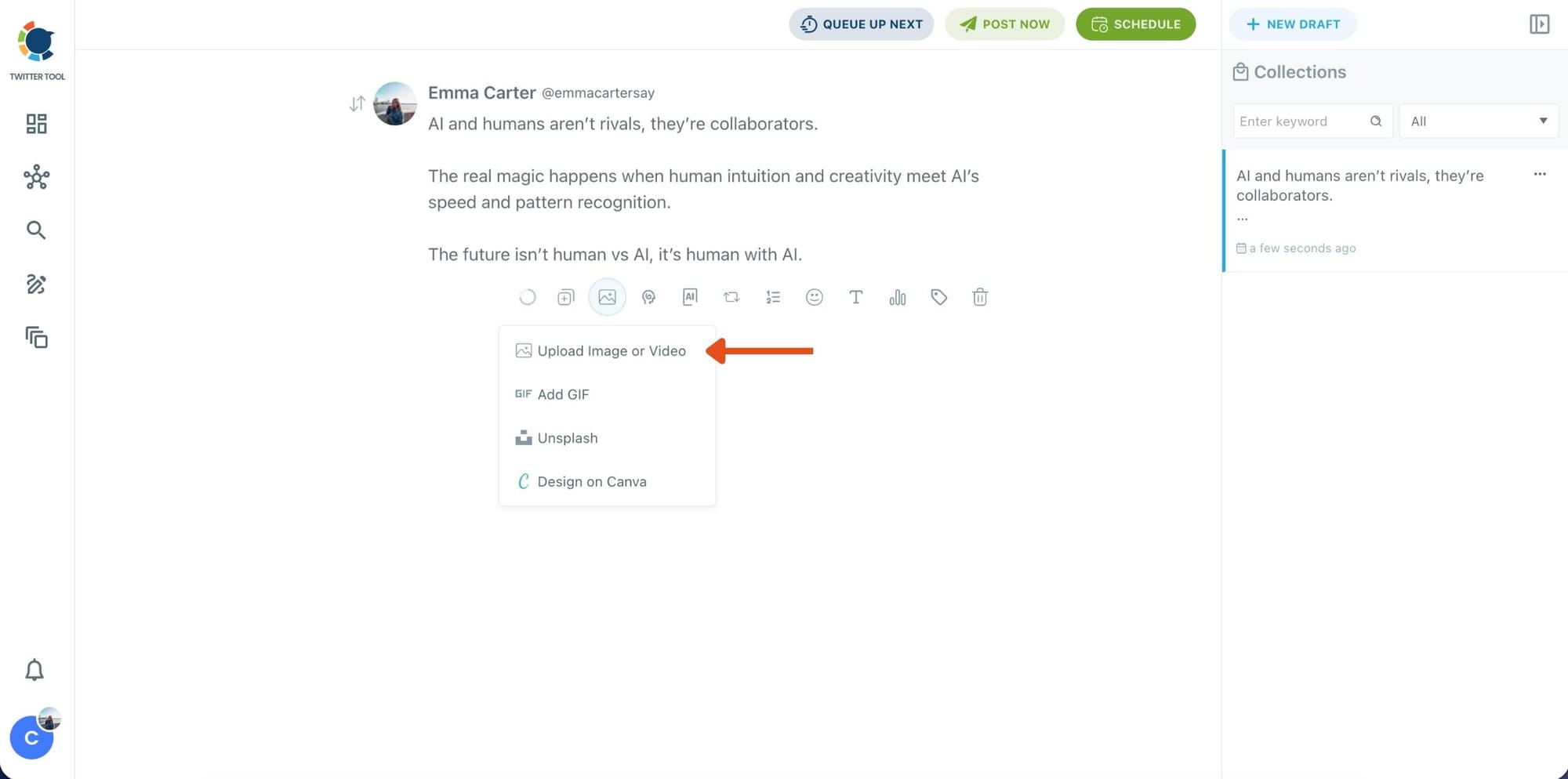
Step 3: Add an image to make the post more engaging
Once your text is ready, attach a visual to your tweet.
You can:
- Upload an image/video from your device
- Pick one from Unsplash
- Or design one instantly using Canva
Step 4: Style your tweet using Circleboom’s Font Generator
Now it’s time to make your tweet stand out visually.
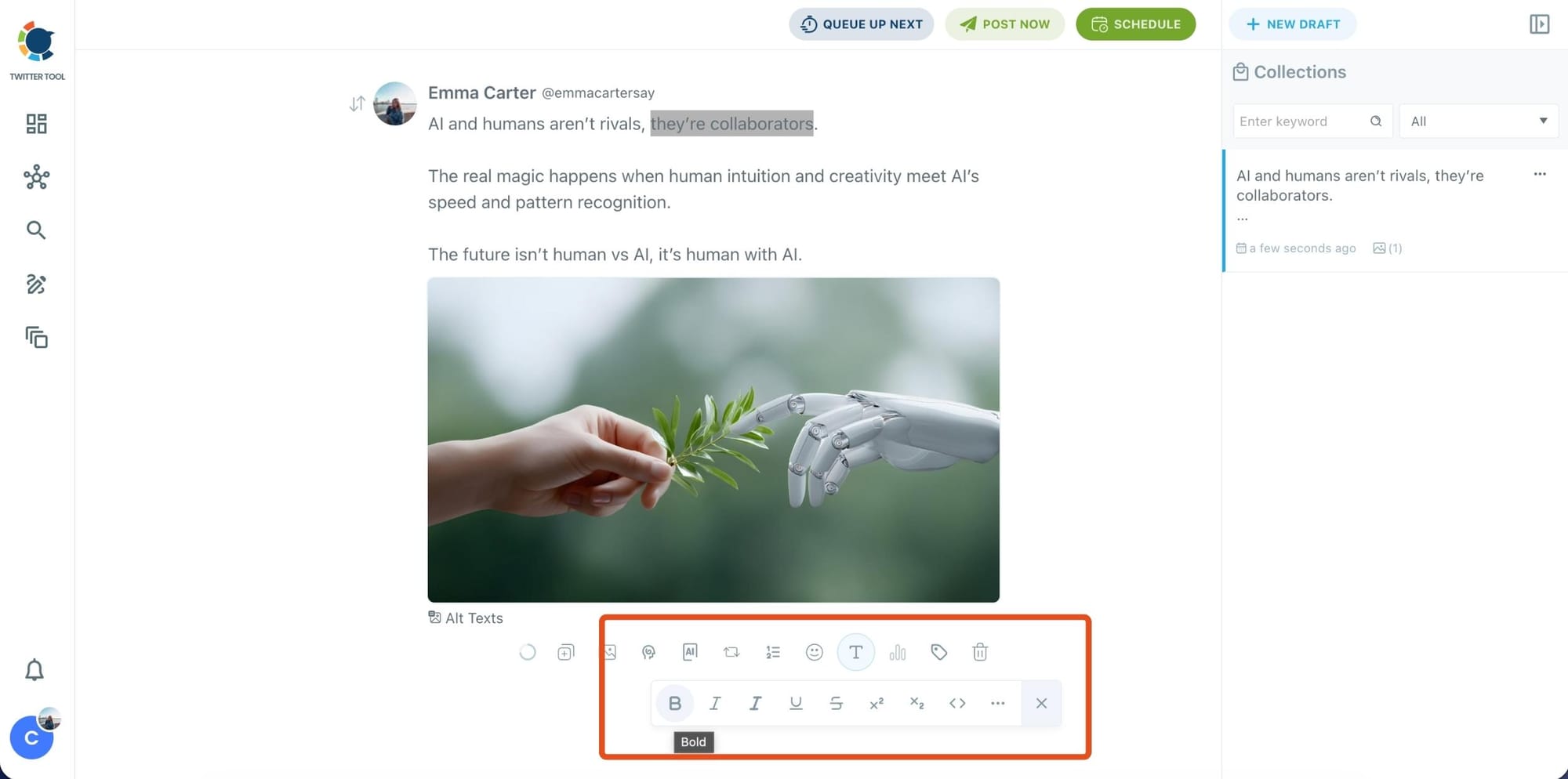
Select the part of your text you want to change, then open the Font Generator toolbar and apply styles like:
- Bold / Italic / Underline
- Different font variations
- Extra formatting options for a more “designed” look
This is perfect when you want key parts of your tweet to grab attention immediately.
Step 5: Set Auto Retweets to boost visibility
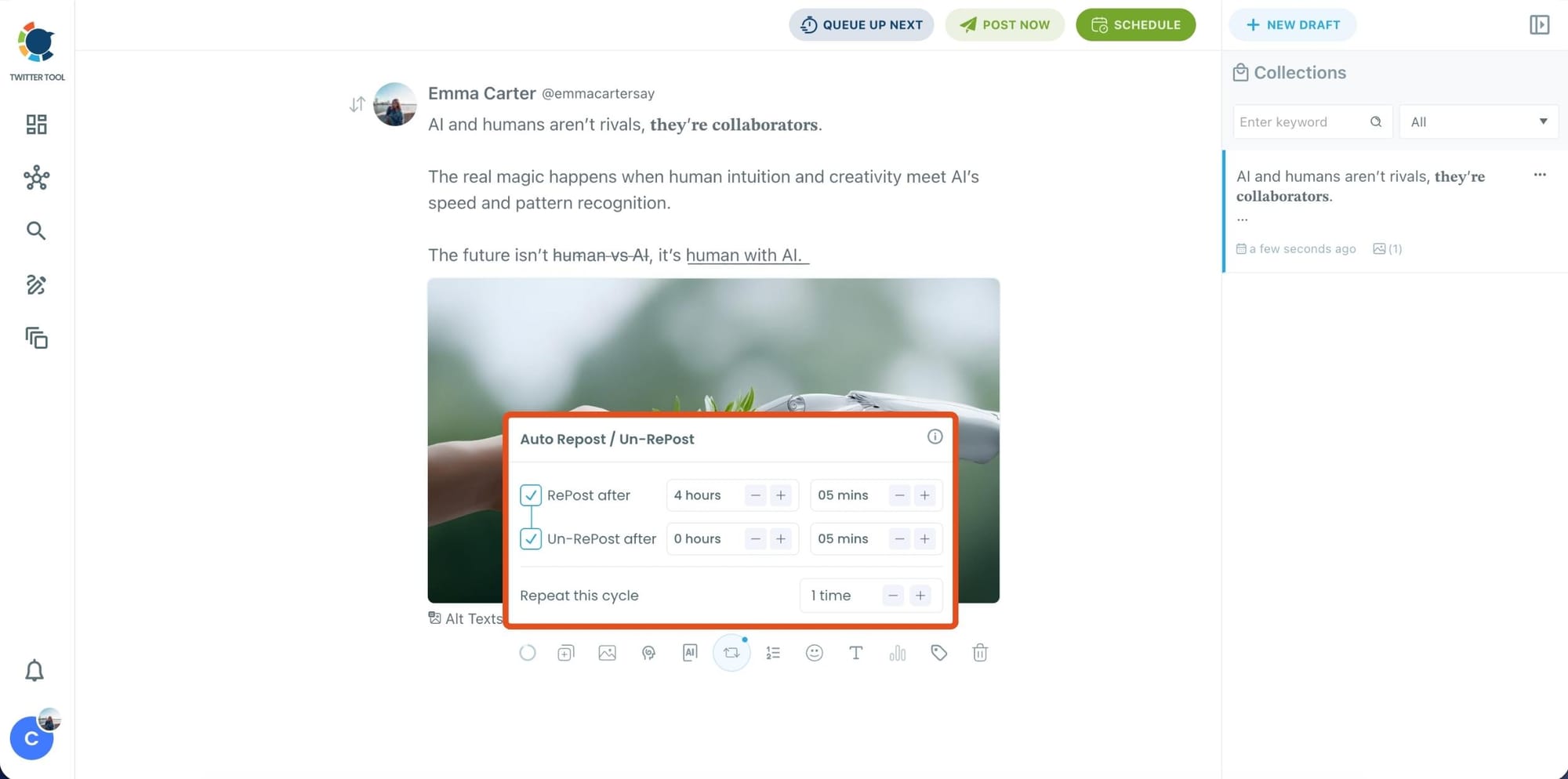
After styling your post, you can increase reach by enabling Auto Repost / Un-RePost settings.
This lets you automatically:
- Repost your tweet after a selected time
- Remove the repost later
- Repeat the cycle if you want more than one repost
It’s a smart way to bring your tweet back into the feed without manually reposting it.
Bonus Tip: Cross-post your tweet to other platforms automatically
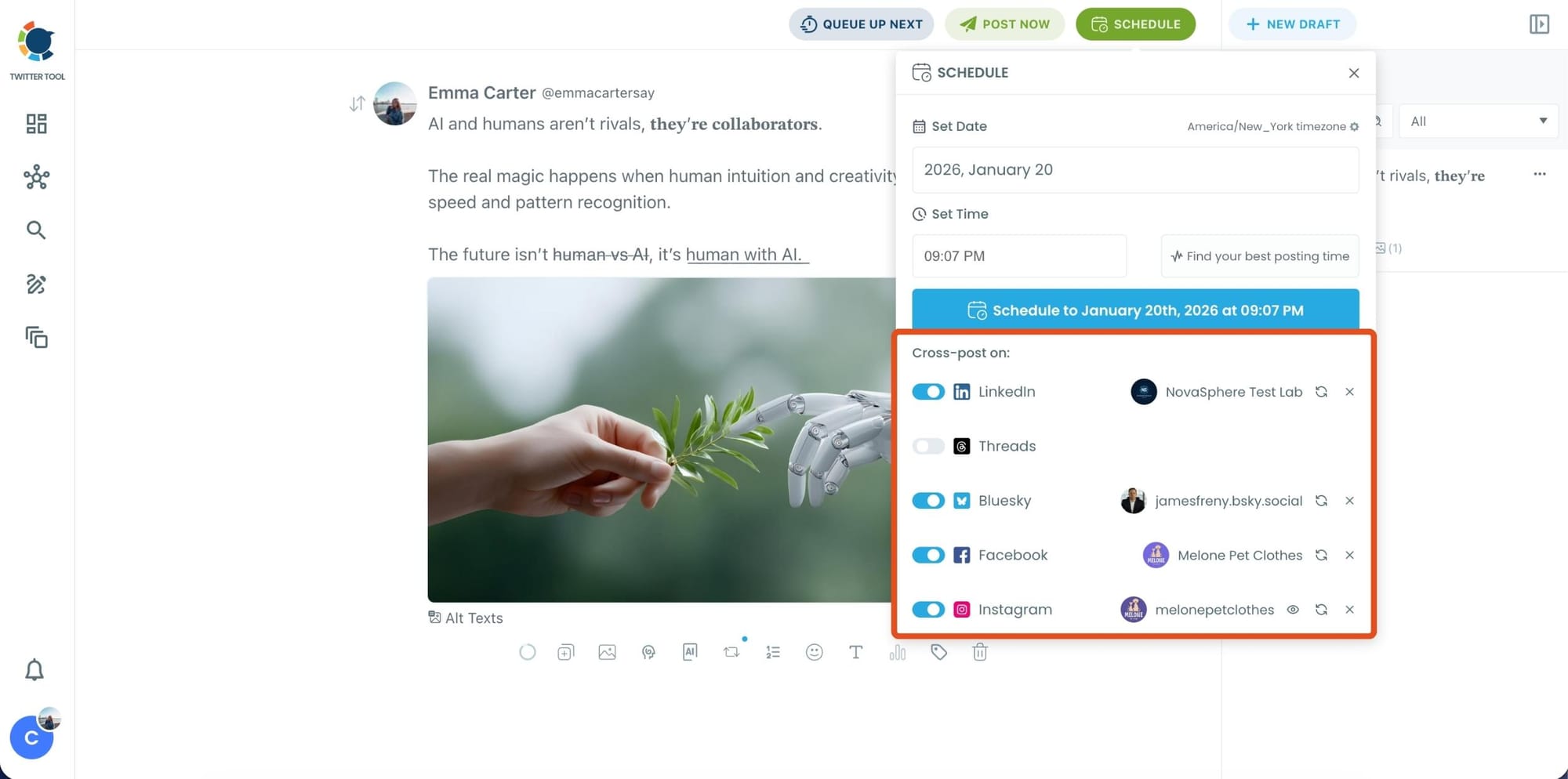
Before you publish, you can also enable Cross-Post to share the same tweet across multiple platforms in one go.
Circleboom lets you post your content to Instagram, Facebook, LinkedIn, Bluesky, and Threads automatically, so you don’t have to rewrite, re-upload, or repeat the same work on each platform.
Step 6: Schedule it for the best time to post
Finally, click Schedule and set your date and time.
You can also click Find your best posting time to see Circleboom’s suggested time slots based on follower activity.

Once you pick the best option, smart-schedule it, and you’re done. Your tweet will go out at the time it has the highest chance to perform well.
Step-by-Step: Automate Reposts for Older Tweets
Already posted tweets can be automated too.
Step #1: Navigate to the Analytics Menu
From the left-hand menu, click on the "Post Management & Analytics" tab, then select "Post Analytics" from the dropdown.
Within Post Analytics, select the "Post Engagement Analytics" option.

Circleboom will display a detailed breakdown of your posts, including metrics like impressions, likes, retweets, replies, and more.
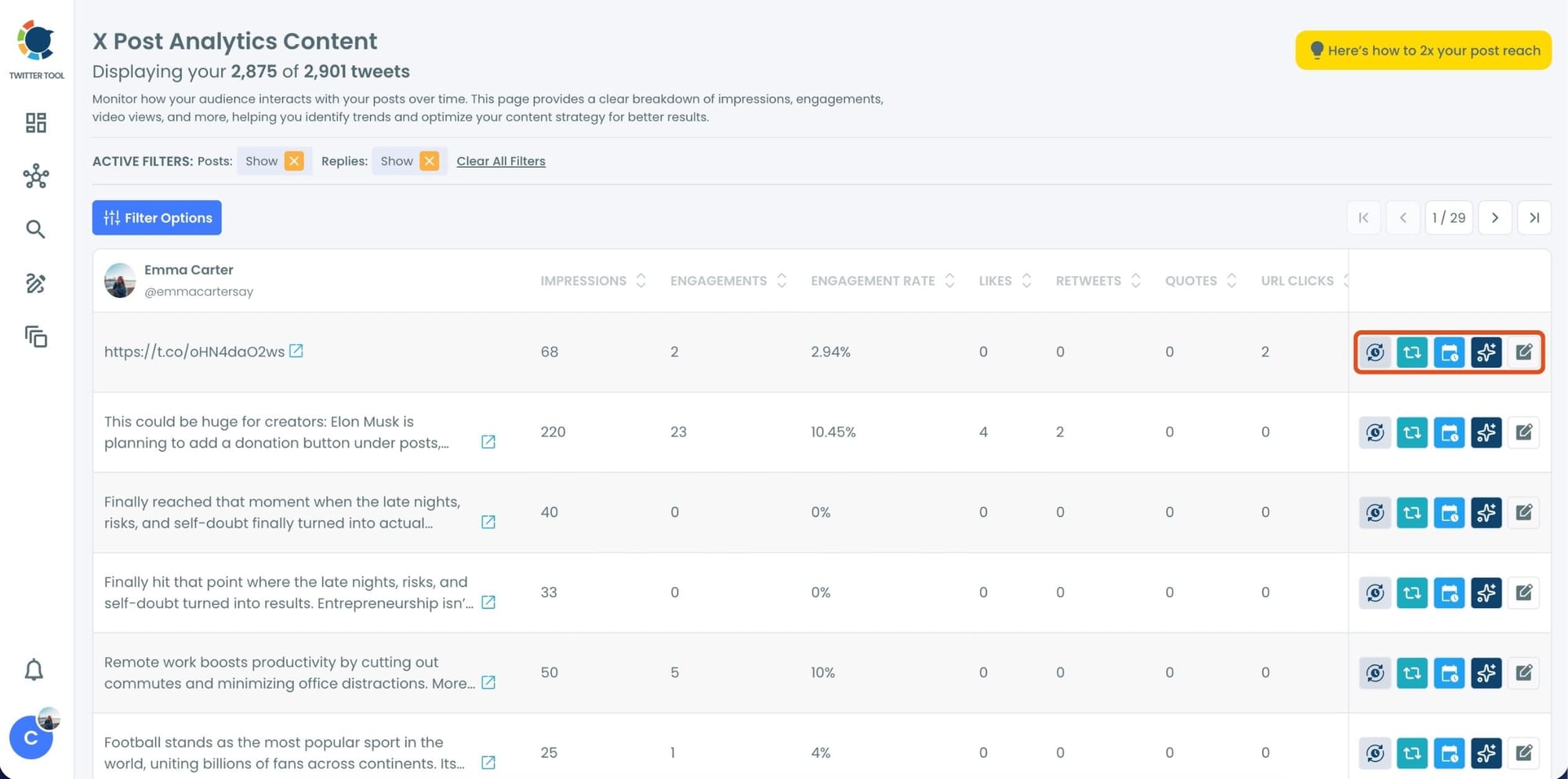
Step #2: Once you’ve found your old tweets, Circleboom offers several tools to make the most of them; choose which you want to use:

🟢 Reschedule Popular Tweets: Found a tweet that’s still relevant or hilarious but didn’t get the engagement it deserved?
With Circleboom, you can reschedule it to repost it at a better time.
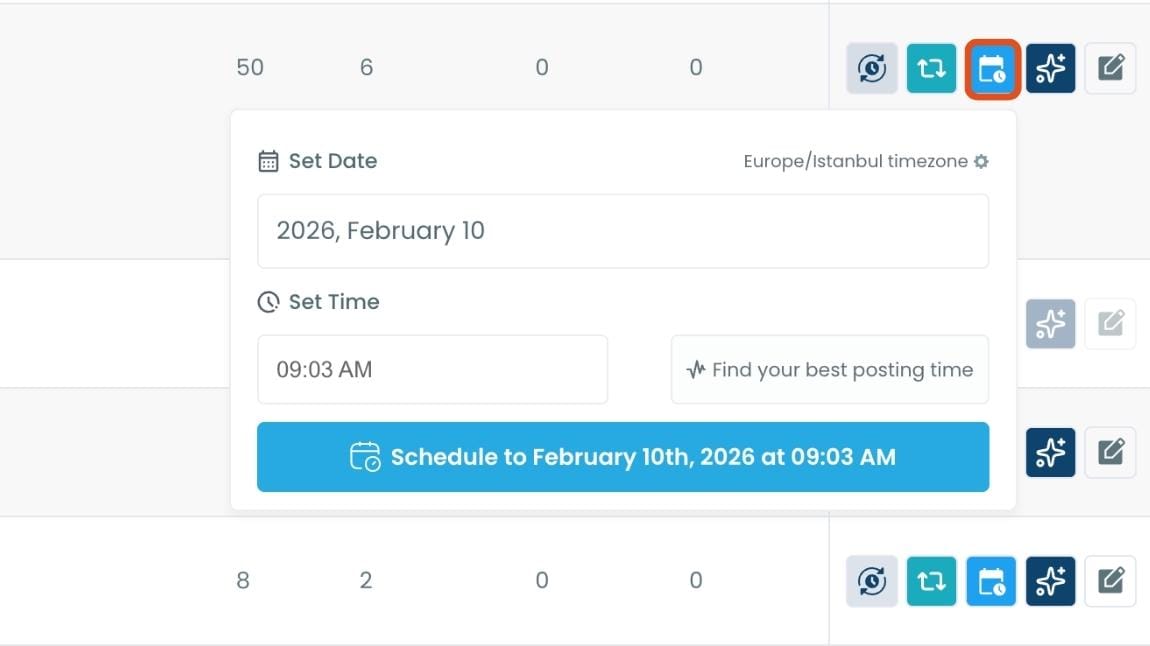
Maybe your audience wasn’t active when you first tweeted it, or perhaps it just got lost in the noise. Rescheduling ensures your best content gets a second chance to shine.
🔵 Refresh Content with AI: Some of your old tweets might feel outdated or could use a fresh twist. Circleboom’s AI-powered tweet generator can help you rewrite or improve them.
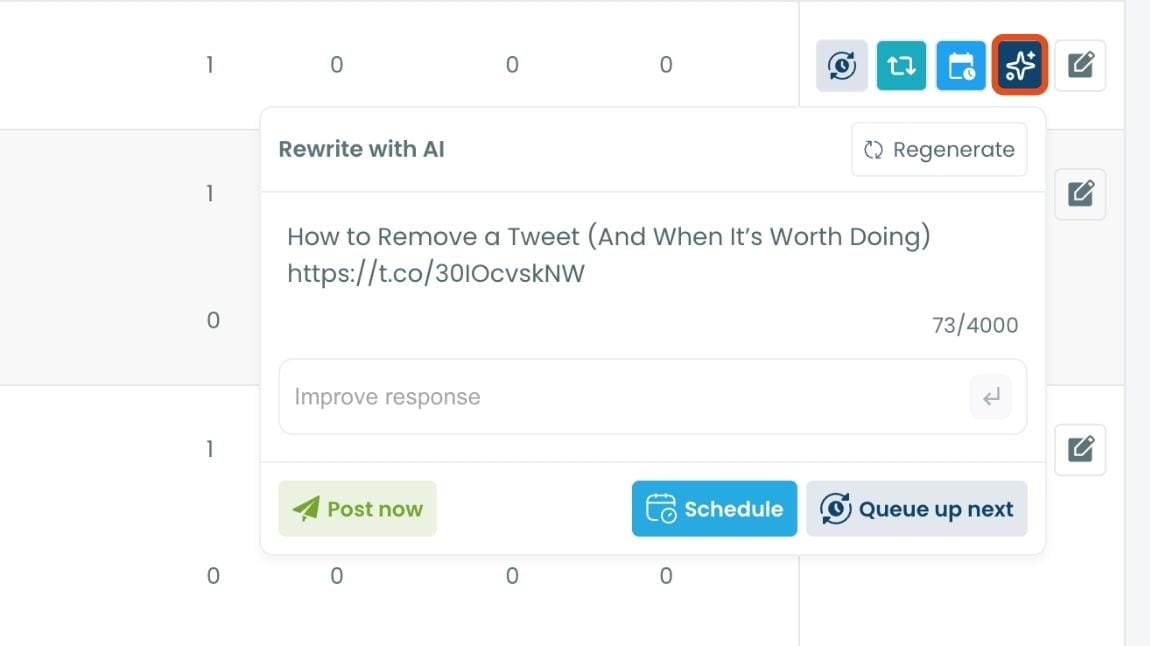
Whether you want to update the language, add a modern twist, or make it more engaging, the AI feature has got you covered.
🟡 Set Auto-Retweets: If you’ve got evergreen tweets that are still relevant, why not let them work for you on autopilot?
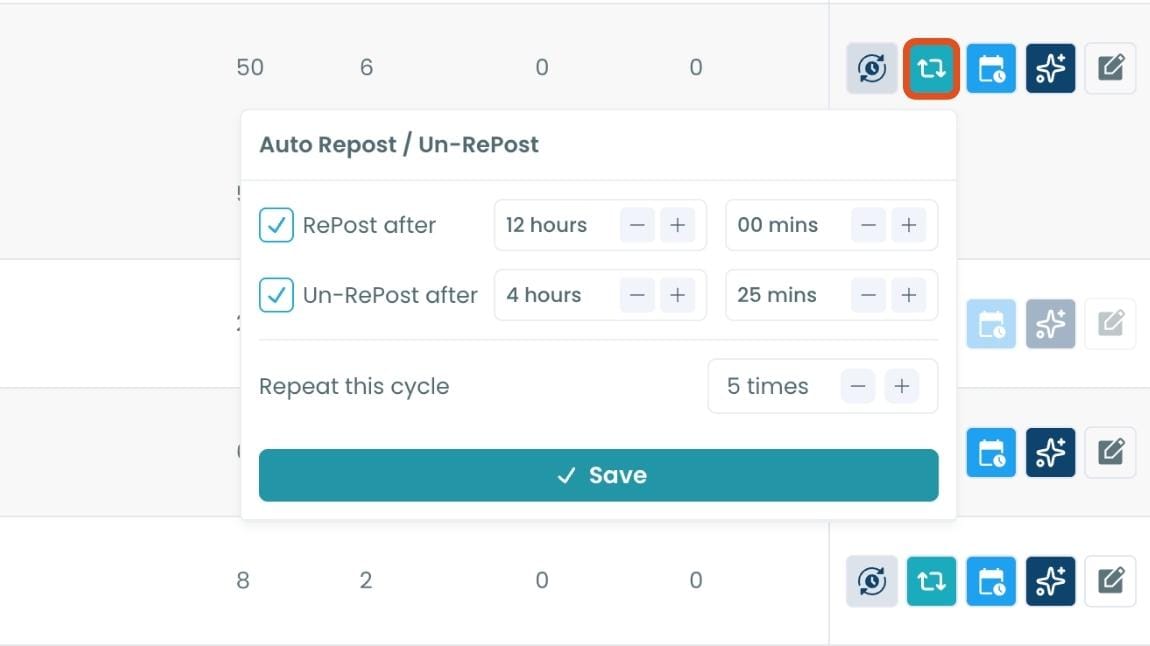
Circleboom’s auto-retweet feature allows you to automatically retweet your best-performing content at regular intervals. This is perfect for driving consistent engagement without lifting a finger.
Final Words
X is changing the rules of the game, but that doesn't mean your automation has to stop. While standard bots are being phased out, Circleboom’s Enterprise API access ensures your workflow remains uninterrupted and safe.
From styling your tweets with unique fonts to setting "Auto-Retweets" for your evergreen content, you now have a complete toolkit to dominate the feed without the risk of suspension. Ready to take your X strategy to the next level? Start automating the right way today.


%20Reply%20Guys%20Dead%20Now%3F)
%20Posts.%20Are%20They%20Smart%20or%20Just%20Lazy%3F)