
This article is written by Circleboom. We are listed as the first alternative to Buffer on this page. We want to name that plainly. Where Buffer is the better fit for your situation, we say so. Where another tool on this list serves a specific need better than either Buffer or Circleboom, we say that too.
Buffer is one of the most liked social media tools on the market. The interface is genuinely clean. The onboarding is fast. The free plan is real, not a crippled preview, and it includes Google Business Profile scheduling from day one. For a small business testing GBP automation for the first time, Buffer is a reasonable place to start.
The question is what happens when you need more than Buffer was designed to give.
What Buffer Does for Google Business Profile
Buffer supports all three GBP post types natively: What's New (Standard), Event, and Offer. Posts can include up to 10 images and a CTA button with a destination link. The post creation flow is simple and consistent: you open the composer, write or generate your caption with the built in AI assistant, attach media, pick a time, and done. In our testing, average time from opening the composer to a confirmed scheduled GBP post was 43 seconds.
The free plan allows 3 channels (one of which can be your GBP) with 10 scheduled posts per channel per month at no cost. Paid plans start at $6 per channel per month. For one or two accounts, this is among the most affordable options in the category.
Buffer's community management inbox consolidates incoming GBP comments with AI powered reply suggestions, so you can respond to questions on your Google posts without opening Google Business Manager separately. The browser extension lets you schedule from any webpage directly into your queue. Platform support extends to TikTok, YouTube, Bluesky, and Mastodon alongside the standard social networks.
When Buffer Might Not Be the Right Fit
You are managing 5 or more accounts. Buffer charges per channel. At 5 channels on the Essentials plan, that is $30 per month. At 10 channels, $60 per month. Tools with flat tier pricing become significantly more economical at this scale.
You need content to post itself. Buffer has no RSS automation and no content discovery. Every post in the queue was put there by a person. If the hard part of your GBP presence is having something to post every week, Buffer does not solve that.
You need UTM tracking built into the post composer. Buffer does not include a UTM builder. Links go out untagged unless you paste pre tagged URLs manually.
You need deeper GBP analytics. Buffer's analytics are functional but general. Tools built closer to GBP workflows track Direction Requests, Phone Calls, and Website Clicks per post type in historical charts. Buffer does not go that deep on GBP specifically.
You need Google review management, not just comment management. Buffer's community inbox handles comments on your posts. Managing and responding to Google Business reviews requires a different tool or a separate workflow.
You need white label delivery for clients. Buffer cannot be rebranded. Clients will see Buffer branding if they interact with the platform.
You need multi level client approval workflows. Buffer has basic draft and approval features on paid plans, but they are not designed for external clients reviewing content in a dedicated interface.
The 5 Best Buffer Alternatives for GBP Scheduling
1. Circleboom
The right alternative when automation and deeper GBP features are more important than a free plan or a minimal interface.
BEST FOR: Small businesses, content managers, and agencies managing 5 or more accounts who need their Google Business Profile to stay active without manual weekly effort, with full analytics and UTM tracking built in from day one.
Circleboom is purpose built for speed and automation. The GBP composer is structured around the actual post format: post type selector, image, text, CTA button, UTM parameters, date and time, all in one flow. Average time from opening the composer to a confirmed scheduled post is 37 seconds, six seconds faster than Buffer in our testing.
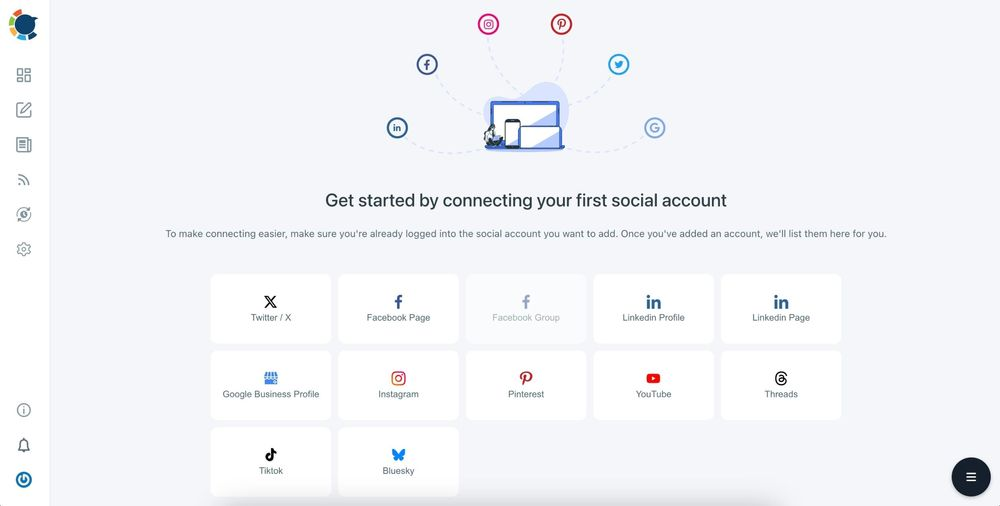
The feature that separates Circleboom most clearly from Buffer is RSS automation. Connect any RSS feed to your GBP schedule and Circleboom automatically pulls content, formats it as a post, and queues it on the frequency you define. A local news source, your own blog, a trade publication, or an industry newsletter all become hands off content streams. For a business that needs its GBP to stay active every week without someone making that happen manually, this removes the consistency problem at its root. Buffer has no equivalent.
UTM tracking parameters are built directly into the composer. Every link that goes out through a scheduled post is automatically tagged for Google Analytics without a separate step. Buffer requires you to paste pre tagged URLs manually. For any business measuring how GBP posts drive website traffic, this difference shows up in every report.
Canva, Unsplash, and Giphy are embedded directly in the editor. A content discovery tool surfaces shareable articles from inside the dashboard for users who prefer curation to full automation. The AI writing assistant generates captions from a URL or a prompt and rewrites in different tones.
Where Circleboom Wins
- RSS automation for hands off GBP content consistency: Buffer has none
- UTM tracking built into the composer on every post
- 37 second post creation, 6 seconds faster than Buffer
- GBP specific analytics: Direction Requests, Phone Calls, Website Clicks with historical trend data
- Flat tier pricing: $24.99 per month for up to 5 accounts, cheaper than Buffer at scale
- Canva, Unsplash, and Giphy embedded in the editor
- Content discovery for curated posting without leaving the dashboard
- Twitter/X account management beyond scheduling: follower analytics, bulk delete, audience data
Where Buffer Still Has the Edge
- Free plan with full GBP scheduling included: Circleboom has a 14 day trial only
- Community management inbox for GBP comments with AI reply suggestions
- Browser extension for scheduling from any webpage
- Bluesky and Mastodon support
- Cleaner, lighter interface for users who want less feature surface
Pricing Pro: $24.99 per month (5 accounts). Premium: $34.99 per month (10 accounts). Business: $74.99 per month (25 accounts). Annual billing reduces each tier by approximately 30 to 40 percent. 14 day trial available.
The pricing comparison at different account counts:
- 1 to 3 accounts: Buffer is cheaper or free. Circleboom at $24.99 flat is the higher cost.
- 5 accounts: nearly identical. Buffer Essentials at $30 per month vs Circleboom Pro at $24.99.
- 10 accounts: Circleboom Premium at $34.99 vs Buffer at $60. Circleboom is $25 cheaper per month.
- 25 accounts: Circleboom Business at $74.99 vs Buffer at $150. Circleboom is $75 cheaper per month.
When to choose Circleboom over Buffer: You manage 5 or more accounts, or content consistency (having something to post every week without manual effort) is the hardest part of your GBP workflow.
2. SocialPilot
The right alternative when Google Business review management is as important as publishing, and you need both from a single platform.
BEST FOR: Local service businesses and agencies where monitoring and responding to Google Business reviews is a core part of the workflow, not a secondary task handled somewhere else.
SocialPilot is the only tool in this category that lets you read and respond to Google Business reviews from inside the scheduling platform. Buffer handles incoming comments on your Google posts. SocialPilot handles actual reviews, the ones that appear in search results and directly influence whether new customers choose you. For a restaurant, a medical clinic, a law firm, or any local business where a single unanswered negative review can affect the next 100 decisions a prospective customer makes, this distinction is not subtle.
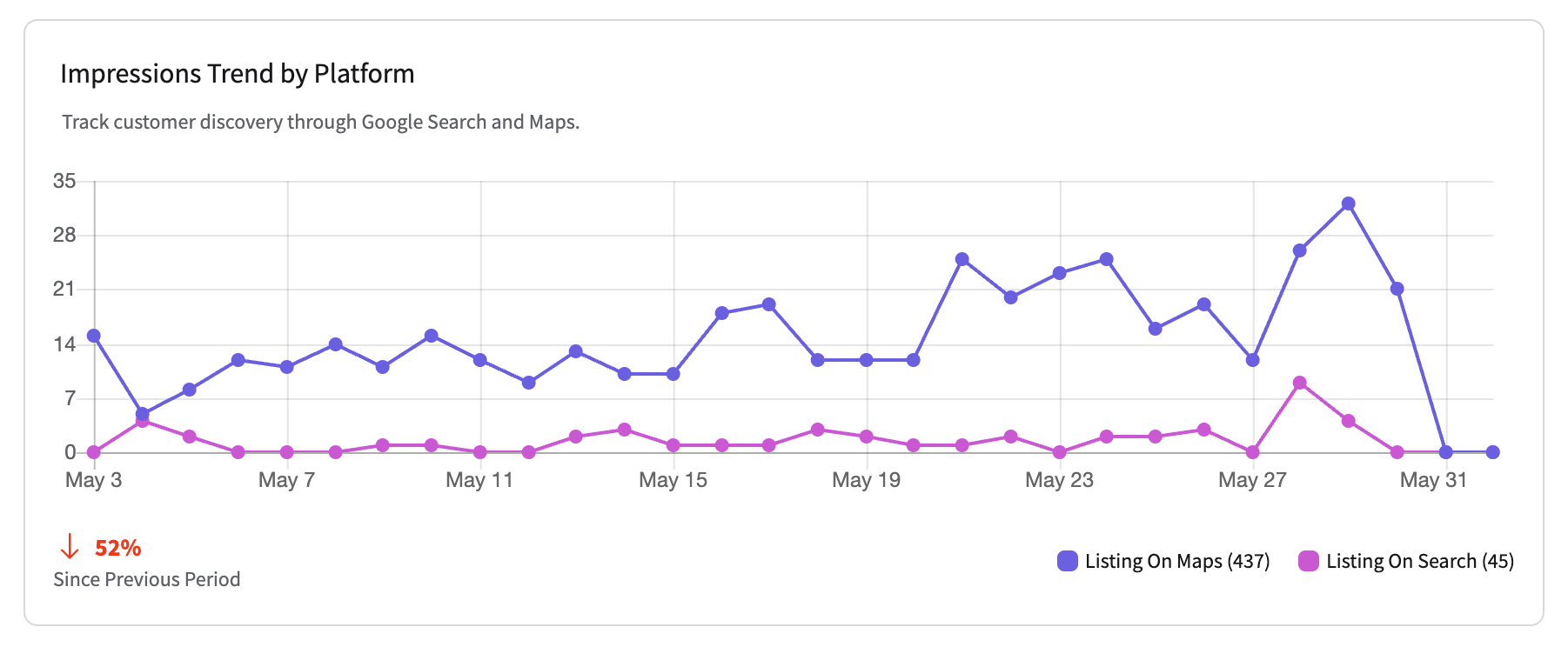
The GBP analytics in SocialPilot are strong: Total Impressions, Average Rating, Total Reviews, and Total Actions with historical trend charts. Bulk CSV scheduling lets you upload a month of GBP posts in a single file, a feature that agencies with high content volume use to eliminate repetitive manual scheduling. White label client reports are included on higher plans, so the output your clients see carries your agency's branding.
The honest limitation is complexity. SocialPilot is built for agencies managing multiple clients, and navigating to the GBP post composer takes longer than in Buffer or Circleboom. In our testing, average post creation time was 1 minute 21 seconds, most of that being navigation overhead rather than actual writing time. For a solo business owner who just wants to schedule posts, the tool carries infrastructure they will never use.
The Review Management Argument
- Only tested tool that lets you respond to Google Business reviews inside the scheduler
- GBP analytics covering Average Rating and Total Reviews alongside engagement
- Bulk CSV scheduling for high volume content across client accounts
- White label client reporting on Scale and Agency plans
- AI caption generation in 10 or more languages
The Complexity Tax
- 1 minute 21 seconds average post creation due to navigation depth
- Interface designed for agencies: solo users pay for structure they do not need
- No free plan
- No RSS automation or content discovery
Pricing Essentials: $30 per month (7 accounts, 1 user). Standard: $50 per month (20 accounts, 3 users). Premium: $100 per month (25 accounts, 6 users). Ultimate: $200 per month. No permanent free plan; trial available.
When to choose SocialPilot over Buffer: Review management is a regular part of your GBP workflow and you want it handled in the same dashboard as post scheduling, not in a separate tab.
3. Loomly
The right alternative when accuracy of the post preview and structured team approval are the workflow priorities.
BEST FOR: In house marketing teams and small agencies where a post going live with the wrong image crop, wrong price, or wrong event date creates real consequences, and where multi stage approval before publishing is a genuine requirement.
Loomly's post preview system renders what the audience will actually see before anything goes live. For GBP posts, this means seeing the exact image crop, the CTA button appearance, and the character count in the context of the actual post format, not an approximation. Buffer's preview is functional but not pixel accurate in the same way. For teams where visual accuracy before publishing matters, Loomly's preview system is a direct and meaningful improvement.
The approval workflow in Loomly is structured but not as complex as Planable's. Posts move through defined review stages before scheduling: an editor drafts, a manager approves, or a client signs off, depending on how the workflow is configured. Stakeholders can leave comments on the post in context rather than in a separate thread. Every version is tracked automatically.
The content calendar in Loomly is one of the clearest in the category. All scheduled posts across all connected accounts are visible in a single drag and drop calendar view. Rescheduling means dragging a post to a different date. For teams that think in calendars rather than queues, this interface is significantly faster to manage than Buffer's queue first layout.
Loomly lacks automation in the same way Buffer does: no RSS feeds, no content discovery, no smart queuing. Content ideas come from the team, and the platform's value is in what happens to those ideas before they publish.
Where the Calendar Wins
- Platform accurate post previews showing exactly what the audience sees
- Multi stage approval workflow with contextual comments and version tracking
- Drag and drop content calendar across all accounts
- Custom branding for client facing deliverables on higher plans
- Idea management: capture content concepts before they become scheduled posts
Where the Gap Shows
- No RSS automation or content discovery
- No review management
- $42 per month entry (Base plan) for 10 accounts, 2 users
- Analytics are functional but less detailed than Circleboom's GBP tracking
Pricing Base: $42 per month (10 accounts, 2 users). Standard: $80 per month (20 accounts, 6 users). Advanced: $175 per month (35 accounts, 14 users). Premium: $369 per month. Annual discounts available.
When to choose Loomly over Buffer: Your team needs structured approval before content publishes and wants a calendar first interface where rescheduling and managing posts across accounts is visually intuitive.
4. Planable
The right alternative when client or stakeholder sign off before publishing is the central challenge, and you need a dedicated space for that conversation.

BEST FOR: Creative agencies and content teams where the approval process itself is the hardest part of the workflow, and where clients need to interact with content in a purpose built review environment rather than inside a scheduling dashboard.
Planable is built around a single conviction: content approval is not a feature, it is a workflow problem that deserves its own product. Every post moves through a structured approval flow before it can publish. Clients and stakeholders interact directly on the post in context: they leave comments, request changes, or click approve. No email threads. No screenshots. No "which version are we going with?" The audit trail is complete and automatic.
Four distinct approval modes give teams exactly the right level of control:
None. Posts go live as scheduled.
Optional. Stakeholders can review but approval is not required.
Required. At least one designated approver must sign off before publishing.
Multi level. Posts move through a defined sequence of approvers in order, each stage required before the next is notified.
Buffer has a basic draft and approval flow on paid plans. It is designed for internal teams, not for client review. When a client needs to sit across from a post and say yes or no before it goes live, Planable is a different class of tool.
The post preview is platform accurate: before anything is approved or scheduled, Planable shows exactly what the audience will see. For GBP posts, the image crop, the CTA button, and the full post format all render correctly.
What Planable does not offer: automation of any kind. No RSS, no content queues, no discovery. The tool assumes content comes from people, and its value is in what happens to that content before it publishes.
The Collaboration Case
- Four approval modes per workspace: none, optional, required, multi level
- Stakeholders approve directly on the post, not over email
- Platform accurate previews including GBP
- Clean interface accessible to non technical clients
- Complete automatic audit trail of all approvals and revisions
- Multi workspace management: one workspace per client or brand
- Unlimited posts on all plans
What You Leave Behind
- No automation: no RSS, no queues, no content discovery
- Analytics are basic
- $39 per month Basic plan does not include multi level approval or unlimited workspaces
- Full agency value starts at Pro: $59 per month
Pricing Basic: $39 per month (1 workspace, 4 users, unlimited posts). Pro: $59 per month (unlimited workspaces, all 4 approval modes). Enterprise: custom. First 50 posts before payment required.
When to choose Planable over Buffer: Your primary challenge is client or stakeholder approval before content goes live, and email threads or screenshot reviews are the current friction point.
5. Sendible
The right alternative when your agency needs to deliver a fully branded platform experience to clients, with no third party name visible anywhere.
BEST FOR: Freelancers and small agencies where the platform interface is part of the professional service being delivered, clients cannot see which tool is behind the delivery, and evergreen content recycling reduces recurring content creation work.
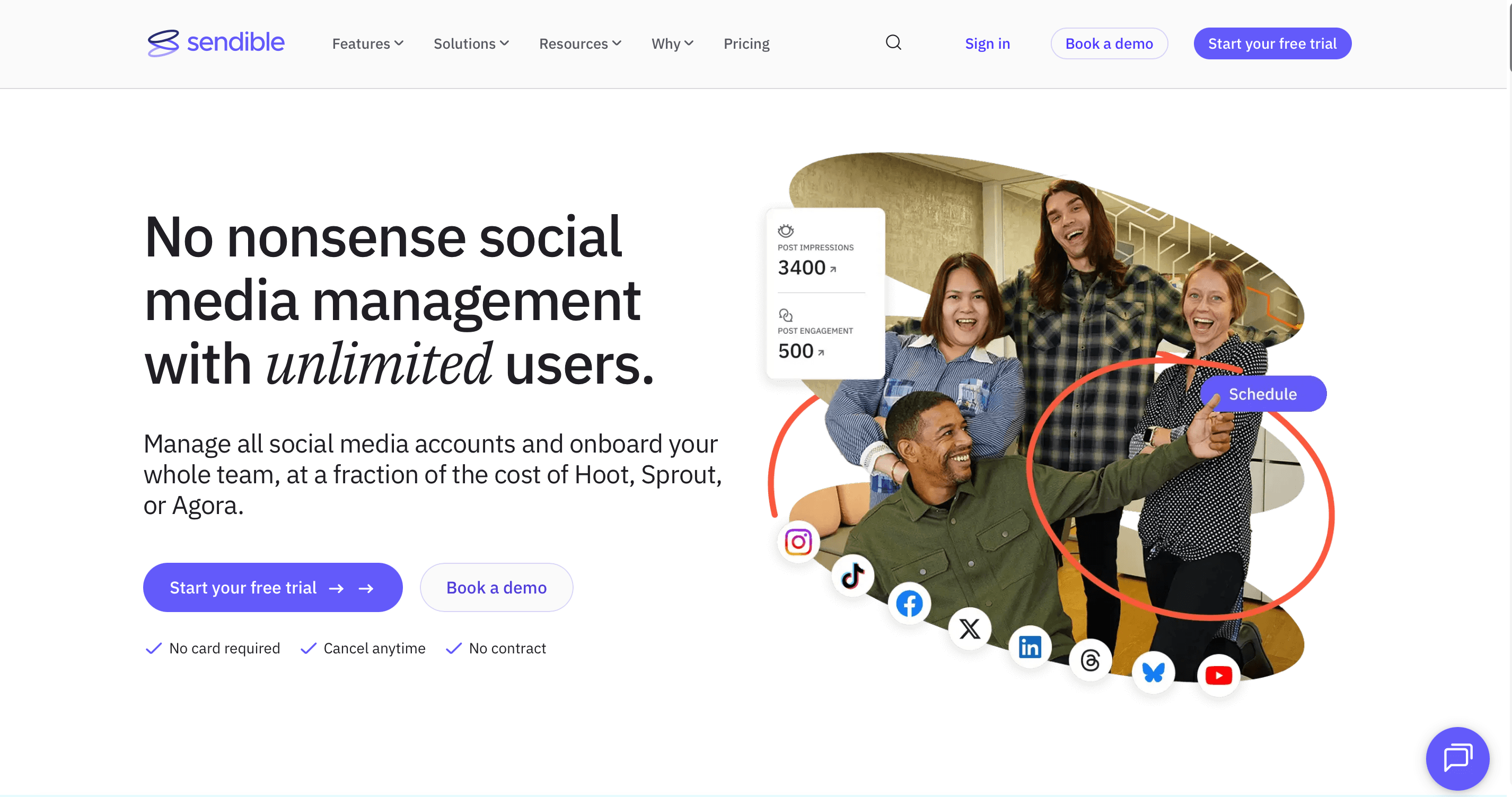
Sendible is the only tool on this list that offers full white label delivery. The entire platform, including the login page, the dashboard, and the client facing workspace, can be rebranded with your agency's name, logo, and domain. Your clients never see the word Sendible. Buffer cannot be rebranded at all. For agencies where the tool experience is part of what the client is paying for, this is not a cosmetic difference.
Client onboarding is built for the agency model. Clients connect their own Google Business accounts through an OAuth flow without sharing credentials. You manage the content. The client retains control of their own account. There is no credential handoff that creates liability or awkwardness.
Smart Queues handle evergreen content recycling automatically. Your strongest performing posts get requeued according to rules you define: promotional content cycles less frequently, educational content more often, seasonal content activates and deactivates on a schedule. For an agency managing a client on a monthly retainer, this feature reduces recurring content creation work meaningfully.
The honest limitation is where the real value actually starts on the pricing ladder. The Creator plan at $29 per month covers the basics, but white label delivery, advanced approval workflows, and full team management all require the Scale plan at $199 per month. If white labeling is the reason you are evaluating Sendible, that is the plan you need to budget for from the beginning.
The Agency Argument
- Full white label delivery: your clients see your brand, not Sendible's
- Credential free client onboarding via OAuth
- Smart Queues for automatic evergreen content recycling with custom rules
- Seasonal content scheduling that activates and deactivates on a calendar
- Multi stakeholder approval workflows
Where the Value Actually Starts
- White label requires the Scale plan at $199 per month, not the $29 entry plan
- No free trial: demo only
- Steeper initial learning curve than Buffer
- No content discovery or RSS automation comparable to Circleboom
Pricing Creator: $29 per month (1 user, 6 profiles). Traction: $89 per month (4 users, 24 profiles). Scale: $199 per month (white label, unlimited users). Enterprise: $750 per month.
When to choose Sendible over Buffer: You run an agency where delivering the platform under your own brand is a professional requirement, and client accounts need to connect without sharing credentials.
How to Choose
The fastest way to decide is to name the specific gap Buffer is not filling.
If the gap is automation and scale pricing, choose Circleboom. RSS feeds for hands off content, UTM tracking built in, and flat pricing that gets cheaper relative to Buffer every time you add an account beyond 4.
If the gap is review management, choose SocialPilot. It is the only tool that brings Google Business review responses into the scheduling dashboard.
If the gap is team approval with calendar visibility, choose Loomly. Multi stage approval in a drag and drop calendar view, with platform accurate previews.
If the gap is client approval workflows, choose Planable. Four approval modes, a client facing interface, and an audit trail that makes the approval conversation happen on the post itself.
If the gap is white label delivery, choose Sendible. The only tool on this list that fully rebrands the platform under your agency's identity.
Frequently Asked Questions
What is the best alternative to Buffer for Google Business Profile scheduling?
The best alternative depends on what Buffer is not giving you. For automation and pricing at scale, Circleboom is the strongest option: RSS automation for hands off content consistency, UTM tracking built into the composer, and flat tier pricing that becomes significantly cheaper than Buffer at 5 or more accounts. For review management, SocialPilot. For client approval workflows, Planable. For white label agency delivery, Sendible.
Is there a free alternative to Buffer for GBP scheduling?
Buffer's free plan is actually the strongest free option in the category. No other tool on this list offers a permanent free plan with Google Business Profile scheduling included. If cost is the constraint, Buffer is the right answer, not an alternative to it.
Does Circleboom support Google Business Profile scheduling?
Yes. Circleboom supports all three GBP post types: What's New, Event, and Offer. Average post creation time is 37 seconds. Features include RSS automation, UTM tracking built into the composer, GBP specific analytics (Direction Requests, Phone Calls, Website Clicks), multi location management, Canva and Unsplash integration, and AI caption generation.
Why is Circleboom cheaper than Buffer at scale?
Buffer charges per channel: $6 per channel per month on the Essentials plan. Circleboom uses flat tier pricing: $24.99 per month for up to 5 accounts, $34.99 for up to 10. At 5 accounts, Buffer costs $30 per month and Circleboom costs $24.99. At 10 accounts, Buffer is $60 and Circleboom is $34.99. The crossover point is around 4 to 5 accounts. Below that, Buffer is cheaper or free. Above it, Circleboom is progressively more economical.
Which Buffer alternative has the best approval workflow for agencies?
Planable has the most complete approval workflow in the category. Four distinct approval modes (none, optional, required, multi level), client facing review interface, contextual commenting directly on posts, and automatic audit trails. Loomly is a strong second for teams that want approval integrated into a calendar view rather than a dedicated approval platform.
Does any Buffer alternative support RSS automation for GBP posts?
Among the tools on this list, Circleboom is the only one that offers RSS automation for Google Business Profile scheduling. Connect any RSS feed and Circleboom pulls content, formats it as a GBP post, and queues it automatically. Buffer, SocialPilot, Loomly, Planable, and Sendible all require manual content input.
Can I manage Google Business reviews from inside a scheduling tool?
Yes, with SocialPilot. It is the only tool tested in this category that includes Google Business review management alongside post scheduling. Buffer's community inbox handles comments on posts, not reviews. SocialPilot handles both.
The Bottom Line
Buffer is a good tool. The interface is clean, the free plan is genuine, and the GBP integration works. The gaps that make people look for alternatives are real but specific: no RSS automation, per channel pricing that grows with every account, basic GBP analytics, no review management, no white label delivery, and approval workflows that are not built for client facing use.
The five tools above each solve one of those problems more directly than Buffer does.
Circleboom for automation and scale. SocialPilot for reviews. Loomly for team approval with calendar visibility. Planable for client facing approval. Sendible for white label agencies.
If none of those gaps apply to you, Buffer may already be the right tool. The goal of this list is not to replace Buffer for everyone. It is to help you recognize when a specific limitation is real and worth addressing with a different tool.