

By [Arif Akdogan] | [25.03.2026]
Yes, you can repost a Tweet as an Instagram Story. And it’s actually a very smart strategy.
Instead of letting your tweets live only on X, you can reuse them and reach a completely different audience on Instagram. This means more visibility, more engagement, and more value from the same content without needing to create something new every time.
Study shows that Instagram Stories have an average reach of just 0.91 users per post, while Reels reach about 11 users and carousels reach about 7.8 users. Why would you miss them?
The problem is, doing this manually takes time. Screenshotting tweets, editing them, resizing for Stories… it quickly becomes messy and inconsistent.
That’s why using the right tool makes a big difference. ⤵️
Circleboom Twitter: The Easiest Way to Cross-Post Tweets
The easiest way to repost your tweets as Instagram Stories is by using Circleboom Twitter.

Circleboom Twitter is an official X Enterprise Developer, which means it works with X safely and reliably through official APIs. It allows you to automatically cross-post your tweets to multiple platforms, including:
- Instagram (Stories, Post, or Reels)
- Threads
- Bluesky
One of its most useful features is how it adapts tweets for Instagram.
➡️ Since Instagram is a visual platform, Circleboom automatically converts your tweets into clean, well-designed images. You can choose different layouts, styles, and colors, so your Stories look native instead of like basic screenshots.
Circleboom is not just about cross-posting. Inside its X Post Planner, you also get tools that make content creation and distribution much easier.
There is an AI Writer to generate tweets, image curation tools to enrich your posts, a font styler to customize how your tweets look, an auto retweeter to keep your content visible over time, and best time to post analysis based on your followers’ activity.
Everything works from a single dashboard, so you don’t have to jump between platforms or deal with manual steps.
How to Repost a Tweet as an Instagram Story
Here’s how to do it step by step with Circleboom:
Step #1: First, log in to your Circleboom Twitter account.
If you don't have an account yet, you can create one in seconds!

Step #2: On the Circleboom Twitter dashboard, navigate to the left menu.
First, find the “Post Management & Analytics” and then click on “Write and Plan Your Post”.

Step #3: Write your tweet. Circleboom’s AI options can generate tweets for you automatically.
When it is ready, you can “Post” or “Schedule” your tweet. To see your cross-posting options, you should click on one of them.
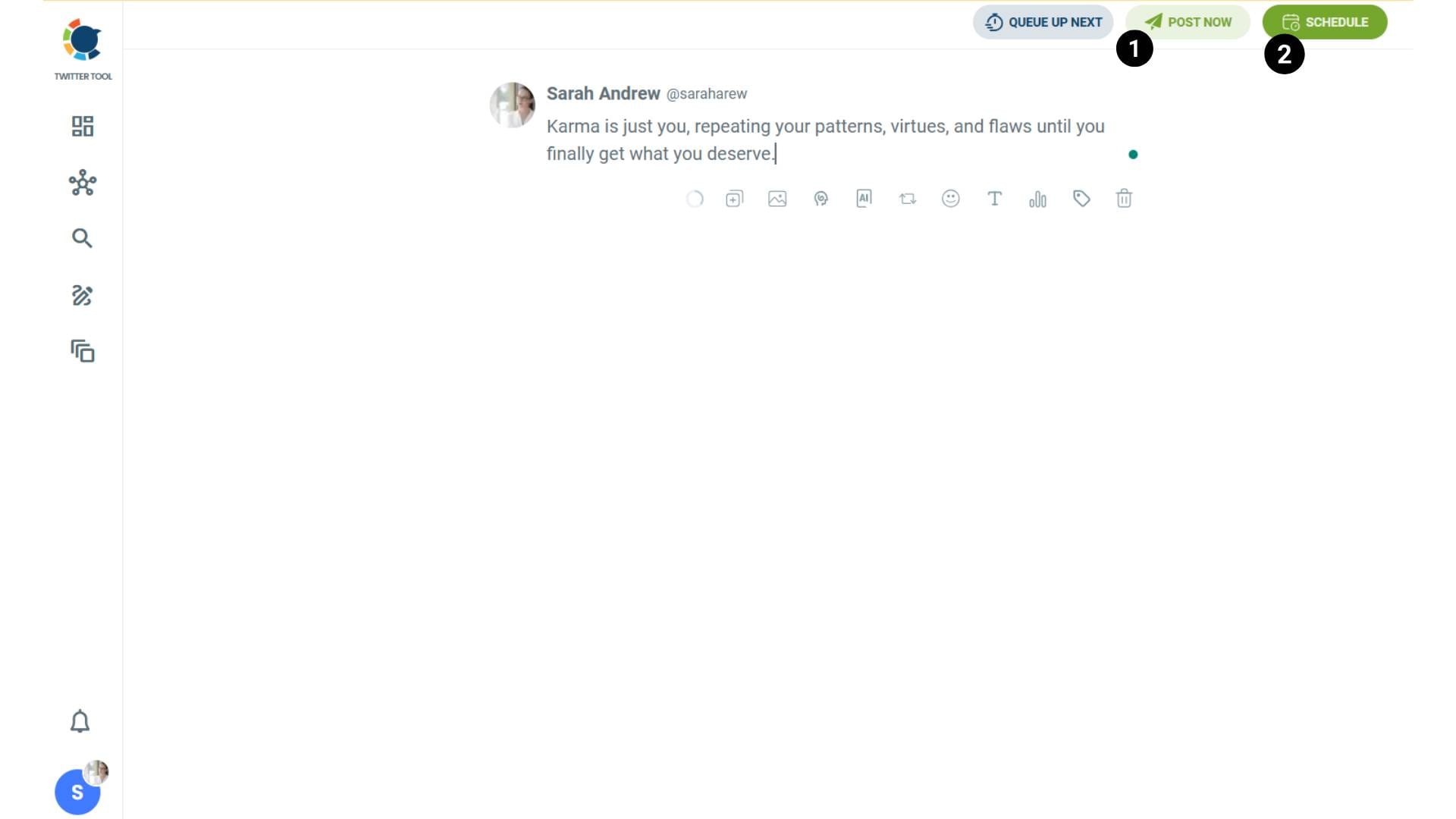
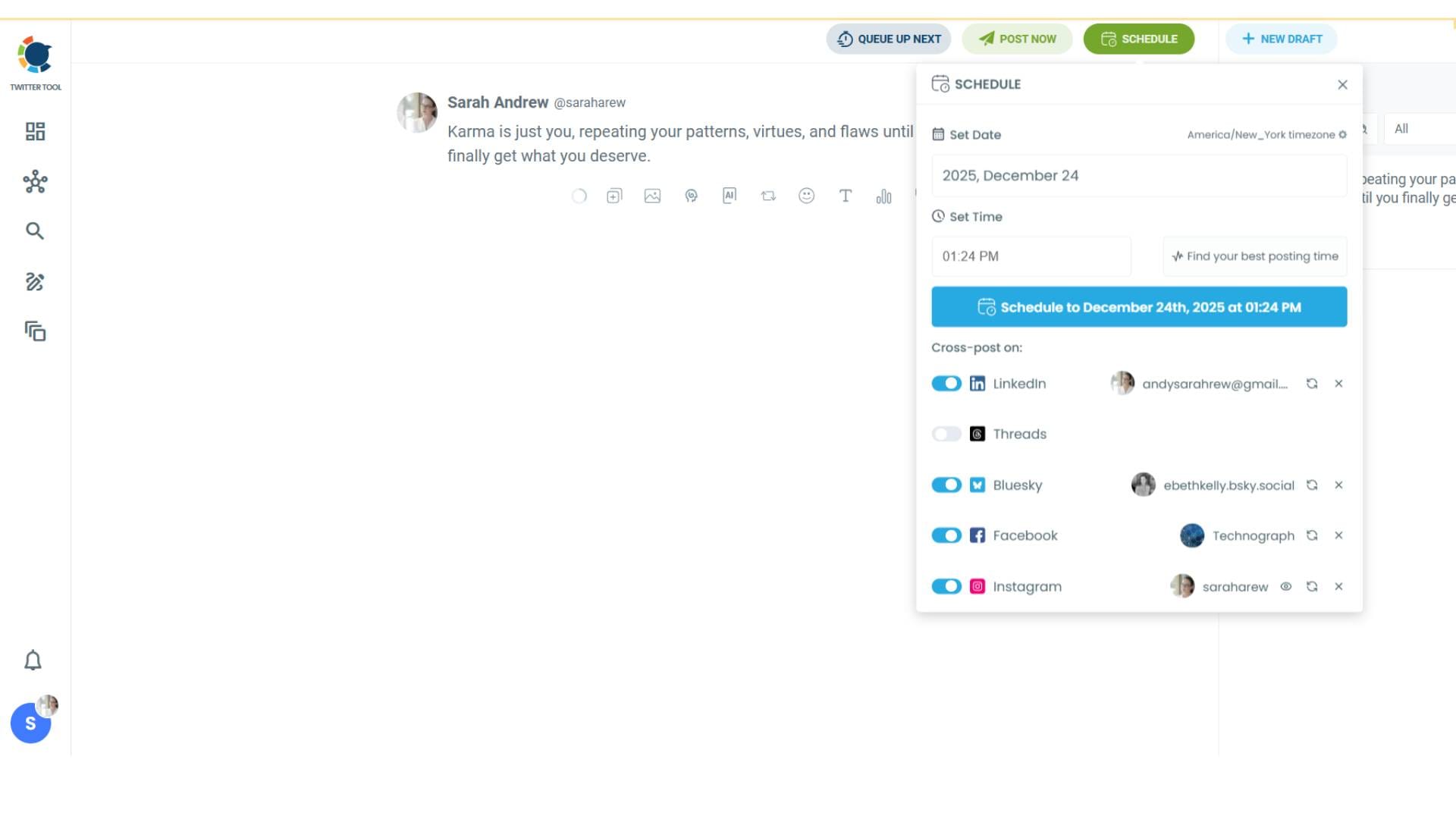
Step #4: You will see your connected platforms. You can cross-post your tweets to these accounts automatically.
You can share tweets on LinkedIn, Facebook, Threads, Bluesky, and finally, Instagram!
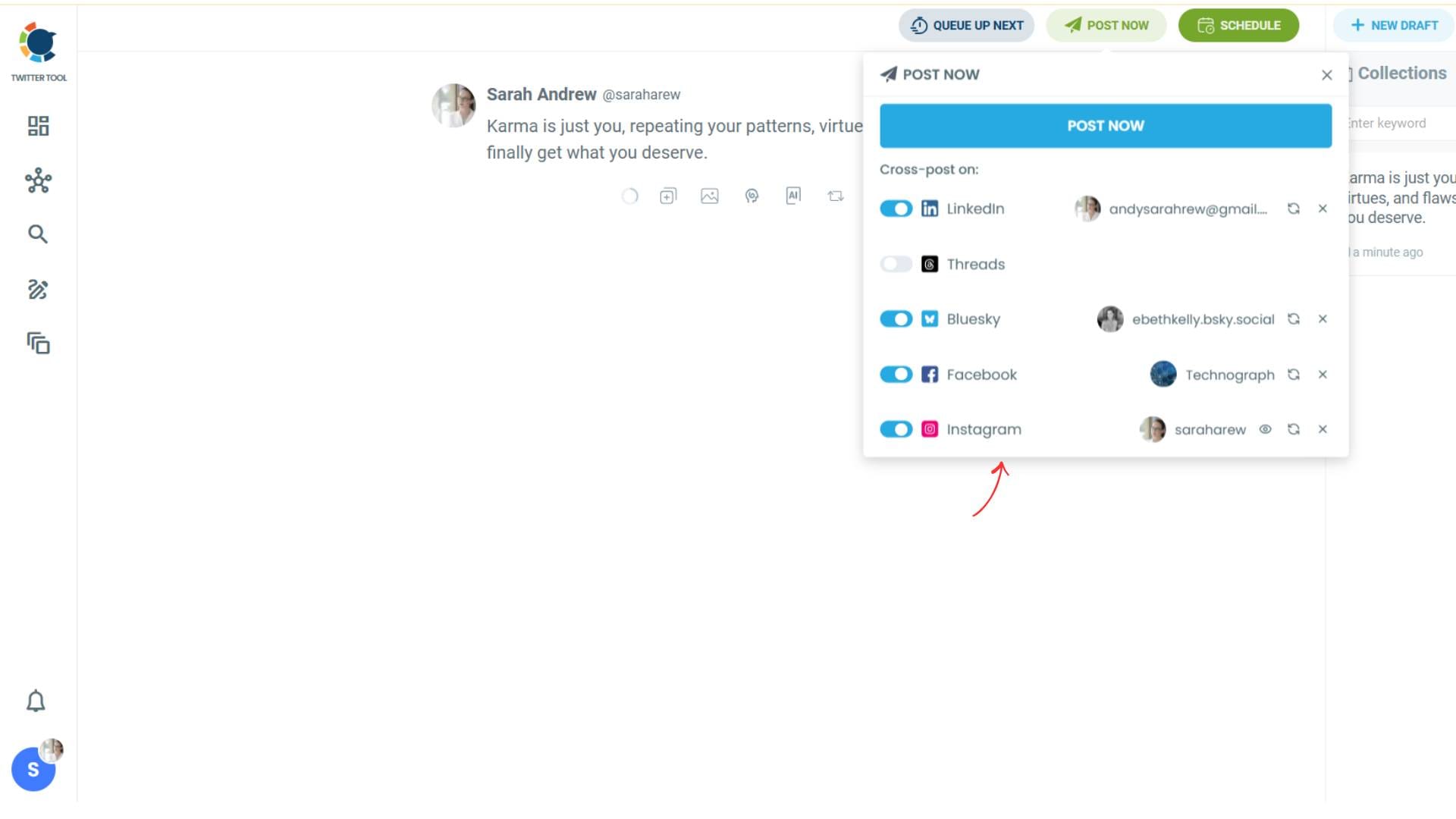
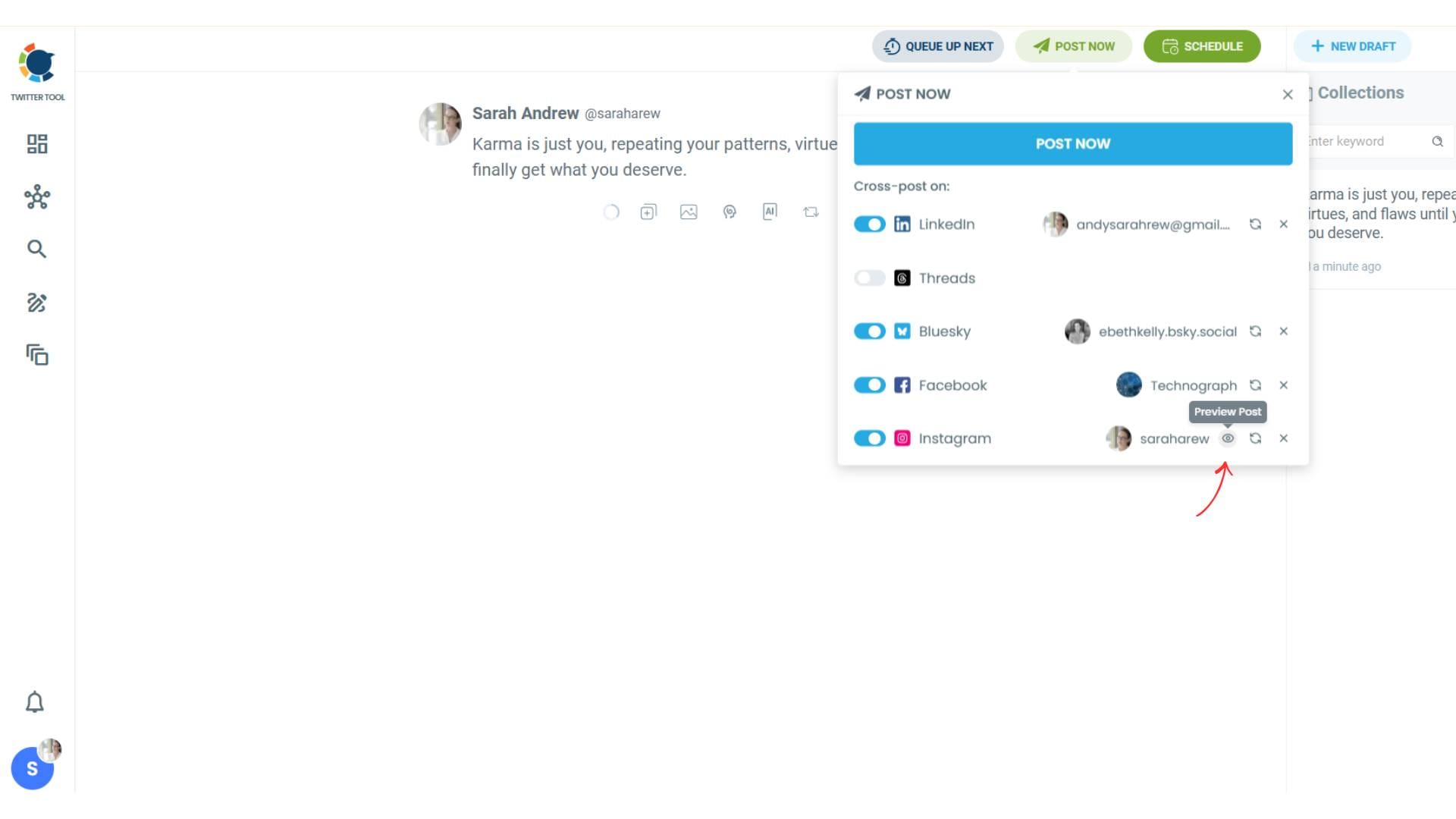
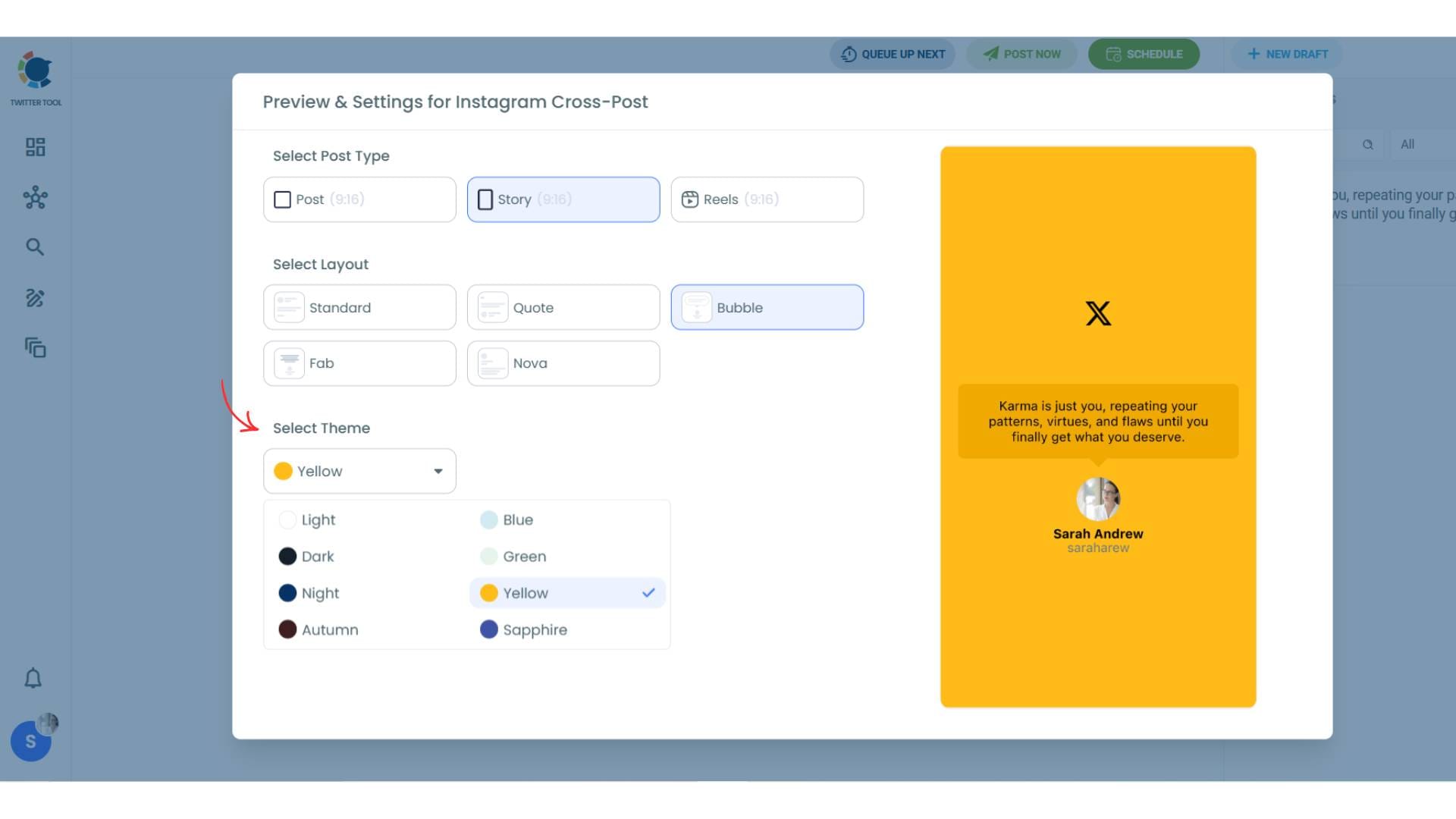
To decide if it is going to be a standard Instagram post or Story or Reels, and decide layouts and colours, click on “Preview”.
Step #5: Here you can select Instagram post type: “Post”, “Story”, and “Reels”.
You can also select the post layout.
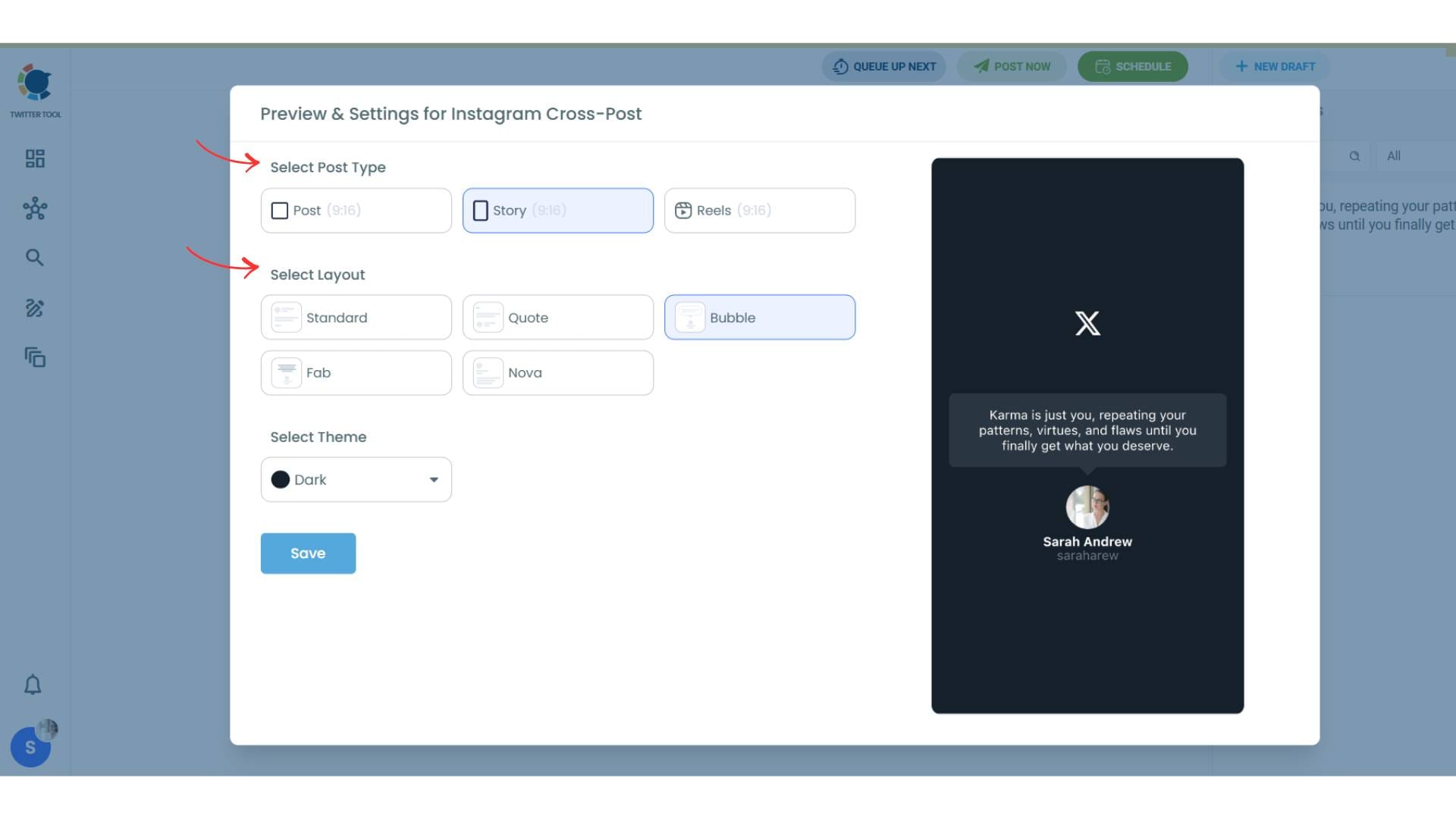
You can also select different themes. Share your tweet on Instagram with different colors.
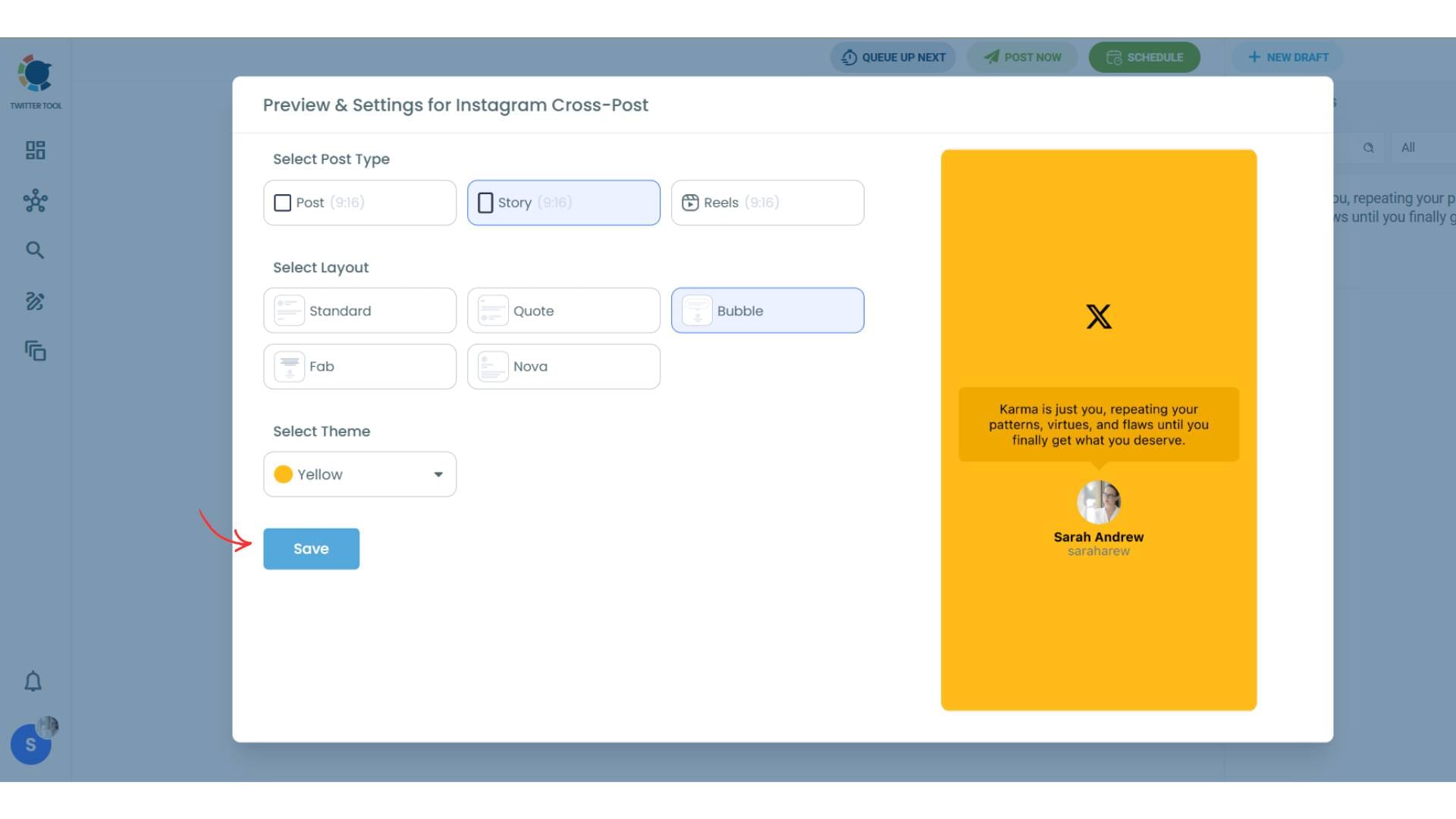
Lastly, you should click on “Save” and your Instagram cross-post is ready.
Step #6: When all is set, you can share your cross post immediately or schedule it for a later time.
You can select the day and hour and click to share your tweet!
You can get more impressions and engagement for your tweets on Instagram. Don't limit yourself to Twitter (X).
Share your tweets on Instagram to reach a wider audience.

How to Cross-Post Tweets Without Circleboom
Perfect! I'll create a section that shows manual cross-posting methods while highlighting why Circleboom is the superior choice. Here's the section:
How to Cross-Post Tweets Without Circleboom
If you prefer not to use an automated tool like Circleboom, you can still cross-post your tweets to Instagram Stories manually. Here are the main methods:
Method 1: Screenshot and Upload
The most basic approach:
- Take a screenshot of your tweet on X
- Crop the image to remove unnecessary elements (browser bars, other tweets, etc.)
- Open Instagram and go to create a Story
- Upload the screenshot from your camera roll
- Resize and position the image to fit the Story frame
- Add stickers, text, or effects (optional)
- Post to your Story
Time required: 2-3 minutes per tweet
Result: Basic screenshot that looks like... a screenshot
Method 2: Use X's Native "Share to Instagram Stories" Feature
X has a built-in sharing option:
- Find your tweet on the X mobile app
- Tap the share icon (arrow) below the tweet
- Select "Share to Instagram Stories"
- X generates an image with your tweet
- Instagram opens with the image ready to post
- Customize if needed and share
Time required: 1-2 minutes per tweet
Result: Tweet card with X branding, limited customization
With Circleboom, the entire process becomes automatic. Your tweets are turned into Story-ready visuals and shared without extra effort. It saves time and keeps your content looking clean and consistent.
 Altug Altug
Why Reposting Tweets as Instagram Stories Works
Tweets are already short, direct, and easy to consume. That makes them perfect for Instagram Stories.
When you repost your tweets as Stories:
- your content gets a second life
- you reach people who don’t actively use X
- you stay active on Instagram without extra effort
Instead of creating separate content for every platform, you start working smarter. One good tweet can perform on multiple platforms.
What Kind of Tweets Work Best as Instagram Stories
Not every tweet performs the same way on Instagram. Some types work especially well:
- short opinions and quotes
- announcements
- blog or link shares
- product promotions
- quick tips or educational content (educational social media content is any content shared on social media platforms that aims to inform, educate, or provide value to the audience. This includes tutorials, how-to guides, industry insights, and informative posts.)
- high-performing or viral tweets
If a tweet already gets attention on X, sharing it as a Story can extend its reach even further.
Final Verdict
So yes, you can repost a Tweet as an Instagram Story. And more importantly, you should.
It’s one of the simplest ways to get more value from your content and reach more people without extra work. Instead of creating separate posts for every platform, you reuse what already works.
With Circleboom Twitter, this process becomes automatic. Your tweets are turned into visual Stories, customized to fit Instagram, and shared across multiple platforms from one place.

