

Yes, people can see your activity in Communities on Twitter (X), even though there isn’t a simple public list showing every Community you’ve joined.
This is something many users misunderstand at first. Since X doesn’t display a clean “Communities list” on your profile, it creates the impression that your participation is private. But in practice, your activity inside Communities is visible in multiple ways, and that visibility can shape how others perceive your account.
Communities are a powerful feature when used correctly.
They allow you to connect with people around specific topics, join focused discussions, and build a more relevant audience.
But because your activity is not truly hidden, the Communities you engage with become part of your public presence whether you realize it or not.
Can people actually see what Communities you are in on X?
X does not currently provide a dedicated section on your profile that lists all the Communities you have joined. That part is true, and it often leads people to assume that their Community memberships are private.
However, what matters is not the list, but the activity.
When you post, reply, or interact inside a Community:
➡️ Your content can be visible on the platform
➡️ Your followers or other users may come across your posts
➡️ Your interactions can appear in timelines or recommendations
This means that even without a visible list, people can still understand what kind of Communities you are part of based on what you engage with.
Over time, this builds a clear signal.
If someone consistently posts in crypto Communities, marketing Communities, or specific niche groups, it becomes obvious where their focus is.
So while membership itself is not displayed directly, your behavior inside Communities is public enough to reveal it.
The rules change every week, from payout boosts to reach suppression. Don’t get left behind. Join the Circleboom X Creator Growth Lab, your dedicated space for real-time algorithm updates, tested engagement strategies, and creator-to-creator insights.
Why this matters more than it seems
Because your Community activity is visible, it becomes part of how your account is perceived.
Every Community you engage in contributes to your overall positioning on X. It affects how people interpret your interests, your expertise, and even your credibility.
For example:
- Being active in high-quality, niche Communities can strengthen your authority
- Engaging in relevant discussions can attract the right audience
- Participating in strong Communities can help you build better connections
On the other hand:
- Joining random or low-quality Communities can dilute your positioning
- Engaging in irrelevant discussions can confuse your audience
- Being associated with inactive or spammy Communities adds no real value
This is why Community selection should not be random. It should be intentional.
The real problem: finding good Communities on X
Even though Communities are valuable, finding the right ones on X is not straightforward.
The native search experience has clear limitations:
🔴 Results often feel unstructured and random
🔴 There is no reliable way to sort Communities by quality
🔴 Filtering options are extremely limited
🔴 You are forced to check Communities one by one
This creates a situation where discovering Communities becomes time-consuming and inefficient. Instead of quickly identifying the best Communities in your niche, you end up guessing which ones are worth joining.
For anyone who wants to be strategic about their presence on X, this is a major limitation.
A smarter way to find Communities
To solve this, using a more advanced search method makes a significant difference.
Circleboom, an official X Enterprise Developer, provides a feature called X Community Search, which is designed specifically to make this process easier and more effective.

Instead of relying on random suggestions, it allows you to:
- Search Communities using any keyword
- Apply filters to narrow down results
- Identify more relevant and higher-quality Communities
- View all matching Communities instantly
- Open them directly on X and join
This approach transforms Community discovery into a structured process rather than trial-and-error.
 infocircleboom.com
How to find Communities with Circleboom (step-by-step)
Step #1: Open Circleboom’s Community Search page
Start by going to Circleboom’s Discover X Communities page.
You’ll see a simple interface with a search bar. Type a keyword based on your interest, such as coding, AI, crypto, or marketing.
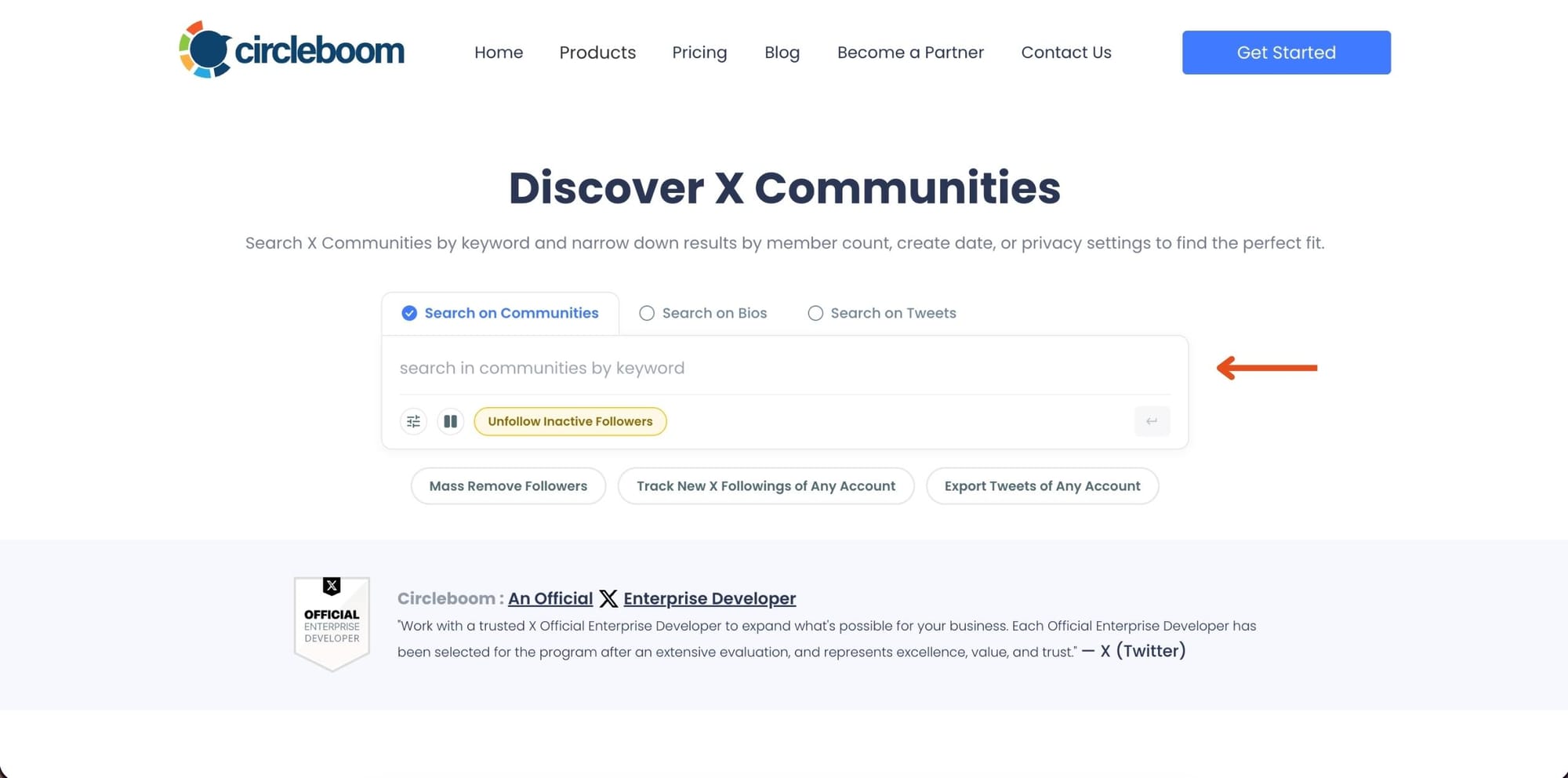
Once you enter your keyword, Circleboom instantly finds Communities related to that topic. This step allows you to move from random browsing to targeted discovery.
Step #2: Refine results using filters
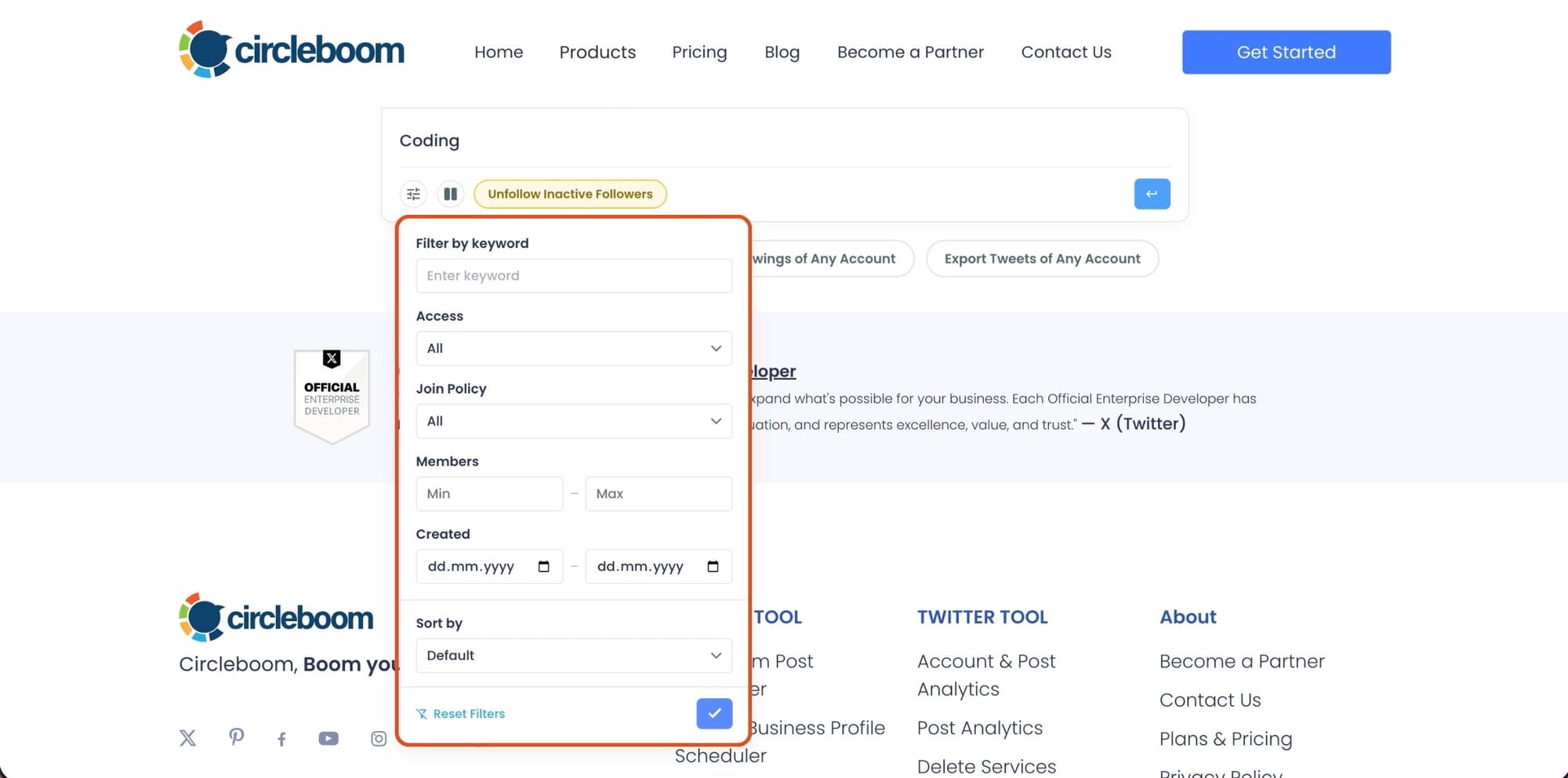
After searching, open the filter panel to narrow down the results.
You can adjust things like access type, join policy, member range, creation date, and sorting. This is what makes the biggest difference. Instead of checking dozens of Communities manually, you reduce the list to only the ones that actually match your expectations.
Step #3: Review Communities and open them on X
Once filters are applied, Circleboom lists all matching Communities in a clean layout.
Each result includes key details like the name, description, member count, and when it was created. You can quickly compare options without opening each one individually. When something looks relevant, click “View on X” to open it.

Step #4: Join the Community
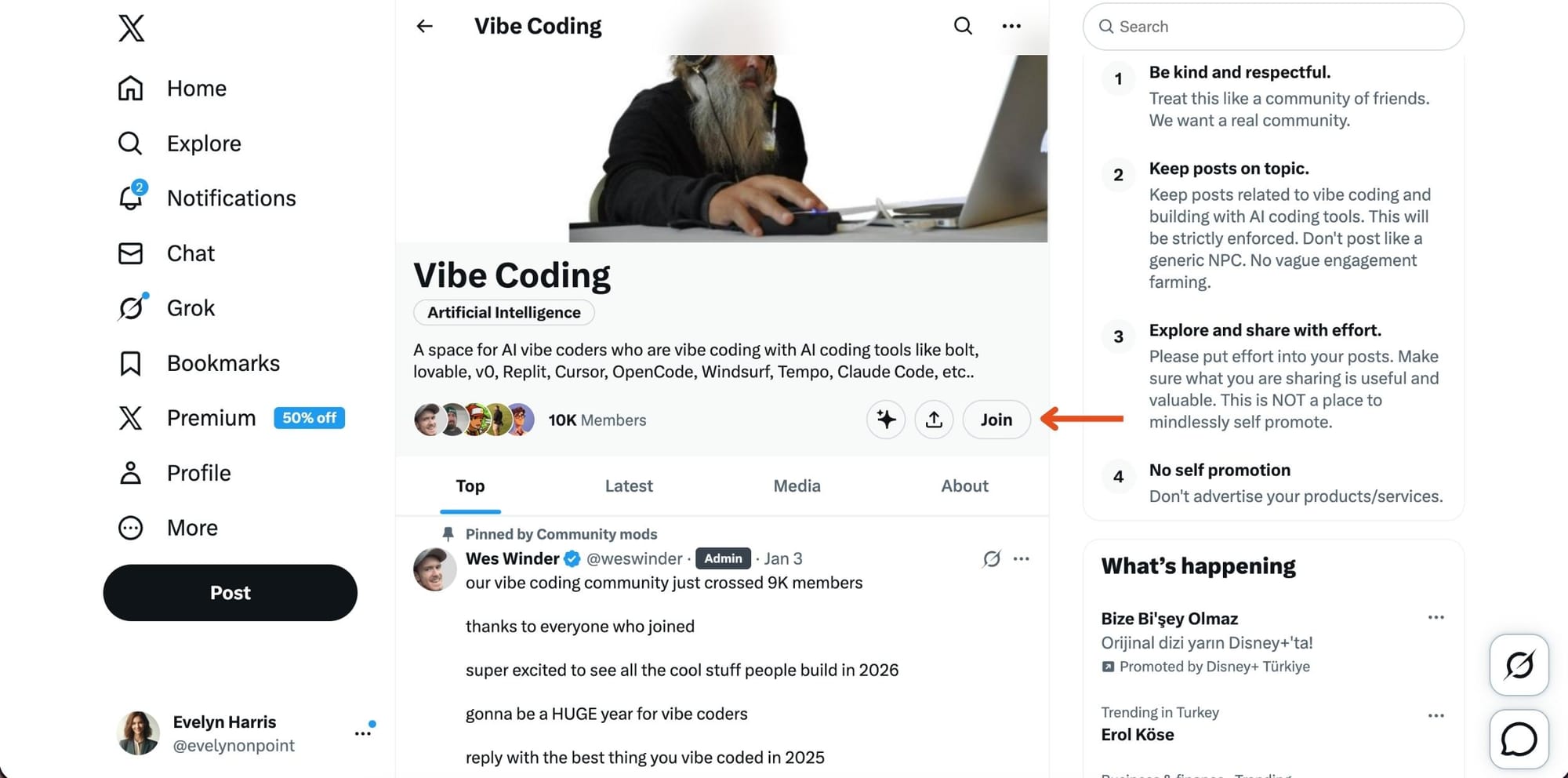
After clicking, you’ll land on the Community page on X.
From there, click the Join button. If the Community is open, you’ll be added instantly. If it requires approval, your request will be reviewed. Once you’re in, you can start participating and engaging with other members.
How to choose the right Communities
To get the most value, it is important to be selective.
- Focus on Communities that align with your niche
- Look for consistent activity and engagement
- Read descriptions and rules before joining
- Avoid joining too many Communities without a clear purpose
- Prioritize relevance and quality over size
Making better choices here directly impacts your experience and visibility on X.
Final thoughts
So, can people see what Communities you are in on Twitter (X)?
➡️ Not through a simple list on your profile, but through your activity, the answer is effectively yes.
That is why joining the right Communities matters more than most people expect.
If you want to build a strong presence, connect with the right audience, and avoid random or low-quality groups, using a more structured way to discover Communities can make a big difference.
And that is exactly where tools like Circleboom help turn a messy process into a strategic one.



%3F)
)