

Most people treat a private list on Twitter as a hidden folder you can fill forever. It is closer to a one-reader feed with hard edges: one viewer, 5,000 members per list and 1,000 lists per account.
On X alone: the privacy setting lives at creation, and every member is added one profile at a time. With Circleboom: Circleboom creates a private Twitter list and adds every selected account to it in one action through official X Enterprise APIs.
→ Create a private Twitter list
The visibility rules, the size limits and the export route follow below.
What a private list on X is
A private list on X is a list of accounts whose posts you read as a separate feed, visible to no one but you. It has the same mechanics as any X list, minus the audience: no one can follow it, find it or see who is on it.
That makes it a research instrument rather than a publishing one.
Public lists say something to the world. Private lists only answer questions for their owner, such as what competitors shipped this week or what a target account is posting about.
For the full picture of lists in general, the parent topic is how to make and use Twitter lists.
This article sticks to the private kind: who sees it, what it holds and how it leaves your account.
Reading accounts on X without following them
A list lets you read accounts you do not follow. Members do not count toward your following number, so a private list of any size leaves your follower-to-following ratio untouched while their posts still reach you.
Some people push that one step further: list the accounts, then unfollow them, so the public Following list shrinks while their posts stay readable. Whether you can prevent people from seeing your following list on X is answered in its own walkthrough.
To check what others see before you start, a Twitter following list viewer shows a following list from the outside.
What Circleboom shows inside a private list
Inside Circleboom, a private list carries more than names. The X List Manager overview marks private lists with a lock icon and shows member and follower counts per list.
Open one and each member row shows tweet, following and follower counts, an activity label and quality flags such as inactive or fake, so you can judge the list as well as read it.
The quickest way to create a private list on Twitter with real members is to start from a set of accounts. Build the list around them, which is the route covered below.
Who can see a private Twitter list?
Only the owner. A private list is not visible to other X users or to the accounts on it, and it cannot be followed or discovered.
Three groups are commonly assumed to see it, and none of them do:
- The accounts you add to it.
- Your followers.
- Anyone searching for lists on X.
Being added to a private list does not reach the member's Notifications.
Public lists behave differently: an account added to a public list may get a notification from X that it was listed.
That single difference is why research lists belong on the private side.
The same logic applies to watching an account without a public follow, covered in how to follow someone on Twitter without them knowing.
One edge case is protected accounts. X's Help with Lists page confirms that only you can view your private Lists. It also notes that a protected account can be listed, but its posts appear in your list feed only if you are an approved follower.
Adding a protected account does not grant access to its posts.
Teams hit a related surprise. Because a private list is visible only to the account that owns it, a colleague signed in to their own account cannot see it either.
Sharing one means exporting its members or deciding, on purpose, to make a separate public list.
How Circleboom builds a private list on X
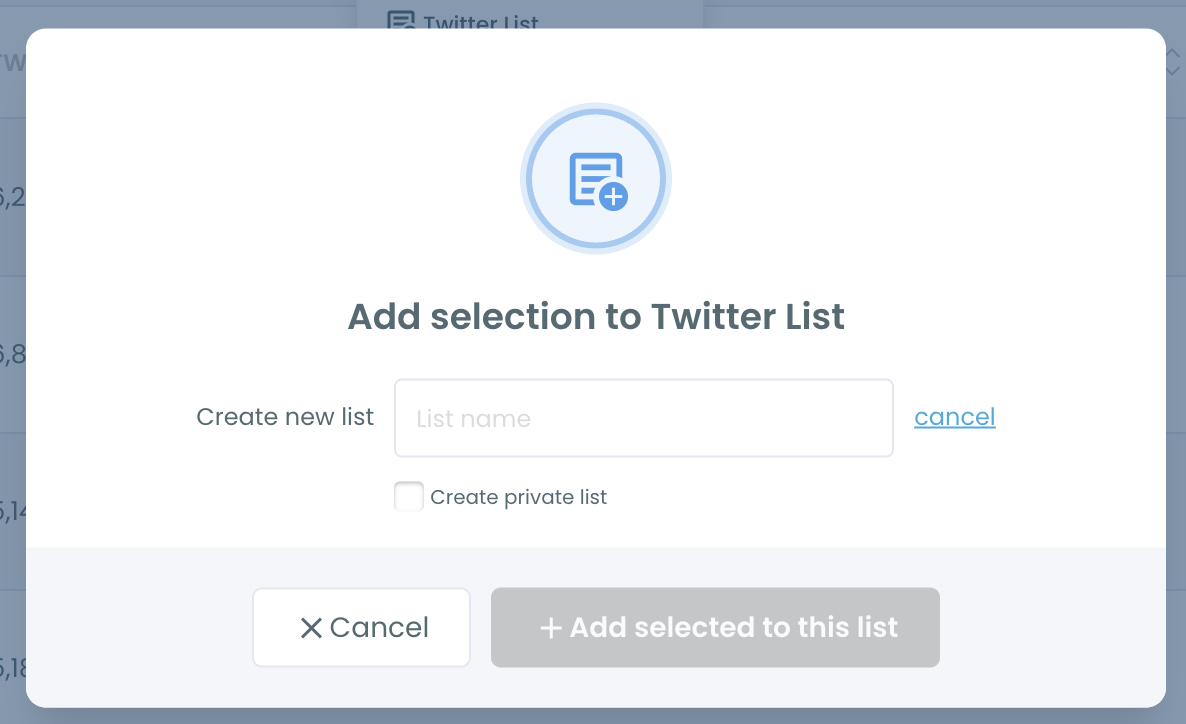
Circleboom creates the list and adds its members in the same operation. From any results grid, you select accounts, open Add to List, switch to "Create new list", type a name and tick "Create private list".
The list is created on your X account with those accounts already inside.
Circleboom is a listed Enterprise customer of X, which means the write to your account goes through X's approved channel rather than an unofficial workaround.
The underlying request is the one X documents to create Lists: a name, a description and a private flag.
The members can come from anywhere in the app. I usually start from a search, because the search defines who belongs.
A Twitter account finder turns a niche keyword into a selectable set of profiles, and that set becomes the private list in one action.
Everything you do to the list afterward also runs through the API. Bulk adds, moves and removals go to X one after another, so a big operation needs time.
Let it run to the end before you judge the result.
Ready to try it on your own account? You can build private lists on Twitter from any selection you already have open.
How many accounts can a private Twitter list hold?
A private list holds up to 5,000 members, and one X account can own up to 1,000 lists. X enforces both limits at the platform level, so they apply on every Circleboom plan and to public and private lists alike.
In practice, the list limit rarely bites. The member limit does, the moment a list is fed from large searches or follower segments.
The arithmetic is simple: 1,000 lists of 5,000 members each is room for 5,000,000 list slots per account, but no single list can pass 5,000.
Running many lists is its own skill. For a practitioner's take on how many lists you can create on Twitter, that experience post is a useful companion.
My own rule is to keep each private list well under the cap and to give it one job.
A list that does one job gets read; a list that does five gets ignored, whatever its size.
Deleting lists you no longer use keeps you far from the 1,000 ceiling. Before deleting one, export its members if you might need them again, since a deleted list cannot be recovered through Circleboom.
What happens at the 5,000-member ceiling on X
A list that reaches 5,000 members stops accepting new ones, and any add beyond that fails. The part most guides skip is what happens when you are already halfway through a bulk add.
If a bulk add hits the 5,000 cap mid-batch, the accounts already added stay on the list and the remaining accounts are simply not added.
Nothing rolls back. So a 1,500-account add into a list that already holds 4,000 members can leave the list full at 5,000, with about 500 accounts left over. Those leftovers need a second list.
You do not have to redo the batch. Select the leftover accounts in the same result and add them to a second private list, or open the full list and use Move to List to shift a group of members into a new one.
Move to List takes the selected members out of one list and places them in another in a single operation.
Planning the split before the first add on X
The fix is to plan the split before you add. Tracking 12,000 accounts needs at least 3 lists, because 12,000 divided by 5,000 is 2.4 and you cannot have part of a list.
Splitting by something meaningful, such as region, keeps each list readable:
| Private list | Accounts | Room left under 5,000 |
|---|---|---|
| Leads US | 4,800 | 200 |
| Leads EU | 4,100 | 900 |
| Leads APAC | 3,100 | 1,900 |
Those numbers are an illustrative split of 12,000 accounts, not a recommendation.
The point is the headroom column: each list keeps space for new accounts, so a later bulk add does not hit the wall halfway through.
A quick habit helps here: check the member count on the list card in X List Manager before each large add. If the batch is bigger than the room left, send the overflow to the next list in the set before you start.
How to create a private list on Twitter in four steps
To create a private list on Twitter in bulk, select the accounts first, then create the list from that selection with the private option ticked. The list arrives on your X account already filled, and you manage its size from X List Manager afterward.
- Log in to Circleboom with the X profile that should own the list, since the list is created on that account and visible only to it.

- Navigate to the Essential Toolbox menu, where X List Manager sits with the export and cleanup tools.

- Create the list from a selection: tick accounts in a search or follower result, open Add to List, choose "Create new list", enter a name, tick "Create private list" and confirm with "Add selected to this list."
- Open the new list in X List Manager to review its members, add more with "Add or import new accounts", and use Move to List when the list nears 5,000.
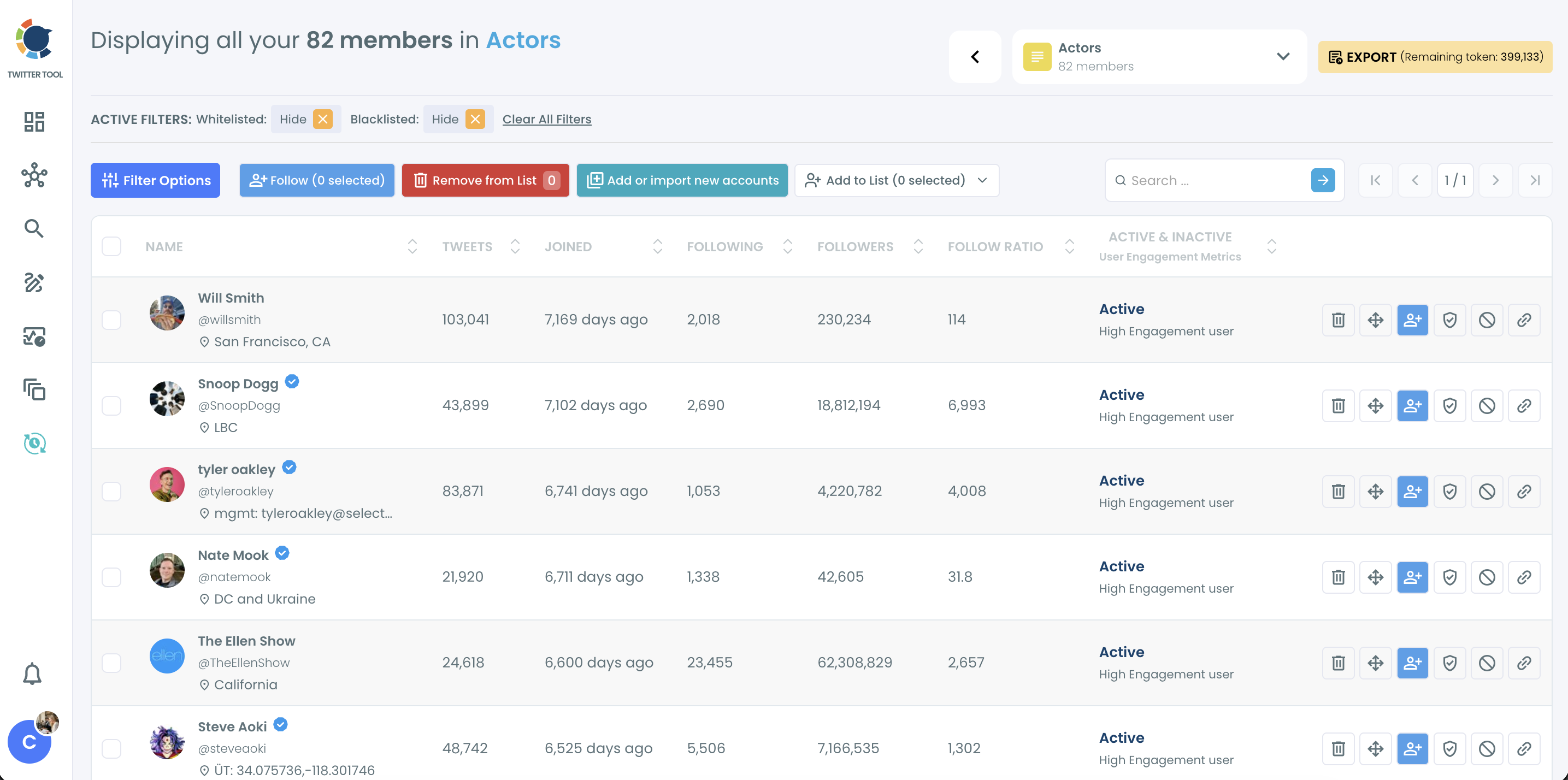
Creating from a selection sets privacy and membership in one write, and managing from the members screen keeps every list under the cap before an add can fail.
The order matters because the ceiling is easier to respect than to recover from.
The loop in one line: select, create private, review, split before 5,000.
List-management clip: moving members between X lists and checking counts from one members screen.
How do you export the members of a private Twitter list?
Open the list in X List Manager and click Export. Circleboom downloads the members as a CSV file, and it covers any list you own.
Each row carries the member's profile data, and the bio and location columns make the file useful for splitting a list further by region or topic offline:
- ProfileId, username and display name.
- Location and bio.
- Tweet, following and follower counts.
- Protected and verified status, with the verified type.
- Quality flags for egghead, fake, inactive and overactive accounts.
Exports are token-based. The remaining token balance shows next to the Export button, and a large list uses tokens in proportion to its member count.
The CSV keeps the list private in a different sense: it is a file you control.
The common uses are a CRM import, a team handoff or a record before you reorganize, merge or delete a list.
An export before a big split is cheap insurance, because it captures exactly who was on the list before members started moving.
Which private list setup fits your situation on X
Your next move depends on what the list is for:
- If the list is for research nobody should see, create it private from a search selection and keep it under 5,000 from day one.
- If the list will grow past 5,000, plan two or three private lists by region or topic before the first bulk add.
- If the list must leave X, export the CSV before any cleanup, merge or delete.
- If the association should be public, make that a separate public list and keep your research lists private.
- If an existing public list should go private, change its privacy with Edit List in X List Manager; members are not notified of the switch.
Each path starts in the same place, with a selection and a ticked box.
→ Create private lists on Twitter with Circleboom
Questions about how private your X list is
Should I make my Twitter list private or public?
Make it private when the list reveals strategy, such as competitors, prospects or sales targets. Choose public only when you want the list seen and followed as curation. You can switch later with Edit List, but going public exposes the full member list to anyone.
What is the fastest way to fill a private list with many accounts?
Select the accounts from a Circleboom search or follower segment and add them in one action, or paste comma-separated usernames into "Add or import new accounts." Both skip X's one-profile-at-a-time adds. Pasting works best for accounts you found outside the app, such as a spreadsheet from a teammate.
Does deleting a private list notify its members?
No. Deleting a list removes it and its member associations from your account, and members are not notified. The deletion is permanent, so export the members first if you need a record.
How quickly do list changes made on X show up in Circleboom?
Circleboom syncs list data within a 24-hour window. Members you add or remove directly on X can take until the next sync to appear, and the sync time shows on the list overview.
Can I follow the members of my private list from the list itself?
Yes. The list view in Circleboom has a Follow button for selected members. Following is optional, though, since a list shows members' posts whether you follow them or not.






)
