
Yes. Every like you leave on X is an engagement signal that X reads when it picks posts for your For You feed. A burst of likes on one topic pulls the feed toward that topic, and removing those likes takes the pull away.
What this answer covers.Why X counts your likes when it ranks For You, in X's own words.What changes on X the moment a like is removed, and what stays the same.The two levers that steer a drifted feed back: unliking a burst and muting its sources.
Circleboom finds and unlikes recent posts on Twitter in bulk, filtered by date, keyword or account, through X's official Enterprise APIs. Start with the likes that affect your For You feed.
What X says about likes and the For You feed
X states it plainly: the posts you like are one of the signals behind the posts it recommends to you. Its help page on X's approach to recommendations lists liked posts among those signals and describes "Not interested" as feedback you can send against a recommendation.
That page explains the input side. It does not explain what happens when you take a like back, and that is the half most readers need.
Removing a like takes it out of the signal
When a like is removed, it stops counting as an active engagement signal from your account. That is how Circleboom's Delete My Last Likes behaves.
Each processed like is removed at the X platform level, the original post stays exactly where it was, and its public like count drops by one.
Nothing about the author's post changes except that your account is no longer recorded as engaging with it. The author is not asked to do anything, and the post keeps every other like, reply and repost it already had.
Put the two facts side by side and the mechanism is clear:
- X uses the posts you like as a signal for what to recommend.
- An unliked post is no longer a like on your account.
- So removing a cluster of likes removes that cluster from the signal X is reading.
A removed like is a removed signal.
X does not publish how much a like weighs against a reply, a repost or the time you spend on a post, so treat any exact weight quoted elsewhere as someone's estimate rather than X's own figure. For the wider picture of how ranking works, see how the Twitter algorithm really works.
Private likes still shape what you see
In 2024 X made likes private for everyone, as Engadget's report on X making likes private explains. Other people can no longer see who liked a given post. Authors still see who liked their own posts.
Privacy changed who can look at your likes. It did not change whether X uses them.
The likes you leave on X still affect your For You feed, your recommendations and the topics X associates with your account, whether anyone else can browse them or not.
Why a burst of likes tilts the whole X feed
A feed rarely drifts because of one like. It drifts because of a burst: many likes on one kind of post, packed into a short window. Common triggers look like this:
- A sports season, where every evening ends with a few highlight clips liked in passing.
- A news cycle you followed closely for a week and then moved on from.
- A research sprint on a topic that has nothing to do with your usual work.
- An accidental run of likes while scrolling fast through one creator's posts.
Each like is small.
Together they tell X the same thing over and over, and X's personalization does what it is built to do with that.
The likes that affect your For You feed most are usually the ones you thought about least.
How cheap, frequent likes tip the X feed
Likes affect the For You feed this strongly partly because they are cheap to give. A like takes one tap and almost no thought, so an account usually leaves far more of them than posts or follows.
That volume makes likes a frequent, unfiltered record of what held your attention, and it is why a single careless week can tip the feed.
The fix follows from the cause. If a window of likes created the drift, removing that window is the most direct correction. You can drop the likes shaping your For You feed by date instead of hunting for them post by post.
Finding the window is easier than it sounds. Most people can name the week the feed changed, because it lines up with something they were watching or following.
If you cannot, the likes list in Circleboom shows the date of every liked post, so the start and end of a topic cluster stand out once the posts sit next to each other.
Removing the Twitter likes that pulled the feed off course
The lever for a recent drift is Circleboom's Delete My Last Likes. Circleboom loads up to your 3,200 most recent likes on Twitter, lets you filter them down to the slice that caused the drift, and unlikes that slice in bulk.
No archive download is needed for this window, because the likes come straight from X.
On X itself, likes come off one post at a time. That is fine for three likes and painful for three hundred, especially when you cannot remember which posts were in the burst.
You can take back the likes behind your For You feed in one filtered run. The landing page shows what you get:

What the likes list shows before you remove anything
Once you log in to Circleboom Twitter, Delete My Last Likes sits in the Essential Toolbox under Delete Tools. The screen shows how many likes it loaded and lists each liked post with its engagement metrics and the date it was created.
Filter Options sits at the top, along with the buttons for removing everything loaded or only the posts you select.
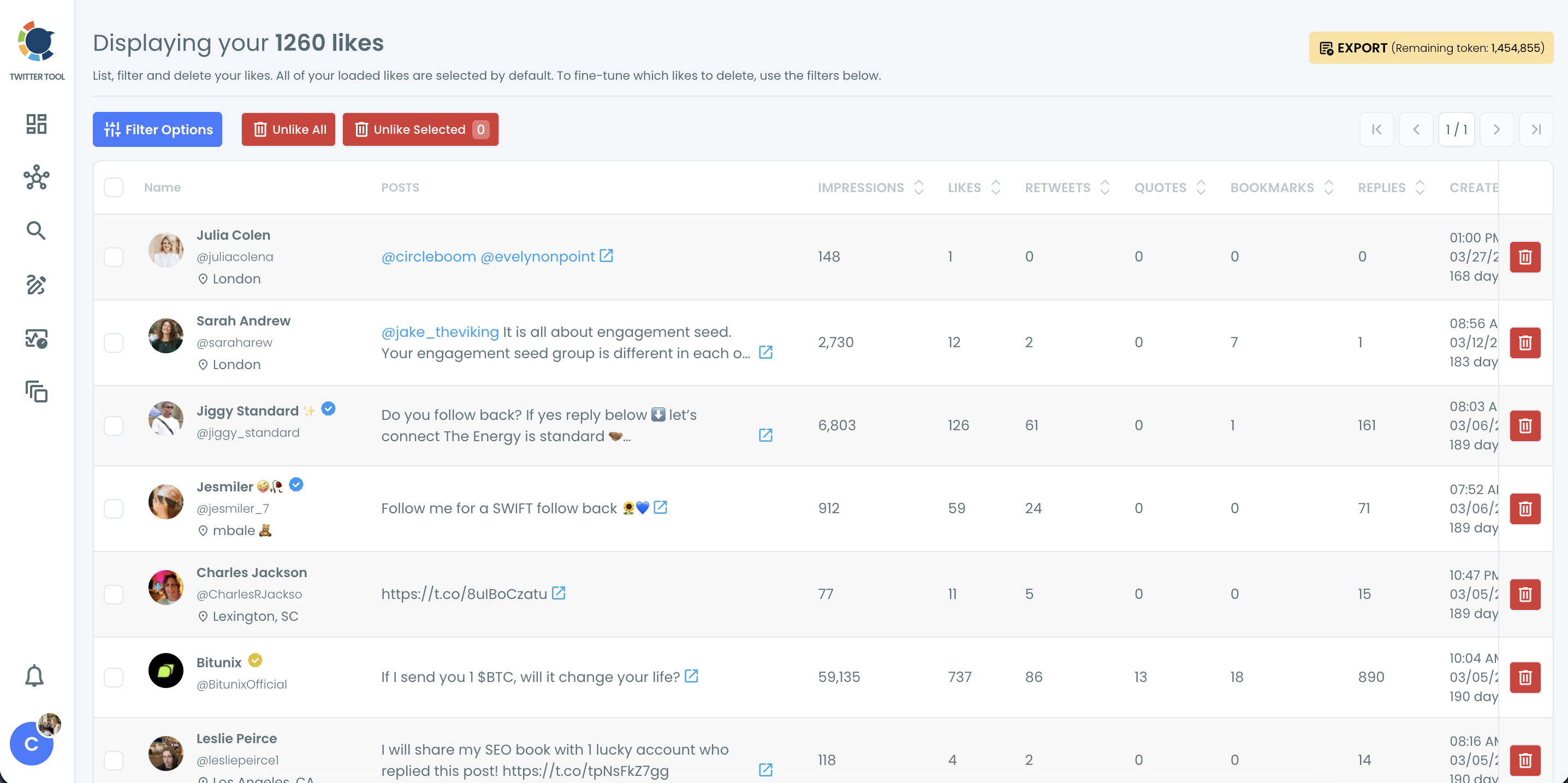
All loaded likes start pre-selected. That default is the reason to filter before you click anything.
Filters that isolate the burst
The filters decide how precise the cleanup is. The ones that matter most for a feed reset:
- Date: an earliest and latest date that frame the week or weeks of the burst.
- Keyword / Username or Hashtag: matches the post text, @mentions and #hashtags, so one topic or one source can be isolated.
- Language: useful when the off-topic posts were in a language you do not usually read.
- Media: separates posts with media from text-only posts, handy when the burst was mostly clips.
Engagement ranges, post type and an exclusion option are there too, for finer cuts.
The username filter is the quiet workhorse here.
When most of the off-topic likes landed on posts from one or two accounts, filtering by those handles removes every like on their posts in a single action. That is often the cleanest way to pull back likes that affect your For You feed when a single source is behind most of the drift.
What happens when you confirm
After filtering, you confirm the removal and Circleboom works through the set at a pace that respects X's rate limits. Large runs take longer, and the browser tab should stay open until the process finishes.
Removal is permanent, so the confirmation step is the place to look twice.
When the For You feed starts to change
X does not publish how fast For You reacts to a removed like. The feed responds to a stream of signals, so the removed burst stops reinforcing the old topic while your newer activity starts carrying more of the weight.
In practice, the clearest results come from pairing the cleanup with a few weeks of deliberate likes on the topics you want back.
Trust matters before a bulk action on your main account. Circleboom is an approved X Enterprise developer, so the unlikes run through access X itself grants to listed partners.
Is a new Twitter account the only way to reset your feed?
No. When your likes affect your For You feed in the wrong direction, a new account is the most expensive way to reset it. It throws away your followers, your posts and your history to fix a problem that can be fixed at the signal.
The less destructive order is to remove the recent burst first, and to reach for a full like-history reset only when the drift goes back years.
Circleboom treats Delete My Last Likes as the first option before Delete All Likes for exactly that reason. Cleaning the recent window addresses the newest personalization signals without erasing older likes that may still serve as bookmarks or relationship history.
When the misalignment is old and spread across many topics, Delete All Likes reads your full history from the like.js file in your X archive instead of the 3,200-like window. X can take 24 to 48 hours to prepare that archive, so request it early.
Still weighing a fresh account? This breakdown compares what each route costs: reset your Twitter algorithm or start a new account.
A full like reset can still keep what matters
Even the archive route does not have to be all or nothing. Delete All Likes has a Protect List, so specific liked posts such as partner content or customer posts survive while everything else is cleared.
The same like.js file can also be uploaded again in a later session with different filters, and likes that were already removed are skipped automatically. That makes a staged reset possible: one topic first, then another, checking the feed in between.
Keeping the X feed from drifting back after a cleanup
Unliking removes the old signal; it does not stop new signal from arriving.
If the same accounts keep posting the same kind of content into your feed, the pattern can rebuild. Recheck your behavior after a cleanup so the same like habits do not undo it.
Muting is the second lever. It removes accounts or words from your view without unfollowing anyone, so you stop seeing, and stop reflexively liking, the posts that started the drift. A walkthrough on muting to curate your Twitter feed shows how to use it day to day.
X's own "Not interested" feedback is the lightest lever of all. Using it on the first off-topic posts that reappear sends X direct feedback against the old pattern, and it costs nothing.
Muting the loudest sources
The loudest offenders are usually a handful of accounts that post far more than everyone else you follow. Circleboom lists overactive accounts to mute on Twitter so you can find them without counting by hand.
Muting at the source: how to stop specific words, phrases, hashtags or people from reaching your Twitter feed after you clear the likes.
For accounts you still want to follow but see less of, the options to remove people from your Twitter timeline sit between muting and unfollowing.
Which move fits your Twitter feed right now
The right next step depends on what caused the drift and how long your likes have been shaping the For You feed. Match your situation to one line:
- If the drift started in the last few weeks, unlike that window with Delete My Last Likes and a date filter.
- If the drift goes back years, request your X archive and run Delete All Likes on the like.js file.
- If a few loud accounts keep refilling the feed, mute them, starting with the most overactive.
- If the feed is clean but X still shows the wrong topics, review the interests X lists for your account.
- If you use likes as bookmarks, export the list as a CSV before removing anything.
Most drifted feeds need the first line plus the third, because likes that affect the For You feed and loud accounts usually arrive together.
The order matters: remove the signal, then stop it from returning.
Every bulk unlike here runs on your own approval, and Circleboom's place on X's Enterprise customer directory is what keeps that action inside X's rules.
Whichever line fits, the principle is the same: change the input X reads, then give the feed time to follow. Pick your line, set your date range, and clear the burst.
→ Reset the likes that affect your For You feed
For You feed and likes: FAQ
What interests has X assigned to my account?
X's settings include an Interests list built from your activity on the platform, and you can deselect topics that no longer describe you. Likes feed into that list along with your other activity, so check it after a cleanup. To study the interests of an audience rather than your own, Circleboom's interest targeting for Twitter audiences covers that side.
Should I unlike only my recent likes or my whole like history?
Start with recent likes. Delete My Last Likes covers your newest 3,200 likes with no archive, which is where a fresh drift lives. Delete All Likes uses your X archive to reach every like you have ever left, and it fits a long-running mismatch or a full rebrand.
Can I get a like back after removing it?
Not automatically. Unliking through X is permanent and Circleboom has no undo, so the only way back is to find the post on X and like it again yourself. Review the filtered list, and export it as a CSV if you want a record, before you confirm.