

Yes. More than most people account for.
A tweet doesn't sit in your followers' feeds waiting for them to come back. It shows up, competes with everything else posted in the same window, and gets buried within minutes. The average lifespan of a tweet is around 15 to 18 minutes. After that, newer content takes over and what you posted is effectively gone from the active feed.
If your followers are asleep, at work, or simply not online during that window, the tweet reaches almost no one. Same content, same quality, a fraction of the results. The post didn't fail. The timing did.
With Circleboom Twitter, you can see exactly when your specific audience is most active, hour by hour, across the week, and schedule your tweets to go out during those peak windows automatically.
Does posting time on X really affect engagement?
Yes. Posting time directly affects how many followers see a tweet during its active engagement window.
A tweet posted during peak activity hours for your audience generates significantly more early interactions than the same tweet posted during low-activity hours. Early interactions also signal to X's algorithm that the content is worth distributing further, compounding the effect.
Circleboom Twitter's When Followers Are Online feature shows you the exact peak hours for your specific audience so you can schedule tweets at the right moments.
 infocircleboom.com
What Is Circleboom Twitter?
Circleboom is an Official X Enterprise Developer, which means it retrieves follower activity data directly through X's official APIs. All timing insights are based on publicly available engagement signals from your real follower base. No scraping, no estimates, fully compliant with platform rules.

Here's what Circleboom Twitter gives you for timing and scheduling:
- Analyze your follower base and identify peak activity hours by day and time slot
- View a weekly activity heatmap showing when your audience is most active
- Schedule tweets directly at optimal times from the X Post Planner
- Combine timing data with content planning for a fully optimized posting workflow
- Revisit activity data as your audience grows and patterns shift
If you want to stop guessing when to post on X and start scheduling based on real audience behavior, Circleboom Twitter is where that data lives.
How to Schedule Tweets on the Best Time to Posts with Circleboom Twitter
Step 1: Go to Circleboom Twitter’s X Post Planner
Open Circleboom Twitter and click X Post Planner + AI Writer.
Then select Write & Plan Your Post to start creating your tweet.

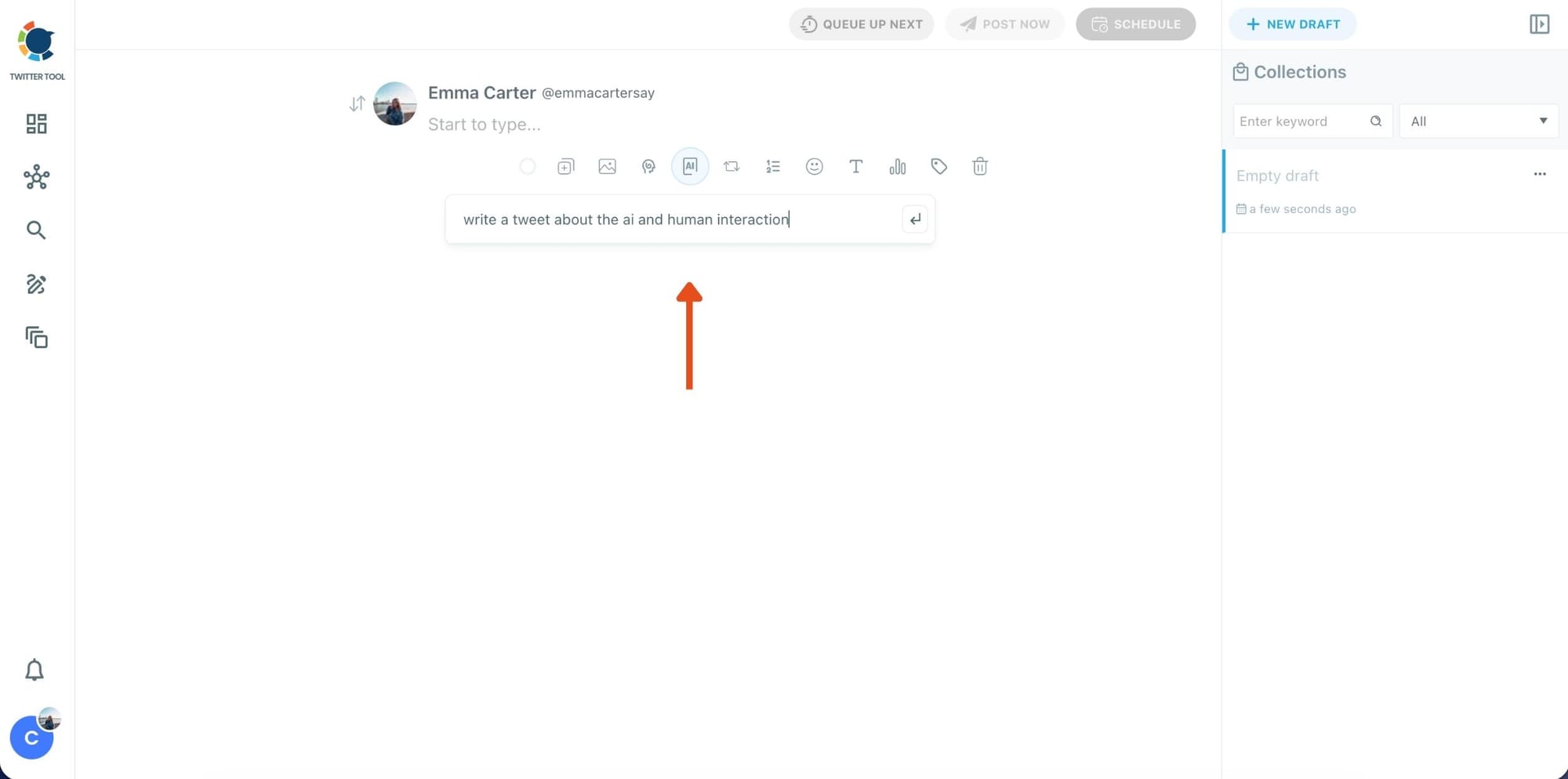
Step 2: Write your tweet (or generate one with AI)
You can type your tweet manually in the editor.
Or, if you want to move faster, click the AI option and let Circleboom generate a tweet idea for you based on your topic.
Step 3: Add an image to make the post more engaging
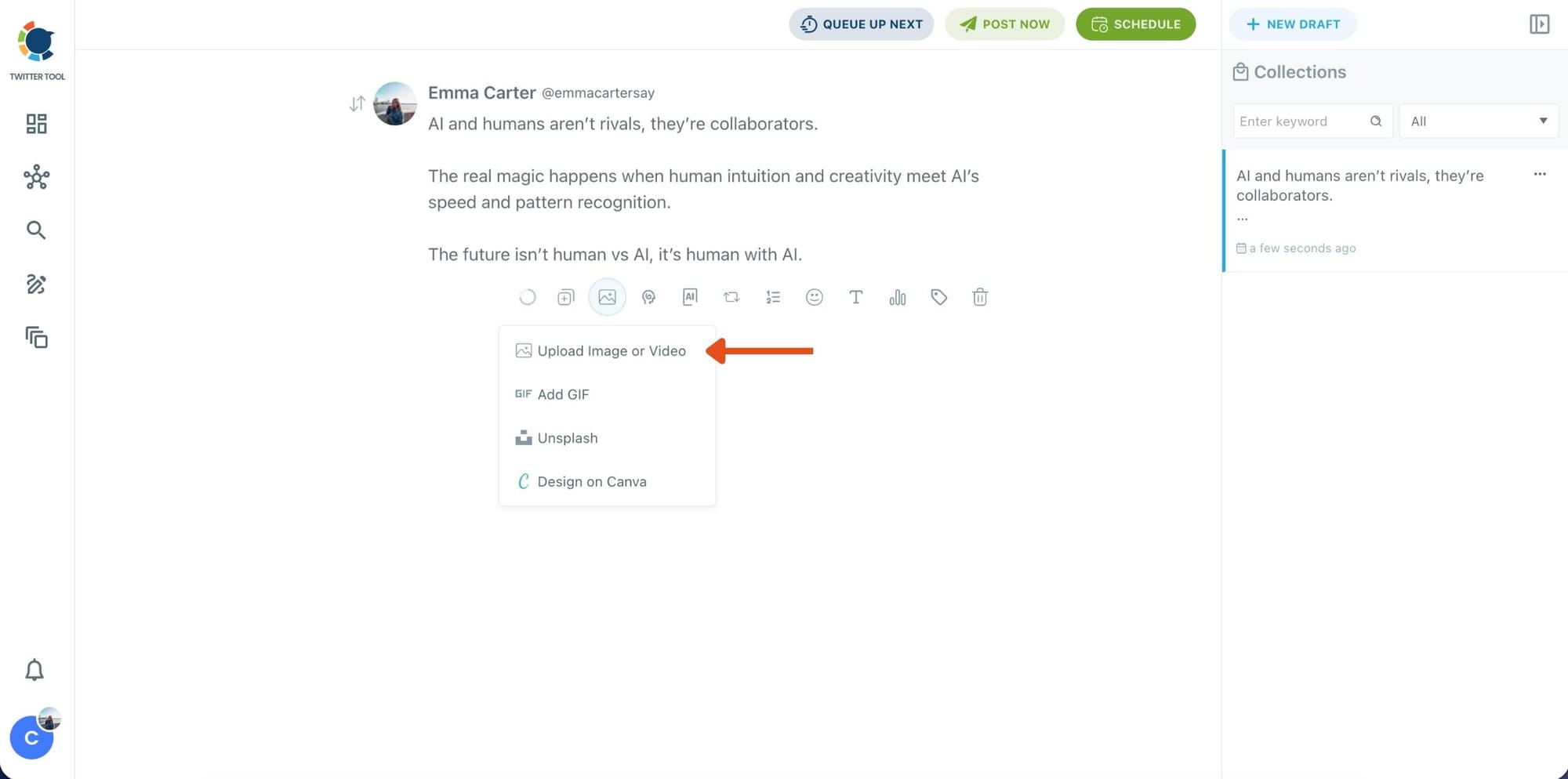
Once your text is ready, attach a visual to your tweet.
You can:
- Upload an image/video from your device
- Pick one from Unsplash
- Or design one instantly using Canva
Step 4: Style your tweet using Circleboom’s Font Generator
Now it’s time to make your tweet stand out visually.
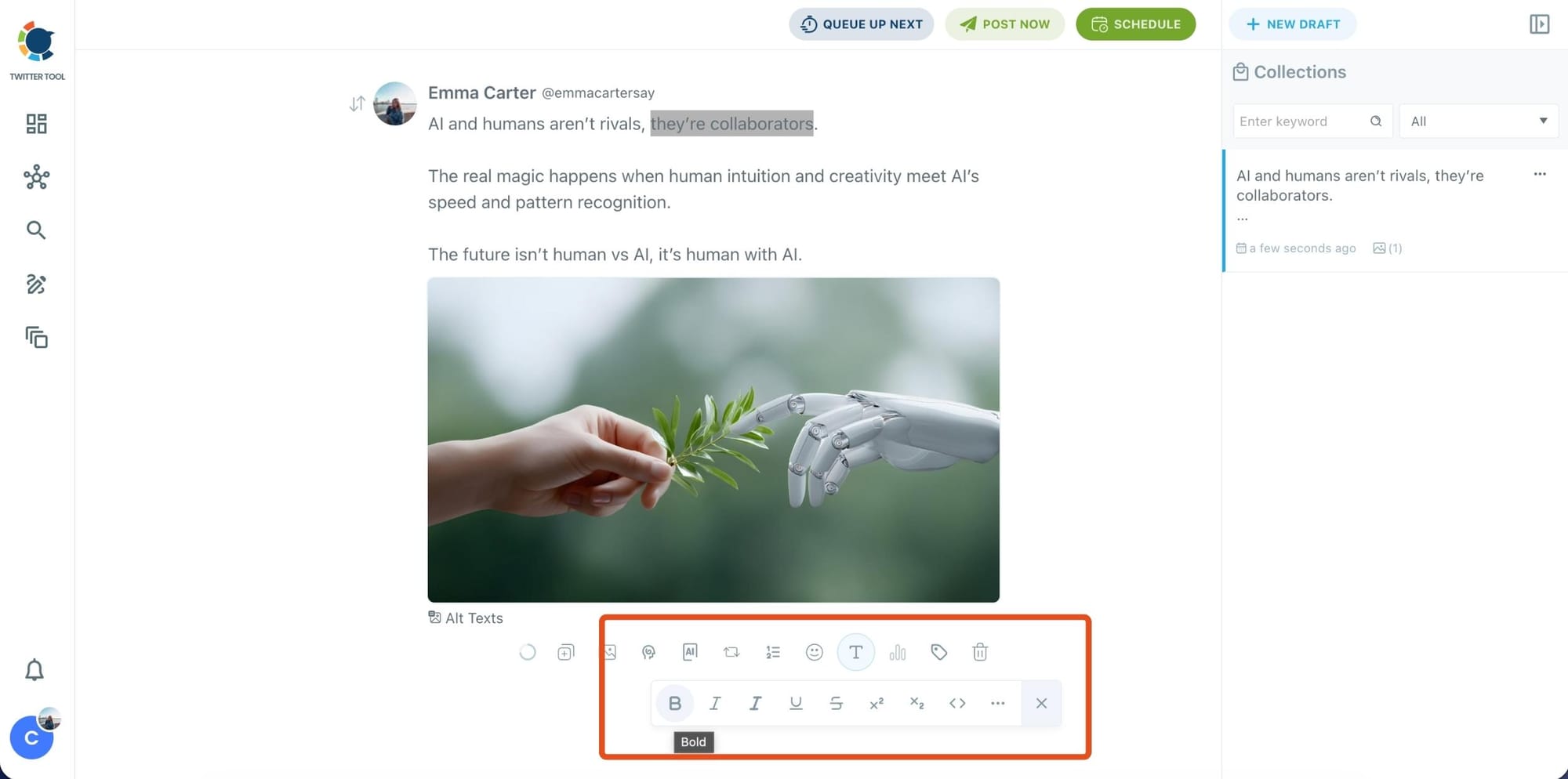
Select the part of your text you want to change, then open the Font Generator toolbar and apply styles like:
- Bold / Italic / Underline
- Different font variations
- Extra formatting options for a more “designed” look
This is perfect when you want key parts of your tweet to grab attention immediately.
Step 5: Set Auto Retweets to boost visibility
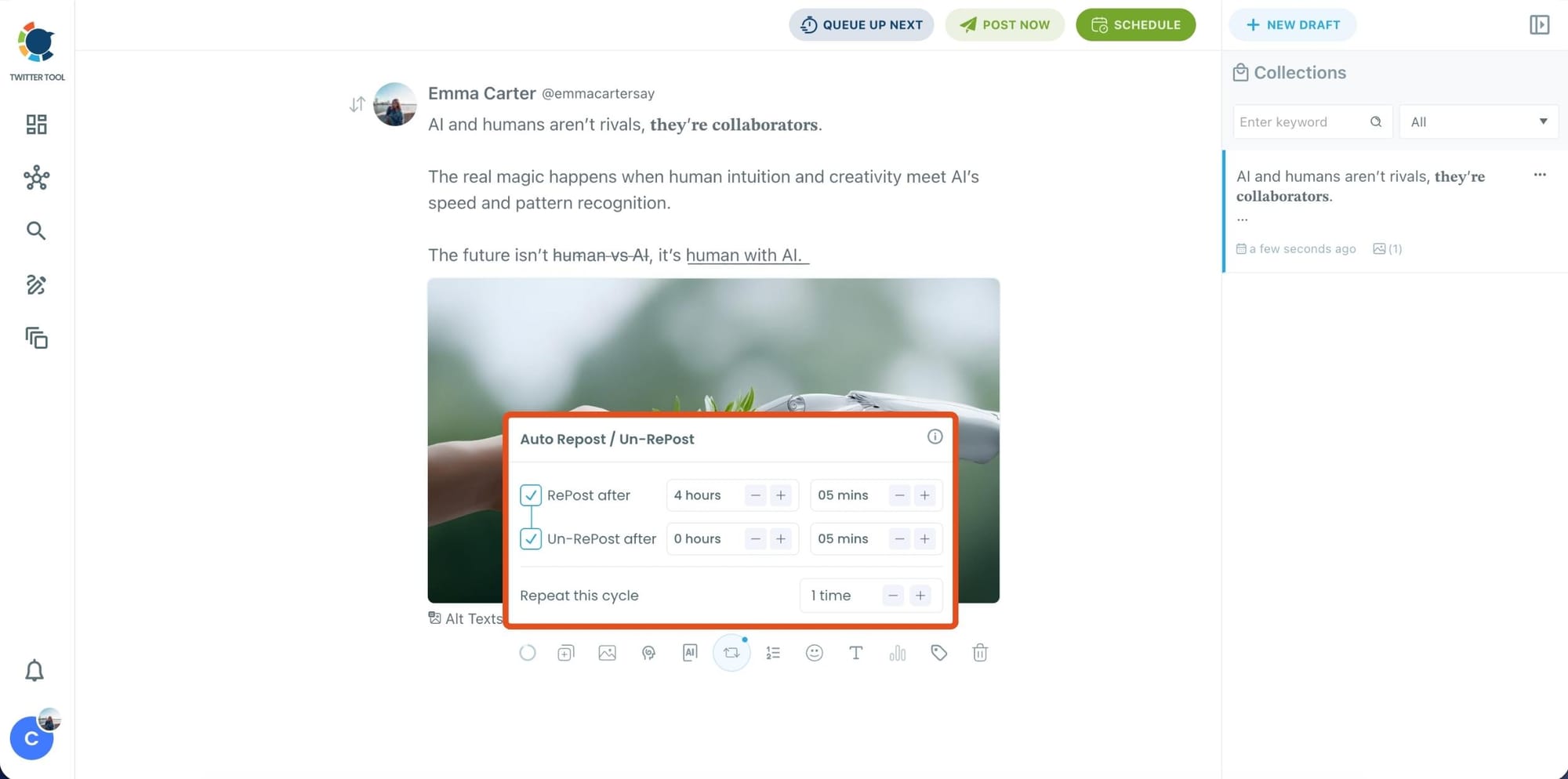
After styling your post, you can increase reach by enabling Auto Repost / Un-RePost settings.
This lets you automatically:
- Repost your tweet after a selected time
- Remove the repost later
- Repeat the cycle if you want more than one repost
It’s a smart way to bring your tweet back into the feed without manually reposting it.
Content on X has a notoriously short shelf life; if your audience isn't scrolling the second you hit 'publish,' your insights vanish into the noise. Circleboom’s Auto Retweet bridges this gap by automatically reviving your top posts, ensuring they land in front of followers regardless of their time zone.
This automation isn't just about staying active. It’s a proven growth hack that can quadruple your impressions and double your engagement. By giving your content a 'second life,' Circleboom forces the algorithm to prioritize your brand, turning every individual tweet into a 24/7 engine for reach.
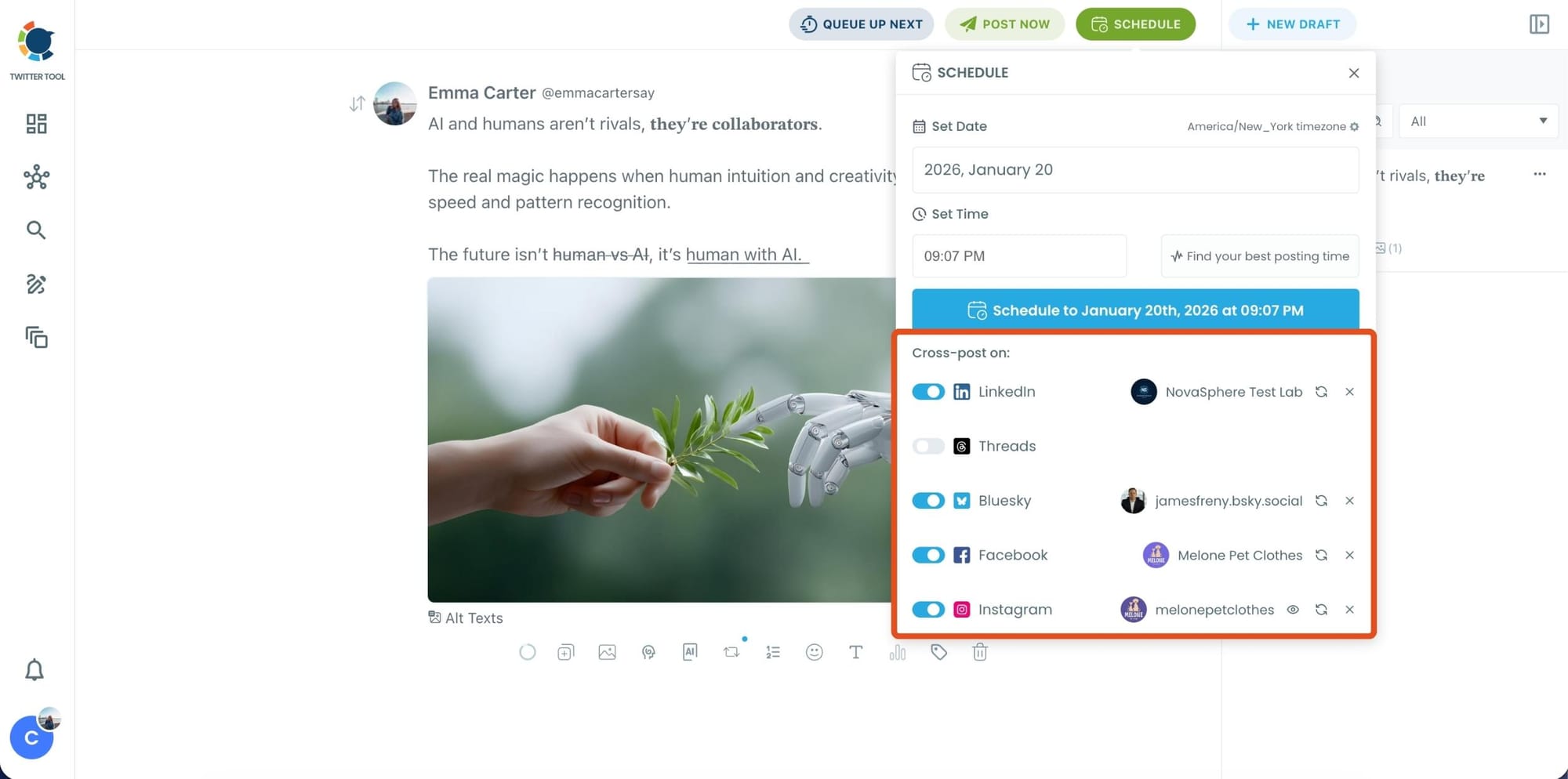
Bonus Tip: Cross-post your tweet to other platforms automatically
Before you publish, you can also enable Cross-Post to share the same tweet across multiple platforms in one go.
 Arif Akdogan
Circleboom lets you post your content to Instagram, Facebook, LinkedIn, Bluesky, and Threads automatically, so you don’t have to rewrite, re-upload, or repeat the same work on each platform.
Step 6: Schedule it for the best time to post
Finally, click Schedule and set your date and time.
You can also click Find your best posting time to see Circleboom’s suggested time slots based on follower activity.
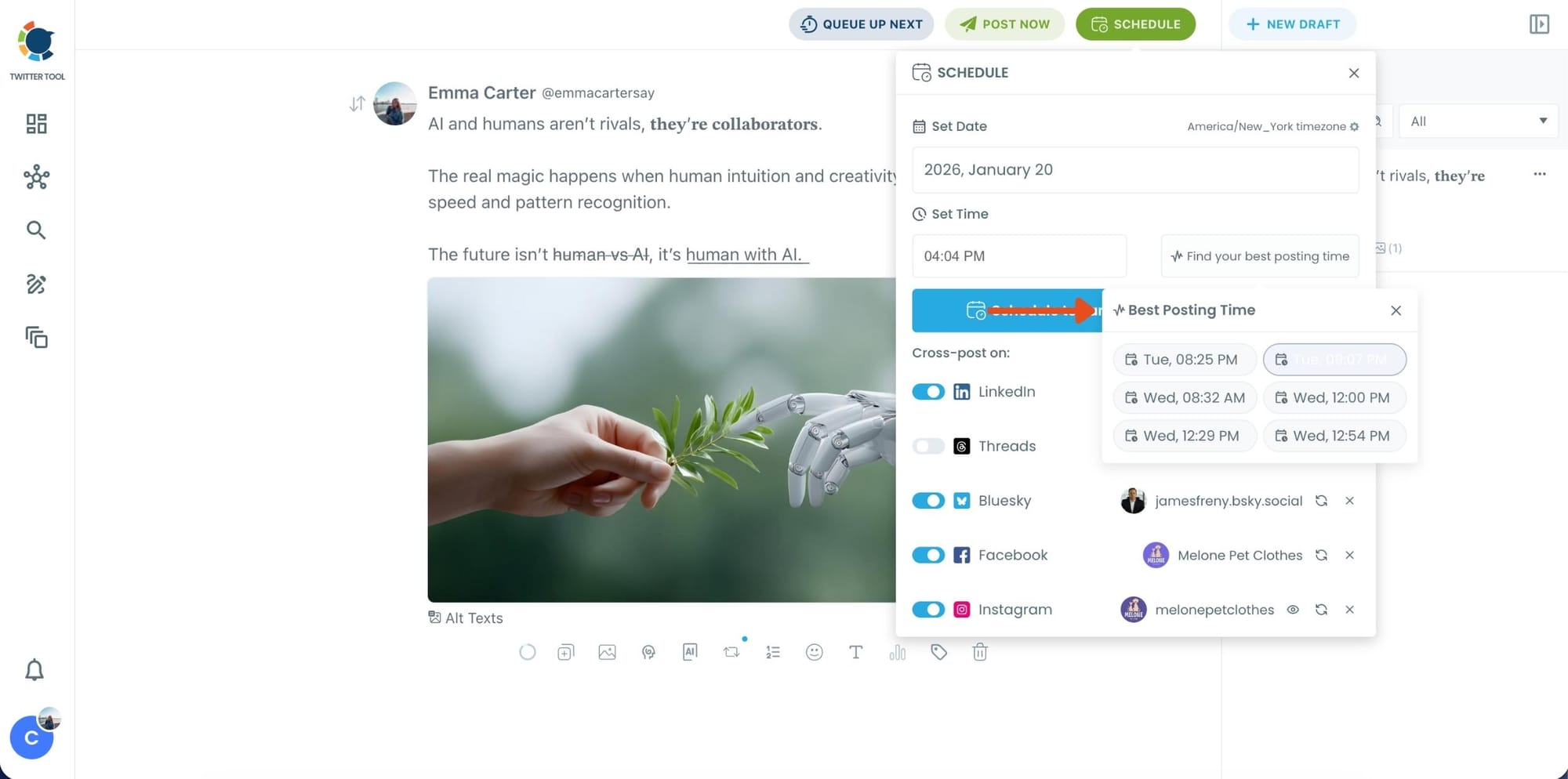
Once you pick the best option, smart-schedule it, and you’re done. Your tweet will go out at the time it has the highest chance to perform well.
Why Timing Matters More Than You Think
Most people understand that timing matters in theory. Fewer understand exactly why it matters at the mechanism level.
When a tweet goes live, it enters a fast-moving feed. X's algorithm decides how many people to show it to based on early engagement signals: likes, replies, retweets, and clicks in the first few minutes. If those signals are strong, the tweet gets pushed further. If they're weak, distribution stops.
Posting during a low-activity window means fewer followers see the tweet in that first critical window. Fewer early interactions means weaker signals to the algorithm. Weaker signals means less distribution. The tweet underperforms not because the content was bad but because it started with a disadvantage it couldn't recover from.
Posting during peak activity reverses this entirely. More followers online means more immediate interactions, stronger early signals, better algorithmic distribution, and more impressions overall, from an identical piece of content.
📌 Timing doesn't replace content quality. A weak tweet posted at the perfect time still underperforms. But a strong tweet posted at the wrong time consistently underperforms what it could have been. Getting both right is the point.
How Circleboom Twitter Analyzes When Your Followers Are Online
The When Followers Are Online feature doesn't use generic data or industry averages. It analyzes your specific follower base.
Circleboom retrieves publicly available activity signals from your followers: when they tweet, when they like content, when they reply, and when they engage across the platform. It collects these interaction patterns, calculates activity density per time slot across the week, and identifies the windows where engagement intensity is highest.
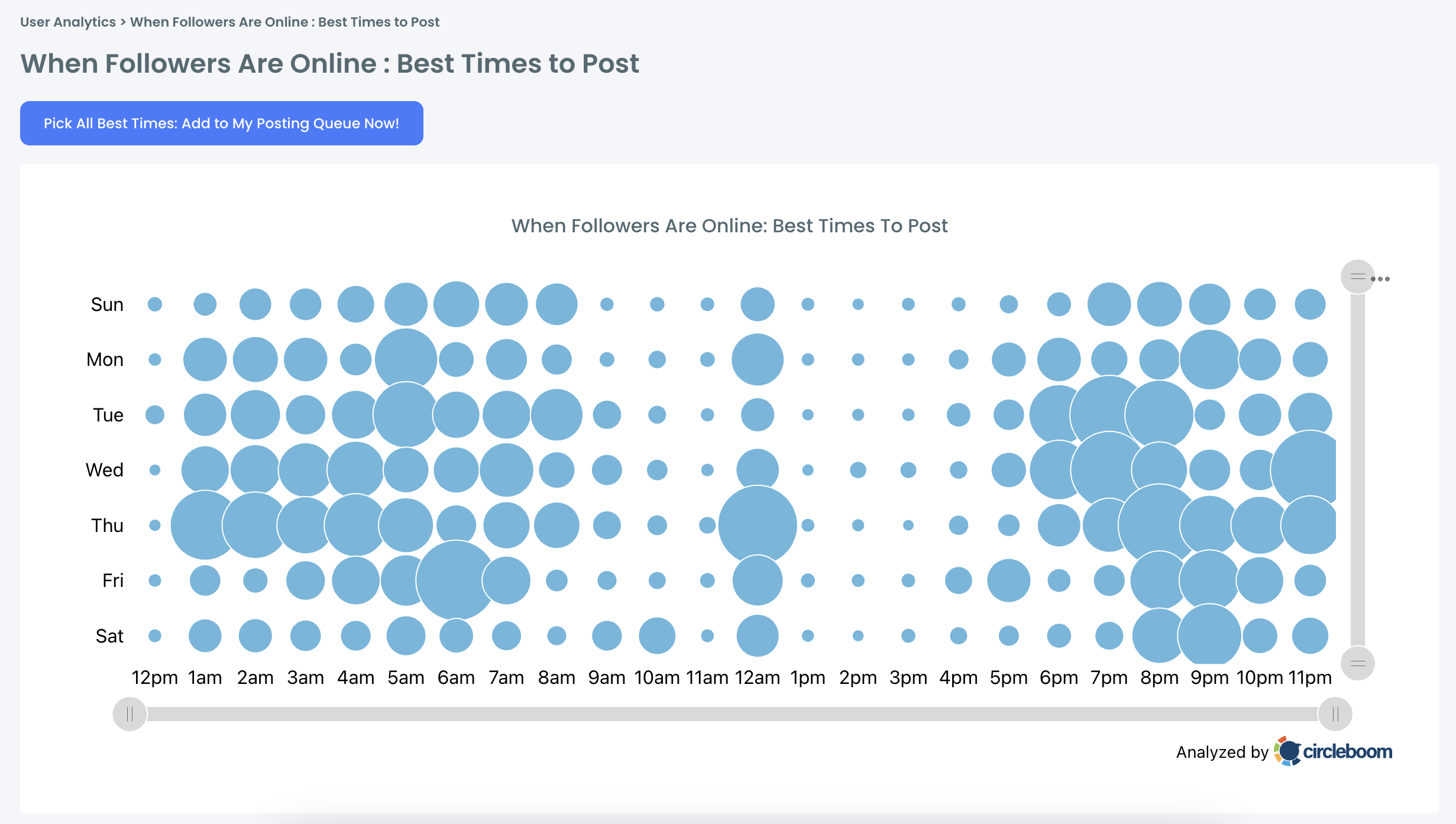
The result is displayed as a weekly heatmap. Days of the week on one axis, hours of the day on the other. Each cell represents an activity level for your followers during that specific day and hour combination. The denser the indicator, the more of your followers are active during that window.
You can see at a glance which hours on which days your audience is most concentrated online. Monday mornings might be dead. Wednesday evenings might spike. Saturday afternoons might be peak. It varies by account and changes over time as your audience grows.
⚠️ Activity patterns are not permanent. As your follower base grows and shifts, the peak windows can move. Revisiting the data regularly, especially after significant follower changes or campaigns, keeps your scheduling aligned with where your audience actually is.
From Timing Data to Scheduled Tweets
Seeing the data is only useful if you act on it. The connection to Circleboom Twitter's X Post Planner closes that loop.
Once you've identified your peak activity windows, you can use the X Post Planner to schedule tweets directly at those times without manual posting. You write the content when you have time and attention for it, set the publish time to match the peak windows, and the scheduler handles the rest.
This separates content creation from content publishing. You don't need to be online during the optimal posting window. You just need to have scheduled into it.
For accounts posting multiple times a day, you can align different tweets with different peak slots across the day and week, maximizing the chance that each piece of content reaches a different active segment of your audience rather than stacking everything into one window.
Combining the timing data with Bulk Schedule Tweets lets you plan an entire week of content at optimal times in one session, so the audience-specific timing insights translate directly into a consistent, automated posting schedule.
infocircleboom.com
Frequently Asked Questions
Does posting time affect engagement on X?
Yes, directly. A tweet's engagement depends heavily on how many followers see it during its active window, which is around 15 to 18 minutes. Posting during peak activity hours for your specific audience maximizes early interactions, which in turn improves how X's algorithm distributes the tweet further.
How does Circleboom figure out when my followers are online?
Circleboom analyzes publicly available activity signals from your follower base, including when they tweet, like, and engage across X. It calculates activity density per time slot across the week and displays the results as a weekly heatmap showing peak engagement windows specific to your audience.
Is the best time to post the same for every account?
No. Optimal posting times vary significantly between accounts depending on the audience's time zones, daily habits, and platform behavior. Generic advice like "post at 9am" is built from global averages that don't apply to individual accounts. Circleboom's data is built from your specific followers, not general benchmarks.
Can I schedule tweets at the peak times Circleboom identifies?
Yes. Once you've identified peak activity windows, you can schedule tweets directly in Circleboom Twitter's X Post Planner to publish at those times automatically. You create the content whenever it suits you and set the publish time to match the optimal windows.
Do the best posting times change over time?
Yes. As your follower base grows and shifts, the peak activity windows can change. Audience behavior evolves, especially after significant follower gains, viral moments, or shifts in content direction. Revisiting the When Followers Are Online data regularly keeps your scheduling strategy current.
Does posting at the right time guarantee high engagement?
No. Timing improves the conditions for engagement but doesn't replace content quality. A tweet that posts during peak hours but says nothing interesting still underperforms. The combination of relevant content and optimal timing consistently outperforms either factor alone.
Final Thoughts
Posting time on X is not a minor detail. It's one of the core variables that determines how far a tweet travels and how many people actually see it. The same content posted at the wrong time routinely underperforms what it could have been.
Circleboom Twitter shows you when your specific audience is most active, hour by hour across the week. The X Post Planner turns that data into a scheduled posting workflow that runs without you being manually online at the right moment.
Stop posting at random times and start scheduling when your followers are actually there.
infocircleboom.com





