
In 2026, X Premium is one of the most misunderstood features on the platform. Many users subscribe expecting an immediate and measurable increase in reach, impressions, and follower growth. The assumption is simple: if you pay, the algorithm should favor you.
But that is not how the X algorithm works.
X Premium changes how you can post and how users perceive you, but it does not fundamentally change how tweets are evaluated and distributed. Visibility is still governed by engagement behavior, especially in the earliest moments after a tweet goes live.
To understand the real impact of X Premium, we need to separate advantages from guarantees.
 Altug Altug
Short Answer: X Premium Helps, But It Does Not Guarantee Reach
X Premium provides supportive advantages, but it does not guarantee increased algorithmic visibility.
A Premium subscription does not:
- Force tweets into the “For You” feed
- Override low engagement signals
- Automatically expose content to non-followers
Many Premium users experience the same problem as non-Premium users: their tweets receive limited impressions and stop spreading shortly after posting.
This happens because the algorithm does not reward status. It rewards reaction.
Premium can improve conditions, but distribution still depends on whether people interact with your tweet quickly and meaningfully.
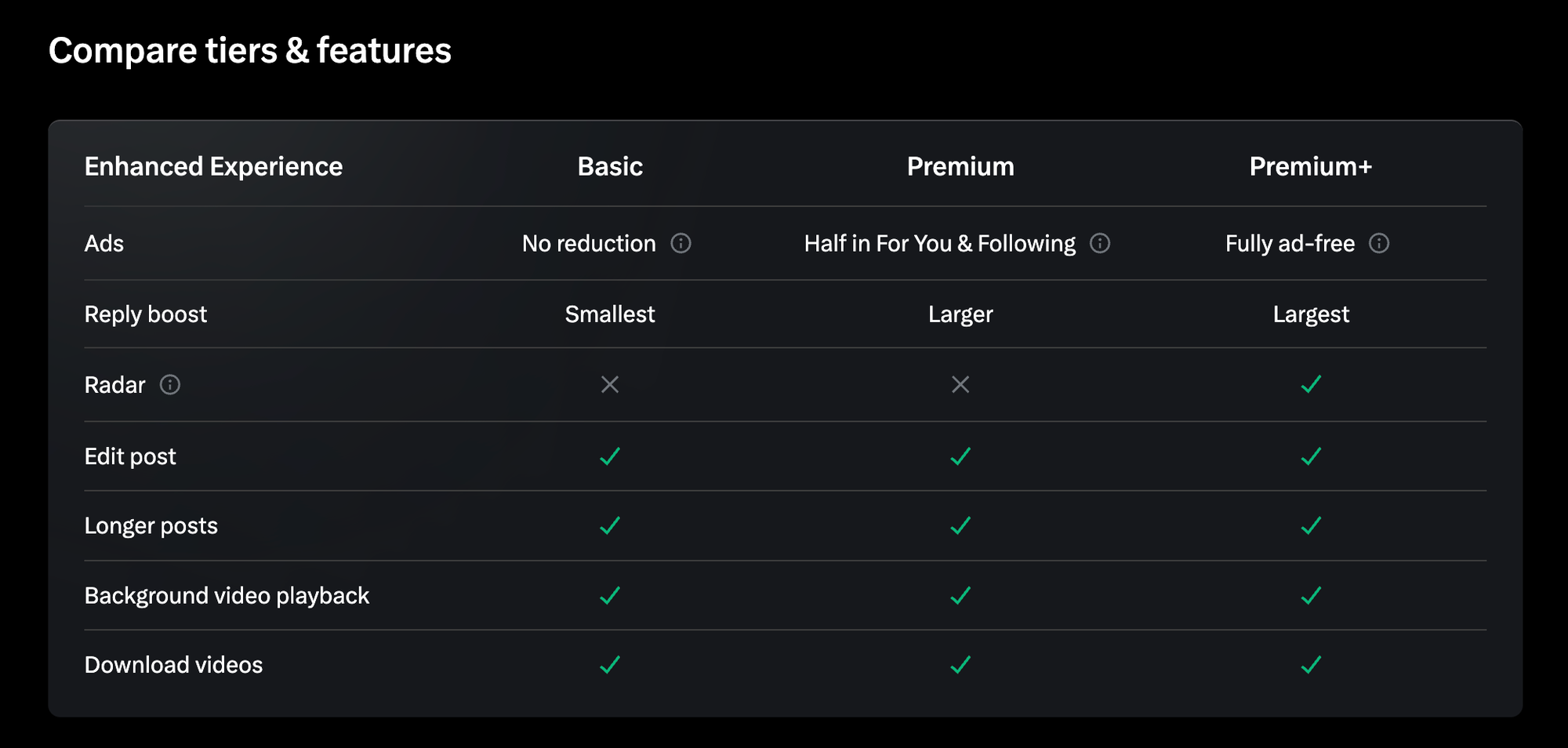
What “Boosting Visibility” Actually Means on X in 2026
Visibility on X is not a single outcome. It is the result of multiple distribution systems working together.
A tweet can appear in:
- Followers’ home timelines
- The “For You” recommendation feed
- Search results and hashtag pages
- Reply rankings inside conversations
When people say “Premium boosts visibility,” they usually mean recommendation visibility, especially in the For You feed. However, X does not use Premium as a primary ranking signal for recommendations.
Instead, the system evaluates:
- Engagement speed
- Interaction depth (replies vs likes)
- User interest matching
- Session behavior (reading time, profile clicks)
Premium does not replace these signals. At best, it helps your tweet perform better once it is shown.
What Advantages X Premium Actually Provides
X Premium offers advantages that can support engagement, but only if your content is already competitive.
One advantage is expanded content capabilities. Longer posts, richer formatting, and additional media options allow for more detailed and expressive tweets. This can increase interaction if users find the content relevant.
Another advantage is perceived credibility. Premium indicators can influence user behavior:
- Some users are more likely to read or reply
- Tweets may feel more “serious” or authoritative
- Replies may receive slightly more attention
Premium also provides better access to tools and analytics, which help users understand what works. However, analytics do not create engagement, they only help optimize future posts.
Premium improves presentation and perception, not algorithmic favoritism.

Why X Premium Alone Doesn’t Guarantee Algorithm Reach
The X algorithm is performance-driven.
It does not ask:
- “Is this a Premium user?”
- “Did this account pay?”
Instead, it asks:
- “Are users reacting to this tweet?”
- “Is this content worth showing to more people?”
When a tweet is published, it is tested with a small group. If engagement is weak, distribution stops. This rule applies equally to Premium and non-Premium accounts.
That’s why many Premium users see:
- High posting frequency but low reach
- No improvement compared to free accounts
- Tweets that disappear minutes after posting
Premium does not protect tweets from underperformance.
The Most Important Factor: First Engagement Window (12–15 Minutes)
The first 12–15 minutes after posting are the most important phase in a tweet’s lifecycle.
During this period:
- The tweet is shown to an initial test audience
- The algorithm measures engagement velocity
- Likes, replies, reposts, and reading time are evaluated
If engagement is strong:
- The tweet is shown to more followers
- It may enter recommendation feeds
- Visibility expands gradually
If engagement is weak:
- Distribution stops
- The tweet no longer reaches new users
- It becomes effectively “dead”
This is why people say tweets die. They don’t disappear, they simply stop being distributed.
X Premium does not extend this window or soften the consequences of weak early engagement.
How Circleboom Twitter Helps Increase Algorithm Visibility
This is exactly why I use Circleboom Twitter.

As an official X Enterprise developer, Circleboom works directly within X’s API limits and focuses on one thing: helping tweets get the best possible chance to perform, without risky automation or guesswork.
Circleboom brings everything you need into a single workflow from creating tweets to timing them correctly and extending their visibility.
With Circleboom Twitter, you can:
➡️ Create tweets inside the X Post Planner
This is the main tweet creation area.
 infocircleboom.com
You can write and edit tweets, use the AI Tweet Generator to improve your copy, add visuals with image curation tools, and generate relevant hashtags before publishing. Everything is prepared in one place instead of posting randomly.
➡️ Publish tweets at the best time to post
Circleboom analyzes your followers’ activity and shows when they are online and most likely to engage.
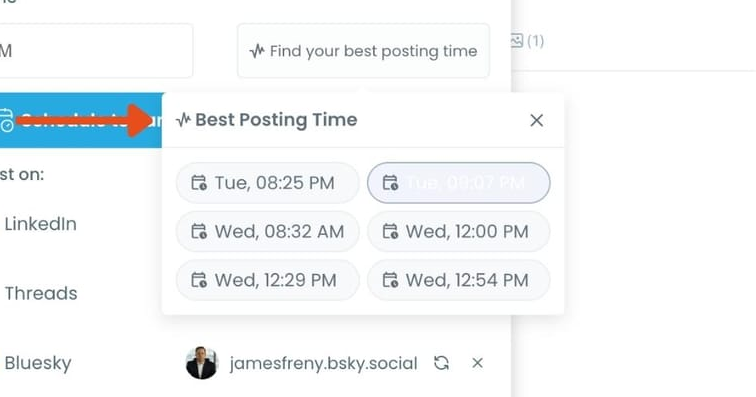
You don’t have to guess anymore. Scheduling tweets at these suggested times increases the chance of strong engagement in the first critical minutes.
➡️ Set auto retweet cycles while creating tweets
While publishing a tweet, you can define auto retweet rules.
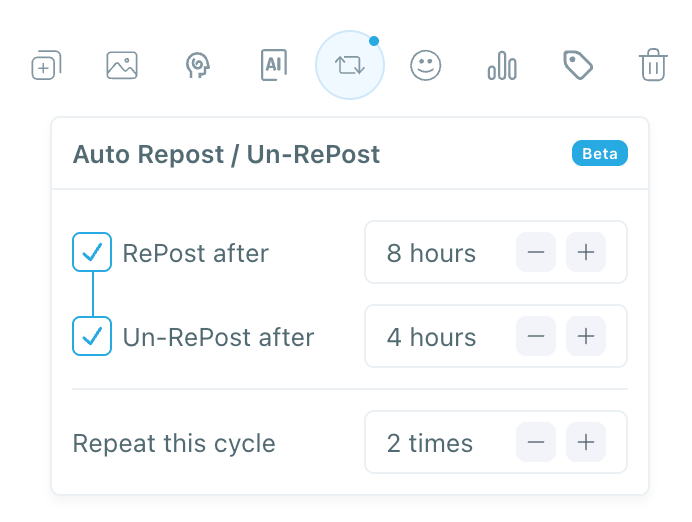
Circleboom can retweet, unretweet, and repeat the cycle automatically based on your settings. This gives your tweets multiple exposure windows instead of relying on a single moment.
➡️ Cross-post the same content to other platforms
Circleboom also allows you to share the same post across connected social accounts. This way, one tweet can reach multiple platforms without rewriting or reposting everything manually.
 infocircleboom.com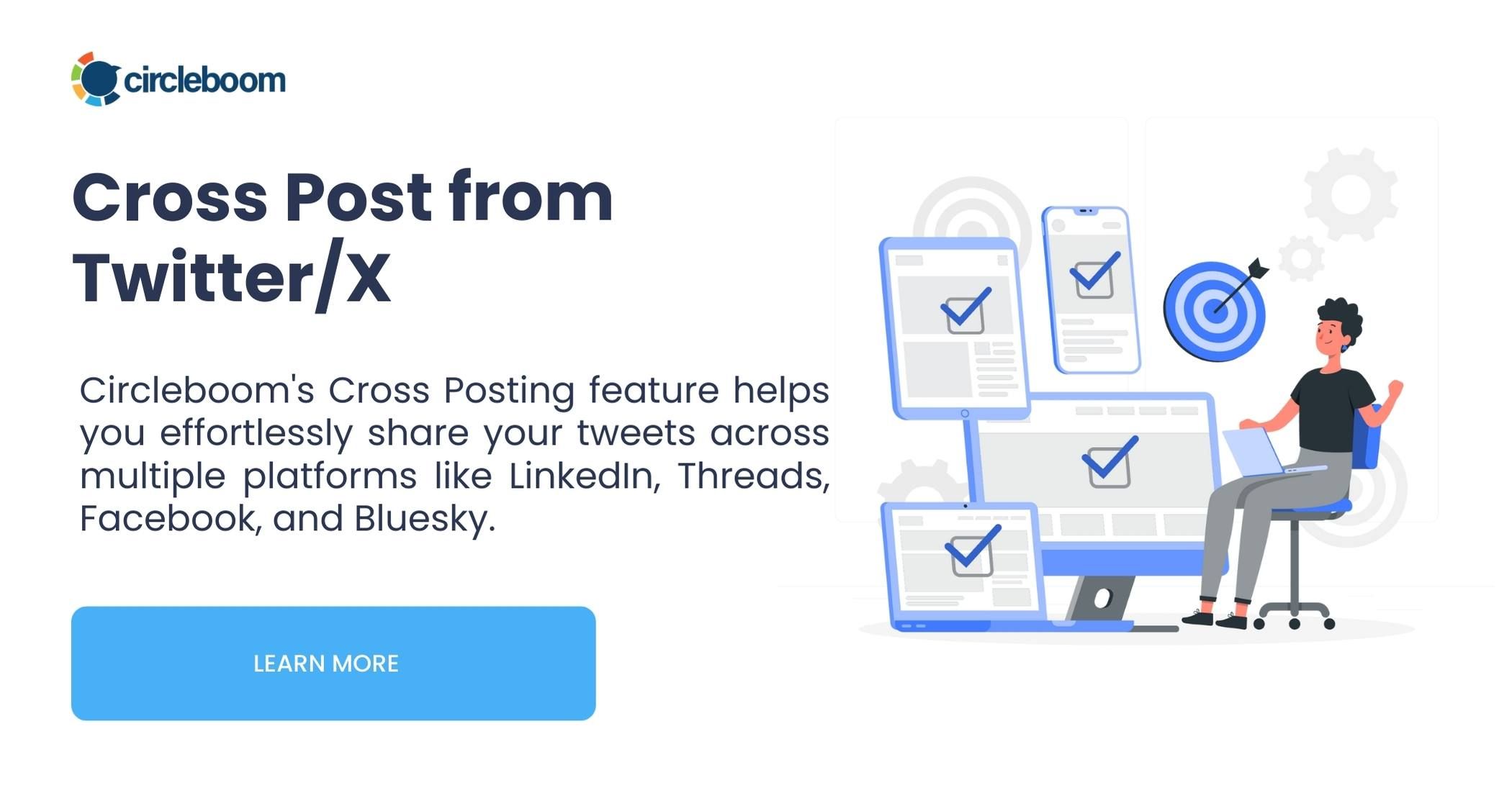
The goal isn’t aggressive automation. It’s structured posting, correct timing, and controlled repetition so your tweets don’t depend on luck to get visibility.
How to Create and Schedule Tweets with Circleboom Twitter
Circleboom turns tweet creation into a planned process.
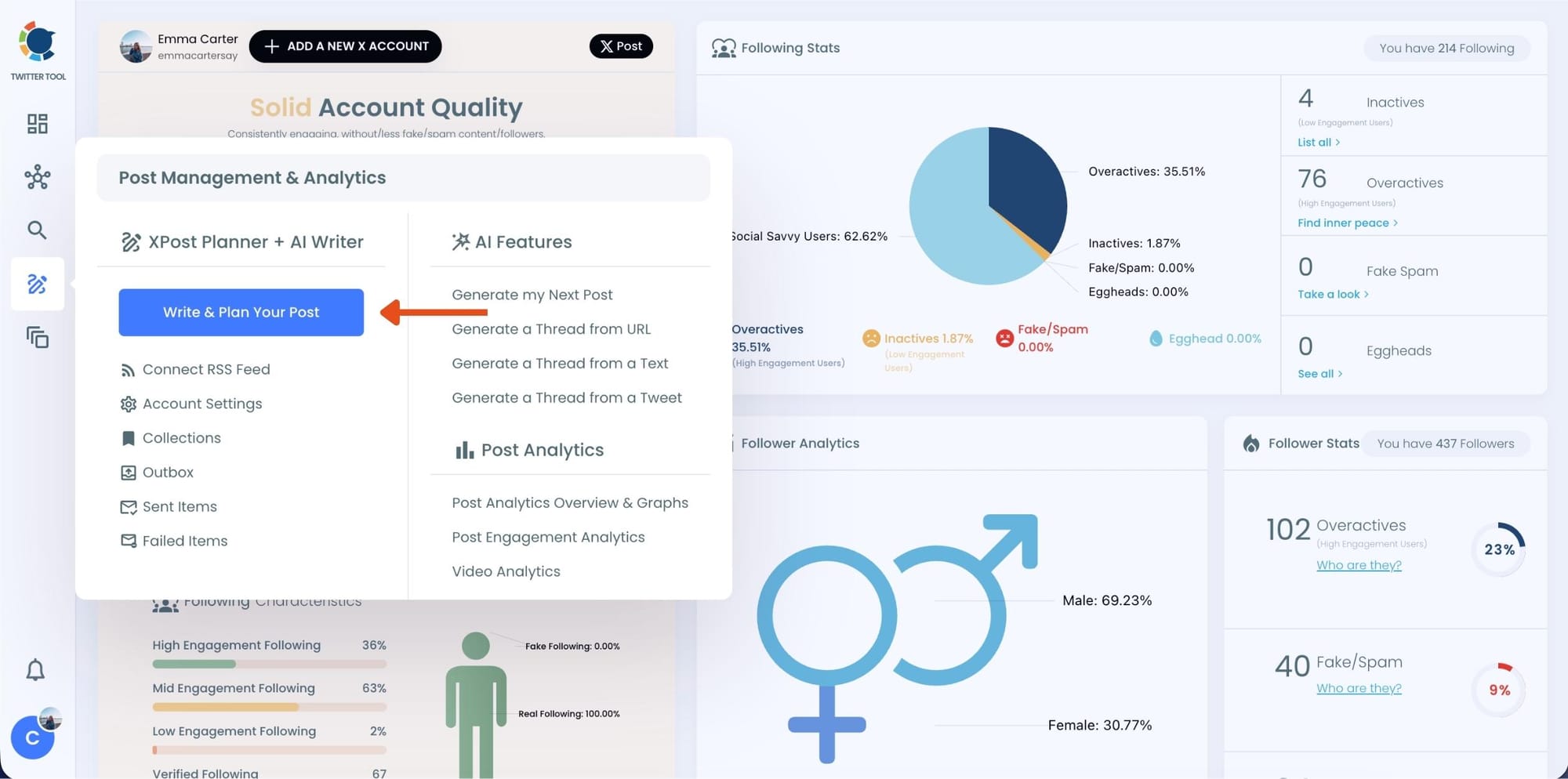
Step 1: Go to Circleboom Twitter’s X Post Planner
Open Circleboom Twitter and click X Post Planner + AI Writer.
Then select Write & Plan Your Post to start creating your tweet.
Step 2: Write your tweet (or generate one with AI)
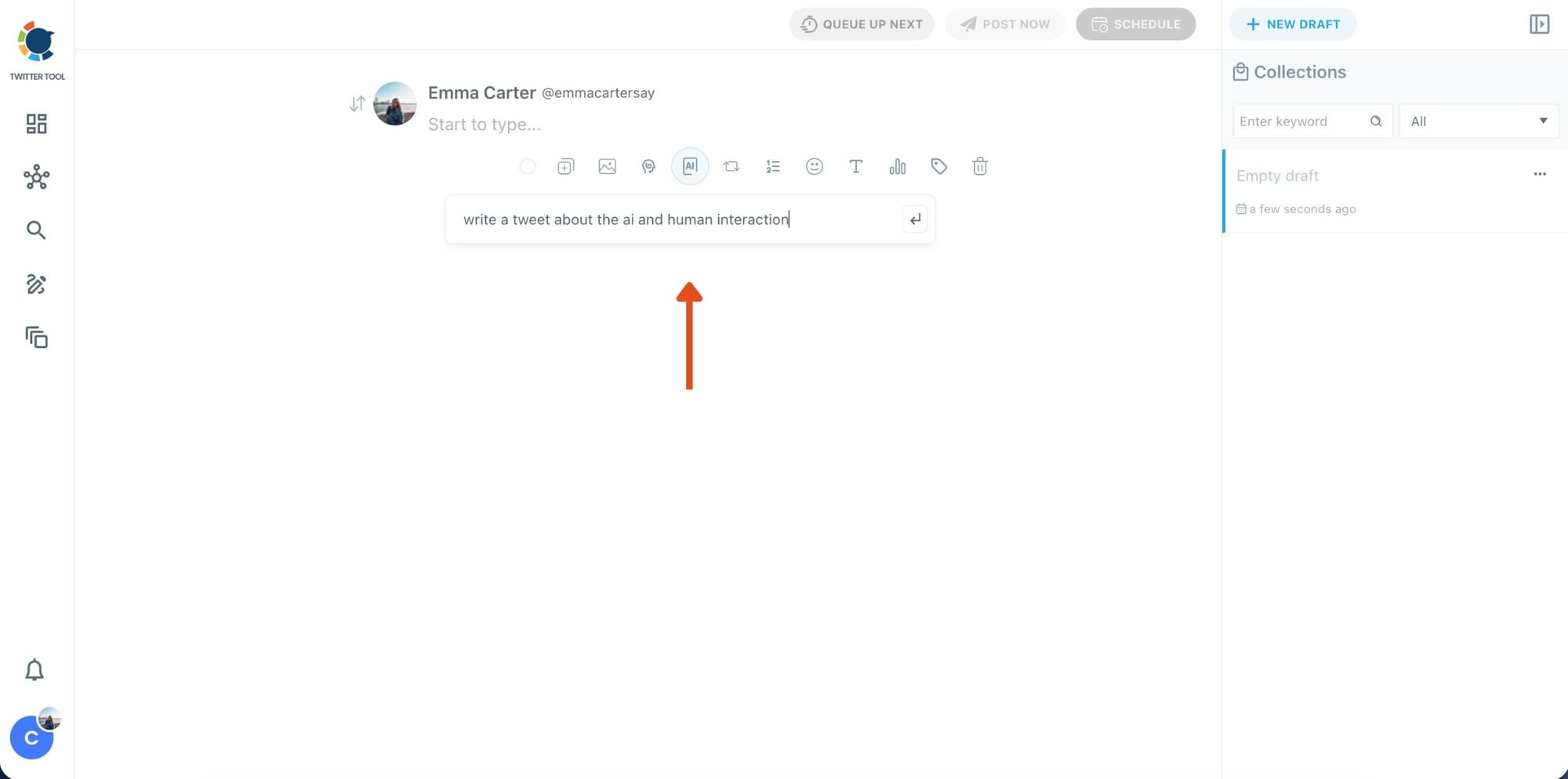
You can type your tweet manually in the editor.
Or, if you want to move faster, click the AI option and let Circleboom generate a tweet idea for you based on your topic.
Step 3: Add an image to make the post more engaging
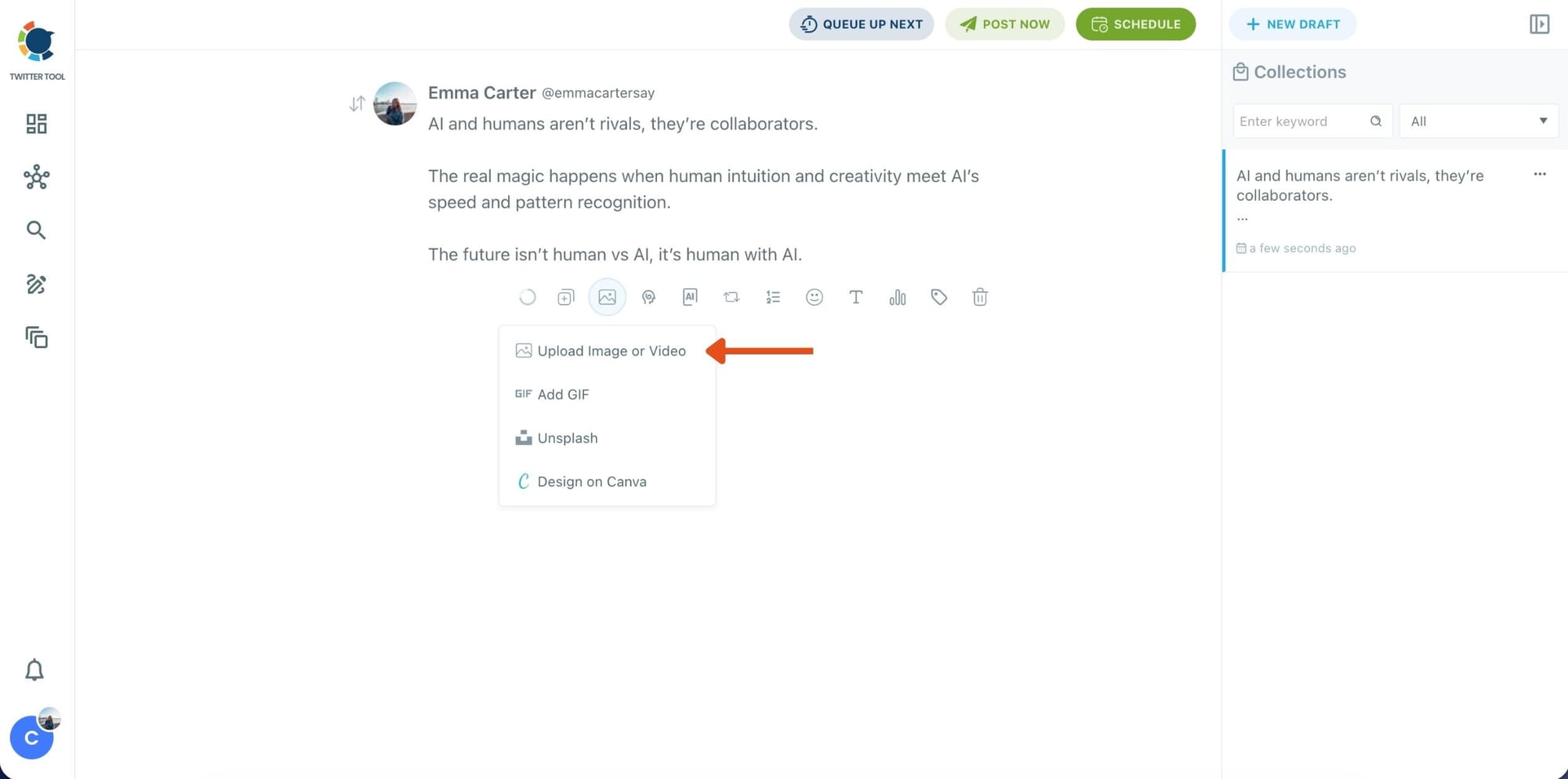
Once your text is ready, attach a visual to your tweet.
You can:
- Upload an image/video from your device
- Pick one from Unsplash
- Or design one instantly using Canva
Step 4: Style your tweet using Circleboom’s Font Generator
Now it’s time to make your tweet stand out visually.
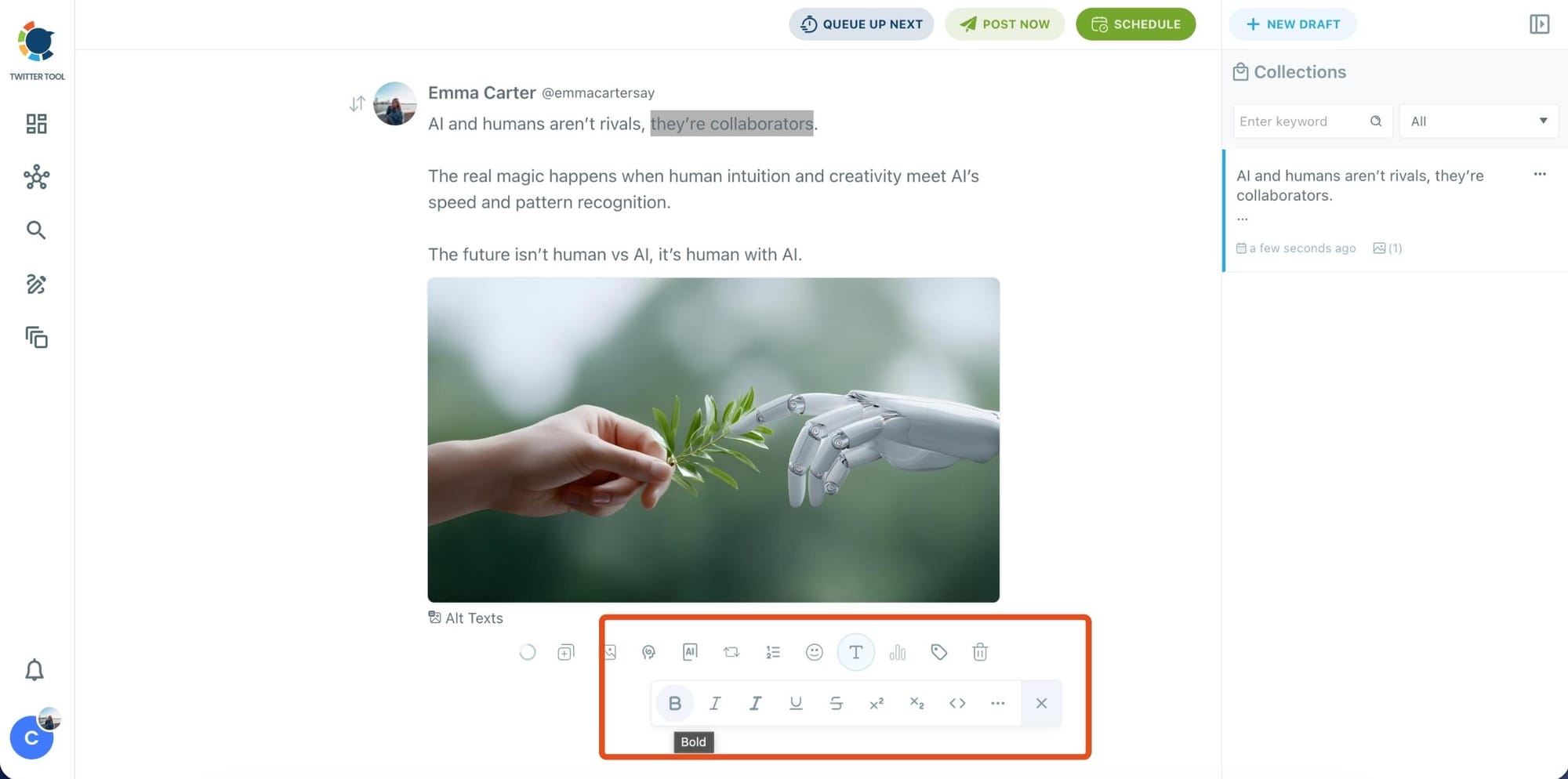
Select the part of your text you want to change, then open the Font Generator toolbar and apply styles like:
- Bold / Italic / Underline
- Different font variations
- Extra formatting options for a more “designed” look
This is perfect when you want key parts of your tweet to grab attention immediately.
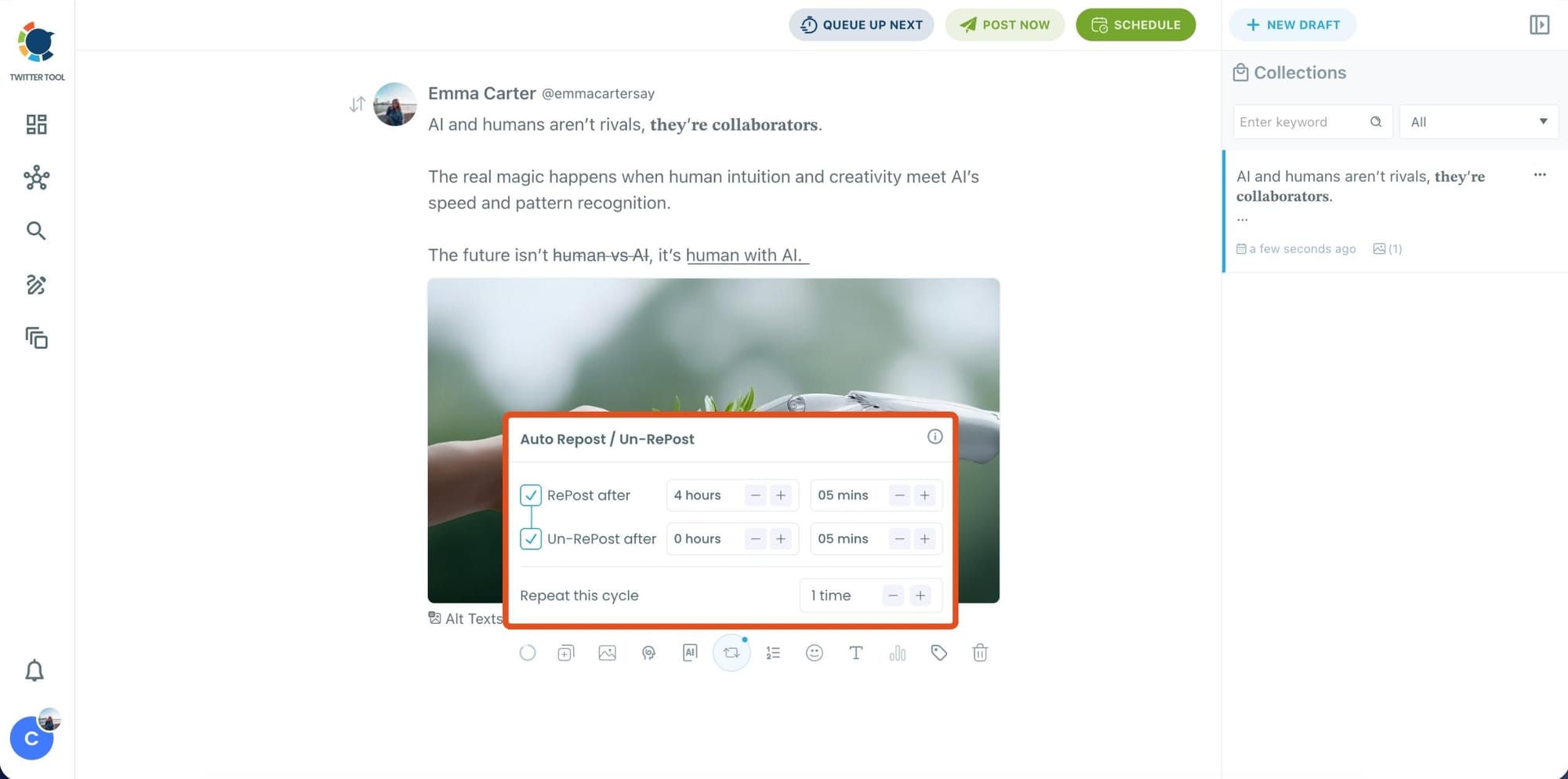
Step 5: Set Auto Retweets to boost visibility
After styling your post, you can increase reach by enabling Auto Repost / Un-RePost settings.
This lets you automatically:
- Repost your tweet after a selected time
- Remove the repost later
- Repeat the cycle if you want more than one repost
It’s a smart way to bring your tweet back into the feed without manually reposting it.
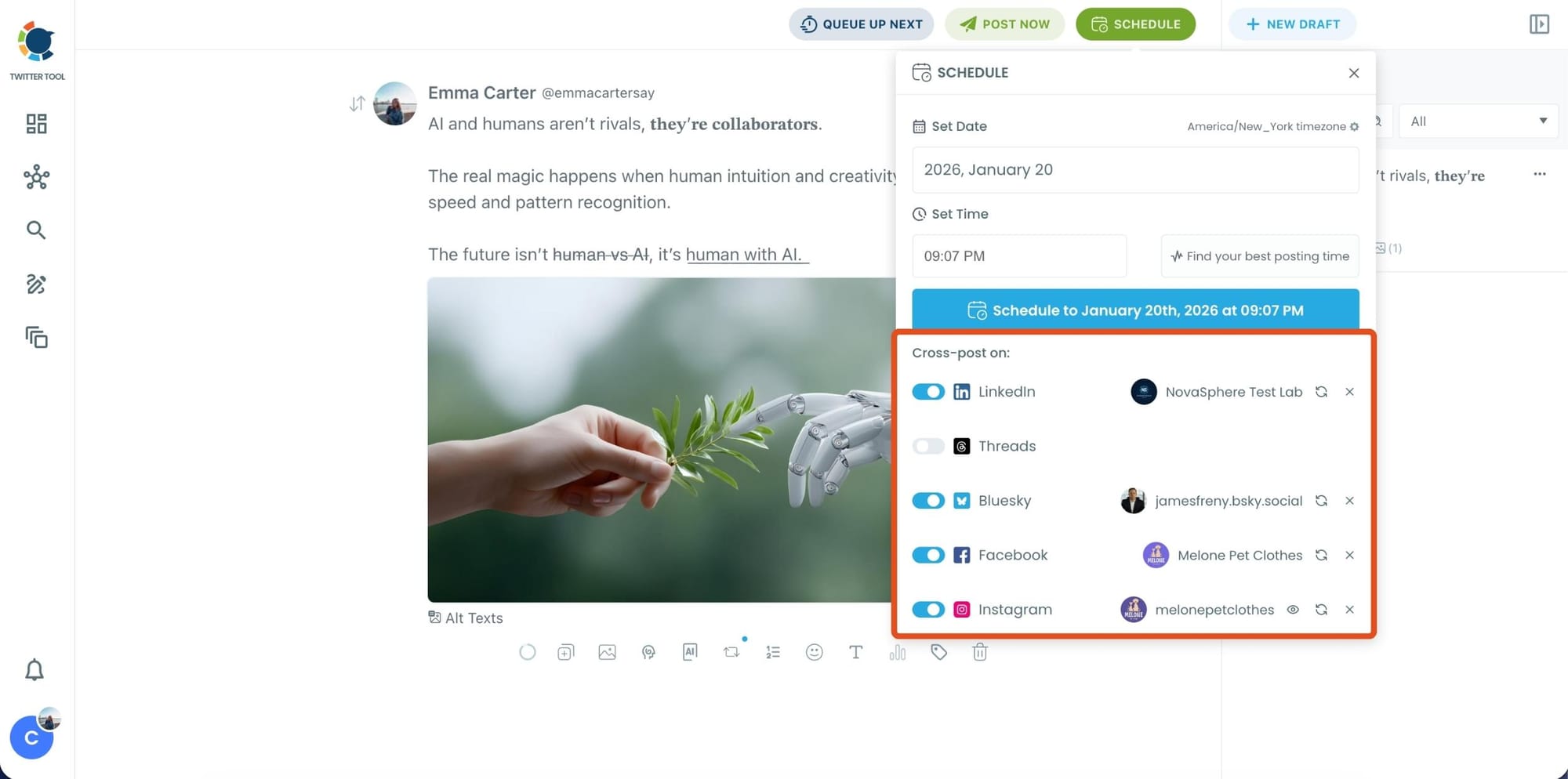
Bonus Tip: Cross-post your tweet to other platforms automatically
Before you publish, you can also enable Cross-Post to share the same tweet across multiple platforms in one go.
Circleboom lets you post your content to Instagram, Facebook, LinkedIn, Bluesky, and Threads automatically, so you don’t have to rewrite, re-upload, or repeat the same work on each platform.
Step 6: Schedule it for the best time to post
Finally, click Schedule and set your date and time.
You can also click Find your best posting time to see Circleboom’s suggested time slots based on follower activity.
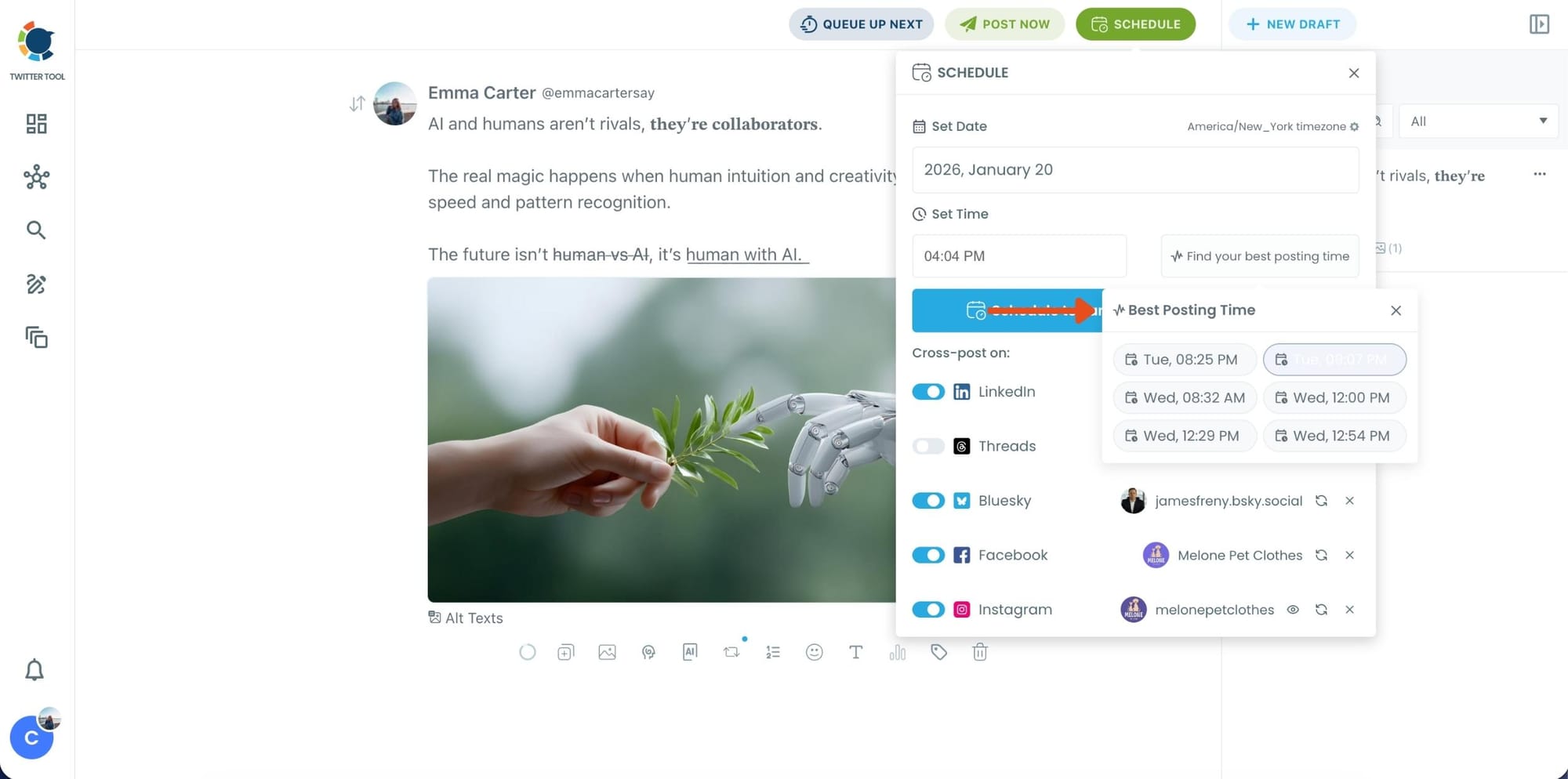
Once you pick the best option, smart-schedule it, and you’re done. Your tweet will go out at the time it has the highest chance to perform well.
X Premium + Circleboom: What Actually Works
X Premium improves how your tweets are presented and perceived, but it doesn’t control when or how widely they are shown. The algorithm still depends on early engagement, regardless of subscription status.
Circleboom focuses on that missing part. It helps you publish tweets when your followers are actually online and gives posts additional exposure through auto retweet cycles.
This increases the chance of getting engagement in the critical first minutes and creates second chances for tweets that need more visibility.
Used together, Premium improves the conditions, while Circleboom improves timing and distribution. That combination is what actually helps tweets perform better on X in 2026.
Final Thoughts
In 2026, X Premium is helpful but it is not a shortcut to visibility.
The algorithm still prioritizes:
- Early engagement
- Interaction quality
- Timing and consistency
Without these, even Premium tweets fade quickly.
Visibility on X requires structure, timing, and repeated exposure not just a subscription. That’s why tools like Circleboom Twitter matter: they help you execute a real visibility strategy instead of relying on assumptions.