

Following back in bulk goes wrong in one predictable way: you select everyone, click once, and end up following bots, dormant accounts and strangers with nothing in common with you. The fix is an order of operations, not more patience.
Filter first, sort second, select third, and only then follow.
To follow back on X in bulk without following junk, narrow the list before you select anything. Circleboom pulls your not-followed-back followers on Twitter into one list, narrows them by engagement and follow ratio, and sends the follows gradually over official X Enterprise API access.
→ follow back on Twitter
The limits passage below shows why a batch of 1,000 takes three days, and why that pace works in your favor.
Why following back on Twitter one profile at a time breaks down
On X, you follow accounts one profile at a time, and there is no way to filter a long follower list before you start. That is fine for five new followers and unworkable for five hundred.
The native follower list has two gaps for this task. It does not separate the followers you already follow from the ones you do not, and it does not show whether an account is active.
So people fall into one of two habits. They ignore the backlog, or they follow everyone to clear it.
I see the second habit more often, and it costs more. Each careless follow adds a stranger's posts to your feed and raises your following count with an account that may never post again.
The work that matters is the narrowing, and X gives you no tool for it.
Circleboom gives you the list of followers you have not followed back as a table you can filter. A judgment call repeated hundreds of times becomes a few settings chosen once.
Why the follow back is worth doing at all
A selective follow back on Twitter is more than tidying. Circleboom's documentation makes the retention case: people tend to stay when they are followed back, and a visible follow-back habit attracts new followers.
It adds a condition. Take the Fake/Bot and Inactive accounts out first, so the follows go only to real accounts.
There is a practical gain too. A follow back also makes a direct message possible, which matters when the follower is a possible partner or customer.
What a filter-first follow back on X looks like
A filter-first follow back means the quality check happens on the whole list before a single checkbox is ticked. Circleboom's You Are Not Following Back feature is built for that order.
The feature compares your follower list with your following list on Twitter and keeps the accounts found only in the first. Every row is someone who chose to follow you and has not been followed in return.
Because Circleboom is a verified Enterprise partner of X, the list is built from official API data and the follows are sent through the same channel. For an action that touches hundreds of accounts, that is the safety detail to check first.
The example filter worth copying
Circleboom's documentation gives one concrete starting filter, and it is the one this walkthrough uses:
- Engagement set to Active, High Engagement
- Follow Ratio above 0.5
Follow ratio is an account's followers divided by the accounts it follows. A floor of 0.5 means the account has at least half as many followers as it follows, which screens out the accounts that follow thousands and are followed by almost nobody.
The engagement setting does the other half. It keeps accounts the tool classifies as currently active and leaves out the Moderate and Inactive groups for a later look.
What the filter leaves out on purpose
The not-followed-back list shows everyone, and the documentation is frank that this includes inactive, low-quality, fake and bot accounts. The Follower Quality filters exist to take those out of view before you select.
If you want the reasoning behind those labels, the post on how to distinguish fake accounts from real ones on Twitter goes through the signs.
Other filters that sharpen the batch
The example filter is a starting point. The same panel has more controls, and all of them can be combined:
- Verification Status, to isolate verified accounts.
- Find in Bio & Name, a text search across display names and bios for a word from your niche.
- Follower Count, with a minimum and a maximum.
- Join Date, with an earliest and a latest date.
- Filter by Language and Filter by Location.
A keyword in Find in Bio & Name is the one I would add first. It is the fastest way to make sure the people you follow back on Twitter talk about the same things you do.
Whatever you combine, an Active Filters bar above the table shows each filter as a tag, with an X to remove it and a Clear All Filters option to reset.
With the list narrowed, you can follow back on X in bulk and know what kind of account sits behind every checkbox.
How many accounts can you follow back on Twitter per day?
Through Circleboom, up to 400 a day. The tool paces Follow actions at 50 every 15 minutes and applies a daily safety limit of 400 follows.
When the daily limit is reached, the remaining queue pauses and resumes automatically the following day. You do not restart anything.
The arithmetic of a large batch
The pace is easy to work out for your own list. These are plain calculations from the documented limits, not measured results:
- 50 follows per 15 minutes means a full day's 400 is sent across eight 15-minute windows.
- A selection of 400 or fewer is handled within a single day's limit.
- A selection of 1,000 runs as 400, then 400, then 200, across three days.
You make the decision once, and the queue spreads the follows out for you.
That spreading is the point. Circleboom's guidance for bulk actions is gradual over aggressive, and it describes the daily limits as safeguards designed to help protect your account.
Circleboom's limit and X's limits are two different things
The 400 figure is Circleboom's own safety limit. X sets its own ceilings on following and describes them in About following on X. Its other caps are collected in About X limits.
Read those pages if you also follow accounts by hand on the same day, because follows from every source count on X's side. For the wider question, there is a full post on how many people you can follow on Twitter in one day.
The practical takeaway for this task is small. Filter hard enough that your batch is one you would be glad to finish, and let the queue handle the timing.
How to follow back on Twitter in bulk, step by step
The flow has nine short steps in three phases.
Open your not-followed-back list
- Open Circleboom Twitter Management and sign in with the X account whose followers you want to review.

- Go to the Followers and Following menu from the icons on the left of the dashboard.

- Select You Are Not Following Back under Followers. The heading above the table gives two numbers: the followers you have not followed back, and your follower total.
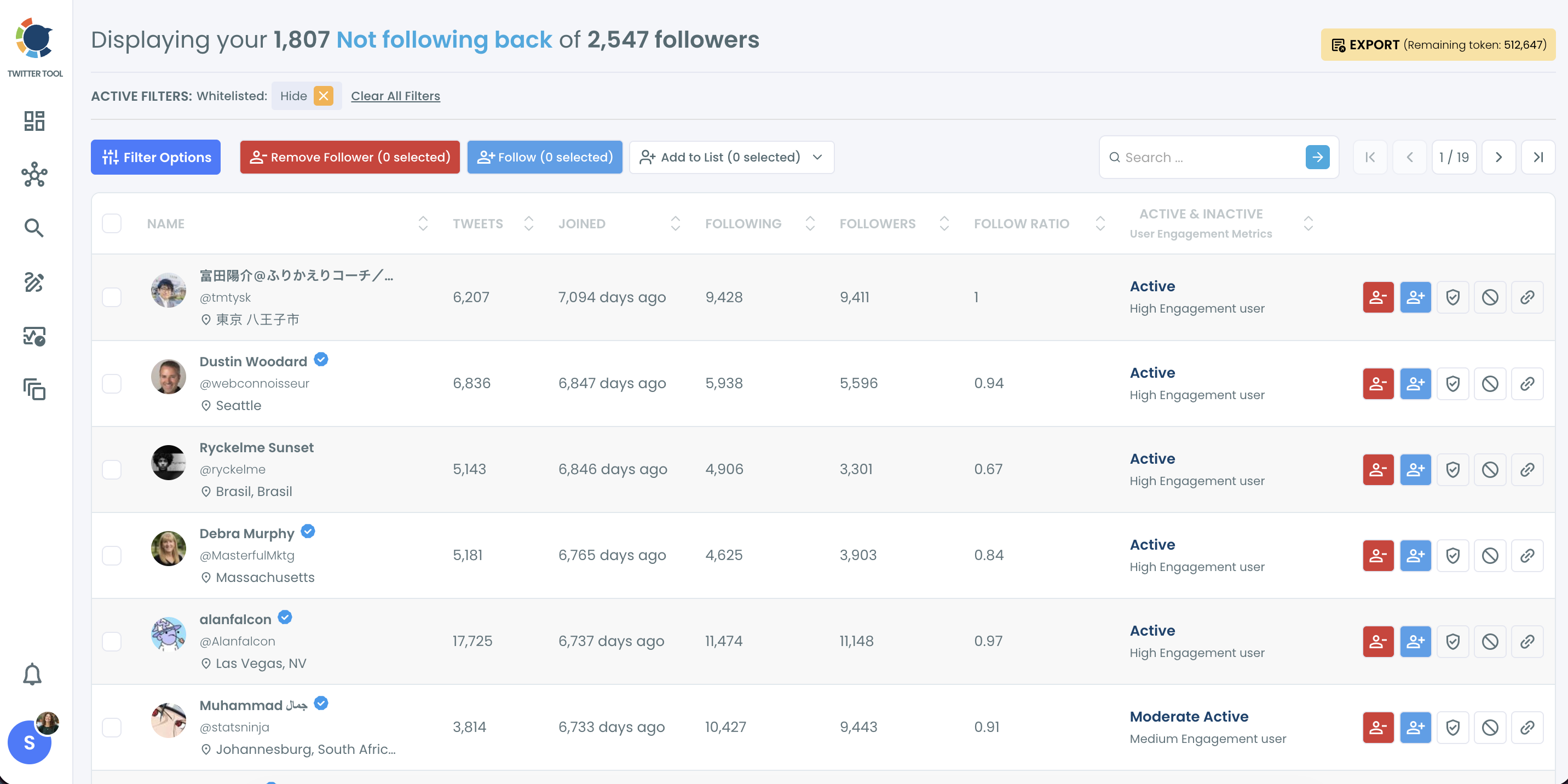
Filter first, then sort what remains
- Click Filter Options to open the side panel, and under Follower Quality set Fake/Bot and Inactive so those accounts are hidden.
- Set Engagement to the Active, High Engagement level and enter 0.5 as the minimum Follow Ratio, then apply the filters.
- Click the Followers column header until the table sorts from the largest account down, so the highest-reach rows are reviewed first.
Select, confirm and let the queue run
- Tick the checkbox on each row you want, or use the master checkbox at the top to select every account currently visible.
- Click Follow and check the number in the button label, then confirm in the Follow Profiles pop-up.
- Read the processing notice that appears next. It restates the pace of 50 every 15 minutes and 400 per day, with the rest continuing the next day.
Filtering before selecting is what makes the master checkbox safe to use, and confirming against the count on the button is what keeps a bulk action a deliberate one.
The walkthrough in four lines:
- Open the list.
- Hide the junk and apply the example filter.
- Sort by Followers and select.
- Confirm, then let the queue pace itself.
One detail to keep in mind at step 8: the only way to take a follow back is to unfollow. An unintended follow adds that account to your feed and your following count until you undo it by hand.
How the Twitter follow-back table handles a long list
Results are paginated, and the master checkbox selects the accounts currently visible. On a long filtered list, that means you work through it a page at a time, which is a natural point to glance over each page before you follow.
A search bar above the table also finds an account by name or username without opening the filter panel. Use it when you remember one follower you meant to follow back on X and want to check that row directly.
After the follows go out, pick the few accounts you care most about and reply to something they posted recently. Circleboom's guidance is to pair a follow back with a reply, a list add or later outreach, because the follow alone is easy to miss.
Is a bulk follow back safe for your X account?
Yes, a bulk follow back on Twitter is safe when the batch is filtered and the follows are paced. Those two conditions are what separate a considered bulk follow from the bursts that platforms treat as aggressive.
Pacing is handled for you. The queue never sends more than 50 in a 15-minute window, and it stops at the daily limit without being told.
Filtering is your half. Circleboom's notes on its Mass Follow action say it works best on highly filtered, clearly relevant segments, and that following large unfiltered lists produces low-quality network growth.
The same action is available well beyond this one list. Bulk follow on Twitter uses the identical button on other follower views and on search results, under the same limits.
For a longer treatment of the risk question, see the post on whether it is safe to bulk follow on Twitter.
One habit helps more than any setting. Before every bulk action, read the Active Filters bar and the selection count, because the action applies to exactly what is selected and nothing else.
How to keep new Twitter followers from becoming the next backlog
Review new followers regularly, and always right after a growth spike, so the decision to follow back on Twitter is made while it is easy. A backlog is only a pile of small decisions that were postponed.
The best time to review this segment is while the context of new followers is still fresh. Two weeks after a viral post you still know which post brought people in, and six months later you do not.
The tool has a view built for the moment of arrival. Who Followed Me shows the accounts that recently started following you with the same enriched profile data, so you can judge quality and decide on a follow back as they come in.
You can check new followers on Twitter from its own page, and the feature offers optional Weekly or Monthly email alerts for new followers.
New-follower triage on screen: who just followed, which ones look like bots, and which ones carry real reach.
A routine that keeps the list short
A workable routine has two parts. Clear the existing backlog once with the nine steps above, then look at new arrivals regularly so the list never grows long enough to need a project.
The accounts that failed your filters do not need a second review each time. If some of them are plainly fake, the same screen has a Remove Follower button. That route runs through the Circleboom Chrome extension, and the page on removing followers on X explains it.
Pick your follow-back path on X by the state of your list
How you follow back on Twitter from here depends on what the title line and the filters show you. I would sort it this way:
- If the filtered list is short, select all of it and follow in one batch. It will finish the same day.
- If the filtered list runs past 400, follow anyway and let the queue carry it across the following days.
- If you are unsure about an account, use Add to List and send it to a Twitter List, so you can read its posts before you commit.
- If most of the list is junk, treat it as an audience problem first and read up on how to control who follows you on X.
The social side of skipping someone is a topic of its own, and it should not hold up the work.
The first branch is the one to aim for. With the example filter on, a backlog can shrink to a batch you read through in a few minutes.
→ Start your bulk follow back on Twitter
What to know while the follow queue runs
Are there big or verified accounts hiding among the followers I ignored?
Often, yes. Sort the list by Followers in descending order, or use the Verification Status filter, and the highest-reach accounts that follow you appear first. Circleboom also has a separate Influencer Followers view for the same purpose.
Will following back change what I see in my feed?
Yes. Following back puts the other account's posts in your feed, which is the main reason to filter by activity and relevance before you follow in bulk.
Can I protect a follower I chose not to follow back?
Yes, with Whitelist. The label marks the account as protected and keeps it out of bulk actions everywhere in Circleboom, so a later cleanup will not sweep it up even though you do not follow it.
Does blacklisting a follower block or remove them?
No. Blacklisting only flags the account as unwanted for future workflows. To remove or block the account you still have to run Remove Follower or add it to the Mass Block list yourself.
Can I export the followers I have not followed back?
Yes. The Export button downloads the selected accounts as a CSV file. Exports use tokens, and the number you have left is shown next to the button.






%20Follow%20Back%20All%20My%20Followers%20on%20Twitter%20(X)%3F)
