

Likes on X are not just small interactions. They are one of the most important signals that shape your Twitter feed and influence how the algorithm understands your interests.
Every post you like tells X what kind of content you want to see more of.
Over time, this can create a problem. Your old likes may reflect interests you no longer have. They may also keep pushing similar content into your timeline even if you are no longer interested in it. Sometimes you simply want a fresh start and clean your activity.
But removing thousands of likes on Twitter is not easy.
Removing your X posts, reposts, likes, replies, etc., is an attempt to erase your digital footprint, and this is a very understandable action when we read every day a new piece of news about how our data has been used by AI agents and so on. If you are a person who is not posting or reposting tweets frequently but utilizes X for reading what others do, you likely have a lot of likes. When this 'enlightening' movement comes around, you want to remove all your likes and clean a bit of your digital footprint from the archives of the internet.
X does not provide a built-in way to delete likes in bulk. If you try to remove them manually, you have to unlike posts one by one, which becomes almost impossible if you have thousands of likes.
This is why I use Circleboom Twitter to clean my likes.
Circleboom Twitter is an official X Enterprise Developer, and it allows you to retrieve and manage your likes from a single dashboard. You can delete them automatically, filter them, or even exclude specific ones that you want to keep.
Why Twitter Likes Matter More Than You Think
Many users see likes as simple bookmarks or quick reactions. However, they play a much bigger role than that.
Likes help the X algorithm understand your interests. Based on the posts you like, the platform decides:
- What type of posts appear in your timeline
- Which accounts might be recommended to you
- What topics X thinks you care about
If your liked posts are outdated or unrelated to your current interests, your feed may continue showing similar content. Cleaning your likes can help reset your timeline and make your feed more relevant again.
 Fatih Kemal Oksuzoglu
Why Deleting Likes Manually Is So Difficult
Twitter does allow you to unlike posts, but only one by one.
If you have hundreds or thousands of liked posts, this quickly becomes unrealistic. You would have to scroll endlessly and remove them individually. In addition, there is no easy way to filter likes by topic, username, or keyword on Twitter itself.
This is where tools designed for Twitter management become helpful.
The Tool I Use to Delete Twitter Likes in Bulk
To remove thousands of likes easily, I use Circleboom Twitter.

Circleboom Twitter retrieves your liked tweets and displays them in a clean dashboard where you can review and manage them.
🟢 If your account has fewer than 3,200 likes, Circleboom can directly retrieve them and show them inside the dashboard. From there, you can select and delete them.
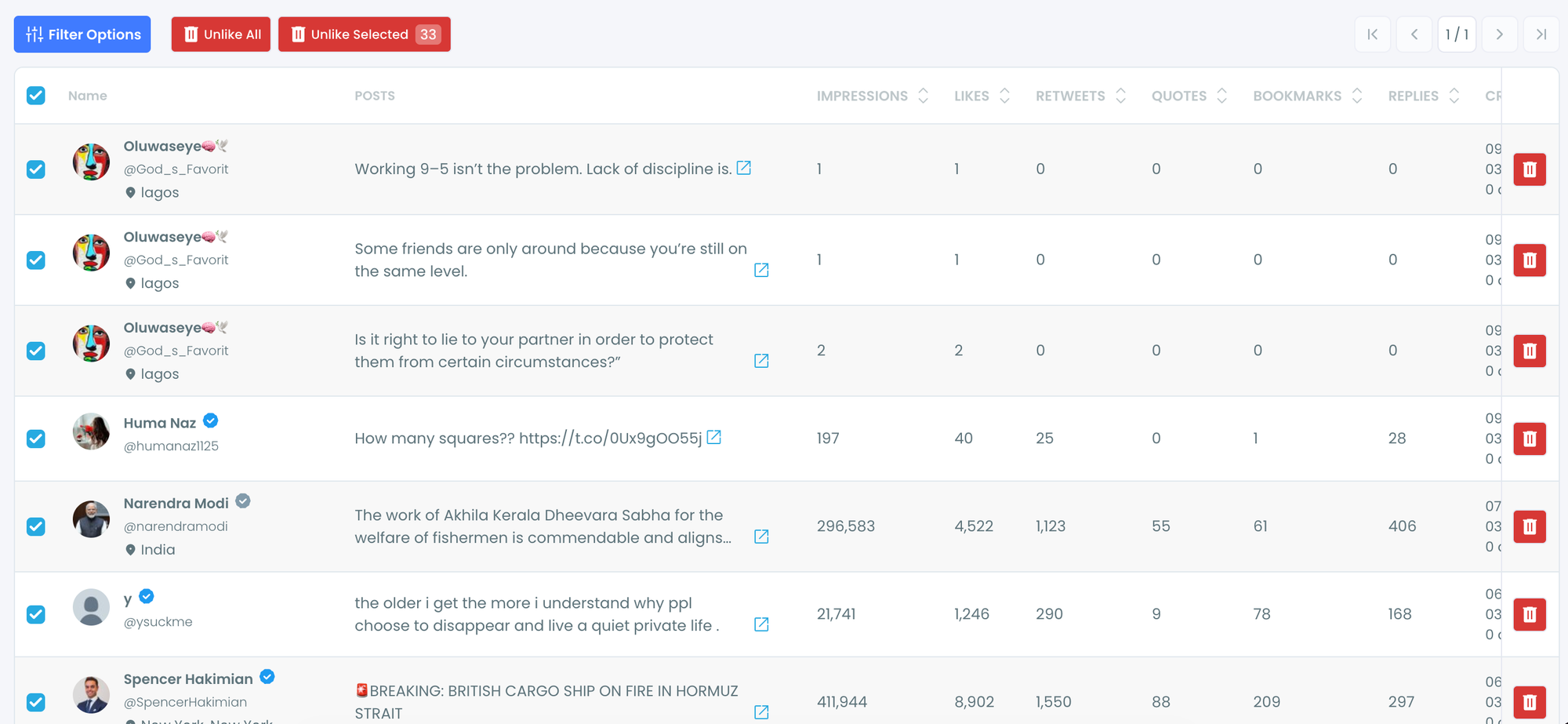
🟢 If you have more than 3,200 likes, you can upload your Twitter archive, and Circleboom will process it so you can delete those likes as well.
 infocircleboom.com
It also provides advanced controls that Twitter itself does not offer. For example, you can:
- Exclude specific likes so they are not deleted
- Filter likes by keyword
- Filter by username
- Filter by hashtag
- Delete only the likes that match your criteria
This makes it possible to clean your likes much more precisely.
How to Remove All Twitter Likes
If you have more than 3,200 likes, Twitter’s API limitation means tools cannot retrieve all likes directly.
In that case, Circleboom provides another solution.
Step 1: Logging into Circleboom Twitter
If you don't have a Circleboom account yet, you can get one quickly with a few clicks.

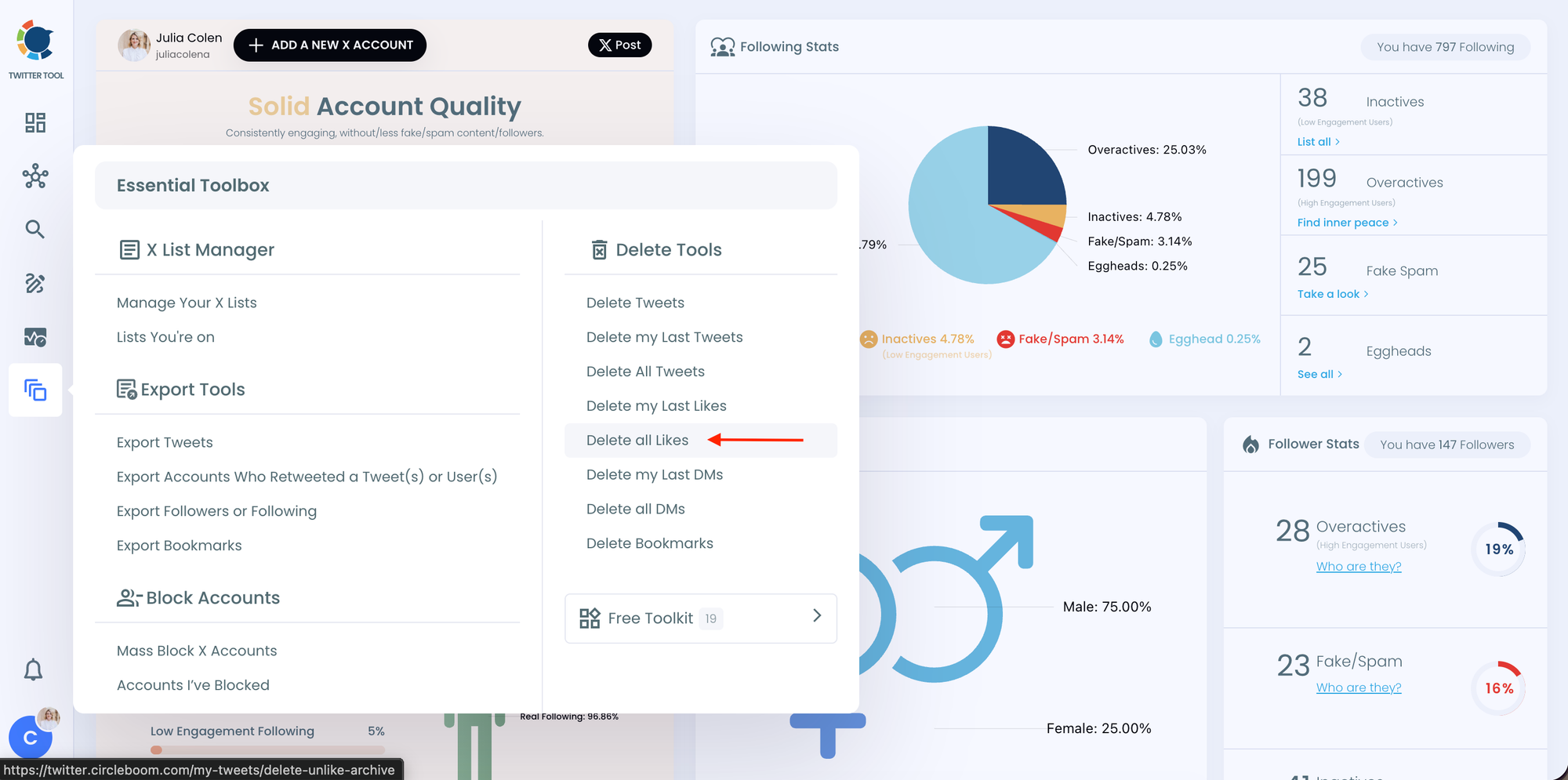
Step 2: Navigate to the left menu and find the "Essential Toolbox" section on the list
Then, you should click on "Delete All Likes" to delete all your X likes.
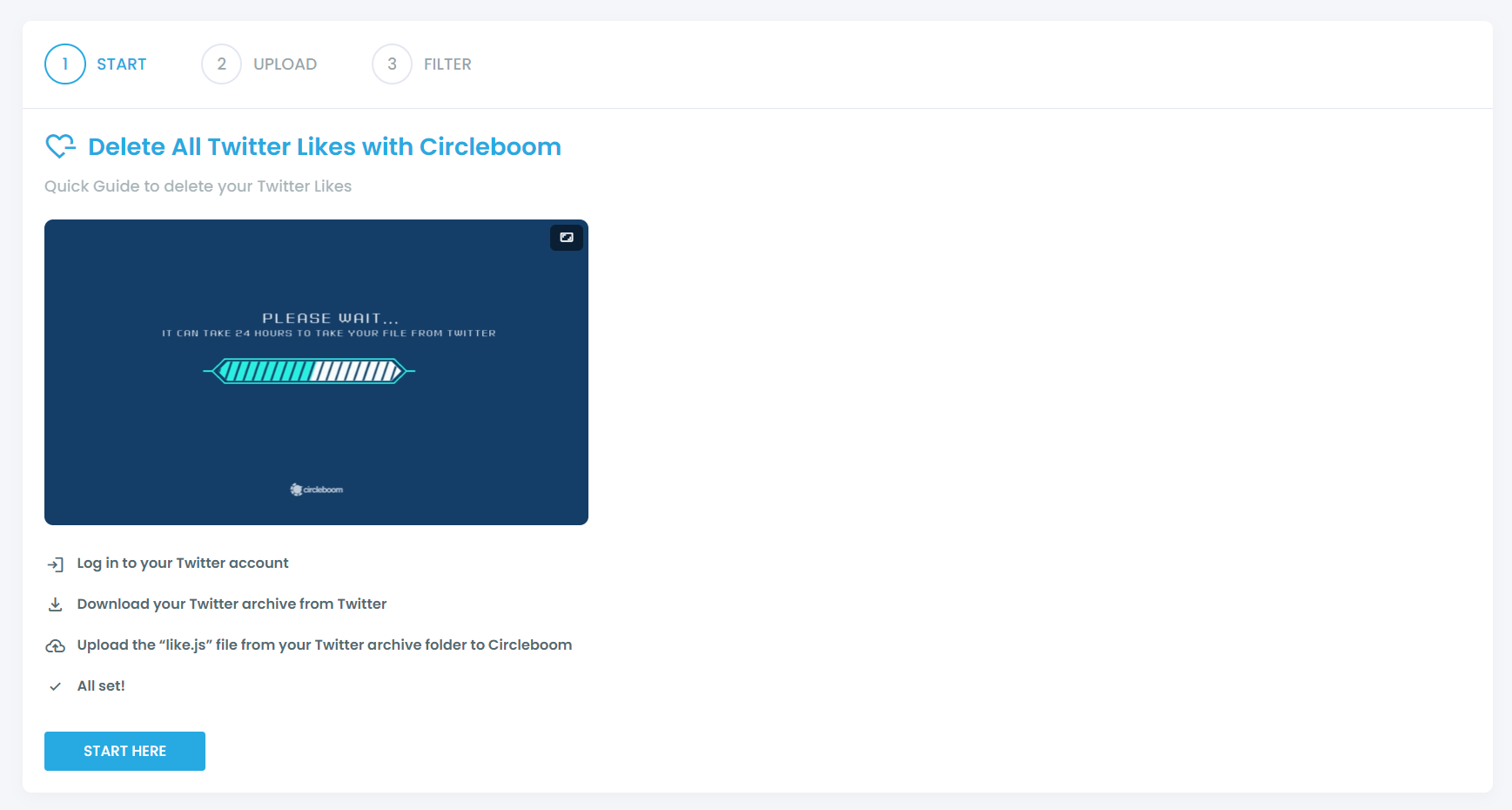
In the next stage, you should click on "Start Here" to proceed.
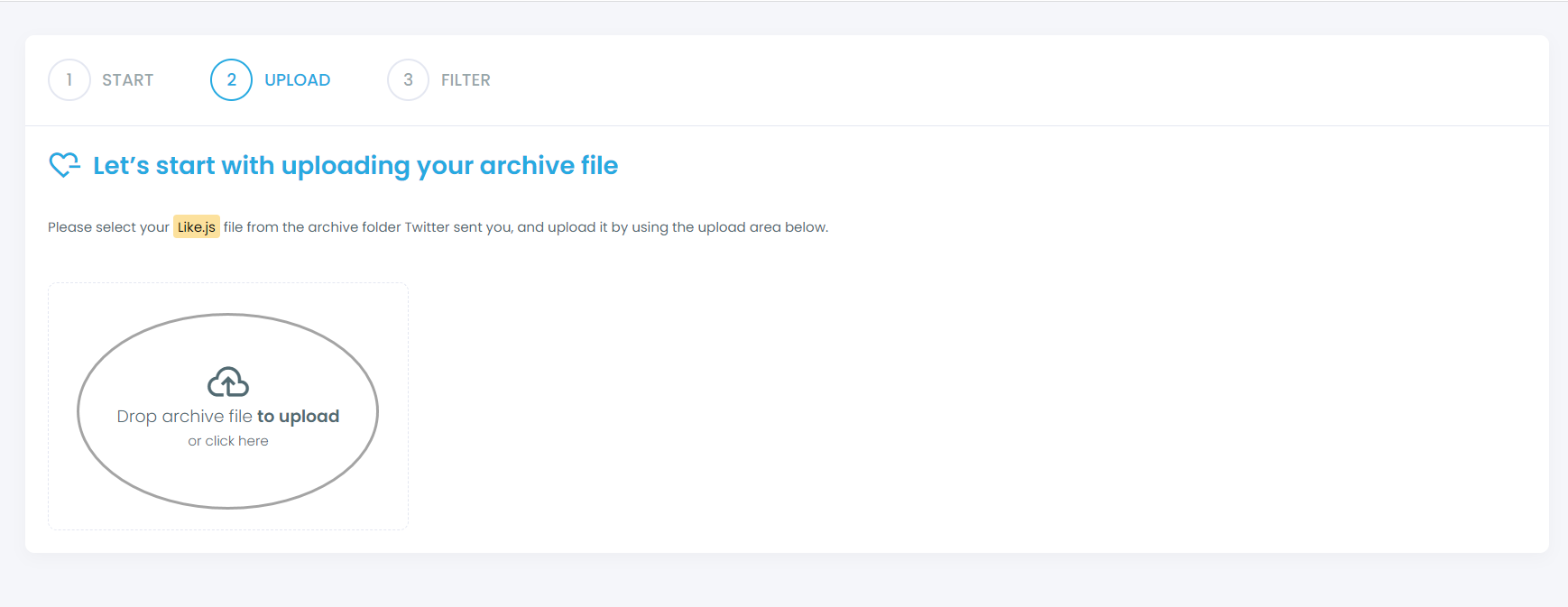
You should find your "like.js" file from your Twitter archive and upload it on Circleboom.
Step 3: Filter your liked tweets and approve your cleaning process
If you want to keep/delete only certain liked tweets, you can apply filters, though this is optional. Our filters give you the flexibility to keep or delete some tweets matching with selected hashtags, keywords, usernames, dates, and more.
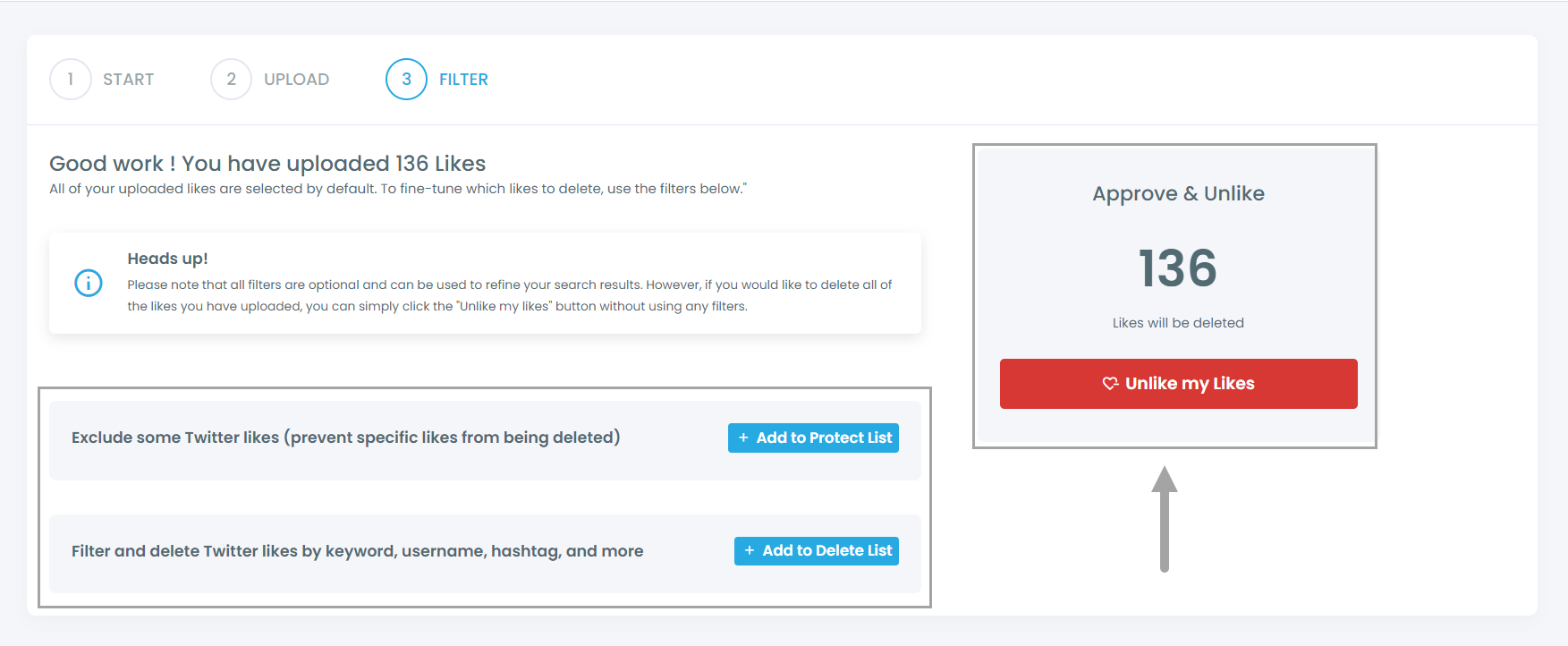
After you confirm your deletion requests, all set! We'll take care of the rest in a timely manner.
How Twitter Likes Influence the X Algorithm
Likes are not just quick reactions. On X, they are one of the signals the algorithm uses to understand what kind of content you are interested in.
Every time you like a tweet, you are essentially telling the platform that the topic, account, or type of content is relevant to you. Over time, the algorithm analyzes these interactions and adjusts your feed accordingly.
Because of this, likes can affect several things:
➡️ What appears on your timeline – If you like posts about a certain topic frequently, X will show you more content related to that topic.
➡️ Recommended posts and accounts – The platform may suggest accounts similar to the ones whose tweets you liked.
➡️ Content distribution patterns – Tweets similar to the ones you interact with may appear more often in your feed.
This means that old likes can continue influencing your feed even if your interests have changed. For example, if you liked many posts about a topic months or years ago, X may still think you want to see similar content.
That is why cleaning your likes can be useful. Removing old likes helps reset the signals you have given to the algorithm and allows your timeline to better reflect your current interests.
Final Thoughts
Twitter likes have a bigger impact on your feed than most people realize. They help the platform understand your interests and influence what appears in your timeline.
If you have thousands of likes, removing them manually is almost impossible. Tools like Circleboom Twitter make the process much easier by allowing you to retrieve, filter, exclude, and delete likes in bulk.
If you want to clean your old likes and refresh your X experience, using a tool designed for this task can save a lot of time.

