
You spent time crafting the perfect tweet. You hit publish. And within 20 minutes, it's buried under a flood of newer posts and nobody sees it again. That's not a content problem. That's a lifespan problem. The average tweet has a lifespan of just 18 minutes, which means most of your best content disappears before it ever reaches its full audience. Auto retweeting your own tweets is the simplest way to fix that.
How to Auto Retweet Your Own Tweets
To auto retweet your own tweets, you need a Twitter scheduling and automation tool that supports recurring repost actions. The fastest and safest way to auto retweet your own tweets on Twitter is to use Circleboom's Auto Retweeter, connect your account, select the tweets you want to recycle, and set a repeat schedule so Circleboom automatically reposts them for you at the intervals you choose.
Auto retweeting your own tweets means scheduling your existing Twitter content to be reposted automatically at set intervals, and the fastest way to do it is with Circleboom's Auto Retweeter.
Keep in mind that the API provides a more accurate real-time data stream than the X interface itself. While the platform UI may experience lag, the API captures and reflects new developments instantaneously.
Circleboom has the official Enterprise API, we don't scrape data from X!

TABLE OF CONTENTS
- Why the Lifespan of a Tweet Is the Real Problem
- What Auto Retweeting Your Own Tweets Actually Means
- Why Auto Retweeting Beats Manually Reposting
- How to Auto Retweet Your Own Tweets with Circleboom
- How to Choose Which Tweets to Auto Retweet
- Best Scheduling Intervals for Auto Retweeting
- How Auto Retweeting Fits Into a Larger Twitter Strategy
- What Circleboom's Auto Retweeter Does That Others Don't
- Is Auto Retweeting Safe? Compliance and Policy
- FAQ
- Conclusion
Why the Lifespan of a Tweet Is the Real Problem
A tweet from Pew Research found that the most engagement on Twitter happens within the first hour of publishing. After that, the drop-off is steep. According to research from Moz, the half-life of a tweet is roughly 24 minutes, making it one of the shortest-lived content formats of any social platform.
This creates a real problem if you're producing quality content. Not everyone in your audience is online when you post. Time zones, busy schedules, and Twitter's chronological feed behavior mean that even your best-performing tweets miss a significant portion of the people who would actually care about them.
Auto retweeting is not about spamming your own audience. It's about giving well-crafted content a second (or third) chance to reach the people who missed it the first time.
What Auto Retweeting Your Own Tweets Actually Means
Auto retweeting your own tweets is the practice of automatically reposting your own published tweets at scheduled intervals using a social media automation tool. It's different from a manual retweet in that the system handles the timing and repetition for you without any additional input once it's set up.
The key benefit is compounding reach. Each time a tweet is auto retweeted by Circleboom on your Twitter account, it appears fresh in follower feeds and has a new opportunity to generate likes, replies, and clicks.
This is particularly valuable for evergreen content: tweets that link to a blog post, promote a product feature, share a tip that never goes out of date, or announce an ongoing offer.
Why Auto Retweeting Beats Manually Reposting
Manual reposting means logging in, finding the tweet, retweeting it, and doing this again days or weeks later. That sounds simple until you're managing a content calendar across multiple topics and accounts.
Auto retweeting with Circleboom on Twitter removes that friction entirely. You set the tweet, set the interval, and the system handles every repost from that point forward. No reminders, no manual searching, no risk of forgetting.
It also allows you to retweet at times you would never be awake or available to do manually. If your audience skews toward a different time zone, automated retweeting ensures they see your content during their active hours.
How to Auto Retweet Your Own Tweets with Circleboom
Here is a step-by-step process to auto retweet your tweets on Twitter using Circleboom:
Step #1: First, you should be a Circleboomer. Go to your browser and find Circleboom Twitter
You need a few seconds to create a new account if you are new to our platform.

Step #2: You should connect your X account to Circleboom.
Circleboom is an official X Enterprise Developer. You don't need to worry about security.

Step #3: Navigate to the left menu and find "X AI WRITER FOR CREATORS".
Then click "Write & Plan Your Post".

Step #4: Here, you need to create your tweet.
As mentioned earlier, you can use our advanced AI Tweet Generator to assist with crafting your next tweet.
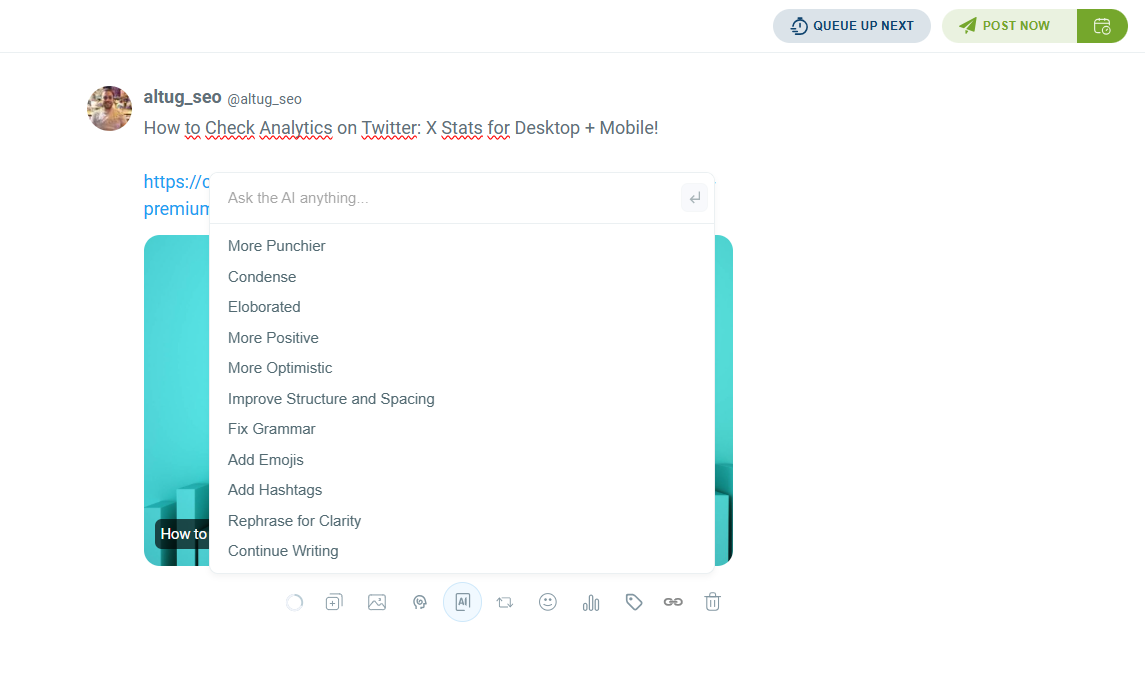
To speed things up, I'm sharing a blog post! Below, you'll find the retweet/repost icon.
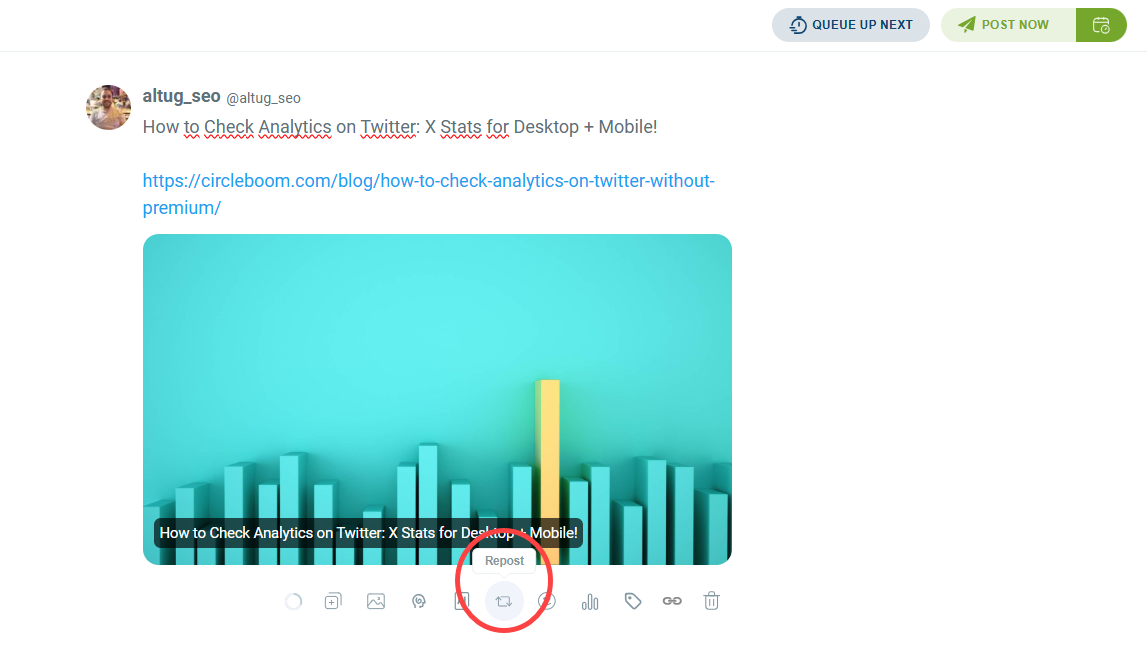
Clicking this icon will open the auto-retweet/auto-repost settings.
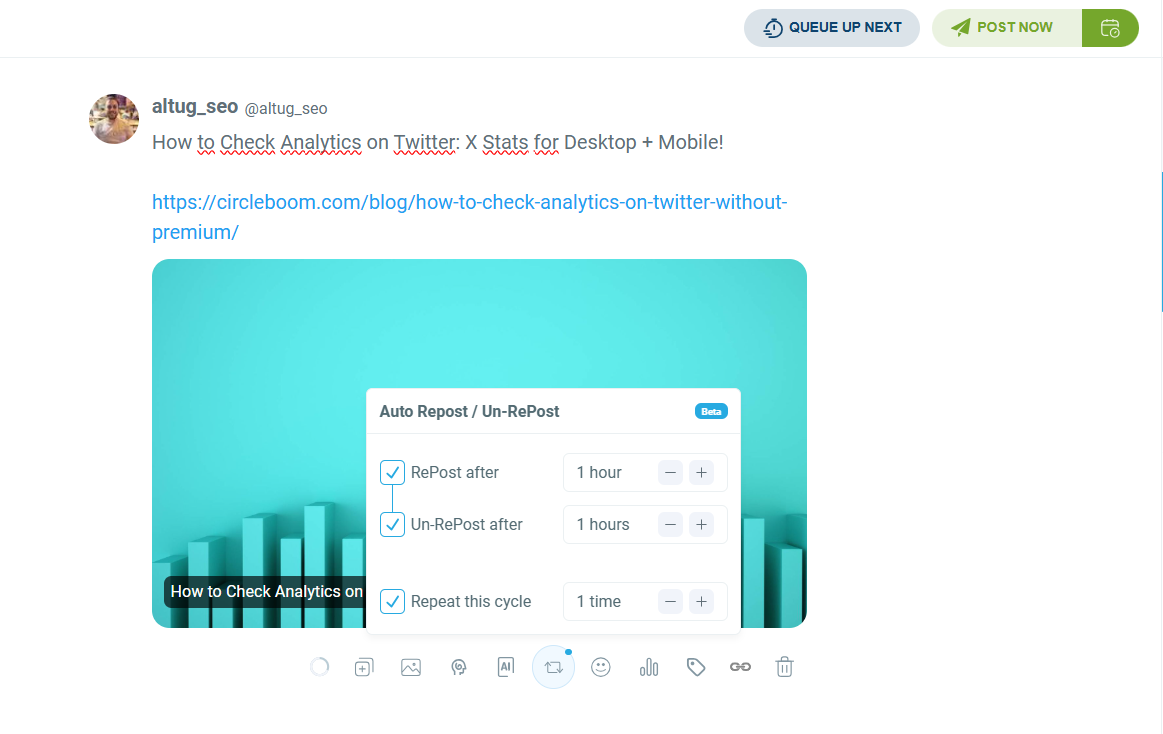
Step #5: You can set the delay between each repost.
Additionally, you can customize the timing between auto-repost and auto-unrepost.
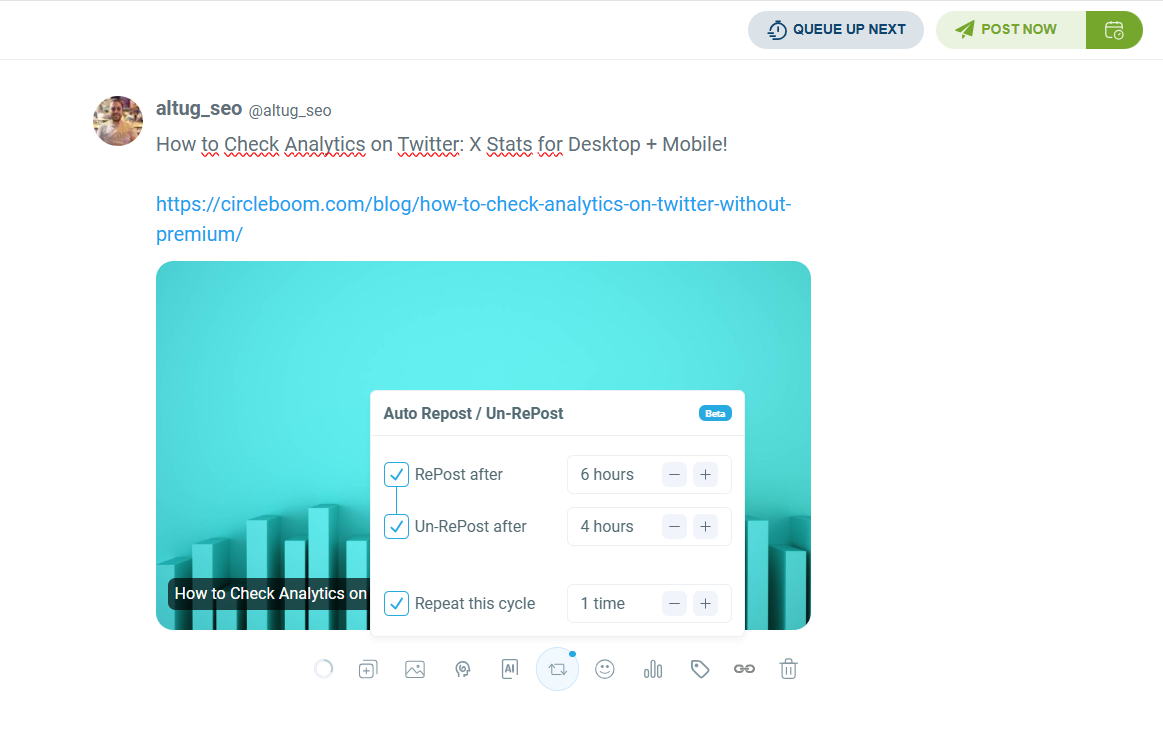
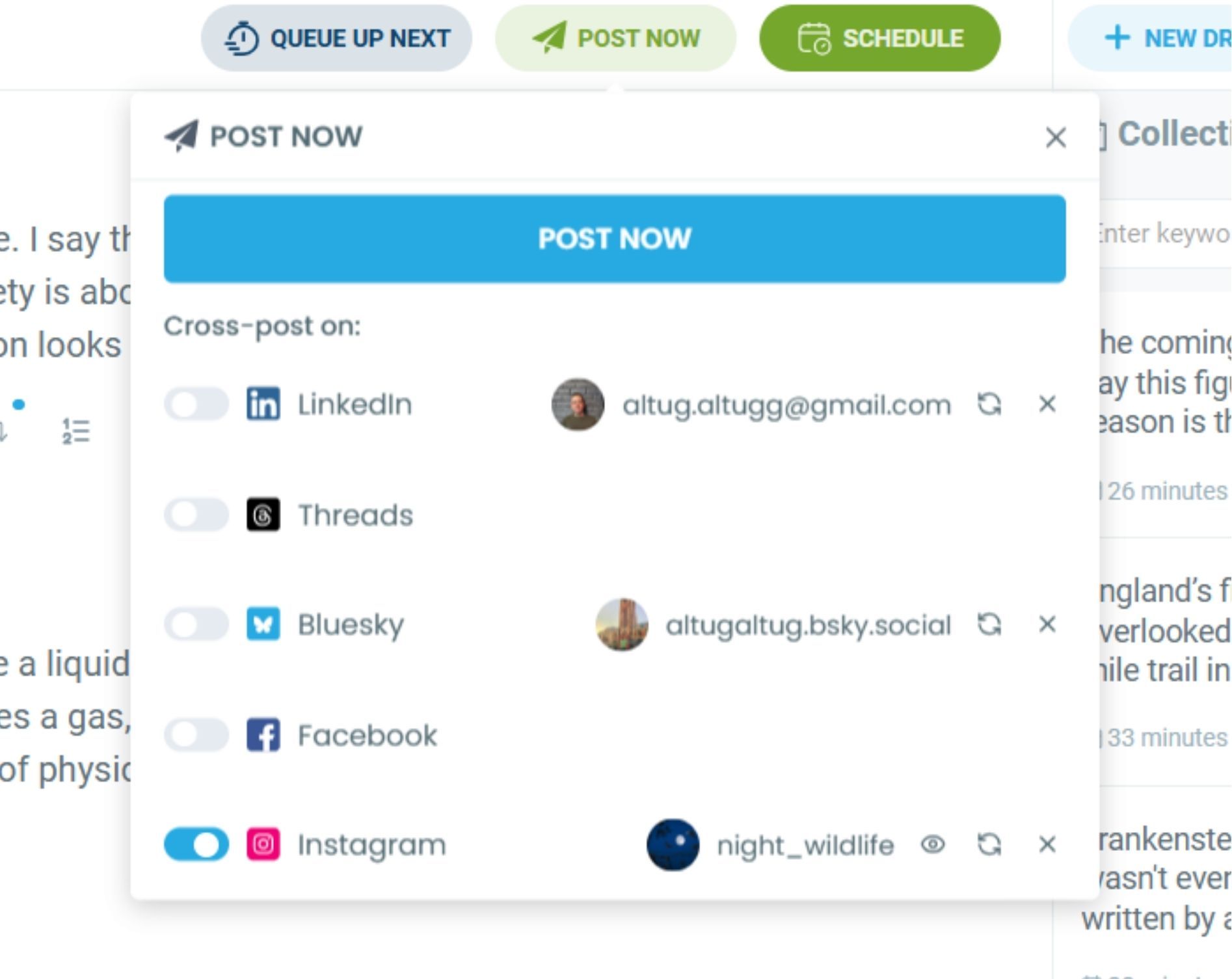
As you can see, you can set it to repeat the loop after a few hours. Once you're done, you can share it immediately or schedule it for later.
With Circleboom, you can also cross-post your tweets on Instagram, Bluesky, Threads, LinkedIn, and Facebook simultaneously!
How to Choose Which Tweets to Auto Retweet
Not every tweet benefits from being auto retweeted. The goal is to recycle content that holds its value over time or that hasn't yet reached its full potential audience.
Good candidates for auto retweeting include tweets that link to evergreen blog posts or resources, tweets that promote features, offers, or tools with ongoing relevance, tweets that share tips or insights applicable beyond the day they were posted, and tweets that performed well the first time but could reach a new segment of your audience.
Avoid auto retweeting time-sensitive content like event announcements, trend reactions, or anything tied to a specific news cycle. Retweeting these after the moment has passed looks out of touch.
Best Scheduling Intervals for Auto Retweeting
The right interval depends on how frequently you post and how active your audience is. As a general guide:
For high-volume accounts posting multiple times a day, auto retweeting key content every 48 to 72 hours keeps things visible without repetition fatigue.
For medium-volume accounts posting once or twice a day, a 5 to 7 day interval works well for evergreen content.
For accounts with an international audience across multiple time zones, spacing auto retweets 12 hours apart in the first cycle ensures you cover both morning and evening windows.
According to Buffer's research on Twitter engagement timing, tweets posted between 9am and 3pm in the target audience's local time see consistently higher engagement rates. Circleboom's scheduler lets you align your auto retweet timing to those windows precisely.
How Auto Retweeting Fits Into a Larger Twitter Strategy
Auto retweeting is one part of a broader content recycling strategy. When you use Circleboom to auto retweet your best Twitter content, you're essentially building a content pipeline that keeps working even when you're not actively posting.
Pair auto retweeting with Circleboom's X Post Planner to create new content alongside recycled content, so your feed always has a fresh mix.
Use Circleboom's Twitter Post Analytics to identify which original tweets perform best, then prioritize those in your auto retweet queue.
Content that gets recycled intelligently compounds its reach over weeks and months without requiring proportional time investment.
What Circleboom's Auto Retweeter Does That Others Don't
Circleboom's Auto Retweeter is built specifically for Twitter and fully compliant with X's official API policies. As an Official X Enterprise Developer trusted by organizations including NBC News, BBC, the American Red Cross, and L'Oréal, Circleboom operates with direct access to Twitter's API and under its guidelines.

The Auto Retweeter lets you set precise intervals, select individual tweets or groups of tweets, and manage everything from a single dashboard. You can pause, edit, or delete any active schedule without disrupting other automation running in parallel.
Circleboom also does not require you to hand over your Twitter password. The entire authentication process runs through Twitter's official OAuth system, which means your credentials stay with Twitter and are never stored by Circleboom.
Is Auto Retweeting Safe? Compliance and Policy
Auto retweeting your own content is allowed under Twitter's developer policies when done through an official API partner like Circleboom. The key distinction is between automation that adds value (recycling your own quality content at reasonable intervals) and automation that violates platform rules (mass spamming, automated engagement farming, or using unauthorized scripts).
Circleboom's Auto Retweeter is designed entirely within X's official API framework, which means using it to auto retweet your Twitter content carries no risk of account suspension when used responsibly. Set reasonable intervals, stick to your own tweets, and the feature works exactly as intended.
FAQ
How often should I auto retweet my own tweets?
It depends on your posting frequency and audience size, but most accounts see good results retweeting evergreen content every 3 to 7 days. Retweeting too frequently in a short window can look spammy to followers who are always online, so spacing it out is key.
Can I auto retweet multiple tweets at once with Circleboom?
Yes. Circleboom's Auto Retweeter lets you set up auto retweet schedules for multiple tweets simultaneously. Each tweet can have its own interval and schedule, all managed from the same dashboard.
Will auto retweeting hurt my Twitter engagement rate?
Done correctly, it improves it. Recycling content that already performed well gives it additional exposure, which generally increases cumulative likes, replies, and clicks. If a tweet performed poorly the first time, auto retweeting it won't fix underlying content problems.
Do I need to be an advanced user to set up auto retweeting in Circleboom?
No. The setup takes under five minutes. You connect your Twitter account, select a tweet, set an interval, and activate. No technical knowledge is required.
Is Circleboom's Auto Retweeter compliant with Twitter's rules?
Yes. Circleboom is an Official X Enterprise Developer and fully compliant with Twitter's API policies. Auto retweeting your own content through Circleboom is safe and within Twitter's terms of service.
What types of tweets should I prioritize for auto retweeting?
Evergreen content gets the most value from auto retweeting. Think tips, tutorials, resource links, product features, and any content that stays relevant beyond its original publish date. Avoid retweeting time-sensitive posts.
Stop Letting Great Tweets Disappear After 20 Minutes
Every tweet you've written that got buried before it reached its audience is a missed opportunity. Auto retweeting on Twitter with Circleboom is the simplest and most effective way to fix that, without spending more time creating new content.
Set it up once, and let your best tweets keep working for you automatically.