
A Twitter List built from a keyword search is fundamentally different from a list you put together manually.
When you manually build a list, you add accounts you already know. Accounts you follow, accounts that show up in your feed, accounts someone recommended. It's a curated collection of your existing network.
A keyword-based list is built from intent. You search for everyone who has tweeted about a specific topic, filter the results down to the accounts worth monitoring, and add them to a list based on what they've actually said, not just who they are. The result is a list of people you know are engaged with a specific subject, which is far more useful for research, outreach, monitoring, or community building than a list assembled from memory and familiarity.
With Circleboom Twitter, you search any keyword historically or in real time, filter the results by account quality, and add selected accounts to a Twitter List directly from the search results. The whole workflow runs from one place.
Can you build a Twitter List from keyword search results?
Yes. Circleboom Twitter's X Account Search on Tweets returns matching tweets alongside the accounts behind them.
From the profile view in the search results, you can select accounts and add them to a new or existing Twitter List directly without visiting each profile individually. The keyword search covers historical tweet data and real-time posts, so the list you build reflects who has actually been discussing the topic.
 infocircleboom.com
What Is Circleboom Twitter?
Circleboom is an Official X Enterprise Developer. All tweet and account data is retrieved through X's official APIs using publicly available information. No scraping, no workarounds, fully compliant with platform rules.

Here's what Circleboom Twitter gives you for keyword-based list building:
- Search any keyword across historical tweet data up to a year back
- Monitor keywords in real time to catch new matching accounts as they post
- Filter search results by follower count, account age, activity level, and engagement status
- Add selected accounts to a new or existing Twitter List directly from search results
- Export the same account dataset as a CSV for use outside the dashboard
How to Build Targeted Twitter Lists from Keyword Searches with Circleboom Twitter
Step #1: Log in to Circleboom Twitter and connect your X account.
Circleboom is an Official X Enterprise Developer, meaning all tweet and account data comes directly from X’s official APIs in a safe and compliant way.

Step #2: Open the left menu and go to “Historical Tweet Search”.
You can find it under:
“X Account Search / on Tweets” → “Historical Tweet Search”
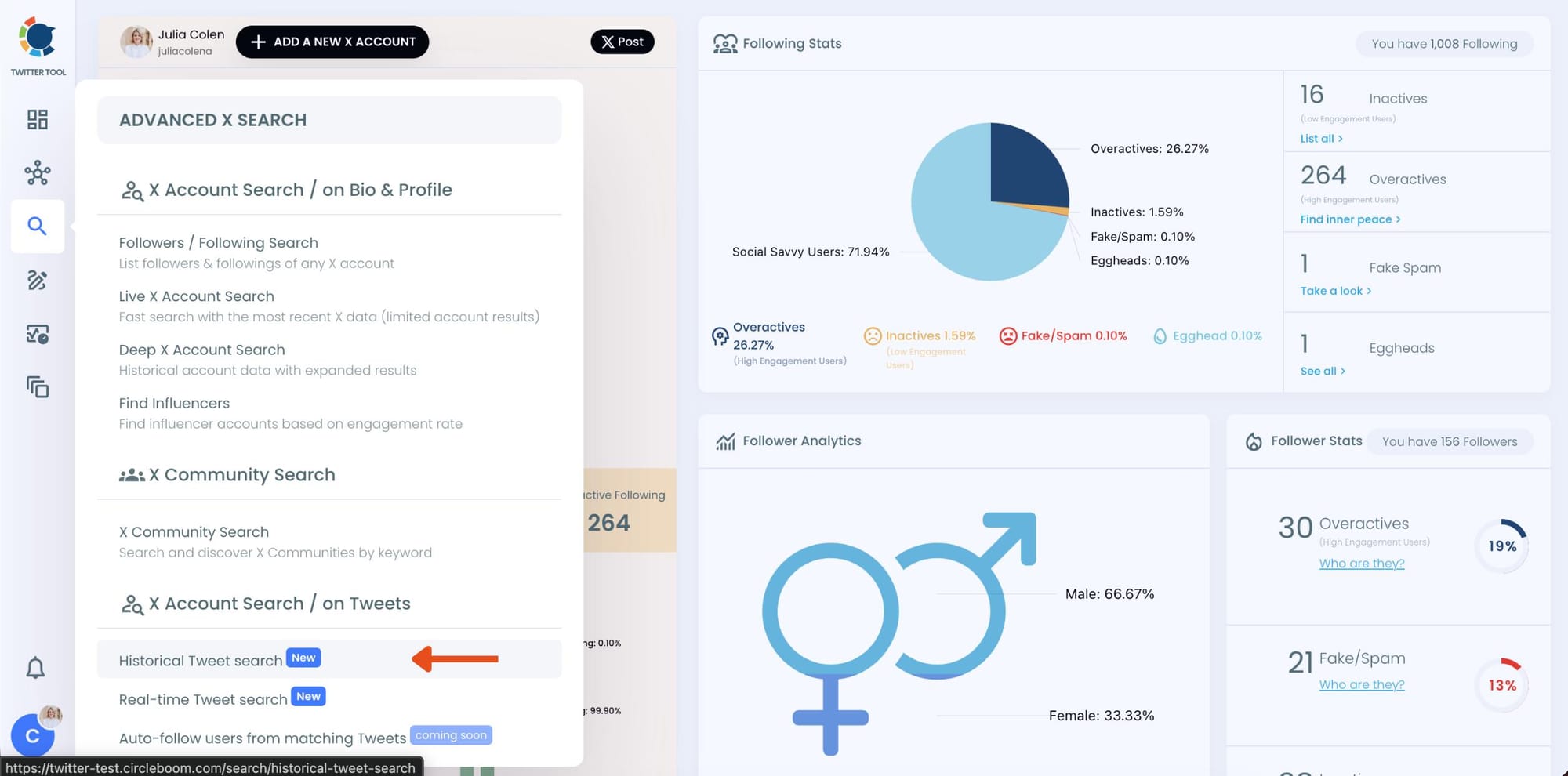
Circleboom also offers “Real-time Tweet Search” in the same section. Historical Tweet Search helps you discover people who tweeted about a keyword in the past across a selected date range, while Real-time Tweet Search continuously monitors new tweets as they happen.
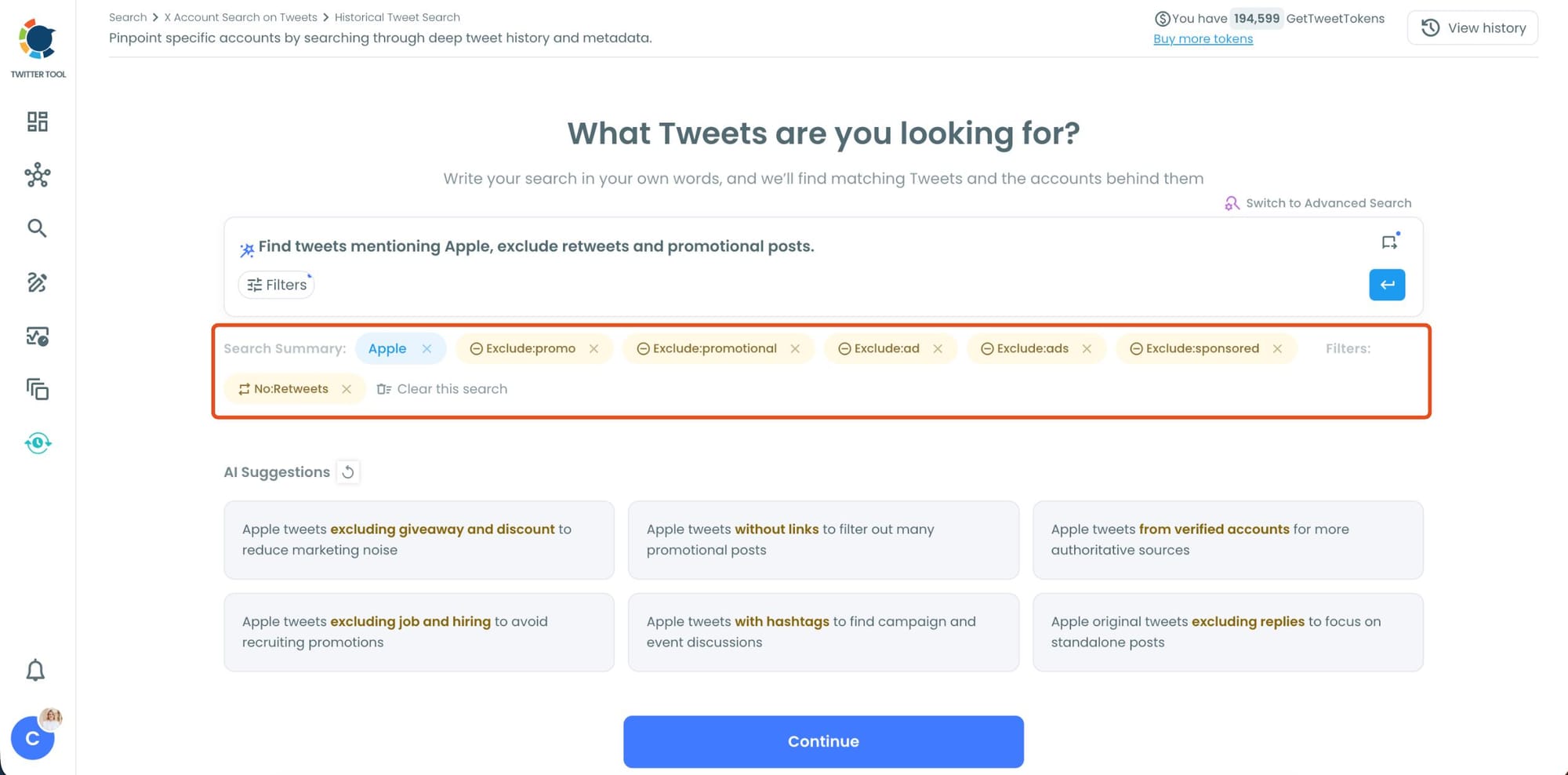
Step #3: Describe the brand mentions you want to find using AI Smart Search
Instead of writing complicated Twitter search operators, you can simply type what you are looking for.
For example: "Find tweets mentioning [your target keyword], exclude retweets and promotional posts."
Circleboom AI automatically understands the intent behind your query, extracts the important keywords, and applies filters automatically.

Step #4: Refine your keyword monitoring search with AI suggestions and filters.
Circleboom also suggests ways to narrow your search results. You can focus on intent, comparison posts, replies, or specific languages while filtering out spam, retweets, and noise.
This helps you find more relevant people tweeting about your keyword instead of scrolling through random tweets.
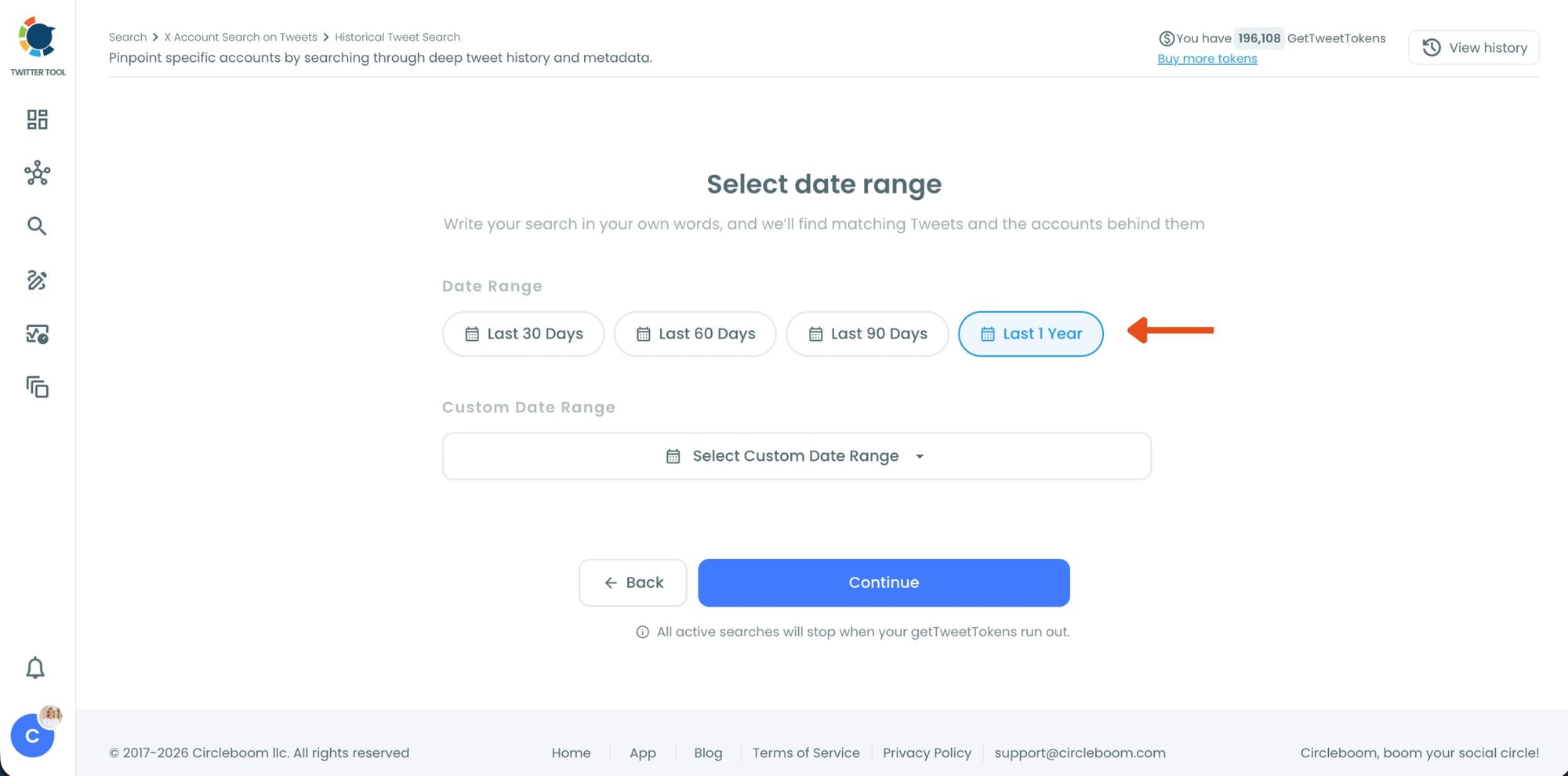
Step #5: Select your historical search date range.
You can monitor tweets from the last 30, 60, or 90 days, search across the last year, or define your own custom date range.
This makes it possible to discover people who tweeted about your topic weeks or even months ago, not just recent tweets.
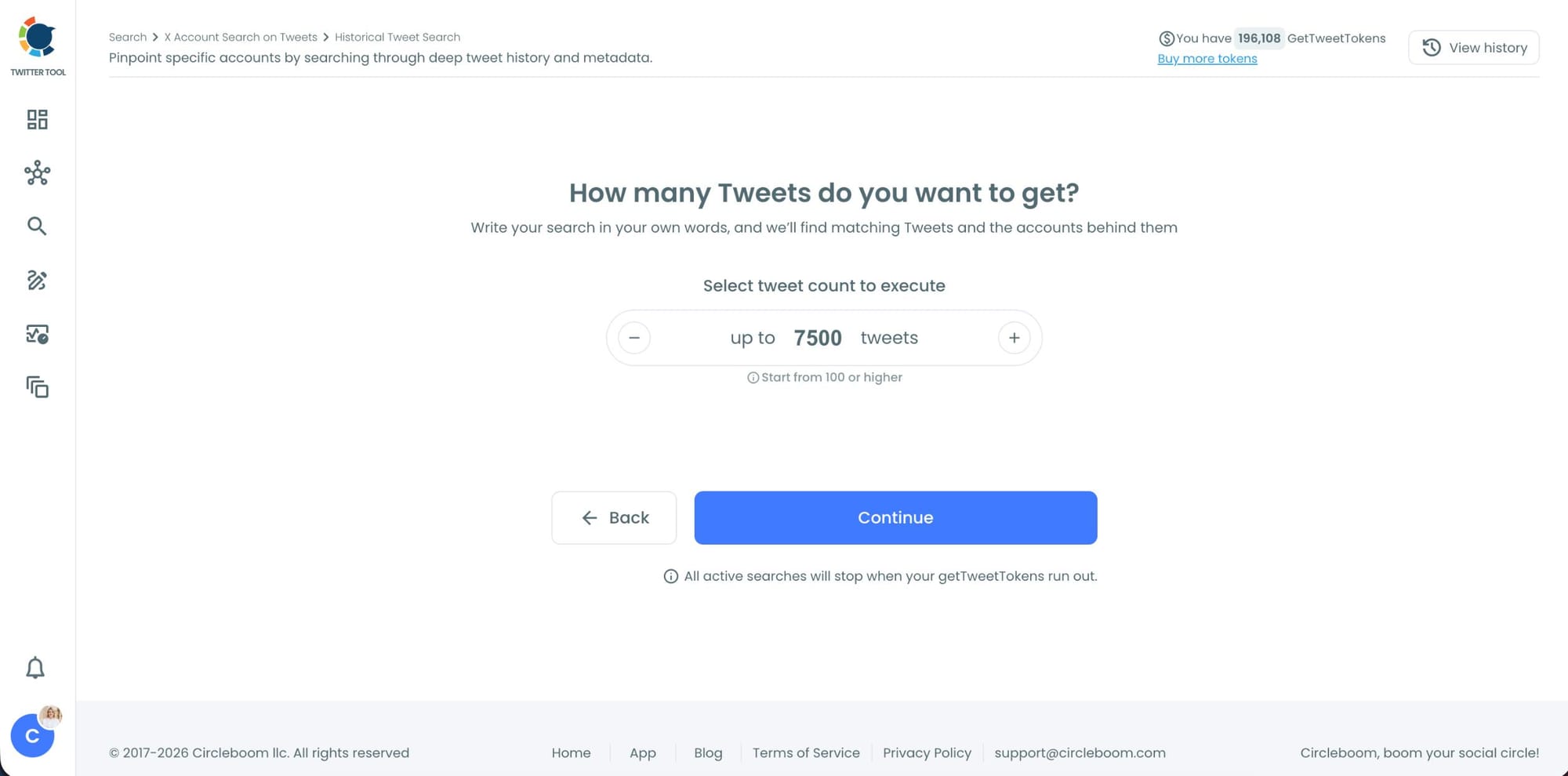
Step #6: Choose how many tweets Circleboom should collect.
Before the search starts, Circleboom lets you select the tweet volume you want to analyze.
Once you click “Continue”, Circleboom scans historical tweet data and starts collecting matching tweets together with the accounts behind them.
Step #7: Analyze the matching tweets and discover the accounts behind them.
Tweet View displays the matching posts together with impressions, likes, retweets, replies, bookmarks, and posting dates so you can quickly understand which conversations are getting attention.
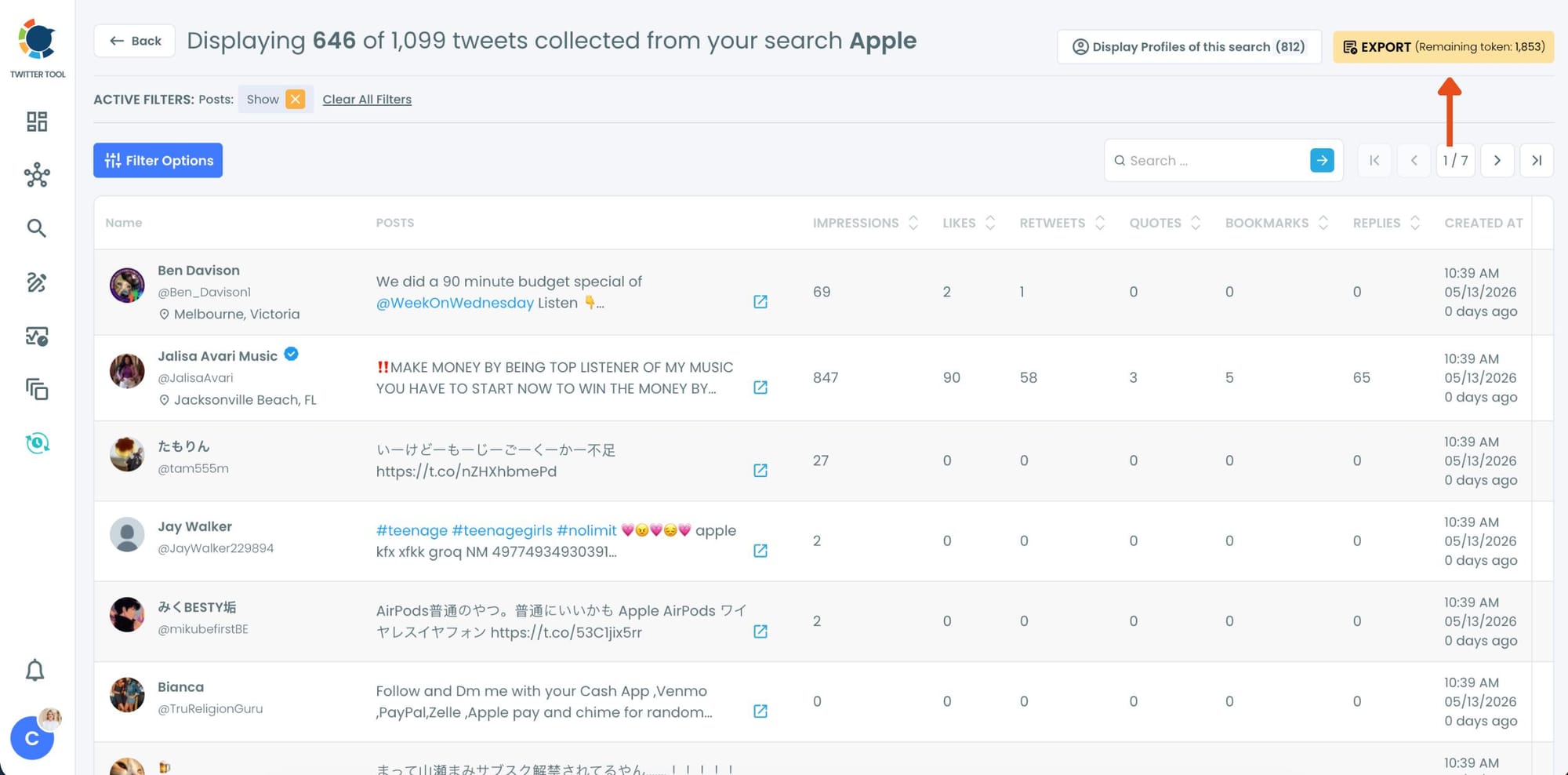
You can also switch to Profile View to focus on the people behind those tweets.
Profile View displays follower count, following count, account age, tweet count, follow ratio, and engagement activity levels so you can evaluate account quality before interacting with them.
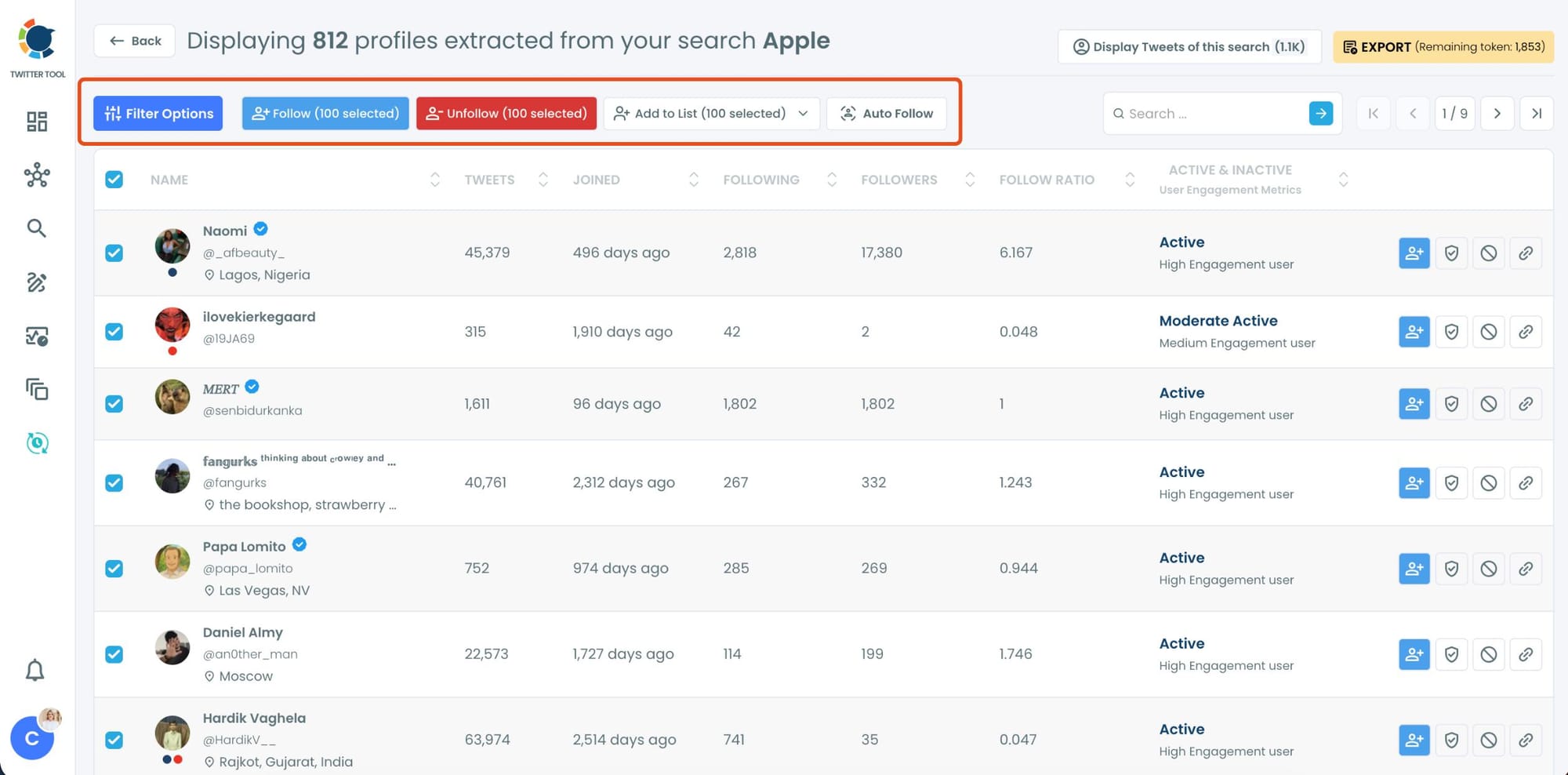
From there, you can directly follow accounts, unfollow them, add selected users into Twitter/X Lists for ongoing monitoring, auto-follow matching users, or export the collected profiles and tweets as CSV files.
Why Keyword-Based Lists Work Better
Twitter Lists are one of the most underused features on the platform. A well-built list is a curated feed of exactly the accounts you want to monitor, without the noise of your main timeline. The problem is that building a good list manually is slow and limited to who you already know.
Keyword-based list building solves both problems.
You discover accounts you didn't know existed. A historical keyword search on a niche topic surfaces every account that has tweeted about it in the past year, including accounts you've never encountered in your normal feed. Many of the most relevant participants in any conversation are not people you already follow.
The list reflects actual engagement, not assumed relevance. Every account on a keyword-built list has demonstrably discussed the topic. They didn't just have a relevant bio or work at a relevant company. They wrote something about it. That's a much stronger signal of genuine interest and expertise.
You can filter for quality before adding anyone. Circleboom Twitter's profile view shows follower count, account age, activity level, and engagement status for every account in the search results. You can narrow the list to active, established accounts with meaningful audiences before adding a single person. The result is a higher-quality list from the start.
📌 Twitter Lists can be public or private. A private list lets you monitor accounts without notifying them or appearing in their followers. For competitive research, prospect monitoring, or industry watching, private lists are almost always the right choice.
The Keyword Search to List Workflow
The workflow has three stages: search, filter, add.
Search. Open Circleboom Twitter's keyword search and write your query in plain English. The AI Smart Search interprets the description, extracts the relevant terms, and structures the search. "Find people tweeting about sustainable packaging innovations, exclude brand promotions" becomes a structured historical search without any operator syntax.
Choose your date range. The last 30, 60, or 90 days covers recent conversation. The last year surfaces everyone who has participated in the topic over a longer window. For list building, a broader date range typically produces a richer starting pool.
You can also run real-time search on the same keyword. New accounts that tweet about the topic after you've started monitoring appear in results automatically, and you can add them to your list as they emerge.
Filter. Switch to profile view. This is where the list gets refined. The full list of accounts behind matching tweets is displayed with quality signals for each one. Filter by minimum follower count to remove very small accounts. Filter by activity status to exclude inactive profiles. Filter by account age to focus on established accounts rather than newly created ones.
The remaining accounts after filtering are your candidate list. The keyword search ensured they've discussed the topic. The filters ensured they're worth monitoring.
Add. Select the accounts you want and add them to a new or existing Twitter List directly from the profile view. The accounts appear on your list without you having to follow them, visit their profiles, or leave the search results.
Types of Lists Worth Building from Keyword Searches
Industry conversation list. Search a core industry keyword and filter for active, established accounts. The result is a monitoring feed of everyone genuinely participating in your industry's Twitter conversation, not just the well-known voices.
 Arif Akdogan
Prospect list. Search for intent-based keywords that signal buying interest or switching consideration. Accounts that tweet about evaluating tools in your category, looking for recommendations, or expressing frustration with current solutions are worth monitoring over time. A private list lets you watch for the right moment to engage.
Competitor audience list. Search your competitor's name and add accounts that tweet about them regularly. These are people already interested in your category who have a relationship with a product you compete with. Monitoring their conversation gives you ongoing intelligence about what that audience values.
Advocate list. Search for anyone who has recommended your product unprompted or mentioned it positively. A private list of these accounts lets you stay connected to your most credible promoters without any formal program or relationship.
 Altug Altug
Niche community list. Search a specific niche topic to find the most active participants in that community. For community managers, researchers, or anyone trying to understand a specific audience segment, this is the fastest way to build a representative monitoring feed.
 Altug Altug
For identifying the highest-reach accounts in any keyword search, Circleboom Twitter's Find Influencers feature layers authority signals on top of keyword-based discovery and can inform which accounts deserve the most attention in your list.
Frequently Asked Questions
Can you add accounts to a Twitter List directly from search results in Circleboom?
Yes. After running a keyword search and switching to profile view, you can select accounts and add them to a new or existing Twitter List directly from the results dashboard without visiting individual profiles.
What's the difference between a keyword-built list and a manually built list?
A manually built list contains accounts you already know from your existing network. A keyword-built list contains accounts that have demonstrably discussed a specific topic, including accounts you've never encountered before. The keyword-built list reflects actual topic engagement rather than assumed relevance.
Can I make the list private?
Yes. Twitter Lists can be set to public or private. A private list lets you monitor accounts without notifying them or showing up in their follower count. For most research and monitoring use cases, private lists are more appropriate.
How many accounts can I add to a Twitter List?
Twitter allows up to 5,000 accounts per list. For keyword searches that return large result sets, using Circleboom's quality filters before adding is the best way to keep lists focused and under the limit.
Can I build multiple lists from the same keyword search?
Yes. You can add different subsets of the same search results to different lists. For example, run a keyword search on an industry topic, add the high-follower accounts to an influencer monitoring list and the mid-size active accounts to a community monitoring list.
Can I also export the same accounts instead of adding them to a list?
Yes. The profile data from any keyword search exports as a CSV file in addition to the Twitter List option. The export includes username, bio, follower count, account age, and activity status, useful for CRM import, outreach, or ad targeting outside Twitter.
Final Thoughts
A Twitter List built from keyword search is one of the most useful tools you can have for ongoing monitoring, research, or community building. It's populated by people who have actually engaged with a topic, filtered down to the accounts worth watching, and built without leaving the search results.
Circleboom Twitter makes the full workflow possible in one place. Search the topic, filter the accounts, add to the list, and start monitoring.
Build targeted Twitter Lists from keyword searches with Circleboom Twitter.
 infocircleboom.com