

To check the latest followers of any Twitter account, you need dated change-detection, not a scroll. Circleboom snapshots any public account's follower list on a schedule, compares each snapshot to the last, and shows every new follower as a timestamped entry with full profile context.
Native list: newest name on top, no dates, no history, no export. Circleboom: every new follower stamped with a date and full profile, for any public X account you point it at.
→ check the latest followers of any Twitter account
Keep reading for why the native tab quietly fails, and the exact workflow that fixes it.
Why the native followers tab is not a real answer
The advice you find everywhere is to open the account's Followers tab and read from the top. It is technically true and practically useless. X orders that list newest-first by follow date, but it hands you nothing else you can act on.
There are no timestamps. The name at the top might have followed an hour ago or three weeks ago, and you have no way to tell. You cannot filter, you cannot export, and you cannot compare today's list against last week's.
Worse, the list forgets. X keeps no history, so a follower who arrives on Monday and leaves on Wednesday is invisible unless you happened to catch them in between. Any account that gains and sheds followers quickly, which is most active accounts, is under-reported by the native view by design.
The order itself is not even guaranteed once you scroll. Developers who work against the platform directly have noted that chronological ordering for follower IDs is not guaranteed by the API. A manual scroll can reshuffle past the first page, so "newest on top" holds for a handful of names and then quietly stops being true.
That gap is where a tool earns its place. To reliably see the newest followers of any account, you need a record that persists across visits. A page that repaints itself every time you load it will never give you that.
What actually answers the question
Circleboom monitors a public Twitter account's follower list through official, policy-compliant access to X and stores each check as a dated snapshot. The moment a new follower appears, it lands in your dashboard with a date attached and the account's profile beside it.
Circleboom is an official X Enterprise Developer company, so this monitoring runs on authorized data access rather than scraping or unofficial workarounds. Your own account never touches a gray-area tool, and the data you read is complete rather than a partial scrape that misses names.
Each detected follower shows up with a username, display name, bio, follower and following counts, tweet count, join date, and activity signals. That context is the difference between a name and a lead. The Twitter follower tracker applies the same logic to a single watched account.
Here is where most people get the value wrong. The point is not the count. A follow is a quiet decision, and reading who a specific account attracts, week over week, is closer to competitive intelligence than vanity metrics.
That reframing is the whole reason to track any Twitter account's latest followers on a schedule. You are not counting an audience. You are watching attention move toward an account before that movement becomes public.
Video walkthrough: how a tracked account's most recent followers render as a dated feed instead of an unsortable scroll.
How to check the latest followers of any Twitter account with Circleboom
The workflow is a short setup wizard followed by a dashboard you can revisit any time. You point Circleboom at a public username, tell it to watch followers, and from then on each new follower arrives dated and profiled. The four moves below run the whole loop.
- Log in to Circleboom Twitter and connect your X account with official OAuth.

- Open the Monitoring menu and choose to track someone's followers and following.
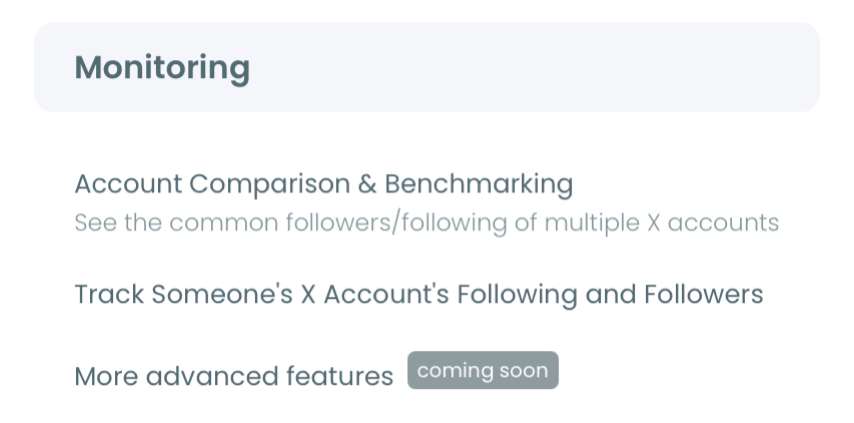
- Enter the target username and validate it, then set the tracking option to Followers so Circleboom watches who follows that account.
- Set your alert schedule and open the dashboard, where new followers appear as dated entries you can filter by range, sort, and export.
That order matters because each step removes a limitation of the manual method. The login earns authorized access, the Monitoring menu scopes the watch to one public account, the Followers option targets exactly the signal you want, and the dashboard turns every check into a permanent dated record instead of a disappearing scroll.
At a glance: connect, point at the account, watch Followers, read the dated feed. Snapshot lag aside, nothing about this asks you to scroll again.
Why doesn't Twitter show follower dates?
X treats the follower list as a current-state view, not a changelog. It shows who follows an account right now, in roughly the order they arrived, and stops there. There is no public history and no notification when someone new follows a third-party account.
That design is why a tracker is the honest answer to this search. Snapshotting rebuilds the missing history from the outside. Each check becomes a dated layer, and the difference between two layers is your list of new followers.
Once those new names arrive, you often want to judge them. You can check if someone's Twitter followers are fake or real once the list comes in. That step separates genuine new interest from bot noise before you read anything into a spike.
The same monitoring approach also works at the aggregate level. You can analyze an account's Twitter followers as a whole to understand the audience behind the numbers, rather than reading one new name at a time.
Who checks another account's newest followers, and why
The reader for this task is rarely doing it out of curiosity. Follow activity is a leading indicator, and several roles read it deliberately.
- Competitor watchers track a rival's account so a cluster of new followers from one niche flags a launch or market entry early.
- Investors and analysts watch which founders and projects start attracting attention before a round or a partnership is public.
- Creators track their own account's incoming followers to confirm they are pulling the audience their content is built for.
Timing is the payoff. An investor who just started attracting a wave of new followers in your category is in active mode, which is a different moment for outreach than a quiet week. Reading the wave early is why people check the most recent followers of any account on a schedule instead of by hand.
If your interest runs the other direction, toward who an account is starting to follow, the same feature watches an account's recently followed accounts on X with the same dated logic.
What you get once tracking is running
You get a dated history instead of a snapshot. Every new follower for the watched account is logged with the date it was detected and the profile behind it, so a name that arrives and leaves between two of your visits is captured rather than lost.
You get a bar chart of follow activity across the tracking window, additions in one color and drop-offs in another, so spikes line up with launches, announcements, or campaigns. You get date-range filtering to isolate a specific week, and a CSV export for research or client reporting.
You also get alerts, which is what turns tracking from a task into a background process. Instead of remembering to open the dashboard, you choose a daily or weekly email, and Circleboom only writes to you when the watched account actually gains or loses followers. A quiet week sends nothing, so the inbox noise stays proportional to the real signal. That means you can watch several accounts at once without any of them becoming a daily chore.
Discovery folds in too. The same product can find people who follow a certain account on Twitter when you want a one-time list rather than an ongoing watch.
Most of all, you get a signal you can act on. When a known account in your space attracts a tight cluster of new followers from one niche in the same week, that convergence is information the market has not processed yet. A count never tells you that. A dated, profiled feed does.
How to read a spike in new followers
A jump in new followers is a question, not an answer. The dated feed tells you when the jump happened and who arrived, and your job is to connect that to a cause. Line the spike up against the account's own activity first: a viral post, a product announcement, a press mention, or a campaign launch usually explains most of the wave.
When the account is a direct rival, a fuller analysis of a competitor's Twitter account tells you whether the wave reflects real momentum or a single lucky mention.
Read composition, not just volume. Fifty new followers who all share a niche, a language, or a location mean something very different from fifty scattered accounts, and the profile data beside each name is what lets you tell them apart. A deeper Twitter account analysis helps here when you want to weigh the wave against an account's existing base.
One follow is never proof of a strategy. A single investor following a single founder can be idle curiosity. The same investor following five founders in one vertical over two weeks is research behavior, and that pattern only becomes visible when the follows are dated and stacked. Patterns beat single events every time, which is the whole reason to keep the tracking running rather than checking once and moving on.
The bottom line
Checking the latest followers of any Twitter account is a monitoring task, not a browsing task. The native tab gives you a newest-first list with no dates, no history, and no reliable order past the first page. A dated snapshot-and-diff loop gives you every new follower with a timestamp and a full profile, for any public account, on authorized data access.
Set it up once and the answer maintains itself. Every follower the account gains lands in a record you can filter, chart, and export, which is what the question was really asking for all along.
The manual scroll answers "who follows this account today." A tracked, dated feed answers the harder and more useful question: who started following it, and when. That second answer is the one that lets you act on attention while it is still forming instead of reading about it later.
→ monitor an account's latest followers
Common questions about tracking any account's followers
Can I check the latest followers of an account that isn't mine?
Yes. You can track any public Twitter account's followers, not only your own. Private accounts cannot be tracked because their follower lists are not accessible through authorized data access.
How quickly does a new follower show up?
Tracking runs on periodic snapshots rather than a live stream, so there is a short delay between the follow happening on X and it appearing in your dashboard. The lag depends on your tracking schedule, and email alerts fire on that schedule only when new activity is detected.
Is tracking another account's followers allowed?
Yes. All tracking uses publicly available data and follows X's platform rules. Circleboom reads only what a public profile already exposes, records it with dates, and never interacts with the tracked account.
Can I export the list of new followers?
Yes. The tracking dashboard has an export option that downloads the detected followers as a CSV, complete with their profile fields, so you can hand the list to a research doc, a CRM, or a client report without retyping anything.
How many accounts can I track at the same time?
That depends on your plan and your remaining tracking token balance, since each active tracking rule consumes a token. Watching an account's followers and its following counts as two separate rules, so budget one token for each direction you want to monitor.

