

Thirty days is the whole window a cleanup tool gets when it reads your X DMs through the API, and that window cannot be moved. Anything older is reachable only through your X archive, which is also the only place a date filter for DMs exists.
Recent tool: the last 30 days only, one Exclude filter, no date range at all. Archive route: Circleboom deletes old DMs on X from your direct-messages.js file inside a date window you define, and it holds official Enterprise developer status with X.
→ How to delete old DMs on X with a date filter
The limits on both sides of that line decide what a cleanup can promise.
The X API stops at 30 days of DMs, and that shapes every cleanup
How to delete old DMs on X starts from one fact: the recent route cannot see them. X's own app deletes one conversation at a time, and Circleboom's API-based tool, Delete My Last DMs, only loads the last 30 days of messages.
That recent tool works well inside its window. It shows how many DMs you have from the last 30 days, lets you exclude accounts, and deletes the rest in one confirmed batch.
It has no date range, no keyword field, and no media filter. For anything older than a month it cannot help, and its own page says as much: a note there points you to Delete All DMs for full deletion.
Why deleting old DMs means choosing a period
Asking to delete old DMs is a different request from emptying the inbox. The word "old" implies a line: one period goes, such as everything before a job change, a handover, or a switch from personal to business use.
The current conversations stay, because those are still doing work: open deals, support threads, and plans with people they talk to every week.
When you weigh the best DM deleter for this job, two questions matter. Does the tool reach past 30 days, and can it stop at a date?
Circleboom's two DM routes answer those questions differently:
| Delete My Last DMs | Delete All DMs | |
|---|---|---|
| Source | X API, no upload | Your archive's direct-messages.js |
| Reach | Last 30 days, fixed | Every DM in the file |
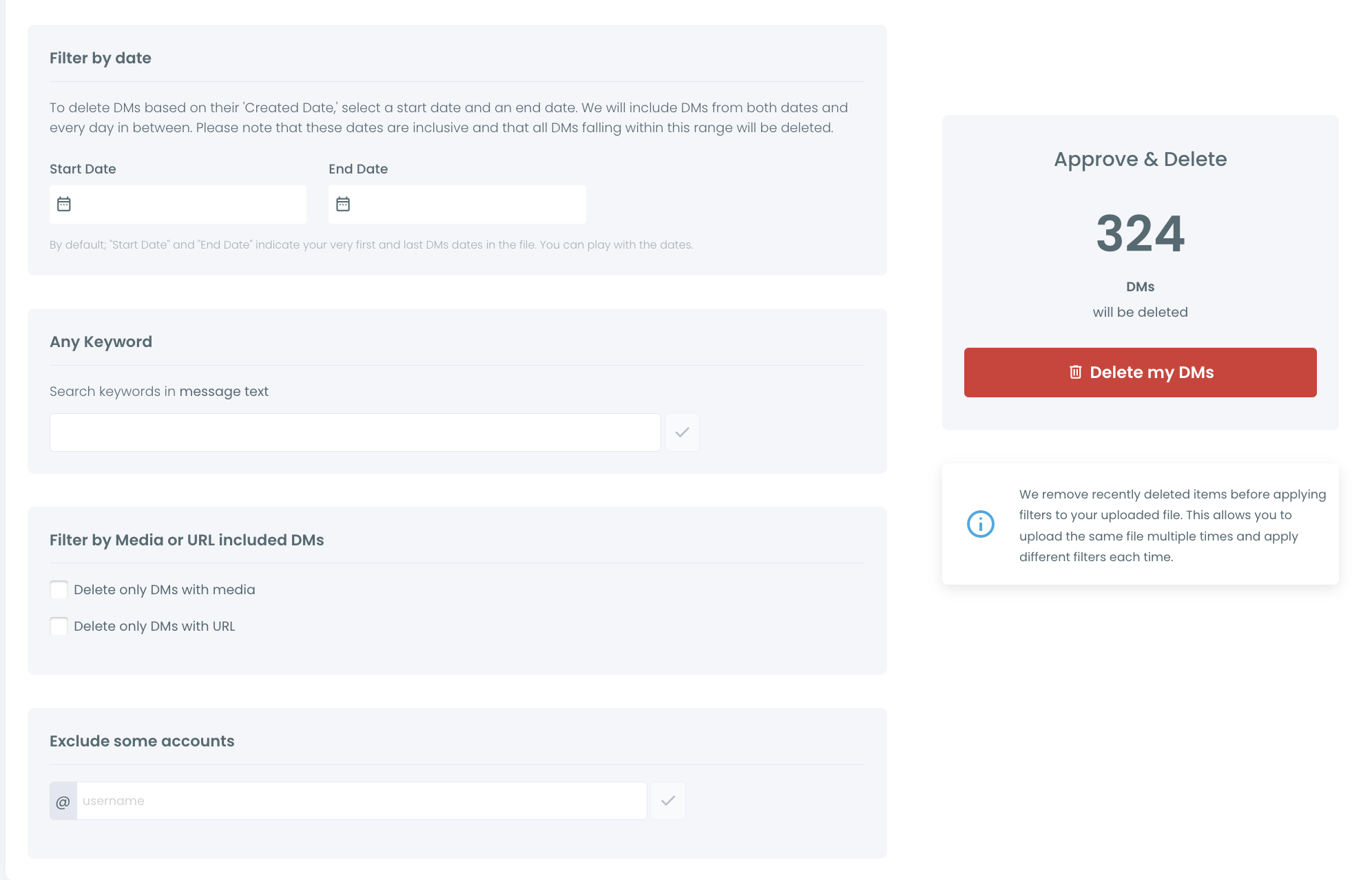
| Date filter | None | Start Date and End Date, inclusive |
| Other filters | Exclude some accounts | Exclude, keyword, media, URL |
The archive route answers yes to both questions. It is the one to use when you need to delete old DMs on X by period rather than all at once.

The date filter reaches every DM in your X archive file
The date filter can reach every DM in your X archive file, going back to the account's first conversation. Circleboom's Delete All DMs reads direct-messages.js from that archive and applies a Start Date and End Date to it.
Four rules define that reach:
- The range is inclusive, so both boundary days belong to the deletion.
- The filter works on each DM's Created Date.
- Until you edit them, the two fields span the earliest to the latest DM the file contains, which means everything.
- Every uploaded DM starts selected, so the date range is what narrows the run.
End Date marks the newest day that goes, and the first day you are keeping must fall after it. Reading it the other way costs you one day of the period you meant to protect.
Exceptions, count, and confirmation
Exclude some accounts sits on top of the dates. A conversation with an excluded account survives even when it falls inside the range, which makes it the way to keep a few old threads without keeping the whole period.
Before anything is deleted, the Approve & Delete panel shows how many DMs will go and the date range. Circleboom then asks for confirmation in a "Delete DMs?" dialog before the run starts.
If you are still comparing options for a DM deleter for X, ask first whether it can stop at a date. For a period cut, you can remove old X DMs with a date range and see the range, the exclusions, and the count on one screen.
Three places a date filter on X DMs cannot reach
A date filter cannot reach anything outside the file you upload, anything on other people's side of a conversation, or anything already deleted. Those three limits hold no matter how the range is set.
The file is a snapshot. It holds the DMs that existed when X prepared your archive. Messages that arrived after that are not in it, so a cleanup of the last few weeks needs either the 30-day tool or a fresh archive.
Deletion is final, so anything already deleted is out of reach for good. The confirmation dialog says so with a red warning before any run, and afterwards your saved archive is the one record you still have.
The DM tool also touches messages and nothing else.
A wider reset uses separate tools, such as Circleboom's option to unlike and delete all Twitter likes for the public side of your history.
Does deleting DMs on X remove them from both sides?
No. Deleting DMs on X removes them from your inbox only, and every other person in the conversation keeps their copy.
X's Direct Message FAQs put it plainly: the removal applies to your account, and the other participants still have access to the messages. That is how X built messaging, and a third-party tool cannot override it.
For a privacy cleanup, this sets the expectation. A date-based deletion controls what your account holds and what anyone with your login can read. It does not reach into the other person's inbox.
If you need a conversation gone from both inboxes, the other person has to delete it too. The details are in deleting Twitter DMs from both sides.
For an old-DM cleanup on X, end the range the day before your cutoff
The right dates depend on which period you are closing. Three common shapes cover most cleanups:
- Everything before a cutoff: leave the Start Date at its default, the first DM in the file, and set the End Date to the day before the cutoff.
- One middle period, such as the years of a previous job: set both dates around that stretch and leave the rest alone.
- One old year at a time: run the earliest year first, then upload the file again for the next one.
The cutoff itself is usually a real event. A handover, a new role, or the day an account switched from personal to business use all give you a date you can defend later.
I pick the day before that event as the End Date, because the inclusive range would otherwise take the first day of the new phase with it. I also write the cutoff down before starting, so any second pass uses the same line.
How to delete old DMs on X with a date range
To delete old DMs on X by date, get your X archive, load the DM file from it into Circleboom's Delete All DMs, frame the old period with two dates, and confirm the count. Only DMs inside that frame are deleted, apart from threads with accounts you exclude.
-
Download your X archive from X's account settings and unzip it.
-
Give Delete All DMs the direct-messages.js file, which sits in the data folder once the archive is unzipped.
-
Frame the old period with a Start Date and End Date, and add any accounts to exclude.
-
Check the Approve & Delete count, press Delete my DMs, then approve the "Delete DMs?" warning.
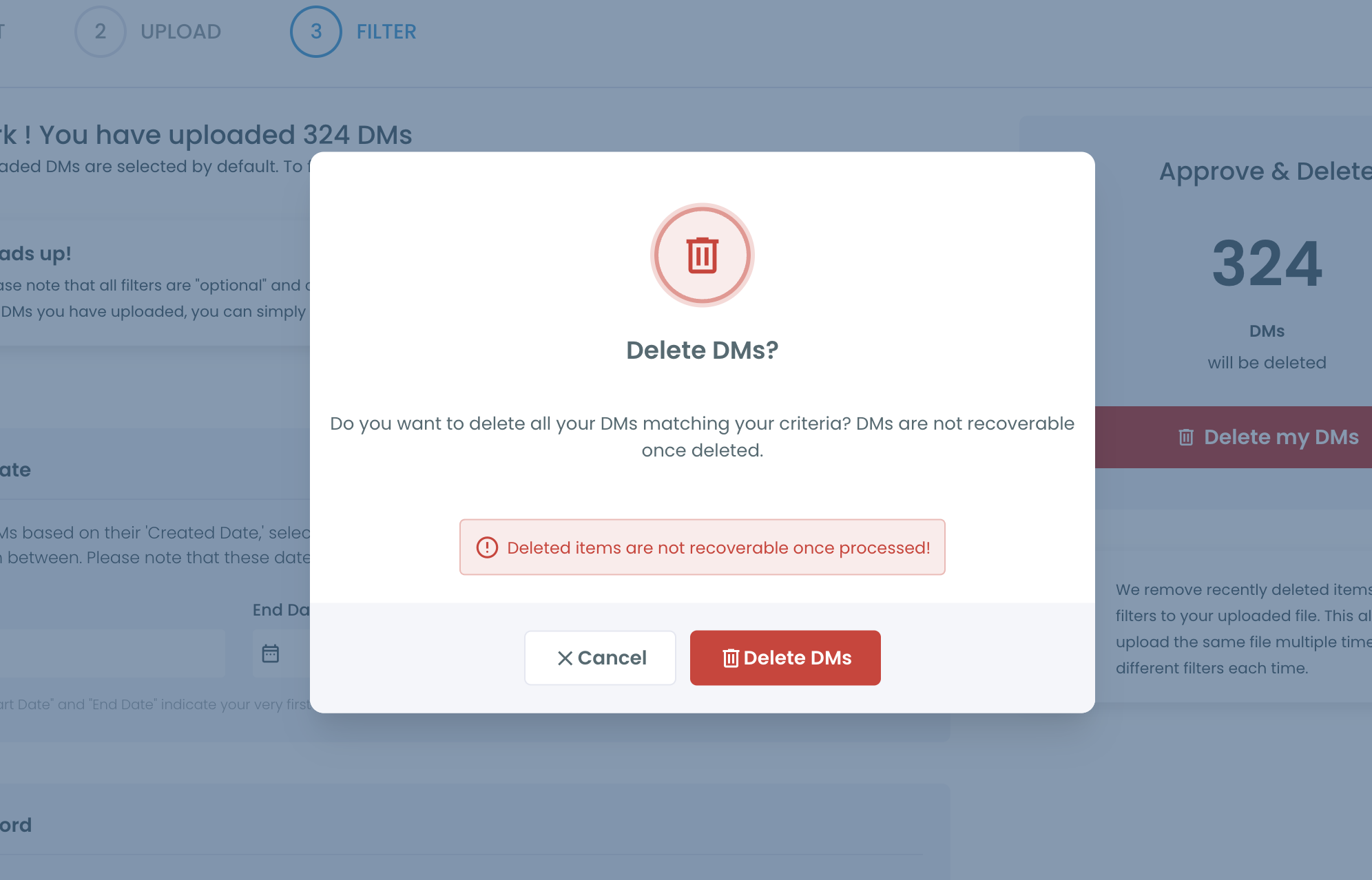
This order puts the scope decision before the safety checks. The dates define the period, the exclusions protect known exceptions, and the count is the last look before an irreversible run.
Full-inbox route for contrast: Circleboom's "How to Delete All Twitter DMs at Once" video, the all-at-once version that a date range narrows down.
How long does it take to delete years of DMs on X?
Deleting years of DMs on X takes two waits: X preparing your archive, then Circleboom processing the deletions. Circleboom's guidance allows 24 to 48 hours for the archive, though X's help center says the wait can be a few days. After that, Circleboom's processing times on Circleboom Twitter set the DM deletion pace at 2,000 per 24 hours.
As an illustrative calculation, an old period holding 7,000 DMs would need about three and a half days of processing once the file is uploaded. A smaller period of a few hundred DMs fits inside the first 24 hours.
That pace favors splitting big histories. I run the oldest year first, check the result, and upload the same file again for the next range.
Circleboom leaves out DMs it has already deleted when the same direct-messages.js file comes back, so separate sessions do not overlap.
Plan the cleanup a week ahead of any handover date, so the archive wait and the processing time both fit.
Using the archive wait well
The 24 to 48 hours before the archive arrives are the right time for the preparation a permanent deletion needs. Nothing about the date range can be set until the file is uploaded, but the decisions behind it can be made in advance.
Use the wait to list the accounts whose threads must survive, to note any agreements, prices, or contacts that live only in old DMs, and to tell anyone who shares the login what is about to change.
Stopping old spam senders from filling your X inbox again
Deleting old spam clears the history, but the accounts that sent it can still write to you. Blocking shuts that door, since X stops a blocked account from sending you new DMs.
Circleboom's Mass Block handles that in bulk when several accounts were behind the old messages. X's API does not offer blocking to tools of this kind, so the actual blocks happen in the Circleboom Chrome extension, account by account, in your browser.
Two related checks help after a cleanup:
- Add repeat senders to your Blacklist, so they do not reappear as clean contacts in later Circleboom searches or exports.
- Review Accounts I've Blocked to confirm the accounts behind abusive threads are already blocked.
The order matters here. Blocking before the deletion keeps new messages from those accounts out of the inbox while the cleanup runs.
Blocking after it keeps the cleaned period from filling up again. Either way, the old spam senders are the ones to block, because they have already shown they will write.
For senders you cannot name in advance, X's own message settings are the other half of the fix. Blocking direct messages on Twitter covers that side.
Old DMs on X need the archive, a date, and a final count
Old DMs on X sit outside the 30-day window that API-based tools can see, so the only way to delete them by date is through your X archive. Circleboom's Delete All DMs applies an inclusive Start Date and End Date to the direct-messages.js file, protects excluded accounts, and shows the count before you confirm.
What it cannot do is reach the other person's copy, messages newer than your archive, or anything already deleted. Blocking the old senders afterwards stops the same accounts from writing again.
Messages are not the only private record that piles up. Circleboom can also delete Twitter bookmarks when those have piled up alongside the messages.
A date range decides which past you keep. The archive decides how far back that choice can go.
→ Delete old DMs on X from your archive by date
What people ask about deleting DMs on Twitter by date
Where is direct-messages.js in my X archive, and what if it is over 100MB?
It sits in the data folder of the unzipped archive, and Circleboom takes that one file rather than the ZIP. Use an archive from the connected X account only.
Files over 100MB need an extra preparation step, with a guide on the Delete All DMs page and help at [email protected].
Can I delete only old DMs that contain links, media, or a certain word?
Yes. Inside your date range, Circleboom's Delete All DMs can narrow the run with Any Keyword for message text, Delete only DMs with media, and Delete only DMs with URL. Each option shrinks the selection further, and excluded accounts stay protected throughout.
How do I keep videos from my DMs before deleting them?
Save them before the run, because deleted DMs on X cannot be recovered through Circleboom. The steps for saving videos from your DMs are worth following first for any clip you still want.

