

Which of your followers would you ask to represent your brand tomorrow? Most account owners answer with a guess, because X never shows who shares their posts most often.
The reliable way to find Twitter brand ambassadors is to rank the followers you already have by how many of your tweets they retweeted, then check the top of that ranking for fit.
How do you find brand ambassadors on Twitter?
Rank your followers by repeat retweets. Circleboom counts how many of your last 3,200 tweets each follower retweeted on X, using official Enterprise APIs, and sorts them into a list of candidates.
→ Twitter brand ambassadors
Why hand-picking ambassadors on X rarely works
Hand-picking fails because X shows sharing activity one post at a time. Each post has its own list of reposters, X displays only part of it, and there is no filter and no export.
No screen on X adds those lists together. So the usual advice, "read your mentions and note who keeps showing up", turns into a memory test. The names you remember are the loud ones and the recent ones, which is not the same as the loyal ones.
The mistake I see most often is settling the question by follower count. A big number is easy to read on a profile, and it says nothing about whether that person has ever shared a word of yours.
A brand advocate, in the sense this guide uses, is a follower who supports your content consistently, especially by retweeting it. Circleboom's blog has a post on how to find your brand advocates on X.
Counting that support by hand does not scale past a few posts. The shortcut is to let software do the count and to find your Twitter brand ambassadors from a ranked list.
When the right voice is outside your followers
This guide stays with people who already follow you. If you decide the right voice sits outside your audience, that is a different search, and Circleboom lets you find influencers on Twitter by keyword.
What makes a follower an ambassador candidate on Twitter?
A follower is a candidate when they have retweeted you more than once, are still active, and fit your niche. Each of the three tests maps to something you can check:
- Repetition. They shared several of your tweets, not one viral post.
- Activity. Their own account is still posting and engaging.
- Fit. Their bio, language and audience make sense next to your brand.
The first two tests are measurable, and the tool measures them for you. The third is a judgment call, and it is the one that protects you.
There is no fixed number of retweets that turns a follower into a candidate. Read the list as a ranking instead: a short head of repeat sharers at the top, then a long tail of people who shared once. Your brand ambassadors on Twitter come from the head.
Authenticity belongs to that third test as well. The ranking already drops accounts flagged as fake, but a manual read is still worth the minute. There is a separate post on whether a Twitter account is authentic.
Consistency is the signal. A follower who shared five of your tweets over a year tells you more than one who shared a single post that happened to travel.
How Circleboom ranks the followers who retweet you on X
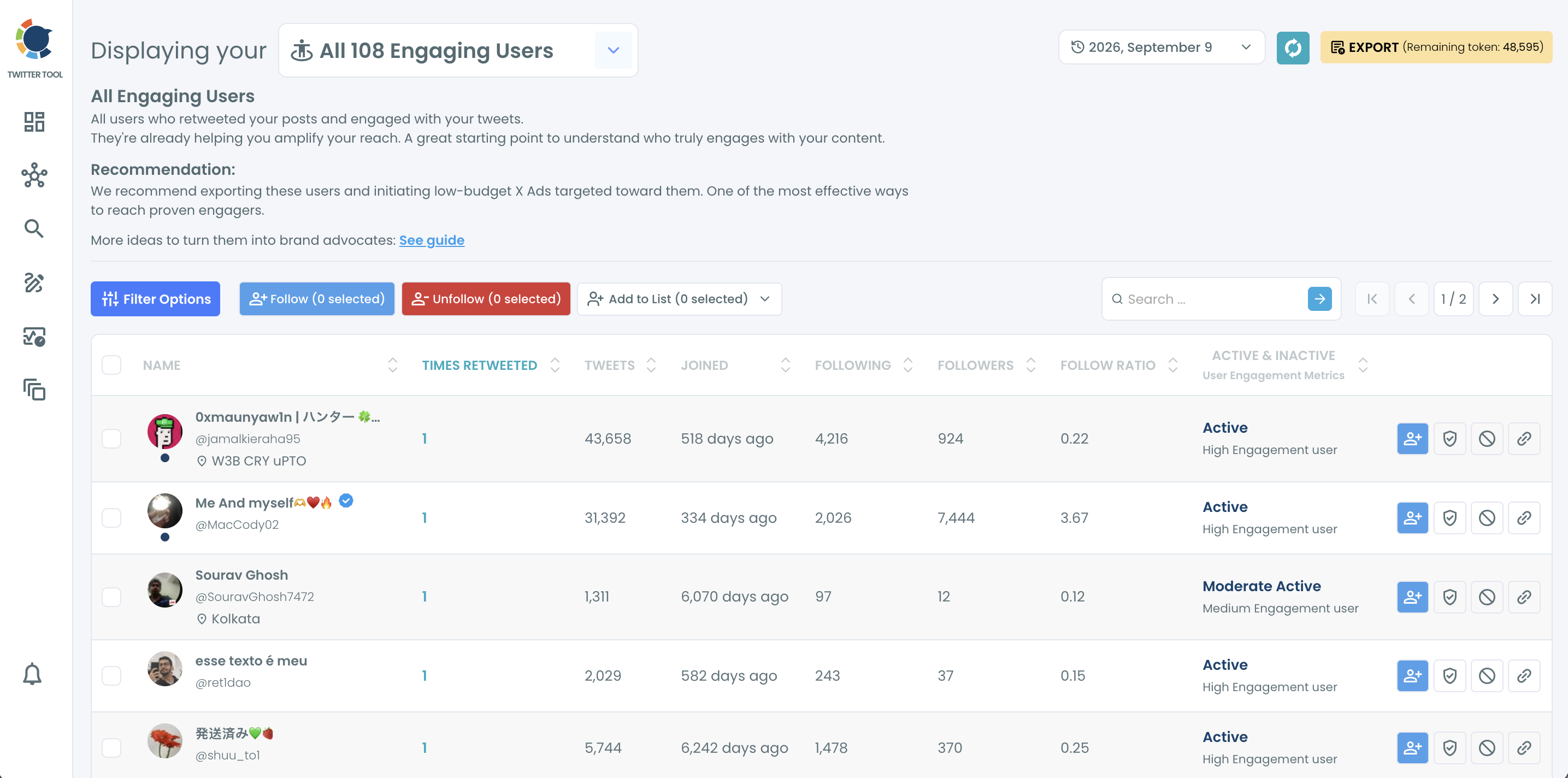
Circleboom's Engaging & Loyal Followers view lists the followers who retweeted your posts on X and shows a Times Retweeted count next to each one. That count is the number of your tweets the follower has shared, and it appears only in this view.
Circleboom is an official X Enterprise Developer, so the retweet records come from X's API and not from scraping. For you, that means complete data and an account that stays inside X's rules while the ranking is built.
Each row of the table carries enough to judge a candidate without leaving the page:
- Name, handle and location.
- Times Retweeted, the ranking metric.
- Tweets, Following, Followers and Follow Ratio.
- Joined, shown as the age of the account.
- An activity label, from active to inactive.
Above the table sit the controls you will use in the steps below: Filter Options, Follow, Unfollow, Add to List and Export. Every row also has its own buttons for following, whitelisting, blacklisting and opening the profile on X.
Compare that with the manual route. Instead of opening posts one by one and copying names, you sort one column and read down.
That single sorted column is the whole method for finding brand ambassadors on X: repeat sharers first, everything else after.
Filters that separate candidates from the rest of the list
Sorting tells you who is loyal. Filters tell you who is relevant, and the Filter Options panel has several that suit an ambassador search:
- Find in Bio & Name searches display names and bios, so a keyword such as a job title or an industry narrows the list to people in your field.
- Filter by Language keeps followers whose profile language matches your market.
- Filter by Location is a free text field, useful for a local brand or a regional launch.
- Follower Count takes a minimum and a maximum, in case you want a floor or a ceiling on audience size.
- Verification Status separates verified accounts from the rest.
Filters can be combined, and an Active Filters bar above the list shows which ones are applied. That bar is worth a glance before you select anyone, because it tells you which slice of your followers you are looking at.
One idea sits underneath all of this. The list is the warmest segment of your audience, people who chose to put their own name next to your posts, so treat it as a relationship list and not as a leaderboard.
How far back the X ranking looks and how long it takes
The ranking covers your most recent 3,200 tweets and takes one to three hours to build. Both facts follow from how the list is made, and both should shape when you start it.
Most follower tools start from the follower list and filter it. This one is built backward from your tweets, and the preparation screen shows each stage while it runs:
| Stage on the preparation screen | What it means for your shortlist |
|---|---|
| Fetching your tweets | Up to 3,200 tweets, the most the X API returns for tweet history. |
| Fetching retweeters | One request per tweet, which is why the wait runs to hours. |
| Removing duplicates and inauthentic accounts | Fake, suspended and locked accounts leave before the ranking. |
| Finalizing the list | Only accounts that follow you stay, each with a count. |
The third row is the one most write-ups on ambassador hunting miss. Because fake, suspended and locked accounts are removed before the count, the top of your list is not padded by bots that repost everything.
What the window and the wait mean for your timing
Three practical consequences follow:
- A follower who supported only your older tweets, beyond the 3,200 window, may not appear.
- The list is a snapshot. Someone who became active last week may be missing until the next run.
- The wait is real, so start the process when you have time for it, not right before a deadline.
The screen itself says the process may take one to three hours and that you will be notified when it is ready. Finished results are stored, and a date selector lets you reopen an earlier run and compare it with a new one.
Other requests are paced too. Circleboom's help center lists them on its page about processing times on Circleboom Twitter.
Feature tour: Engaging and Loyal Followers, and how it shows who retweets you on X.
How to find brand ambassadors on Twitter step by step
Eight steps in three phases take you from a connected account to a saved shortlist.
Connect the account and start the ranking
- Log in to Circleboom Twitter and authorize the X account you manage.
- Go to the Followers and Following menu in the left sidebar.

- Select Engaging & Loyal Followers and let the preparation screen finish. Come back when the notification arrives.
Shortlist by repeat retweets, then by fit
- Click the Times Retweeted column header to sort the list with the highest counts first.
- Open Filter Options and set the filters that define fit for your brand, such as Filter by Language or Find in Bio & Name.
- Check the activity label on each remaining row and set aside candidates marked inactive.
- Use Open Profile to read each candidate's recent posts on X. Engagement does not prove alignment, so this manual read is the step not to skip.
Save the shortlist as a list
- Tick the checkbox on each candidate, click Add to List and choose Twitter List. Pick an existing list from the dropdown or create a new one.
The sequence puts the measurable test first and the judgment call last. Opinion never decides who gets looked at, only who stays, and saving the result as a list means the work outlasts the session.
The run, compressed:
- Connect the account and start the ranking early.
- Sort by Times Retweeted.
- Filter, check activity and read profiles for fit.
- Save the survivors to a list.
Keep your Twitter ambassador shortlist in one list
A dedicated list keeps your candidates' posts in one feed, so you can read and reply to them without searching for each account. Now you have the names of your likely Twitter brand ambassadors. The list is what turns those names into a daily habit.
Circleboom adds every selected account to a list in one action. Doing the same on X means adding each profile separately, which is slow once the shortlist passes a dozen names.
If no suitable list exists, the same pop-up creates one. You set the name, an optional description and whether the list is public or private, and the selected accounts become its first members. Names such as "Advocates" or "Community Amplifiers" keep the purpose obvious.
Public or private: which setting suits a shortlist
The privacy choice deserves a second of thought. X's own page on how to use X Lists covers public and private lists. A private list suits a shortlist you are still vetting, since candidates do not need to know they are being considered.
After the first save, Twitter List Manager is where upkeep happens. You can remove members who no longer fit or move accounts to another list, for example from a candidates list to a confirmed one.
A list also sets up the conversation that comes next. Before you write to anyone on it, plan the approach. There is a post on building a direct message strategy for brands.
What about people who retweet you on X but do not follow you?
They are not in this ranking, because the final stage keeps followers only. A person who shared your launch thread three times without following you will not show up on the list, however useful they are.
Circleboom covers that group with a different export. Export Accounts Who Retweeted, in the Essential Toolbox menu, retrieves the accounts that retweeted a specific tweet. You paste the tweet's URL, add it to the export list and download the retweeters as a CSV file.
The file carries the same profile fields as other account exports, including username, location, follower count and bio, plus flags for fake and inactive accounts. That is enough to vet a stranger with the same three tests you used on your followers.
The page for that workflow is where you export Twitter retweeters. A sensible use is to run it on your best campaign tweet and look for handles that are missing from your follower ranking.
Follow the non-followers gradually
Those missing handles are supporters you have not connected with yet, and some of them may be future brand ambassadors on X.
Following them is a reasonable first move, and Circleboom keeps it gradual: you confirm the selection, and follows are paced at 50 every 15 minutes with a daily safety limit of 400. Anything still queued continues the next day.
For more on working with these exports, see the post on how to extract Twitter retweet lists.
Twitter brand ambassadors start as a ranked list
Finding Twitter brand ambassadors is a counting problem first and a judgment problem second. Circleboom does the counting across your last 3,200 tweets, and you do the judging on a short, sorted list.
What you gain is a shortlist you can defend. Every name on it has shared your posts repeatedly, is still active and passed your own read of their profile.
The part that makes the work last is the list at the end, because a shortlist that lives in a closed tab is forgotten within a week.
Start the ranking today, since the wait is the slow part, and review it when the notification arrives.
→ Rank your Twitter brand ambassadors
What to know once your shortlist is ready
Should I whitelist my shortlist before removing or unfollowing anyone?
Yes. Whitelist marks an account as protected in Circleboom and excludes it from bulk actions, so whitelist your candidates before any cleanup of your Twitter followers. You can apply it per row or to a whole selection under Add to List.
Is a small loyal account a better pick than a large one?
Usually, yes. A small account that shares your posts repeatedly has already shown the behavior you want, while a large account that never interacts has not. Use the Followers column to compare candidates only after loyalty is established.
Can I download the shortlist as a spreadsheet?
Yes. The Export button downloads the selected accounts as a CSV file with fields such as username, location, follower count and bio. Exports run on a token balance, and the remaining tokens are shown on the button.
How often should I rebuild the ranking on X?
Rebuild it whenever you need a current view, for example before a campaign. Each result is a snapshot of the day it was made, and the date selector lets you compare a new run with earlier ones to see who is rising.

