

After using Twitter (X) for a while, the list of accounts you follow can grow a lot.
At first it feels manageable. You follow a few creators, some brands, a few friends, and maybe accounts related to your interests. But over time the number grows into hundreds or even thousands.
At that point, I realized something.
I actually had no clear view of the accounts I was following.
Yes, Twitter shows your following list on your profile, but it’s not very useful if you want to review or analyze it properly. The page keeps loading more accounts as you scroll, and there is no option to download the list or organize it.
I wanted a proper list so I could review it, analyze it, and understand who I was actually following.
But Twitter doesn’t provide a way to export that list.
Why having a following list can be useful
Your following list says a lot about your account.
Every account you follow affects your timeline, the content you see, and even how the platform understands your interests.
There are many reasons why someone might want to review their following list.
For example, you may want to:
➡️ review who you are following
➡️ organize your network
➡️ identify inactive accounts
➡️ detect spam or fake profiles
➡️ analyze how your following list has changed over time
Trying to do this directly on Twitter is difficult because the platform simply shows accounts one by one as you scroll.
Without a proper list, it’s almost impossible to analyze anything.
That’s why exporting the following list into a spreadsheet becomes very helpful.
Exporting a following list with Circleboom Twitter
To get a proper list of the accounts I follow, I used Circleboom Twitter.

Circleboom Twitter is an official X Enterprise Developer, which means it works with Twitter through official infrastructure rather than unreliable scraping tools.
With Circleboom, you can export:
- your followers
- your following list
- another account’s followers
- another account’s following
 Kevin Frank
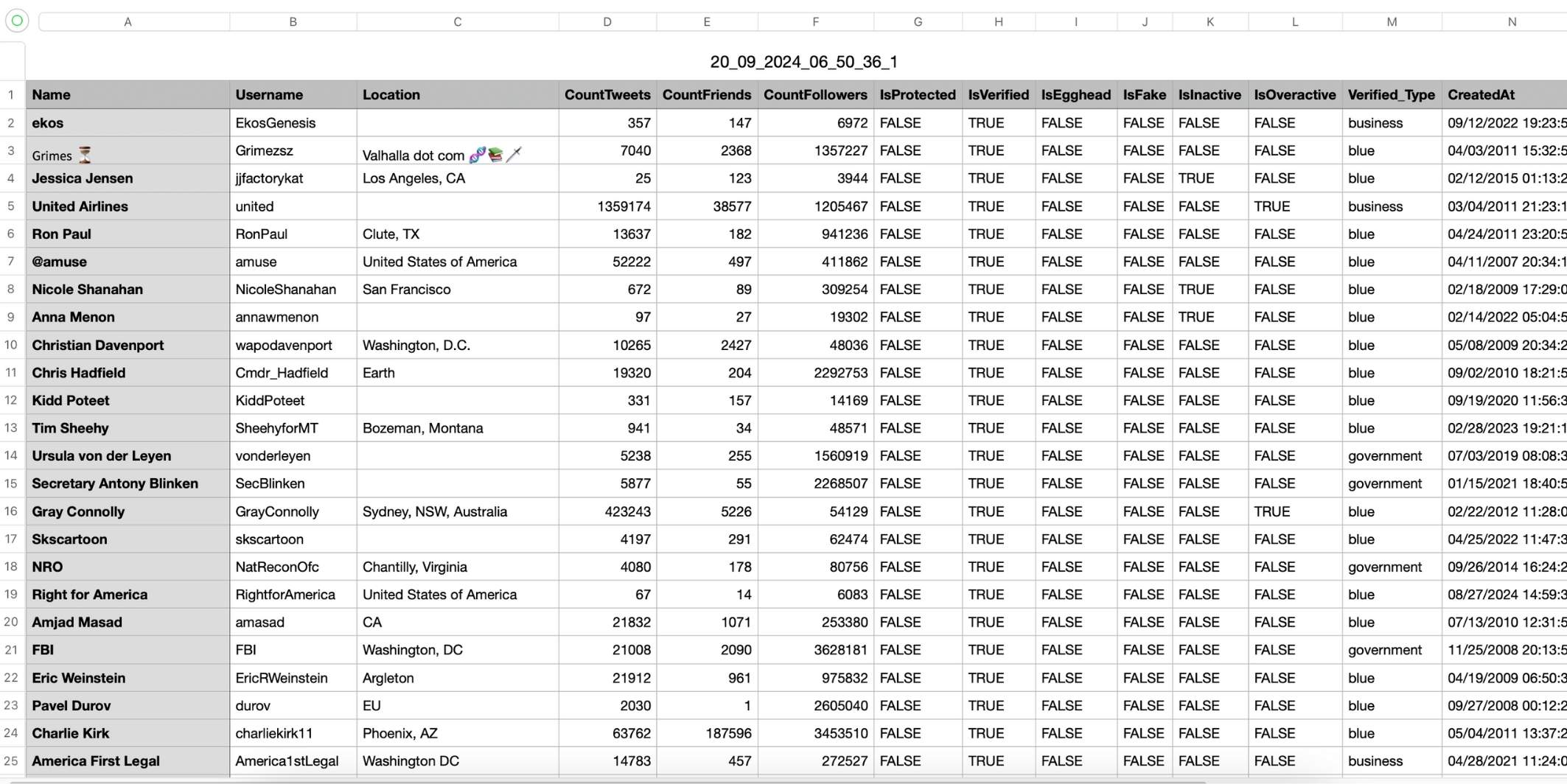
The exported data comes as a clean CSV or Excel file, which makes it easy to analyze.
Instead of scrolling endlessly through the following page, you get a structured list that can be opened in Excel or Google Sheets.
The file includes detailed information about each account, such as:
- Twitter ID
- username
- account creation date
- follower count
- following count
- tweet count
- account activity signals
Having these details makes it much easier to understand the accounts you follow.
How to export your Twitter following list
Here is how you can get your following list using Circleboom Twitter.
Step #1: Go to the Circleboom Export Twitter Following List Window
First, navigate to the Circleboom “Export Twitter Following List” window.
Here, enter the Twitter/X username of the account whose following list you want to export. This can be your own account or any other Twitter user’s account. After entering the username, click the “Search” button.

Step #2: Select the Following List Option
Circleboom allows you to export either the followers list or the following list of the account you searched for.
Since the goal is to export the accounts that the user follows, choose “Export Twitter/X Following” and click “Next.”

Step #3: Enter Your Email Address
Circleboom will send the exported following list to your email in CSV format.
Enter your email address in the required field and click “Next” to proceed.

Step #4: Receive the Following List via Email
That’s it. Within a few minutes, Circleboom will send the following list of the searched account to your email.
You’ll receive a downloadable CSV file containing detailed information about all the accounts that the user follows.
Analyze and manage your following list
Once you have the following list in a spreadsheet, reviewing it becomes much easier.
You can sort the data, filter accounts, and identify patterns.
Circleboom also helps with automatic analysis of accounts.
 Arif Akdogan
The platform can evaluate accounts you follow and help detect things like:
- inactive accounts
- suspicious or fake accounts
- low-quality profiles
After the analysis, you can take actions directly from the dashboard.
For example, Circleboom allows you to:
This is especially useful if your following list has grown too large over time.
Final thoughts
Twitter allows you to see the accounts you follow, but it does not provide a way to export the list as a structured dataset.
If you want to review or analyze your following list properly, exporting it to a spreadsheet is the best solution.
Tools like Circleboom Twitter, an official X Enterprise Developer, make this possible by allowing you to export your following list as a CSV or Excel file. Once you have the file, you can analyze the accounts you follow and manage your network much more effectively.

