
Getting followers is one problem. Keeping them engaged is a completely different one.
Most accounts focus everything on the number. The follower count grows, the engagement doesn't follow, and slowly the reach collapses. Posts that used to get responses start getting nothing. The audience is there on paper and gone in practice.
The fix isn't posting more often. It's posting the right things, at the right time, to the right people, in a way that keeps reaching them more than once. Here's how to do it.
Tip 1: Tweet About What Your Followers Actually Care About
The most common engagement mistake is posting what you think your audience wants instead of what they actually respond to. These are often different things.
Engagement follows relevance. When a tweet lands on a topic your followers genuinely care about, they react. When it doesn't, they scroll past. And if it keeps not landing, they eventually stop checking.
The problem is figuring out what that topic actually is. Most accounts guess based on general niche assumptions or what performed well last time. Both are unreliable. Your audience is specific to you, and what they care about shifts over time.
The more systematic approach is to look at your actual follower base and find the patterns. What topics come up repeatedly in their bios and tweets? What categories cluster together? That's the interest data that should be shaping your content calendar.
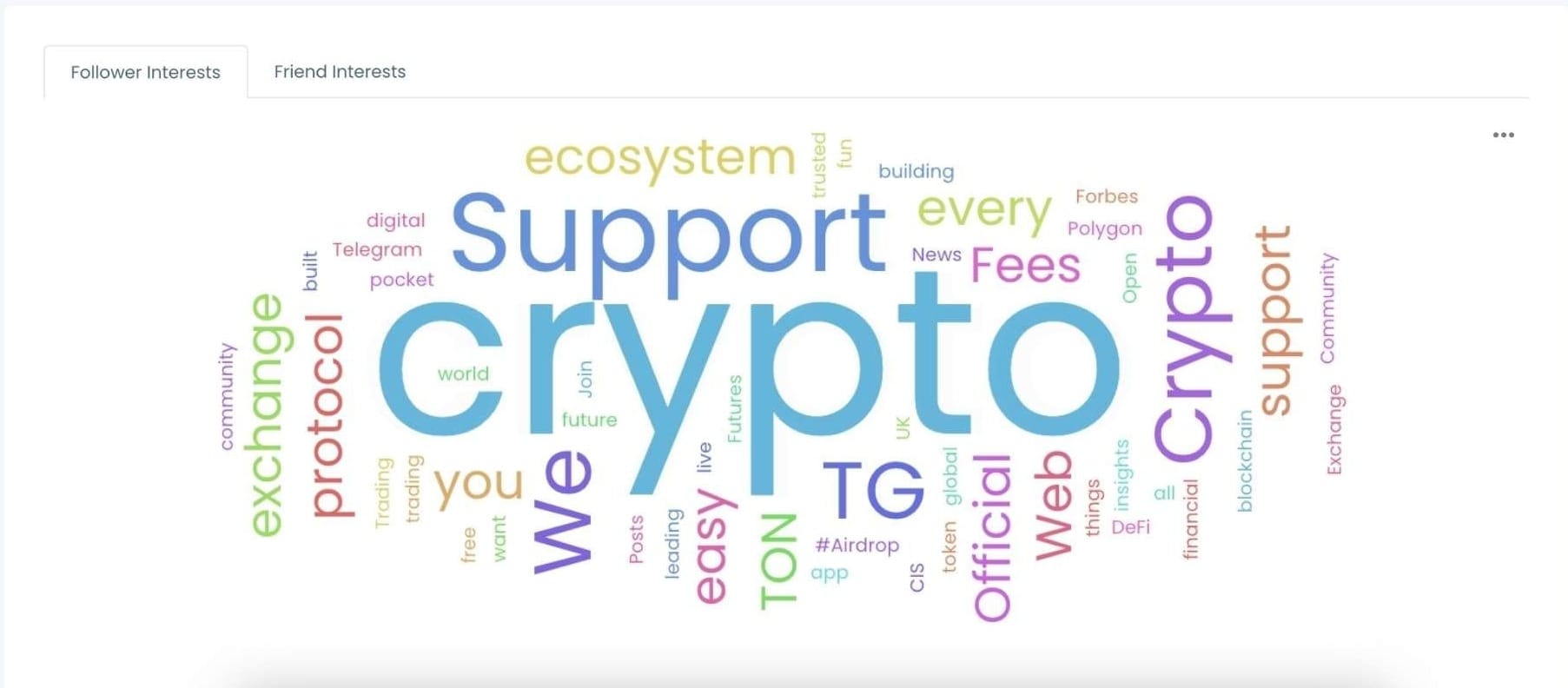
📌 Relevance isn't about posting in your niche broadly. It's about matching the specific intersection of topics that your specific followers care about. The more precisely you can identify that, the better your engagement rate.
Tip 2: Post When Your Followers Are Actually Online
A well-written tweet posted at 3am to an audience that's asleep gets almost nothing. The same tweet posted during peak activity gets three times the impressions in the first hour.
Twitter's feed moves fast. A tweet has a window of roughly 15 to 18 minutes where it's actively circulating before newer content pushes it down. If your followers aren't online during that window, they won't see it.
Most accounts pick posting times based on general advice: "post at 9am," "post on Tuesday," "post in the evening." Generic recommendations built from global averages. Your audience is not the global average. Their active hours depend on their time zones, their daily habits, and the specific platform behavior of the people following you.
The only way to know when your followers are online is to look at data specific to your account.
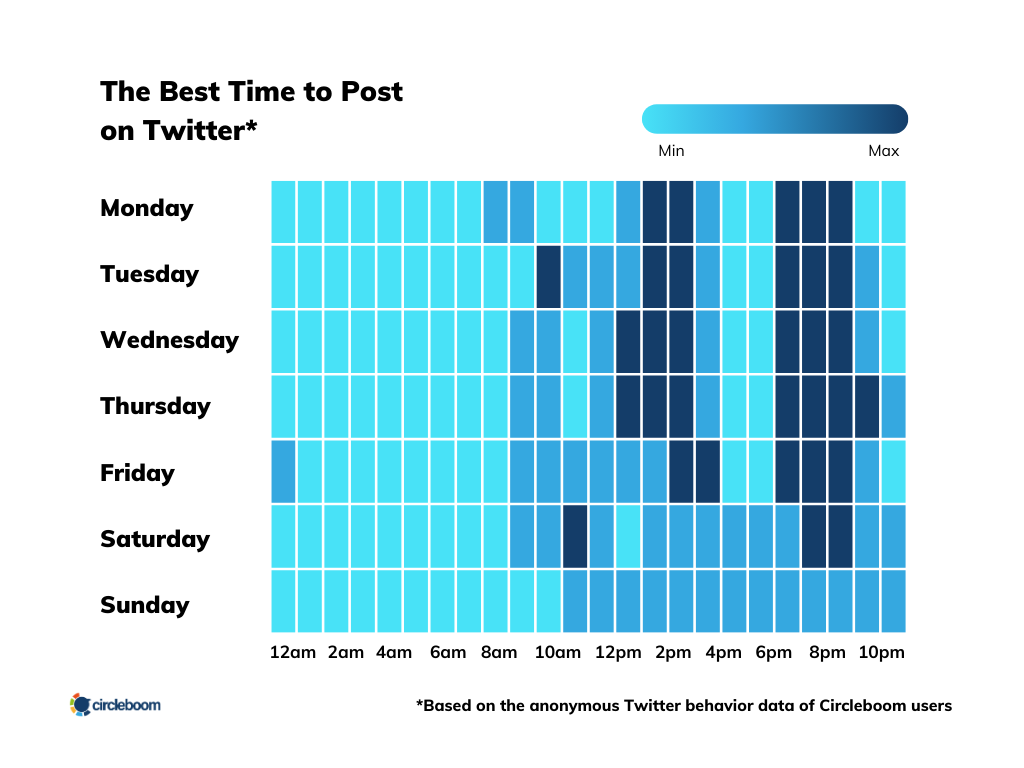
⚠️ There's no universal best time to post on Twitter. What works for a US-based B2B account with a professional audience looks completely different from what works for an entertainment account with an international following. Use your own data.
Tip 3: Keep Your Best Content Visible with Auto Retweets
Most of your followers didn't see your tweet the first time.
A tweet lifespan on Twitter is around 15 to 18 minutes. Even a tweet that performs well in that window reaches only a fraction of your total audience. The rest were offline, in a different tab, or buried under a fast-moving feed.
Reposting the same tweet at a different time reaches the followers who missed the first window. It's not about spamming. It's about giving your content a second or third chance to land with the people who were already following you when you posted it.
Doing this manually is tedious and easy to forget. Automating the repost cycle means your best content keeps working without requiring you to push it each time.
Keep repost intervals meaningful. A few hours apart at minimum, timed to different activity windows. The goal is to reach different segments of your audience, not to flood the feeds of followers who were online both times.
Tip 4: Stay Consistent Without Being Online All the Time
Consistency is one of the highest-leverage habits on Twitter. Accounts that post regularly build a presence in their followers' feeds. People come to expect content from them. When something relevant happens in their niche, those followers think of the consistent account first.
The problem is that most people can't be online consistently throughout the day. Life doesn't run on a content calendar.
The solution is scheduling. Write content when you have the time and attention for it, then set it to publish when your audience is most active. The consistency your followers experience doesn't require you to be manually present at every posting moment.
I Use Circleboom Twitter for All of This
These four tips are straightforward in theory and genuinely difficult to execute manually at any consistent level. Figuring out what your followers care about, knowing when they're online, keeping content visible through reposts, and staying consistent over time all require data and automation that Twitter doesn't provide natively.
Circleboom Twitter is how I handle all of it in one place. Circleboom is an Official X Enterprise Developer, which means it works directly with X's official APIs. All data retrieved is based on publicly available information accessed through compliant, verified API access.

The Interest Cloud analyzes my follower base and generates a visual word cloud of the topics they discuss and care about most. The largest words in the cloud are the topics I should be posting about. It's not a guess. It's built from real data across my actual followers' tweets and bios. I look at it before planning any content batch and it consistently surfaces topics I wouldn't have prioritized otherwise.
When Followers Are Online shows me the specific hours when my audience is most active. Not generic advice. My audience's actual activity pattern. I use this to set my scheduling windows so every important tweet goes out during a peak engagement period.
The Auto Retweet feature inside the X Post Planner lets me set up automatic repost cycles when I'm creating or scheduling a tweet. I define the timing, the removal window, and the number of cycles. After that, the content keeps resurfacing without any manual action. For evergreen posts and announcements, this is one of the most efficient things I do.
And the X Post Planner itself handles the scheduling so I can write content when I have time and publish it on the schedule that actually matches when my followers are around.
How to Find What Your Followers Are Interested in with Circleboom Twitter
Step #1: Go to Circleboom Twitter and log in.
If you don't have a Circleboom account yet? Let's get yours in no time!
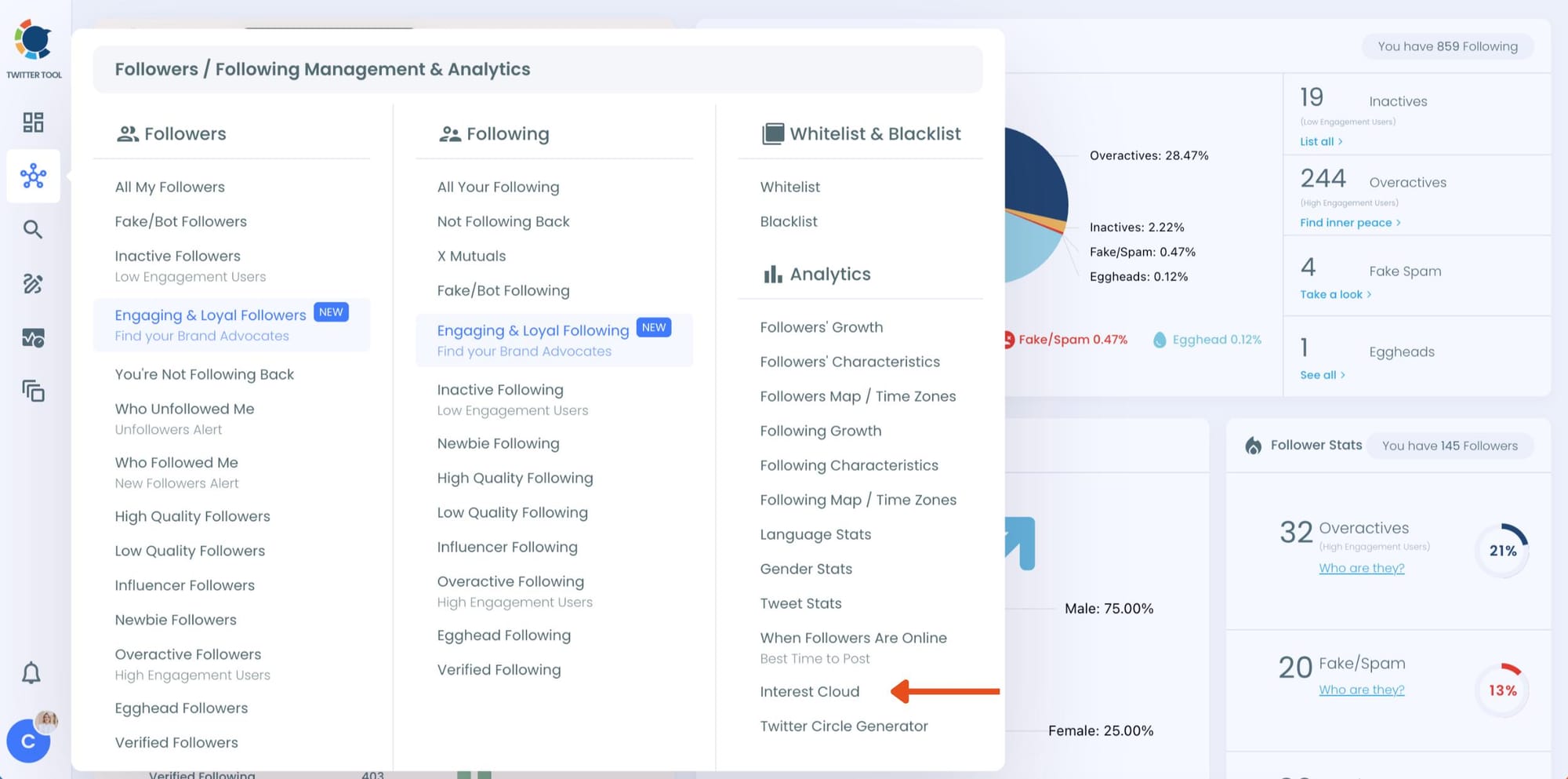
Step #2: When you have entered the Circleboom dashboard, find the left-hand menu.
On the menu, click on "Analytics" and "Interest Cloud" from the drop menu.
Step #3: The Interest Cloud will prompt within seconds.
Here, you will have both Twitter audience insights graphs for your friends and followers separately.
Moreover, you will get percentages for the usage distribution of each word that appear on the graph to allow you to make the correct analysis through interests from Twitter.
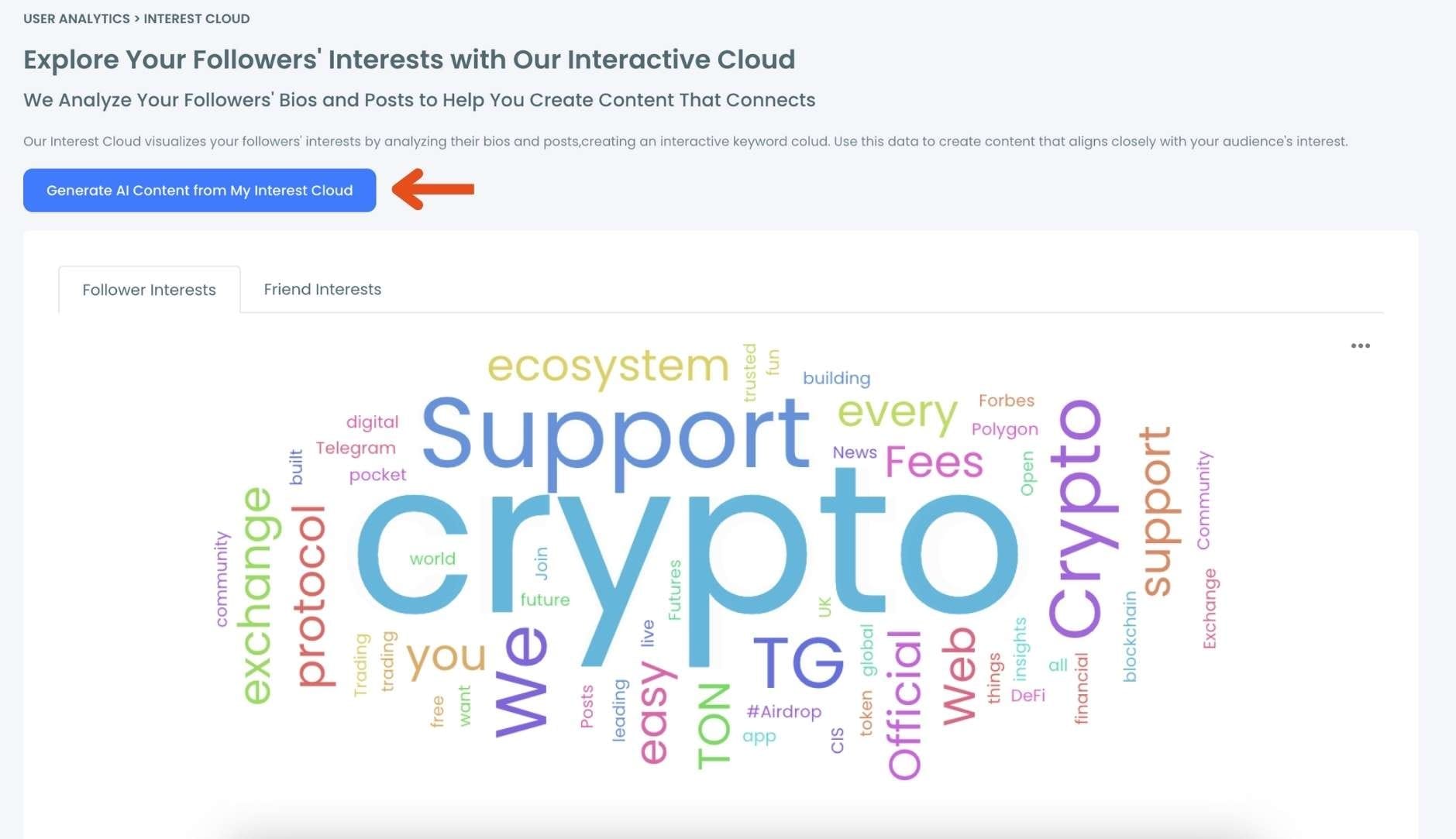
You can also save Interest Cloud graph in different file formats like PNG, SVG, JPG and PDF to use the graph in comparative analysis while defining your Twitter Interest Targeting strategy over time!
From Interests to Tweets: Use Circleboom's AI Writer to Act on What You Find
Seeing your followers' top interests is one thing. Turning them into actual tweets is where most people slow down.
Once you know the topics your audience cares about, Circleboom's AI Tweet Generator lets you act on that information immediately
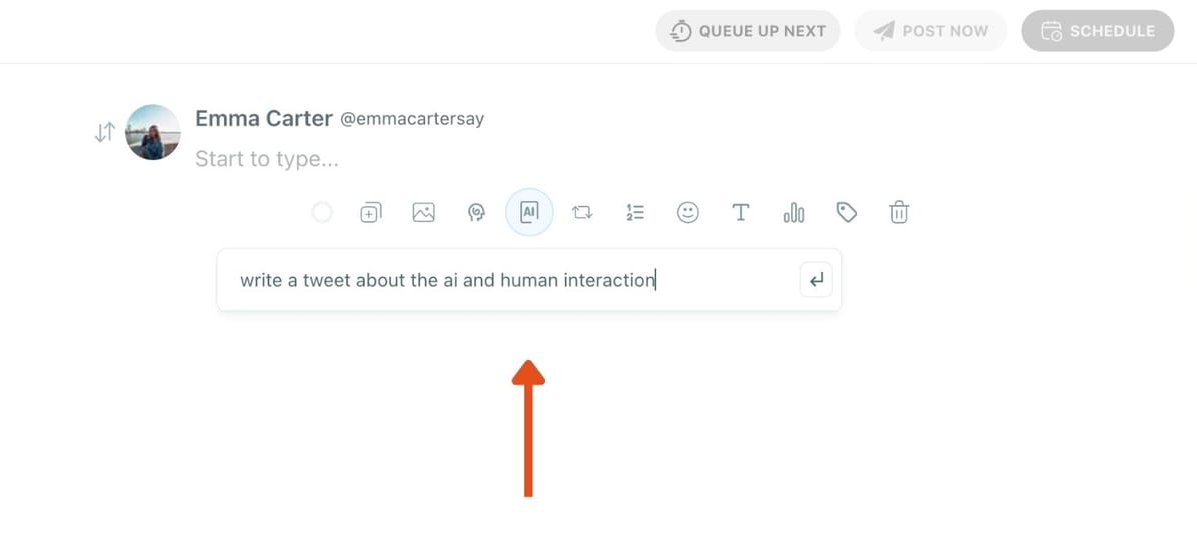
. You take a keyword or theme from the Interest Cloud, feed it into the AI writer inside the X Post Planner, and it generates a ready-to-publish tweet around that topic. You can adjust the tone, condense it, make it punchier, or expand it into a thread, all within the same editor.
The workflow becomes: identify the interest, generate the tweet, schedule it. No blank page, no guessing whether the topic will land.
This is particularly useful when you spot a cluster of related interests in the cloud. Instead of writing one tweet and moving on, you can use the AI writer to generate a series of posts around that theme, building a content streak without having to restart from zero each time.
How to Create and Schedule Tweets to Get More Intractions
Step 1: Go to Circleboom Twitter’s X Post Planner
Open Circleboom Twitter and click X Post Planner + AI Writer.
Then select Write & Plan Your Post to start creating your tweet.

Step 2: Write your tweet (or generate one with AI)
You can type your tweet manually in the editor.
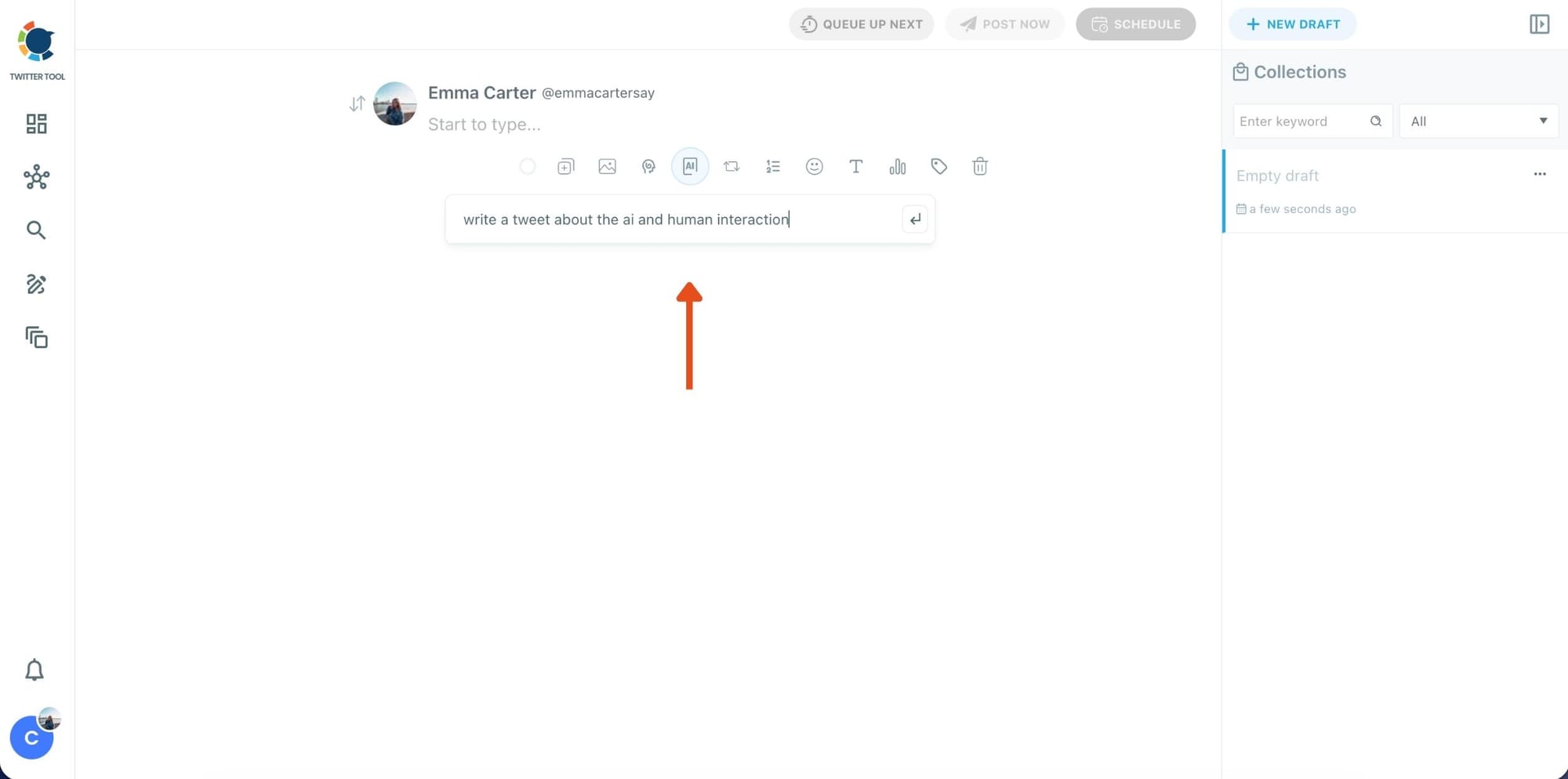
Or, if you want to move faster, click the AI option and let Circleboom generate a tweet idea for you based on your topic.
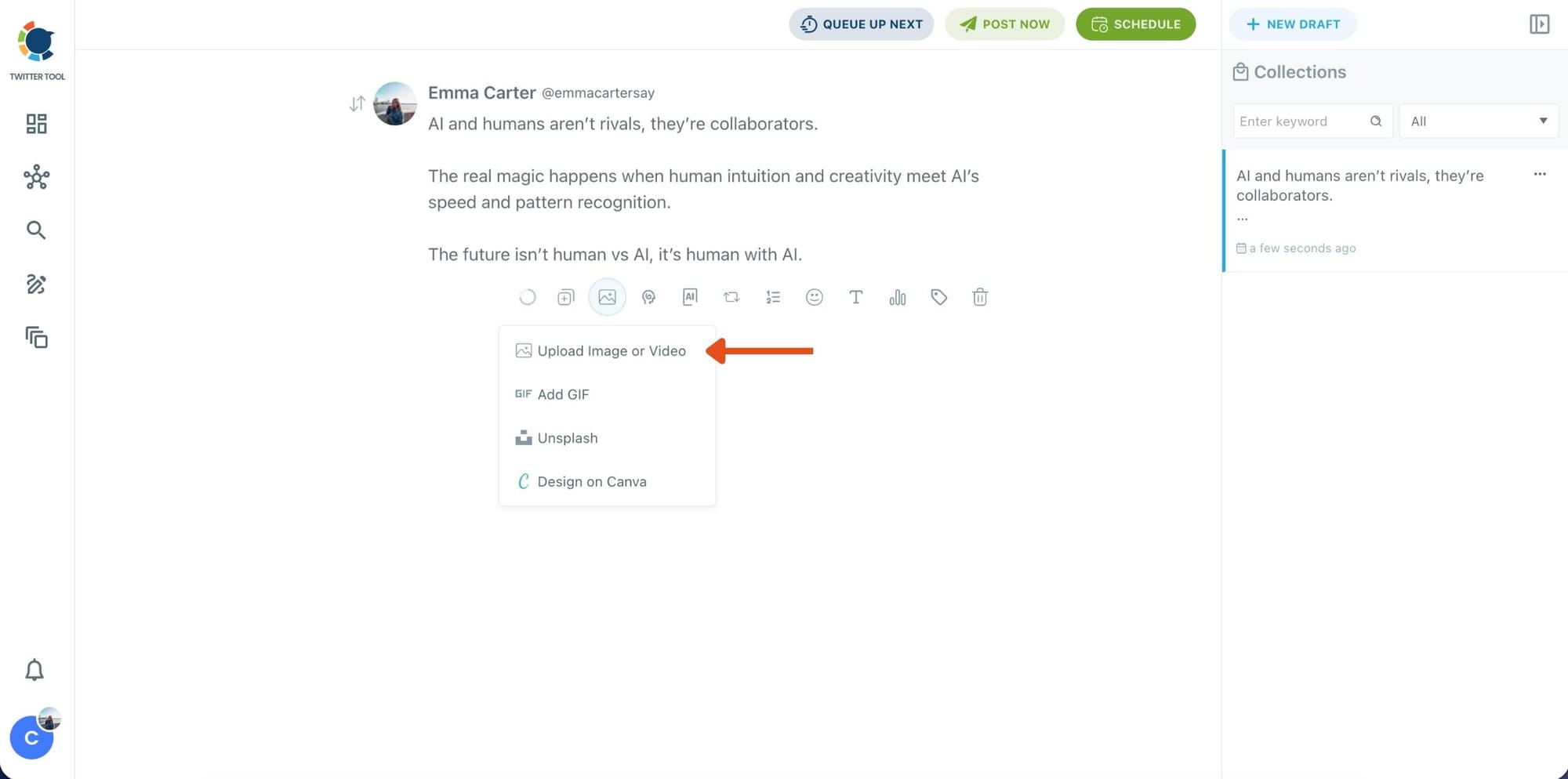
Step 3: Add an image to make the post more engaging
Once your text is ready, attach a visual to your tweet.
You can:
- Upload an image/video from your device
- Pick one from Unsplash
- Or design one instantly using Canva
Step 4: Style your tweet using Circleboom’s Font Generator
Now it’s time to make your tweet stand out visually.
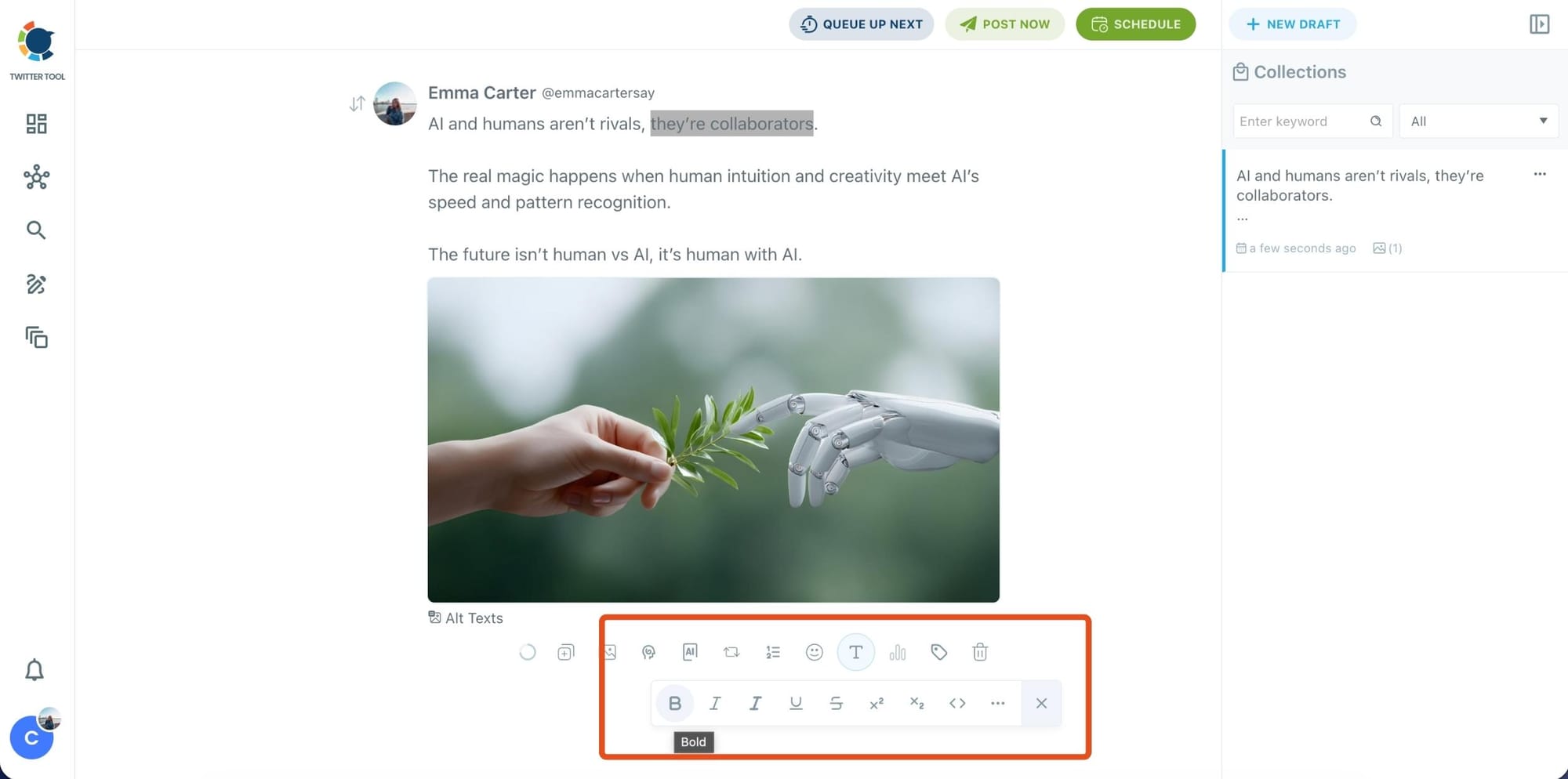
Select the part of your text you want to change, then open the Font Generator toolbar and apply styles like:
- Bold / Italic / Underline
- Different font variations
- Extra formatting options for a more “designed” look
This is perfect when you want key parts of your tweet to grab attention immediately.
Step 5: Set Auto Retweets to boost visibility
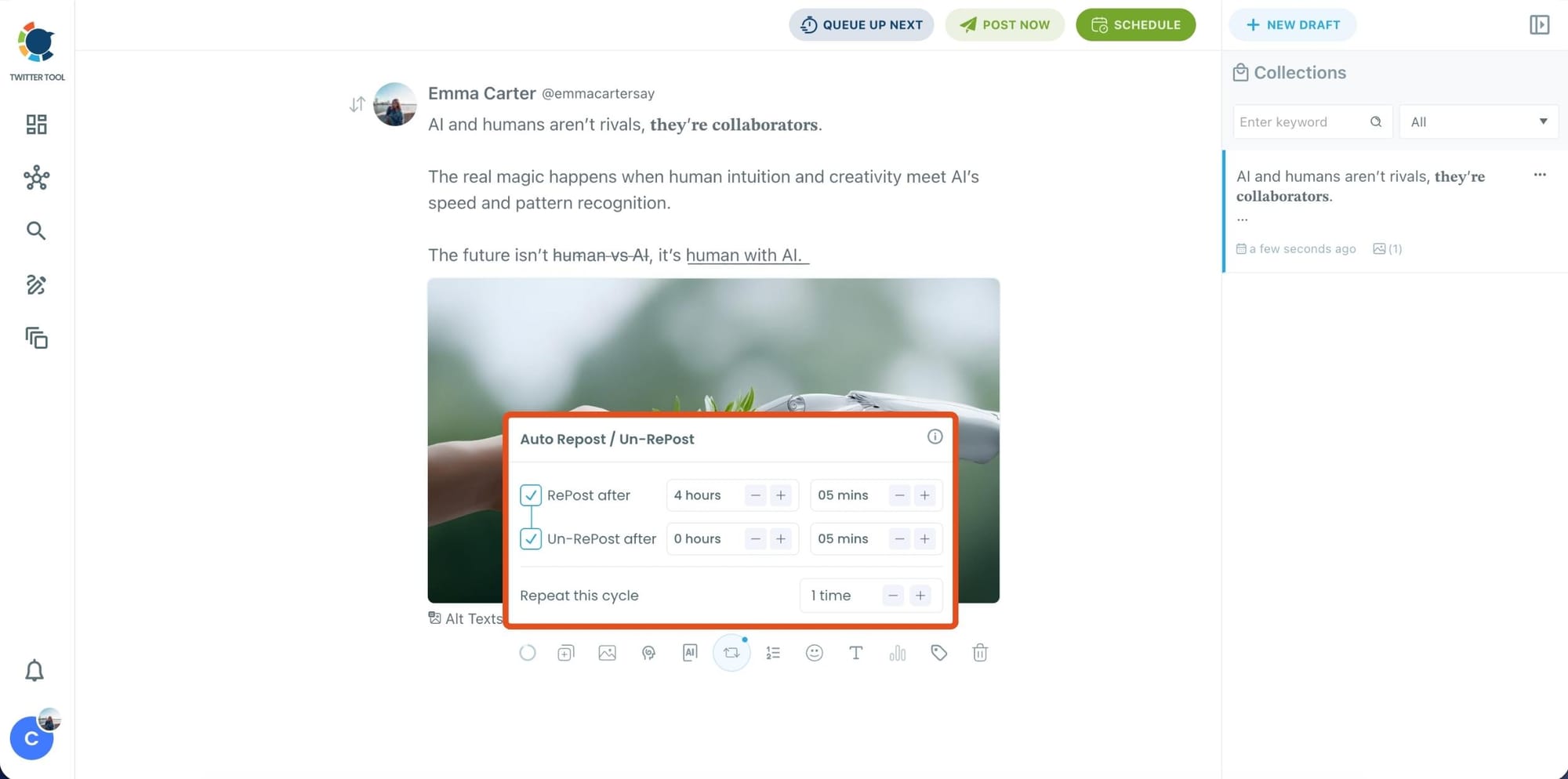
After styling your post, you can increase reach by enabling Auto Repost / Un-RePost settings.
This lets you automatically:
- Repost your tweet after a selected time
- Remove the repost later
- Repeat the cycle if you want more than one repost
It’s a smart way to bring your tweet back into the feed without manually reposting it.
Content on X has a notoriously short shelf life; if your audience isn't scrolling the second you hit 'publish,' your insights vanish into the noise. Circleboom’s Auto Retweet bridges this gap by automatically reviving your top posts, ensuring they land in front of followers regardless of their time zone.
This automation isn't just about staying active. It’s a proven growth hack that can quadruple your impressions and double your engagement. By giving your content a 'second life,' Circleboom forces the algorithm to prioritize your brand, turning every individual tweet into a 24/7 engine for reach.
Bonus Tip: Cross-post your tweet to other platforms automatically
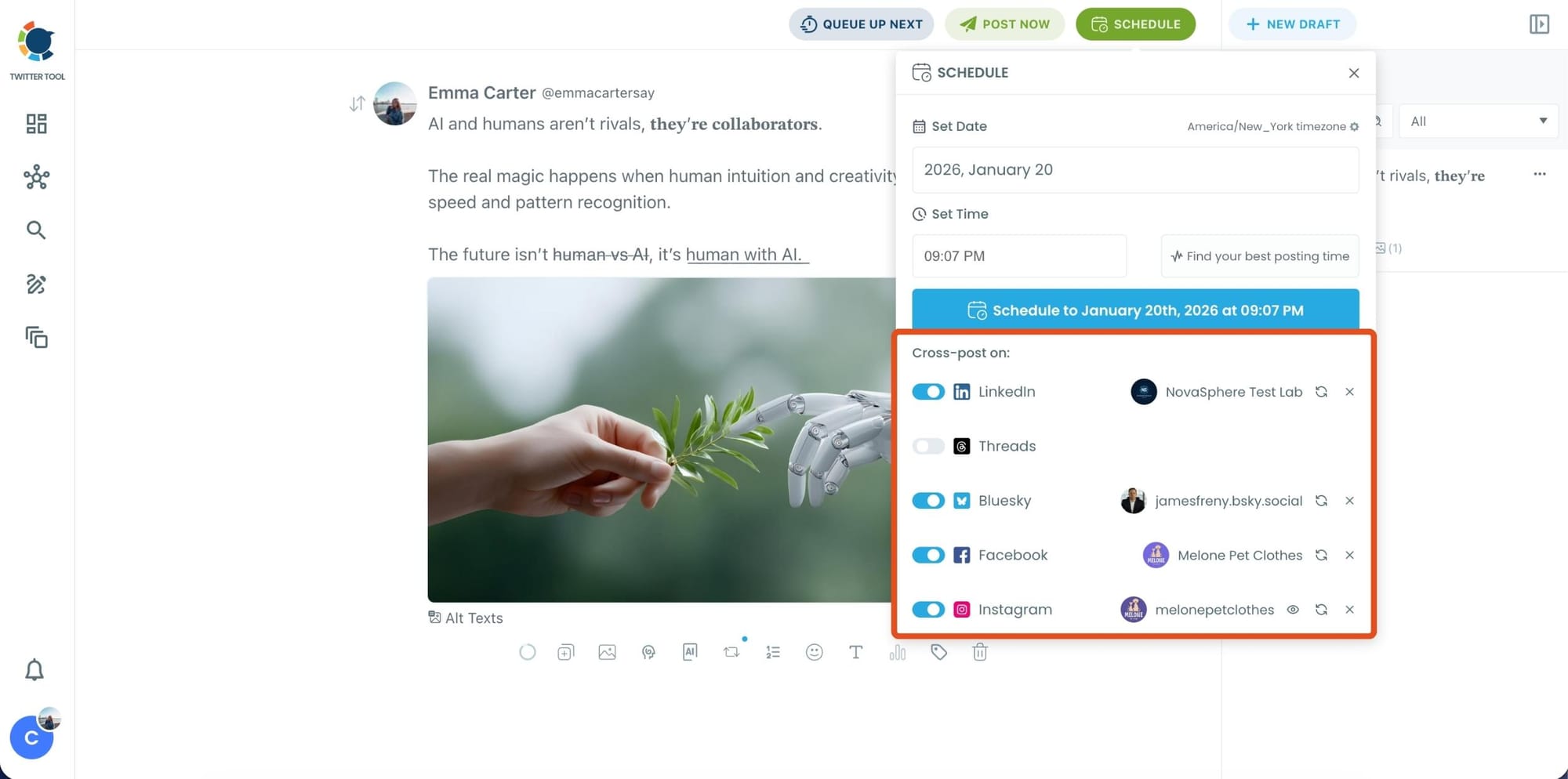
Before you publish, you can also enable Cross-Post to share the same tweet across multiple platforms in one go.
 Arif Akdogan
Circleboom lets you post your content to Instagram, Facebook, LinkedIn, Bluesky, and Threads automatically, so you don’t have to rewrite, re-upload, or repeat the same work on each platform.
Step 6: Schedule it for the best time to post
Finally, click Schedule and set your date and time.
You can also click Find your best posting time to see Circleboom’s suggested time slots based on follower activity.
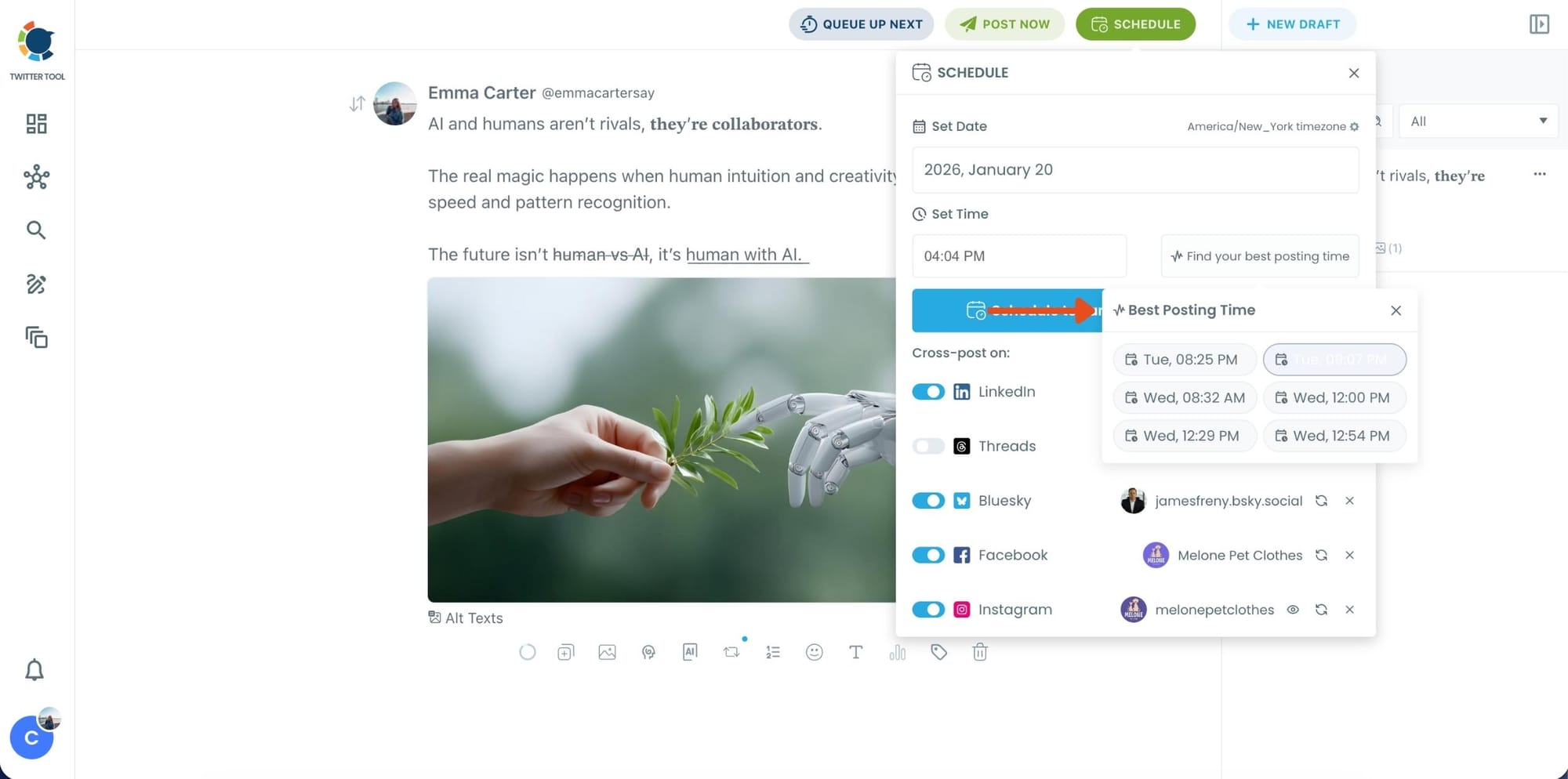
Once you pick the best option, smart-schedule it, and you’re done. Your tweet will go out at the time it has the highest chance to perform well.
Frequently Asked Questions
How do I keep my Twitter followers engaged?
The most effective approach combines three things: posting content that matches your followers' actual interests, publishing at times when your specific audience is most active, and keeping content visible through scheduled reposts. Circleboom Twitter's Interest Cloud, When Followers Are Online, and Auto Retweet features handle all three.
What kind of content gets the most engagement on Twitter?
Content that is relevant to what your specific followers already care about consistently outperforms content that is broadly aimed at a general niche. Circleboom Twitter's Interest Cloud shows you the exact topics your followers discuss most, which is a more reliable guide than niche assumptions or general advice.
How do I find out what my followers are interested in?
Circleboom Twitter's Interest Cloud analyzes your follower base using their tweets and profile bios and generates a word cloud of the topics that appear most frequently. The larger the word, the more commonly it appears across your followers. This gives you a data-driven starting point for any content strategy.
Does posting time really affect engagement?
Yes, significantly. Twitter's feed moves quickly and a tweet's active engagement window is around 15 to 18 minutes. Posting during peak activity hours for your specific audience maximizes the number of followers who see the tweet during that window. Circleboom Twitter's When Followers Are Online feature shows you exactly when those peak hours are for your account.
How many times should I retweet my own content?
Two to three reposts per tweet is a reasonable range for most accounts, spaced several hours apart and timed to different activity windows. The goal is to reach followers who missed the first post, not to repeat it to people who already saw it. Circleboom Twitter's Auto Retweet feature lets you configure the number of cycles and timing intervals when you create the tweet.
Can I schedule tweets and auto retweets at the same time in Circleboom?
Yes. Inside Circleboom Twitter's X Post Planner, you can write and schedule a tweet and configure the Auto Retweet cycle in the same editor before the tweet is published. The repost schedule activates automatically once the original tweet goes live.
Final Thoughts
Engagement isn't about posting volume. It's about posting what your followers actually care about, when they're online to see it, and making sure it reaches them more than once.
Circleboom Twitter gives you the Interest Cloud to guide what you post, the timing data to guide when you post, and the auto retweet tools to make sure it stays visible. The four tips above work on their own. They work considerably better with the right tools behind them.
Keep your followers engaged on Twitter with Circleboom Twitter.
 infocircleboom.com