

There’s a debate that never ends in the creator world:
Which platform pays more, TikTok or YouTube?
Some creators swear TikTok is the best place to grow fast. Others argue that YouTube is the real long-term money machine. And honestly, both sides have a point, because both platforms are constantly trying to attract creators with new monetization programs, bonuses, and incentives.
You can find more about YouTube monetization on one of my old blogs here ⬇️
 Altug Altug
But the debate itself usually distracts creators from the bigger opportunity.
Because the real mistake isn’t choosing the “wrong” platform…
It’s choosing only one platform.
If you’re putting effort into creating videos anyway, why limit your growth to a single algorithm? Why post your content in one place and ignore the fact that you could get discovered twice as fast on another?
The smartest move isn’t TikTok or YouTube.
It’s TikTok and YouTube.
And once you decide to use both, you quickly realize the next question matters more:
How do you share the same videos on TikTok and YouTube without doubling your workload?
That’s exactly what this blog post will solve.
 Arif Akdogan
Why Sticking to One Platform Is a Big Mistake
Most creators treat platforms like something you have to commit to fully:
- “I’m only focused on TikTok.”
- “I’m building on YouTube only.”
- “I don’t have time for both.”
That mindset sounds logical, but it quietly slows down growth.
Because platforms change all the time.
Algorithms shift. Viral patterns change. Monetization rules update. Programs come and go. Your niche might suddenly perform better on one platform than the other without any warning.
When you rely on a single platform, you’re basically building your growth on one unpredictable system.
Using both TikTok and YouTube gives you real advantages:
1) You double your chances of discovery
A video that performs average on TikTok can suddenly take off on YouTube Shorts. And the reverse happens too.
Same content. Different audience behavior. Different algorithm response.
2) You build a stronger creator presence
Your audience doesn’t live on one app. Some people scroll TikTok all day. Others spend most of their time on YouTube Shorts.
Being present on both keeps you visible to more people and makes your brand feel bigger.
3) You keep your growth and income more stable
Even if you’re not monetized yet, being active on both platforms gives you more long-term options. More reach can lead to more followers, more community, more brand deals, and more opportunities later.
So the goal is not picking a “winner.”
It’s building distribution.
The Problem: Sharing Videos on Both Platforms Feels Like Double Work
This is where most creators get stuck.
They understand the logic of being on both platforms… but the workflow becomes painful.
If you post separately, your routine becomes something like this:
- Upload your video to TikTok
- Write caption and hashtags
- Post
- Upload the same video again to YouTube Shorts
- Rewrite caption or title
- Post again
And doing this every day is exactly how creators burn out.
It’s not that the strategy doesn’t work.
It works.
It’s just hard to stay consistent when every post requires repeated effort.
That’s why the best approach is simple:
Upload once → publish everywhere.
And that’s where Circleboom Publish becomes the easiest solution.
The Best Option: Link TikTok and YouTube Using Circleboom Publish
Circleboom Publish is a social media management tool that lets you manage multiple accounts across multiple platforms from one dashboard.

But the reason it matters for this workflow is that it doesn’t just help you smart- schedule content, which is sharing posts when your followers are online; it helps you distribute content without repeating the same tasks.
Instead of treating TikTok and YouTube as two separate workflows, Circleboom lets you connect them and publish your videos to both with the same setup.
And it doesn’t stop there.
It also allows you to connect platforms like Instagram too, so you can take a single video and use it across multiple channels.
That means your short-form content becomes a system, not a daily chore.
How to Link Your TikTok to Your YouTube Channel with Circleboom Publish (Step-by-Step)
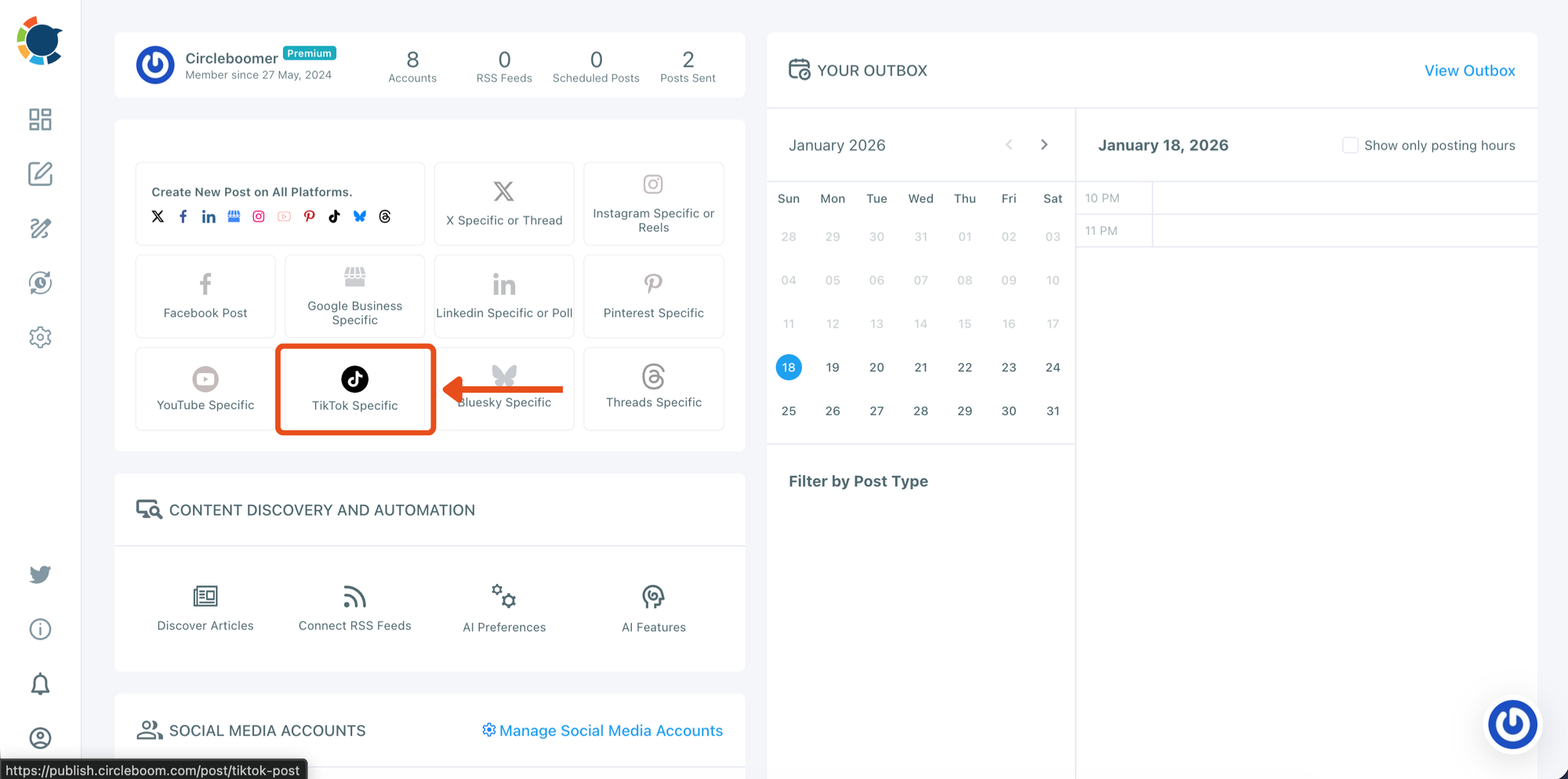
Step #1: Start a TikTok-specific post from the dashboard
From your Circleboom Publish dashboard, go to the post creation area and click TikTok Specific.
This opens the TikTok composer, where you’ll upload your video and prepare it for publishing.
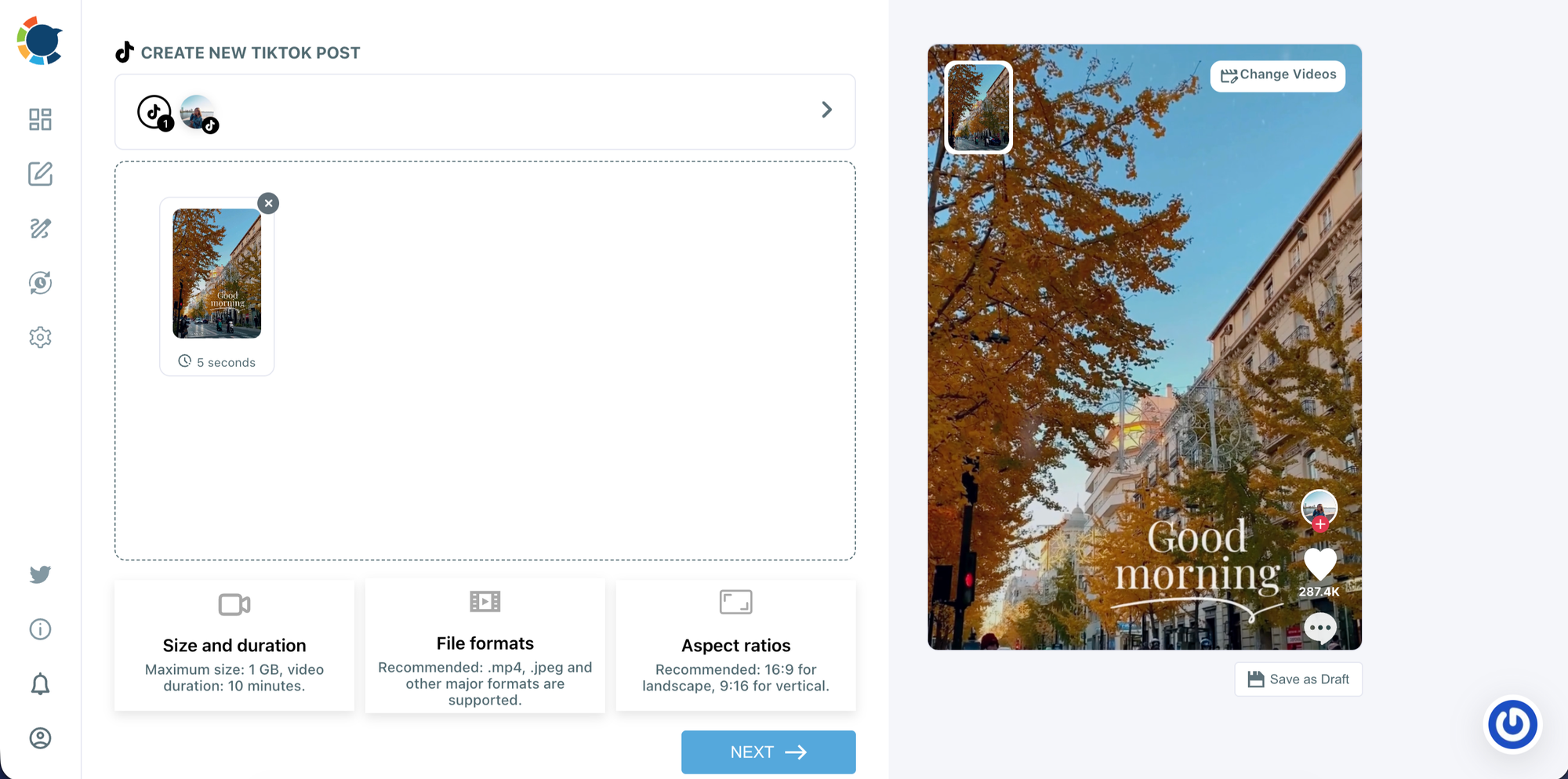
Step #2: Upload your TikTok video and preview it
Drag and drop your video into the upload area (or click to select a file). Once it’s uploaded, you’ll see a TikTok-style preview on the right side so you can confirm the video looks correct before moving forward.
When everything is ready, click NEXT.
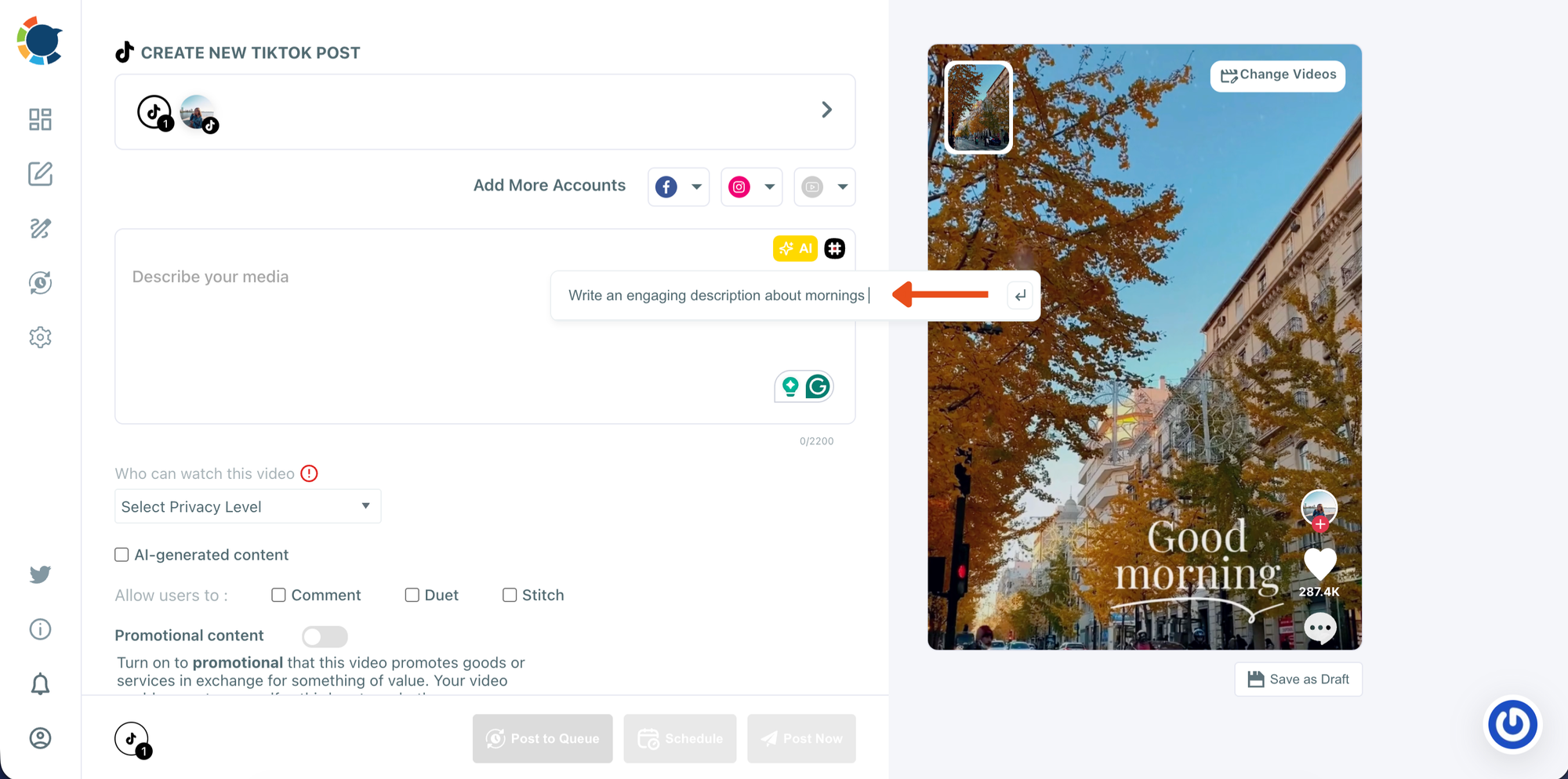
Step #3: Write your description (caption) for the video
After moving to the next screen, you’ll be able to add your caption in the description field.
If you want help writing it faster, use the AI tool to generate a caption idea and adjust it to match your tone.
Step #4: Connect your YouTube Shorts account to cross-post the same video
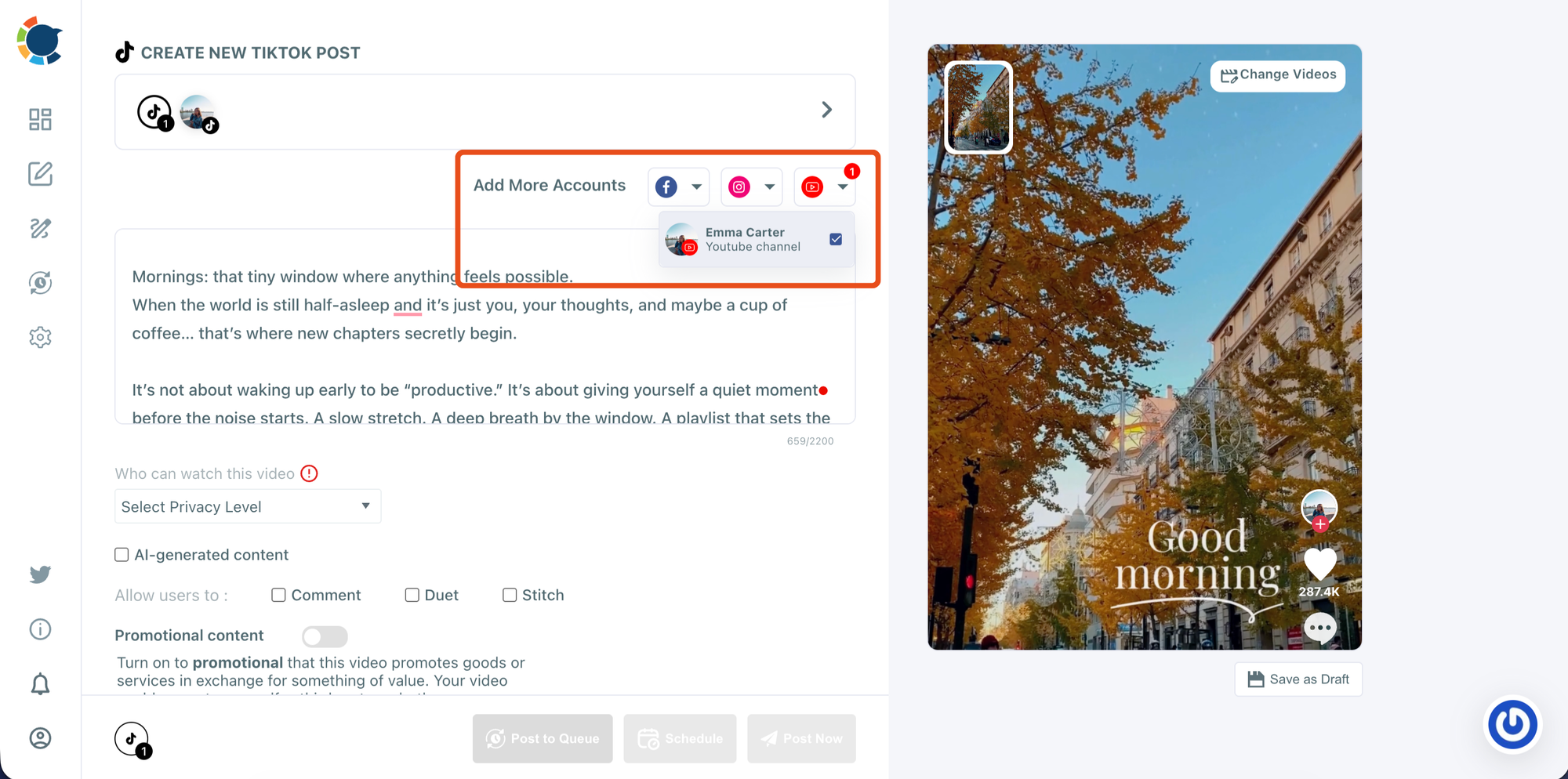
At the top of the composer, click Add More Accounts and select YouTube. Then choose the YouTube channel you want to publish Shorts from.
Once it’s selected, your TikTok video becomes a cross-platform post that can be published to both TikTok and YouTube Shorts at the same time.
Step #5: Adjust visibility and post settings, then get ready to publish
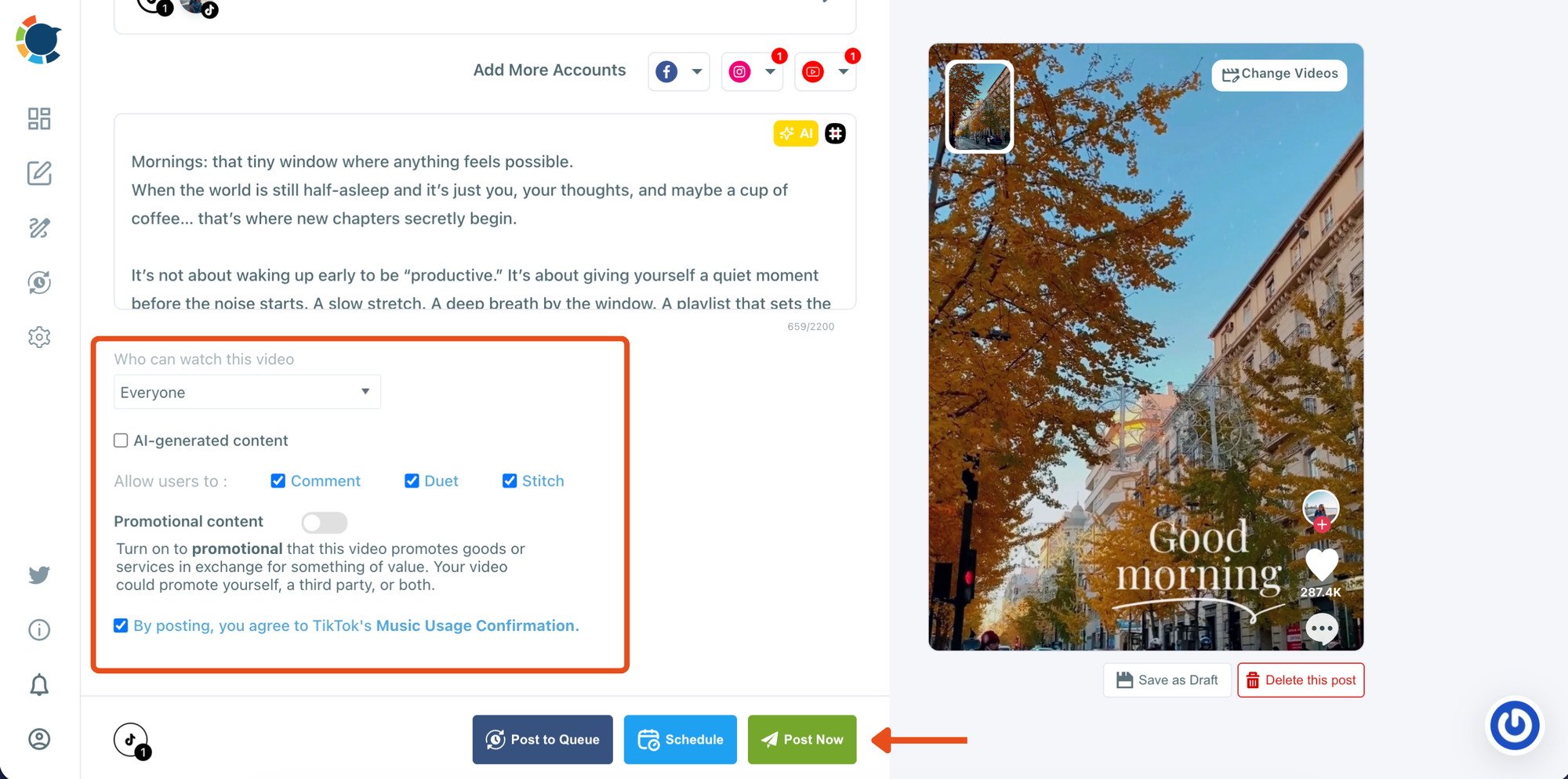
Before publishing, choose who can watch the video using the privacy dropdown.
You can also control interaction settings like comments, duet, and stitch if needed. After reviewing everything, you’re ready to either publish immediately or schedule it.
Step #6: Schedule the post for the best time (or publish instantly)
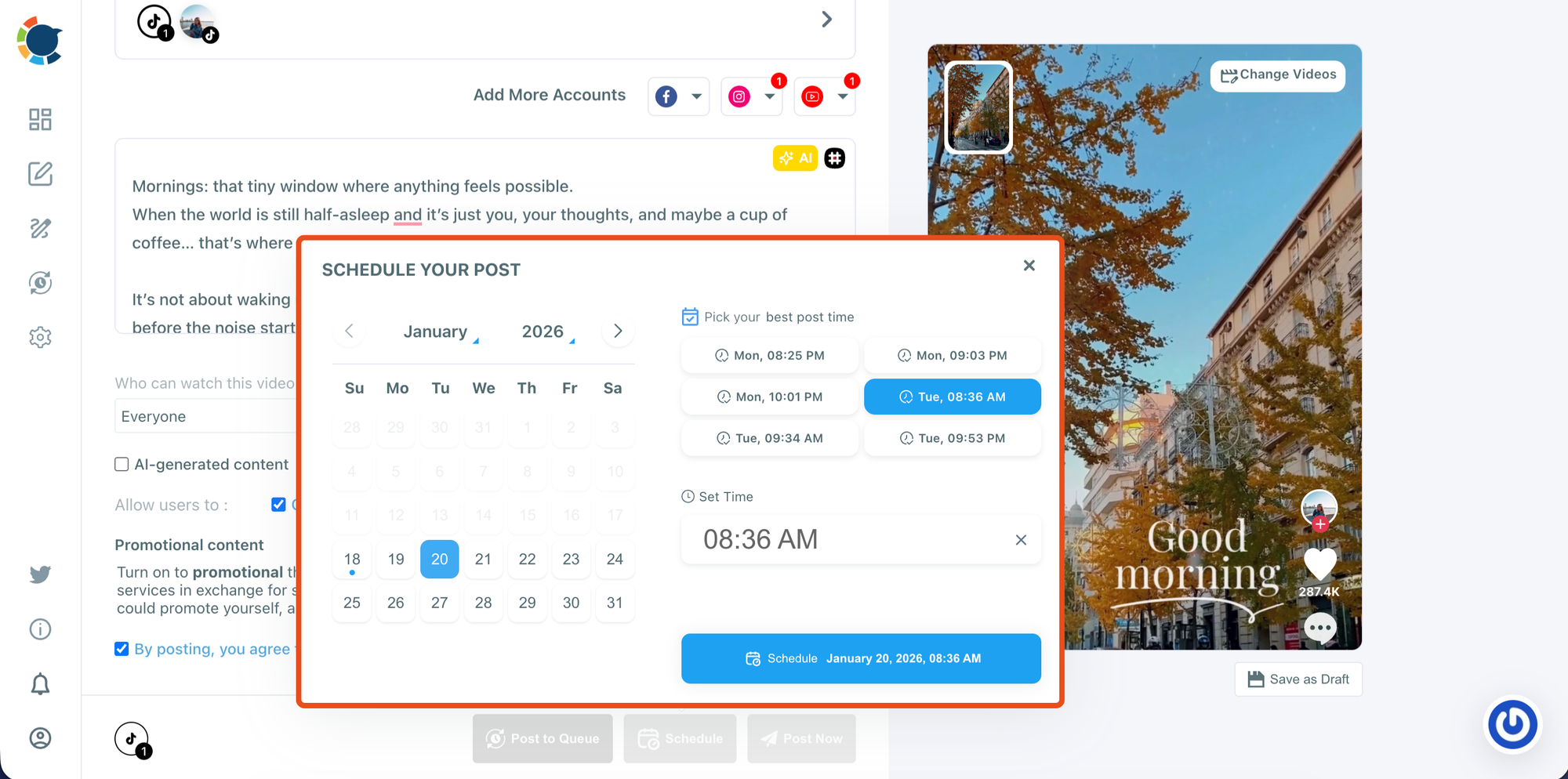
Click Schedule to set a date and time. Circleboom will also suggest the best posting times so you can choose a high-performing slot with one click.
When the date and time are selected, confirm scheduling to publish the same video on TikTok and YouTube Shorts automatically.
Best Practices to Make Cross-Posting Work Better
Cross-posting isn’t about copying blindly. A few small habits can improve results a lot:
Keep your hook strong in the first second: Both TikTok and Shorts reward immediate attention. If your first second is weak, the swipe-away happens instantly.
Don’t overcomplicate captions: Short-form viewers care more about the video than the caption. Keep it direct and clear.
Post consistently, even if it’s not daily: Three times a week consistently beats seven posts in one week and then silence for a month.
Track which platform reacts better: Sometimes one platform will push your content more. That doesn’t mean the other is useless; it means your distribution is working exactly as it should.
 Arif Akdogan
Final Thoughts
TikTok vs YouTube will always be a debate, because both platforms want creators, and both try to reward them in different ways.
But the smartest strategy isn’t choosing one.
It’s using both platforms together, so you can increase discovery, build a bigger presence, and give your content more chances to go viral.
The easiest way to make that sustainable is using a tool like Circleboom Publish, because it lets you link your TikTok and YouTube accounts and share the same video across both platforms from one dashboard.
Once you set it up, your workflow becomes simple:
Create once → publish on TikTok and YouTube → grow on both without extra effort.




)


