X shows you a live follower count and nothing else. No timeline of who started following an account last week, no record of who that account followed back, no history of the relationships that already unraveled. The only way to actually monitor a Twitter account is to build that timeline yourself, outside of X.
What this guide gives you:A repeatable way to track any public account's follower, following, and unfollow activity over timeThe three monitoring layers that turn static profile data into a behavioral signalThe exact Circleboom workflow, from login to alerts, with honest notes on what the official X API will and won't show you
Circleboom monitors any public Twitter account's follow activity over time through official X Enterprise APIs.
Start with monitor Twitter account.
Why X Leaves You Blind to Account Activity
X was never built for longitudinal monitoring. The feed shows a profile's current follower count, current bio, current following number, a snapshot. What the platform refuses to surface is the diff: the accounts that started following yesterday, the three handles this profile quietly followed last week, the mutuals that vanished over the month. If you want any of that, you have to assemble it yourself.
That gap costs anyone reading for signal:
- A competitor's new-follow list reveals who they're courting for partnerships or hiring.
- An influencer's sudden unfollow of a brand is a story in itself.
- A crypto founder following an auditor before a public announcement is a buy signal the market won't see for another week.
None of this is hidden data, all of it is public per X's Following FAQs, but X itself won't organize it for you. Circleboom's own Twitter Follower Tracker handles this logic internally for your own audience, which is why monitoring external accounts needed a separate feature lane. A similar principle shows up in the companion Twitter follower tracker walkthrough: the data is there, but somebody has to diff it for you.
The manual fix breaks on day three. Bookmarking a profile, screenshotting the follower count, writing usernames in a spreadsheet, rechecking every other day, that routine is slow, error-prone, and misses anything that changes and then reverts before you check back.
A real workflow to monitor a Twitter account does two things your eyeballs can't: it snapshots public follower and following data on a schedule, and it diffs each new snapshot against the previous one. What comes out the other side is a timeline of follow events with full profile context attached to each.
How to Monitor a Twitter Account with Circleboom
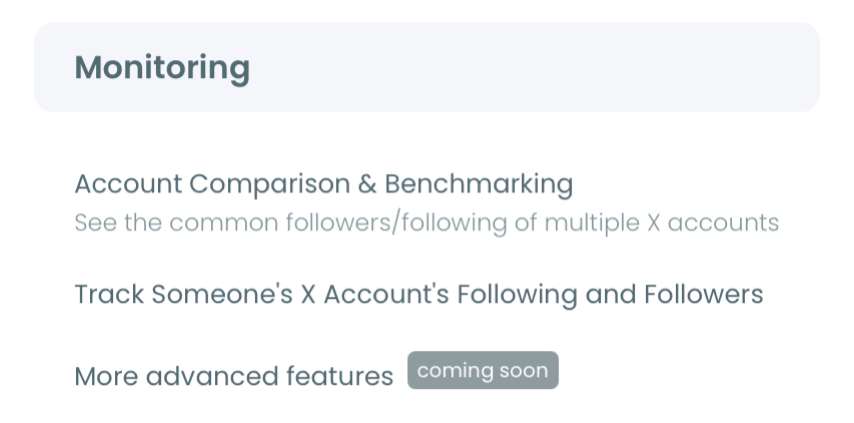
Circleboom's monitoring tools turn follow activity on any public Twitter account into structured timeline data. Under the Monitoring menu, two features work together: Track Someone's X Account's Following and Followers handles the timeline of follow events, and Account Comparison & Benchmark Report compares two accounts side by side.
Both pull from the same public X data, and Circleboom is listed on X's Enterprise customer directory, meaning the monitoring pipeline runs through official API access, not scraping. That matters the minute X tightens its rate limits or suspends unofficial tools.
Launch a Twitter account monitoring run from the Monitoring menu, and the pipeline below starts working quietly in the background. The approach mirrors what the checking someone's new followers on X flow does for adjacent use cases.
The process, step by step.
Phase 1 — Set up Circleboom and pick the account to monitor
- Log in to Circleboom Twitter and connect your X account through official OAuth.
- Open the Monitoring menu from the left navigation, then choose Track Someone's X Account's Following and Followers.
- Enter the public username of the account you want to monitor and confirm the handle. Circleboom validates that the account is public before tracking starts; protected accounts aren't trackable on any platform, since X itself hides that data from non-followers.
Phase 2 — Configure tracking and enable alerts
- Select the tracking types. Circleboom runs three separate monitors for each account: new followers (accounts that start following), new following (accounts the target starts following), and unfollow events. Turn on all three unless you have a narrower focus, since the three signals answer different questions.
- Enable alerts so new activity reaches you without manually reopening the dashboard. Daily cadence fits competitive tracking; weekly cadence fits slower audience research.
Phase 3 — Review results and take action
- Open the results dashboard after the first polling cycle completes. Each detected account shows username, display name, profile image, bio, follower and following counts, tweet count, and account creation date, enough context to triage without clicking through to X. From there you can follow relevant accounts, add them to Twitter lists, or export the data as a CSV for deeper analysis.
That sequence is what makes the process hold up: the login earns official-API access first, the configuration narrows monitoring scope before polling starts, and the dashboard gives full profile context at review time instead of burying it one click deep. Skip the tracking-type selection and half the signal never reaches you; skip alerts and you're back to manually reopening the tab every morning.
Quick recap:
- Log in and connect your X account.
- Open the Monitoring menu and enter the public handle.
- Turn on new-follower, new-following, and unfollow tracking.
- Review the results dashboard and export or act on the detected accounts.
Demo walkthrough: how the dashboard surfaces new-follower activity on a monitored account in one scroll.
What Monitoring Actually Unlocks
Once the tracking pipeline is running, your relationship with the account's activity changes. You stop refreshing a profile to check if anything moved. You start noticing patterns: the types of accounts a competitor follows before a product launch, the sudden follower spike that precedes a campaign going public, the quiet unfollowing wave that often precedes someone leaving the industry. The recently-followed timeline on X is often the earliest behavioral signal an account gives off, earlier than any tweet.
The three monitoring layers give you distinct signals. The activity layer shows you what an account publishes, the loudest and most-watched and least-informative data. The relationships layer shows who that account follows and who follows them back, quieter, more predictive, often the real intent signal. The audience composition layer shows the shape of the account's followers over time, drift toward new niches, overlap with your own audience, geographic shifts. When all three layers update together, account behavior reads like a narrative instead of disconnected notifications.
Practical patterns emerge fast. If you're watching an investor, the sequence of new follows tends to match their next portfolio moves. If you're watching a competitor, their hiring direction leaks through their follows weeks before a press release. If you're watching a creator, comparing the number of new followers week-over-week separates organic growth from paid spikes.
For the deepest read on any single account, pair monitoring with Circleboom's Twitter Account Analysis, which surfaces follower demographics, interests, and quality scores alongside the follow-activity timeline. The tool doesn't care whose account you're pointing it at, as long as it's public.
What to Do Next
The fastest path to a working monitor is three decisions:
- Pick 1–3 accounts where follow activity would actually change what you'd do next, a competitor, an investor, a creator, or a hiring target.
- Turn on all three tracking types for each account; tighten scope later once you see the volume.
- Set alert cadence to daily for active competitive work, weekly for slower-moving audience research.
A thin monitor across ten accounts is noise. A deep monitor on three accounts is a signal.
FAQ
How often does Circleboom refresh tracking data?
Tracking runs on a continuous polling schedule, the system captures a fresh snapshot of each monitored account's followers and following lists at regular intervals and compares it against the previous snapshot. Alert cadence (daily or weekly) is a separate setting that controls how often detected changes reach your inbox, not how often data is actually captured.
Can I monitor a private (protected) Twitter account?
No. Protected accounts restrict their follower and following lists to approved followers only, so neither Circleboom nor any other third-party tool can read that data, since the restriction is enforced on X's side. Circleboom only tracks public accounts, which is a platform boundary, not a product limitation.
Is monitoring another person's public account safe and compliant?
Yes, for public accounts. All data Circleboom surfaces is already public on X; the tool organizes it into a timeline instead of requiring you to manually refresh the profile. Every operation runs through official X (Twitter) Enterprise APIs, which means rate limits are respected, no scraping is involved, and the monitoring workflow stays inside X's terms of service.