
Following someone on Twitter is not a neutral action. Every follow sends a signal about your interests, your niche, and the kind of network you are building. Over time, these signals compound and directly affect both the quality of your timeline and how your account is positioned by the algorithm.
When a following list grows without intention, the impact isn’t immediate. It shows up gradually as a noisier feed, weaker engagement signals, and a growing sense that your account lacks focus.
In many cases, the problem is not what you are posting, but who you are connected to.
This is where unfollowing accounts that do not follow you back becomes an important part of long-term account maintenance.
Not every non-follower should be unfollowed
One of the biggest misunderstandings about unfollowing non-followers is assuming it should apply to everyone. That approach usually causes more harm than good.
Some accounts are followed purely for the value they provide, not for reciprocity. For example:
- major news and media accounts
- large influencers and public figures
- niche experts whose content you actively read
These accounts add value regardless of whether they follow back.
The situation is very different with peer-level accounts. When an account is similar in size, operates in the same niche, and is clearly building its own network, a lack of follow-back often signals a one-sided connection.
Over time, following too many such accounts creates imbalance and weakens the overall structure of your network.

Why unfollowing non-followers is not about ego
Unfollowing is often framed as an emotional reaction, but in practice it is a structural decision.
Twitter evaluates who you follow to understand your interests, your community, and your relevance within certain topics. An unfocused following list sends mixed signals, while an intentional one strengthens your positioning.
When your following list includes many peer-level accounts that show no interest in mutual connection, your account begins to look less intentional within its niche. Unfollowing in this context is not about demanding attention.
It is about removing noise and strengthening the signals your account sends.
Why doing this manually doesn’t work
In theory, unfollowing accounts that don’t follow you back sounds simple. In reality, Twitter does not give you a clear way to compare followers and following. You are left with scrolling long lists, opening profiles one by one, and trying to remember who follows you back.
Once your following count grows, this method breaks down. You miss accounts, make incorrect assumptions, and eventually stop reviewing altogether.
Manual unfollowing fails not because people are careless, but because the platform does not surface the data in a usable way.
 Altug Altug
The approach I use: selective unfollowing, not blind cleanup
The key to unfollowing safely is clarity before action. I never unfollow based on assumptions. I want to clearly see the relationship between my followers and my following list before making any decision.
At a high level, my logic looks like this:
- keep high-value informational and influencer accounts
- unfollow peer-level accounts that don’t follow back and don’t engage
- avoid aggressive, emotional mass unfollowing
This approach keeps the network focused without shrinking it unnecessarily.
The tool I use to find who doesn’t follow me back
This is where Circleboom Twitter becomes really useful.

Circleboom Twitter is an official X Enterprise developer, which means it works within X’s approved system instead of relying on risky or aggressive methods. That matters when you’re dealing with follow and unfollow actions, because doing this the wrong way can create long-term problems.
Keep in mind that the API provides a more accurate real-time data stream than the X interface itself. While the platform UI may experience lag, the API captures and reflects new developments instantaneously.
Circleboom has the official Enterprise API, we don't scrape data from X!
What makes Circleboom practical is how clearly it shows the relationship between your followers and your following list. It analyzes both lists and then displays which accounts are not following you back in a dedicated view. Instead of guessing or checking profiles one by one, you see the full picture in one place.
Circleboom gives you control at every step. You can:
✅ review all non-followers in a single list
✅ keep high-value accounts like influencers or news sources
✅ focus only on peer-level accounts that don’t follow back
When you’re ready, Circleboom lets you unfollow those accounts with one click. The unfollowing process runs automatically in the background and respects platform limits, so you don’t have to worry about pacing or safety.
Overall, Circleboom turns unfollowing non-followers from a manual, frustrating task into a simple, controlled workflow that fits naturally into regular account maintenance.
How to Unfollow Everyone Who Doesn’t Follow You Back with Circleboom Twitter
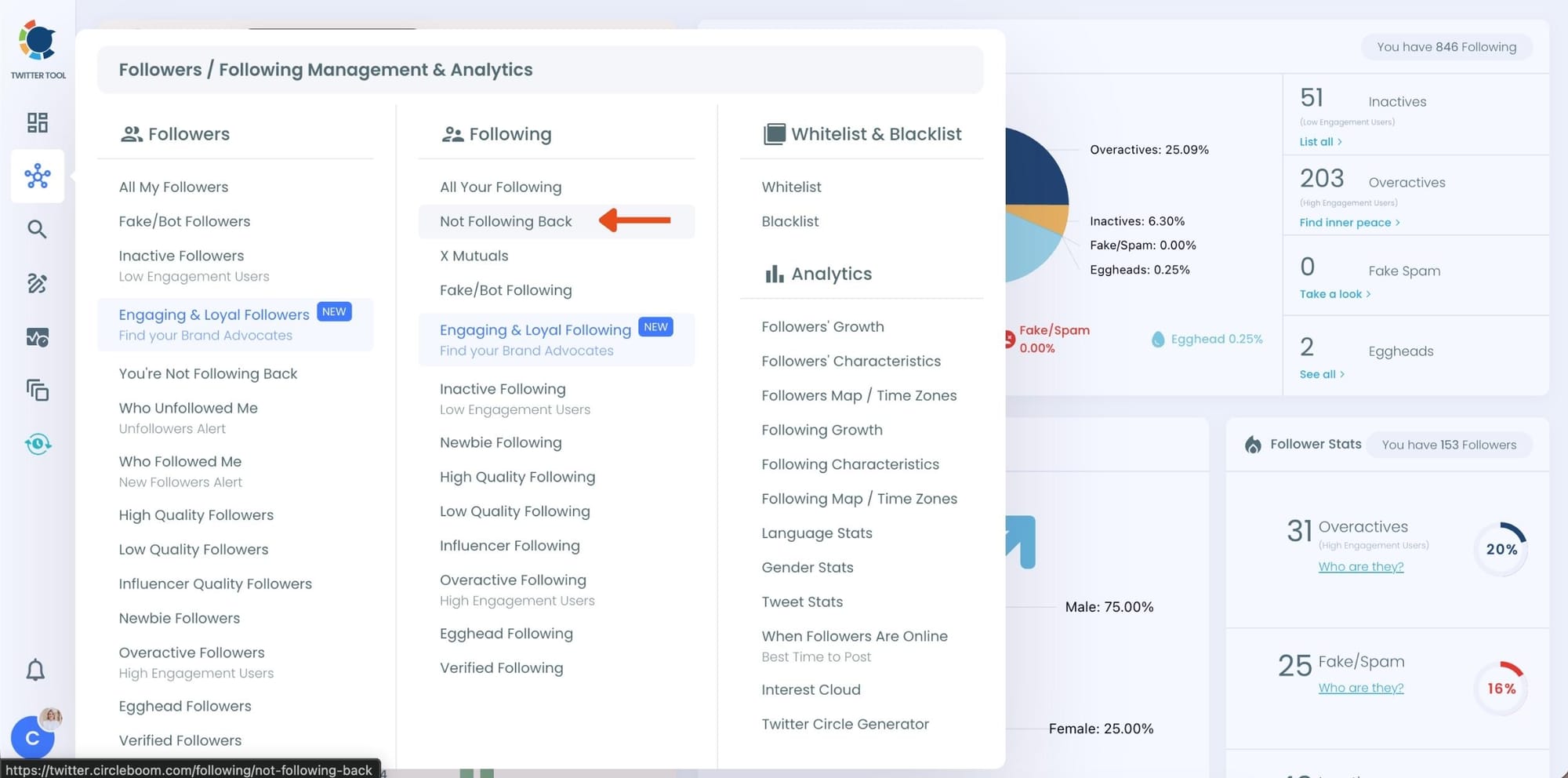
Step #1: Go to “Not Following Back” from the dashboard
After logging in to Circleboom Twitter, open the main dashboard and navigate to the Not Following Back section.
This is the dedicated area where Circleboom analyzes your account and focuses only on the accounts you follow but that don’t follow you back.
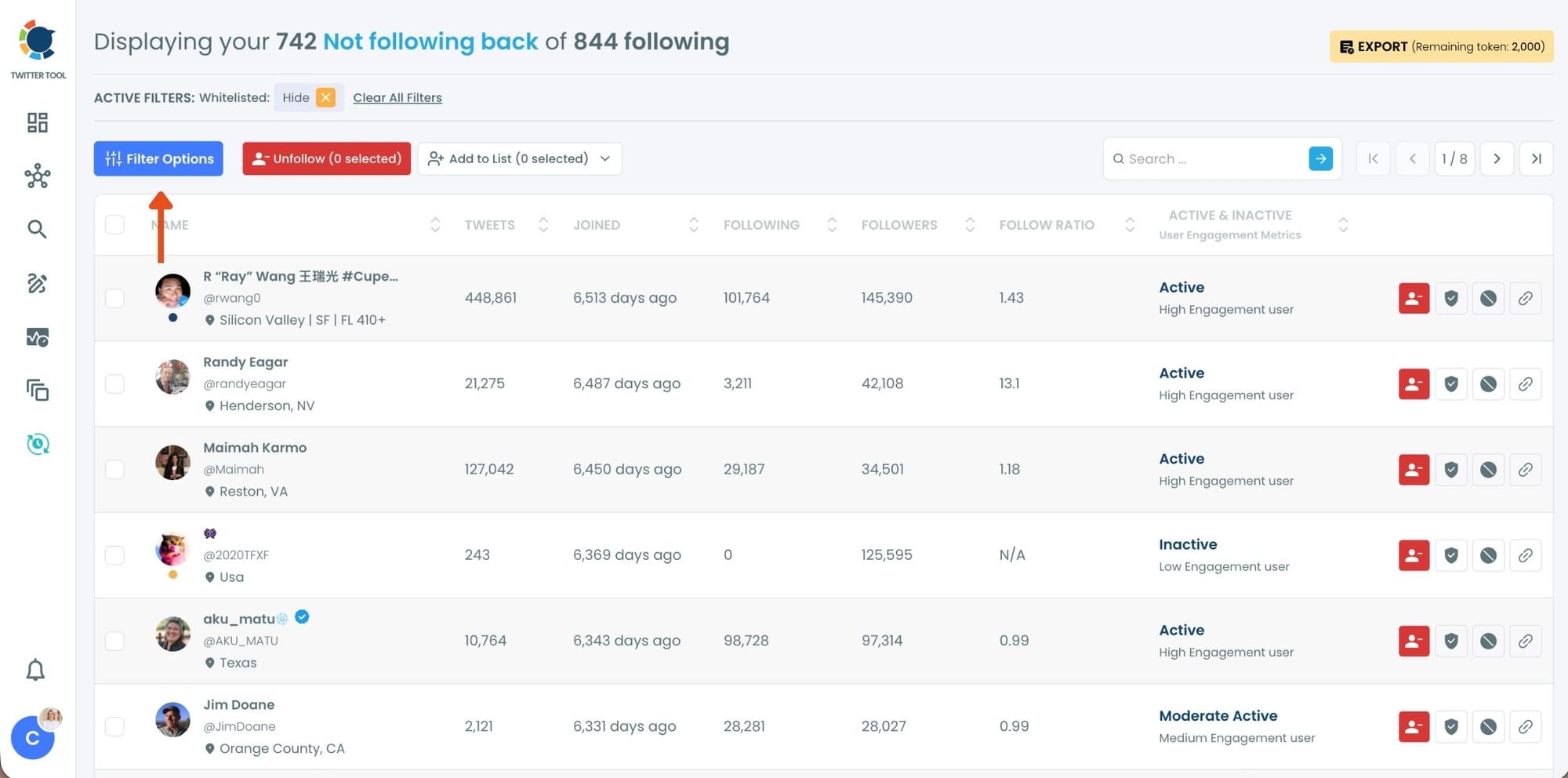
Step #2: Review the list of accounts that don’t follow you back and click “Filter”
Circleboom automatically lists all the accounts you are following that are not following you back.
Instead of acting immediately, click on the Filter option to narrow the list and make more intentional decisions.
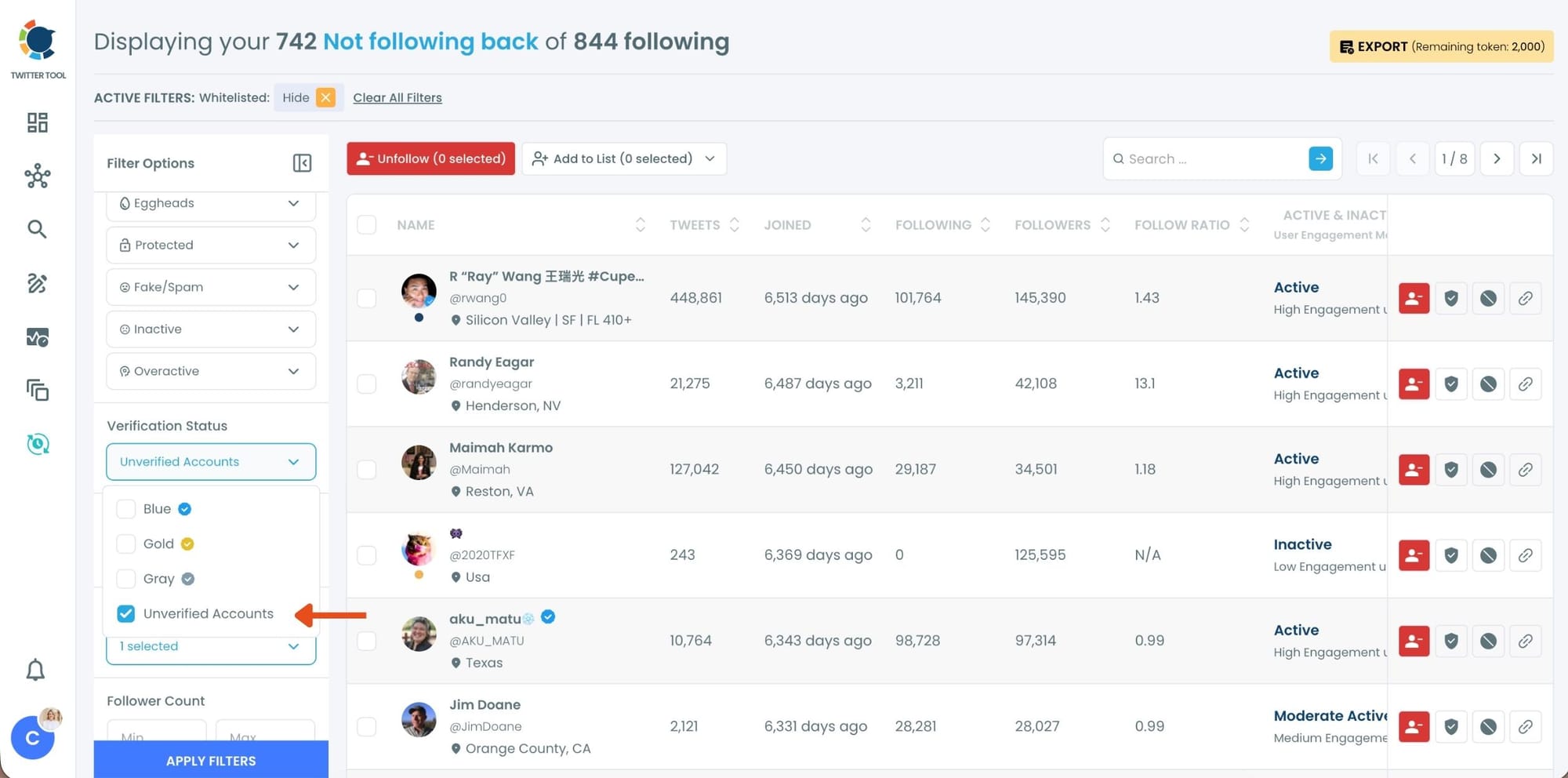
Step #3: Apply filters to refine the list
In the filter options, select the criteria you want to focus on. In this case, choose filters such as unverified accounts, inactive accounts, and fake accounts, then apply the filters.
This helps you avoid unfollowing valuable profiles while focusing on low-quality or irrelevant ones.
Step #4: Select the accounts and unfollow
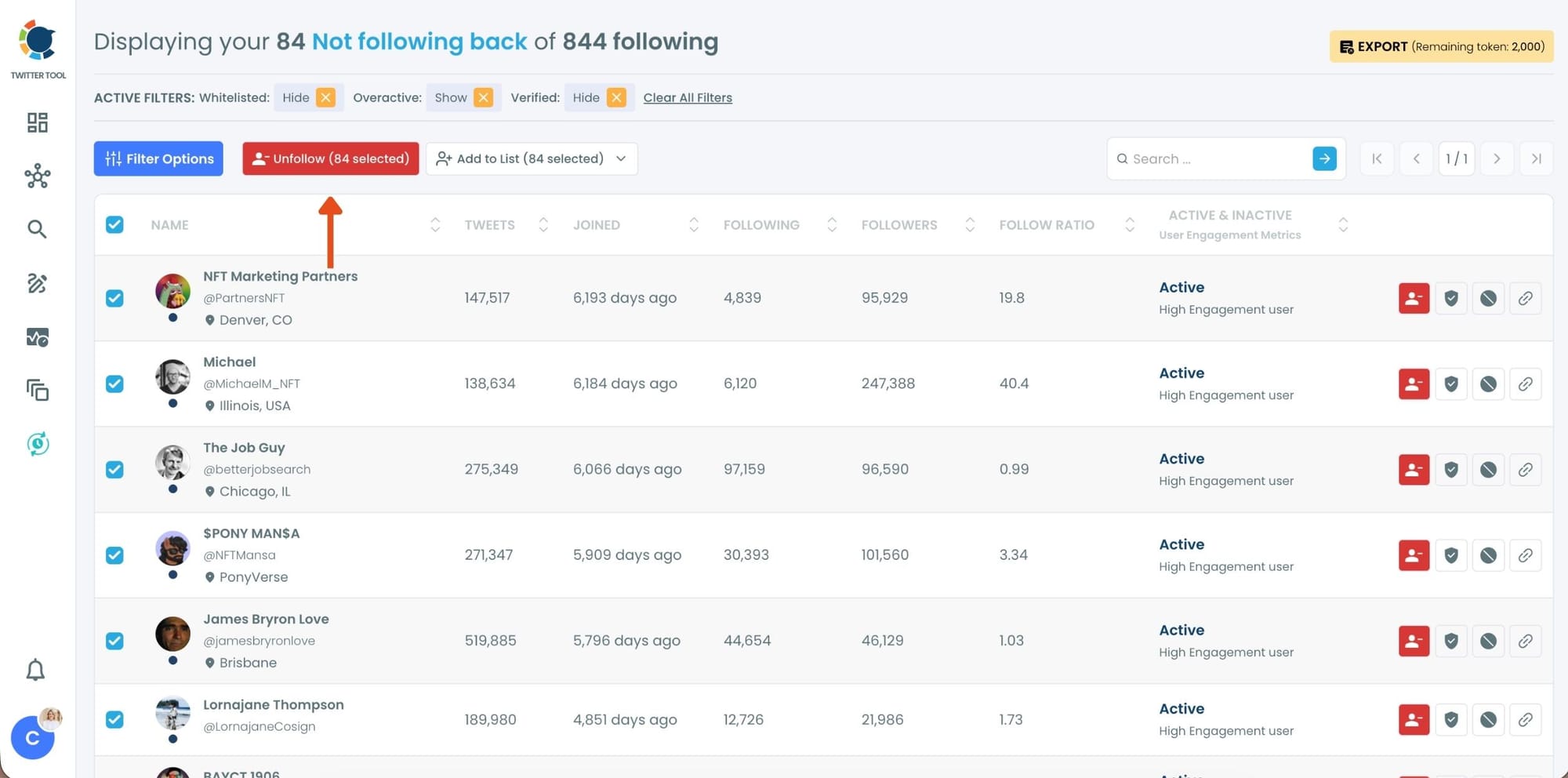
After applying the filters, Circleboom displays the refined list of accounts.
You can unfollow accounts one by one if you want full control, or select all accounts at once and click the Unfollow button to proceed in bulk.
Step #5: Confirm the unfollow action
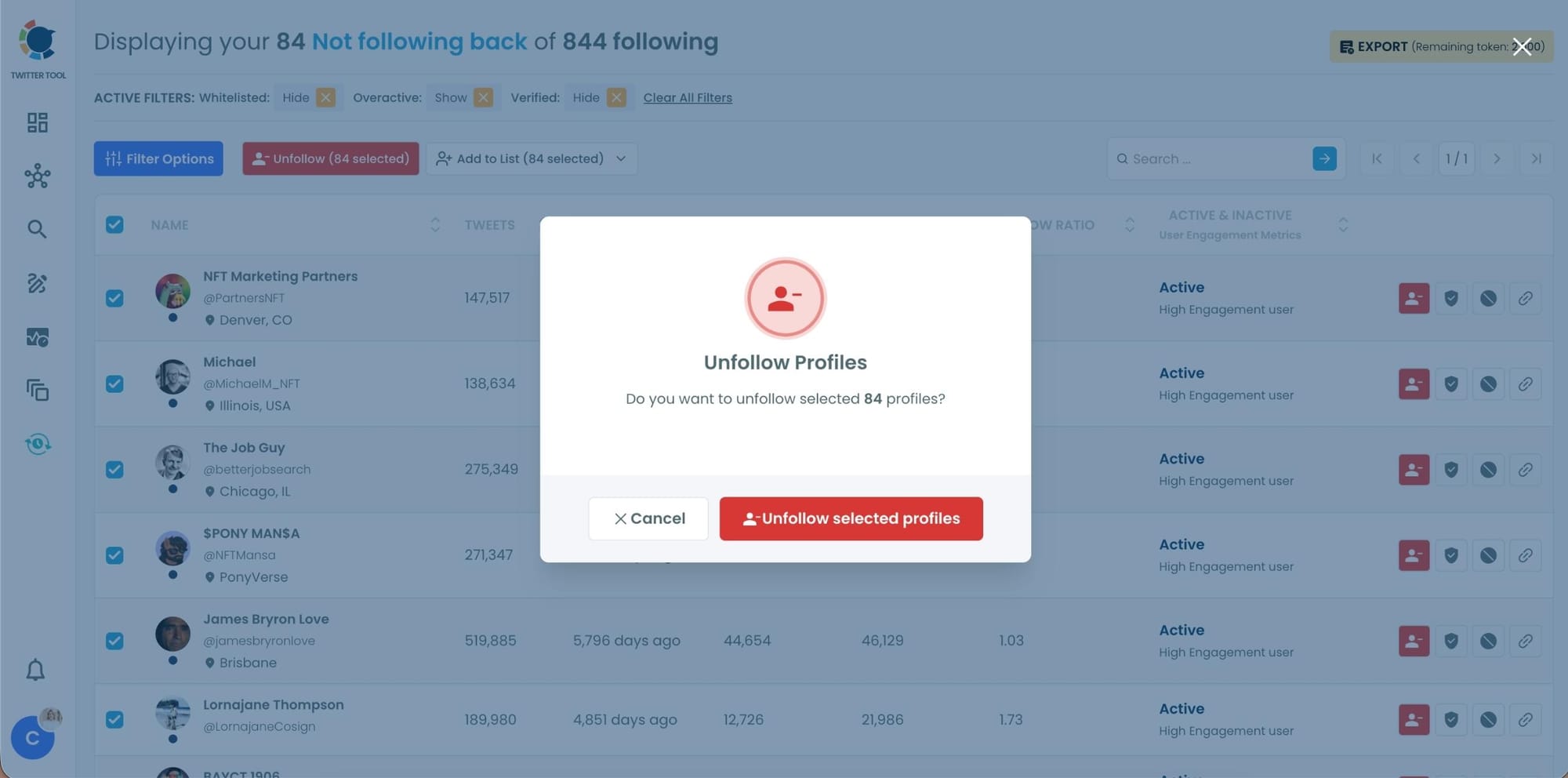
Finally, confirm the unfollow action.
Circleboom handles the unfollowing process automatically in the background, following platform limits to ensure everything is done safely and smoothly.

Additional Tip: Set Unfollower Alerts
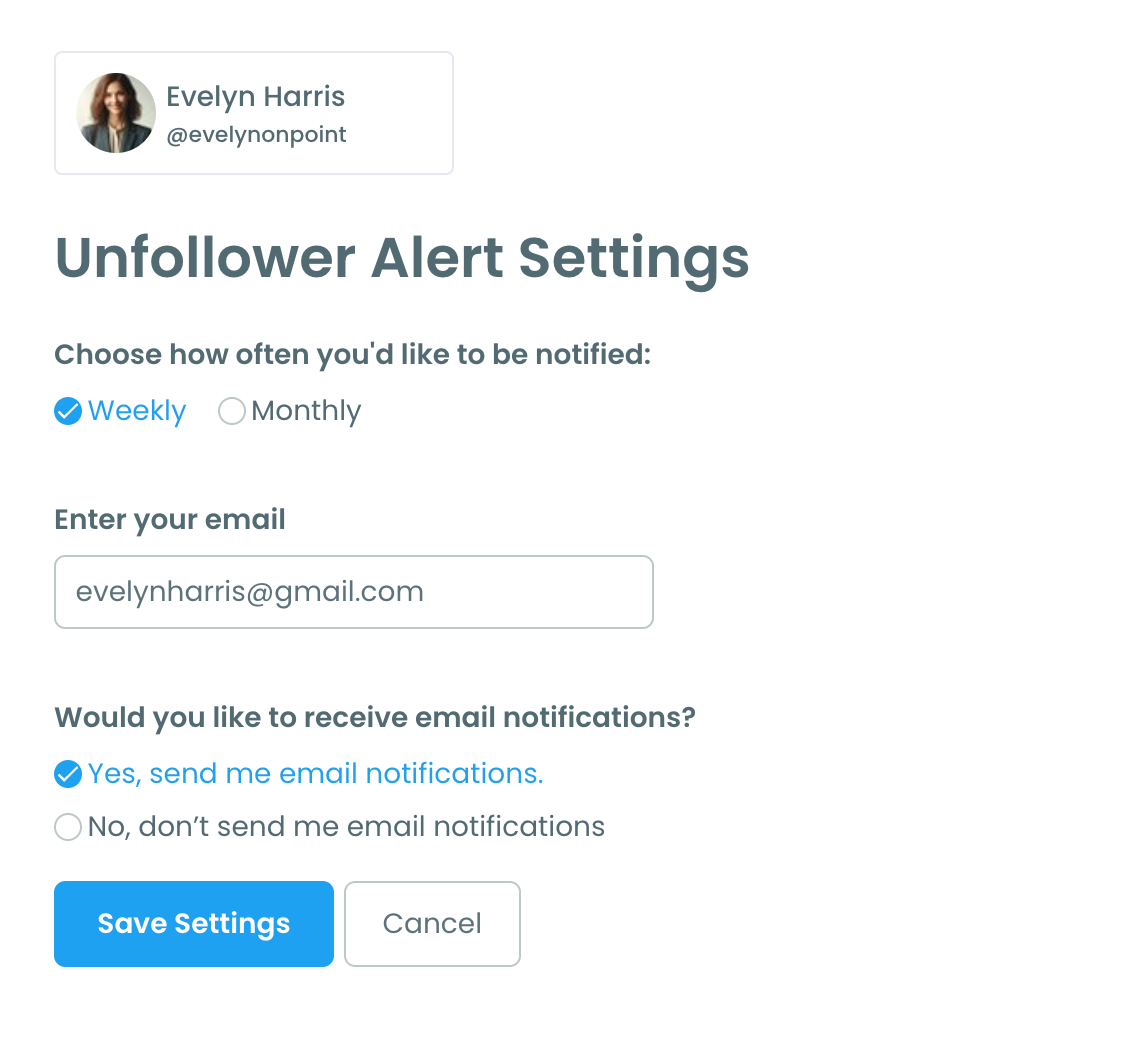
Want to stay ahead of unfollowers? Circleboom Twitter has an Unfollower Alert function that sends automated weekly updates if someone unfollows you.
What changes after you unfollow non-followers
After unfollowing non-followers, especially peer-level accounts, the difference is noticeable. Your following list becomes more intentional, your timeline feels cleaner, and your account sends clearer signals about its niche and purpose.
You also gain mental clarity. You stop wondering who follows you back and who doesn’t. Account management feels controlled and deliberate instead of reactive.
Why a balanced follow ratio matters on Twitter
A balanced follow ratio is not about vanity or aesthetics. It is about perception and trust. Accounts with extreme imbalance often appear unfocused or transactional, while accounts with a healthier balance tend to look intentional and credible.
 Altug Altug
Maintaining this balance helps support long-term account health and strengthens how your profile is perceived within your niche.
Common mistakes that cause problems
Unfollowing becomes risky only when it is done without strategy. The most common issues happen when people:
- unfollow everyone blindly
- remove valuable informational accounts
- act too aggressively in a short period of time
Tools like Circleboom provide visibility, but judgment and pacing still matter.
Unfollowing as regular account maintenance
Unfollowing non-followers should not feel aggressive or negative. It is simply regular account maintenance. Just like reviewing inactive apps or outdated subscriptions, reviewing your following list ensures your network reflects your current goals.
Using Circleboom Twitter to identify and unfollow accounts that do not follow you back turns unfollowing into a controlled, data-driven process rather than an emotional reaction. When done correctly, unfollowing strengthens your account instead of harming it.

