

Stalkers are everywhere online, especially on X. You can never really tell who’s scrolling through your profile, checking who you follow, or even drawing conclusions from your following list.
It’s a strange feeling when someone mentions, “I saw you followed that account yesterday.” It happened to me once, someone I barely knew referenced a profile I had just followed that morning.
That’s when I realized how exposed the “Following” tab can make you feel.
Why Your Following List Can Be a Problem
Your following list says a lot about you, your interests, beliefs, professional connections, and even daily habits.
That visibility can easily be misused:
🔵 Competitors might map your sources, clients, or influencers.
🔵 Acquaintances might judge you by who you follow.
🔵 Harassers or bots might target your network or contacts.
🔵 People might misinterpret your following activity without context.
Unfortunately, X doesn’t offer a “hide following” switch. Even if your account is private, followers can still see the list. So what can you actually do?
The Hidden Trick: Use Private Lists
There’s a practical workaround that most users overlook — private Lists.

Lists on X are like custom timelines: you add accounts to a list, and their tweets appear in that feed.
If you make it private, no one else can see who’s inside.
That means you can unfollow everyone publicly, keep your “Following” count nearly zero, and still read tweets from all your favorite accounts via your private list.
Why You Shouldn’t Do It Manually
You could add everyone you follow to a private list manually, but if you follow hundreds or thousands of accounts, that’s impossible to do efficiently.
X’s built-in list tool forces you to add each account one by one, which is time-consuming and prone to errors.
That’s where Circleboom List Manager, an official Customer Developer of X, becomes a lifesaver.
The Easy Way: Hide Your Following List with Circleboom Twitter
Circleboom Twitter helps you automate the entire process safely and easily.

Here’s what it does:
✅ Automatically loads your entire following list with detailed stats like activity, influence, and more.
✅ Lets you select all accounts at once and add them to a private X List in one go.
✅ Once they’re safely listed, you can unfollow all of them in one click, all within X’s API limits, so your account stays safe.
You’ll still be able to read everyone’s tweets through your private list, but nobody will see who you’re following anymore.
Step-by-Step: How to Hide Your Following List Using Circleboom
Step #1: Log in to your Circleboom Twitter account.
If you don't have a Circleboom account, you can create one in seconds to manage your X profile with the excellent features of Circleboom Twitter.

Step #2: Navigate to the left menu and find "Following" there.
Then you should click on "All Your Following". Circleboom will list all your X friends.

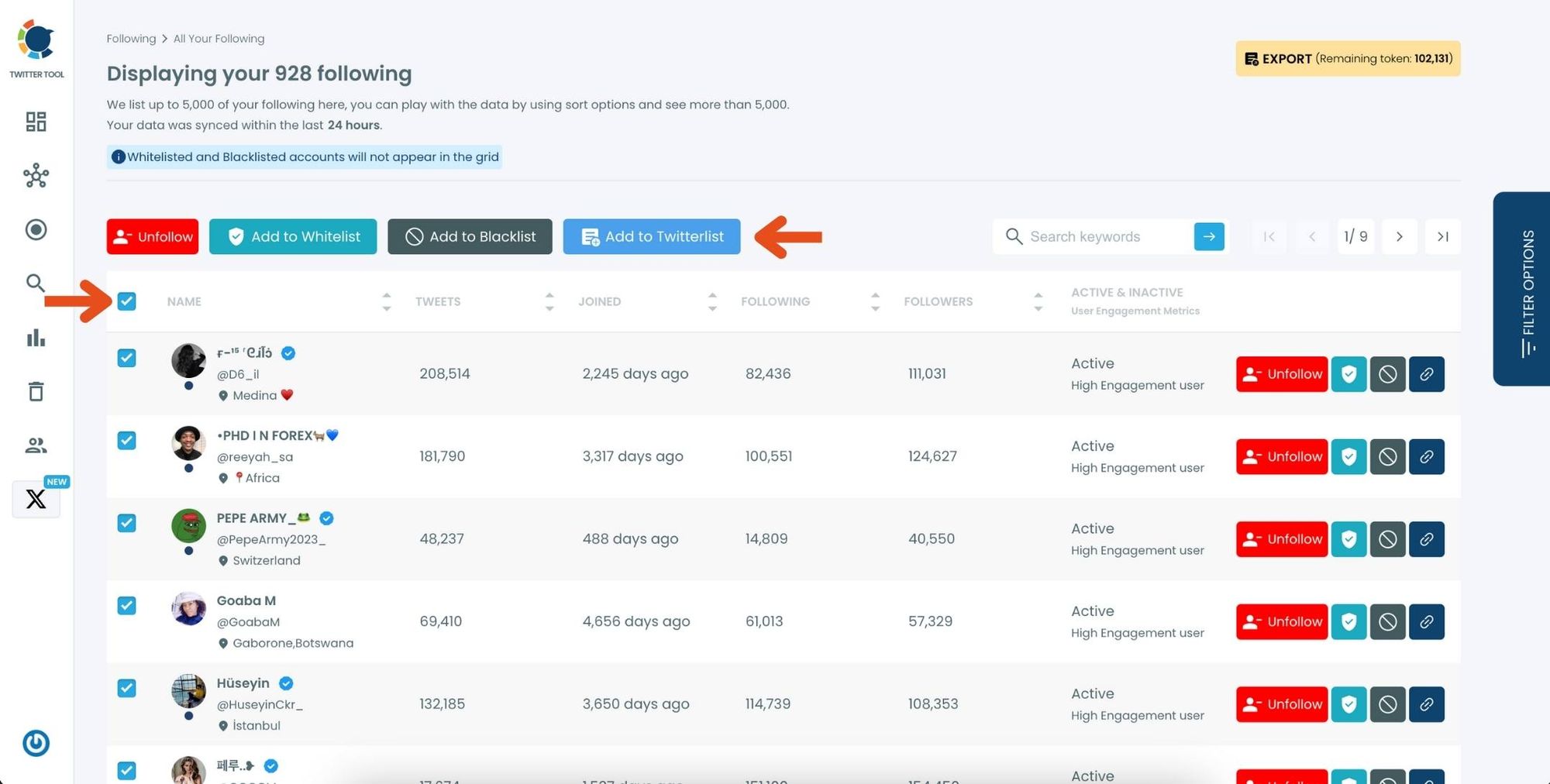
Step #3: Here is the list of your following. You can select all of them or some.
Once you select them, you can click on the "Add to Twitterlist" button ( blue one ). You can create a new X list or add them in bulk to an existing list.
Create a new X list or add your following to an existing list.

Now all your following are on the new private list.
The next step is unfollowing them.
Step #4: By clicking on the red "Unfollow" button, you can unfollow all the followings.

Now, only you can see this X list and follow the updates from these specific users you have added to your list.
As the X list is only visible to you, it is an effective way to hide who you follow on X.
Tips for Keeping Your Following List Private
➡️ Use multiple Lists: Create separate private Lists for different topics (e.g., “News,” “Friends,” “Crypto,” “Design”). It helps you stay organized while keeping them all invisible.
➡️ Keep a small public following: Follow only your closest friends, brand account, or a few trusted sources publicly; this makes your profile look natural while hiding the rest.
➡️ Don’t rename your private Lists to reveal topics: Even the List title can hint at who’s inside; choose neutral names like “Reading” or “Favorites.”
➡️ Update your Lists regularly: As you follow new interests, remember to add new accounts to your private List instead of following them publicly.
➡️ Avoid adding inactive or spam accounts: Use Circleboom’s filters to clean your following before adding them to a private List.
➡️ Be cautious with engagement: If you frequently like or reply to tweets from your private List, people may still notice a pattern and infer who you follow.
➡️ Use Circleboom Following/Follower Manager: Review your following list periodically to detect fake or inactive accounts before moving them to your private List.
Final Thoughts
You can’t technically “hide” your following list on X, but you can make it invisible in practice. By moving everyone into a private List and unfollowing them, you maintain your privacy while keeping your feed intact.
And doing it manually is nearly impossible; that’s why I used Circleboom Twitter, the official developer tool of X, to automate the process.
It protected my privacy, cleaned my profile, and made my account look perfectly minimalist.
If you want to keep your following list private and your reading habits personal, try Circleboom Twitter today, it’s the easiest, safest way to do it.

