

Social networks have long evolved from being merely communication platforms to something much bigger. Today, instead of using traditional search engines and visiting sites, people use social networks to actively search for information and even buy goods.
Users already spend most of their time on social networks, so why bother opening an additional operating system tab to access a search engine to ask a question? Besides, there is more trust in social networks, as this is where people discuss things openly and share their authentic experiences.
However, visibility on social networks increasingly depends on algorithmic ranking systems similar to those used in Google and Yahoo. In simple terms, social networks function as search engines of their own kind.
That’s why social SEO becomes vitally important. You can learn how to get more reach on social media by following this comprehensive guide that features five core social SEO optimization strategies.

What Is Social SEO and Why It Matters
Some seven years ago or more, people used Google to ask all sorts of questions. Back then, they went to TikTok to have fun, to watch videos, and to write comments.
Today, ask a teenager where they search for goods, and chances are they’ll say on X or Instagram. People want to be entertained, and they want a single space for everything. They choose social media over traditional search engines.
Social SEO is simply structuring and organizing your social content in a way that makes it attractive to social engines’ search algorithms. Similar to traditional SEO, social media SEO relies on trust signals and ranking systems to display content to social media users.
These signals usually include things like:
- Keywords appearing in captions, hashtags, and transcribed words people speak in social media videos.
- Engagement signals such as downloads, saves, shares, and comments.
- Social account authority fueled by constant activity and audience engagement.
- Content format performance, especially for short-form video.
Social networks have incrementally turned into search engines, often more advanced than their traditional counterparts. Social SEO becomes a must-have skill to appear trustworthy to search algorithms and to appear in search results.
In some cases, for instance, in eCommerce platforms like Etsy, starting a business without active promotion on Pinterest and Instagram is like playing a football game handicapped by will, e.g., with your legs tied with a rope.
 Altug Altug
How Social Media Platforms Use Search and Discovery
Let’s now explore how search and discovery work on popular social media platforms. In particular, you’ll learn how social platforms’ algorithms rank content, understand the role of keywords, and user engagement signals.
How Social Media Algorithms Rank Content
Every social media is slightly unique due to its proprietary ranking algorithms, but the core of its search and discovery logic is common and surprisingly simple — show people what they are most likely to read, watch, and listen.
This mechanism of content selection, processing, and display is based on a deep understanding of people’s search behavior and intent behind each particular request.
Contemporary ranking algorithms increasingly behave like professional human sociologists, marketers, and psychologists all in one pack.
Take TikTok as an example. When a new video is uploaded, the platform doesn’t instantly push it to millions of viewers. Instead, it shows the clip to a small test audience first. If that group watches the video until the end or interacts with it, the algorithm expands its reach step by step.
In that case, the fate of the content largely depends on a few measurable signals:
- Watch time and whether people actually watch the clip till the end.
- Comments, shares, and saves in the first minutes and hours.
- Keywords in titles, captions, hashtags, and spoken/transcribed audio.
- The authority of the creator, which is derived from the performance of their previously published content.
This assessment of the content is happening on the fly or in real time — the more engagement a particular piece of content creates in the first hours of its publication, the higher the ranking position of this content in the social media’s search results.
Hashtags vs Keywords in SEO for Social Media
Hashtags used to be the main tool that helped content get discovered on social media. When you posted about travel to Brazil, you’d typically support your post with hashtags like #BrazilTravel, #VisitBrazil, #ExploreBrazil, #BrazilAdventure, and others, which helped your post appear in relevant feeds.
Today, however, social SEO discovery also depends on something more traditional for SEO, namely, on keywords.
Modern social platforms’ search algorithms, powered by AI, understand message content, read images, and even understand words in videos. So, keywords work in every type of content, and they complement traditional hashtags.
There is no hashtags vs keywords war, really. Both are the two equally effective weapons in every social SEO practitioner’s arsenal. Here is how they differ:
- Hashtags group content into broad thematic categories.
- Hashtags help posts appear in trending discussions or topical feeds.
- Keywords describe the exact topic behind users’ queries.
- Keywords help algorithms match content to specific search queries.
Imagine a gamer posting a clip testing a budget gaming mouse. Writing “budget gaming mouse test” in the caption gives the algorithm a clear keyword anchor. Hashtags like #gaminggear, #pcgaming, and #mousereview help push the clip into gaming-related content feeds.
User Engagement Signals and Their Impact
To understand what social platforms search engines truly value, forget for a moment about hashtags and keywords. Observe the life of an average post. With time, you’ll notice something remarkable, constant sound, the vibe of user emotions surrounding the lifespan of a post.
User behavior comes to the surface as the real currency of human relationships on social media. People comment, share, hate, like, bookmark, and delete posts. The algorithms track
User behavior by these various engagement signals and rank content based on how it engages the audience.
Social media platforms push the content into recommendations primarily based on the following engagement signals:
- Likes, which indicate immediate interest.
- Comments showing that a piece of content captures attention and hits users’ pain points.
- Shares, suggesting the content is viewed by the readers as valuable enough to be presented to their friends.
- Saves or bookmarks, often interpreted as delayed interest signals.
Platforms’ smart engines continuously observe and evaluate content based on how people interact with it. The more successful you are at driving engagement, the higher the chances that your content will be placed on top of people’s news feeds and in their recommended items to watch.
Core Social SEO Optimization Strategies
All the above-mentioned knowledge can be essentially condensed into five distinct strategies and channeled into achieving more reach on social media. Let’s explore how to use strategies, starting with the key one, building authority through engagement and community signals.
Building Authority Through Engagement and Community Signals
To master this SEO social media strategy, it helps to think of authority as a reputation system. Just like in the pre-digital PR, you build your reputation on social media through consistent and positive communication and engagement with your audience.
The more people respond to your encouragement and community-building signals, the more confident the search algorithms become in recommending your page or post to others.
Real, i.e., lasting results don’t come from a single successful engagement act; they come as a result of continuous activity aimed at building a strong positive reputation for your business, organization, or personal brand.
Examples of such actions include:
- Replying to comments quickly. In the first couple of hours after publication, read and respond to all worthy (positive or negative) comments to keep the engagement high.
- Asking specific questions in captions. Oftentimes, people need to be reminded that they can leave comments and share their personal experiences. Even reminding viewers to hit the “Like” and “Subscribe” buttons in videos can do wonders.
- Publishing follow-up posts responding to popular comments. Comments and discussions often help you uncover even more interesting topics to explore than the original post.
- Encouraging saves by sharing practical tips or checklists. No matter the content type (e.g., video, post, or infographics), try to break it into useful sections, steps, points, things to do, etc. This encourages users to remember and save your content.
Another complementary tactic involves buying quality backlinks, which can help reinforce a brand’s authority beyond social platforms. Social media’s bots check outside space for relevant mentions of your brand, products, and services, and when they find proof of you being popular, they take it as a strong additional authority factor.
Keyword Optimization for Profiles and Content
Keywords have joined hashtags in their important mission, helping businesses and brands get discovered on social media. But how exactly do they complete this mission?
If you think that the more keywords you use, the better, this tactic is equally as detrimental to one’s visibility as using no keywords at all. Just like conventional search engines punish keyword stuffing, so do their social media counterparts when their bots encounter oversaturated with keywords content with hampered readability.
Instead, you should use relevant search terms sparingly: some in usernames, bios, and captions, others in posts and articles to help platforms understand and rank your content for specific queries.
This approach will also help casual users and marketers to search for specific content more accurately using keywords.
Practitioners implementing SEO and social media marketing automation solutions often face integration challenges when managing keyword data across platforms, which is why many rely on a marketing and SEO API. The latter helps them avoid a lack of personalization and inadequate content, when automating social post management leads to a shifting focus from the target audience’s real problems and concerns.
Creating Search-Friendly Captions, Tags, and Visual Content
Social media uses machine algorithms that analyze content by finding specific elements like captions, tags, hashtags, and content inside visual elements.
This differs from how humans perceive and process content, meaning that for you as a content creator, naming and marking the content is as important as the content itself.
Captions, tags, and visual context are like product details or labels that help social media engines understand and make sense of your content. When all these elements speak the same language and accurately describe a particular product or a concept, search algorithms don’t struggle to match your content with what users search in this category.
Here is what you can do right now with SEO for social media to help local engines properly interpret your content:
- Write captions that contain clear descriptive phrases, such as “five morning exercises that help with swollen back or back pains,” instead of vague text like “morning movement.”
- Add relevant hashtags that reinforce the topic, for example, #Backpainexercises, #Stopbackpain, #Morningroutineforback.
- Include on-screen text in videos that transcribes what is said or adds more details, but reinforces the main content.
- Choose thumbnails or cover images that reflect the subject, giving viewers and algorithms immediate context.
Tags, captions, and visual elements don’t take much time to fix or to write from scratch in a proper, social SEO-friendly manner. However, the output from these actions is well worth the effort, comparable to the famous Pareto’s 20% of efforts that bring 80% of outcomes (provided the content itself is a high-quality one).
Creating optimized content is only part of the process. Distribution plays an equally important role in social SEO performance.
If you already have a website, you can turn social media into a powerful SEO advantage.
Instead of manually sharing every new article or update, you can automate the entire process. With Circleboom Publish, you can connect your website’s RSS feed and automatically share new posts across your social media accounts the moment they are published.

This creates a consistent flow of fresh content signals, increases your content’s visibility, and drives continuous traffic back to your website.
More importantly, it strengthens your overall SEO by combining social engagement with search discoverability, helping your content reach both algorithms and real users at the same time.
Step #1: Go to Circleboom Publish, and log in with your Circleboom account.
Don't have one yet? No worries, get yours in secs!

Step #2: Once you log in, add your Twitter/X account(s) to continue. Your other options are Facebook, Instagram, LinkedIn, Pinterest, Threads, Google My Business, and YouTube.
All these will take only a few seconds, nothing more.

Step #3: Click on the "Connect a New RSS Feeds" on the left-hand menu.
Or you can continue with the "Connect RSS Feeds" button on the bottom of the dashboard.

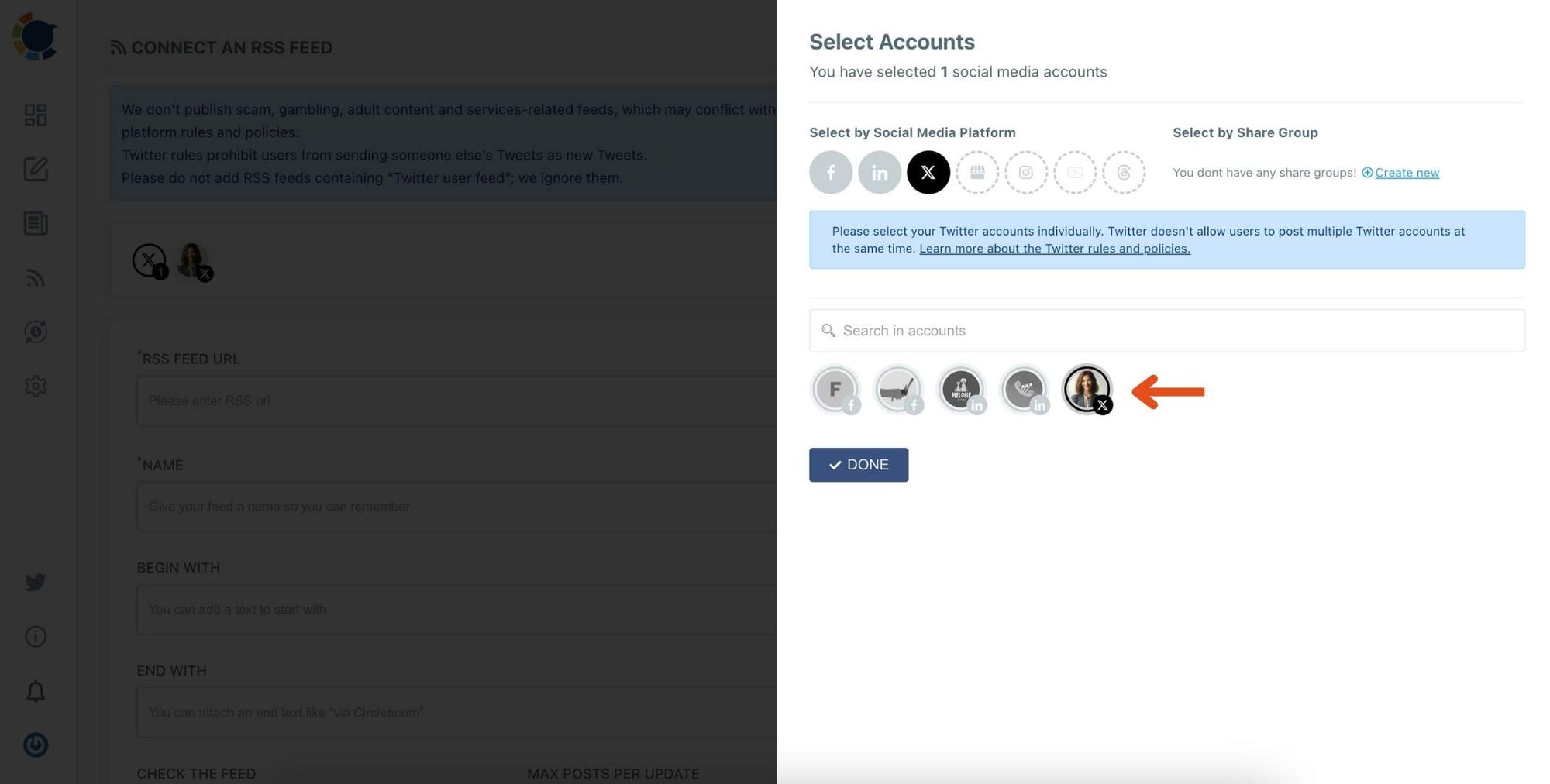
Step #4: Here, you need to select the Twitter account to which you want to connect RSS feeds. To do this, you should first click on the "Select Account" tab.
Then, pick up the Twitter accounts that you want to auto-post from RSS feeds.
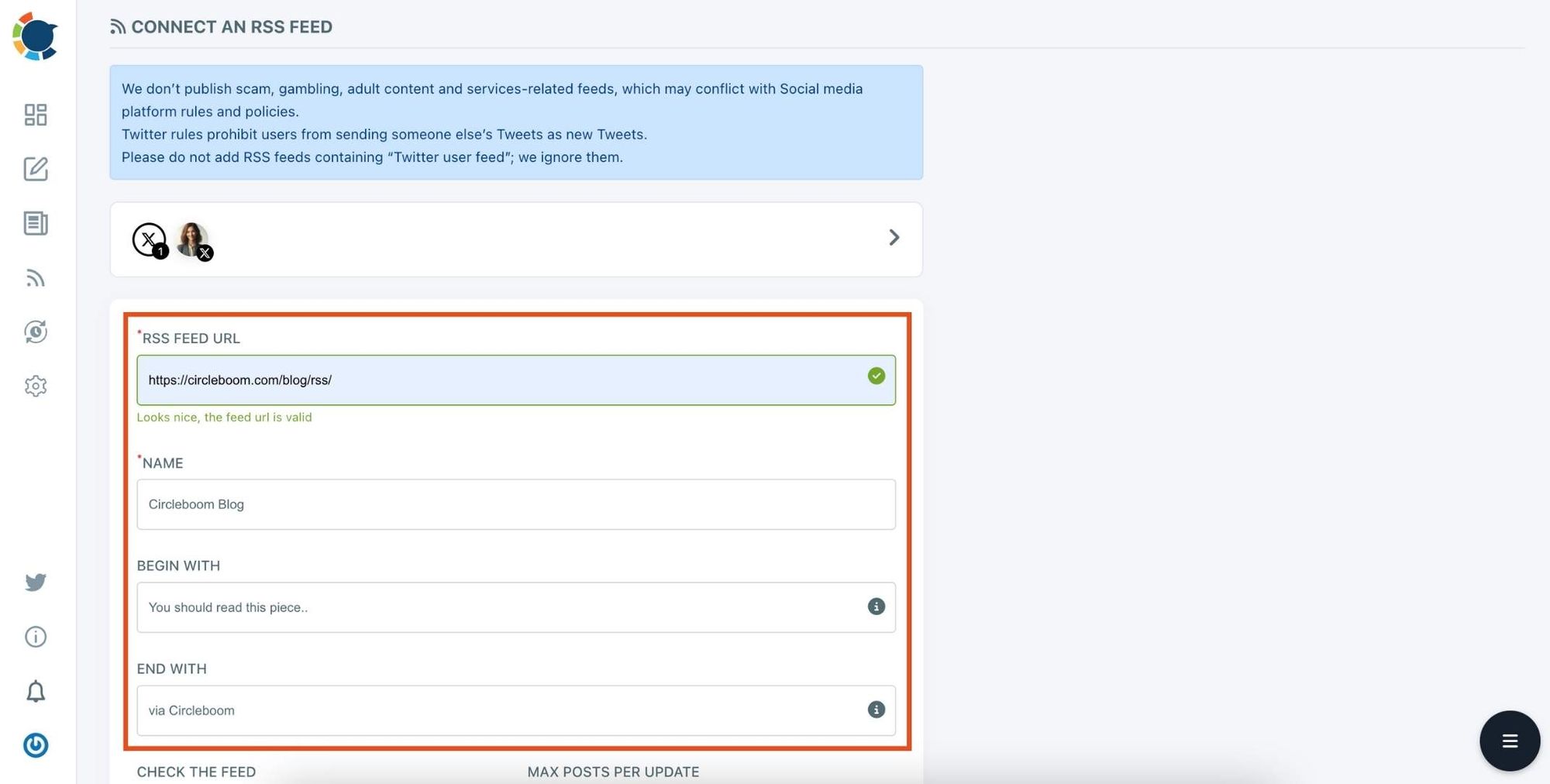
Step #5: Now, add your RSS feeds to the "RSS FEED URL" box to connect them to your Twitter account.
You can also name the feed you want to auto-post to Twitter or add a specific text to publish with RSS tweets.
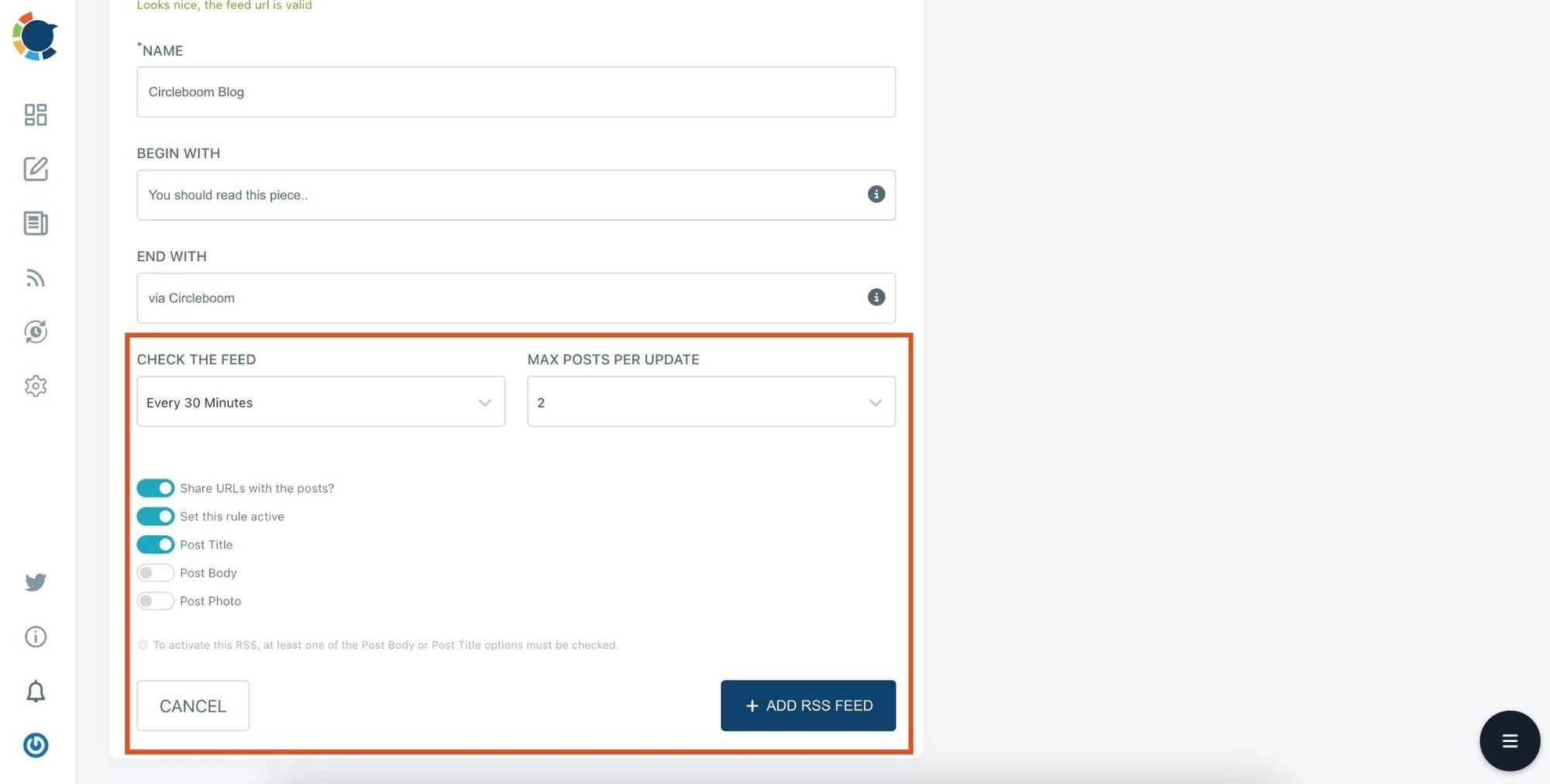
Step #6: Then, you can set time intervals and frequency to auto-post from RSS Feeds. Once you complete all the steps, finish the process by clicking on the "+ ADD RSS FEED" button.
Auto-posting RSS Feeds to Twitter is that easy!
You can add multiple RSS feeds by following these steps!
Optimizing Profile Metadata (Bio, Username, Descriptions)
While individual posts act as powerful and independent visibility drivers, your profile metadata is a permanent attention anchor. It works not only for human visitors, but also for social media algorithms.
The latter analyzes your bio, username, and relevant descriptions, and if they find a good match with your publications, they’ll give your content more weight and display it to a wider audience.
Profile metadata acts like a permanent label attached to every piece of your content, enhancing or reducing its impact. It’s the one central element that you should get right before publishing anything.
Check out these quick tips on how to optimize your profile metadata effectively:
- Include a clear keyword in the username or display name. It must be perfectly aligned with your area of expertise or eCommerce niche.
- Write a bio that describes exactly what type of content people can expect. It helps to check a couple of bios of your direct competitors before crafting your own.
- Add location or specialization details. This helps with local discovery on social media when you target specific geographic areas, countries, or places.
- Keep the description concise but specific. A common mistake is when authors overcomplicate their biographies with too many details (wordiness), making them hard to read and understand.
Profiles play a crucial role on social media. Whenever a stranger discovers your content and finds it interesting, they often go and check your profile, hoping to find proof of your expertise and reasons why they should trust you. Laconic and professional descriptions are what you should aim for and what users would appreciate.
Using Alt Text and Accessibility Features for Search Visibility
Accessibility features were originally introduced into social media more than a decade ago to help people with visual and hearing impairments comprehend content.
However, relatively recently, when social algorithms became empowered with AI engines, the same accessibility features became recognizable by machines. Today, they successfully provide smart algorithms with additional informational signals, helping them understand content better.
Here are several examples of such features and what they mean for the discoverability of your content:
- Alt text for images — write a short description of your image, including relevant keywords (the primary keyword is usually a must in alt texts). For example: “Street food market in Rio de Janeiro at night.”
- Closed captions for videos — just enable captions to help platforms understand the content of your videos. Human users with visual impairments will also appreciate your effort (they can additionally enable voice over, if they cannot read text).
- Descriptive file names when uploading media — when possible, use meaningful and descriptive file names like brazil-beach-sunset.jpg instead of generic file codes like image87121.
- Accessible emoji and text formatting — use easy-to-read emoji formats (large sizes, common emojis, instead of exotic and small font ones) to help readers understand your content, while reducing the size of textual information.
Keep in mind that the interpretation and perception of emojis and other graphical content may vary from country to country. For instance, the OK hand gesture 👌 is widely used to mean “all good,” yet in certain countries (Brazil, Turkey, and Greece) it can be interpreted as rude or even offensive.
The Bottom Line
Social media emerged as a virtual alternative to real, face-to-face human interactions. Its modern realization is packed with amazing interactive features, greatly enhancing human communication and related social signals.
This means that achieving more reach on social media is both easier than ever and also harder, because the competition is also very high. Under these circumstances, the most effective social SEO strategies for building visibility include:
- Building authority through engagement and community signals.
- Keyword optimization for profiles and content.
- Creating search-friendly captions, tags, and visual content.
- Optimizing profile metadata (bio, username, descriptions).
- Using alt text and accessibility features for search visibility.
The exact order you apply these strategies is not as important as your persistence and discipline, as mastering even one or two of them to perfection is better than trying all, but never excelling at any single one.

