

Some signals on Twitter have a half life measured in hours.
An account tweeting about frustration with a competitor's outage is most receptive to an alternative right now, while the problem is live and the frustration is fresh. An event attendee tweeting the conference hashtag is part of a shared moment that closes when the event ends. A prospect announcing they are evaluating tools in their category is in a decision window that may last a few days.
Finding these accounts through a historical search a week later is still useful. Finding them while the moment is still active is a different category of opportunity entirely.
That is what a tweet catcher does.
👉 Catch every real time tweet about any topic
What Is a Tweet Catcher?
A tweet catcher is a tool that monitors the live stream of public tweets from a defined start date forward, captures every tweet matching a keyword or topic as it is posted, and surfaces the accounts behind those tweets in a structured, actionable format.
It is not a notification tool that sends you an alert. It is a collection tool: you define what you want to catch, set the start date, and it gathers matching tweets continuously from that moment. The result is both a live tweet log and an extracted account list that you can filter, follow, add to a list, or export.
The distinction from a standard search is timing and structure. X's native search shows a feed of tweets ordered by recency or relevance. It does not build a persistent collection from a defined start point. It does not extract and deduplicate the accounts behind matching tweets. It does not let you filter that account list by follower count or engagement level. It does not let you act on those accounts in bulk.
A tweet catcher does all of those things from the moment you start it forward.
What X's Native Search Does Not Give You
X's built in search returns tweets in a chronological or relevance ranked feed. There is no mechanism to start collecting from a defined point and accumulate every matching tweet from that moment forward in a structured log. The feed refreshes. Results shift. Older posts scroll out of view. If you are not watching at the right moment, you miss it.
There is no way in the native interface to take the accounts behind matching tweets and see them as a deduplicated, filterable list. You see the tweets. The accounts are buried in the feed. There is no bulk action available: no way to follow all accounts posting about a keyword, no way to add them to a list, no way to export them.
For use cases where timing and volume both matter, the native search is not a workflow. It is a window.
How Circleboom's Real Time Tweet Search Works as a Tweet Catcher
Circleboom's Real Time Tweet Search collects live public tweets matching your criteria through the official X Enterprise API from a start date you define, then extracts and deduplicates the accounts behind those tweets into a structured, actionable list. It is the tweet catcher functionality built into the Circleboom Twitter management platform.
Here is how to use it.
Step 1: Write Your Search
Open Real Time Tweet Search inside Circleboom. The interface asks you to describe what you want to catch in your own words. Write the search in plain language: "accounts looking for social media scheduling tools," "companies frustrated with their current analytics platform," "people tweeting about the SaaStr conference."
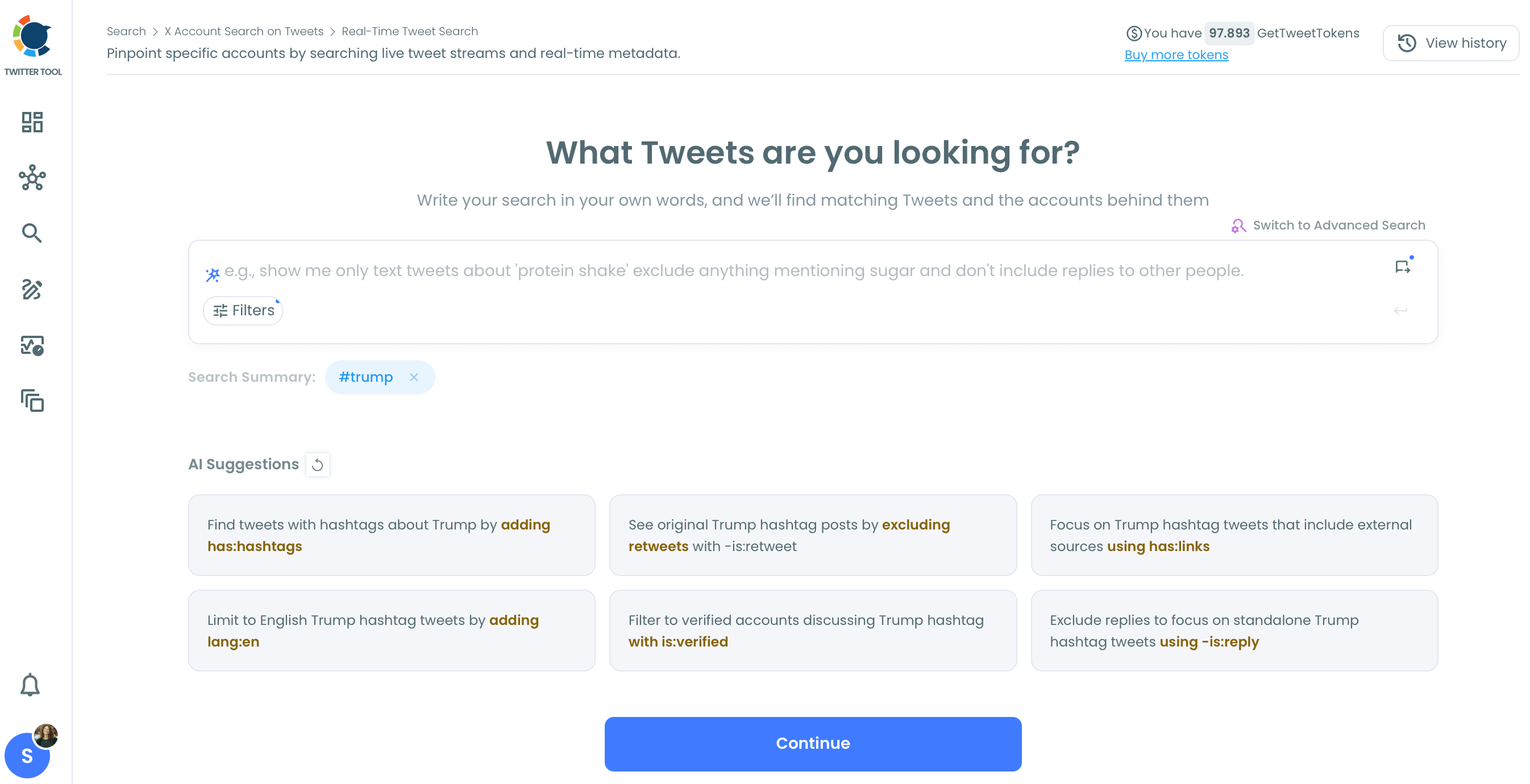
The system shows AI suggested refinements. You can accept a suggestion, modify it, or switch to Advanced Search to define keyword match types, exclusions, hashtags, cashtags, language, and content filters manually.
Step 2: Set Filters
Open the Filters panel to narrow the collection before it starts:
- Keywords and match type: exact phrase, contains, or partial match
- Exclude terms: remove noise and irrelevant replies before collection begins
- Language: filter to a specific language
- Replies: include or exclude reply tweets
- Links: include or exclude tweets containing links
- Hashtags and cashtags: filter by specific tags
- Verified accounts: collect only from verified accounts if relevant
- Media type: all tweets, image posts, video posts, or text only
- Engagement minimums: set a minimum like, retweet, or impression count to filter out low quality posts
Setting engagement minimums before starting is one of the most effective quality controls. A keyword like "social media tool" generates a high volume of irrelevant noise. Requiring at least 3 likes filters that stream significantly without eliminating genuine signals.
Step 3: Set the Start Date
Select when to begin collecting. Options are Last 24 Hours, Last 7 Days, Last 30 Days, or a custom date. The start date anchors the collection: every matching tweet from that moment forward enters the log.
For most tweet catching use cases, the start date is the moment the relevant event or context begins:
- The moment a competitor's incident becomes public
- The opening hour of a conference or live event
- The publication date of a piece of content you want to monitor
Step 4: Set the Collection Size and Run
Select how many tweets to collect. This controls the size of the collection, not the number of unique accounts extracted. Collection consumes GetTweetTokens from your balance proportional to the number of tweets retrieved. Your remaining token balance is displayed before the collection runs.
Step 5: Review the Results
Results come back in two views, switchable from the same results page.
Tweet View shows the collected matching tweets: tweet text with a direct link to the original post on X, impression count, like count, retweet count, quote count, bookmark count, reply count, and the creation timestamp for each tweet.
Profile View (accessed via the "Display Profiles of this search" button) shows the deduplicated list of every unique account that posted a matching tweet since the start date. Each account displays follower count, following count, follow ratio, tweet count, account join date, and an engagement classification. This is the primary output for prospecting, outreach, and monitoring use cases.
You can search, filter, and sort within the Profile View without consuming additional tokens.
Step 6: Act on the Accounts
From the Profile View, available actions include:
Follow: Follow selected accounts directly from the results.
Auto Follow from matching keyword: Circleboom continuously searches live tweets using your keyword and the filters you set, identifies the account owners behind matching tweets, and follows them automatically. This turns the tweet catching workflow into an automated growth action: you define the signal you want to catch and Circleboom follows the accounts expressing it as they appear, without requiring you to be present for each one.
Add to Twitter List: Add the accounts to a Twitter/X List for ongoing monitoring without changing your core follower/following relationship.
Add to Mass Block List: Useful for filtering out competitors or unwanted accounts you want to exclude from future interactions.
Export as CSV: Download the full account list with profile data for CRM import, outreach sequencing, or research documentation.
When a Tweet Catcher Creates the Most Value
The feature works for general keyword monitoring, but it is most powerful in specific situations where timing is the critical variable.
Competitor Incidents
When a competitor experiences a visible public problem, an outage, a product controversy, a customer service failure going viral, there is a window of a few hours to a few days when affected accounts are actively expressing dissatisfaction in public.
Starting Real Time Tweet Search the moment the incident becomes visible with keywords targeting the competitor's name and the problem type captures every account posting about it from that point forward. These accounts are explicitly unhappy with the alternative and most receptive to a different solution while the frustration is still active. The window for this kind of outreach closes as the incident fades from conversation. The tweet catcher runs from the moment it opens.
Live Events and Conferences
Conference hashtags generate a short, intense burst of posting from the accounts most engaged with that event. Starting collection at the event opening and running it through the close captures every account tweeting the hashtag in real time: attendees, speakers, remote followers commenting from outside the venue.
This creates a participant list that no post event analysis can fully replicate. The accounts posting during a live event have a shared context in that moment that makes connection natural. That context closes when the event ends. A tweet catcher open during the event captures it while it exists.
Buying Signal Monitoring
Accounts expressing a buying intent publicly, things like "looking for recommendations on X", "evaluating our tools this quarter", "anyone using Y service, what do you think", are in a decision window that is active and open. The tweet catcher running on keywords matching the buying signal surfaces these accounts while the window is open rather than discovering them in a historical search after the decision has already been made.
Setting the start date to the current moment and using focused keywords that match the actual language people use when expressing the problem, not category jargon, produces a live stream of accounts that are already telling you they have the need your solution addresses.
Campaign and Content Monitoring
When a campaign launches, a press release goes live, or a piece of content starts to spread, the spread itself is a data set. Who is sharing it. What they are saying about it. Which audiences it is reaching that were not already in your follower base.
Starting Real Time Tweet Search the moment the content publishes and running it on the campaign keywords or the content link shows the spread as it unfolds, not as a retrospective aggregate. The accounts picking up the conversation early are often the most relevant ones for follow up, collaboration, or amplification support.
Practical Notes
Set filters before starting, not after. The filters available before collection begins are the same ones available in the results. But applying them before collection keeps the result set cleaner from the start and avoids collecting large volumes of irrelevant tweets that consume tokens without producing usable accounts.
Watch collection size relative to account output. The tweet count you select controls collection size, not the number of unique accounts extracted. A keyword generating many tweets from a small number of highly active accounts produces fewer unique profiles than the same count from a keyword with many different authors. For prospecting use cases, prefer broader keywords that generate diverse authors over narrow keywords that generate repeated tweets from the same accounts.
Export and act quickly. Live tweet data has a short window of maximum actionability. An account expressing a competitor complaint on Monday morning is a different prospect by Thursday. Export strong results and act on them, or at minimum add them to a list, while the shared context that made them relevant still exists.
Combine with Historical Tweet Search. Real Time Tweet Search catches what is happening now from a defined start point. Historical Tweet Search shows whether the same signal has been expressed in the past by accounts that may be receptive again. Running both on the same keyword builds a fuller picture: who is saying it right now, and who has said it before.
Use Auto Follow with filters active. Auto Follow from matching keyword is a continuous action. It follows every account matching the keyword from the live stream as they appear. Before enabling it, set engagement minimums and quality filters. A broad keyword with Auto Follow and no filters will follow accounts at high volume without quality control. Engagement minimums and exclude terms keep the action focused on accounts that meet the bar you care about.
Frequently Asked Questions
What is a tweet catcher?
A tweet catcher is a tool that monitors the live stream of public tweets from a defined start point forward, collects every tweet matching a specified keyword or topic, and surfaces the accounts behind those tweets in a filterable, actionable list. Circleboom's Real Time Tweet Search is a tweet catcher: it collects matching live tweets from a start date you define, presents them as both a tweet log and an extracted account list, and supports direct follow, list, and export actions on those accounts.
How is real time tweet search different from historical tweet search?
Real Time Tweet Search collects live tweets from a start date forward. It is designed for use cases where timing matters: a competitor incident, a live event, a buying signal expressed right now. Historical Tweet Search queries a past archive within a date range you specify. It is designed for use cases where the signal happened in the past and you want to find accounts that expressed it during a defined historical window. The two are often used together: Real Time catches what is happening now; Historical shows who said the same thing before.
Can I automatically follow accounts tweeting about my keywords?
Yes. Circleboom's Auto Follow from matching keyword continuously searches live tweets using the keyword, start date, language, engagement, and account filters you set, and automatically follows the account owners behind matching tweets as they appear. For example, a brand can search for tweets like "looking for a social media tool" and automatically follow accounts expressing that need as they post. Setting engagement minimums and exclude terms before enabling Auto Follow keeps the action focused on relevant, quality accounts.
Does it work for any keyword or hashtag?
Yes. Real Time Tweet Search works with any keyword, phrase, hashtag, cashtag, or combination of search terms that match content in public tweets. The filter set also supports language, media type, verified account, and content type filtering, so searches can be narrowed well beyond a simple keyword.
How do I know how many tokens a search will consume?
The GetTweetTokens balance and the estimated token consumption for the selected tweet count are displayed before the collection runs. Tokens are consumed proportional to the number of tweets collected, not the number of unique accounts extracted. Export also consumes tokens separately from the collection itself.
Can I export the accounts I find?
Yes. The Profile View in Real Time Tweet Search includes an Export button that downloads the full account list as a CSV, with follower count, following count, follow ratio, tweet count, account join date, and engagement classification for each account. The CSV is ready for CRM import, outreach sequencing, or research documentation.
What happens to tweets that get deleted after collection?
If a tweet is collected before being deleted, it will appear in the tweet log. Tweets deleted before the collection ran will not appear. The account behind a deleted tweet may still appear in the Profile View if other matching tweets from that account were collected.
The Underlying Principle
Twitter/X is a real time network. Its value as a prospecting and intelligence tool depends on treating it that way.
A keyword monitoring report delivered weekly tells you what happened. A tweet catcher tells you what is happening. The difference between those two things is the entire window in which the people expressing the signal are still in the moment, still receptive, and still findable while the context that made them relevant still exists.
Circleboom's Real Time Tweet Search starts from the moment you define. From that point forward, every public tweet matching your criteria enters the collection. The accounts behind them are extracted, deduplicated, and ready to act on while the moment is still open.
The window is short. The catcher should already be running when it opens.

