

As your Twitter account grows, not every interaction feels positive. Some users flood your feed with unwanted opinions, repetitive posts, or negative energy. Others might simply post content you don’t want to see — yet unfollowing them could feel awkward or risky.
That’s when most people start wondering: Should I mute them or block them?
I’ve been there too. After a while, I realized that understanding the difference between muting and blocking is key to keeping your Twitter experience peaceful and relevant.
What Does “Mute” Mean on Twitter?
When you mute someone on Twitter, it’s like putting them on silent mode.

You won’t see their tweets or retweets on your timeline, and you’ll stop getting notifications from them — but they can still see, reply to, and interact with your tweets.
They won’t even know you muted them.
It’s the best option if you want to quietly avoid seeing someone’s content without hurting feelings or starting unnecessary drama.
For example:
- You can mute a friend who posts too often.
- You can mute a brand that tweets 50 times a day.
- You can mute trending topics or hashtags that you’re tired of.
🔧 How to Mute Someone on Twitter
Step #1: Go to the profile of the account you want to mute.
Step #2: Click the three dots (•••) icon in the top-right corner.
Step #3: Select “Mute @username.”
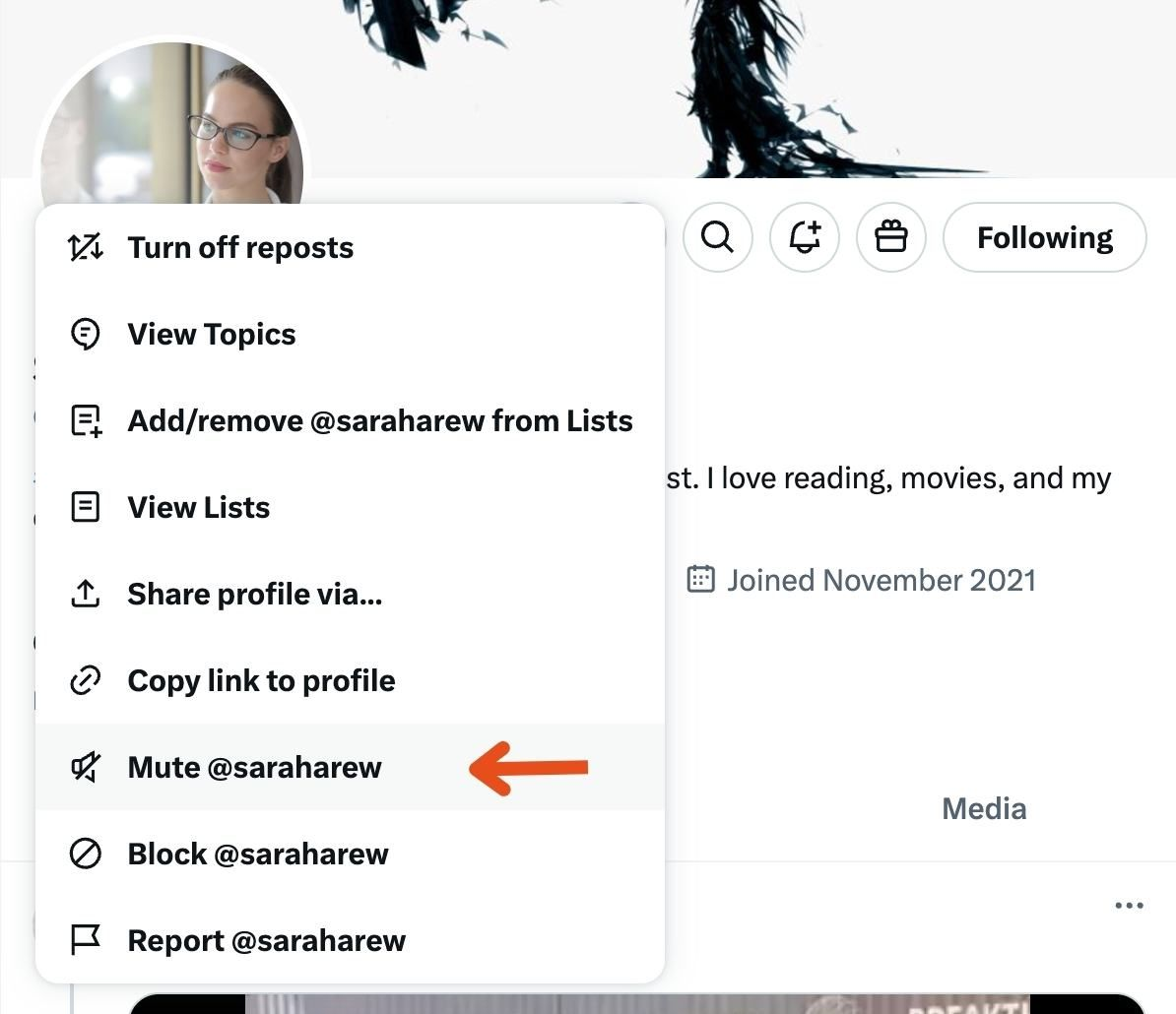
Step #4: Confirm by clicking “Mute.”
 Arif Akdogan
That’s it — you won’t see their tweets or notifications anymore, but they’ll still be able to follow and interact with you.
What Does “Block” Mean on Twitter?
Blocking, on the other hand, is a stronger and more definitive action.

When you block someone on Twitter:
🟢 They can’t follow you anymore.
🟢 They can’t view your tweets, mention you, or message you.
🟢 You also won’t see any of their activity.
It’s the digital equivalent of closing the door — completely cutting communication.
Blocking is useful if someone is:
- Spamming your mentions.
- Being rude or harassing you.
- Part of a spammy or bot network.
- Posting content you don’t want to engage with at all.
If your goal is to protect your privacy, safety, or mental peace, blocking is the better choice.
🔧 How to Block Someone on Twitter
Step #1: Go to the user’s profile.
Step #2: Click the three dots (•••) icon on their profile page.
Step #3: Choose “Block @username.”
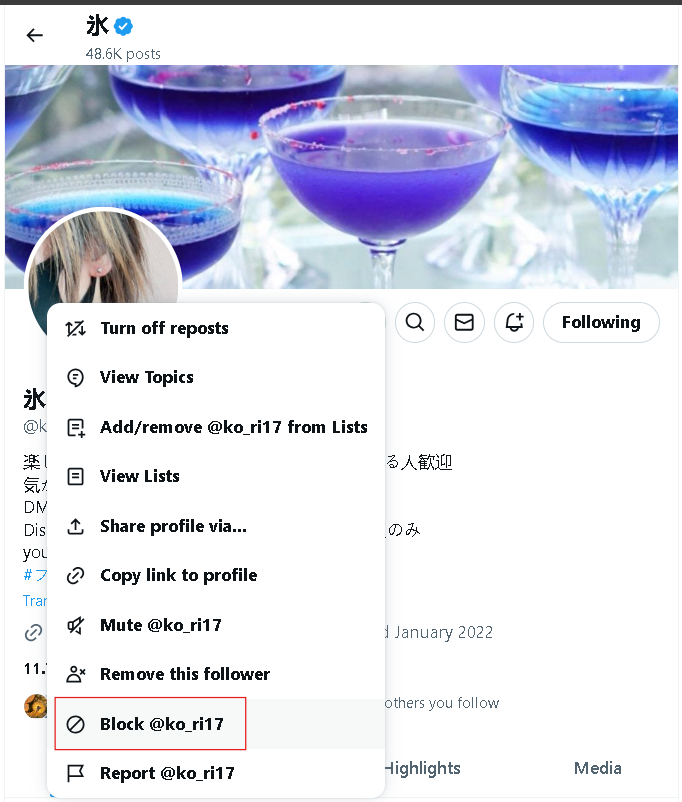
Step #4: Confirm by clicking “Block.”
 Arif Akdogan
Once you block them, they’ll immediately be unable to see your tweets, follow you, or interact with you in any way.
The Difference Between Muting and Blocking
Here’s a quick comparison:
| Feature | Mute | Block |
|---|---|---|
| Visibility | Muted user can still see your tweets | Blocked user can’t see your tweets |
| Interaction | They can still mention, reply, or follow you | They can’t interact with you at all |
| Notifications | You won’t get notified of their actions | You won’t receive anything — they’re completely gone |
| Privacy | Subtle and private | Direct and visible |
| Best For | Managing noise or spammy content | Removing unwanted followers or threats |
In short:
- Mute = Silence without confrontation.
- Block = Complete disconnection and protection.
Why Blocking Is Often the Better Option
While muting helps manage noise, it doesn’t solve deeper issues like spam followers, bots, or toxic users. These accounts still follow you and affect your engagement metrics — even if you never see them.
That’s why blocking is often the smarter move. It cleans your follower list, improves engagement quality, and gives you total control over who can interact with you.
But there’s one problem — blocking people one by one is exhausting.
How I Block Followers in Bulk with Circleboom
When I realized I had hundreds of fake or unwanted followers, I knew manual blocking wasn’t an option.
So, I started using Circleboom Twitter — an official X Enterprise Customer.

Circleboom lets you:
🔹 Detect fake, spam, or inactive followers automatically.
🔹 Apply filters by activity, verification, or follower ratio.
🔹 Select and block multiple accounts in one click.
🔹 Even mass block followers of another Twitter account.
It’s completely safe because Circleboom works within Twitter’s official API limits — so you can block accounts efficiently without risking suspension.
How I Blocked Harmful Followers Using Circleboom
Here’s exactly how I did it:
Step #1: Land in Circleboom Twitter dashboard.
If you don't have an account yet, get one, it takes only a minute.
Step #2: On the dashboard, hover on left menu.
Find there "Followers" and "All My Followers".
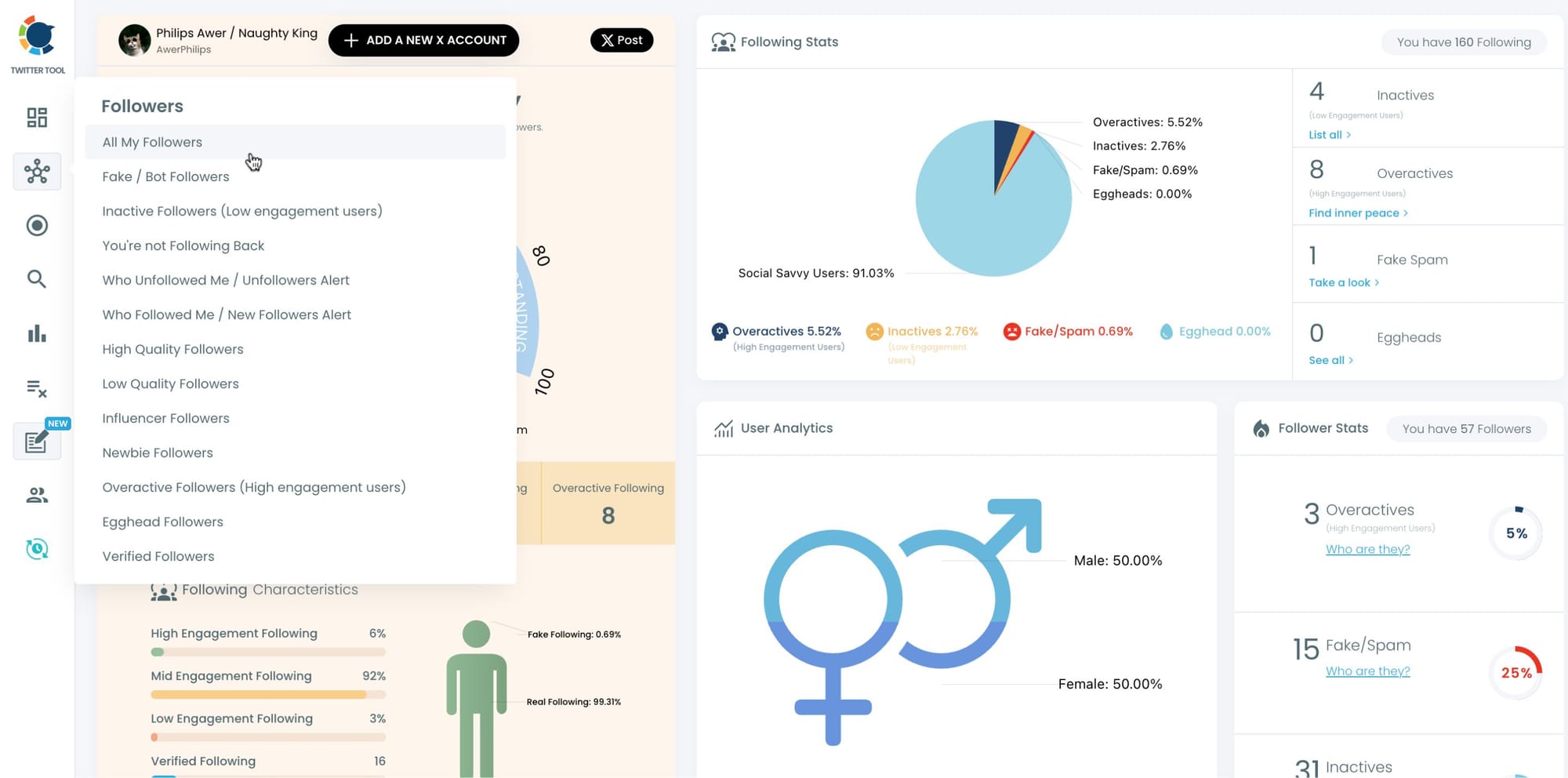
Step #3: All your followers will be listed. You can mass block all your followers if you wish.
Alternatively, you can apply filters to find inactive, spammy, ghost, and unwanted followers.
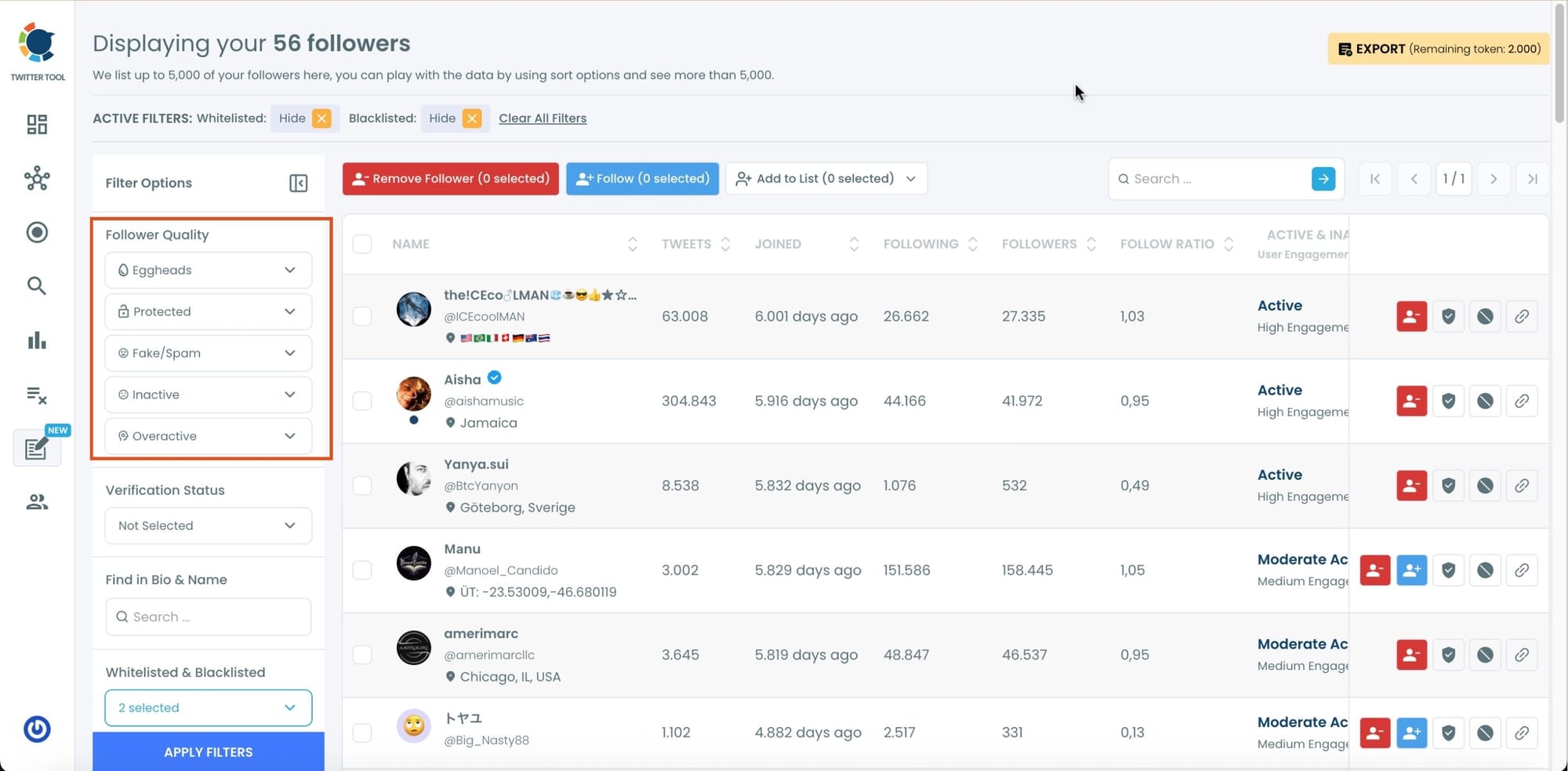
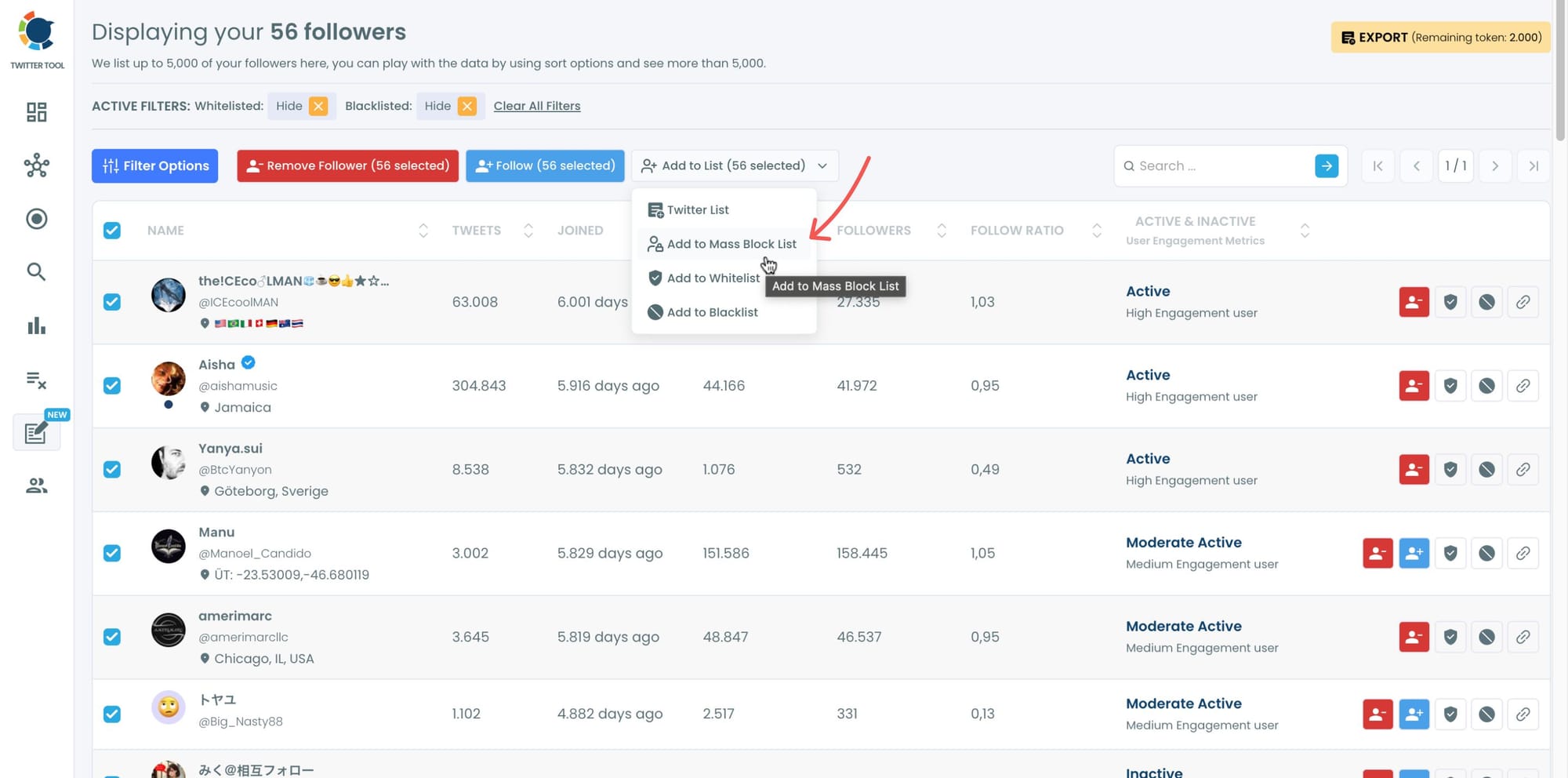
Step #4: After filters are applied, now you should select accounts.
You can select some or all to mass block. I selected all! Then, you should click on "Add to Mass Block List".
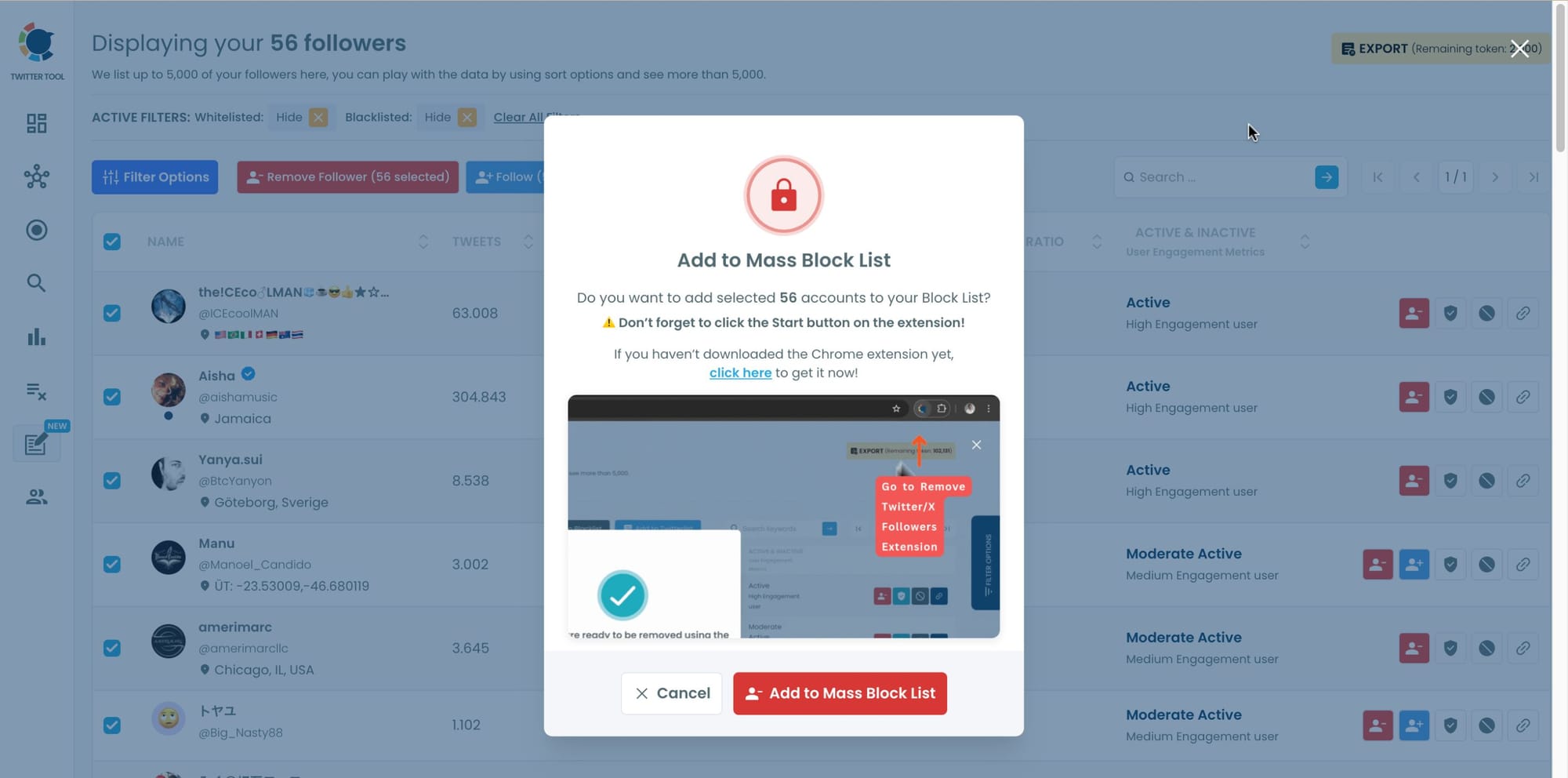
Step #5: A new window will welcome you stating that you should download Circleboom's Twitter Mass Block Extension.
If you haven't downloaded it yet, click in "click here" and move forward. If you have this extension, click on "Add to Mass Block List".
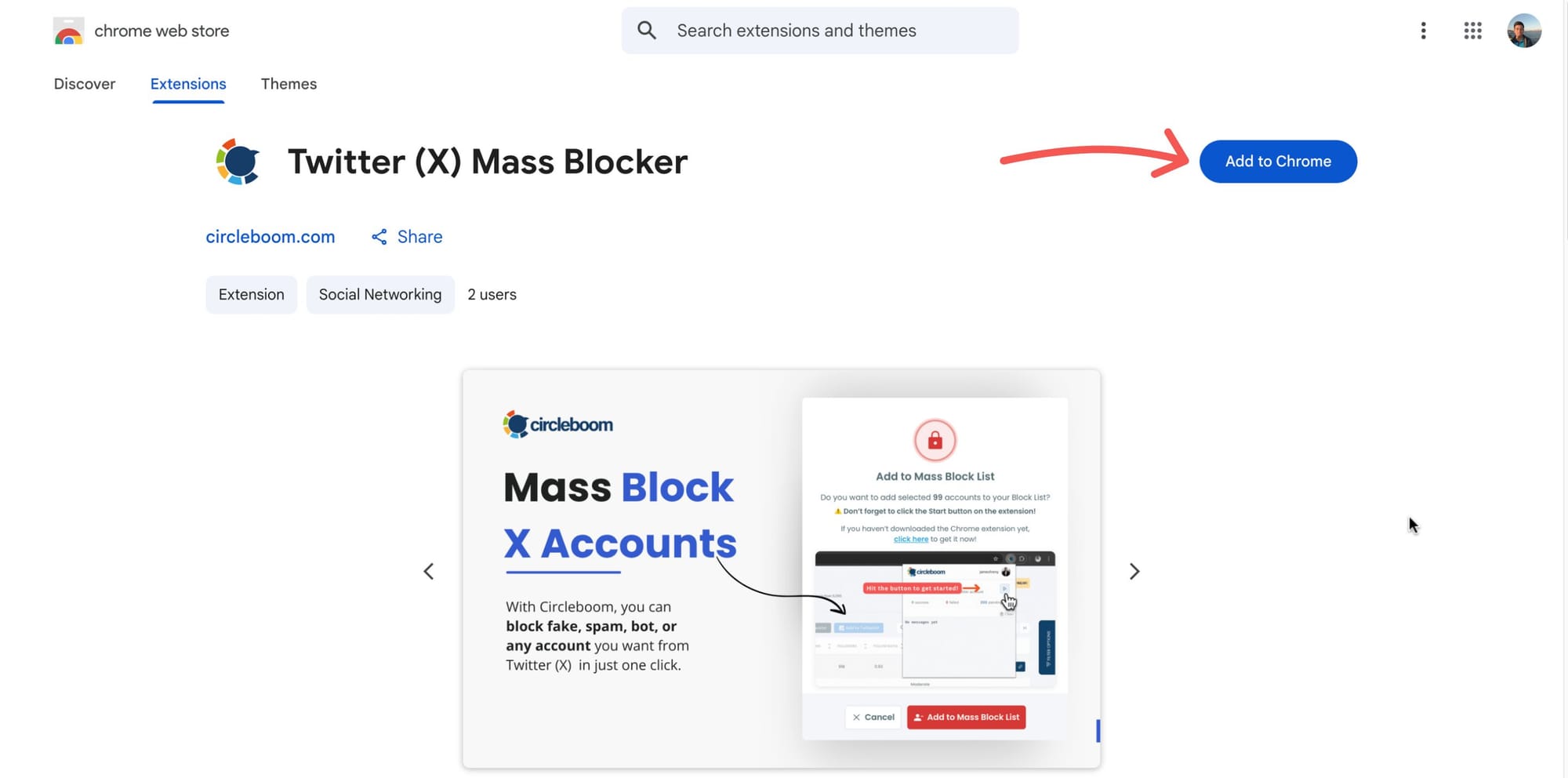
Step #6: You will be directed to the Chrome Extension page.
There, please click on "Add to Chrome".
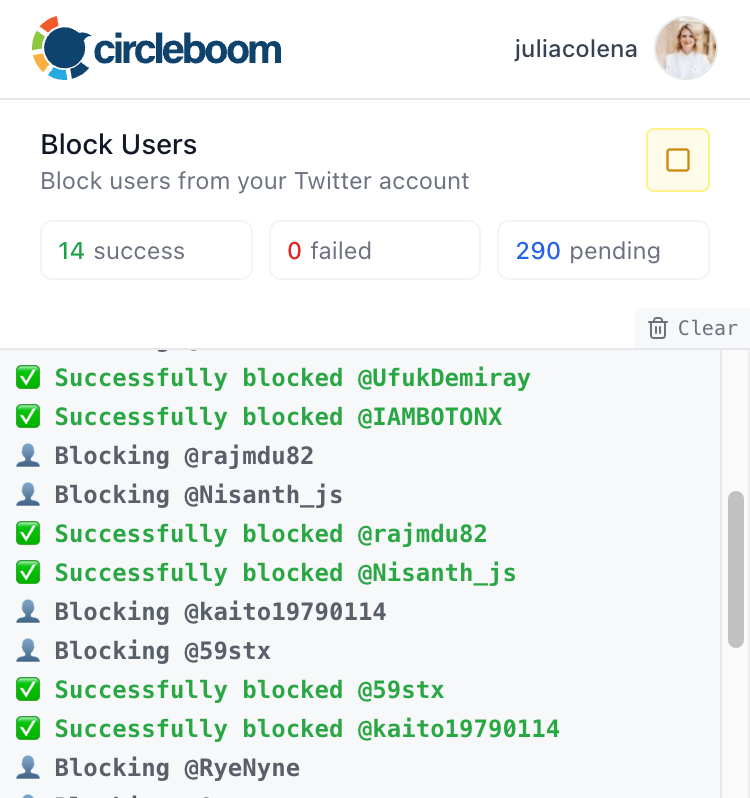
Then your process will start.
Now, you can mass block your spammy, bot followers on Twitter with Circleboom.
Step #7: Another option is to mass block followers and/or followings of another Twitter account.
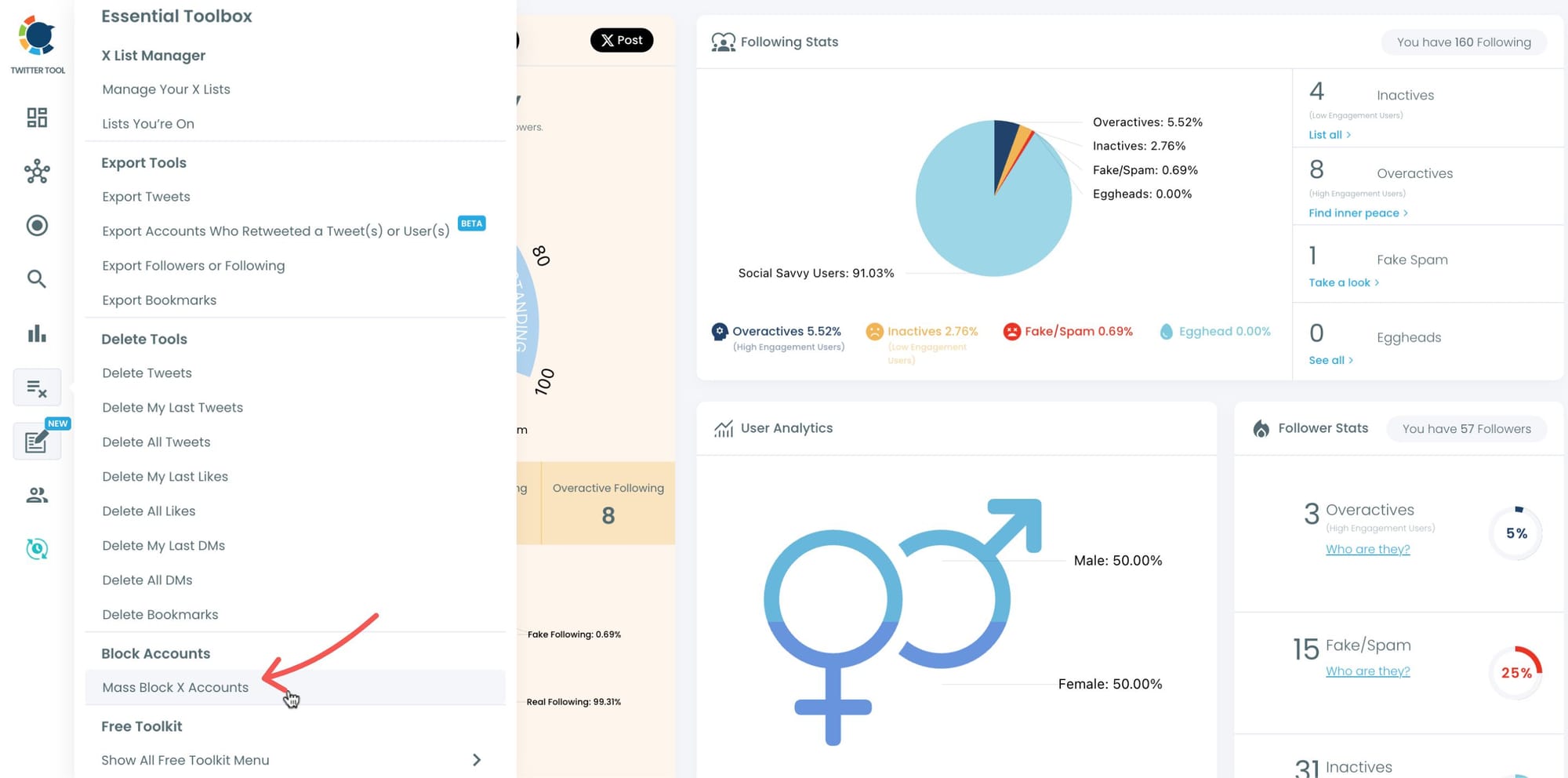
You may dislike the opinions of an X account. It means that their followers accept their opinions. They agree with them. So, you don't want to block only that Twitter account but also their followers! This is possible with Circleboom. You should go back to the Circleboom dashboard and find "Mass Block X Accounts" in the Essential Toolbox.
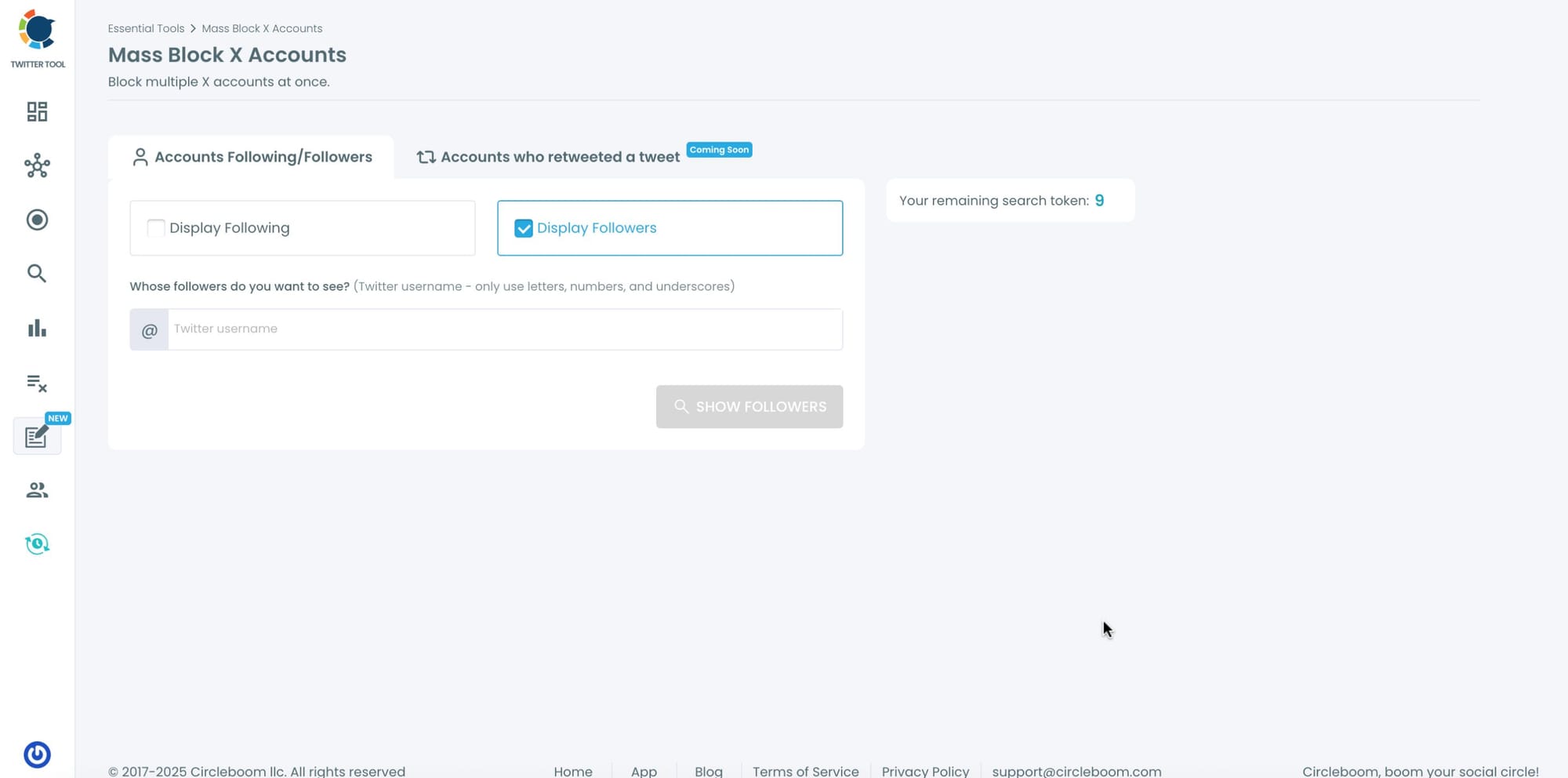
Step #8: You will be directed to the Account Search module. There are two options: "Display Following" and "Display Followers".
After choosing one of them, you need to enter a Twitter username to mass block followers or followings.
Step #9: I search for the followers of Andrew Tate. His opinions about women are very cruel so I don't agree with them.
I don't want to see a post published by any of his followers, so I wanted to mass block them. Circleboom listed all his followers.
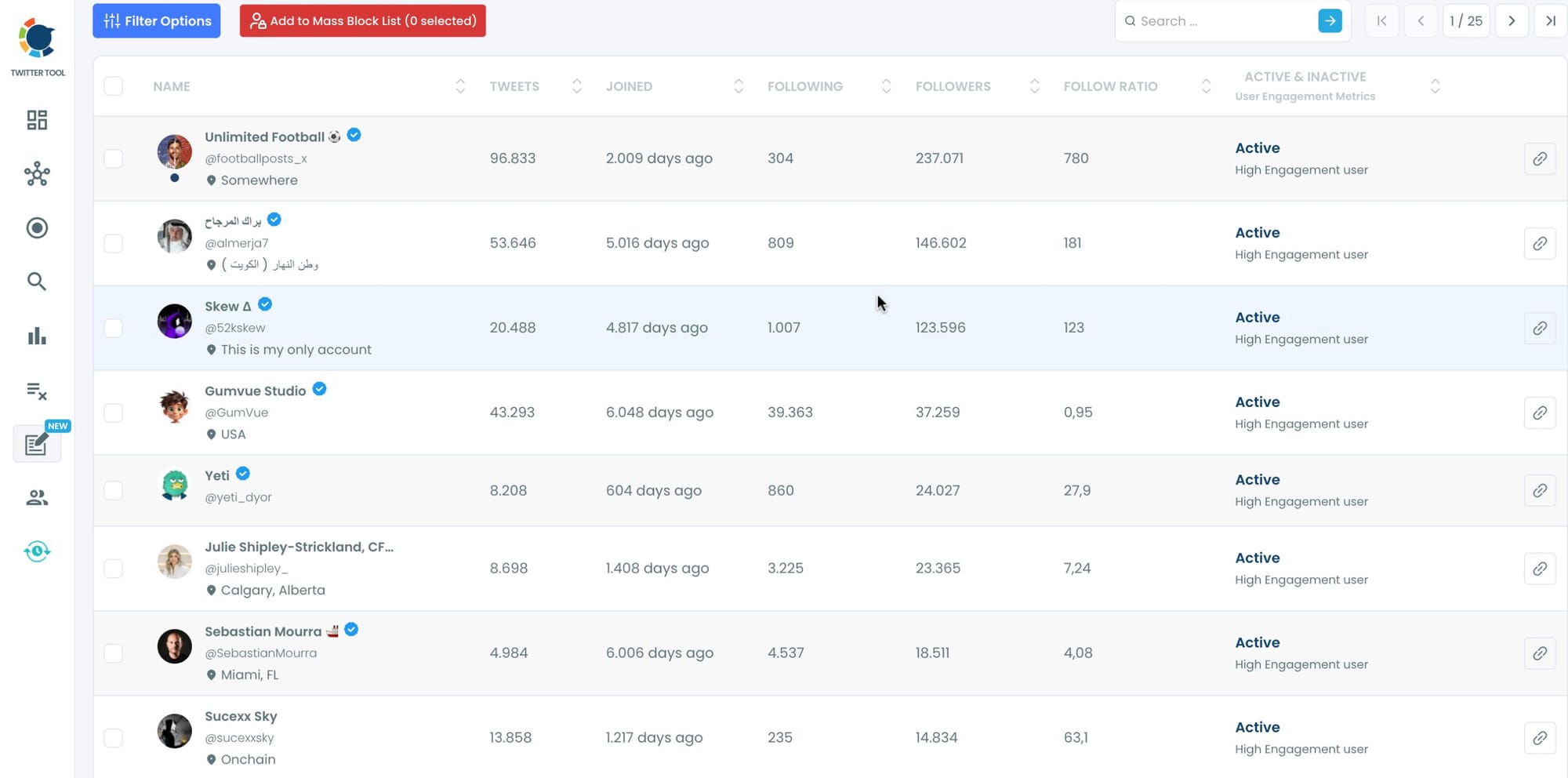
Step #10: After you have selected all the accounts listed here, you should first click on the "Add to Mass Block List" at the top.
Then a new window will appear. There, you should click on the "Add to Mass Block List".

That's it! Now, you can mass block multiple Twitter accounts with Circleboom!
Final Thoughts
Muting is for comfort. Blocking is for control.
If your goal is to build a clean, authentic, and peaceful Twitter space, blocking is the better option — especially when done smartly.
Instead of spending hours doing it manually, you can use Circleboom Twitter to identify unwanted followers and block them all at once, safely and automatically.
Protect your feed. Protect your peace.
And let Circleboom do the heavy lifting.

