

Most weak campaigns fail before they ever go live. They fail in research. A team thinks it understands the conversation, but in reality it only understands the latest noise. It sees what is trending this week and mistakes that for the long-term shape of audience interest. Then it launches with the wrong wording, the wrong assumptions, and the wrong confidence. This is why the best strategists search for historical tweets before they write the first line of copy.
 Altug Altug
The Market Already Has a Memory
That phrase matters more than it seems. To search for historical tweets is to accept that the platform already contains a memory of the market. People have already complained, praised, joked, compared, recommended, doubted, and reframed your category. If you do not retrieve that memory, you build your strategy in the dark. X’s own search documentation makes clear that there is a difference between recent search and archive-grade search. Recent search is limited to the last 7 days, while full-archive search reaches back to March 2006 for pay-per-use and Enterprise customers. For anyone doing serious category work, that historical reach changes the game.
A Better Way to Prepare for a Launch
Think of a skincare brand preparing to introduce a new serum. The naïve approach is to read current influencer posts and copy the style of the moment. The smarter approach is to search for historical tweets around the ingredient, the symptom, competitor names, and the category clichés that customers have repeated for years.
When you search for historical tweets, you stop seeing a launch as an isolated event and start seeing it as an intervention in an ongoing conversation.
Why Advanced Twitter Search Matters for Marketers
This is where advanced Twitter search becomes more than a buzz phrase. Done properly, advanced Twitter search helps separate customer language from brand language. That matters because brands often describe products in ways no customer would naturally say. X’s operator system supports this kind of narrowing through exact phrases, hashtags, mentions, from: and to: operators, URL targeting, language filters, and exclusions for retweets or replies. Combined with time windows, these tools let you search for historical tweets not just for volume, but for texture.
 Altug Altug
Build Messaging From Evidence, Not Assumption
A good strategist asks different questions at each stage. What have people been saying about this topic over the last month? What did they say a year ago? What language appears every time a similar launch happens? When frustration spikes, what words do people use? Which product claims draw suspicion, and which claims create curiosity? If you search for historical tweets with those questions in mind, you stop relying on intuition alone. You begin to build messaging from evidence.
Why Downloading and Exporting Matters
This is where the workflow usually expands into download and export. It is one thing to find posts in the interface. It is another to download tweets into a format where a team can review them together. The moment a launch team wants to cluster objections, highlight recurring terms, and compare one period to another, it needs something more stable than an open browser tab. That is why marketers who search for historical tweets seriously almost always end up wanting to export tweets or download historical tweets into CSV or Excel.
 Arif Akdogan
How Circleboom Supports This Workflow
Circleboom’s public product pages map closely to that need. The company states that it is an official X Enterprise Developer and highlights export functionality for tweets, including CSV and Excel output. Its materials also describe tweet export workflows, advanced Twitter search tooling, and account-based exports up to 3,200 tweets. That combination matters for marketers because the archive is only useful if it becomes reviewable. A spreadsheet makes the conversation portable. It can be shared with copywriters, product managers, founders, and ad teams.
 Altug Altug
A Practical Example From SaaS Marketing
Imagine a B2B SaaS company about to relaunch its pricing page. Internally, the team believes the category is all about automation, speed, and scale. Then someone decides to search for historical tweets around competitor names plus phrases like “confusing pricing,” “too expensive,” “worth it,” “switched from,” and “cancelled because.” Once the team exports tweets and studies the archive, a different picture emerges. Customers are not confused by feature count. They are confused by plan boundaries. They are not mainly asking for more automation. They are asking whether the tool becomes expensive the moment a team grows. That shift in evidence changes the launch copy, the FAQ, the ad angles, and even the demo script.
Why “Scrape Tweets” Is Usually the Wrong Goal
That is why trying to scrape tweets in an improvised way is often the wrong instinct for marketing teams. The phrase “scrape tweets” gets used loosely, but what teams actually need is structured retrieval. They need to search for historical tweets with logic, then export tweets cleanly, then filter and annotate them. X’s official search system is built around query operators, archive access, and pagination. That is a much better foundation for campaign research than trying to collect fragments manually.
 Altug Altug
Historical Search Helps You Avoid Market Fatigue
There is another reason to search for historical tweets before a launch: audiences remember what brands forget. A claim that feels fresh inside a boardroom may sound recycled or evasive to customers who have watched similar promises fail for years. Historical search helps you identify those fatigue patterns. Maybe every “finally” claim in your niche gets mocked. Maybe every “AI-powered” promise now triggers skepticism unless paired with proof.
Maybe the audience has moved from excitement to price anxiety. If you do not search for historical tweets first, you risk launching into a conversation that has already turned against your angle.
Use Historical Search to Understand Timing
The best teams also use historical search for timing. X documents full-archive post counts, which means analysts can estimate topic volume over time before committing to a deep retrieval workflow. That allows a team to see whether a keyword is seasonally noisy, steadily growing, or tied to one-off spikes.
Once you know that, you can decide whether to target historical tweets around a recurring annual cycle, a product incident, a regulation date, or a creator-driven meme wave. Research stops being random and starts becoming temporal.
Competitor Archaeology: One of the Most Underrated Use Cases
One of the most undervalued uses of this method is competitor archaeology. Most brands monitor competitors only in the present tense. They watch the latest posts, the latest ad creatives, and the latest feature claims. But if you search for historical tweets about a competitor, you can see how their messaging evolved, when complaints repeated, and which promises kept returning.
When you export tweets and sort them chronologically, you often discover that what looks like innovation is really repetition with new design. That is strategically useful. It helps you avoid copying stale rhetoric and identify where the market has become numb.
Why Circleboom Works Well for Teams
Circleboom is especially useful in that kind of workflow because it combines two things teams often need at the same time: search support and export practicality. Its pages frame tweet export as a tool for understanding successful accounts and for listing and downloading tweets into spreadsheet formats. That is exactly the kind of infrastructure that turns historical search from a one-person exercise into a team process. Once the archive leaves the interface and enters a file, it becomes workable.
The process is surprisingly simple.
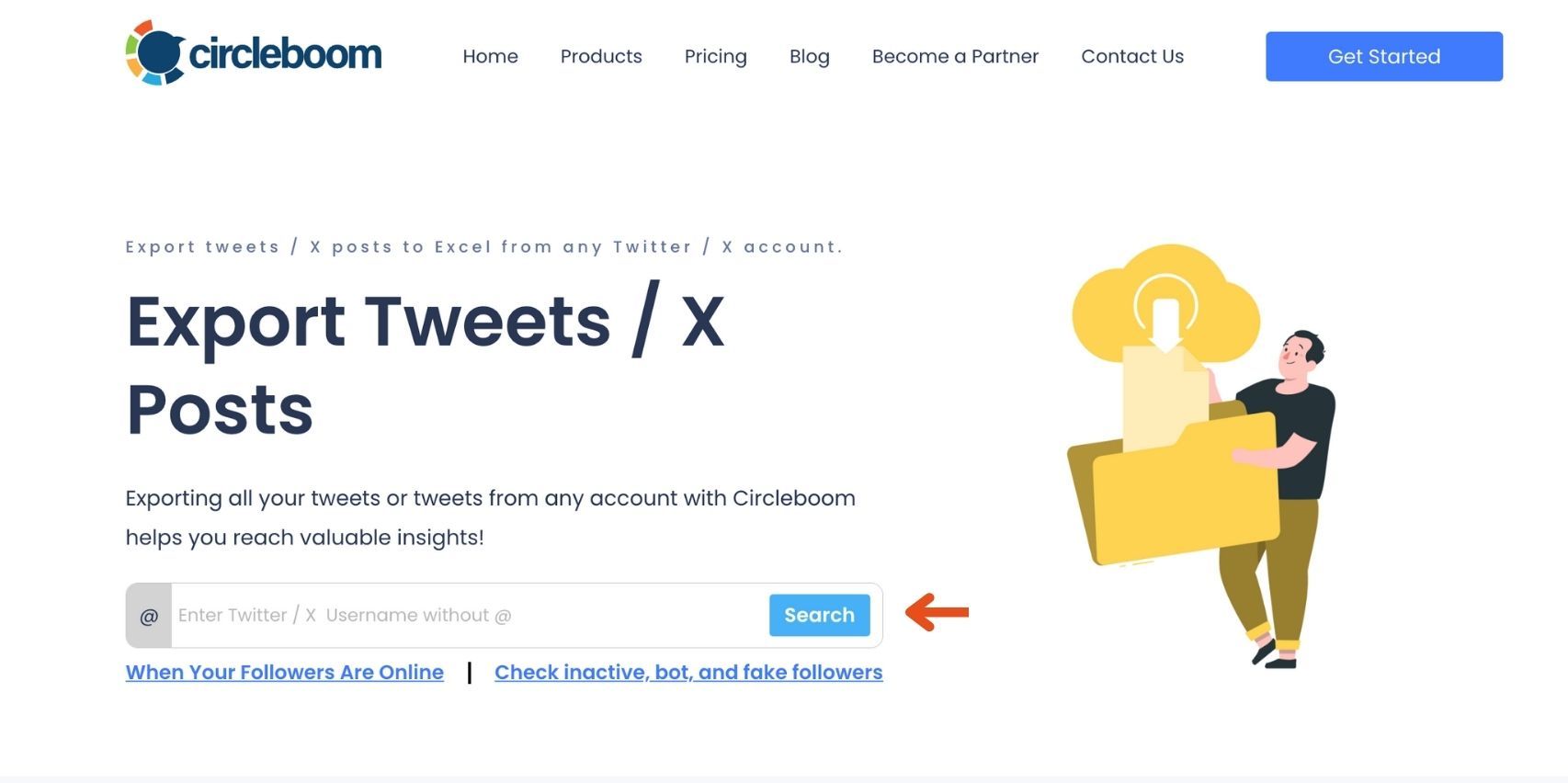
Step #1: Enter the Username
On the Circleboom export page, type in the Twitter/X username of the account you want to export tweets from (without the “@” symbol) and click on the blue “Search” button.
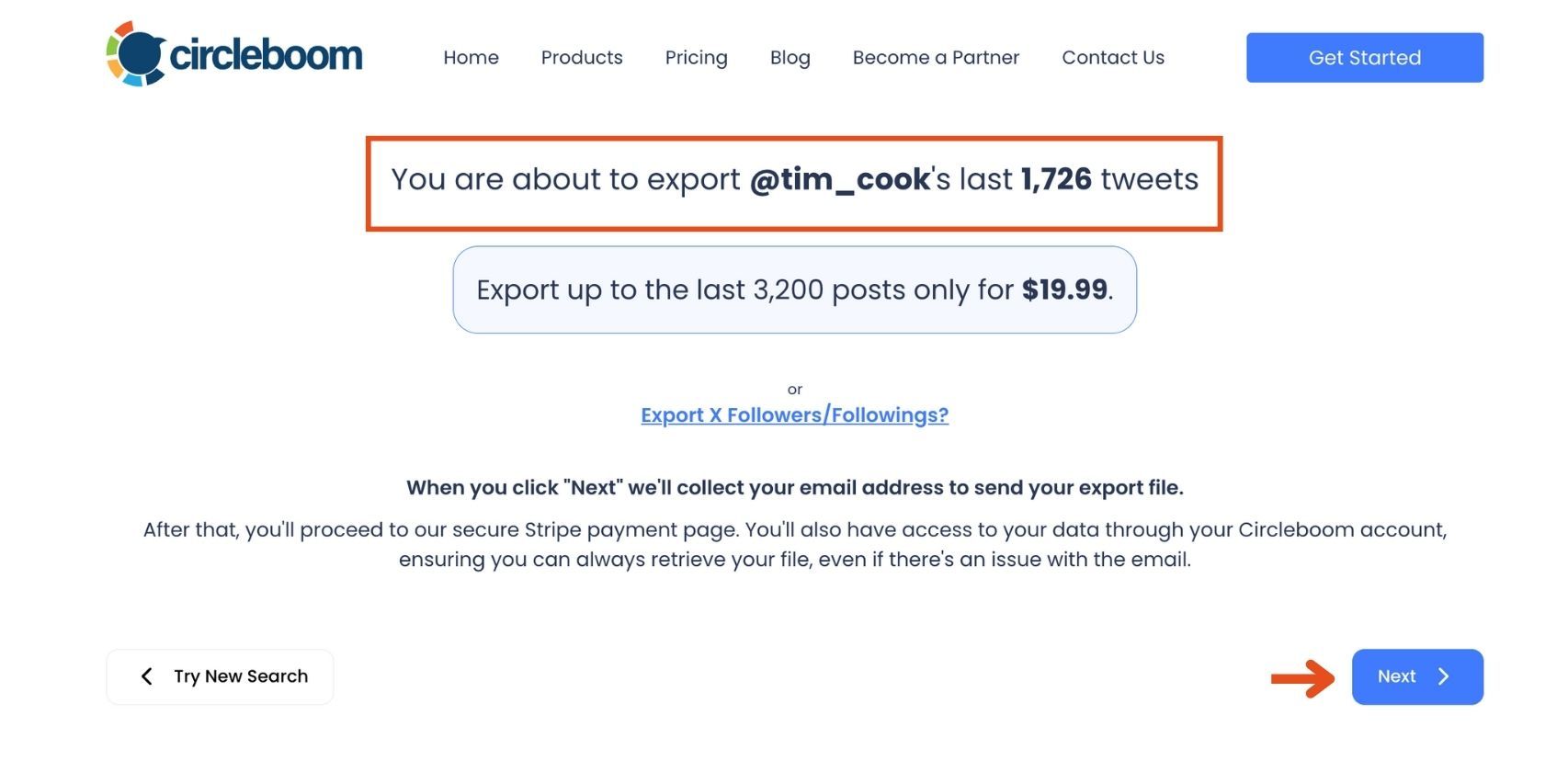
Step #2: Confirm the Tweet Count
Circleboom will display the total number of tweets available for export from the selected account. Review this information, then click the “Next” button to proceed with the export process.
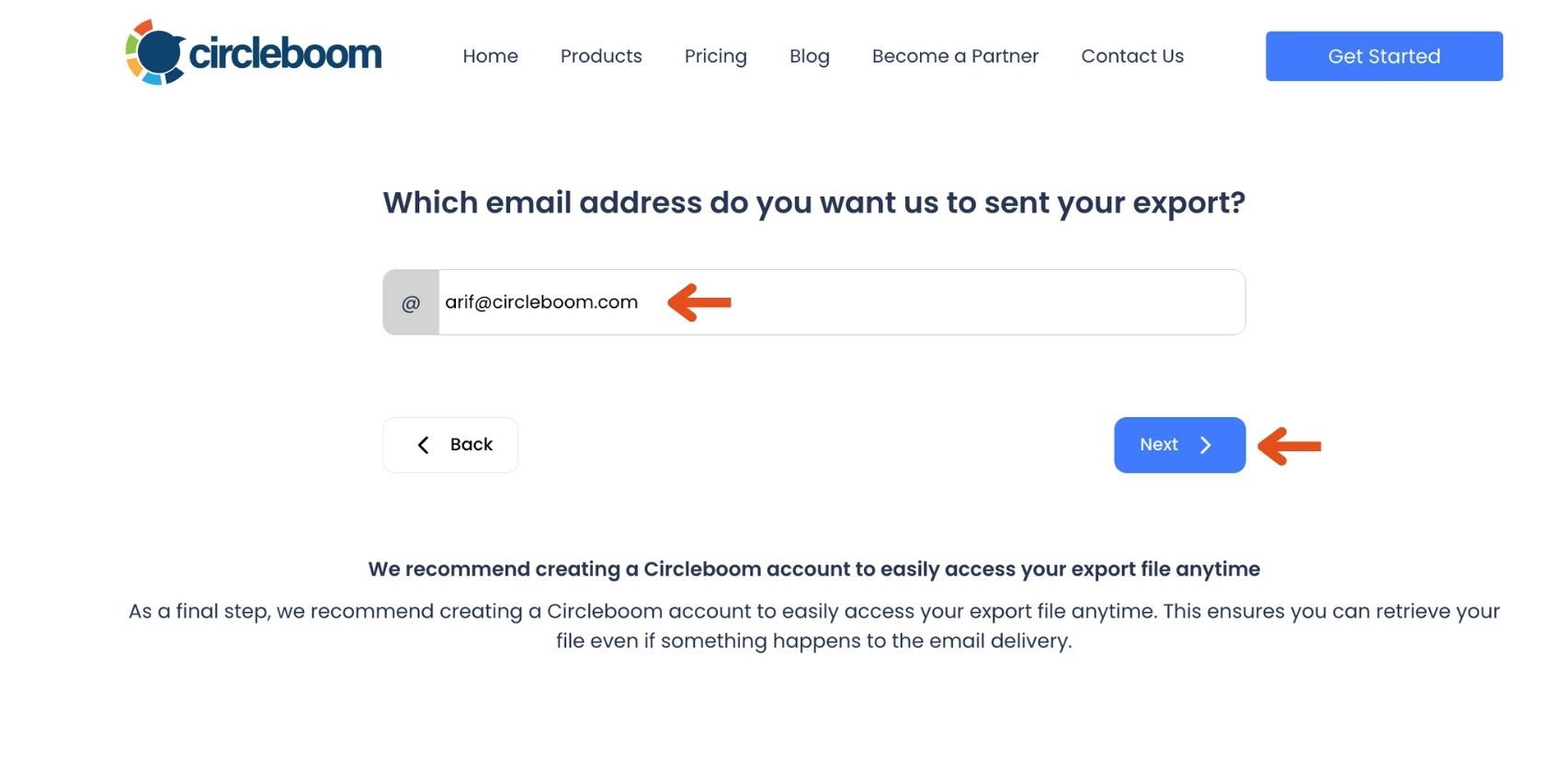
Step #3: Enter Your Email Address
Enter the email address where you’d like to receive the exported tweet file. Circleboom also recommends creating an account for easy access to your export file at any time. After entering your email, click the “Next” button to continue.
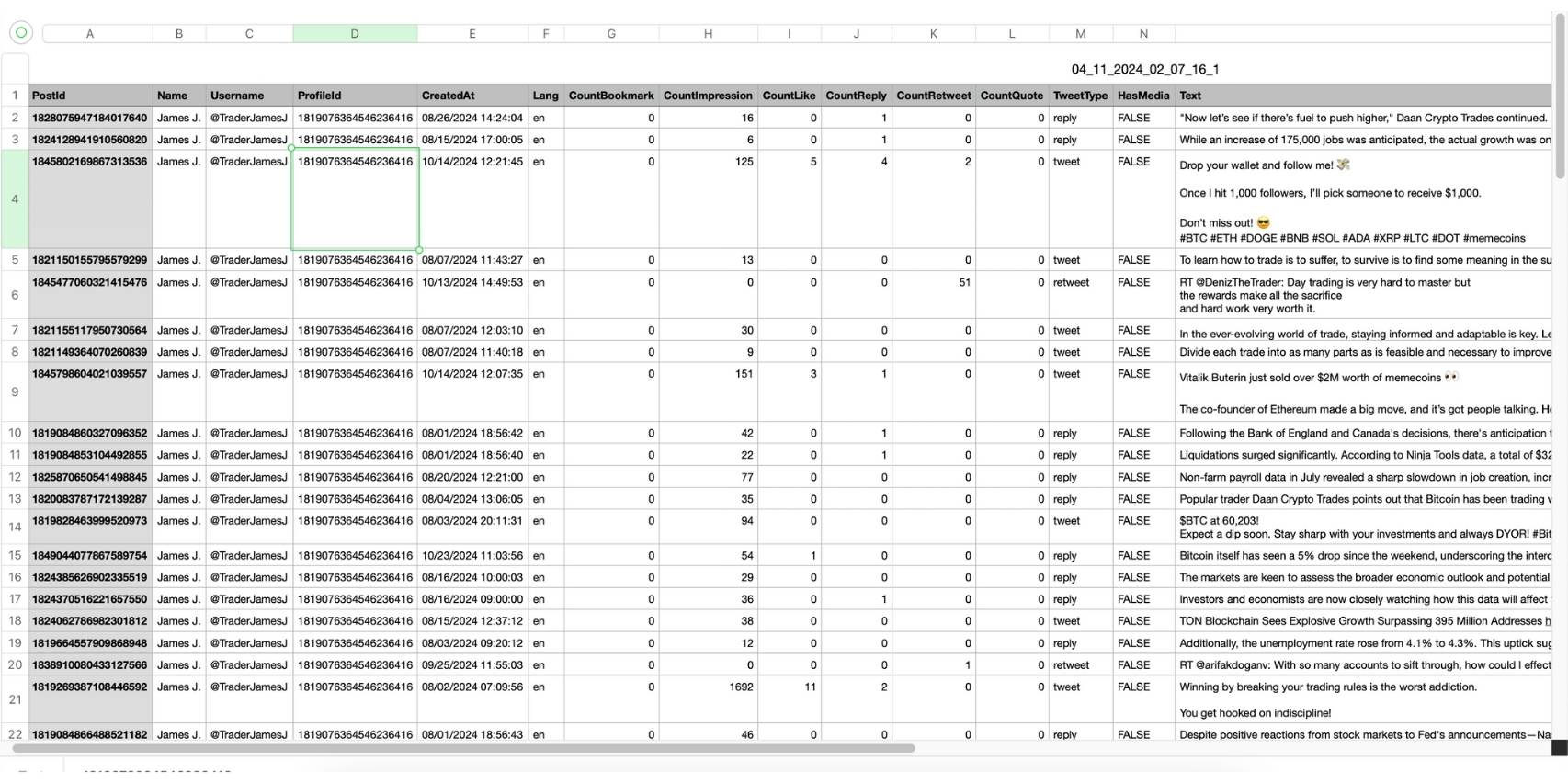
Step #4: After entering your email address, Circleboom sends the exported tweets in a CSV format directly to your inbox.
This CSV file includes essential details like Post ID, username, tweet text, engagement metrics (likes, retweets, replies), language, and timestamps, making it easy to review, analyze, or archive the tweets.
That's it!
Historical Does Not Always Mean Old
It is also worth saying plainly that “historical” does not always mean ancient. Sometimes the difference between a good launch and a weak one is understanding the last 30, 60, or 90 days with more care than your competitor does. Search for historical tweets from the last quarter and you may find wording that is still fresh enough to matter. Search from the same quarter one year ago and you may find recurring seasonal objections. Search from three years ago and you may identify a claim that everyone in the category quietly abandoned. Historical work is often about choosing the right window, not the oldest one.
Treat Historical Search as Pre-Launch Due Diligence
A strong marketing team treats historical search as pre-launch due diligence. Before announcing a feature, it looks at how similar features were received. Before naming a campaign, it checks what that phrase already means on X. Before betting on an influencer angle, it studies the archive of audience response. Before investing in creative, it downloads tweets and looks for the exact language of desire and frustration. This is not overthinking. It is respect for the public record.
Final Thought
The Circleboom angle fits naturally here because marketers usually do not want an API lecture; they want an operating workflow. Circleboom’s product pages translate official-access ideas into practical actions: find posts, export tweets, download tweets, and work in Excel or CSV. For teams that need results more than documentation, that matters.
So if you are launching anything that depends on public language, do not begin with creativity alone. Begin with retrieval. Search for historical tweets before you write the ad. Search for historical tweets before you approve the slogan. Search for historical tweets before you trust your gut about what people care about. Then export tweets, annotate the archive, and look for the patterns that survive across time.
Because in modern marketing, originality is not only about saying something new. It is also about proving you actually listened to what the market has been saying all along.




)
