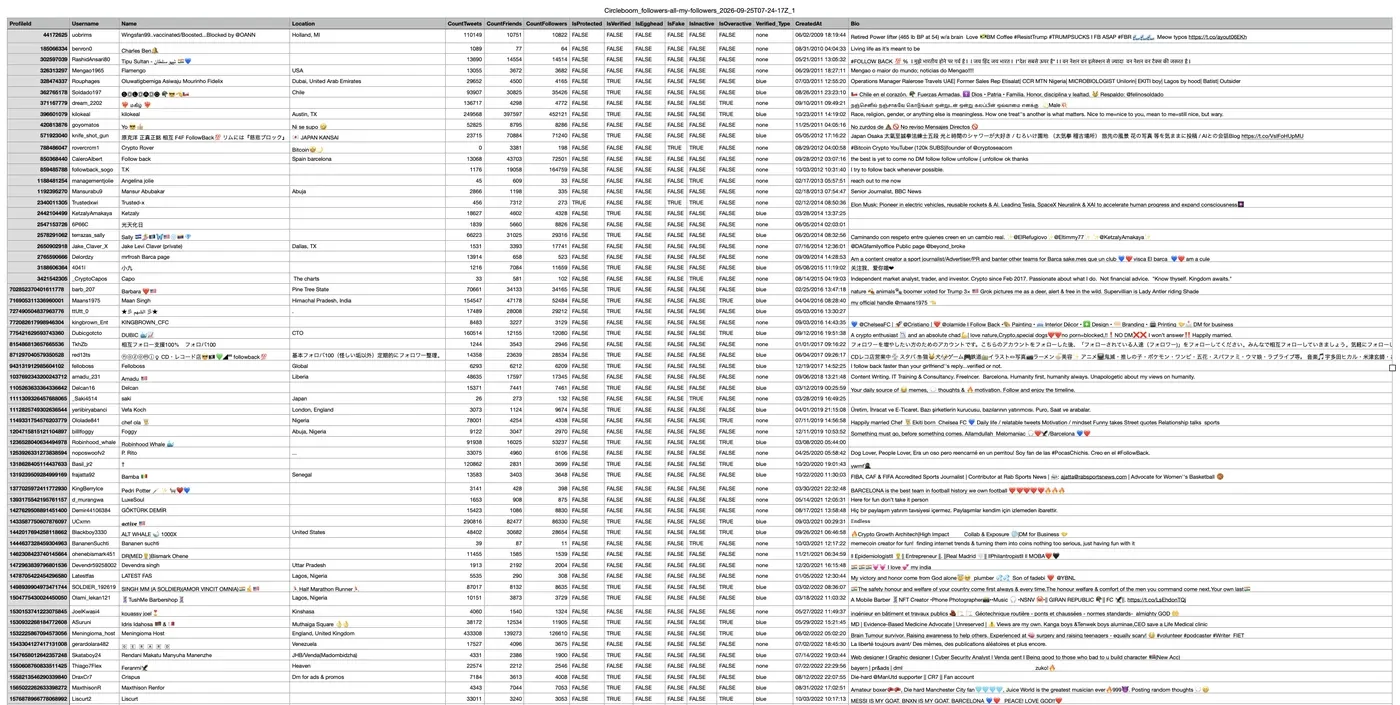


Export List of Followers on Twitter
Export the full followers list of your own or any public X account to CSV, with real records retrieved through official X APIs.

Circleboom Twitter Tool
Circleboom Twitter management tool provides account analytics, follower/following insights, tools to check, fakes, spammers, inactive accounts, advanced account search and delete tweets services
EXPORT TWITTER FOLLOWER LIST
X shows your followers as a long list you can only scroll, with no way to filter or download it. With Circleboom, you can see every account that follows you with its join date, tweet count, following and follower counts on one page, filter the list and export it.
Need the accounts you follow instead? Export your Twitter following list.
FILTER & EXPORT TWITTER FOLLOWERS
Circleboom Twitter presents other kinds of filters that you can implement on your Twitter followers. So, you can export the list of your inactive or overactive Twitter followers. Or, you can get a list of your fake/spam Twitter followers and export them as well.
EXPORT TWITTER / X ACCOUNTS BY KEYWORD
You can narrow down the results by keyword. Circleboom lets you find followers and following accounts with specific keywords in their usernames or bios and download them as a CSV file. To export accounts you find with search, use the Export Twitter Accounts tool.
EXPORT SOMEONE’S TWITTER FOLLOWERS LIST
Curious who follows a big account like Elon Musk? With Circleboom's Export Followers or Following tool, you can enter any public username and download its full followers list, then filter it, for example to see only the verified followers.
EXPORT LISTS INTO EXCEL AND CSV
Download your followers list as a CSV file that opens in Excel or Google Sheets. Then use the data for audience research, outreach, a backup of your audience, or to create Twitter lists.
X IS THE NEW TWITTER! XPORT FOLLOWER LISTS!
Twitter changed its name to X, and Circleboom works with the new platform as an Official X Enterprise Developer. You can export your followers and following lists to CSV without any problem.
COMPLETE FOLLOWER LISTS THROUGH OFFICIAL X APIS
Circleboom is an Official X Enterprise Developer, so your followers export is built from real records retrieved through official X APIs, including followers that X's own interface stops loading in long lists.
Scraping-based tools load pages to collect followers, so they can miss records or produce incomplete lists when pages fail to load. With Circleboom, every row comes from the official source.
EXPORT LIST OF VERIFIED TWITTER FOLLOWERS
When you list all your Twitter followers, you can filter them by verification status and see only the verified accounts that follow you. Then export your verified followers to CSV, or add them to a Twitter list.
EXPORT TWEETS / X POSTS
Do you want to export tweets from any accounts? If yes, you can utilize Circleboom’s Export Tweets feature to list and export tweets of any X account (up to 3,200 tweets)!
You can download the tweets of any user and export them into a spreadsheet with Circleboom’s Tweet Exporter!
EXPORT TWITTER / X ACCOUNTS BY HASHTAG
Additionally, you can list Twitter / X accounts by searching with hashtags. Enter any hashtag and let Circleboom list and export Twitter / X accounts containing this hashtag. Finally, you can export Twitter accounts by hashtags to Excel or CSV files.
CIRCLEBOOM FOR iPHONE
Circleboom is also available as an iOS app, so you can manage your X account from your iPhone and iPad too.
YOU ARE IN SAFE HANDS ON CIRCLEBOOM!
Small and big businesses, as well as non-profit organizations all across the world, prefer Circleboom. We strictly follow the Twitter Rules, which forbid any action on Twitter that could jeopardize your account's security. You're in safe hands with Circleboom!
HOW TO EXPORT TWITTER FOLLOWERS LIST
Do you want to export your own followers list or someone else's? Here's how to do it with Circleboom:
First, log into Circleboom Twitter dashboard.
Don't have a Circleboom account yet? You can create one with your email.

Connect your X account to Circleboom.
Circleboom connects through X's official sign-in as an Official X Enterprise Developer, so it never asks for your password.

To export your own followers, open the left menu and go to Followers / Following Management & Analytics > Followers > All My Followers.
You'll see every account that follows you. Select all or some of them and export the list to CSV.

Filter your followers before you export.
Use Filter Options to narrow the list, for example to verified, inactive or fake/bot followers, so your file contains only the segment you need.

To export someone else's followers, go to Essential Toolbox > Export Tools > Export Followers or Following.
Enter any public X username and check the profile card that appears to confirm it's the right account. Then choose Export Followers and click Export. Circleboom retrieves the full followers list through official X APIs and prepares your CSV file.

Open your CSV file.
Every row is one follower with profile ID, username, name, location, bio, tweet, following and follower counts, protected and verified status, verified type, quality flags (egghead, fake, inactive, overactive) and account creation date. Export your Twitter followers list now!