


Delete Tweet
Delete your tweets, retweets, likes, bookmarks, DMs, replies, and your entire X archive in bulk with Circleboom.

Circleboom : An Official Enterprise Developer
"Work with a trusted X Official Enterprise Developer to expand what's possible for your business. Each Official Enterprise Developer has been selected for the program after an extensive evaluation, and represents excellence, value, and trust." — X (Twitter)Circleboom Twitter Tool
Circleboom Twitter management tool provides account analytics, follower/friends insights, tools to check, fakes, spammers, inactive accounts, advanced account search and delete tweets services.

DELETE TWEETS BY DATE
Target specific time frames. Effortlessly erase tweets from particular dates with precision. Pick a start and end date to clean up a specific period, like an old campaign or a past chapter of your account. Everything outside the selected range stays untouched.

DELETE TWEETS BY LANGUAGE
Make your feed universally appealing. Eliminate tweets in selected languages to cater to a broader audience. Filter your tweet history by language and remove the posts that no longer fit your audience. Ideal for accounts moving to a single-language content strategy.

DELETE ALL TWEETS BUT MEDIA
Preserve what's visually impactful. Keep only media-containing tweets for a more engaging profile. Circleboom removes your text-only tweets and leaves every photo and video post standing. The result is a visual-first profile that makes a stronger first impression.

DELETE TWEETS BY POPULARITY
Curate a high-impact feed. Selectively delete tweets based on their popularity to maintain a quality presence. Sort your tweet history by likes and retweets to see what resonated and what didn't. Keep the winners, clear the rest, and let your best tweets define your profile.

DELETE RETWEETS
Control your shared content. Quickly remove retweets to ensure your feed truly represents your views. Undo retweets in bulk using date and keyword filters, so old shared content stops speaking for your account.

DELETE MULTIPLE TWEETS
Efficiency at its best. Remove multiple tweets simultaneously to save time and effort. Filter, select, and erase hundreds of tweets in a single action, right from a searchable list of your recent posts.
DELETE REPLIES
Manage your interactions. Selectively remove replies to keep conversations relevant and positive. Filter your reply history by date or keyword and remove old conversations in bulk. Your profile keeps only the interactions worth showing.

DELETE MENTIONS
Control your narrative. Remove unwanted mentions to maintain a polished and professional profile. Bulk remove tweets mentioning specific accounts, ideal after partnerships, giveaways, or conversations you've outgrown.

DELETE TWEETS YOU’VE LIKED
Keep your likes up-to-date. Easily un-like tweets you liked to ensure your favorite content remains aligned with your interests. Scan your like history with date and keyword filters and unlike in bulk. A curated like list keeps your profile consistent with who you are today.

DELETE ALL TWEETS IN BULK
Simplify your Twitter presence. With Circleboom, removing all tweets at once is quick and stress-free. Upload your Twitter archive and Circleboom wipes your entire tweet history in one go, no matter how many years it spans. It's the cleanest way to start fresh for a rebrand or a privacy reset.

DELETE TWEETS BY KEYWORD
Focus on content that matters. Remove tweets containing specific keywords to refine your Twitter feed. Search your tweet history for any word, phrase, or hashtag and bulk delete every matching post. It's the fastest way to erase an outdated topic from your timeline.
DELETE MEDIA TWEETS
Streamline your visual content. Quickly remove all tweets with media to declutter your digital footprint. Filter your timeline down to posts with photos, videos, or GIFs and delete them in bulk. Old visuals disappear while your text tweets stay in place.
DELETE LOW ENGAGEMENT TWEETS
Boost your Twitter appeal. Remove tweets with low engagement to highlight your best content. Set your own like and retweet thresholds and bulk delete the tweets that fall below them. What remains is a timeline built from your top-performing content.
DELETE TWITTER LIKES
Revise your endorsements. Easily un-like tweets to keep your preferences current and relevant. Unlike tweets in bulk with date and keyword filters instead of removing likes one by one. Your like history is public, so keeping it current protects your image.
CLEAN TWITTER ARCHIVE
Start fresh or curate meticulously. Deep clean your Twitter archive to reflect your current persona. Upload your X archive to reach your full posting history, far beyond what the API shows. Delete old tweets, likes, and DMs from a single dashboard.

DELETE MORE THAN 3200 TWEETS
Break the barrier. With Circleboom, you're not confined by the 3200 tweet limit for deletions. X's API only reaches your most recent 3,200 tweets, but your uploaded archive unlocks your entire history for deletion. Even accounts with tens of thousands of tweets can be fully cleaned.

DELETE QUOTES
Refine quoted content. Erase quote tweets that no longer align with your message or brand. Find your quote tweets in seconds and clear the ones tied to outdated opinions or expired campaigns.

CLEAN TWITTER ON IOS
Maintain your Twitter on the go. Use Circleboom on iOS to keep your Twitter account clean and organized. The Circleboom iOS app brings tweet deleting, unliking, and account cleanup to your iPhone. Manage your Twitter history anywhere, anytime.

CIRCLEBOOM KEEPS YOU SAFE, ALWAYS!
Circleboom is the top choice for diverse users, spanning individuals, small businesses, corporations, and non-profits globally. What sets us apart? We strictly adhere to Twitter Rules, ensuring no actions that could jeopardize your account. Trust Circleboom for a secure and compliant experience on Twitter—you're in safe hands!
HOW TO DELETE TWEETS IN BULK
Delete tweets in bulk with Circleboom. List your tweet history, filter by date, keyword, engagement, and more, then remove exactly what you want in a few clicks!
Log in to Circleboom Twitter. If you don't have a Circleboom account yet, you can get one in seconds!
Once you are on your dashboard, open the "Essential Toolbox" menu from the left sidebar. Under "Delete Tools", click on "Delete Tweets".

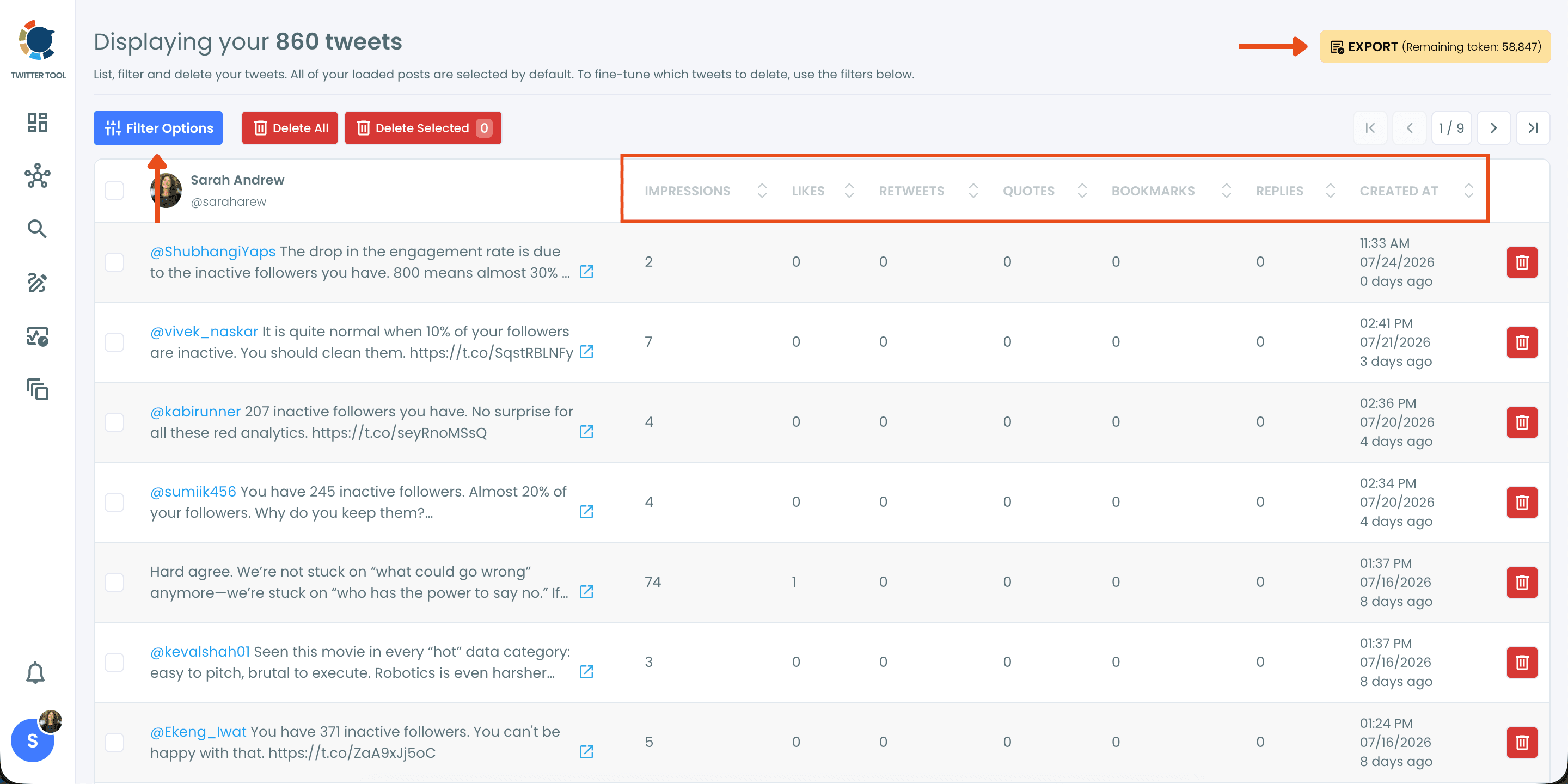
Review your tweet list before deleting anything.
Circleboom lists your tweets in a structured table with the metrics that matter: impressions, likes, retweets, quotes, bookmarks, replies, and creation date. Click any column header to sort and instantly see which tweets performed and which didn't. If you want a backup or a report first, hit the "EXPORT" button in the top right to download your tweet data before cleaning up.
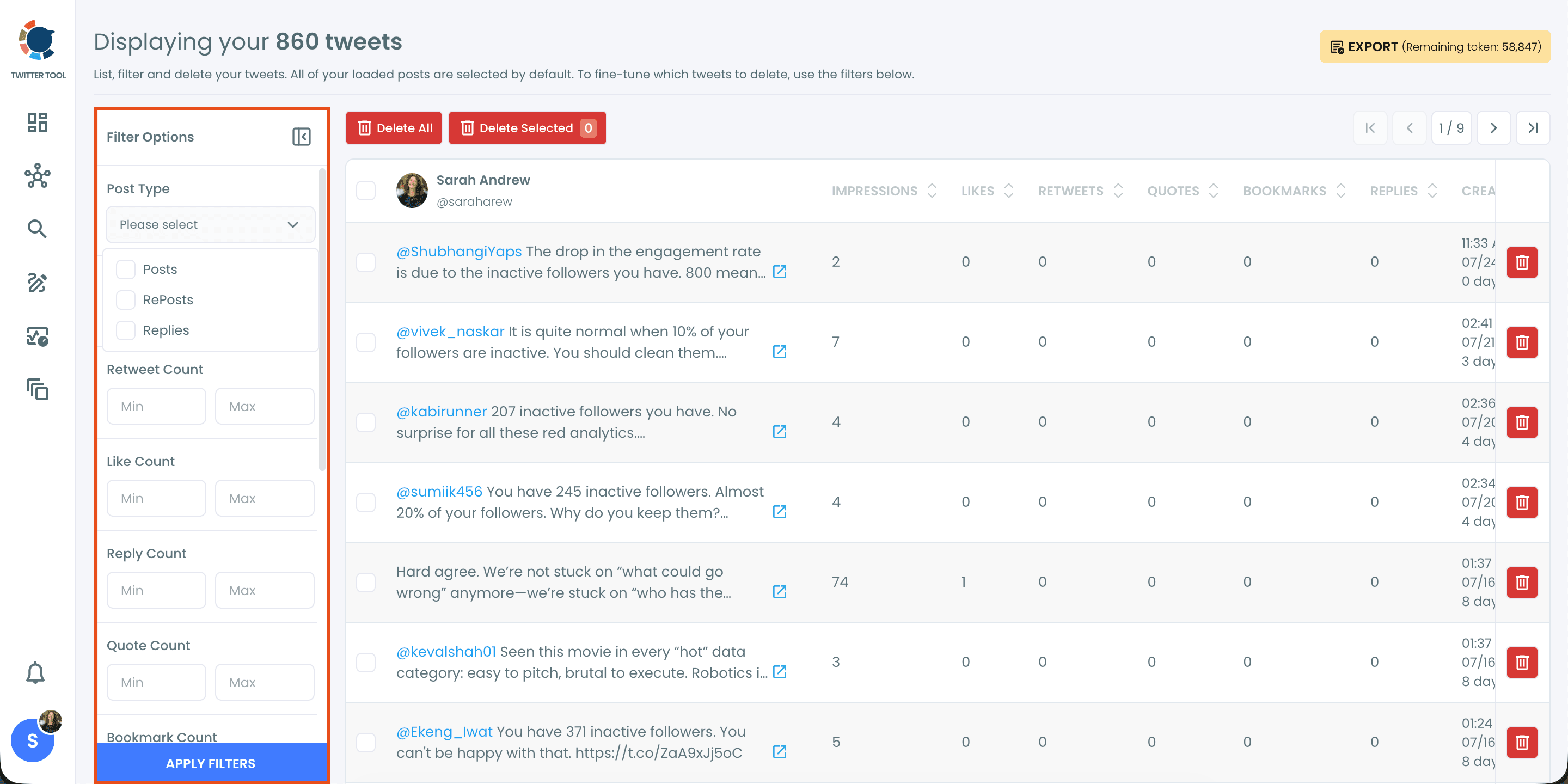
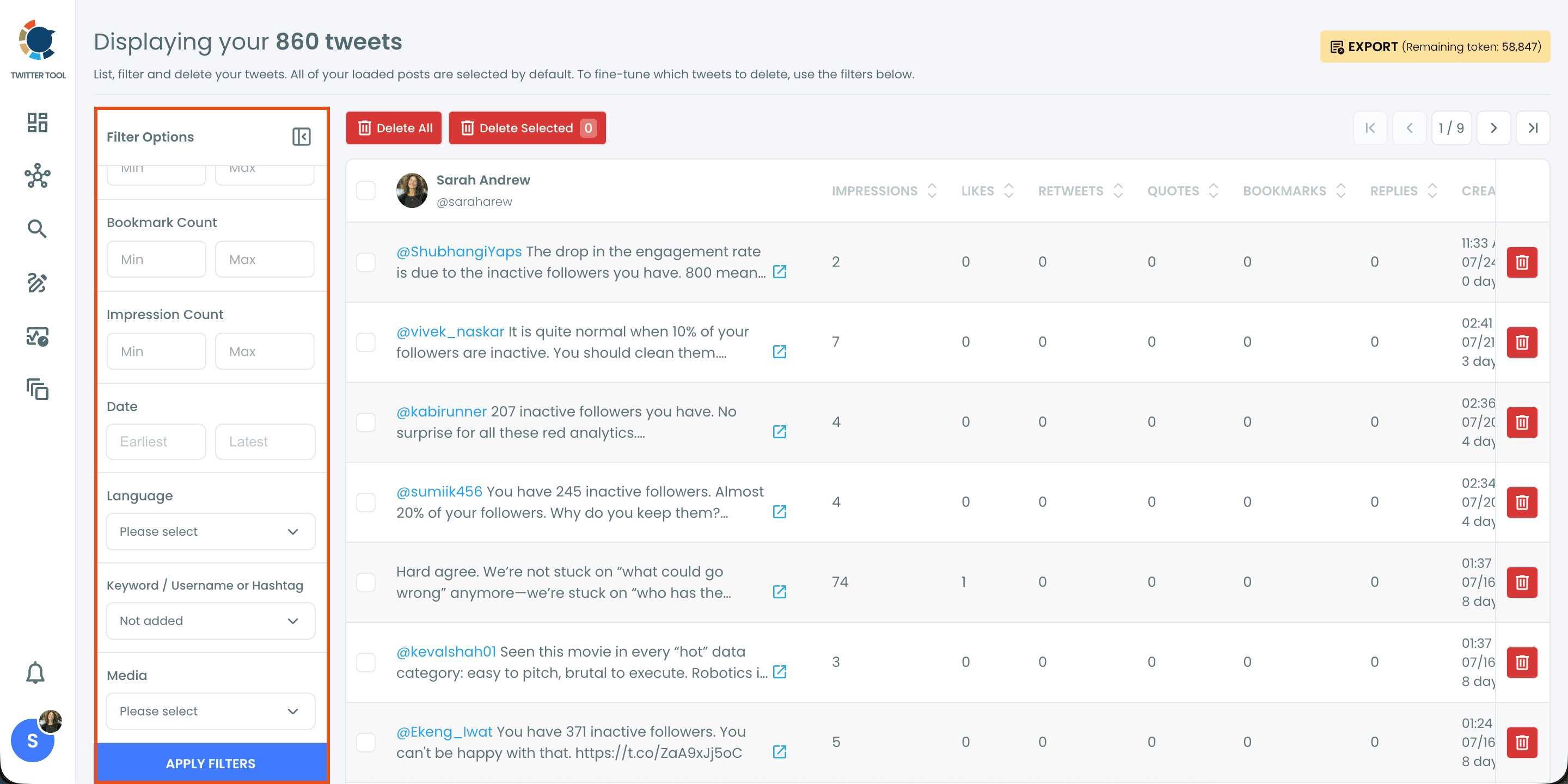
Use "Filter Options" to target exactly what you want to delete.
Click "Filter Options" to open the filter panel. Start with "Post Type" to choose what kind of content you are cleaning: posts, reposts, or replies. Then set minimum and maximum ranges for retweet, like, reply, quote, and bookmark counts to separate your best tweets from the ones that fell flat.
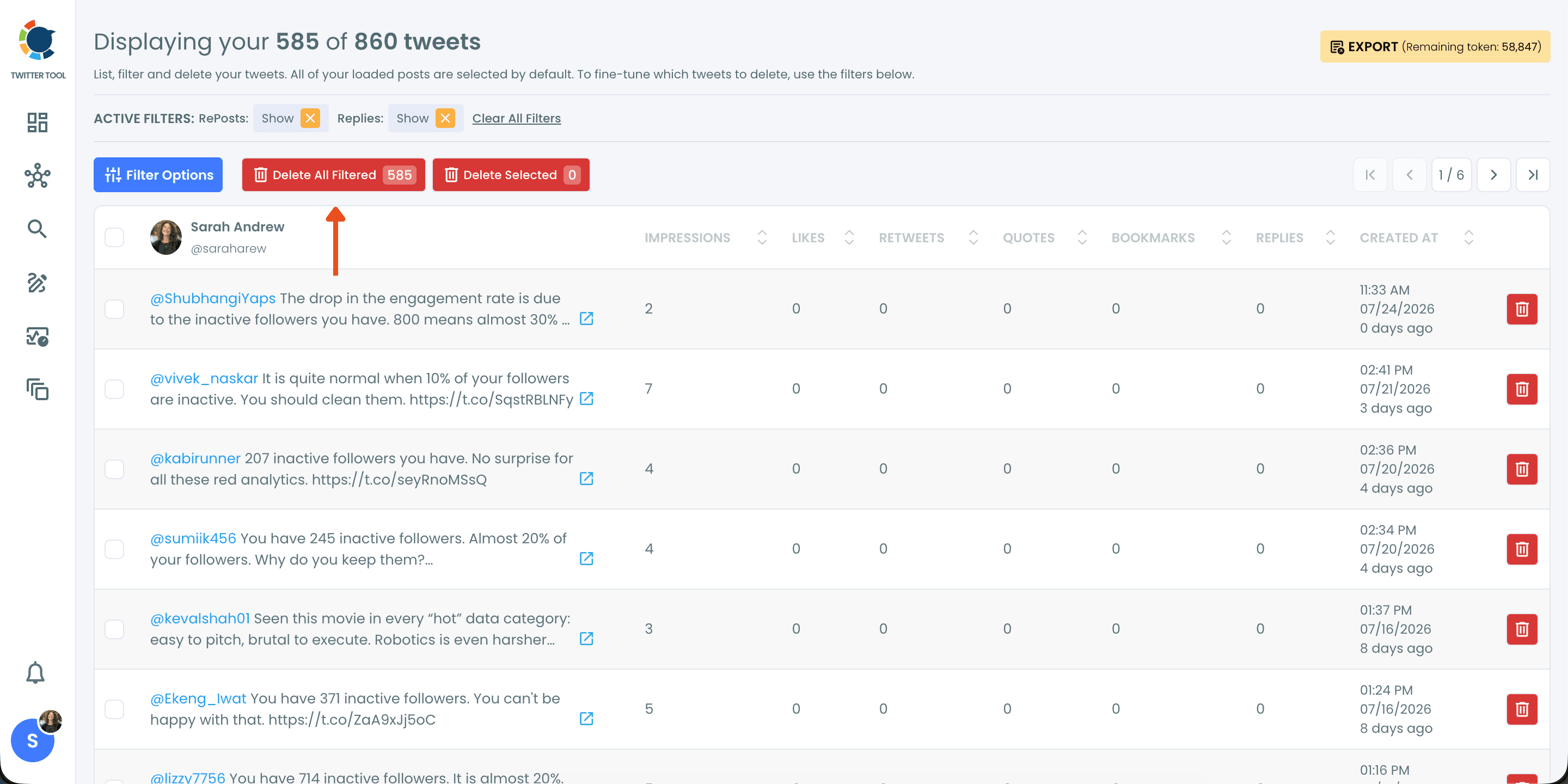
Click "Delete All Filtered" to remove the matching tweets.
Once your filters are applied, the header shows how many tweets matched, and the "Delete All Filtered" button carries the same count. Click it to remove every tweet on the filtered list, or tick individual checkboxes and use "Delete Selected" for a hand-picked cleanup.
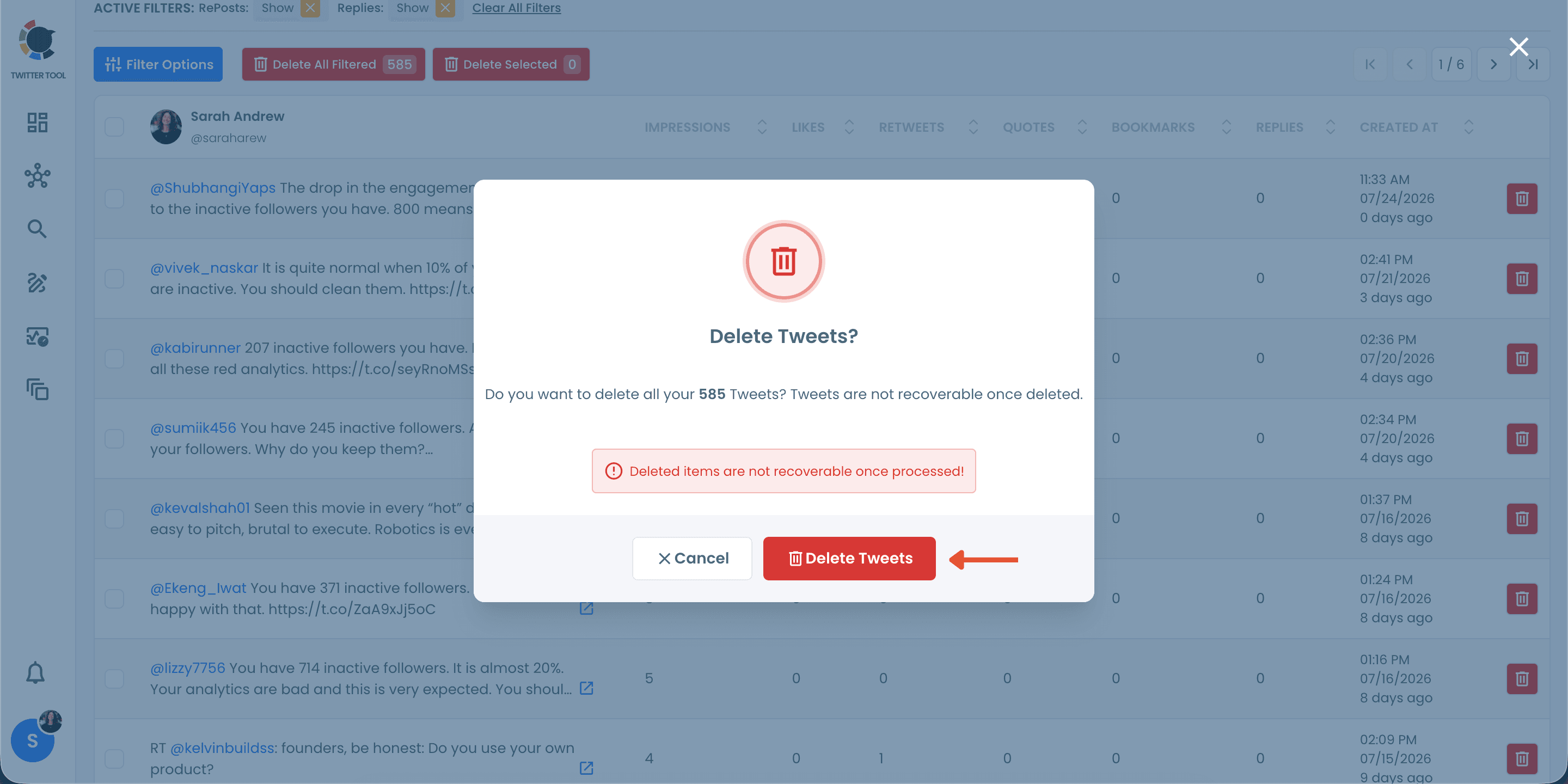
Confirm the deletion, and you're done!
Circleboom asks for a final confirmation and reminds you that deleted tweets are not recoverable. Take a second to double-check the count, then click "Delete Tweets". Your selected posts are removed from your X account permanently, leaving a cleaner, more consistent tweet history behind.
Frequently Asked Questions (FAQs)
Do you want to have a new, cleaner appearance on Twitter? If so, maybe you should consider deleting your tweets, deleting retweets, or removing your old Twitter likes!