

Posting a tweet itself is not hard.
What’s hard is doing it every single day, without missing days, without rushing, and without losing quality.
At first, manual posting feels manageable. You open X, write something, maybe add an image, and post. But once you try to be consistent, reality hits. Some days you are busy. Some days you forget. Some days you remember at the wrong hour. Other days you have good ideas but no time to publish them properly.
After a while, posting becomes stressful instead of useful. That is usually the moment people start looking for bulk scheduling.
What Bulk Scheduling Actually Solves in Real Life
Bulk scheduling is not just a technical feature. It solves daily problems that appear when you try to grow or maintain an account seriously.
In daily use, bulk scheduling means this:
You stop thinking about posting every day and start thinking about posting once per week or once per month.
You sit down, prepare content calmly, and schedule everything ahead of time. After that, your account keeps posting whether you are working, traveling, sick, or simply offline.
This matters because Twitter rewards consistency. Random posting leads to random results. Planned posting leads to predictable activity.
Bulk scheduling is commonly used when:
➡️ you want your account active even when life gets busy
➡️ you do not want posting to depend on motivation
➡️ you want to separate content creation from content publishing
➡️ you want to post at optimal hours without checking the clock
➡️ you want to plan campaigns instead of reacting daily
Once content is scheduled, your mental load drops. You are no longer “behind” on posting.
Why Bulk Scheduling Is a Big Upgrade Over Manual Posting
Manual posting depends on habits. Bulk scheduling depends on systems.
That difference is huge.
When posting manually, mistakes happen easily. You forget to add an image. You post at a dead hour. You rush a tweet because you are late. You skip a day because something unexpected comes up.
Bulk scheduling removes these problems one by one.
It helps you:
🟢 save hours every week by avoiding repetitive work
🟢 keep your timeline active without daily effort
🟢 post at consistent times instead of random moments
🟢 review content before it goes live
🟢 plan content when you are focused instead of rushed
Another underrated benefit is confidence. When your posts are already scheduled, you stop worrying about your account. That allows you to focus on replies, engagement, or completely different tasks.
If you are a creator on X and want to know about the latest developments regarding the algorithm changes, engagement strategies, payout boosts, etc., you can join Circleboom's X Creator Growth Lab Community and enjoy a free space to learn from and contribute to!
The Limitation of X When Posting at Scale
X is designed for real-time posting, not structured content planning.
Yes, you can post manually. Yes, you can schedule single tweets. But once you try to manage content seriously, the platform shows its limits very clearly.
There is no way to upload many posts at once. There is no CSV import. There is no campaign-level planning. Everything is built around one post at a time.
This works for casual users. It does not work for:
- creators posting daily
- brands running campaigns
- marketers managing content calendars
- people preparing content weeks in advance
At that point, trying to do everything inside X becomes inefficient and frustrating.
Why I Use Circleboom Twitter Instead
To manage posting properly, I use Circleboom Twitter. It is an official X Enterprise developer, which is important when using third-party tools.

Circleboom Twitter is not only about scheduling. It is built around the full posting workflow, from idea to publication.
Inside Circleboom Twitter, content creation and planning feel more controlled:
✅ AI post generator helps when ideas are low
✅ Buil-in image curation tools like Canva, Unsplah and Gifhy save time searching for visuals
✅ font styling tool help posts stand out visually
✅ best time to post suggestions remove guesswork
and moreover,
✅ Bulk scheduling tool handle timing automatically
 infocircleboom.com
Instead of logging in every day just to post, you plan once and let the system do the rest.
Bulk Scheduling Tweets with Circleboom Twitter
Bulk scheduling in Circleboom Twitter is built for people who already know what they want to post and just want an efficient way to publish it.
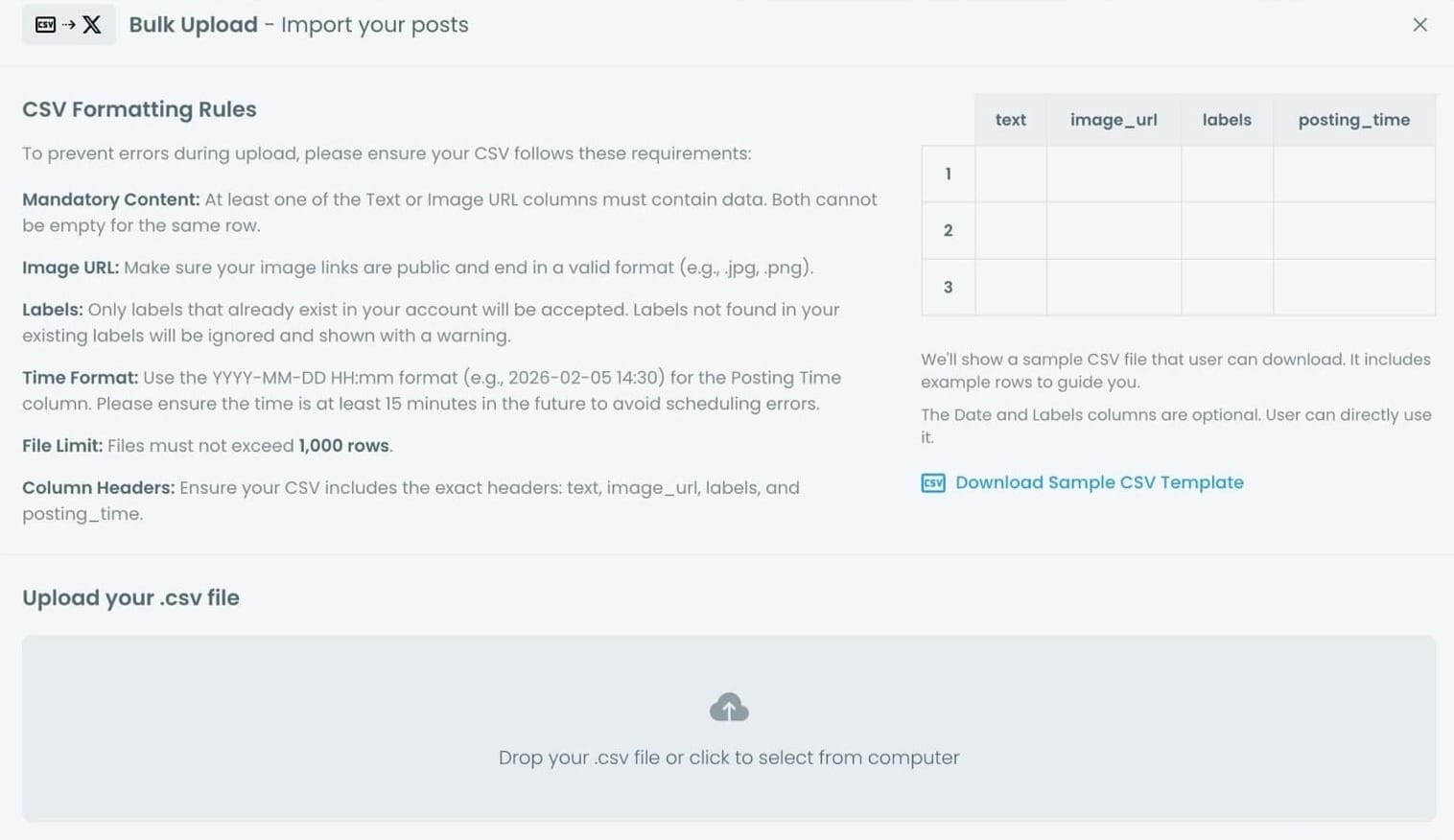
The system works through a CSV upload. This might sound technical at first, but it is actually very practical. A CSV file is simply a structured list of your tweets with their content and posting times.
This approach is powerful because:
- you can prepare content offline
- you can review everything before uploading
- you can schedule large batches at once
- you can fix errors before anything goes live
Once the file is uploaded, Circleboom handles the rest.
CSV Formatting Rules Explained in Detail
The rules may look strict, but they exist to prevent broken posts and scheduling failures.
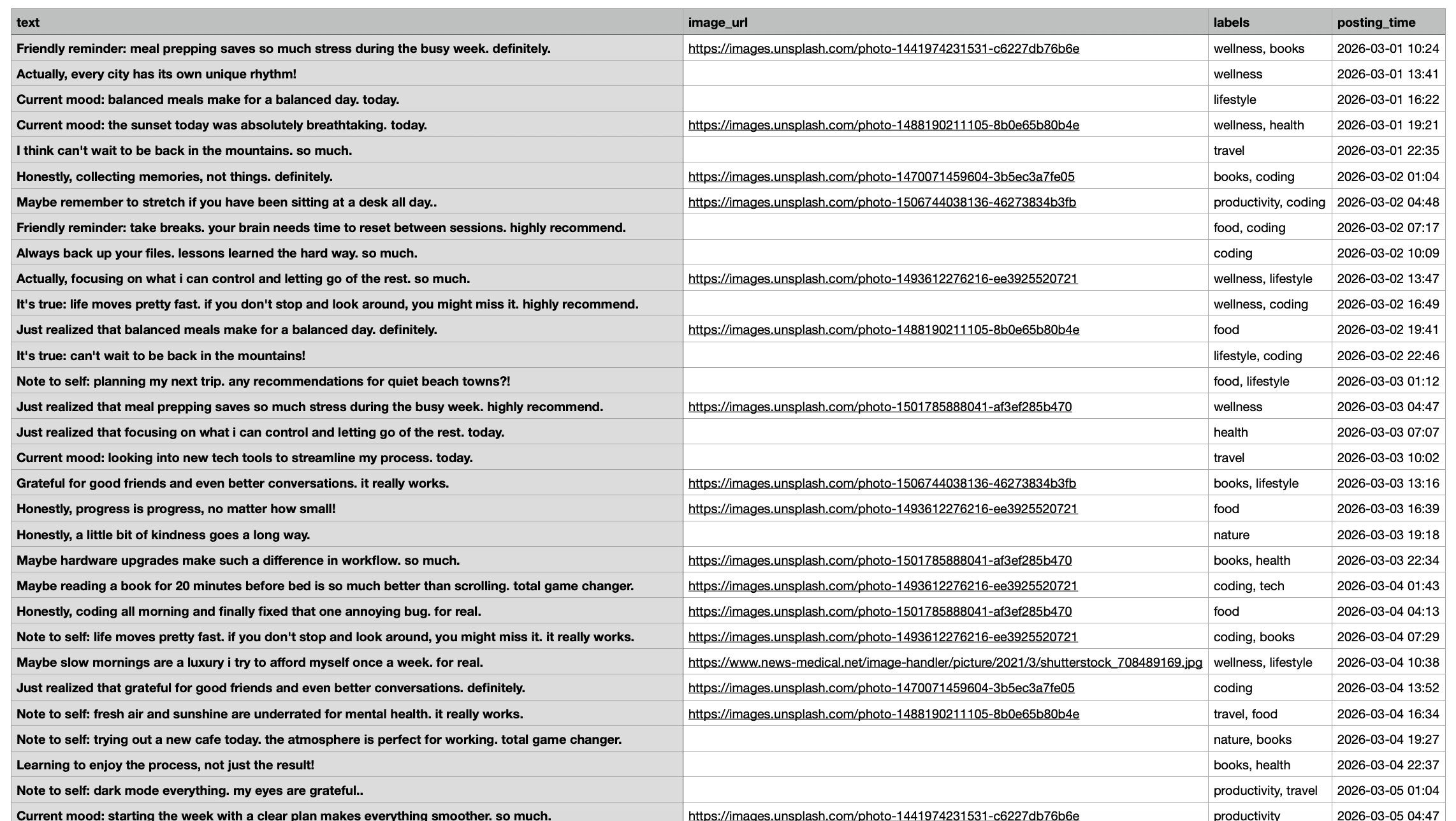
Each post must contain content: Every row must include either text or an image. This prevents empty posts from being scheduled accidentally.
Images must be accessible: Image URLs need to be public and must end in a valid format like .jpg or .png. If the system cannot access the image, it cannot attach it to the tweet.
Labels help with organization: Labels allow you to group and manage posts. However, only labels that already exist in your account are accepted. This keeps the system clean and avoids confusion.
Posting time must follow a clear format: Dates and times must use YYYY-MM-DD HH:mm. This removes ambiguity and ensures correct scheduling.
The system also requires the time to be at least 15 minutes in the future to prevent accidental instant posting.
Column headers must stay exactly the same: The system reads data based on column names. Changing them breaks the upload. That is why the headers must remain:
- text
- image_url
- labels
- posting_time
To avoid mistakes, Circleboom provides a sample CSV template. Using it saves time and prevents most errors.
How to Bulk Schedule Tweets with Circleboom Twitter
Step #1: After logging in to Circleboom Twitter, click Bulk Schule.
This opens the bulk scheduling interface and allows you to import multiple tweets at once instead of creating them one by one.

Step #2: Upload your CSV file
Upload your CSV file by dragging it into the upload area or selecting it from your computer.
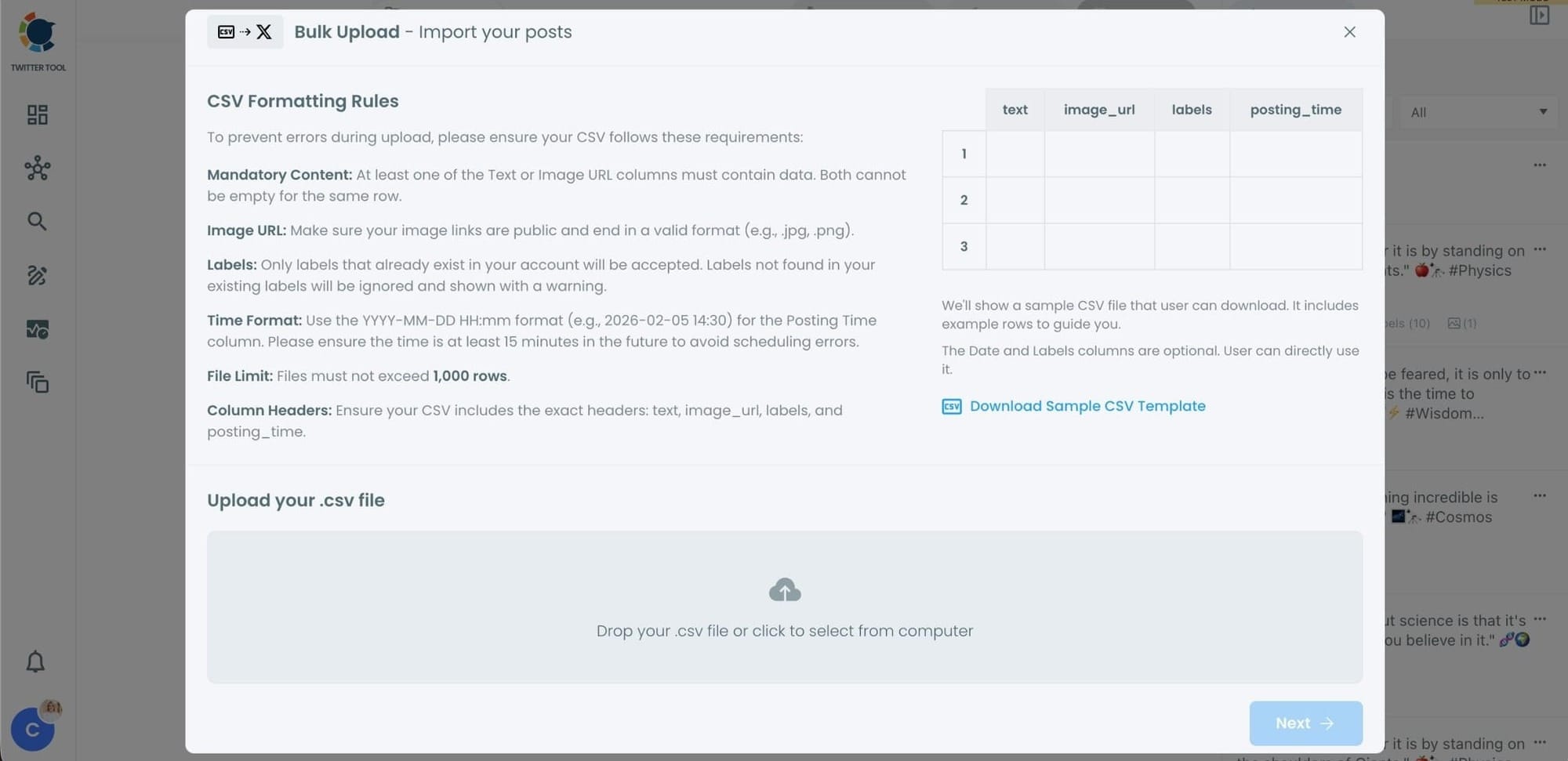
Before uploading, make sure your CSV file follows the required format.
Your file should include the correct column headers, and each row should represent a single tweet.
You can include tweet text, image URLs, labels, and posting times.
Preparing the file in the correct format prevents errors during scheduling.
Step #3: Review your imported tweets
After uploading the CSV file, Circleboom shows all your tweets in a preview list.
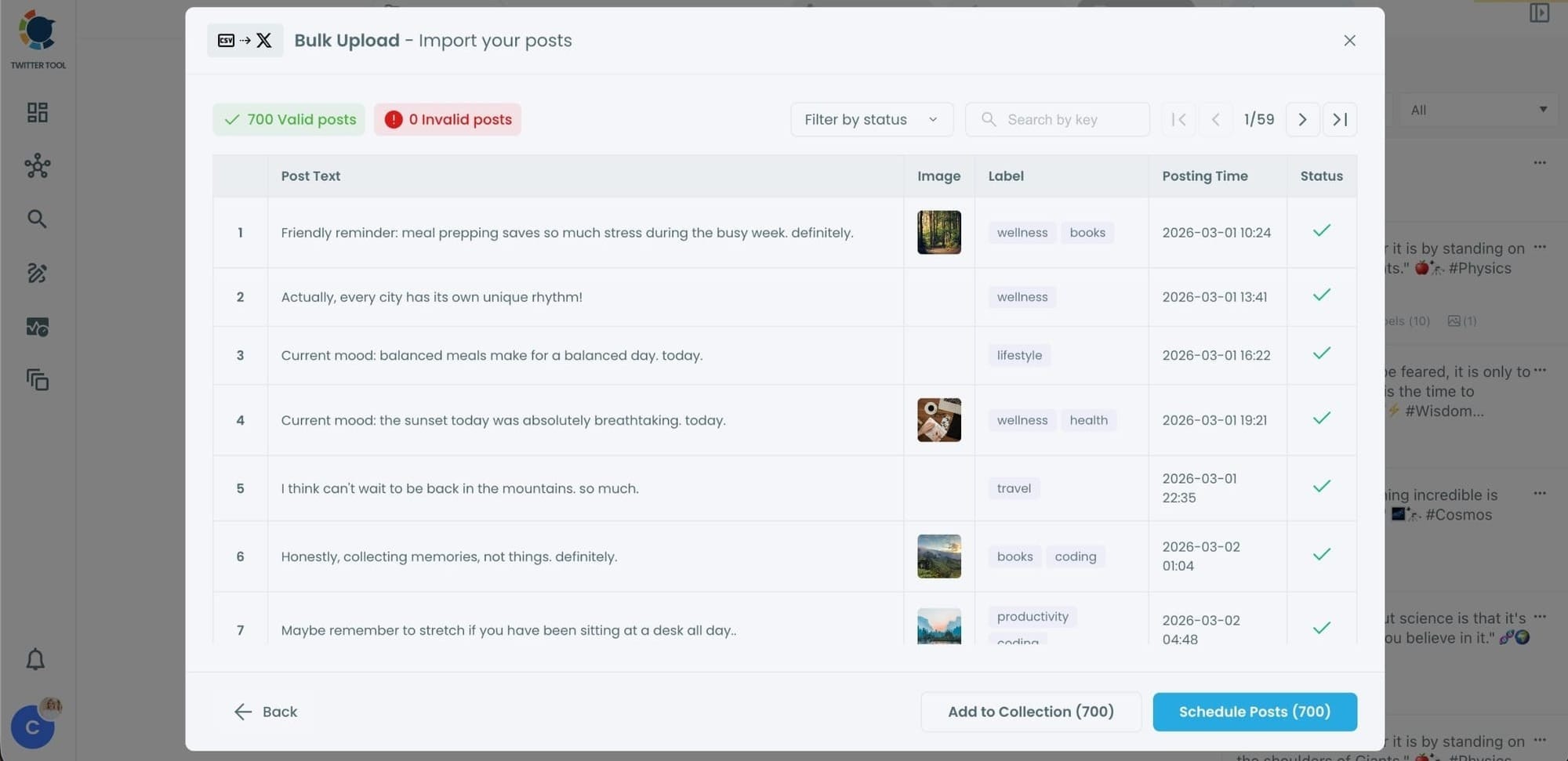
At this stage:
- Valid tweets are marked clearly
- Invalid tweets are shown with the reason for the error
- You can also add tweets to Collections if you want to organize or reuse them later
This step helps you catch and fix problems before anything is scheduled.
Step #4: Schedule all tweets at once
Once everything looks correct, click Schedule Posts.
Circleboom automatically schedules all valid tweets based on the posting times in your CSV file.
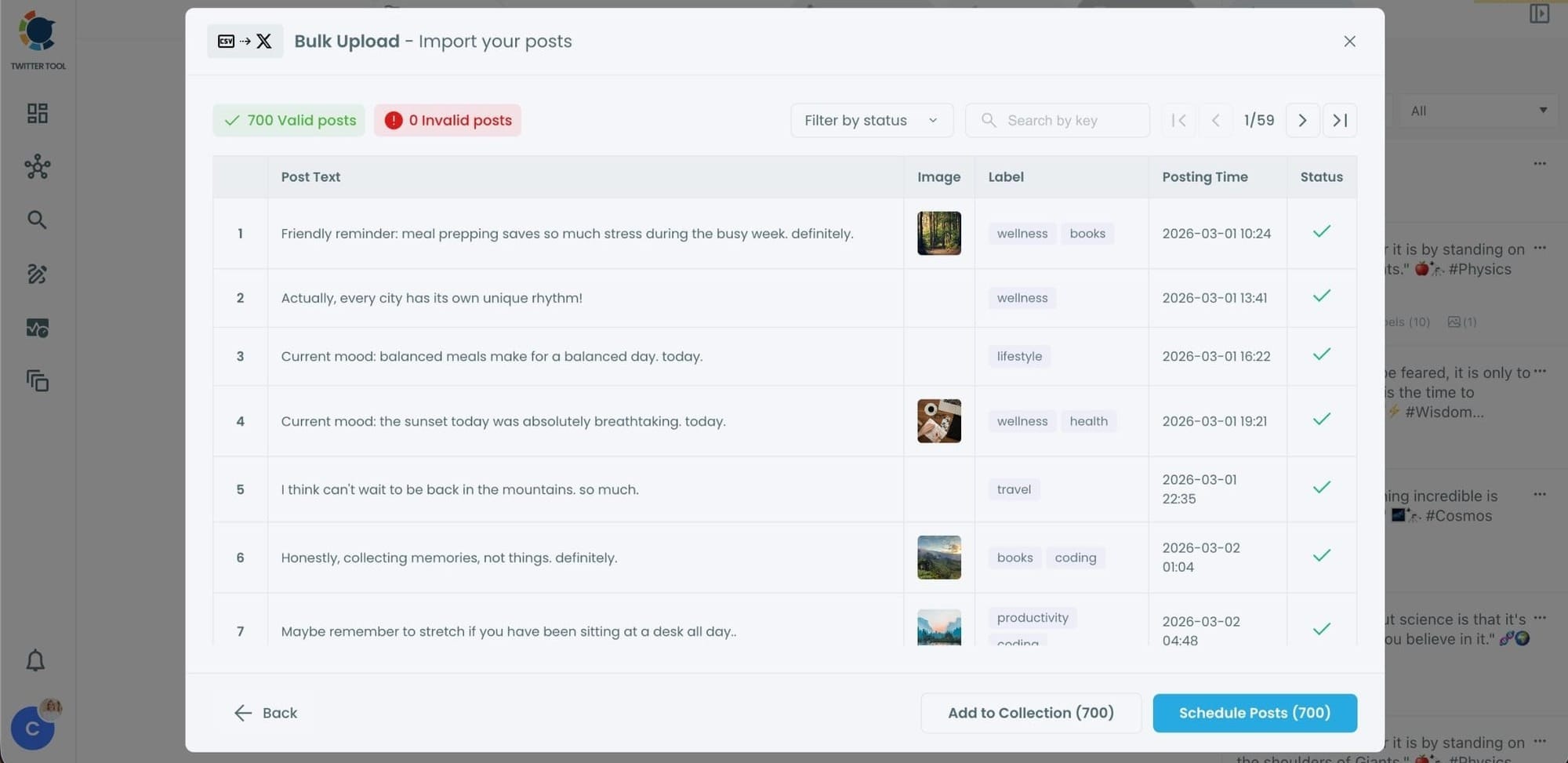
Even hundreds of tweets can be scheduled in seconds, without manual work.
Step #5: Manage scheduled tweets from the Outbox
After scheduling, all your tweets appear in the Outbox and calendar view.
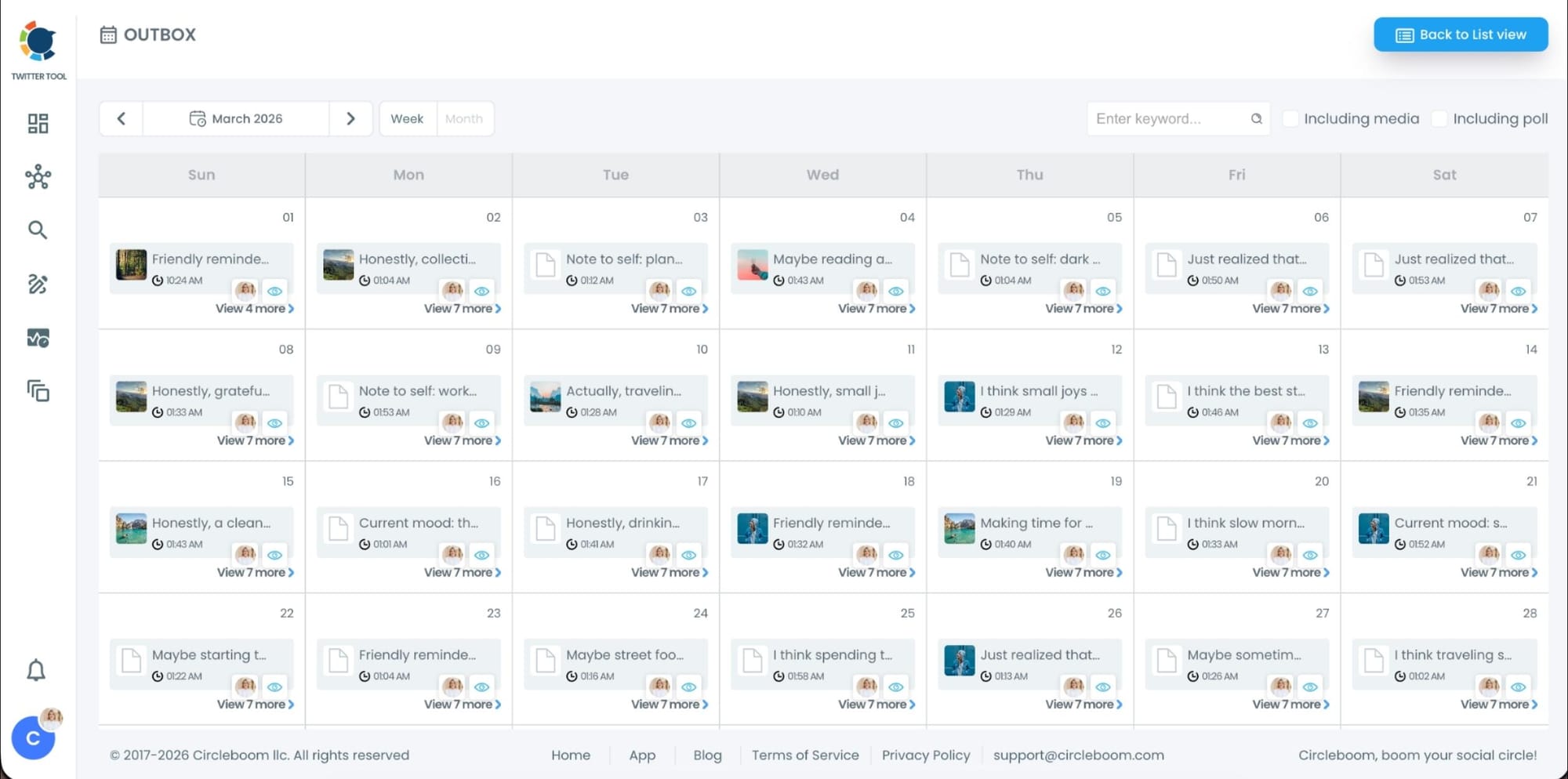
From here, you can:
- See all scheduled tweets by date and time
- Make changes if needed
- Edit or remove scheduled posts
- Keep track of your content easily
This gives you full control even after bulk scheduling is completed.
Why Bulk Scheduling Becomes Non-Negotiable Over Time
Most people try to post manually for too long. Eventually, one of two things happens. They either post inconsistently or they burn out.
Bulk scheduling prevents both.
When content is planned ahead:
- posting becomes predictable
- quality stays stable
- stress disappears
- growth becomes easier to manage
That is why bulk scheduling is not just for large brands. It becomes essential for anyone who wants to treat Twitter seriously.
Final Thoughts
Bulk scheduling is not about automation for the sake of automation. It is about control.
When posts are scheduled in advance, you are no longer reacting every day. You are executing a plan. That shift alone changes how Twitter feels to manage.
That is why I rely on Circleboom Twitter’s bulk scheduling feature instead of trying to handle everything manually inside X.

