
A follower count is just a number. It tells you how many accounts follow someone. It tells you nothing about what those accounts actually are.
An account with 200,000 followers might have a genuinely engaged audience built over years. It might have 150,000 bots purchased in three batches. The profile page looks identical either way. The number sits there, and Twitter gives you no way to look behind it.
This matters in more situations than people realize. You're evaluating a potential collaboration. You're looking at a competitor's growth. You're vetting an influencer before a paid partnership. You want to know if the reach you're paying for is real.
With Circleboom Twitter's Advanced X Search, you can enter any public username, pull up the complete list of their followers, and apply filters that surface fake, bot, inactive, and low-quality accounts across the entire dataset at once.
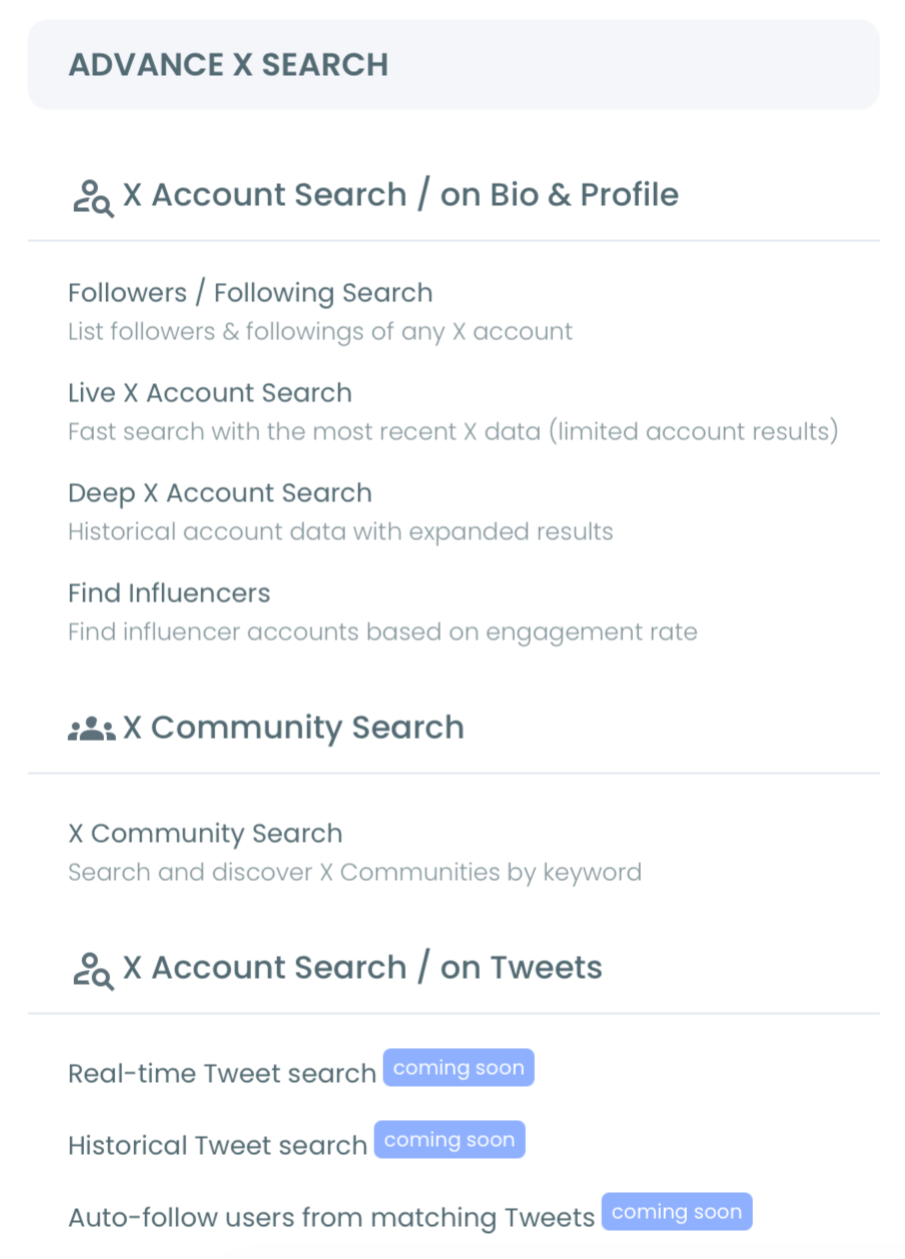
What Twitter hides behind a scrollable list, Circleboom makes searchable and filterable in seconds.
Can you check if another account has fake followers on Twitter?
Yes. Any public account's follower list is visible to anyone on Twitter, but the platform gives you no way to filter or analyze what's in it.
With Circleboom Twitter's Followers Search, you can retrieve the complete follower list of any public account and apply filters for fake accounts, bot signals, egghead profiles, low activity, and account age, giving you a clear picture of audience quality that Twitter's native interface never shows.
 infocircleboom.com
What Is Circleboom Twitter?
Circleboom is an Official X Enterprise Developer, which means it retrieves data directly through X's official APIs.
All follower data accessed through Circleboom is publicly available. Private accounts cannot be searched. No scraping, no credential sharing, full compliance with platform rules.

Here's what Circleboom Twitter's search and analysis features give you:
- Search the complete follower or following list of any public X account
- Filter results by fake or bot signals, account age, tweet count, and activity level
- Detect egghead accounts, inactive profiles, and spam-like behavior across any audience
- Sort and segment results by follower count, following count, and engagement indicators
- Export any filtered result set as a CSV file for deeper analysis
If you want to check whether another account's followers are real, Circleboom Twitter gives you the tools to find out.
How to Check If Another Account Has Fake Followers with Circleboom Twitter
Here is a step-by-step guide to learning if someone's followers are fake or not with Circleboom:
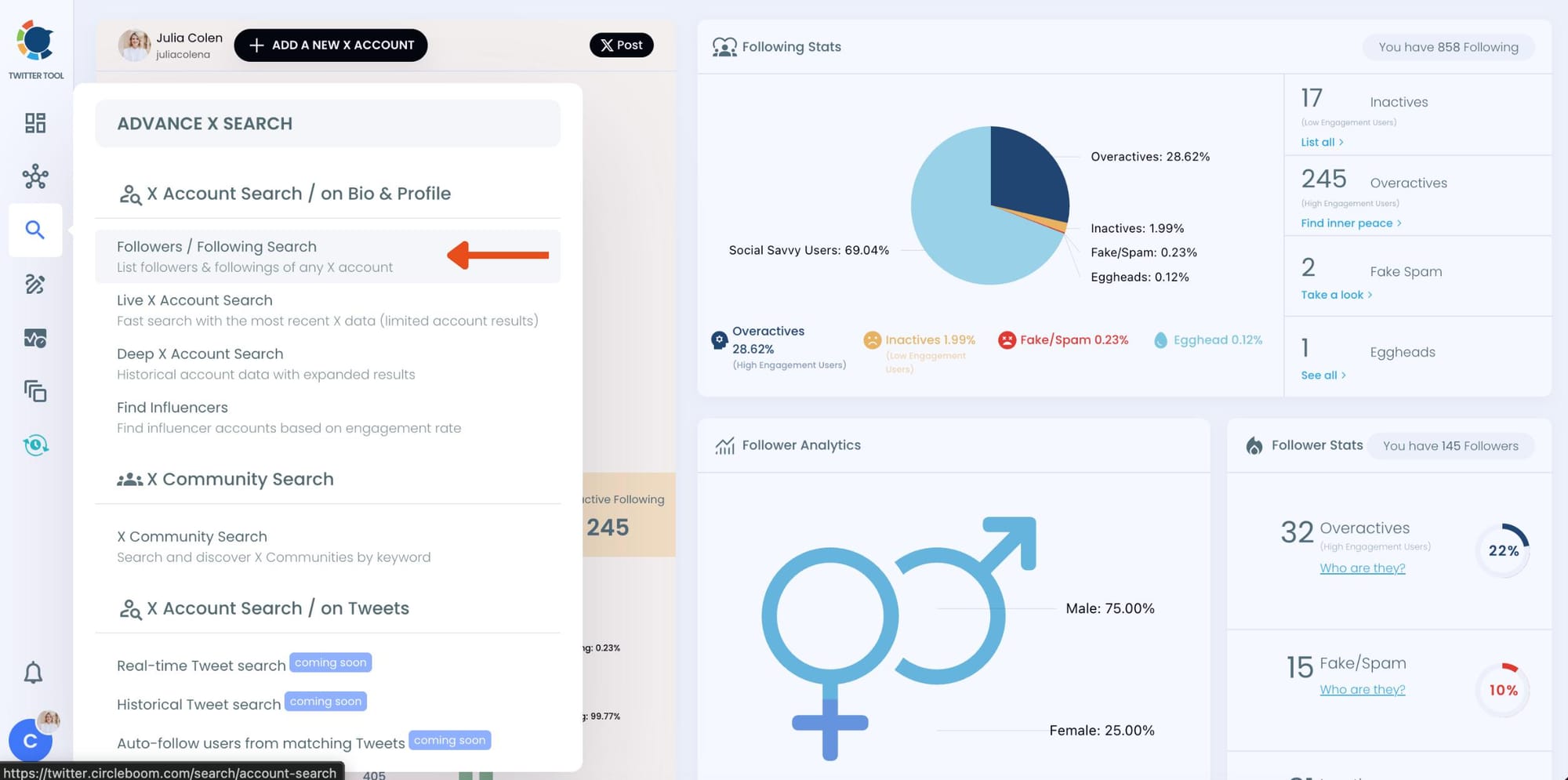
Step 1: Log into Circleboom and Open Advance X Search
Log into your Circleboom Twitter account. From the dashboard, open the left menu and click on the Search icon. Under Advanced X Search, click on Followers / Following Search — "List followers & followings of any X account."
Step 2: Enter the Username and Select "Display Followers"
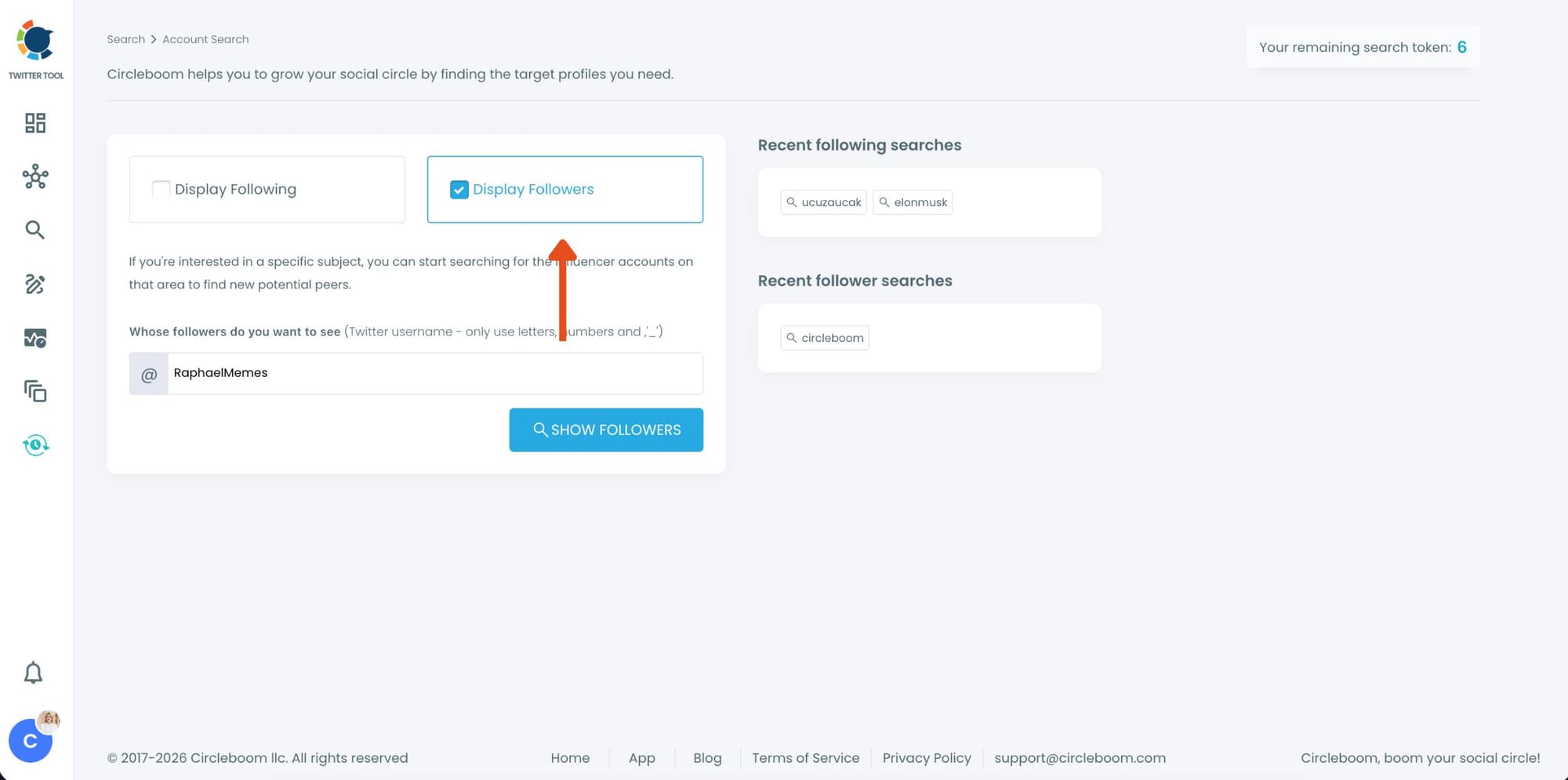
You'll land on the Account Search page. Make sure Display Followers is selected, then type the username of the account you want to check in the search field.
Click Show Followers to load their follower list.
Step 3: Browse the Full Follower List
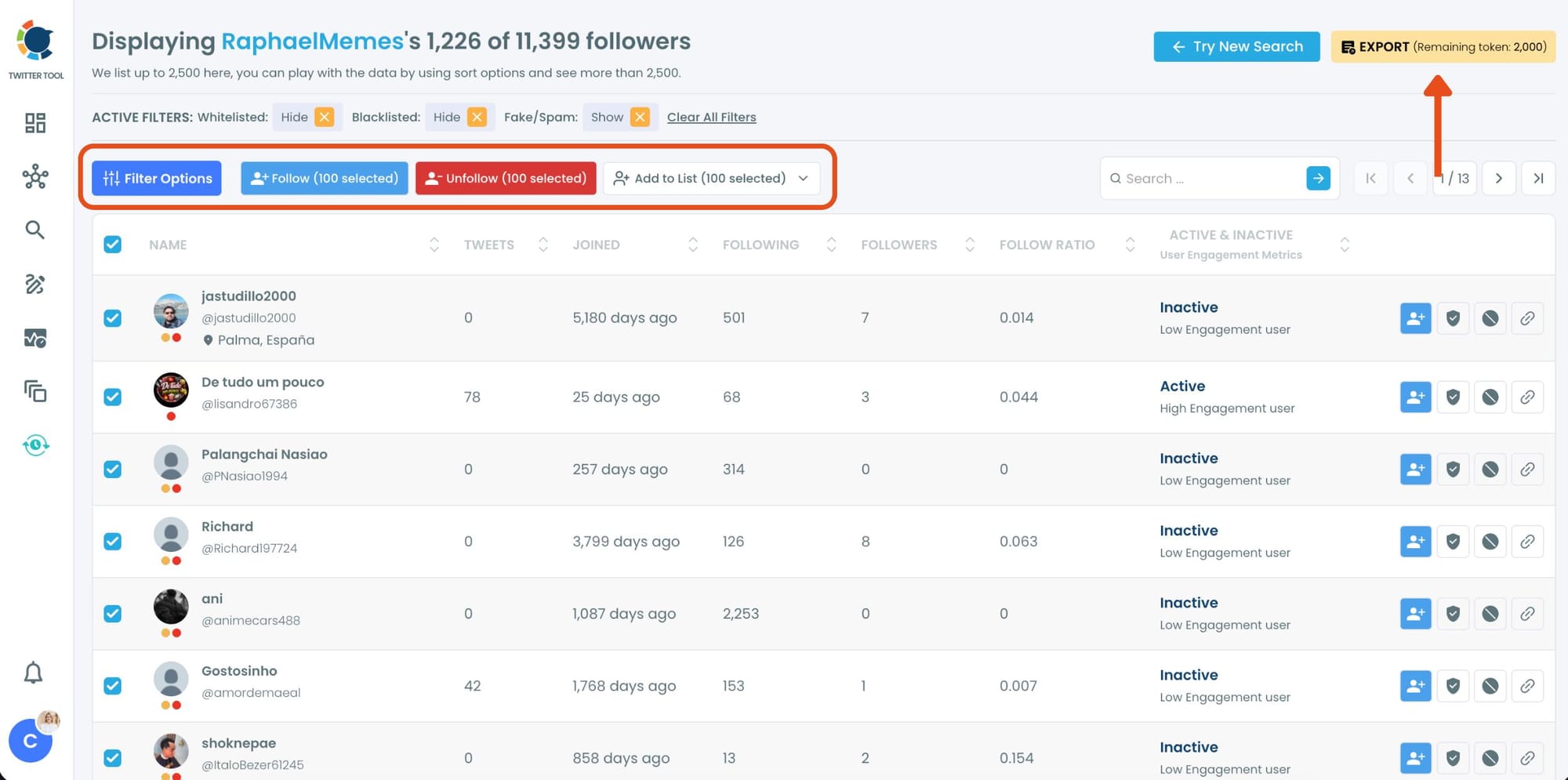
Circleboom loads the complete follower list of the account. You can see each follower's tweet count, join date, following count, followers count, follow ratio, and activity status at a glance.
Accounts marked as Inactive or Low Engagement start standing out immediately, even before any filters are applied.
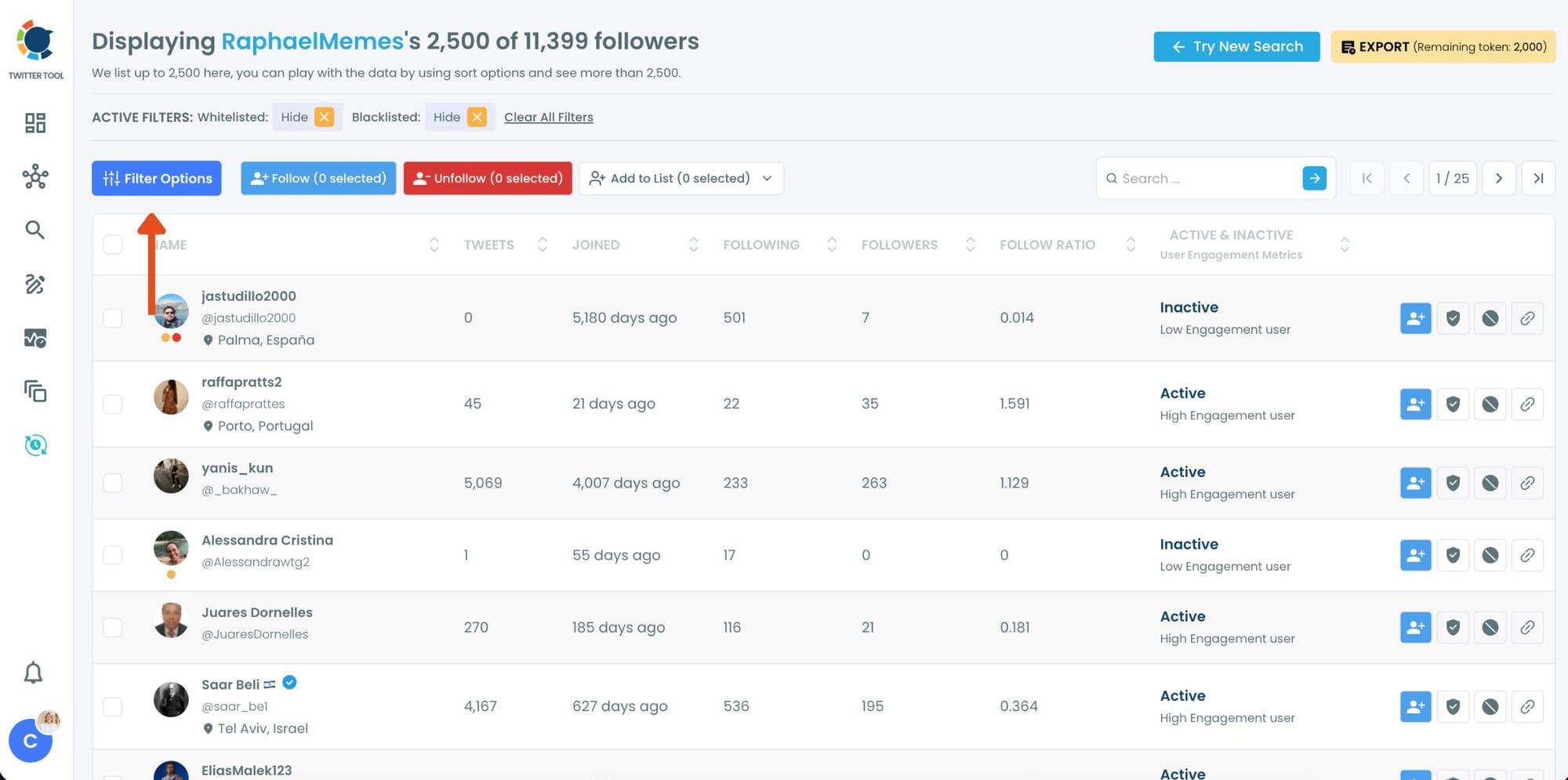
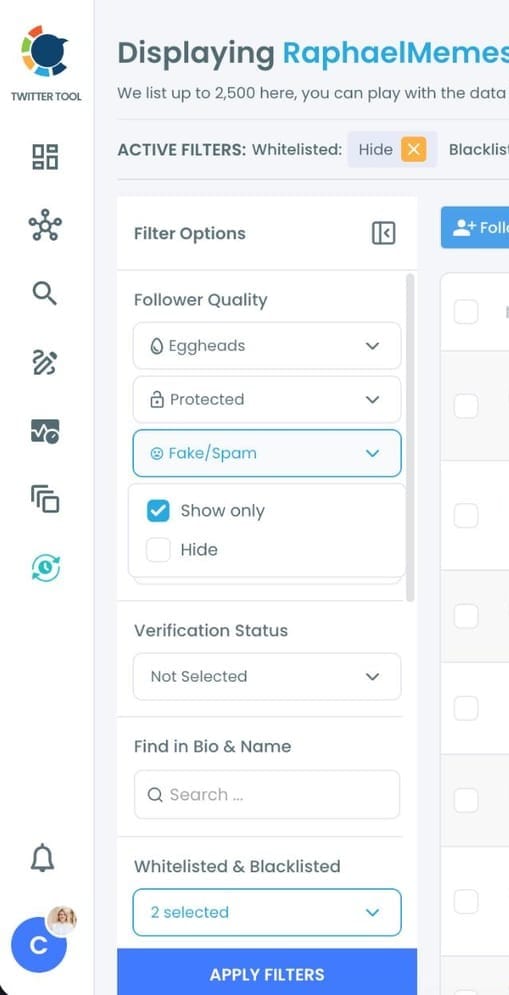
Click Filter Options on the left side
Step 4: Apply the Fake/Spam Filter
Under Follower Quality, expand the Fake/Spam dropdown and select Show only. Hit Apply Filters to narrow the list down to accounts flagged as fake or spam.
You can also combine this with Egghead, Protected, or Verification Status filters for a more precise result.
Step 5: Review the Results and Take Action
Circleboom now displays only the accounts that match your selected filters. Each row shows the full profile data so you can evaluate every flagged account at a glance.
From here you can select accounts and use the action bar to Follow, Unfollow, Add to List, or Export the results as a CSV file for further analysis.
What Twitter Shows You vs. What Circleboom Shows You
On Twitter, you can click the followers tab on any public profile and see the list. That's the full extent of what's available natively. You're looking at avatars, usernames, and short bios.
No sorting. No filtering. No quality signals. Just a scrollable list that goes on for however many followers the account has.
For an account with a few hundred followers, that's manageable. For an account with 50,000, 200,000, or a million followers, scrolling through looking for bots is not a realistic option. You'd be making gut-level judgments on individual profiles with no way to isolate the suspicious ones or see the pattern across the full dataset.
📌 The difference between Twitter's native view and Circleboom's isn't just convenience. It's the difference between looking at a haystack and having a magnet. Filters change what's possible entirely.
Circleboom Twitter retrieves the full follower list of any public account and presents it in a structured, sortable, filterable table. You can apply multiple filters at once, narrow the list down to accounts that match specific quality signals, and see the results immediately. What would take hours of manual scrolling takes seconds.
What the Filters Actually Reveal
The value of the search feature is in the filters. Each one targets a different signal that indicates a fake, bot, or low-quality account. Used individually they're useful. Combined, they give you a precise read on audience quality.
Fake and bot filter. This is the most direct signal. Circleboom analyzes behavioral patterns, follower to following ratios, activity levels, and account characteristics to classify accounts as likely fake or bot-operated. Applying this filter to another account's followers surfaces the accounts that match those patterns immediately.
infocircleboom.com
Egghead filter. Egghead accounts are profiles without a custom profile image, still using the default avatar. Incomplete profiles are strongly associated with bot accounts, newly created throwaway accounts, and abandoned profiles. A high concentration of egghead followers is a clear quality signal.
Low tweet count filter. Real users tweet. Accounts that have been around for years and have posted fewer than a handful of times are either abandoned or were never real in the first place. Filtering by tweet count below a threshold quickly isolates these accounts.
Account age filter. A sudden follower spike often involves newly created accounts. If a large portion of an account's followers were created recently and in clusters, that's a pattern. The account age filter lets you see what proportion of the audience is genuinely established versus recently manufactured.
Follower to following ratio filter. Bot accounts and follow-farming accounts typically follow thousands of accounts while having very few followers themselves. A wildly imbalanced ratio is one of the clearest indicators of an account that exists to inflate numbers rather than participate authentically.
Inactive account filter. An account that hasn't posted in months or years adds nothing to an audience. High concentrations of inactive followers reveal whether a following was built gradually by real people or padded by accounts that have since gone dormant or been suspended and revived.
infocircleboom.com
⚠️ No single filter is conclusive on its own. An account without a profile image might be a real person who never got around to uploading one. A newly created account might be a genuine new user.
The signal becomes meaningful when multiple filters point to the same accounts, or when the proportion across the full follower list is abnormally high.
Why You'd Want to Check Another Account's Fake Followers
Influencer vetting before a paid partnership. Paying for a sponsored post or a shoutout on an account with 80% fake followers means your money reaches almost no one real. Checking follower quality before committing is a standard part of any serious influencer evaluation. Circleboom Twitter makes that check possible in minutes rather than requiring a specialist audit.
Competitor analysis. If a competitor's follower count is growing fast and their engagement isn't keeping pace, that gap might reflect a purchased audience. Understanding whether a competitor's reach is real changes how you interpret their apparent market position.
Evaluating audience overlap before a co-promotion. When two accounts collaborate and cross-promote, each is lending their credibility to the other's audience. If that audience is largely fake, the collaboration produces nothing except association with an inauthentic account.
Niche research and account discovery. If you're trying to find genuinely active accounts in a specific space, being able to filter another account's followers by quality and activity helps you identify the real participants in that niche without wading through noise.
If you're also concerned about the fake followers in your own audience, Circleboom Twitter's Fake and Bot Follower Checker does the same analysis for your own account and lets you remove suspicious followers directly from the dashboard.
Frequently Asked Questions
Can you check if another Twitter account has fake followers?
Yes. Any public account's follower list can be retrieved and analyzed. Circleboom Twitter's Followers and Following Search lets you pull up the complete follower list of any public account and filter it by fake and bot signals, account age, activity level, egghead status, and follower to following ratio to identify low-quality accounts across the audience.
Is it possible to see someone else's followers on Twitter?
Yes. Twitter makes follower lists publicly visible for public accounts. You can see them natively by clicking the followers tab on any public profile. What you can't do natively is filter, sort, or analyze that list at scale. Circleboom Twitter adds those capabilities on top of the publicly available data.
What signals indicate a fake or bot follower?
The clearest signals are extreme follower to following ratio imbalances, very low tweet counts relative to account age, default profile images, accounts created recently in clusters, and no meaningful activity over extended periods. When several of these signals appear together on the same account, the likelihood of it being a fake or bot account increases significantly.
Can the account owner tell if I searched their followers?
No. Searching and filtering another account's public follower list generates no notification for the account owner. It is the same as visiting their followers tab manually, just more efficient and filterable.
Does this work on private accounts?
No. Private accounts have protected follower lists that are not accessible to anyone outside their approved followers. Circleboom Twitter's Followers and Following Search only works with public accounts using publicly available data through X's official APIs.
How is this different from checking my own fake followers?
The search feature retrieves and filters any public account's follower list, including accounts that are not yours. The Fake and Bot Follower Checker is specifically designed for your own account and includes the additional ability to remove flagged followers directly. Both use the same quality signals but serve different purposes.
Can I export another account's follower data?
Yes. Any filtered result set from the Followers and Following Search can be exported as a CSV file. This is useful for keeping a record, sharing the data with a team, or doing further analysis outside the Circleboom dashboard.
Final Thoughts
A follower count tells you how many accounts follow someone. Circleboom Twitter tells you what those accounts actually are.
The filters in the Followers and Following Search surface fake accounts, bots, egghead profiles, inactive users, and ratio anomalies across any public account's follower list in seconds. What Twitter keeps behind an unfiltered scroll becomes structured, sortable data you can actually use.
Check if another account has fake followers on Twitter with Circleboom Twitter's Followers and Following Search.
infocircleboom.com